
A great church announcement video is like getting a warm handshake at the front door. It’s a short, punchy video that shares key updates and community news, but it does so in a way your congregation already loves and engages with every single day.
Why Video Announcements Are a Game-Changer for Church Growth
It's time we stop thinking of video as some kind of optional extra. For the modern church, it’s a vital ministry tool. The slow fade of the paper bulletin isn’t just a trend—it’s a necessary shift to connect with people where they actually spend their time.
Your church family is already scrolling through Facebook, tapping through Instagram Stories, and watching clips on YouTube. Video is the native language of these spaces. When you create an announcement video that people can share, it becomes your digital handshake, offering a personal touch that a block of text in a bulletin just can't replicate.
Thinking Beyond the Pews
These videos aren't just for keeping current members in the loop. They're a front door for potential visitors, giving them a real taste of your church's culture and personality long before they consider stopping by on a Sunday. You're turning routine updates into genuine opportunities for connection.
A well-made announcement video serves as an open invitation to your city. Every time someone shares a post about VBS or an Easter service, your ministry gets introduced to new people who might never have walked through your doors otherwise.
This move toward digital connection isn't just a hunch; the numbers back it up. The recent explosion in online church service viewership has massively boosted overall church engagement. In fact, average weekly online views jumped 32% from 519 to 686 per service. Growing churches are leading this charge, not by replacing in-person gatherings, but by using online video to complement them. You can learn more about how churches are expanding their reach through online engagement.
Let's look at how this shift really plays out in practice.
Traditional Bulletins vs Modern Video Announcements
The difference is clear. While bulletins have their place for in-person logistics, video is unmatched for creating a shareable, inviting message that can travel far beyond your church walls.
Making High-Quality Video Realistic for Any Church
Of course, the thought of producing quality videos week after week can feel like a huge mountain to climb, especially when you're short on time, budget, or technical know-how. This is exactly why we built ChurchSocial.ai. It's designed to simplify your entire social media workflow from start to finish. With ChurchSocial.ai, you can create AI-generated reels from your sermons, use our graphic templates and editor to create and post photos and carousels, and manage everything with our simple drag-and-drop calendar.
Take our Sermon Clip Creator, for instance. It can analyze your sermon and instantly suggest ready-to-use clips.
Instead of you spending hours scrubbing through footage to find a good moment, the AI does the heavy lifting. It helps you turn a single weekend message into multiple pieces of shareable content for the week ahead, making a powerful announcement video a totally achievable task for any church team, big or small.
Planning and Scripting Videos for Maximum Impact
A great announcement video doesn't start with a fancy camera; it starts with a simple plan. Before you even think about hitting record, the most important thing you can do is figure out the one single message you need to get across. Why? Because vague announcements get scrolled past, but focused ones get people to act.
Whether you're hyping up the annual potluck or trying to find more volunteers for the youth group, every video has to have a goal. Just ask yourself this one question: "What is the one thing I want someone to do after they watch this?" Getting clear on that answer will shape your entire script and keep your message from getting muddled.
Nail Down Your Core Message
Try boiling your entire announcement down to a single sentence. This little exercise forces you to trim the fat and get right to the point.
For example, instead of a rambling update about the upcoming food drive, your core message might be, "We need 20 volunteers to help sort donations this Saturday at 9 AM." See how much clearer that is?
When you have that kind of focus, writing the script becomes a whole lot easier. You're not just throwing information out there anymore. You’re crafting a direct invitation that asks for a specific response. It's the difference between a passive update and an active call to action.
Plug-and-Play Script Templates for Any Occasion
To save you some time, here are three versatile script frameworks you can steal and adapt for pretty much any announcement you need to make.
- The 30-Second 'Quick Hit' (for Reels/Shorts): Perfect for grabbing attention on social media. Start with a hook, give the critical info, and close with a clear CTA. No fluff.
- The 60-Second 'Main Update' (for Facebook/Instagram Feed): This format gives you a little more breathing room. You can share a quick story or the "why" behind the announcement before you get into the details.
- The 2-Minute 'Deeper Dive' (for Email/YouTube): Save this one for bigger announcements that need more context, like launching a new sermon series or giving an update on a building campaign.
This shift from static bulletins to dynamic video is a huge leap in how we communicate as a church.
As communication gets more visual and immediate, our potential to connect with people and grow our reach just explodes.
Let AI Write Your Scripts for You
Let's be real—writing fresh scripts every single week is a major time-suck. This is where a tool like ChurchSocial.ai can completely change your workflow.
Our platform can connect directly to your church calendar (like Planning Center) and other church calendars. All you have to do is select an upcoming event, and our AI content generator will instantly write a script for you based on the event details you've already entered. This integration allows ChurchSocial.ai to create content for events seamlessly.
A well-planned script is the blueprint for an effective video. It ensures your speaker stays on message, your timing is right for the platform, and your call to action is impossible to miss.
If you want to go deeper, learning the fundamentals of video creation is key to making sure your message lands. You can learn more about how to create impactful videos from experts who have this down to a science.
Finally, give some thought to who will deliver the message and where you'll film. Pick someone who is comfortable and natural on camera—it doesn't always have to be the senior pastor! And filming in a place that feels authentic, like your church lobby or a cozy meeting room, adds a personal touch that really connects with people.
Filming and Editing Without a Hollywood Budget
The idea of producing weekly videos can feel like a huge mountain to climb, sparking images of expensive cameras, complicated lighting setups, and a full-on film crew. But let's be real: you don't need any of that to create a powerful church announcement video.

Honestly, the best video tool your church has is probably sitting in your pocket right now. Today's smartphones are more than capable of capturing crisp, clear video that looks incredible on social media. The secret isn't the gear—it's knowing how to get the most out of what you already have.
Mastering the Basics with Your Smartphone
To instantly make your videos look better, you just need to focus on three simple things. Getting these right will take your content from "homemade" to "professional" without spending a dime.
- Lighting is Your Best Friend: Don't worry about buying expensive light kits. Just find a big window with some nice, soft natural light, and have your speaker face it. This one move eliminates those harsh shadows and gives everything a warm, welcoming feel.
- Clear Audio is Not Optional: People will forgive a video that's a little grainy, but they will click away in a heartbeat if they can't hear what's being said. If you have even a small budget, an inexpensive lapel mic that plugs into a smartphone is the single best investment you can make.
- Keep Your Background Simple: The background should never be the star of the show. Find a clean, uncluttered space—maybe a tidy office or a quiet corner in your church lobby. The focus needs to stay on the person speaking and their message.
Authenticity will always connect more deeply than perfection. A genuine message delivered with clear audio and good lighting is far more effective than a slick, corporate-style video that feels impersonal.
This has never been more true. Video has exploded as the go-to way for churches to communicate clearly. On platforms like Instagram and TikTok, you'll often see authentic, selfie-style clips outperform highly polished productions because they feel real and relatable.
From Raw Footage to Polished Post
Okay, so you've got your footage. Now what? A few simple edits can turn that raw clip into a polished, shareable announcement. This is where a lot of church teams get bogged down, wrestling with confusing software or sinking hours into tedious tasks.
This is exactly why we built easy-to-use editing tools directly into ChurchSocial.ai.
Our graphic templates and video editor were designed for church teams, no matter their technical skill level. You can use our templates to create and post photos and carousels, add branded intros, pop in lower-third text with key dates, and even add some background music—all without leaving the platform.
This empowers anyone on your team, from a pastor to a volunteer, to create a fantastic announcement video. For a deeper dive, check out our guide on video editing for beginners. With ChurchSocial.ai, you have everything you need to turn a simple smartphone recording into a powerful ministry tool that connects with your community all week long.
Turn Sermons into Powerful Announcement Clips
Your Sunday sermon is a goldmine of shareable content, but let's be honest—finding those perfect moments can feel like searching for a needle in a haystack. So often, that powerful teaching lives and dies on Sunday morning. But it doesn't have to. You can easily repurpose it into engaging clips that inspire your community all week long.
Picture this: your pastor shares a compelling story about community service during the message. Instead of that moment getting lost, you could turn that exact clip into a powerful call-to-action video for an upcoming volunteer event. This isn't just about saving time; it’s about amplifying your core message in a format people actually love to watch and share.
Unlocking Your Sermon Content
When it comes to church social media, consistency beats chasing a viral hit every single time. Platforms like YouTube reward channels that post weekly, and churches that consistently share sermon clips and event announcements see real, steady momentum. In fact, one congregation doubled its impressions in just 60 days by faithfully posting repurposed content, blending sermon clips with photos of church life.
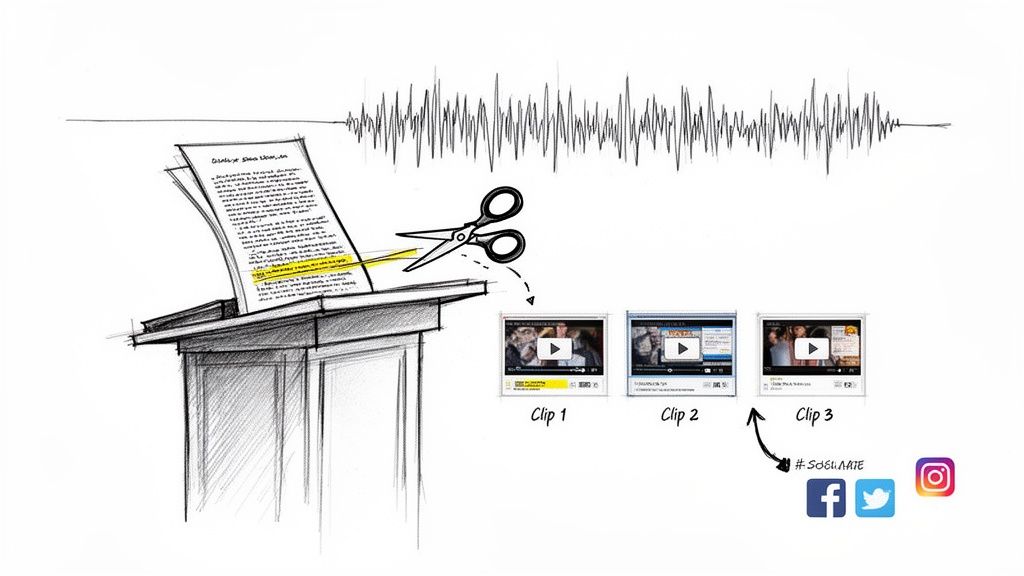
This is where you can let AI do the heavy lifting. The Sermon Clip Creator inside ChurchSocial.ai changes the game. Forget spending hours scrubbing through sermon footage. Just upload your video or transcript, and our AI gets to work creating AI-generated reels from your sermons. It automatically finds the most impactful segments and generates multiple, ready-to-share video clips.
From One Sermon to a Week of Content
What used to be a tedious editing task now takes just a few minutes. This simple step turns a one-hour sermon into a full week of engaging micro-content. It's perfect for promoting a sermon series, sharing midweek encouragement, or creating a powerful announcement that ties directly back to your teaching.
Repurposing your sermon isn't just about creating more posts. It's about giving your most important messages more opportunities to sink in and inspire action throughout the week.
The value doesn't stop with video, either. With ChurchSocial.ai, that same sermon transcript can be used to generate a ton of other content to support your video clips.
- Social Posts and Blogs: Let AI generate content like social posts and blog articles from the sermon transcript to help you dive deeper into the topic.
- Event Promotion: Seamlessly connect to your Planning Center calendar to create content for upcoming church events.
- Graphic Creation: Use our built-in graphic templates and editor to design branded photos and carousels that match your video's message.
Everything is managed from a simple drag-and-drop calendar, making it easy to plan and post across all your social media accounts. You can learn more about how to create clips from video and see how this feature can totally transform your workflow. By unlocking the content you already have in your sermons, you can build a more consistent and impactful online presence without adding hours to your week.
Distribute Your Videos for Maximum Reach
You’ve filmed, edited, and exported a fantastic announcement video. That’s a huge win, but the work isn’t quite finished. A great video that nobody sees is a missed opportunity, right? This is where strategic distribution comes in—it’s how you turn all that creative effort into real-world engagement.
Simply posting your video whenever you have a free moment won’t cut it. To really connect with your church community, you need a predictable rhythm. People need to know when and where to look for updates. Plus, what works on one platform might fall flat on another. A quick, vertical Reel for Instagram just feels different than a longer, widescreen update you’d post on YouTube.
Streamline Your Distribution Workflow
Let’s be real for a second: juggling multiple social media accounts is chaotic. Logging in and out of Facebook, Instagram, and YouTube to post the same announcement is a massive time-waster and an easy way to let things fall through the cracks. The only way to escape that last-minute scramble is with a unified scheduling tool.
The goal here is to build a communication plan you can actually stick with for the long haul. When your posting is consistent, it does more than just share information; it builds trust and keeps your congregation connected all week long.
Smart distribution isn't just about posting everywhere. It's about posting with purpose on the right platform, at the right time, with a message tailored to the audience scrolling there.
This is exactly why we built the drag-and-drop calendar inside ChurchSocial.ai. We wanted to create a command center for all your church’s social media, allowing you to easily manage and update all your accounts from one place.
Your All-in-One Content Calendar
Instead of bouncing between different apps, you can plan, schedule, and publish everything from one intuitive dashboard. Imagine sitting down once a month and lining up all your video announcements. You get a bird’s-eye view of your entire content plan, making it easy to see if you have a healthy mix of updates, inspiration, and community highlights.
Our AI can even write unique, platform-specific captions for each post. This saves you from the mind-numbing task of rewriting the same message over and over for different audiences. It's a simple bit of automation that keeps your congregation in the loop while freeing up hours of your team’s time. And if you're looking to really maximize your video's potential, understanding the principles of how to make a video go viral can offer some fascinating insights.
This integrated approach makes your workflow seamless. You can even connect ChurchSocial.ai to your Planning Center calendar. When a new event gets added there, our platform can automatically generate content for it, tying your entire communication strategy together. For a deeper dive, check out our complete guide on effective content distribution strategies.
Sample Weekly Video Announcement Distribution Schedule
To give you a practical idea of what this looks like, here’s a simple schedule for getting the most mileage out of a single announcement video. This approach ensures you're reaching different segments of your audience throughout the week.
This multi-touchpoint strategy keeps your announcement top-of-mind without feeling repetitive, hitting people on the platforms they use most.
FAQs: Your Church Announcement Video Questions Answered
Stepping into video for the first time usually brings up a few questions. It's totally normal. Getting tangled in the "what ifs" is easy, but let's clear up some of the most common concerns so your team can start creating with confidence.
Here are the practical hurdles I see churches face all the time when they start making videos.
How Long Should Our Announcement Videos Be?
This is easily the number one question, and the answer is always: it depends on where you're posting it. You've got to match the video length to what people expect on that specific platform.
- Instagram Reels or TikTok: Think fast. You need to grab them immediately, so aim for 30-60 seconds, max.
- Facebook or Email: You have a little more breathing room here. A 60-90 second video works perfectly for a main weekly update.
- YouTube: If you're doing a deeper dive into a topic or event, you can stretch it out to 2-3 minutes.
No matter the platform, here's the golden rule: get your most important information in the first 15 seconds. Always. Respect people's time and you'll make sure the main thing is actually heard.
What's the Bare Minimum Equipment We Need?
Honestly, you can get started right now with a modern smartphone. The cameras and microphones built into today's phones are more than good enough for great social media video.
If you’re going to make one small investment, buy an inexpensive lapel mic that clips onto a shirt. It will make a world of difference in your audio quality.
Beyond that, use what's free! Stand facing a window for beautiful, soft lighting. Remember, your message matters more than your budget.
Authenticity is your greatest asset. A genuine, slightly unpolished video often connects better with a congregation than a slick, corporate-style production that feels impersonal.
How Can We Make Videos Consistently When We Have No Time?
This is the exact problem we built ChurchSocial.ai to solve. The secret to consistency isn't always filming brand-new content every single week. It's about having a smart system to plan and manage your church social media.
Our AI Sermon Clip Creator, for instance, can pull multiple short, shareable AI-generated reels from a single Sunday sermon. You can turn one message into an entire week's worth of posts.
We also have built-in graphic templates and an editor to make branding quick, and our simple drag-and-drop calendar allows churches to easily manage and update all of their social media. It turns what feels like a time-consuming chore into a manageable—and even enjoyable—workflow.
Ready to stop the social media scramble and start connecting more effectively with your community? With ChurchSocial.ai, you can create AI-generated reels from your sermons, use professional graphic templates, and manage your entire social media plan from a simple drag-and-drop calendar. Visit https://churchsocial.ai to see how we can help you amplify your church’s message.


