

So, what exactly is Facebook video transcription? In simple terms, it's the process of turning the spoken words from your church’s Facebook videos into text. This text then appears on-screen as captions, making your sermons and updates immediately accessible to the 85% of people who watch videos with the sound off.
It’s a straightforward but incredibly effective way to make sure your message of hope cuts through the noise online.
Why Your Church Needs Facebook Video Transcription
In a feed full of distractions, getting your church's message to the people who need it most is a real challenge. Your team puts so much heart into creating powerful sermons and video content, but what if it gets lost in the silent scroll? This is where Facebook video transcription stops being a "nice-to-have" tech feature and becomes a vital tool for modern ministry.

Think about your church volunteers. They’re often wearing multiple hats, from greeting people at the door to managing the weekly bulletin. Piling on complex social media tasks can be too much. Without an easy system in place, that powerful Sunday sermon you uploaded to Facebook will stay silent for the vast majority of your online audience who watch videos on mute.
Expanding Your Digital Front Door
Transcribing your videos isn’t just about adding words to a screen; it’s about fundamentally changing how people can connect with your ministry. It’s about opening your church's digital front door wider than ever before.
Here’s how it makes a tangible difference in your outreach:
- Reaching the Silent Audience: Like we mentioned, most Facebook users watch without sound. Captions make sure your message lands clearly, whether someone is scrolling during a quiet moment at work or in a loud coffee shop.
- Improving Accessibility: Transcription makes your content inclusive for individuals who are deaf or hard of hearing, helping you live out the core ministry value of serving everyone in your community.
- Boosting Engagement and Reach: Videos with captions get watched for much longer. This tells the Facebook algorithm that your content is valuable, which often means it gets shown to more people.
A sermon video without transcription is like a locked church door. People can see it, but they can't get inside to experience the message. Transcription is the key that unlocks it for everyone.
A Ministry Partner for Social Media
Figuring out all these technical steps shouldn't be another burden on your plate. That's why tools designed specifically for churches are so important. With ChurchSocial.ai, you have a partner focused on making your entire social media process simpler. Our platform helps turn your sermon recordings into real assets for growth.
With ChurchSocial.ai, you can create AI-generated reels from your sermons, create AI-generated content from the sermon transcript like social posts and blogs, use our graphic templates and editor to create and post photos and carousels, and our simple drag-and-drop calendar allows your church to easily manage and update all of its social media. We also integrate with Planning Center and other church calendars to create content for events. Let us handle the tech hurdles so you can focus on what truly matters—connecting with your community and sharing your message of hope.
Why Your Church's Message Needs to Be Heard (Even on Mute)
If you want your church’s message to truly connect with people online, it has to be accessible to everyone, no matter how they’re scrolling through their feed. This is where Facebook video transcription stops being a technical task and becomes a vital part of your ministry. It’s about building an inclusive digital space where every single person feels seen, heard, and welcomed.
Think about it this way: you’d never dream of holding a Sunday service with a broken sound system. Yet, a staggering 85% of Facebook videos are watched without sound. When you post a sermon video without captions, you're essentially doing the same thing online—broadcasting a message that the vast majority of your audience will never actually hear. Captions are the key to reaching this silent majority.
Reaching People Beyond the Pews
But this goes deeper than just convenience. Digital accessibility is about ensuring people with hearing impairments can fully engage with your online ministry. When you provide accurate transcripts and captions, you're living out the call to be a welcoming community, making sure no one gets left on the sidelines. It's a simple act that can profoundly deepen someone's connection to your church.
This commitment to inclusivity also has a powerful side effect: it makes your videos perform way better. Our experience shows that videos with captions don't just reach more people; they hold their attention for much longer. That increased view time tells Facebook's algorithm your content is valuable, which means it gets shown to more of your congregation and potential visitors.
In ministry terms, that translates directly to more people hearing the Gospel and a stronger sense of community online.
Let's face it, the Facebook feed is a crowded place. Users watch over 4 billion videos every single day, so your church's content is competing for a sliver of that attention. For churches using a tool like ChurchSocial.ai, this is a massive opportunity. But with 85% of those videos viewed on mute, a silent video is an invisible one. Adding captions can boost video views by 12% and cause completion rates to skyrocket from 66% to 91%. You can dig into more of these viewing habits by exploring the latest Facebook video statistics.
Making Accessibility Effortless
Okay, so the thought of transcribing and captioning every sermon clip probably sounds exhausting, especially for already busy church staff and volunteers. This is exactly where technology designed for ministry can step in to serve your team. Instead of sinking hours into tedious work, you can automate the whole thing.
ChurchSocial.ai was built to lift this specific burden. Our platform gives you powerful, easy-to-use tools that make digital accessibility a sustainable part of your workflow:
- AI Sermon Clip Creator: It automatically finds the most powerful moments in your sermon and turns them into shareable short videos—perfect for Facebook Reels.
- AI Content Generation: Instantly generates social posts, blogs, and discussion questions from the full sermon transcript.
- AI Caption Writer: Instantly generates accurate captions for all your video content, so every clip is ready to engage scrollers and those with hearing needs from the moment you post.
By automating the transcription and content creation process, your team is freed from the 'how' and can focus on the 'who'—the people you are called to serve. It transforms a technical chore into a seamless part of your ministry workflow.
The impact of this simple change is huge. The table below breaks down just how much of a difference captions can make for your church's videos on Facebook.
Transcription Impact on Sermon Video Engagement
By embracing Facebook video transcription, you’re not just playing a game to please an algorithm; you’re optimizing your ministry for people. You're building a more inclusive, engaging, and effective digital outreach that ensures your message of hope can be received by everyone, everywhere.
How to Get Your Sermon Videos Transcribed
Let's be real—getting your sermons transcribed can feel like one more thing on an already overflowing plate. For busy church staff and volunteers, the goal isn't just to get it done, but to find a workflow that actually works week after week without causing a headache.
You've got a few different paths you can take. Some are quick and easy but have their pitfalls, while others are more robust and can completely change how you repurpose your content.
We’re going to walk through three core methods, starting with the simplest one built right into Facebook. Then, we'll look at a more accurate approach using a dedicated AI service. Finally, we'll cover the most streamlined process of all: an integrated platform like ChurchSocial.ai that's built for ministry. The idea is to move from good, to better, to best.
This simple visual shows why it's worth the effort. A silent, uncaptioned video is often just scrolled past. But add captions, and you open the door to a much wider audience.

As you can see, captions break the silence for the huge number of people scrolling with their sound off. It makes your message instantly accessible and gives them a reason to stop and engage.
The Good: Facebook’s Auto-Captions
When you're just getting started, Facebook's own auto-caption tool is incredibly tempting. It’s free, it’s built-in, and it requires zero extra software. You just upload your sermon video and flip the switch for auto-captions. Easy, right?
Well, yes and no. Convenience often comes at a cost, and in this case, the cost is accuracy. Facebook's AI can really struggle with the specific language of a sermon—think theological terms, names from scripture, or even just your pastor's unique speaking style. This can lead to some pretty awkward (and sometimes distracting) errors in the captions.
What this means in practice is that a volunteer will have to sit down and manually edit the entire thing. It's certainly better than nothing, but that correction process can become a real time-sink, especially during busy seasons like Easter or Christmas.
The Better: Dedicated AI Transcription Services
For a much more professional result, your next step up is a dedicated AI transcription service. These tools are built for one thing: turning audio into accurate text. They almost always deliver far better results than Facebook’s general-purpose AI.
The workflow is pretty straightforward. You download your sermon video from Facebook, upload it to the transcription platform, and let its powerful AI do the work.
You’ll get back a highly accurate transcript that you can download as an SRT or VTT file—these are the standard formats for captions. From there, you just upload that file to your Facebook video. This approach dramatically reduces the time you spend editing and ensures your message comes across clearly and professionally.
Using a dedicated transcription tool takes your content from just "having captions" to having accurate captions. That small difference shows your online community a real commitment to quality and accessibility, which protects the integrity of your message.
To get started, you can find guides on the best video transcription software to see which platforms fit your needs. While this method is a huge improvement, it still involves a few different steps and juggling files between websites.
The Best: The ChurchSocial.ai Workflow
Now, let's look at the most seamless option, one designed from the ground up for a church's unique needs.
Picture this: It's Sunday afternoon. Your communications volunteer needs a powerful, 60-second reel from the morning sermon to post on Monday and kick off the week's engagement. Instead of a clunky, multi-step process, ChurchSocial.ai makes it a single, fluid action.
Here’s what that looks like:
- Upload Your Sermon: First, you simply upload the full sermon video directly into ChurchSocial.ai.
- AI Finds the Highlights: Our AI gets to work, analyzing the entire sermon to pinpoint the most impactful and shareable moments—those powerful stories and key takeaways that are perfect for social media.
- Automatic Transcription and Captions: As the AI generates these clips, it also creates a highly accurate transcript and burns the captions directly onto the video. No manual review, no separate caption files, no extra steps.
In just a few minutes, you have several perfectly captioned sermon reels, ready to schedule. This isn’t just about saving time; it’s about multiplying your impact with a fraction of the effort. You can learn more about how this all works in our guide to finding a great sermon transcription service.
An integrated workflow like this removes all the friction. It empowers a single person—whether a staff member or a volunteer—to create a whole week's worth of engaging, accessible video content from a single Sunday message, all without the usual headache.
Turn One Sermon into a Full Week of Content
A Facebook video transcription of your sermon is so much more than just a text file. Think of it as a content goldmine. Once you have that transcript, the real ministry impact begins. This is where you pivot from the technical task of transcription to the strategic work of discipleship, transforming one Sunday message into a week-long conversation with your community.
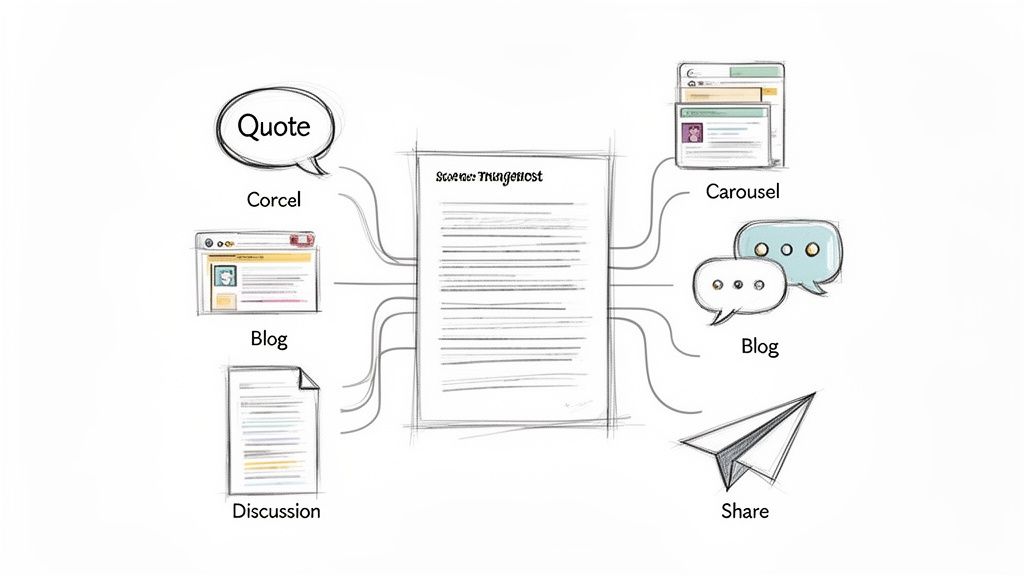
And that's exactly where ChurchSocial.ai comes in. Our platform was built to take your sermon transcript and instantly multiply its value, helping you plan and create an entire week of content that connects with your congregation.
From Transcript to Engagement
With an accurate sermon transcript in your hands, the possibilities are huge. Instead of scrambling for post ideas, you now have a deep well of biblically sound content just waiting to be reshaped for different platforms and purposes. This process doesn't just fill your social media calendar; it reinforces the Sunday message in creative and accessible ways.
Here are just a few ideas you can put into action right away using ChurchSocial.ai:
- Generate Shareable Quote Graphics: The AI can spot the most powerful and memorable lines from the sermon. From there, you can use our built-in graphic templates and editor to create beautiful, branded images that are perfect for sharing on Facebook and Instagram.
- Create Engaging Carousels: Did your pastor have three main points? We can help you turn each point into a separate slide for an insightful Instagram carousel, complete with eye-catching visuals from our graphic editor and a few discussion prompts.
- Draft a Summary Blog Post: Turn the full transcript into a well-written, concise blog post for your church’s website. This is a huge win for people who prefer reading, and it also gives your website’s SEO a major boost, helping new families discover your church online.
- Craft Small Group Discussion Questions: The AI can analyze the sermon's core themes and generate thoughtful questions designed to spark deeper conversations in your small groups, directly connecting their weekly meeting to the Sunday message.
A sermon transcript unlocks the potential to serve your congregation far beyond Sunday morning. It allows the message to live on in their daily lives through social media, blog posts, and group discussions, fostering a more connected and engaged church community.
This approach delivers an incredible return on your effort. The time and energy poured into a single sermon are maximized, reaching people where they are all week. To get the most out of this, I'd recommend exploring some powerful content repurposing strategies that can really help you transform one message into a week's worth of engaging content.
Maximizing Reach and Reclaiming Time
Repurposing your sermon content does a lot more than just fill a content calendar; it dramatically increases your reach and impact. The numbers don't lie. Facebook video posts already have an average engagement rate of 6.01%, which is way higher than other post types.
When you add captions and use the transcript to create follow-up content, you supercharge this effect. Videos with subtitles see 91% completion rates compared to 66% without them. A full transcript can lift your overall engagement by up to 50%. For churches, this is huge—discussion questions pulled from a sermon can generate 135% more organic reach than a simple image post.
Ultimately, this strategy is about good stewardship—stewardship of the message God has given you, and stewardship of your team's time. With ChurchSocial.ai, you empower your staff and volunteers to work smarter, not harder. They can reclaim precious hours once spent brainstorming content from a blank slate. Our platform handles the heavy lifting, freeing your team up to focus on what really matters: meaningful interaction and ministry.
This system turns your Sunday sermon into the cornerstone of your entire weekly communications strategy, ensuring the message of hope reaches further and resonates more deeply than ever before. It's a simple, sustainable workflow that helps even the smallest church make a big impact online.
Streamline Your Content with a Visual Calendar
So you’ve pulled some powerful content from your sermon transcript. That’s a fantastic start, but the work isn’t over. If you want to see real growth on social media, the secret sauce is consistency. This is usually the point where church staff and volunteers, who are already stretched thin, start to feel overwhelmed. How do you keep a steady stream of content flowing without it turning into a second job?
The key is building a sustainable workflow. Instead of treating social media like a frantic, last-minute chore, you can orchestrate everything from a single, unified place. With ChurchSocial.ai, that command center is our simple, drag-and-drop visual calendar.
From Sermon to Schedule in Minutes
Let's imagine it's Monday morning. You've already used ChurchSocial.ai to generate a couple of impactful reels, a handful of quote graphics, and a summary blog post from yesterday's sermon. What’s next?
Forget logging in and out of a half-dozen different platforms. You can get your entire week's worth of content scheduled in one sitting.
- Drag that sermon reel over to Monday's slot for Facebook and Instagram.
- Pop a quote graphic into Tuesday's schedule.
- Queue up the blog post link to publish on Wednesday morning.
It’s an intuitive, at-a-glance view of your content week, giving you confidence that your church's message is reaching people consistently on all your channels. You can dive deeper into this rhythm in our guide on creating a social media content calendar for your church.
A visual calendar transforms social media management from a stressful, reactive task into a calm, proactive strategy. It empowers a single volunteer to execute a plan that looks like it was created by a full communications team.
Integrate and Automate Your Church Events
We all know how much time promoting church events can eat up. First, you create the event in your main church software. Then, you have to painstakingly copy and paste every single detail to create posts for social media. ChurchSocial.ai puts an end to that duplicate work for good.
Our platform integrates directly with Planning Center and other popular church calendars. This means all your church's events are automatically synced and pulled right into your ChurchSocial.ai calendar. From there, creating and scheduling promotional posts is a breeze—no more copy-pasting required.
This integration turns your calendar into a genuine ministry hub. It perfectly aligns your digital outreach with the actual life and rhythm of your church, making sure your community is always in the loop. It’s this kind of practical, time-saving tool that helps even the smallest church team maintain a polished, professional online presence without the burnout.
Common Questions About Video Transcription for Churches
Dipping your toes into new ministry tools always brings up good questions. For a lot of churches, especially those powered by amazing volunteers, the idea of adding Facebook video transcription to the weekly to-do list can feel like a big ask.
Let's tackle some of the most common concerns head-on. This isn't about piling on more work; it’s about making the work you’re already doing connect with more people, more effectively.
Is This Too Technical for Our Volunteers?
This is easily the biggest hesitation we hear, and it makes perfect sense. But here's the good news: the tools available today are built for everyone, not just tech experts. While trying to manually edit captions can feel clunky, a platform like ChurchSocial.ai is designed to handle it all for you.
You really don't need a video pro on your team. If a volunteer is comfortable uploading a video to Facebook, they have all the skills they need. Our AI does the heavy lifting—finding the most powerful moments in your sermon, transcribing them, and adding accurate captions with just a few clicks. It takes what could be a technical headache and makes it a simple, straightforward part of your weekly rhythm.
We Have a Small Budget. Is This Affordable?
Stewardship is everything in ministry, so cost is always a top consideration. The great thing is that this technology has become incredibly accessible. The AI transcription market is expected to jump from $4.5 billion to a massive $19.2 billion by 2034, and that massive growth is making these tools more powerful and less expensive. While hiring a manual transcriptionist can be pricey, AI-driven solutions offer a way to get professional results without the high cost. You can actually see more on how automated transcription is changing the game.
For the solo pastor or small church team, ChurchSocial.ai gives you an affordable way to automate everything from captioning to scheduling. It turns your raw sermon video into a week's worth of engaging content that grows your reach without needing a big media budget.
Will We Actually See a Difference in Engagement?
Absolutely. And this goes way beyond just being more accessible (though that’s a huge win). The data is incredibly clear: videos with captions just perform better. Think about it—captions can increase views by 12%, and 80% of Instagram Stories with a voiceover perform better when they have captions.
These aren't just numbers on a page. More views and longer watch times mean your message is actually being heard. It leads to more shares, more comments, and ultimately, more people feeling a connection to your church. Your sermon's impact doesn't have to stop on Sunday morning; transcription gives it a brand new life online all week long.
Ready to simplify your church's social media and amplify your message? With ChurchSocial.ai, you can turn one sermon into a full week of engaging content, from AI-generated reels to perfectly captioned videos and beautiful graphics. Stop spending hours on social media and start seeing real results. Explore how we can help your ministry grow at https://churchsocial.ai.


