
When you're uploading a YouTube Short, you'll need to select a single frame from the video itself to act as your thumbnail. Unlike regular long-form videos, you can't upload a separate, custom-designed image. The trick is to spot the edit icon (a little pencil) on the video preview screen right before you hit publish.
Why Your Shorts Thumbnail Is a Digital Welcome Mat
Think of your YouTube Shorts thumbnail as the digital version of a warm greeting at your church’s front door. In the endless, fast-paced scroll of social media, it's the one thing that can make someone pause and consider your message. A great thumbnail isn't just a technical step; it's a vital ministry tool.
That first impression tells a potential viewer everything about your sermon's tone and value in a fraction of a second. It can be the difference between a casual swipe and a genuine moment of connection. For churches, learning how to edit a Shorts thumbnail well is a powerful way to meet people right where they are.
The Undeniable Impact of a Strong First Impression
In the world of short-form video, that first second is everything. Platforms like YouTube Shorts, which get over 70 billion daily views, have trained us all to make snap judgments. A tiny, thoughtful change to your thumbnail can translate into thousands of new impressions, making it a surprisingly high-impact focus for your church's outreach efforts.
The data doesn't lie: short-form content often sees 2.5 times more engagement than long-form videos. This makes your thumbnail one of the most important levers you can pull for growth.
In this environment, your thumbnail's visual appeal is crucial. The right image can dramatically boost the chances that someone will stop scrolling to watch your sermon clip or event announcement.
How ChurchSocial.ai Simplifies Your Ministry's Workflow
Creating these vital first impressions doesn't have to be a heavy lift for your church team. This is exactly where a purpose-built tool like ChurchSocial.ai can change the game for your ministry.
- AI-Powered Content: With ChurchSocial.ai, you can upload a sermon and our AI will automatically generate engaging Reels and Shorts from it. It can even create social posts, blogs, and more from the sermon transcript.
- Effortless Design: Our graphic templates and editor let you create beautiful, on-brand thumbnails and social posts, even if you have zero design experience.
- Simple Scheduling: Our simple drag-and-drop calendar allows churches to easily manage and update all of their social media, helping you plan and schedule content consistently.
By blending AI-driven content creation with user-friendly design tools, your church can produce powerful short-form videos that grab attention and spread your message further. To really understand how all the pieces fit together, from the initial idea to viral potential, you can explore this guide on how to make YouTube Shorts that go viral.
The Building Blocks of a Captivating Thumbnail
Before you even open an editor, it’s worth thinking about what makes a great thumbnail. These are the core principles that help your short-form videos—whether on YouTube Shorts, Instagram Reels, or TikTok—actually get noticed by your community.
The first non-negotiable is the aspect ratio. Every short-form video platform uses a 9:16 portrait orientation. Sticking to this format is crucial. It ensures your designs fill the whole phone screen and look professional, not like an afterthought with awkward black bars.
Designing for Ministry Impact
Beyond the technical stuff, the design itself is what communicates your message. For churches, this is a huge opportunity to show your heart and mission visually before anyone even clicks play.
Think about the key ingredients that make a thumbnail stand out in a sea of content:
- High-Contrast Colors: You need your thumbnail to pop. Bold, contrasting colors are your best friend here, helping grab a viewer's eye as they scroll.
- Readable Fonts: The font choice is critical. It has to be bold, clear, and easy to read on a tiny screen. A sermon title or a compelling question needs to be understood in a fraction of a second.
- Reflective Imagery: Your images should feel like your church. This could be a powerful still from the sermon, an abstract background that fits your brand, or a graphic that hints at the video's theme. If you want to use AI to generate unique visuals, learning how to prompt AI to create compelling images is a great skill to develop.
Creating a consistent look across all your thumbnails helps people instantly recognize your content. This visual branding builds familiarity and trust over time.
This is exactly where having the right tool can be a game-changer for ministry teams. Instead of starting from scratch every time, ChurchSocial.ai provides ministry-focused templates designed with these best practices in mind.
They already have the right colors, fonts, and layouts, which makes professional design accessible to anyone on your team. Just add your church’s branding, and you'll have a stunning result in minutes. You can dive deeper into these ideas in our guide on effective church graphic design. This lets you focus on your message while the platform handles the design, making sure your digital front door is always welcoming.
Step-by-Step Guide to Editing Your YouTube Shorts Thumbnail
Alright, you know what makes a good thumbnail. Now, let's get into the nitty-gritty of actually making it happen. Editing your Shorts thumbnail on YouTube is pretty straightforward, but you have two different paths you can take: the quick-and-easy mobile option or the more powerful custom upload from your desktop.
Most of the time, you'll probably be uploading from your phone. When you're in the YouTube app and about to hit "publish," take a close look at the preview of your video. You’ll spot a little pencil icon right on the video itself. Tap that, and you can slide through every frame of your Short to pick the perfect one for your thumbnail.
Selecting the Perfect Moment in the YouTube App
This mobile feature is a lifesaver when you're short on time. Let's say you've got a clip from a sermon about finding joy. You can literally scroll to the exact moment the speaker has a huge, welcoming smile. That single frame does so much work for you, instantly setting a positive tone for the video.
The trick is to be intentional with your choice. Don't just land on a random spot. Look for a frame that is:
- Clear and In-Focus: Steer clear of any blurry frames or moments with a lot of motion. You want something crisp.
- Emotionally Resonant: What feeling are you trying to convey? Find the frame that captures that emotion—joy, reflection, excitement—the best.
- Visually Interesting: Is the shot well-composed? Is it cluttered? Find a clean, compelling moment.
Taking just ten seconds to consciously pick a great frame can make a huge difference in whether someone stops their scroll to watch your ministry's content.
Gaining More Control with YouTube Studio on Desktop
For those times when you want to make a bigger impact, uploading a custom thumbnail from your computer using YouTube Studio is the way to go. This is where you get to add all the good stuff—text, your church logo, and specific brand colors—that you can't when you're just picking a frame on mobile.
Here, you can design a thumbnail that poses a thought-provoking question like "Where Is Hope Found?" or clearly announces the title of a new sermon series. This is where the building blocks we talked about—ratio, colors, and text—all come together.
This little infographic perfectly sums up the core ideas for building a great thumbnail from scratch.
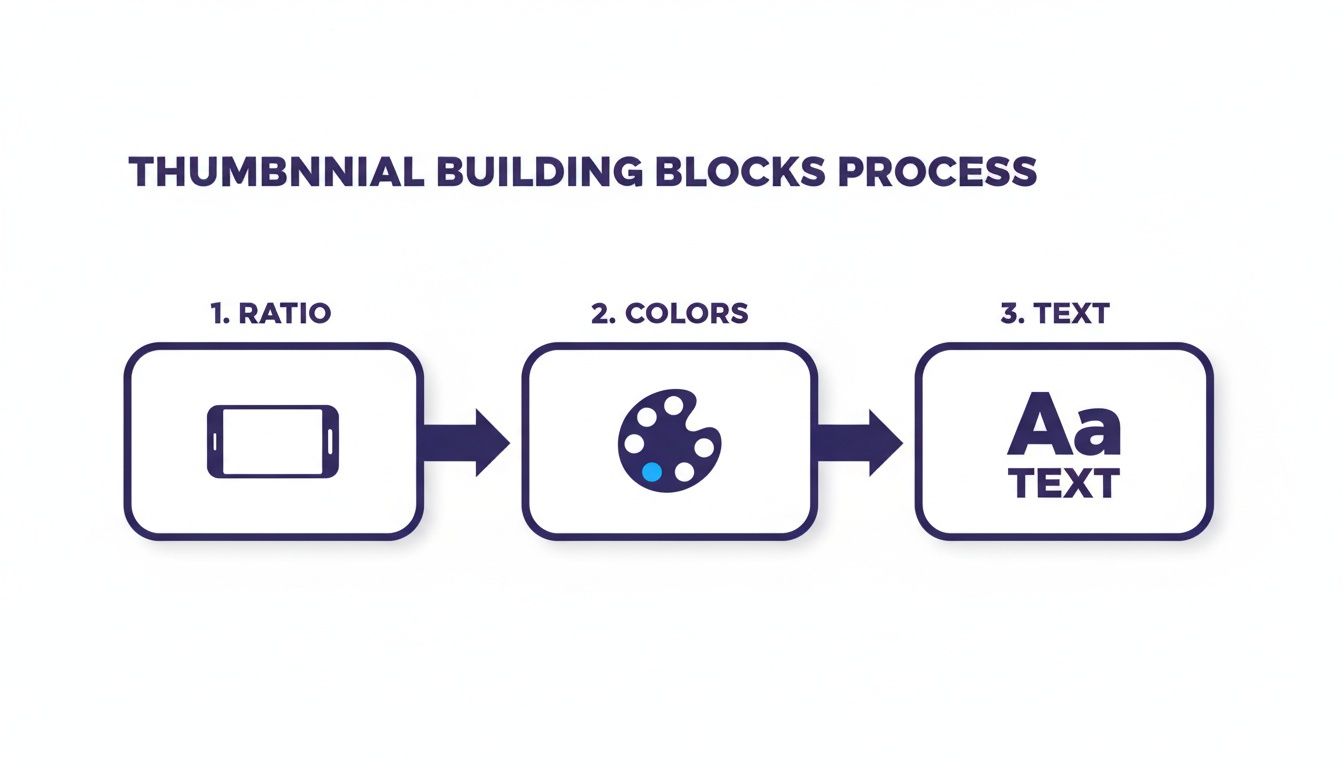
If you can master these three things—the right ratio, smart color choices, and clear text—you've got the foundation for every single successful thumbnail your church will ever create.
Before we move on, let's do a quick comparison of what you can and can't do on the major platforms.
Thumbnail Editing Features by Platform
As you can see, YouTube gives you the most control if you're willing to hop on a computer, while Instagram offers solid on-the-go customization.
Streamlining the Entire Workflow
Trying to juggle all of this for different platforms can honestly feel like a full-time job. This is where having a central hub like ChurchSocial.ai can be a game-changer for your church. After our AI pulls out compelling clips from your sermon, you can jump right into our graphic editor to design the perfect custom thumbnail using templates built for ministry.
If you want to learn more about that initial step of creating the clips themselves, check out our guide on the best video editing software for beginners.
By bringing content creation, design, and scheduling into one place, ChurchSocial.ai lets you focus on your message, not on the messy mechanics of social media.
This unified approach means any staff member or volunteer, no matter their technical skill level, can execute a professional-looking social media plan. You can plan your content, design your visuals, and schedule it all to post from one simple drag-and-drop calendar.
Turning Sermons into Shareable Shorts
What if you could take every weekend sermon and spin it into a full week of social media content? And what if you could do it without adding hours of work for your team? That’s exactly what ChurchSocial.ai was built to do for your ministry. We designed the entire process to amplify your message, all starting with the content you already create every Sunday.
It all begins when you upload your sermon video. From there, our AI kicks in. It carefully goes through the entire sermon, looking for the most powerful, shareable moments—those key phrases, impactful stories, or heartfelt conclusions that really connect with people. It then automatically generates compelling short-form video clips from these highlights.
From AI-Generated Clip to Polished Post
That first automated step is a huge time-saver, but it's really just the beginning. Once you have these AI-selected clips, getting to a finished post is incredibly smooth. You can take any of those clips and instantly create a stunning, on-brand thumbnail without ever leaving the platform.
This is where editing your Shorts thumbnail becomes so simple. Our built-in graphic editor comes loaded with templates made just for churches. You can:
- Add Your Sermon Title: Use bold, clear fonts that are easy to read on a phone.
- Match Your Church’s Branding: Tweak the colors and add your logo in just a few clicks.
- Create Intrigue: Pose a thought-provoking question that relates to the sermon clip.
This all-in-one system means you don't need to juggle multiple tools or learn complex design software. It puts professional-quality visuals within reach for anyone. If you want to see this in action, check out our guide on how to create sermon clips from a video.
A Unified Calendar for Your Ministry
The whole process comes together in a fully scheduled social media post. In one single place, you can pair your AI-generated video with its custom thumbnail and an AI-generated caption that captures the heart of the clip.
The entire workflow—from sermon transcript to scheduled post—is managed on a simple drag-and-drop calendar. This gives you a bird's-eye view of your church's digital outreach, making it easy to plan content weeks or even months ahead.
By handling the heavy lifting of content creation and design, ChurchSocial.ai frees up your church to focus on what matters most: sharing your message. This helps you build a consistent, impactful online presence that connects with your community and reaches new people—all without burning out your staff or volunteers. The platform even integrates with Planning Center and other church calendars to create content for events.
Creative Thumbnail Strategies to Grow Your Church's Reach
Knowing the technical steps for editing a Shorts thumbnail is one thing, but creating one that truly connects with people is a different skill entirely. An effective thumbnail for your ministry has to do more than just look good; it needs to spark genuine curiosity and start building a connection.
A simple but powerful tactic is to add just 2-4 words of bold, intriguing text. Imagine you have a sermon clip about faith during hard times. A thumbnail asking "Where is God Now?" is infinitely more compelling than one that just states the sermon title. That little bit of text is often the hook that stops the scroll.
Building Trust Through Consistent Branding
Consistency is the absolute cornerstone of building a recognizable online presence for your church. When your thumbnails for Shorts, Reels, and other posts all share a similar visual style—using the same fonts, colors, and logo placement—your congregation and new viewers will instantly know the content is from you.
This visual familiarity builds trust. Over time, people learn that your content offers value, whether that's a word of encouragement, information about an upcoming event, or just a moment for reflection.
A consistent brand isn't about being restrictive; it's about being reliable. It tells your community that you have a clear, thoughtful message to share with them.
With ChurchSocial.ai, keeping that consistency is straightforward. Our graphic templates are designed specifically for ministry, letting you quickly create on-brand thumbnails for everything you post. You can even use our integration with Planning Center to pull in event details and create visuals that match your church's established look.
The Value of Testing and Discovering What Connects
The only way to truly know what resonates with your online community is to test different approaches. This is where A/B testing, or split testing, becomes a powerful tool for digital discipleship. The concept is simple: you try two different thumbnail styles for similar videos and see which one performs better.
For instance, you might test:
- A text-only thumbnail versus one with an abstract background.
- A question versus a bold statement.
- Bright, modern colors versus more traditional, subdued tones.
This process gives you invaluable data. Time and again, we've seen how even small thumbnail experiments can produce a significant lift in engagement. It’s a high-return practice, especially now that short-form video drives most user interaction online. Simple A/B tests commonly report click-through rate increases of 12–28% and view improvements of 7–18% when a winning design is found. You can explore more on the impact of short-form video statistics to see why these small efforts matter so much.
The insights you gain from testing can end up shaping your entire content strategy. Within ChurchSocial.ai, you can easily manage these experiments, create different visual styles in our editor, and track performance to make data-informed decisions that grow your church's reach.
Your Top Thumbnail Questions, Answered
We get a lot of questions from church leaders trying to navigate the ever-changing world of social media. Let's tackle some of the most common ones about Shorts thumbnails and how you can manage them effectively.
Can I Change a YouTube Shorts Thumbnail After Publishing?
Yes, you absolutely can! This is one of the best things about YouTube. Unlike some other platforms, they give you the flexibility to swap out a thumbnail even after your Short is live.
It's a huge advantage, really. It means you can test different images or text overlays to see what resonates most with your audience. To make a change, just head over to YouTube Studio on a desktop, find the video, click into the 'Details' tab, and you'll see the option to upload a new custom thumbnail. It's that simple.
How Can We Create Pro Thumbnails with No Designer on Staff?
This is a challenge we hear all the time, and it's one of the core reasons we built ChurchSocial.ai. We're firm believers that every church, no matter its size or budget, deserves access to great design tools.
Our platform comes loaded with a whole library of professional, ministry-focused graphic templates. You can easily drop in your sermon title, tweak the colors to match your church’s branding, and add your own images in just a few clicks. The editor is designed to be incredibly intuitive, so any volunteer or staff member can jump in and create a stunning thumbnail without needing any design background.
This approach empowers your team to create visuals that reflect the excellence of your ministry, ensuring your digital first impression is always a welcoming one.
By removing the technical hurdles, your team can stay focused on the message itself, not on fighting with complicated software.
How Much Time Should We Realistically Spend on a Thumbnail?
The name of the game is maximum impact for minimal effort. Once you have a good system in place, whipping up a powerful thumbnail should only take a few minutes.
Honestly, using the templates and simple editor inside ChurchSocial.ai, you can get a polished, on-brand thumbnail done in 5-10 minutes. When you develop a consistent style, you not only build a recognizable online presence for your church but also save a ton of precious time. That small investment can pay off big time in views and engagement.
Does ChurchSocial.ai's AI Help Create Thumbnails?
It sure does, just maybe not in the way you'd think. Our AI is all about giving you the perfect starting material. Its main job is to go through your long-form sermon and automatically pull out the most engaging and shareable clips.
This means you start the creative process with high-impact video moments ready to go. From there, it’s easy to grab a compelling frame from one of those AI-selected clips to use as the foundation for your thumbnail. Then you can pop it into our graphic editor to add text and branding. It's a seamless workflow, taking you from AI-generated content straight to a finished design.
Ready to transform your church's social media and reach more people with your message? ChurchSocial.ai provides all the tools you need—from AI-powered sermon clips and content generation to beautiful graphic templates and a simple drag-and-drop calendar. Start simplifying your workflow and amplifying your ministry today.


