
In 2026, a church's social media presence is more than just a digital bulletin board; it's a vital extension of its ministry. For the dedicated staff and volunteers managing these platforms, the challenge is immense: creating engaging content, fostering community, and reaching new people, all with limited time and resources. The pressure to maintain a consistent, high-quality online presence can lead to burnout, turning a powerful ministry tool into a significant burden. This is where a strategic approach, supported by the right tools, becomes essential for sustainable success.
This guide moves beyond generic advice to offer 10 powerful, practical social media manager tips specifically tailored for the unique context of church communication. You'll discover how to transition from simply posting announcements to building a vibrant online community that reflects God's love and extends your church's reach far beyond its physical walls. We will cover a comprehensive range of strategies, from foundational content planning and volunteer management to advanced techniques in community engagement and crisis communication.
A central theme throughout these tips is leveraging efficiency to maximize impact. We'll explore how powerful AI platforms like ChurchSocial.ai can revolutionize your workflow. Imagine automatically transforming sermon transcripts into AI-generated reels, social posts, and blog articles, or using intuitive graphic templates to create beautiful, branded content without needing a design background. With tools that simplify scheduling and integrate with your existing church calendars, managing your church's social media becomes less of a chore and more of a blessing. Let’s dive into the strategies that will help your digital ministry not just function, but truly thrive.
1. Develop a Consistent Posting Schedule and Editorial Calendar
A well-planned editorial calendar is the foundation of a successful church social media strategy. It transforms your online presence from a reactive, often stressful task into a proactive, intentional outreach tool. This calendar acts as a strategic map, outlining your posts weeks or even months in advance across all platforms. This foresight ensures your digital messaging aligns perfectly with your church’s core activities, like sermon series, seasonal events, and ministry goals.
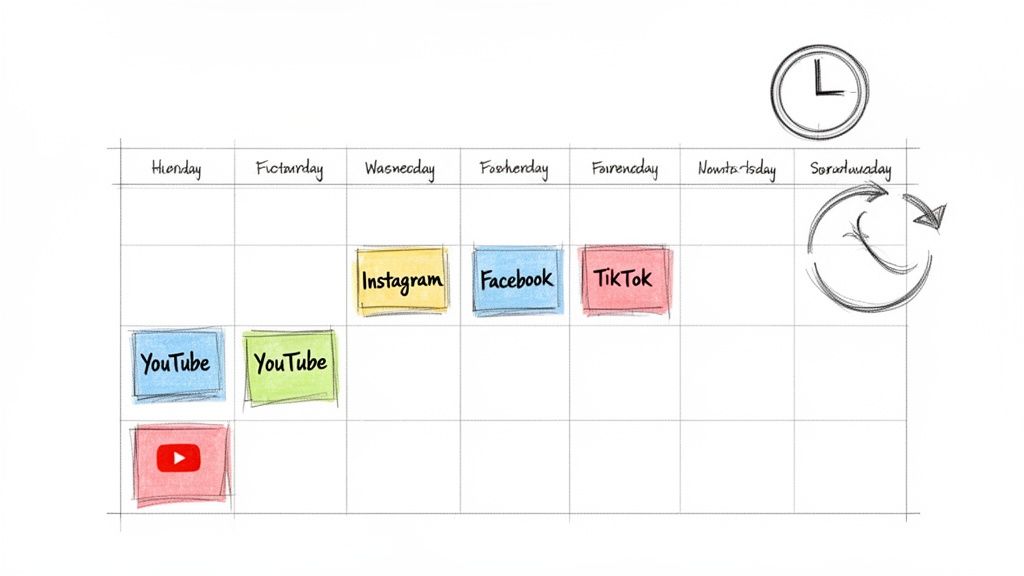
By planning ahead, you reduce last-minute scrambling, maintain a consistent voice, and empower volunteers with clear direction. More importantly, it frees up your time to focus on what matters most: genuine, in-the-moment community engagement.
How to Implement a Content Calendar
Start by mapping out your church’s key dates. This includes sermon series, holidays like Easter and Christmas, and major events such as Vacation Bible School (VBS), community outreach days, or youth group retreats. Once you have these "pillar" events, you can build your content around them.
For example, if your pastor is starting a new series on the book of James, you can plan ahead:
- Two weeks before: Announce the new sermon series with a branded graphic.
- Week of: Share a short video clip from the pastor inviting the congregation.
- During the series: Post AI-generated sermon clips, key quotes as graphics, and discussion questions related to each week's message.
Key Insight: A content calendar isn't about being rigid; it's about being prepared. By scheduling the majority of your content, you create the margin to be spontaneous and responsive when unique ministry opportunities arise.
Streamlining Your Workflow
One of the most effective social media manager tips is to use a dedicated tool for planning. A platform like ChurchSocial.ai provides a unified visual calendar, allowing you to see and schedule posts for Facebook, Instagram, and more, all in one place. Its simple drag-and-drop interface makes rescheduling effortless, and integrations with church calendars like Planning Center can automatically pull in event details to create content for your events. This level of organization ensures a cohesive and purposeful online presence that consistently supports your church's mission.
2. Leverage AI-Powered Sermon Content Transformation
Your weekly sermon is one of the most powerful and content-rich assets your church produces. Instead of letting it live only as a long-form video, you can use AI to multiply its impact, transforming a single message into a week's worth of engaging social media content. This approach extends your ministry's reach far beyond Sunday morning, delivering hope and truth to people’s feeds every day.
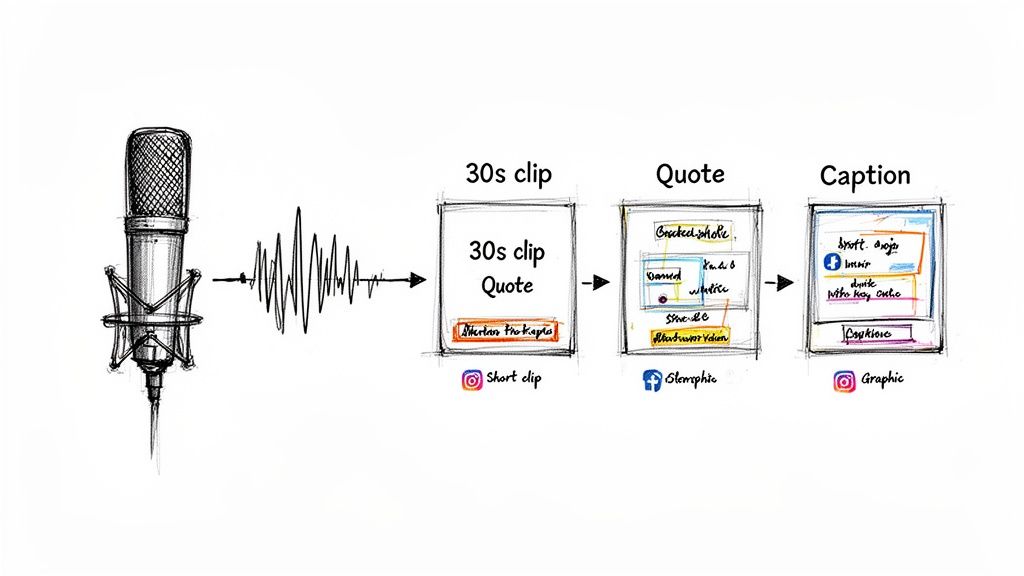
AI-powered tools like ChurchSocial.ai can analyze sermon audio or transcripts to identify the most compelling moments, automatically generating short video clips, quote graphics, and discussion prompts. This not only saves immense amounts of time but also ensures you are consistently sharing the core of your church's message in formats optimized for each social platform.
How to Implement AI-Powered Repurposing
The process begins by simply providing the AI with your sermon content. From there, the technology takes over, breaking down the message into shareable assets. This is one of the most effective social media manager tips for maximizing your output with minimal effort.
Imagine turning one 45-minute sermon into multiple pieces of content:
- AI-Generated Reels: Generate five to seven powerful, 30-second clips for TikTok or Instagram Reels that highlight key points.
- Quote Graphics: Create shareable images featuring impactful quotes for Instagram Stories and Facebook feeds.
- Discussion Questions: Produce thought-provoking questions based on the sermon's themes to spark engagement in your Facebook group.
- Blogs from Sermons: Expand on sermon transcripts to create detailed blogs for your church website, boosting SEO.
Key Insight: AI doesn't replace your message; it amplifies it. By automating the creation of derivative content, you free up your team to focus on personal interaction and discipleship, both online and in person.
Streamlining Your Workflow
Using an integrated platform is crucial for making this strategy manageable. ChurchSocial.ai is designed specifically for this purpose, allowing you to upload a sermon and automatically receive AI-generated reels, social media posts, and even blog content from the transcript. You can then use the built-in graphic editor and drag-and-drop calendar to schedule everything in one place. This seamless workflow transforms content repurposing from a complex task into a simple, sustainable part of your weekly routine.
3. Create Branded Visual Content Without Design Experience
Consistent, professional-looking visuals are essential for capturing attention online, but most churches don't have a graphic designer on staff. This is where user-friendly design tools and templates become invaluable. They empower volunteers and staff to produce polished, on-brand content that reflects your church’s identity without requiring years of design experience. This approach ensures every sermon announcement, event promotion, and scripture graphic looks cohesive and professional.

By leveraging pre-designed templates, you eliminate guesswork and ensure brand consistency across all platforms. This not only saves immense amounts of time but also equips anyone on your team to contribute high-quality visuals, strengthening your church's digital presence and making it more recognizable to your community.
How to Implement Branded Visuals
Begin by establishing a simple brand kit. This should include your church’s logo, primary and secondary colors, and specific fonts. Having these core elements defined makes it easy to apply them to any design. Then, create a handful of core templates for your most common post types.
For example, your template library could include:
- Sermon Series: A bold, recognizable layout for announcing new series.
- Verse of the Day: A clean, easy-to-read design for daily scripture posts.
- Event Promotion: A template with clear sections for event titles, dates, and locations.
- Volunteer Spotlight: A design that highlights a photo and a short quote.
Key Insight: The goal isn't to be a world-class designer; it's to be consistent. A simple, consistently applied brand identity is far more effective than sporadic, overly complex designs that don't match.
Streamlining Your Workflow
One of the most effective social media manager tips for visual creation is to use an integrated platform. Tools like ChurchSocial.ai include a built-in graphics editor with professionally designed templates and a photo editor to create and post photos and carousels tailored specifically for churches. You can easily customize these with your brand kit, add your text, and schedule the finished graphic directly to your social media calendar. For ministries looking to enhance their visual presence without extensive design skills, leveraging tools that offer AI-generated thumbnails can also significantly streamline the process of creating engaging visuals for video content. By combining these resources, you can produce a month’s worth of branded content in a single session. If you want to explore more options, you can find several free graphic design software for beginners that can help get you started.
4. Engage Your Community Through Strategic Storytelling
Facts and figures can inform, but authentic stories are what truly connect and inspire. Strategic storytelling moves your church’s social media from a simple announcement board to a powerful testament of faith in action. It involves sharing genuine experiences from your congregation that illustrate how God is working, turning passive followers into an engaged community and attracting new people to your church's mission.

These narratives build an emotional connection, showing the real-world impact of your ministries far beyond Sunday morning. When people see stories they can relate to, it makes your church feel more accessible and alive, demonstrating the tangible hope and support found within your community.
How to Implement Strategic Storytelling
Begin by identifying potential stories within your church. Look for examples of answered prayers, life changes, and community impact. Always get written permission before featuring individuals, and frame the narrative to highlight their journey and God's faithfulness.
For instance, you could showcase:
- A family’s journey: Document how the church's support network helped a family through a difficult crisis.
- Volunteer spotlight: Share the story of a volunteer who discovered their calling through serving in a specific ministry.
- Newcomer experience: Feature a new member's story, from their first hesitant visit to becoming a connected part of the church family.
Key Insight: The most powerful stories are often the simplest. An authentic, phone-recorded video testimony or a candid photo with a heartfelt caption can resonate more deeply than a highly polished production.
Streamlining Your Storytelling Workflow
Collecting and organizing these stories can be a significant undertaking. This is where a unified platform becomes one of the most effective social media manager tips for modern ministry. Using a tool like ChurchSocial.ai, you can create a system for story submissions and manage the content creation process seamlessly.
After collecting a testimony, you can use the AI-powered tools within ChurchSocial.ai to transform it into various formats: a short video script, a series of quote graphics for Instagram, or a longer-form blog post for your website. You can then schedule these posts directly in the visual calendar, ensuring these powerful stories are woven consistently into your overall content strategy. This approach not only saves time but also amplifies the impact of each story across all your digital channels.
5. Repurpose Content and Optimize Posting Times
One of the most effective social media manager tips is to work smarter, not harder. Instead of constantly creating new content from scratch, focus on strategically repurposing your most impactful messages and optimizing when you post them. This two-part approach reduces your workload while significantly boosting your reach and engagement across all platforms.
Repurposing means taking one core piece of content, like a sermon, and reformatting it into multiple unique posts. At the same time, optimizing your post times involves using platform analytics to discover the exact moments your congregation is most active and likely to engage. Combining these strategies ensures your best content is seen by the most people at the perfect time.
How to Implement Repurposing and Optimization
Start with a high-value piece of content, such as your Sunday sermon. From this single source, you can generate a week's worth of posts. This "create once, publish everywhere" model respects your time and amplifies your church's core teachings.
For instance, a single 30-minute sermon can be transformed into:
- Short-form Video: An AI-generated reel of a powerful 60-second clip for Instagram and TikTok.
- Quote Graphics: Several key quotes designed as visually appealing graphics for Facebook and Instagram.
- Discussion Prompts: A thought-provoking question related to the sermon to spark conversation in a Facebook Group.
- Blog Post: The full sermon transcript or a summary published on your church's website.
Key Insight: Your goal isn't just to post more; it's to make every post count. By analyzing performance data, you can stop guessing and start making informed decisions about what to create and when to share it, ensuring your efforts directly support your ministry goals.
Streamlining Your Workflow
To effectively manage this process, lean on analytics and a unified scheduling tool. Built-in analytics on platforms like Facebook and Instagram provide valuable data on audience activity. Check these weekly to spot trends. You might discover that weekend announcements get 3x more engagement on Friday evenings or that volunteer requests perform best on Tuesday mornings.
A platform like ChurchSocial.ai simplifies this entire workflow. You can upload your sermon and use its AI tools to automatically generate reels, quote graphics, and post captions. Then, using its intuitive drag-and-drop calendar, you can schedule this repurposed content to go live during your newly identified peak engagement times, ensuring maximum impact with minimal effort.
6. Build Community Through Authentic Two-Way Conversations
Effective church social media isn't a one-way broadcast; it's a dynamic conversation that fosters a sense of belonging. Moving beyond simple announcements to cultivate genuine, two-way dialogue is how a digital platform transforms into a digital ministry. This approach turns passive followers into an active, engaged community by showing them they are seen, heard, and valued.
By prioritizing interaction, you create a safe space for spiritual questions, shared prayer requests, and celebratory testimonies. This digital fellowship strengthens the bonds within your congregation throughout the week, extending the church's impact far beyond Sunday morning.
How to Implement Two-Way Conversations
The key is to shift your content strategy from informing to inviting. Instead of just posting service times, ask questions that prompt reflection and sharing. This simple change encourages participation and signals that your church’s online space is for everyone.
For instance, after posting a sermon clip, you can actively foster discussion:
- Ask a direct question: Post a follow-up story asking, "How did today's sermon on forgiveness challenge you? Share your thoughts below."
- Create a poll: Use Instagram or Facebook stories to create a poll like, "What prayer topic should our community focus on this week?"
- Feature your community: Repost member testimonies with their permission or highlight insightful comments from a previous post.
- Host live interactions: Schedule a brief live Q&A session with a ministry leader to answer questions submitted by the community.
Key Insight: The goal of engagement isn't just to boost metrics; it's to practice digital discipleship. Every reply, every answered DM, and every acknowledged prayer request is an opportunity to minister to someone and reinforce that they are part of a caring church family.
Streamlining Your Engagement
Consistently monitoring and responding to comments and messages across multiple platforms can be demanding. This is where a unified tool becomes one of the most vital social media manager tips for community building. A platform like ChurchSocial.ai brings all your notifications and messages into a single inbox, ensuring no comment or prayer request gets missed. You can assign specific volunteers to monitor conversations during key times, like after a service, and use AI-generated content ideas from ChurchSocial.ai to pose thoughtful questions that spark meaningful dialogue. This organized approach ensures your engagement is both heartfelt and sustainable.
7. Develop a Crisis Communication and Moderation Plan
A proactive crisis communication plan is an essential, often overlooked, aspect of church social media management. It prepares your team to handle negative comments, controversial topics, and pastoral emergencies with grace and wisdom. This plan is your guide for protecting your church's reputation and, more importantly, caring for your community when difficult situations arise online.
Without a plan, your team may react emotionally or inconsistently, potentially escalating a minor issue into a major crisis. Having documented moderation policies and escalation procedures ensures a measured, compassionate, and unified response that reflects your church's values, even under pressure.
How to Implement a Crisis and Moderation Plan
Start by defining what constitutes a "crisis" versus a routine negative comment. This could range from theological disagreements in the comments to a community tragedy or a direct mental health concern shared publicly. Document clear, step-by-step procedures for each scenario.
For example, when handling a critical comment on a sensitive social issue:
- Acknowledge: Acknowledge the comment privately via DM if appropriate, offering to connect them with a pastor.
- Assess: Determine if the comment violates your community guidelines (e.g., harassment, spam).
- Respond or Remove: Respond publicly with a pre-approved, compassionate statement or remove the comment if it violates guidelines.
- Escalate: Know exactly when to alert pastoral leadership for guidance on complex theological or personal matters.
Key Insight: Your moderation plan is a ministry tool. It's not about silencing dissent but about creating a safe and constructive online space. A clear plan empowers your team to minister effectively, even in challenging digital conversations.
Streamlining Your Response
Effective crisis management requires vigilance. To stay informed about public perception and catch potential issues early, a practical guide to brand monitoring can be an invaluable resource. For daily management, one of the best social media manager tips is to use built-in platform tools. Most social networks allow you to automatically hide comments containing specific keywords, which can filter out spam or harmful content before it becomes a public issue.
For a more streamlined workflow, a tool like ChurchSocial.ai allows you to manage all comments and messages in one unified inbox. This ensures no comment is missed and that your team can respond quickly and consistently according to your established guidelines. This centralized approach helps maintain a caring and secure online environment that faithfully represents your church.
8. Leverage User-Generated Content and Volunteer Ambassadors
Your most powerful storytellers are already sitting in your pews. Leveraging user-generated content (UGC) means encouraging and featuring photos, videos, and stories created by your congregation members. This strategy transforms your social media from a monologue into a vibrant community conversation, providing authentic perspectives that resonate far more than polished marketing materials. It builds deep community investment and significantly reduces your content creation workload.
By empowering volunteer ambassadors and congregation members to share their experiences, you multiply your reach through their personal networks. A simple photo from a youth group event shared by a teen attendee can connect with friends and families in a way an official church post never could. This approach showcases the real-life impact of your ministry through the eyes of those it serves.
How to Implement a UGC Strategy
Start by creating a simple, branded hashtag for your church, like #GraceChurchLife or #HopeCommunityFam. Promote this hashtag during services, on slides, and in your online communications, encouraging people to use it when they post about their church-related experiences. This makes it easy for you to find and share their content.
Here are a few ways to gather and feature UGC:
- Event Photo Submissions: Set up a simple submission system (like a dedicated email or a cloud folder link) for big events like VBS or outreach days.
- Weekly Spotlights: Feature a "Member Monday" or "Testimony Tuesday" post, sharing a story or insight submitted by a congregation member.
- Service Projects: Ask volunteers to capture photos and short videos during community service projects and share them using your church hashtag.
Key Insight: People want to feel seen and valued. When you consistently seek out and celebrate member-generated content, you are not just filling your calendar; you are affirming that every person's story is an important part of your church's larger narrative.
Streamlining Your Workflow
Managing UGC submissions and getting proper permissions can feel overwhelming, but it doesn't have to be. One of the most effective social media manager tips is to centralize this process. You can use a platform like ChurchSocial.ai to schedule and organize these posts within your main content calendar. When you find a great photo on Instagram with your hashtag, simply get permission in the comments, save the image, and upload it directly into your ChurchSocial.ai media library. From there, you can schedule it for the perfect time, ensuring a steady stream of authentic, community-driven content that builds connection and engagement.
9. Integrate Social Media With Website, Email, and Google Business
Your church's social media should not exist in a silo. True digital outreach happens when your online platforms work together as a unified ecosystem, creating a seamless experience for your community and visitors. This integration ensures consistent messaging, maximizes engagement opportunities, and guides people toward meaningful next steps, whether that's registering for an event or joining a small group.
By connecting your social media, website, email marketing, and Google Business Profile, you create multiple touchpoints that reinforce your church’s message and mission. A visitor who finds your sermon on Instagram should be able to easily find your service times on your website and see positive reviews on Google, all with a consistent brand and voice.
How to Implement an Integrated Strategy
The goal is to create a digital pathway. Instead of just posting content, think about the journey you want someone to take. Each platform should strategically point to another, strengthening the overall system.
Consider this integrated flow for a new sermon series announcement:
- Email: An email is sent to your congregation announcing the new series, with a direct link to a dedicated landing page on your website.
- Social Media: A coordinated social media post goes live at the same time, featuring an AI-generated sermon clip or branded graphic that also drives traffic to the website landing page.
- Website: The landing page contains full details, a series trailer, and links to join related small groups or download study materials.
- Google Business: An event is created on your Google Business Profile for the series kickoff, making it easy for local searchers to find.
Key Insight: Integration turns passive viewers into active participants. When your platforms work in concert, a single social media post can lead to event registration, an email subscription, and a first-time visit, all because the user experience was clear and connected.
Streamlining Your Workflow
One of the most valuable social media manager tips is to use tools that facilitate this integration. A platform like ChurchSocial.ai helps manage the social media component of this strategy. You can use it to create compelling AI-generated content that aligns with your email campaigns and then schedule it to post at the perfect time. Furthermore, its integration with church calendars like Planning Center can automatically create content for events, which you can then use to create consistent announcements across all your channels, including your Google Business Profile. This unified approach ensures every piece of content supports the same ministry goal.
10. Build a Sustainable System That Doesn't Burn Out Volunteers
A vibrant social media presence is often powered by passionate volunteers, but relying on their enthusiasm alone can lead to burnout. The most effective church social media strategies are built on sustainable systems that respect volunteer time, provide clear direction, and prevent any single person from becoming a bottleneck. This approach ensures consistency and longevity, even as volunteers transition.
By designing a clear, documented workflow with realistic expectations, you empower your team to serve effectively without sacrificing their personal lives. This structure protects your ministry's online momentum and fosters a healthy, rewarding volunteer culture.
How to Implement a Sustainable Volunteer System
The key is to define roles and batch tasks to match realistic availability. Instead of expecting daily engagement from everyone, create a system that divides the workload. For example, you can establish a simple, rotating schedule that aligns with volunteer strengths and time commitments.
Consider this monthly workflow:
- Week 1 (Planning): A 2-hour team meeting to brainstorm ideas and map out the next month’s content calendar.
- Week 2 (Creation): Volunteers assigned to content creation use templates and AI tools to produce graphics, sermon clips, and captions.
- Week 3 (Scheduling): A designated scheduler loads all approved content into the social media management platform.
- Week 4 (Engagement): A different volunteer monitors comments and messages for an hour or two throughout the week.
Key Insight: Sustainability comes from clarity and automation, not just hard work. One of the best social media manager tips is to document every process, from how to create a graphic to how to respond to a prayer request, so a new volunteer can step in seamlessly.
Streamlining Your Workflow
Automation is your greatest ally in preventing volunteer burnout. A tool like ChurchSocial.ai can handle the repetitive tasks, freeing your team to focus on creative and relational work. Use it to automatically schedule recurring posts like weekly service reminders or daily scripture verses. You can create a library of branded graphic templates that volunteers can easily edit, ensuring brand consistency without needing advanced design skills.
Furthermore, integrating your church calendar from a service like Planning Center can automatically generate content ideas for upcoming events, saving hours of planning time. By celebrating volunteer contributions in church updates and showing the positive impact of their work, you keep your team motivated and connected to the mission, ensuring your social media ministry thrives for the long haul.
10-Point Social Media Manager Tips Comparison
Empowering Your Ministry with the Right Tools and Strategy
Navigating the digital landscape as a church social media manager is no small task. It's a unique ministry that requires a blend of strategic planning, creative content creation, community engagement, and technical know-how. Throughout this guide, we've explored a comprehensive set of social media manager tips designed not just to help you post online, but to build a thriving digital extension of your church community. We've moved beyond generic advice to provide actionable frameworks for sustainable success.
The journey from feeling overwhelmed to feeling empowered begins with a clear, documented strategy. As we discussed, establishing a consistent posting schedule and editorial calendar is the bedrock of a successful social media presence. It transforms your efforts from reactive to proactive, ensuring your message of hope is shared consistently and purposefully. This foundational step prevents burnout and creates a reliable rhythm for your online community.
From Sunday's Sermon to a Week of Content
One of the most powerful takeaways is the immense, often untapped, potential lying within your weekly sermon. We detailed how to leverage AI-powered tools to transform a single message into a multitude of engaging content pieces. This isn't just about saving time; it's about amplifying your ministry's core teachings. Imagine effortlessly turning a 30-minute sermon into multiple short video reels, insightful quote graphics, thoughtful blog posts, and discussion-starting questions for your social channels.
This content repurposing strategy, combined with creating branded visuals even without a design background, ensures your church's digital storefront is both cohesive and compelling. Remember, your goal is to stop the scroll and offer a moment of connection, and a strong visual identity is key to achieving that.
Building a Thriving Digital Community, Not Just an Audience
Beyond content, the heart of your social media ministry is connection. Our exploration of authentic two-way conversations and strategic storytelling highlighted a critical shift in perspective. Your role isn't just to broadcast information; it's to foster a space where people feel seen, heard, and valued. This means asking questions, responding to comments, and celebrating the stories within your congregation.
Furthermore, building a sustainable system is paramount. We covered practical social media manager tips for developing crisis communication plans, leveraging user-generated content, and building a volunteer team that operates with clarity and passion. Integrating your social media with your website, email newsletters, and Google Business Profile creates a seamless digital ecosystem that guides people on their journey of faith, from discovery to discipleship. The ultimate goal is a system that thrives without leading to volunteer burnout, making your digital ministry both effective and enduring.
By implementing these strategies, you are not merely managing social media accounts. You are stewarding a powerful platform for outreach, discipleship, and community building. You are extending the reach of your church's mission far beyond your physical walls, meeting people exactly where they are. The key is to embrace smarter workflows and leverage tools like ChurchSocial.ai designed specifically for the unique challenges and opportunities of church communication. This strategic approach will free you up to focus on what truly matters: connecting with people and sharing the Gospel in a digital age.
Ready to transform these social media manager tips into action with less effort? ChurchSocial.ai is the all-in-one platform built for churches, helping you turn sermons into AI-generated reels and posts, design beautiful graphics, and manage your entire content calendar with a simple drag-and-drop interface. Start saving time and amplifying your ministry's impact today by exploring ChurchSocial.ai.


