

Getting your sermon from video to text is the first step to unlocking a week's worth of social media content. It's a simple process: upload your video to an AI service like ChurchSocial.ai, let our AI create a draft transcript, and then give the text a quick review for accuracy. In just a few minutes, your spoken message becomes a flexible digital asset ready for ministry.
This one step is the key to turning a single sermon into an entire week of content for your church's social media accounts.
Turn One Sermon Into a Week of Ministry Content
What if you could take one Sunday message and turn it into a full week of social media posts, blog articles, and even AI-generated video clips? This isn't about piling more work onto your church staff or volunteers. It's about working smarter to multiply your church's reach. Video transcription is what makes it all possible with ChurchSocial.ai.
Instead of a volunteer spending hours manually typing out a sermon, ChurchSocial.ai can generate a complete transcript in a matter of minutes. That simple change lets your team shift its focus from tedious tasks to what really matters—sharing the message of the Gospel in new and creative ways across all your social media platforms.

From Sermon to Social Media Fuel
The real game-changer here is efficiency. The time savings are incredible. AI video transcription processes your footage at 3-5 times real-time speed. That means a 60-minute sermon becomes a searchable script in just 12-20 minutes, a massive leap from the four or more hours it would take a person to do it by hand.
Those saved hours add up fast. We've seen church teams save up to four hours weekly per member—that's over 200 hours annually. It's like getting a full month of work time back for ministry. You can dig into these video transcription efficiency statistics to see the full impact. This reclaimed time lets you repurpose one sermon across YouTube, Instagram, and Facebook, all without needing a huge team.
The goal isn't just to get a text document. It’s to unlock the valuable message inside your video, making it accessible, searchable, and ready for digital outreach with a platform like ChurchSocial.ai.
Why Transcripts Supercharge Your Content
A sermon transcript is so much more than a record of what was said. Think of it as the raw material for a powerful content strategy for your church. Once you have a text version of your sermon, you can:
- Create AI-Generated Reels: Platforms like ChurchSocial.ai use the transcript to find powerful moments in your sermon and automatically create short, captioned video clips that are perfect for social media.
- Generate Engaging Social Posts: Instantly pull out inspiring quotes, key takeaways, and discussion questions to fill your content calendar for the entire week.
- Draft Blog Articles and SEO Content: A full transcript can be easily polished into a blog post for your website. This helps your church get discovered by people searching for relevant topics on Google.
- Design Graphics and Carousels: Use key phrases and sermon points as the text for eye-catching graphics, which you can create in minutes using our pre-made templates and graphic editor.
This approach makes sure every piece of content you share is cohesive and reinforces the core message from Sunday. With ChurchSocial.ai, this isn't just a theory. Our platform is built specifically to take your transcribed sermon and automatically generate a variety of posts, turning your existing content into a powerful engine for digital outreach, all managed in our simple drag-and-drop calendar.
Getting Clear Audio for Accurate Transcriptions
When you're trying to turn a video into text, there's one lesson that trumps all others: the quality of your transcript is a direct reflection of your audio quality. It’s the classic "garbage in, garbage out" problem, and it's especially true when working with AI transcription. A clean audio file is the single most important thing for creating accurate, usable content for your church.
This doesn't mean you need to build a professional recording studio in your sanctuary. Often, it's the small, practical tweaks that make the biggest difference. The goal is simple: capture the speaker's voice clearly and cut out as much background noise as possible so ChurchSocial.ai can deliver the best results.
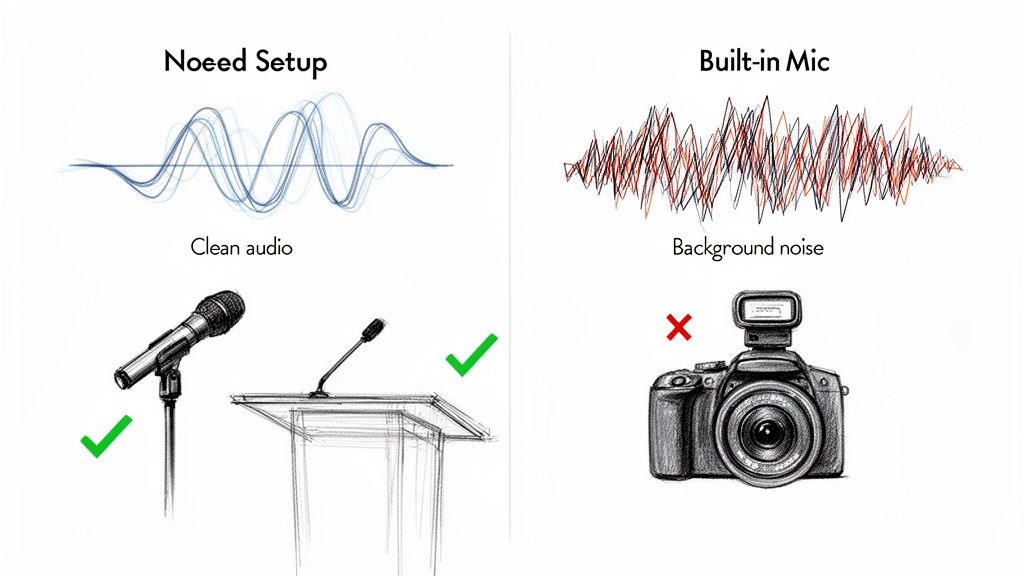
Prioritize a Dedicated Microphone
The biggest mistake we see churches make is relying on the microphone built into their camera. Those mics are designed to pick up everything—the coughs from the back row, the echo bouncing off the walls, even the low hum of the air conditioner. All that extra noise just confuses the transcription software and tanks your accuracy.
The solution is to get a microphone as close to the person speaking as you can. This one change isolates their voice, giving the AI a much cleaner signal to work with.
- Lapel Microphone: This is usually the best option. Clipped right onto the pastor's shirt or lapel, it captures clear audio no matter how much they move around the stage.
- Podium Microphone: If your pastor stays at the lectern, a good podium mic is another fantastic choice that keeps their voice front and center.
If you're looking to upgrade your church's entire setup, we break down different microphone options in our guide to finding the right video recording system for your church.
Investing in a simple $50 lapel mic can improve transcription accuracy more than any other single factor. It’s a small cost for a massive reduction in future editing time.
Think of it this way: a cleaner audio file means less manual cleanup for you or your volunteers. When you upload a sermon with crisp audio to ChurchSocial.ai, our AI can produce a much more precise transcript right from the start.
This accuracy carries over into everything else. Our Sermon Clip Creator can more easily pinpoint powerful quotes and generate compelling video clips without any awkward, misheard words. This ensures your message is captured just as you intended, saving your team hours of editing and helping you get the Gospel out more effectively online.
The Best Way for Churches to Transcribe a Sermon
So, you’re ready to turn your sermon videos into text. That's a huge step. But right away, you're met with a big question: should you use an automated AI service or have a person transcribe it manually? The best path for your ministry really comes down to what you need most—speed, affordability, or a human touch.
For most churches we work with, this decision boils down to the demands of a weekly content cycle. To stay relevant and consistently share the Gospel online, you need to get your message out quickly. This is where AI-powered tools like ChurchSocial.ai have completely changed the game.
Automated AI vs. Manual Transcription
Let's break down the two main options you have.
Automated transcription uses artificial intelligence to listen to your sermon and convert it into text, often in just a few minutes. Tools like ChurchSocial.ai have this built right into their platform, specifically for church workflows. You upload your video, and moments later, you have a complete text draft ready to be transformed into social media posts.
Manual transcription is the traditional route. A real person—maybe a volunteer from your congregation or a paid professional—sits down and types out every single word. While there’s undeniable value in the human ear, this process is significantly slower and can get expensive fast.
Thinking about the practical steps involved? This guide on how to transcribe YouTube video to text is a great resource that walks through different approaches, helping you see what fits your church's workflow.
A few years ago, the big question was whether AI was "good enough." That's not the debate anymore. The technology has improved so much that top-tier AI tools now hit 99% accuracy on clear audio. That's right on par with professional human transcribers, but they deliver it in minutes, not hours or days.
For the vast majority of your church’s needs, modern AI transcription isn't just "good enough"—it's the most practical and efficient way to build a consistent digital ministry.
To help you visualize the trade-offs, here’s a quick comparison of the two methods.
Transcription Method Comparison for Churches
Choosing between AI and a human transcriber involves weighing speed, cost, and accuracy against your specific needs. This table breaks down the key differences to help you make an informed decision for your church's content strategy.
Ultimately, the choice depends on the content's purpose. For high-volume, timely content, AI offers a clear advantage. For highly sensitive, one-off projects, the human touch might be worth the investment.
So, What's the Best Choice for Your Ministry?
If your goal is to create a steady stream of social media content from your weekly sermons, an automated AI service is the hands-down winner. The blend of speed, low cost, and impressive accuracy is simply unmatched. It empowers your team to turn a Sunday message into a full week of engaging content before Monday is even over.
For a deeper look at what this can do for your church, check out our guide on using a sermon transcription service.
Does this mean manual transcription is obsolete? Not entirely. You might still use a professional service for a very specific, high-stakes project, like transcribing a legal document or a sensitive testimony where every single pause and inflection matters.
But for 99% of your church's day-to-day content—from sermons and Bible studies to announcements—the sheer efficiency of a platform like ChurchSocial.ai will help your ministry reach more people with less effort.
How to Quickly Edit Your AI-Generated Transcript
AI transcription has come a long way, but it's still not perfect. The tech is fantastic at getting the bulk of the work done, but it can easily misspell a biblical name, a specific theological term, or a location unique to your community.
Think of the AI's output as a 95% complete draft. That final 5% is where a quick human review turns a good transcript into a great one. This final polish is what ensures every sermon clip, social post, and blog you create is flawless. Best of all, it doesn't take hours—a focused 15-minute review is typically all you need.
Your 15-Minute Review Workflow
The secret to an efficient review is knowing exactly what to look for. You're not aiming for a word-for-word literary masterpiece. Instead, focus your attention on these high-impact areas:
- Proper Nouns and Terminology: The AI will almost certainly stumble on names of people in your church, local street names, or the title of a sermon series. A quick "find and replace" can fix these across the entire document.
- Theological & Scriptural Accuracy: Always double-check scripture references. An AI might hear "John 3:16" but type "John 3:60." It’s a small slip-up that can cause big confusion.
- Speaker Labels: If your sermon included an interview or had multiple speakers, make sure the AI assigned the right text to the right person. Most transcription editors make this a simple drag-and-drop fix.
This quick polish is crucial before you start creating content with a tool like ChurchSocial.ai. It guarantees that every social post, blog draft, and discussion question generated from the text is a perfect reflection of your message.
Correcting Common AI Mistakes
After you’ve done this a few times, you’ll start to see patterns. Homophones—words that sound alike but have different meanings (like "their," "there," and "they're")—are a very common mistake. Punctuation can also be a bit off, with commas and periods showing up in odd places.
Thankfully, the transcription tools built into platforms like ChurchSocial.ai have an interactive editor. You can play the audio and watch as the corresponding text is highlighted, making it incredibly easy to listen to a tricky section and type the correction right then and there.
For a deeper look into this process, a practical guide on how to transcribe video to text offers some great additional insights. Taking this small step to clean up your transcript ensures your source text is solid, setting up ChurchSocial.ai to generate powerful, accurate content from your sermon.
Turn Your Sermon Transcript Into a Week of Content
A finished transcript isn't just a record of your sermon; it’s the fuel for an entire week of ministry content. This is where all that prep work really starts to pay dividends. Once you have that clean, polished text, you can move from simple transcription to creating a wide range of content that feeds your entire digital presence from a single message.
The whole process can be boiled down to a simple workflow. You start with your video, let ChurchSocial.ai handle the heavy lifting of creating a draft, and then you swoop in for the final polish.
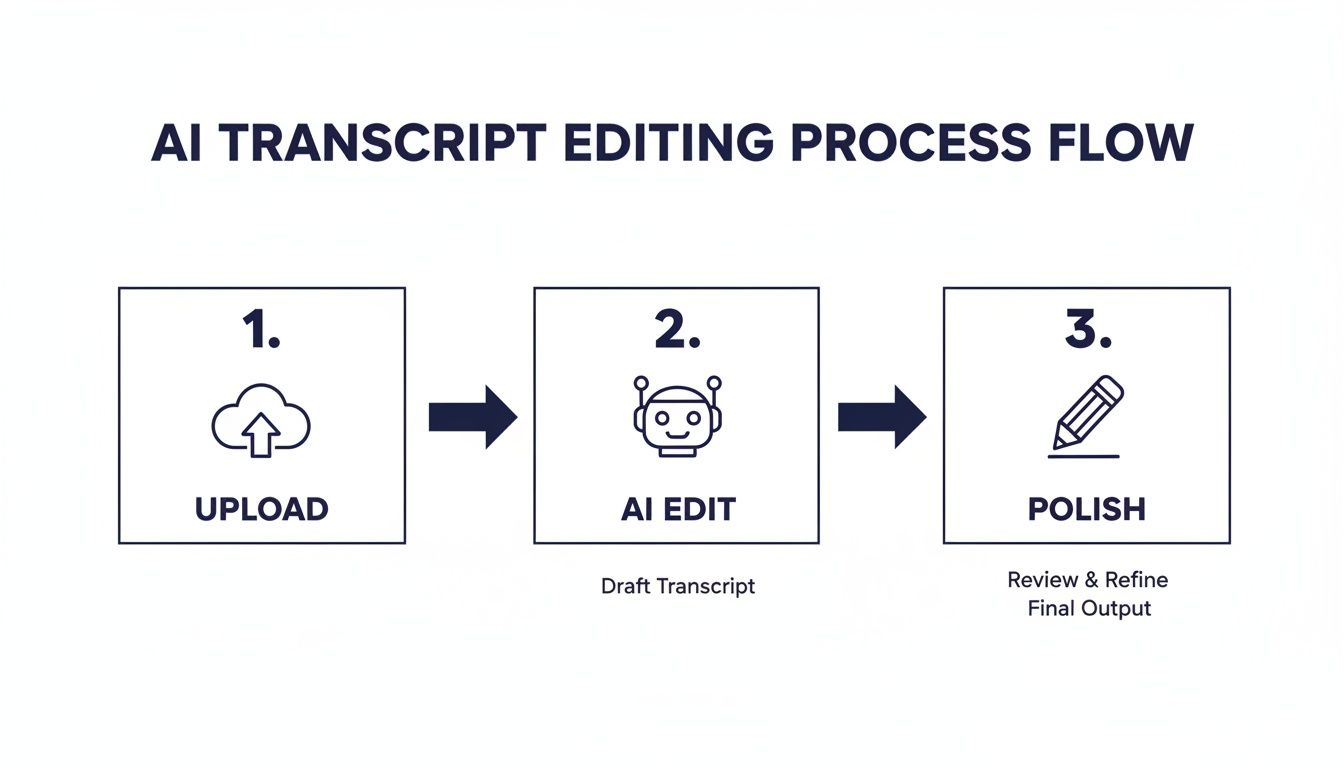
It’s an approach that gets you out of the weeds and back to focusing on ministry. Now, let’s get into the practical ways you can put that transcript to work inside a platform like ChurchSocial.ai.
Generate AI-Powered Sermon Reels and Captions
The fastest and most impactful thing you can do with your transcript is create short, attention-grabbing video clips for Instagram, TikTok, and YouTube Shorts. Manually scrubbing through a 40-minute sermon to find the perfect 60-second highlight is a real time sink. This is where AI completely changes the game.
With our Sermon Clip Creator in ChurchSocial.ai, you just feed it your sermon video and the polished transcript. Our AI reads the entire text and pinpoints the most powerful, shareable moments—those key statements, profound points, or touching stories. It then automatically clips the video and burns in dynamic, accurate captions directly from the transcript, making your content accessible even when watched on mute.
A sermon transcript is the key to unlocking your video's potential. It makes your message searchable, shareable, and ready for any digital platform your church uses.
Create Social Posts, Graphics, and Carousels
Your sermon is full of quotable moments, and a transcript makes them incredibly easy to find. Instead of re-watching the whole message, you can just scan the text for those standout sentences. But tools like ChurchSocial.ai can take it even further. Our AI Content Writer can analyze your sermon transcript and instantly draft a whole batch of social media posts.
Imagine getting all of this from a single transcript:
- Inspirational Quotes: Pull out powerful one-liners and immediately pair them with your church’s branding using our built-in graphic templates and editor.
- Thought-Provoking Questions: Turn a key sermon point into a question to spark conversation and engagement with your online community.
- Carousel Posts: Break down a core teaching concept—like the fruits of the spirit or a three-point outline—into a simple, multi-slide carousel graphic that you can create and schedule right in our platform.
For churches wanting to get the most out of every sermon, looking into different content repurposing tools can open up even more creative avenues for sharing your message.
Draft Blog Posts and Small Group Guides
Your transcript is also the perfect foundation for longer-form content that serves your congregation throughout the week. A full sermon transcript can be quickly adapted into a blog post for your church website using our AI. This not only gives your members a great resource but also does wonders for your website's SEO, helping new people find your church when they search for relevant topics online.
On top of that, you can use the transcript to generate a downloadable PDF guide for small groups. Use the AI to draft discussion questions, suggest related scriptures for deeper study, and summarize the main takeaways. You can then schedule all of this content—the reels, posts, blog, and guide—in our simple drag-and-drop calendar, effectively planning out an entire week of digital outreach from one Sunday message.
A Few Final Questions About Sermon Transcription
Even with a solid plan, you probably still have a few questions floating around. That’s completely normal. Let's walk through some of the most common things church leaders ask before they jump into transcribing their video content.
How Accurate Is It with Music or Worship in the Background?
This is a big one. The short answer is that AI transcription tools work best with clean, spoken-word audio. For your sermons, you’ll get the most accurate results by transcribing a video that contains only the sermon itself.
Most AI tools, including the one built into ChurchSocial.ai, can get tripped up by loud worship music or congregational singing. Isolating the pastor's speech is the single most important thing you can do to get a clean transcript that’s ready to be turned into social media content.
Can I Transcribe More Than Just Sermons?
Absolutely. While this guide is focused on sermons, this same workflow is perfect for video announcements, ministry updates, testimony videos, or even event highlight reels. The real magic happens when you start mixing different types of content together.
The goal is to create a seamless social media plan. By transcribing both your sermon and event announcements, you create a cohesive feed that both nurtures your congregation and promotes upcoming activities.
For instance, ChurchSocial.ai can integrate with your church calendar, including Planning Center. This lets you automatically create social posts for upcoming events, blending your transcribed video clips with details pulled straight from your church calendar. It's a simple way to keep everyone in the loop and manage everything in one place.
What Video File Format Do I Need?
Don't worry too much about the technical details here. Most modern AI services, including the tools inside ChurchSocial.ai, are built to handle all the common video formats like MP4, MOV, and WMV.
What matters far more than the file extension is the audio clarity within that file. A high-quality MP4 with crisp, isolated audio will always give you a better transcript than a huge MOV file with muffled sound from a distant microphone.
How Much Time Does This Really Save?
The time savings are massive. Honestly, it’s one of the biggest wins you'll get from using AI to transcribe video to text. Let's look at a pretty standard 40-minute sermon.
- Doing it by hand: You or a volunteer would likely spend 3-4 hours typing it all out.
- AI Transcription: Usually takes about 10 minutes.
- Human Review: A quick proofread takes around 15 minutes.
- Creating & Scheduling Content: With ChurchSocial.ai, this can be done in under 5 minutes.
You’re basically turning half a day's work into less than 30 minutes. That frees you, your staff, or your volunteers to focus on the person-to-person ministry that an AI can't do.
Ready to turn your sermons into a full week of ministry content? With ChurchSocial.ai, you can generate AI sermon reels, create social posts from transcripts, design graphics with our templates, and manage it all in a simple drag-and-drop calendar. Start planning and managing your church's social media with our easy-to-use tools. Learn more at ChurchSocial.ai.


