
You open the church events calendar on Monday morning and see the same pattern again. A ministry leader texted late Friday with a room request. Someone else already announced a different event from the stage. The website still shows last month's gathering. Instagram has nothing scheduled. Volunteers are waiting for details, and guests have no idea what's happening.
That isn't a calendar problem alone. It's a ministry systems problem.
A strong church events calendar does more than keep rooms from colliding. It aligns staff, helps volunteers prepare, gives newcomers confidence, and turns upcoming ministry moments into content people will notice.
Beyond the Bulletin A Modern Church Calendar Strategy
Many churches still treat the calendar like a storage bin for dates. Add the event. Publish the PDF. Drop a short notice in the bulletin. Hope people find it.
That approach breaks down fast. It creates internal confusion and external invisibility at the same time. Your team ends up managing conflicts in private while your congregation misses key moments in public.
The calendar has always shaped church life
The calendar matters because it has always mattered. The core annual rhythm of many churches rests on calendar practices that were taking shape more than 1,600 years ago, with distinct feasts for the Nativity developing by the mid-4th century and December 25 adopted in Antioch just before AD 380, a date already observed in the west, as outlined in this historical study of the church calendar's origin.
That's a useful correction for modern church teams. The calendar isn't a side task. It's one of the oldest ways the church has organized shared attention, worship, and community life.
A church calendar works best when it answers two questions at once. What are we doing together, and how will people find out in time to join?
Static calendars solve only part of the problem
A static PDF can archive information. It can't coordinate a staff team well. It can't adapt when plans change. It can't feed your social channels, email schedule, website listings, volunteer asks, or ministry reminders without manual work.
That's why more churches need to think of the calendar as a central ministry operating system, not just a publishing requirement. It sits right in the middle of planning, communications, and attendance.
A better model looks like this:
- Internally, the calendar helps leaders sequence ministry activity, avoid collisions, and protect volunteer capacity.
- Externally, the same calendar becomes the source for invitations, reminders, registration pushes, and follow-up content.
- Strategically, it gives the church a way to connect discipleship rhythms with outreach visibility.
If your team is still fighting calendar chaos, it helps to look beyond event pages alone and rethink the full workflow around church event management software for ministry teams.
The shift is simple to describe, even if it takes discipline to implement. Stop asking, “Where do we list this event?” Start asking, “How does this event move from idea to approval to promotion to attendance?”
Laying the Foundation for Your Events Calendar
Most calendar problems start before anyone touches software. They begin when the church has no shared planning horizon, no intake process, and no agreement on what belongs on the master calendar in the first place.
A healthy church events calendar starts with policy, not technology.

Start with categories, not dates
When every event looks equally important, the calendar fills with noise. Churches do better when they define a few simple event categories before they plan the year.
Common categories include:
- Worship and liturgical gatherings such as special services, prayer nights, and seasonal observances.
- Discipleship events like classes, studies, and retreats.
- Outreach moments such as service days, drives, and neighborhood events.
- Community and fellowship gatherings that build belonging across the church body.
- Internal ministry meetings that matter for staff and volunteers but may not need public promotion.
Those categories help leaders make decisions. A public outreach event should be planned and promoted differently than an internal training night. A recurring class needs a different workflow than a once-a-year Christmas event.
Build one intake lane for everyone
If ministry leaders submit requests by hallway conversation, text thread, email, and Sunday lobby chat, your team will miss things. A single intake process fixes more chaos than most churches expect.
Use a simple event request form and require the same fields every time. At minimum, collect event name, ministry owner, requested date, location needs, target audience, childcare needs, registration needs, and promotional notes.
Practical rule: If an event doesn't go through the request form, it isn't ready for the calendar.
That sounds strict, but it protects everyone. Ministry leaders get clarity. Communications gets complete information. Operations can spot conflicts before they become apologies.
Plan farther ahead than feels natural
Churches usually underestimate lead time. Leadership should approve an annual calendar about 12 months in advance when possible, major seasonal events often need at least 2–3 months of planning, and volunteers should be invited at least one month before the event to reduce last-minute strain, according to Shelby Systems' event planning guidance for churches.
That planning window gives you room to pace the year instead of stacking everything into the same busy stretches.
A practical rhythm looks like this:
- Annual planning for anchor events and ministry seasons.
- Quarterly review to adjust for changes and capacity.
- Event-level launch planning once a date is approved.
- Volunteer invitation cutoff before urgency turns into burnout.
For teams that need a straightforward planning template, ABC Hire's guide for seamless events is a useful reference because it reinforces the discipline of thinking through logistics before promotion begins.
Protect breathing room on purpose
An overfull calendar usually looks productive from the inside and exhausting from the outside. Churches often assume more events create more engagement. In practice, too many events compete for attention, volunteers, facility space, and communication bandwidth.
Leave margin. Not every ministry needs a prime slot every month. Not every idea needs churchwide promotion. A sustainable church events calendar makes room for the congregation to participate, not just observe an endless stream of announcements.
Building and Integrating Your Digital Calendar Hub
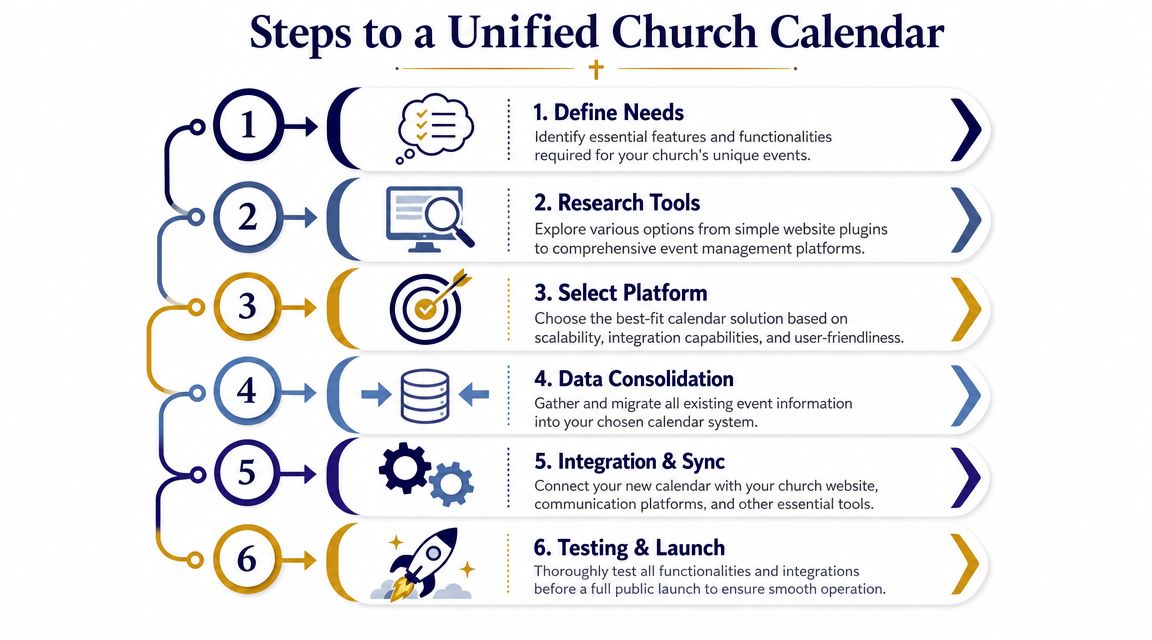
Once the planning process is stable, the next job is building a single source of truth. Without that, your website calendar, internal schedule, registration system, and staff communication tools all drift apart.
That's when double-entry starts. Then mistakes multiply.
Choose the system that owns the event
Every church needs to answer one technical question clearly. Which platform is the authority once an event is approved?
For some churches, that's a church management system. For others, it's Planning Center, a facilities scheduler, or a dedicated event platform. The exact tool matters less than the rule behind it. Approved event data should live in one primary place and flow outward from there.
A good digital hub usually connects:
- Internal scheduling for staff, rooms, and resources
- Public calendar display on the church website
- Personal calendar visibility through Google or Outlook sync
- Registration or sign-up tools when attendance needs tracking
- Communication workflows for email, social, and reminders
Build the workflow before you build the page
A church can have a polished website calendar and still run a weak process behind it. The stronger setup starts upstream.
An expert-recommended workflow includes a virtual request form to avoid double-entry, real-time conflict detection to prevent double-booking, and calendar software that integrates with Google/Outlook so stakeholders can see events on personal calendars, as described in Smart Church Solutions' guidance on managing the church calendar.
That sequence matters because each step removes a different kind of friction.
| Workflow stage | What it solves |
|---|---|
| Intake form | Missing details and scattered requests |
| Conflict detection | Room collisions and shared resource clashes |
| Sync and visibility | Staff confusion about dates and updates |
| Reporting and review | Errors that quietly spread across teams |
If your team has to retype the same event in multiple places, the system is inviting mistakes.
Make integrations do the repetitive work
Most churches don't need more tools. They need fewer manual steps between the tools they already use.
That's where integrations earn their keep. If your church uses Planning Center or another church calendar system, connect it to the channels where event data needs to appear. Keep your master event information in one place, then let downstream systems display or distribute it.
Teams evaluating that setup can use this overview of Planning Center integrations for church workflows to think through what should sync automatically and what should stay under manual review.
Two cautions help here.
- Don't automate bad data. If the intake process is weak, integration only spreads incomplete information faster.
- Don't sync everything publicly. Staff meetings, prep blocks, and internal holds may belong in the system but not on the public church events calendar.
The goal isn't maximum complexity. It's clean data, clear ownership, and less rework.
Turning Your Calendar into a Promotion Engine
Sunday afternoon, the event gets approved. By Monday, the website listing is live. Then nothing else happens until someone asks on Friday why registration is still light.
That pattern is common because many churches still treat the church events calendar like a filing cabinet. Store the details, publish the page, move on. A stronger approach treats each calendar entry as the start of a promotion workflow that feeds social posts, short videos, story reminders, and follow-up content people will see.
Your website calendar still matters. It holds the official details. But attention usually starts on Instagram, Facebook, YouTube, email, or text. The calendar should supply the facts. Your communications plan should turn those facts into repeatable content.
Events need a content plan, not just a listing
Once an event is approved, ask a better question than “Is the page live?” Ask, “What will help the right people notice this, understand it quickly, and take the next step?”
That shift changes the role of the calendar. It becomes the source document for a campaign.
Each event can usually produce several pieces of content:
- Announcement post for awareness
- Short video or Reel that connects the event to ministry purpose
- Story reminders closer to the date
- Graphic carousel that answers practical questions
- Last-call registration post
- Day-of reminder
- Follow-up recap that builds interest for the next event
If your team needs a repeatable posting rhythm, this guide to a social media content calendar for churches is a useful next step. For churches that want broader ideas for channel strategy, practical social media tips for churches can help.
Match content format to the event
Different events need different promotion.
A sermon series launch often works best with a pastor video and a few supporting graphics. A volunteer drive usually needs direct copy, clear roles, and a deadline. Youth nights respond well to short video and quick-cut photos. A food pantry collection often performs better with simple visuals, a list of needed items, and a clear drop-off window.
The trade-off is time. Video often gets more attention, but it takes coordination and approval. Static graphics are faster to produce and easier to repeat. Carousels help when people need details like childcare, cost, parking, age range, or registration steps. Choose the format that fits the event and your team's actual capacity.
ChurchSocial.ai can fit into that workflow in a practical way. It connects with Planning Center and other church calendars, includes a drag-and-drop social calendar, generates sermon-based clips and posts, and creates event graphics from templates. Used well, tools like that reduce the time between approved event details and public promotion.
A simple two-week schedule works better than random posting
Church teams do not need a complicated campaign for every event. They need a schedule they can repeat.
| Timeframe | Platform | Content Type |
|---|---|---|
| 2 weeks out | Instagram and Facebook | Announcement graphic with date, audience, and clear next step |
| 10 days out | Reels or Shorts | Short pastor or leader video explaining why the event matters |
| 1 week out | Stories and Facebook | Reminder with registration or attendance details |
| 5 days out | Instagram carousel | FAQs such as childcare, parking, cost, and who it's for |
| 3 days out | Email and social | Final invitation with practical details |
| Day of | Stories and Facebook | Same-day reminder and directional information |
The church events calendar enables many churches to save real time. The raw material already exists. Sermon clips can frame the spiritual reason behind an event. Ministry leaders can record a short phone video. Existing brand templates can handle the graphic work. The calendar gives your team timing, deadlines, and source details. Then promotion stops feeling improvised and starts working like a system.
Maintaining Momentum and Measuring Success
A church events calendar drifts out of usefulness when nobody owns maintenance. Details go stale. Old events crowd the screen. Promotional patterns stay the same even when response changes.
The fix isn't glamorous. It's regular review.

Keep the calendar clean and current
Teams need a recurring habit for checking what's on the calendar, what has changed, and what should be archived. The public view should never force people to sift through expired listings to find what matters now.
A maintenance rhythm can stay simple:
- Weekly check for date, time, and room updates
- Pre-weekend review for anything being announced publicly
- Post-event cleanup to remove old listings or move them to archives
- Monthly audit for overloaded periods, missing details, or bottlenecks
Clean calendars communicate competence. Messy calendars create hesitation before a guest ever visits.
Measure actions, not vanity
The most useful review questions are practical. Did people register? Did guests show up prepared? Did volunteers respond on time? Which channels moved people to act?
Church teams often over-focus on public applause metrics and under-focus on attendance readiness. A post can get attention and still fail to answer the basic questions that help someone attend.
Useful signals include:
- Registration pattern by event type
- Channel response such as whether email, social, or announcements triggered the most activity
- Volunteer response speed after invitations go out
- Question volume from attendees, which often reveals weak event descriptions
- No-show patterns, which may point to timing, clarity, or audience mismatch
Let results change the next calendar cycle
Measurement only matters if it changes next time's decisions. If one ministry keeps launching requests late, tighten deadlines. If one event type repeatedly confuses people, rewrite the standard event template. If reminders on social perform better than website-only updates, build that into your repeatable process.
Communications and operations need each other. Attendance feedback should shape future event setup. Promotion data should affect how early events are approved, when details are finalized, and what information is collected at intake.
The strongest churches don't treat the church events calendar as a static artifact. They treat it like a live ministry system that learns over time.
Calendar Best Practices and Common Pitfalls
A polished calendar can still fail people if it assumes too much. Churches often write event listings for insiders who already know the building, the ministry names, and the unspoken rules.
Guests don't know any of that.

Write for the person who has never been there
A major gap in many church calendars is accessibility and audience fit. Details like childcare, cost, parking, and whether an event is newcomer-friendly are often missing, which creates barriers for attendees. That matters even more because millions of households in the U.S. still lack broadband access, making a website-first approach incomplete, as discussed in this look at common gaps in church calendar listings.
That should change how churches write event descriptions.
Instead of “Join us for a great night of fellowship,” write the details people need:
- Who it's for such as parents, students, seniors, newcomers, or the whole church
- What to expect including format, length, and whether it's formal or casual
- What it costs, if anything
- What support is available such as childcare, translation, online access, or mobility accommodations
- What action to take next like register, bring a friend, or just show up
Avoid the mistakes that make calendars feel closed
Several common habits render a church events calendar less useful than it should be.
- Insider language: “Women's Equipping Collective” may make sense internally. A guest may have no idea what it means.
- Information gaps: Leaving out parking, entrance location, or childcare creates friction that people feel before they arrive.
- Late volunteer asks: When teams recruit at the last minute, the same reliable people get asked again.
- Announcement overload: If every event is urgent, none of them feel important.
- Website dependence: Some people won't discover events there first, and some won't access the site easily at all.
The most welcoming event page is the one that answers the awkward questions before someone has to ask.
A good final check is simple. Read the listing as if you're new, busy, slightly unsure, and looking at it on your phone. If the event still feels clear, doable, and inviting, the calendar is doing its job.
A church calendar shouldn't stop at listing dates. It should help your team turn approved events into clear, timely content people will see and respond to. If you want one place to plan posts, turn sermons into short clips, create graphics, and manage a social schedule alongside your church calendar, take a look at ChurchSocial.ai.


