

The meeting has ended. The last vote is settled, the fellowship hall is empty, and someone is staring at a legal pad filled with arrows, half-sentences, and names squeezed into the margin.
That moment is familiar in a lot of churches. Minutes usually fall to a faithful volunteer, an office admin, or a staff member who already has five other responsibilities. The pressure isn't just about typing up notes. It's about turning a fast-moving meeting into an official record the church can trust later.
A good church minutes template solves more than a formatting problem. It helps leaders remember what was decided, protects the church when questions come up months later, and creates a usable record for future planning. Done well, minutes become part governance tool, part ministry history, and part communication foundation.
Beyond the Notepad An Introduction to Purposeful Minutes
Most bad minutes don't begin with bad intentions. They begin with fatigue.
A church secretary sits through a long board meeting. The pastor's report sparks discussion. A budget motion gets amended. Someone brings up a building concern right before adjournment. By the end, the notes make sense only to the person who wrote them, and even that clarity starts fading by the time they get home.

Churches often treat minutes like a clerical task. In practice, they're much more than that. Minutes preserve decisions, show whether the church followed its own process, and give future leaders a clear account of what happened and why.
When minutes are vague, churches pay for it later. Leaders disagree about whether a motion passed as stated. A committee remembers an assignment differently. A member asks when an initiative was approved, and nobody can point to a clean record. That confusion affects trust as much as administration.
Why this work matters
Minutes support several parts of church health at once:
- Accountability: Leaders can review what was approved, deferred, or assigned.
- Continuity: New board members inherit a real history instead of oral tradition.
- Governance: Official records help show that meetings were properly conducted.
- Communication: Approved decisions give staff and volunteers a reliable basis for sharing updates.
Good minutes don't capture everything said. They capture what the church must be able to prove, remember, and act on.
I've seen churches get immediate relief upon moving from open-ended note-taking to a consistent template. The shift feels small, but it changes the tone of the whole process. Instead of reconstructing the meeting afterward, the secretary records it in a structure that already knows what matters.
That same structure also helps internal communication. If your church struggles to move decisions from the boardroom to the wider team, this practical guide to improving internal communication in churches is worth reading alongside your minute-taking process.
The Foundation of Effective Church Minutes
A strong church minutes template starts with the right assumptions. Minutes are not a transcript. They are not sermon notes. They are not a catch-all log of every opinion shared around the table.
They are the formal record of a meeting's actions, essential discussion points, and procedural validity.
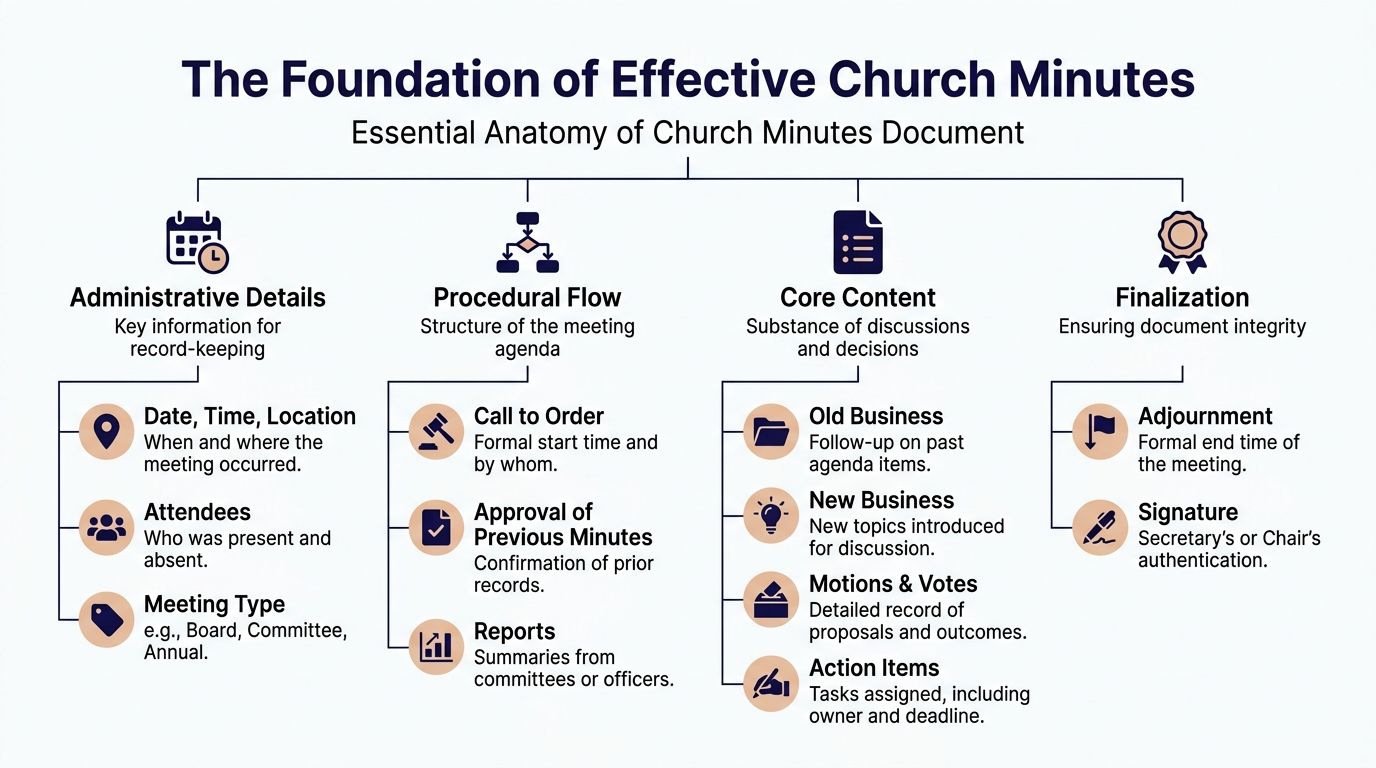
What every set of minutes needs
At minimum, a usable set of church minutes should identify the meeting clearly and establish that the group had authority to act. That means recording the meeting type, date, time, place, chair, secretary, and attendance information relevant to your governing body.
Quorum matters. If your bylaws require a certain number of board members or elders to be present, the minutes should reflect whether that standard was met. Prayer and opening procedure may also matter depending on church tradition and polity.
Reports should be summarized briefly. A pastor's report can be noted as presented. A finance report can be received. A ministry update can be acknowledged. What doesn't belong in the record is unnecessary personal detail, side commentary, or private pastoral content.
What to record exactly
Some parts of the meeting require precision, not summary.
Use exact wording for motions before the vote. Then record the disposition clearly. If the motion was adopted, say so. If it was defeated, say so. If it was referred back to a committee, record that outcome plainly.
Include:
- Meeting identity: Regular or special meeting, church body, date, time, and location
- Attendance status: Present, absent, guests when appropriate, and quorum confirmation
- Procedural actions: Approval of previous minutes and approval of agenda if your body follows that practice
- Official decisions: Motions, amendments, and vote outcomes
- Adjournment details: Time of adjournment and required signatures
Practical rule: If someone needs to verify what the board decided six months from now, the answer should be obvious from the minutes without calling three people.
What causes problems
The most common mistakes usually come from either over-recording or under-recording. Some secretaries try to write everything. That creates bloated minutes and often exposes details that should have stayed confidential. Others reduce the record so much that no one can tell what action was taken.
That balance matters because governance problems aren't theoretical. Church Law & Tax's guidance on taking minutes at a church business meeting notes that accurate templated minutes reduce approval disputes by 85%, and that a quarter of sample minutes reviewed by presbyteries omit prayer or quorum, which can potentially invalidate decisions.
Confidentiality is part of accuracy
Church leaders sometimes think accurate minutes mean highly detailed minutes. Often the opposite is true.
Good minutes identify actions and major discussion themes without recording pastoral counseling details, prayer concerns better handled elsewhere, or personal observations about participants. The record should protect the church's memory and the church's people at the same time.
Download Your Free Church Minutes Templates
Starting from a blank page is where many churches lose time. A secretary opens Microsoft Word or Google Docs, tries to remember what belonged in last month's minutes, and ends up rebuilding the same document again.
A better system is to keep a small set of reusable templates and match the template to the type of meeting. That one decision usually fixes most consistency problems.
The three templates most churches need
A practical church office usually needs more than one version.
Formal board minutes template
Use this for elder meetings, deacon boards, trustee meetings, or any setting where motions, votes, and governance details must be recorded carefully.Committee minutes template
This version can be leaner. Building committee, missions team, worship planning team, and event planning groups usually need action-oriented notes more than full procedural language.Congregational business meeting template
This format should be clean and public-facing. The focus is on approved actions, clear reporting, and a record that can be understood by the wider church body.
Word or Google Docs
Both formats work. The right choice depends on how your church already operates.
Use Microsoft Word if your office stores documents locally, relies on printed approval copies, or prefers traditional file workflows. Use Google Docs if multiple leaders review drafts, comments need to be resolved quickly, or the secretary writes minutes during the meeting on a shared device.
The value isn't in the software itself. It's in the repeatable structure. A good template prompts the secretary to record the right information in the right order. That reduces guesswork, shortens editing time, and helps the board recognize a consistent format month after month.
What a useful template should already include
Before you download or build a church minutes template, make sure it has room for:
- Header information: Church name, meeting type, date, time, location
- Leadership identification: Chairperson and secretary
- Attendance and quorum: Present, absent, guests, quorum notation
- Approval fields: Previous minutes and current agenda
- Reports section: Brief summaries only
- Business sections: Old business, new business, motions, and outcomes
- Closing details: Adjournment time and signature lines
A template should reduce mental load, not create more of it. If the form feels cluttered or forces the secretary to improvise around missing fields, it isn't doing its job.
A Step-by-Step Guide to Recording Perfect Minutes
Once the template is in front of you, the work becomes much simpler. The goal is to follow the meeting in order, write only what belongs in the official record, and finalize the draft while the details are still fresh.

A standardized 8-part template works especially well because it keeps the secretary from skipping key elements. According to eForms' church meeting minutes guidance, using this structure helps with compliance and efficiency, and drafting minutes immediately after the meeting can produce up to 95% recall accuracy, compared with 70% after 48 hours. The same guidance also warns that omitting approval of previous minutes is a common pitfall that can invalidate records.
Part 1 through Part 3
Start with the framework before the discussion gets complicated.
1. Meeting details
Write the title clearly, such as "Business Meeting Minutes for Grace Community Church." Add the date, time, location, chairperson, secretary, and attendance details needed for your church body.
2. Approval of previous minutes
Record whether the previous minutes were reviewed and approved. If corrections were made, note that they were corrected before approval rather than rewriting the full prior discussion.
3. Current agenda approval
If your group formally adopts the agenda, record that approval, as it establishes the scope of the meeting.
Part 4 and Part 5
These two sections usually generate the messiest notes unless the secretary is disciplined.
Recording reports without clutter
Department reports should be brief and functional. Note that the pastor presented a report. Note that the education director gave an update. Note that the treasurer submitted financial information if your practice is to receive it in the minutes.
Don't load this section with every supporting detail. Reports can be attached or retained separately if your church's process allows that.
A clean report summary sounds like this:
Pastor's report was presented and received. Discussion followed regarding upcoming outreach plans.
That is enough unless the report included a motion or decision that must be separately recorded.
Recording motions with exact wording
Motions need exact language before the vote. Then the result needs a plain outcome.
Good example:
Motion to approve the revised youth retreat budget. Adopted by quorum vote.
Bad example:
Budget was discussed and people seemed in favor.
The first version creates a record. The second creates an argument later.
Part 6 through Part 8
The final sections bring clarity to what the meeting accomplished.
- Actions voted: List each approved action clearly. If your church uses numbering by month or year, keep that format consistent.
- Major discussions: Summarize only discussion points that matter for context, and leave out confidential details.
- Adjournment: Record the end time and include signature lines for the secretary and any additional required signer.
A sample filled-out section
Here is a simple example of what a clean entry can look like:
| Agenda Item | Record in the Minutes |
|---|---|
| Approval of previous minutes | Minutes of the March regular board meeting were reviewed and approved as corrected. |
| Treasurer recommendation | Motion to approve the proposed facility maintenance expense. Adopted. |
| Children's ministry update | Education Director presented spring volunteer training plans. Report received. |
| New business | Board discussed summer event coordination and referred final scheduling to the events committee. |
| Adjournment | Meeting adjourned at 8:42 p.m. |
What to do right after the meeting
The best secretaries don't wait.
Open the draft as soon as the room clears. Fill in any shorthand while names, motions, and outcomes are still easy to recall. If something is unclear, ask the chairperson that day rather than guessing later.
Write minutes while your memory still has the meeting in sequence. Reconstruction is where most errors begin.
A reliable after-meeting workflow looks like this:
- Clean up shorthand immediately: Expand abbreviations and complete sentence fragments.
- Verify motions and outcomes: Make sure each motion has a recorded disposition.
- Check the opening items: Confirm meeting type, quorum, and previous-minutes approval were captured.
- Trim unnecessary detail: Remove commentary, side conversations, and personal notes.
- Prepare the draft for review: Save it in the church's standard location and send it to the proper reviewer.
A church minutes template is most effective when it creates the same rhythm every time. The process shouldn't depend on the memory or style of one especially organized person. It should be strong enough that a new volunteer can follow it and still produce a trustworthy record.
Customizing Templates for Different Church Meetings
One template won't fit every room. A board meeting, a committee meeting, and a congregational business meeting serve different purposes, involve different audiences, and carry different confidentiality concerns.
If you use the same level of detail for all three, you'll either over-document routine meetings or under-document formal ones.
Matching the template to the meeting
A board or session meeting usually needs the most discipline. It may involve governance decisions, membership matters, finance questions, or sensitive personnel discussions. The minutes should be formal, concise, and careful about confidentiality.
A committee meeting is usually more operational. The group may be assigning tasks, reviewing event plans, or recommending action to another body. The tone can be simpler, but decisions and assignments still need to be clear.
A congregational meeting often creates the most public record of the three. The language should be readable, orderly, and focused on what the church approved as a whole.
Meeting minutes requirements by church body
| Meeting Type | Level of Detail | Confidentiality Focus | Primary Purpose |
|---|---|---|---|
| Board or elder meeting | High for motions and procedure, brief for discussion | Strong. Exclude sensitive personal details and privileged matters from broad circulation | Official governance record |
| Committee meeting | Moderate. Focus on assignments, recommendations, and next steps | Moderate. Keep internal planning notes restrained | Operational follow-through |
| Congregational meeting | Clear but streamlined. Highlight reports, motions, and approvals | Lower for broad church record, but still avoid unnecessary personal detail | Public accountability and church-wide clarity |
Practical adjustments that help
Use these differences when tailoring your church minutes template:
- For board meetings: Include stronger opening detail, quorum confirmation, and signature lines.
- For committees: Add visible action-item fields so responsibilities don't disappear after discussion.
- For congregational meetings: Use plain language and avoid internal shorthand that only leaders understand.
A church that standardizes these variants usually gains two things. The records become easier to review, and volunteers stop wondering how much to write in each setting.
If your team already builds reusable workflows in other areas, the same mindset applies to minutes. This article on creating templates for church workflows is a helpful companion for building repeatable administrative systems.
Best Practices for Approval Storage and Archiving
Minutes aren't finished when the secretary types the draft. They become fully useful only after review, approval, signing, and consistent storage.
That's where many churches break the chain. A draft lives in someone's laptop downloads folder, corrections happen by email, and nobody is certain which file became the final copy.
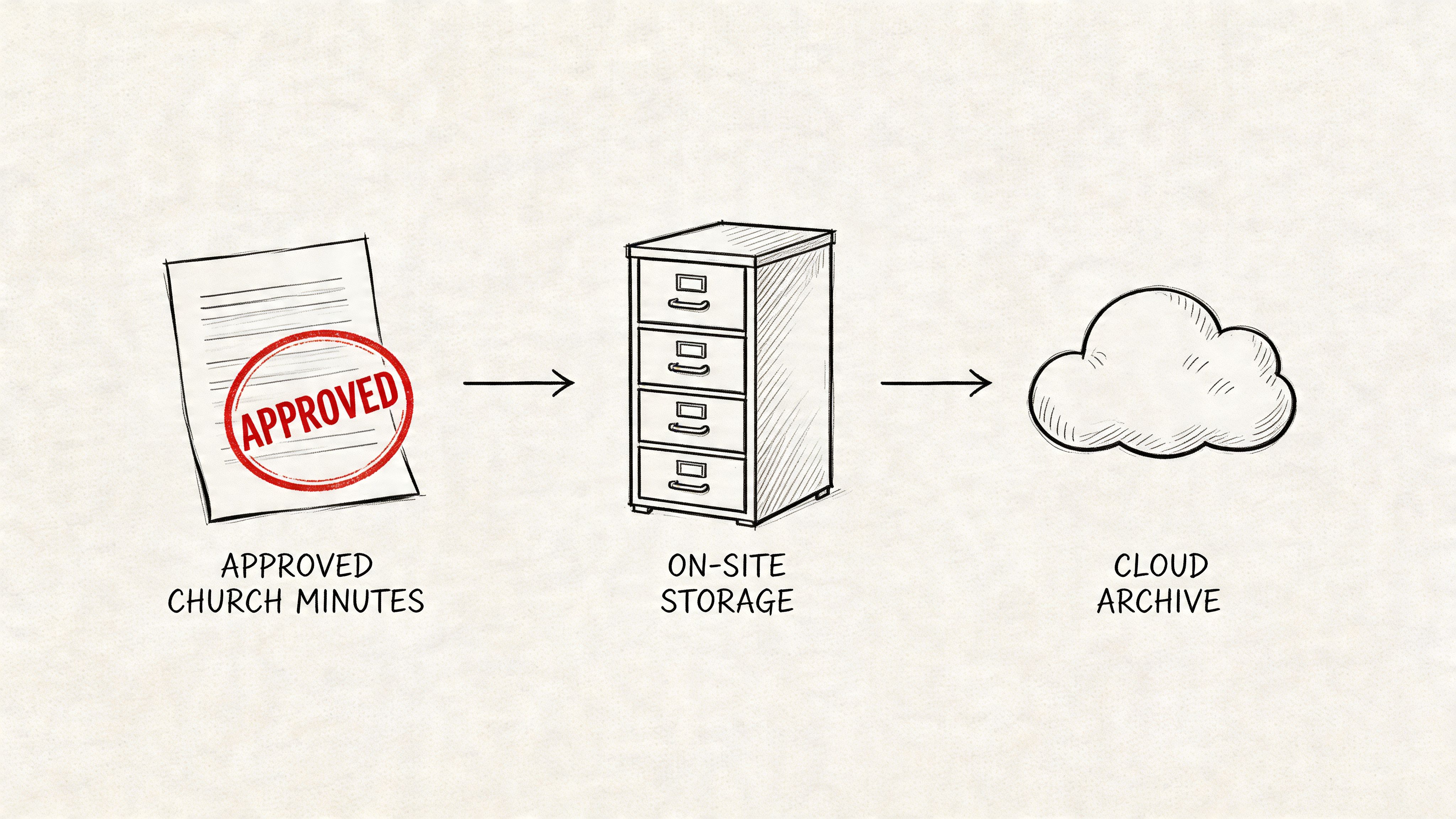
A clean post-meeting workflow
The approval process works best when it is predictable and boring. That is a compliment.
Use a checklist like this:
- Prepare the draft quickly: Finish the first clean version soon after the meeting.
- Send it to the right reviewer: Usually the chairperson, clerk, or designated leader.
- Mark it clearly as draft: Don't let unapproved versions circulate as final records.
- Approve at the next meeting: Record that approval in the subsequent minutes.
- Apply signatures: Add the secretary's signature and any required additional signature.
- Store one final version: Keep the approved copy in the church's designated archive.
Digital archive or physical binder
Most churches do best with both.
A digital archive gives speed, searchability, and backup. Google Drive, Microsoft OneDrive, or another secure cloud folder can work well if permissions are clear and naming conventions stay consistent.
A physical binder still helps in churches that rely on hard-copy records, annual handoffs, or historical review. Printed signed copies can provide peace of mind and continuity, especially when leadership changes.
Keep one version of the truth. Drafts can move around. Final approved minutes need one obvious home.
Naming and retention habits
Simple naming conventions prevent a surprising amount of confusion. Use file names that include the church body and meeting date. Avoid titles like "minutes final updated newest."
Good examples:
- Board Minutes 2026-04-15
- Missions Committee Minutes 2026-05-02
- Annual Congregational Meeting Minutes 2026-01-28
Keep access limited to the appropriate leaders, especially for governing board records. Confidentiality doesn't end when the meeting adjourns.
Churches evaluating broader administrative systems may also benefit from comparing their software stack. This guide to church management software options can help teams think through storage, workflows, and operational fit.
From Minutes to Ministry Momentum
Strong minutes do more than document a meeting. They reduce confusion, support orderly leadership, and preserve the history of what a church has decided.
That matters because ministry doesn't run on memory. It runs on clear decisions, shared understanding, and faithful follow-through.
A reliable church minutes template gives your church all three. It helps the secretary know what to capture, helps the board review a trustworthy record, and helps future leaders understand the path that brought them here. The work may feel administrative, but its impact is pastoral, practical, and long-term.
When churches treat minutes as part of ministry stewardship, they stop producing scattered notes and start building institutional clarity.
Churches that want the same kind of clarity in their communications can use ChurchSocial.ai to plan content, organize campaigns in a drag-and-drop calendar, turn sermon transcripts into social posts and blogs, create sermon clips and reels, and design graphics with ready-made templates. Once your church records decisions clearly, it becomes much easier to share the right message at the right time.


