

Sunday starts with a familiar scramble. One volunteer is checking whether the livestream is working, another is searching for last minute lyric slides, and the communications person is trying to remember which post was supposed to go out after the service. Meanwhile, someone in the office is asking whether the donor update synced properly and whether the youth retreat got added to the calendar.
That chaos isn't really about a lack of effort. It's usually a sign that churches and technology have grown in different directions, with too many disconnected tools carrying too much of the ministry load. A healthier approach is to treat technology like a ministry system, where each tool has a job, a owner, and a clear place in the workflow.
The good news is that churches already have a long track record of adopting useful tools in stages. The question isn't whether technology belongs in church life. It's how to use it with clarity, care, and a plan that helps people.
Understanding the Need for Church Technology
The busiest churches rarely struggle because they lack tools. They struggle because the tools don't talk to each other. A volunteer may be using one app for livestreaming, another for scheduling, a third for social media, and a fourth for giving, while the pastor still needs a quick answer about what was posted, what was promoted, and what still needs attention.
That's why a unified tech approach matters. It helps churches reduce duplicate work, keep communication consistent, and make sure ministry moments don't get lost between platforms. For a practical overview of how ministries can think about that bigger picture, the guide on Technology solutions for growing ministries is a useful companion.
A familiar Sunday morning pattern
A church tech stack often grows one need at a time. First comes email, then a website, then livestreaming, then a giving tool, then another calendar, then social media scheduling. Each addition solves one problem, but the whole system can become hard to manage if no one steps back to see how the pieces fit together.
That's why many churches feel stretched thin. The issue isn't only the number of tools, it's the lack of a shared workflow. When staff and volunteers know where content starts, who approves it, and where it gets published, the ministry feels calmer even when the pace stays fast.
Practical rule: If a tool doesn't reduce confusion for the people using it, it's probably adding friction somewhere else.
A better way to think about church technology is as a support structure for outreach and follow-up. The right setup helps a church speak with one voice, serve people more consistently, and make ordinary tasks easier for volunteers who are already giving a lot of time. That's the lens that makes every later decision easier.
Understanding Key Technologies in Churches
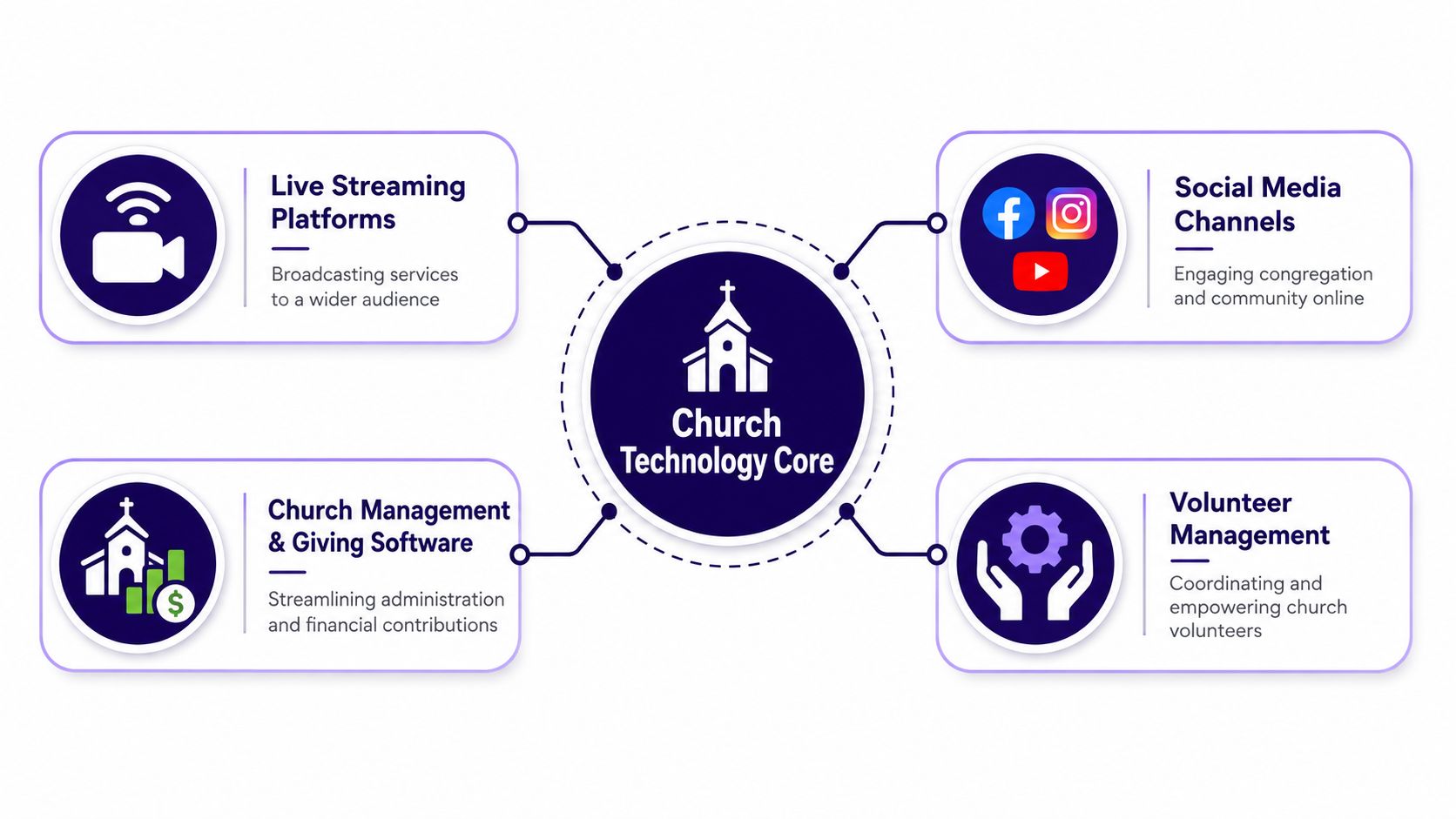
Church technology works best when you treat it like a system of connected rooms instead of a pile of gadgets. One room handles communication, another handles worship, another handles data, and another handles volunteer coordination. If those rooms don't connect, the church spends more time switching between tasks than doing ministry.
The core building blocks
Live streaming platforms are the front door for people who can't be in the room. Think of them like a digital storefront. If the cameras, audio, and platform work well, visitors can “walk in” cleanly and stay long enough to engage. If the setup is clumsy, they leave before the sermon starts.
Social media channels are the church's conversation space. They're where reminders, clips, testimonies, and event updates can keep showing up throughout the week. The key is not to treat social media like a bulletin board. It works more like a hallway where short, repeated touchpoints matter more than one long announcement.
Church management and giving software is the church office's spine. It handles people records, registrations, contributions, and related admin work. The historical pattern matters here. Between 2000 and 2010, email adoption in U.S. congregations rose from 35% to 90%, while live streaming was used by only 19% (Faith Communities Today). That pattern shows that churches usually start with basic communication tools before moving into more advanced digital worship systems.
Volunteer management tools keep the ministry engine running without constant reminders from staff. They help match people to roles, show where gaps exist, and reduce the number of last minute text chains. For a solo volunteer, that can mean fewer surprises. For a multi-site church, it can mean fewer coordination headaches across campuses.
Churches exploring AI should think of it as a content assistant, not a replacement for judgment. An option like ChurchSocial.ai can take sermon transcripts and turn them into social posts, blog drafts, and reel-style clips, which fits neatly into a communications workflow when a team wants to reuse sermon content without starting from scratch.
What each tool usually does best
- Streaming tools: Help people join worship remotely and support event broadcasts.
- Social platforms: Keep the church visible between Sundays.
- Management systems: Organize people, giving, and schedules in one place.
- AI content tools: Repurpose sermon material into formats that match each channel.
If a church is small, one staff member may touch all four categories. If the church is mid-sized, separate people may own them. In a multi-site context, the primary need is consistency, because one campus can't afford to improvise a completely different process from another.
For a deeper look at how AI fits into church communications, the article on AI for churches gives a helpful next step without making the topic more complicated than it needs to be.
Evaluating Benefits and Risks of Tech Adoption
Technology can help churches widen reach, reduce repetitive work, and improve follow-up. It can also create new problems if it's adopted too quickly or without enough discernment. The question isn't whether digital tools are useful. The question is whether they fit the church's worship culture, staffing level, and ministry priorities.
A useful way to evaluate the upside is to ask what gets easier. Does the church communicate more clearly? Do volunteers get scheduled with less stress? Do people give more consistently because the process is simpler? Does the church have better visibility into what's happening? If the answer is yes, the tool may be worth adopting.
But the risks are real too. Screens can compete with attention. Poorly governed content can damage trust. Privacy mistakes can expose donor or member information. And some congregations feel that too much digital presence changes the emotional temperature of worship in ways they don't want.
Where the friction usually shows up
A 2026 study found recurring concerns that technology can conflict with Christian values, leading some congregations to explore screen-free worship postures (Christianity Today). That's not a rejection of all tools. It's a reminder that churches have to weigh reverence, attention, and belonging alongside convenience.
Some of the strongest technology decisions are really culture decisions.
That's why a church should ask a few plain questions before adding anything new. Who will use it every week? What problem does it solve? What happens if it breaks? Who checks the content before it goes live? Who owns the data after the tool is installed?
A balanced approach works better than a “try everything” approach. Some churches will lean into livestreaming and digital giving. Others will keep worship spaces more screen-light and use technology mostly behind the scenes. Both can be faithful if the tools are chosen carefully and used with purpose.
Crafting a Step-by-Step Technology Roadmap
A church tech roadmap should feel like a ministry plan, not a software shopping list. The safest way to move forward is in phases, because every church needs time to test, train, and adjust. If a team jumps from interest to full rollout too fast, volunteers usually end up carrying the stress.

Start with assessment, not excitement
The first step is to write down what's already happening. Which tools does the church use? Which teams depend on them? Where do people get stuck? This is also the point where a communications pastor may realize that the church doesn't have a content system, it has a collection of habits.
Next comes tool selection and budgeting. The goal isn't to buy the most impressive platform. It's to choose tools that match the church's actual size, staff capacity, and ministry rhythm. A smaller church might need one tool that handles several tasks. A larger church may need more specialized systems with tighter integration.
Use a pilot before a full launch
A pilot gives the church a low-risk way to learn. That might mean testing a new livestream setup for one service, or running a content workflow for one ministry area before expanding it. One-third of U.S. churches were using AI tools by 2025 mainly for content creation and design, which makes pilot planning especially important if a team wants to use AI responsibly instead of treating it like a one-off experiment (Religion Unplugged).
Training should come before scale, not after it. People need to know not just which button to press, but why the process matters. A volunteer who understands the workflow is far more useful than one who has only memorized a sequence of clicks.
After rollout, churches should keep a habit of adjusting. The best systems get simpler over time because the team learns what to remove. That's where a drag-and-drop calendar, sermon content repurposing, and event integration can matter. A communications workflow built around upcoming ministry dates can turn one sermon or one event into a steady stream of posts, clips, and reminders without making staff start from zero each week.
Assigning Roles Governance and Security Responsibilities
Church tech breaks down fastest when everyone thinks someone else is handling the details. Clear roles prevent that. The leadership team sets direction, the communications lead manages public messaging, the IT or systems owner protects access and reliability, and volunteers carry out the weekly work inside defined boundaries.

Who owns what
The church leadership or governing body should approve major tech decisions and keep the big picture in view. The IT administrator manages systems, access, and support. The communications pastor or director oversees content, social posting, and digital outreach. A multi-site coordinator, where needed, makes sure campuses follow the same standards without losing local flexibility.
Volunteers should support execution, not invent policy on the fly. They can run slides, monitor streams, schedule posts, or help with AV. What they shouldn't do is guess at donor data handling, approve sensitive content, or bypass security rules to save time.
The ethics question matters here too. An ethics-focused review recommends creating panels of theologians and practitioners to vet digital content and training members in media literacy before publishing (RSIS International). That gives churches a practical review rhythm instead of relying on one hurried approval at the last minute.
Governance and security in plain language
A useful policy doesn't need to be long. It needs to answer who approves, who publishes, who edits, and who can see sensitive information. That protects both the church and its people.
For teams comparing security features across platforms, a resource like Information security practices can help leaders think through access, handling, and digital safeguards without turning the process into a technical maze.
Operational rule: If the church can't explain who is allowed to change a post, a password, or a payment setting, the system isn't ready yet.
A content governance workflow can keep things from drifting. One person drafts, another reviews, and a final owner signs off before anything goes live. That's especially important for social media, livestream captions, and any message that touches giving or membership data.
Measuring Success and Calculating ROI
Church leaders don't need fancy dashboards to know whether a tool is working. They need a small set of meaningful metrics and a consistent way to check them. If a tech investment makes ministry clearer, faster, or more reliable, that should show up somewhere in the data.
A good starting point is to measure engagement, attendance follow-through, giving behavior, and volunteer responsiveness. The right KPI depends on the tool. Social media tools should be judged differently than a donor platform or a scheduling app. A single number won't tell the whole story, but a simple trend line can tell you a lot.
By 2023, only 31% of congregations said they never collected online contributions, down from 70% in 2015, which shows how digital giving moved from edge case to common practice (Hartford Institute research summarized by Moses Tab). That kind of shift is exactly why leaders should track ROI instead of relying on instinct alone.
A simple metric table for church tech review
| Key Church Tech ROI Metrics | Recommended Benchmark |
|---|---|
| Social post reach and interaction | Compare month over month for steady improvement |
| Livestream participation | Track consistency across services and special events |
| Online giving participation | Watch for reduced friction and more recurring gifts |
| Volunteer scheduling response | Measure how quickly shifts are filled |
| Content production turnaround | Check whether posts and clips move faster than before |
Churches can build a simple report by pulling numbers from their social tools, giving platform, and calendar system into one monthly review. That report should include one sentence about what improved, one sentence about what stalled, and one action item for the next month. For churches already thinking about social media performance, the guide on how to measure social media ROI can sharpen that process further.
The point of ROI isn't to reduce ministry to numbers. It's to prove that the systems serving the church are indeed serving the church.
Real-World Examples and Mini Case Studies
A small rural church often starts with limited staff and a few committed volunteers. One team may use a simple livestream setup for people who are traveling, then add an AI-assisted content workflow so the sermon transcript becomes social posts and short clips for the week. That keeps the pastor from writing every caption from scratch and gives the church a more consistent online presence without asking volunteers to become designers.
In another setting, a multi-site network needs coordination more than invention. One campus can't publish in isolation if the other campuses need the same event details, sermon themes, and volunteer calls. A shared calendar and content system can help every location stay aligned, while local leaders adjust the details that matter in their own communities.
A useful social workflow can also reduce the number of people needed in the publishing chain. A tool like ChurchSocial.ai can take sermon transcripts, create AI-generated reels, draft social posts and blogs, and organize scheduled content in a drag-and-drop calendar, while also pulling in events from Planning Center or other church calendars. That kind of setup is especially helpful when one person is managing a full week of church communication.
For churches choosing images, the best results usually come from clean graphics, sermon text overlays when they make sense, and visuals that don't depend on having people in every frame. That keeps the content reusable and avoids cluttering the message.
One church learned that the real win wasn't a flashier stream. It was a calmer workflow. Another learned that once the calendar, sermon content, and volunteer updates lived in one place, the team stopped repeating the same information in three different channels. Those are the kinds of gains that matter long after the novelty wears off.
Conclusion and Next Steps with ChurchSocial.ai
Churches don't need every tool. They need the right tools in the right order, owned by the right people. A clear roadmap, thoughtful governance, and practical measurement make technology feel less like a burden and more like a ministry asset.
The best next step is simple. Audit the tools you already use, name who owns each one, and test one workflow that would save your team time this month. If social media is the bottleneck, a platform like ChurchSocial.ai can fit into that workflow by turning sermon content into clips and posts, organizing them on a calendar, and syncing with church event systems.
A CTA for ChurchSocial.ai.


