

Sunday afternoon arrives, and the church volunteer managing social media is still sorting through the sermon notes. Monday needs a Scripture reflection, Tuesday needs an event reminder, Wednesday could use a short video, and the weekend service deserves more than a last-minute graphic. Meanwhile, Facebook, Instagram, TikTok, and YouTube each need content that feels native to the platform.
A spreadsheet can record those tasks, but it can't listen to a sermon, suggest a useful clip, create a branded carousel, and place everything into a workable publishing rhythm. An AI social media content calendar generator can do that by turning the church's existing ministry material into an organized workflow, while leaving people responsible for judgment, pastoral care, and final approval.
Why Church Social Media Feels Overwhelming Without a System
A typical church social media week doesn't begin with an empty creative brief. It begins with real ministry. A pastor preaches on hope, a volunteer announces a midweek gathering, a staff member sends a registration link, and someone remembers that the church hasn't posted a welcome message in several days.
Without a shared system, those pieces live in different places. Sermon recordings may sit in a video folder, event details may appear in email, and post ideas may be written on paper or remembered during a rushed lunch break. The person publishing content then becomes the person responsible for finding information, writing captions, creating graphics, checking dates, and remembering which channel needs what.

The hidden cost of last-minute posting
Manual planning creates more than inconvenience. It makes the church's public voice dependent on whoever happens to have time that day. A volunteer might publish several announcements close together, forget an important registration deadline, or reuse the same caption across platforms even though the audiences behave differently.
That inconsistency can also make volunteers feel as if social media is an endless stream of small emergencies. They aren't only writing posts. They're coordinating a recurring ministry communication operation with limited staff, changing schedules, and many reviewers.
Ministry reality: A calendar should reduce the number of decisions people have to make at the last minute, not simply store more tasks in one place.
A calmer center for the work
An AI calendar gives the team a visual place to collect ideas, draft content, assign ownership, review assets, and schedule approved posts. The value isn't just that software can write a caption. The value is that sermon content, event promotion, visual design, and publishing can follow one repeatable path.
The church still supplies the message and the pastoral perspective. AI helps prepare the first draft and organize the work. That distinction matters. Authentic communication doesn't require every sentence to be typed from a blank page, but it does require humans to decide whether the final message is accurate, kind, timely, and faithful to the church's voice.
What an AI Social Media Content Calendar Generator Really Does
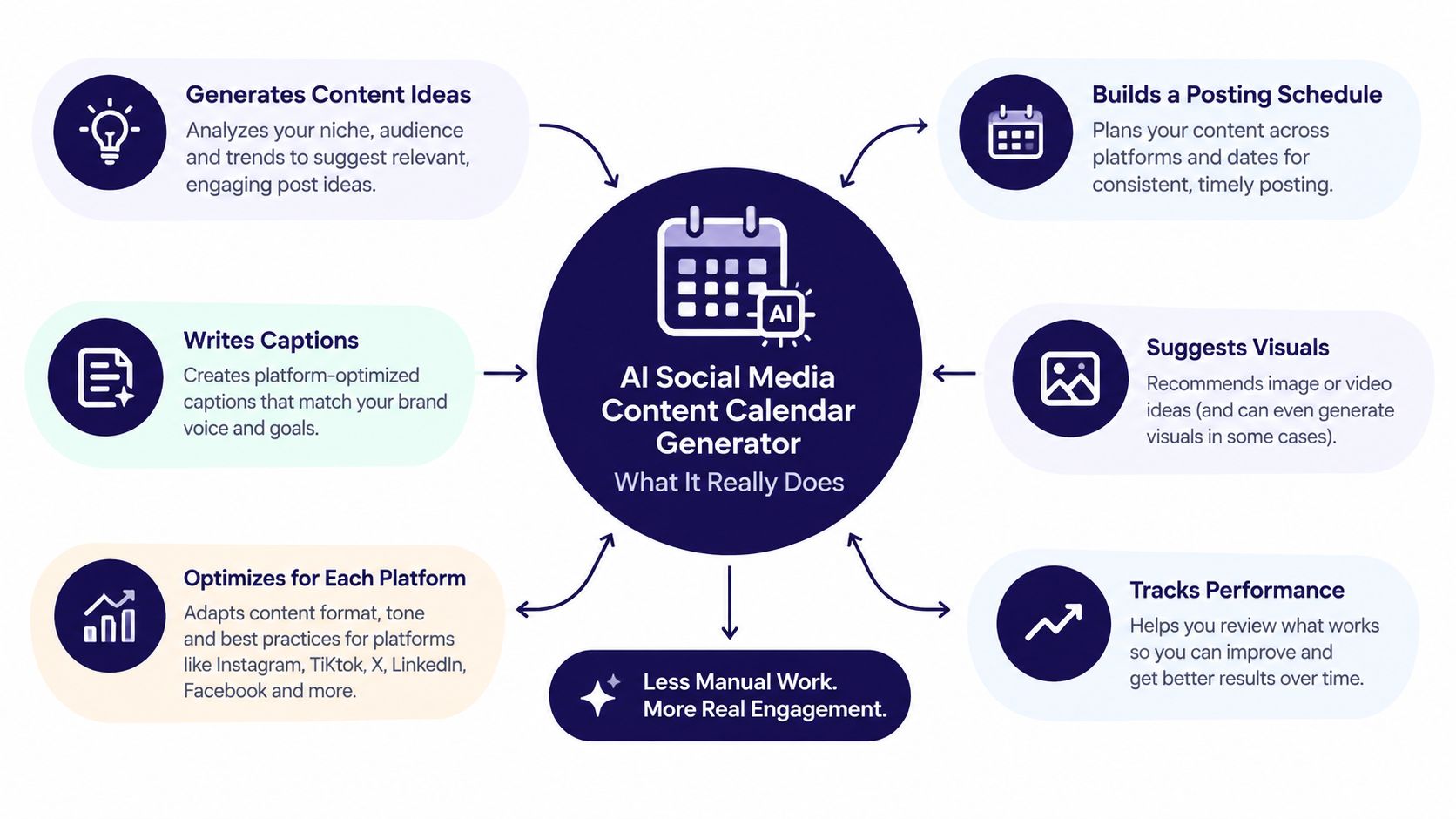
Think of an AI calendar as a ministry assistant with a strong memory for repeatable tasks. You provide the source material, such as a sermon transcript, an event detail, a ministry announcement, or a campaign idea. The system helps turn that material into content options, then places those options into a calendar where people can edit and approve them.
A traditional calendar answers, “What should we post on this date?” An AI social media content calendar generator helps answer several questions at once:
- What is the central message? It can identify themes and useful ideas from a sermon or written brief.
- What format fits the message? The same idea might become a reel, a quote graphic, a carousel, a blog post, or a discussion question.
- How should each platform receive it? Instagram may need a visual-first caption, while Facebook may benefit from more context and a clear invitation.
- Who reviews it? A shared calendar can show ownership, status, notes, and changes before publication.
- When does it publish? Scheduling becomes part of the plan rather than a separate task after writing.
More than a collection of post ideas
A static template gives you columns and blank spaces. A generic scheduler may let you upload finished material and choose a publishing time. An AI calendar combines content generation, organization, editing, approval, and scheduling in a connected workflow.
For readers who want a basic definition of the underlying social media content calendar term, the important distinction is simple. A calendar isn't merely a list of dates. It becomes useful when it records the message, audience, channel, asset, status, and next action for every post.
ChurchSocial.ai's content automation guide provides additional context for thinking about automation as a repeatable process rather than a magic button. In church communications, that process might begin with Sunday teaching and end with approved posts distributed throughout the week.
The right mental model
Don't treat the generator as a replacement for the communications team. Treat it as a first-draft engine and coordination workspace. It can reduce repetitive writing and help a small team see the entire month, but people still need to check names, dates, Scripture references, pastoral tone, permissions, and sensitive material.
That makes the calendar a workflow object, not a content dump. Each post should have a purpose, a responsible person, a format, and a clear path to approval.
How the AI Turns Sermons and Events Into Scheduled Posts
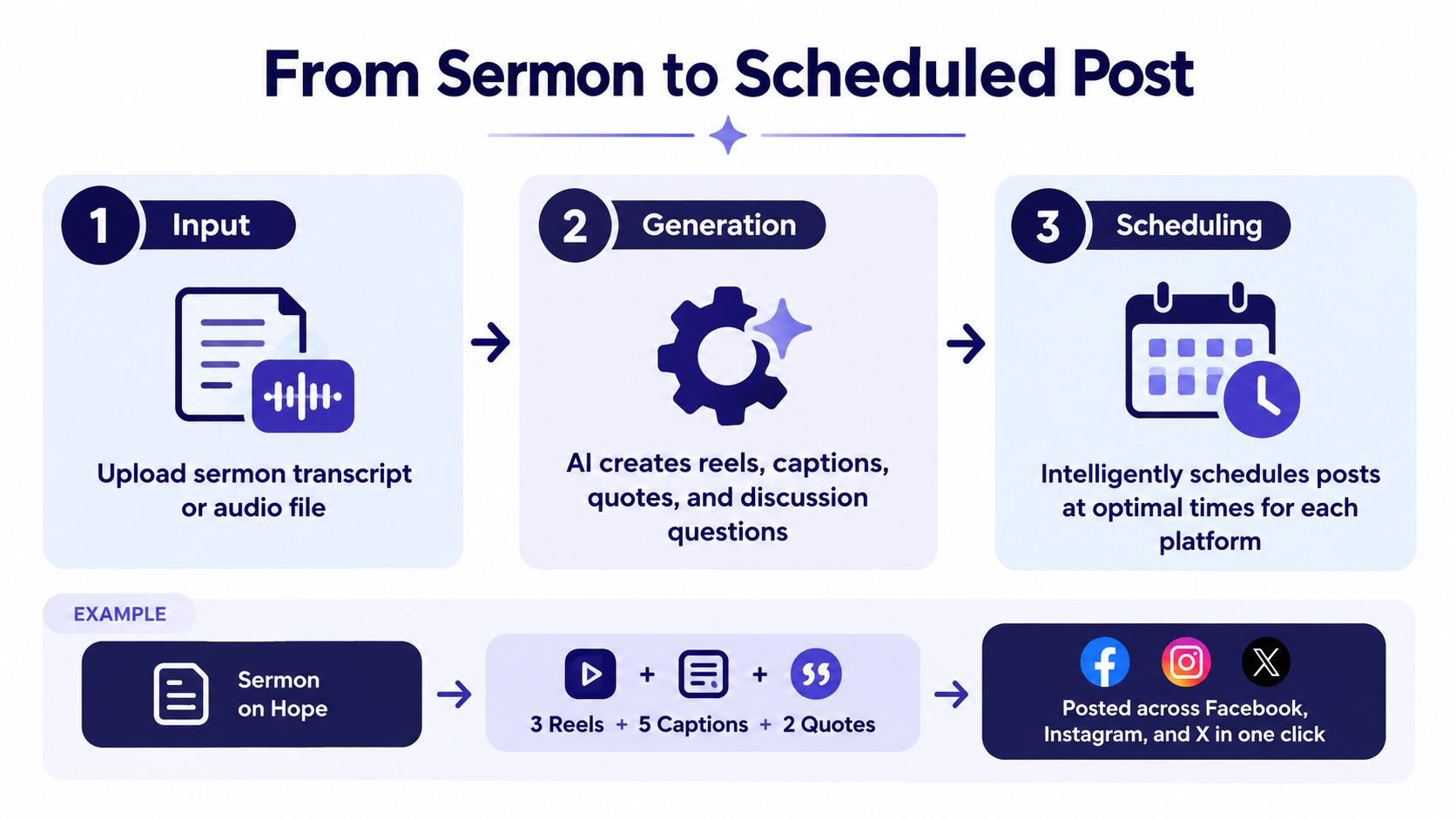
The process makes more sense when you separate it into three layers: input, generation, and scheduling. Each layer solves a different church communication problem.
Input begins with material you already have
The church doesn't need to invent a new campaign before using an AI calendar. A sermon transcript can provide the central source. An uploaded recording or transcript can reveal memorable phrases, teaching points, questions, and applications. An event calendar can supply the practical details, such as the event name, date, location, and registration information.
ChurchSocial.ai can create AI-generated reels from sermons and generate content from a sermon transcript, including social posts, blogs, and other formats. If your starting point is video, a resource on how to transcribe video to text can help your team understand why accurate text makes repurposing easier.
The same principle applies to event content. ChurchSocial.ai integrates with Planning Center and other church calendars to create content for events, which reduces the need to retype information into a separate planning document.
Generation turns one message into several useful formats
Suppose the sermon centers on hope. The system might prepare a short reel from a meaningful sermon segment, a caption that invites reflection, a quote for a graphic, a carousel that explains the main teaching, and a blog draft for people who prefer longer reading.
That is the same ministry message expressed through different doors. A reel reaches the person who watches short video. A carousel gives a teaching team something to save and share. A discussion question can help a small group continue the conversation.
Teams exploring how to repurpose video content with AI will recognize the broader workflow. The goal isn't to post an identical message everywhere. It's to preserve the core idea while adapting the length, structure, visual treatment, and invitation for each channel.
Scheduling matches content to context
A strong generator doesn't use one universal caption or one fixed posting time. One independent analysis reported that platform-specific prompts produced an average engagement rate 2.4 times higher than generic AI-generated content across 15,000 posts from 200 business accounts. That finding is documented in analysis of platform-specific AI calendar prompts, and its practical lesson for churches is clear. Give each platform its own job.
Scheduling also needs local audience context. An analysis of 399 million social posts found that midweek mornings and weekend evenings often produced stronger engagement windows, with Tuesday through Thursday from 9 a.m. to 1 p.m. local time performing consistently well on weekday mornings, while Saturday and Sunday from 9 p.m. to midnight were the strongest weekend windows for Instagram, Facebook, and YouTube. The findings appear in this analysis of audience-aware social scheduling.
Those windows are starting points, not commandments. The church should compare them with its own performance notes and pastoral priorities.
Key Benefits for Churches With Small Teams and Big Missions
Church communications teams rarely need more content for its own sake. They need a dependable way to turn meaningful ministry material into a manageable publishing rhythm. An AI calendar helps by reducing the repetitive work around drafting, formatting, designing, and coordinating posts.
The shift is already visible across marketing workflows. A 2026 social media management report says 65% of marketing teams use AI tools for at least some social content creation or scheduling tasks, up from 43% in 2024, a 22-point increase documented by the 2026 AI social media management report. A separate 2026 adoption analysis reports that 87% of marketers use generative AI in at least one recurring workflow, compared with 51% in Q1 2024 and 76% in Q1 2025. That analysis also says Salesforce's State of Marketing 2026 used a double-anonymous survey of 4,450 marketing decision-makers across North America, Latin America, Asia-Pacific, and Europe, as described in the 2026 marketing AI adoption analysis.
Less pressure on the volunteer
A volunteer can begin with a sermon transcript instead of a blank calendar. AI prepares possible captions and content formats, while the volunteer chooses what serves the congregation. Templates and a graphics editor also let non-designers create photos and carousels without rebuilding every layout from scratch.
That doesn't mean the church should maximize output. A smaller set of useful posts, shaped by actual performance notes and ministry priorities, may serve people better than a crowded feed full of filler.
More consistency without flattening the voice
A shared calendar gives staff and volunteers one view of what is planned, what needs review, and what has already been published. That matters for a solo volunteer, but it also supports larger teams that need clearer ownership and fewer duplicated efforts.
Churches can document recurring categories such as worship encouragement, community care, event invitations, ministry stories, and sermon follow-up. The AI supplies drafts within those boundaries. People provide the warmth, discernment, and local knowledge.
For practical ideas designed around limited church staffing, the small church social media guide offers a useful companion. The central principle is straightforward: automation should give ministry leaders more room for people, not create another system that demands constant maintenance.
Real World Ways Churches Use an AI Calendar Every Week
A church's calendar becomes valuable when it connects separate communication needs. Sermons, events, graphics, and platform publishing shouldn't compete for attention. They should reinforce one another.
Sunday teaching becomes a week of conversation
After the sermon, the communications volunteer can use the transcript as the source for several drafts. One short reel can carry a strong teaching moment. A carousel can explain a practical application. A caption can invite people to reflect, and a blog can give members a longer version to read or share.
The volunteer then places those assets into the drag-and-drop calendar, adjusts the dates, and adapts each caption for the intended platform. The message remains connected to Sunday, but the church isn't asking its audience to consume the same post repeatedly.
Events move from calendar entry to invitation
Planning Center describes a centralized calendar that lets staff plan and schedule events, share them, manage facilities, and track resources. It also connects calendar events with products such as Registrations, Groups, and Services, according to Planning Center's calendar overview.
That connection changes the communications question from “Did someone remember to make a post?” to “Which message should introduce, explain, and remind people about this event?” A church can create an announcement graphic, a short invitation, a registration reminder, and a final practical note without manually recreating the event details each time.
A month gains a healthy ministry rhythm
A useful calendar balances content types. Some posts encourage people. Some help the community understand what the church does. Others invite people to worship, register, serve, or ask questions.
ChurchSocial.ai's graphic templates and editor support photos and carousels, while its AI tools can prepare reels, sermon-based posts, blogs, and discussion questions. The result is a connected workflow where the team can see whether the month reflects the church's actual ministry, rather than filling empty squares.
Setting Up Your AI Calendar With Safe and Simple Approval
Automation works best when the church decides what must remain human. A one-click publishing promise may sound convenient, but ministry communication carries details that deserve review. Dates, names, theological language, pastoral sensitivity, image permissions, and event instructions can all affect how a post is received.
A practical approval system doesn't need to be complicated. It needs clear ownership and a visible status for every asset.
Start with the source and the channels
Connect the church's social accounts and relevant church calendars. Planning Center's setup workflow includes adding people, rooms, and resources, then configuring approval groups, which demonstrates how church calendars can use permissions and resource management instead of functioning as simple date lists. The mechanics are described in Planning Center's calendar setup guidance.
Then choose one sermon transcript and one upcoming event for the first planning cycle. Starting with real material helps the team judge whether the drafts sound like the church and whether the workflow fits existing responsibilities.
Use a visible review path
A simple status sequence might look like this:
- Draft: AI has prepared the first version.
- Owner review: The assigned volunteer checks the message, media, platform, and call to action.
- Ministry review: A pastor, ministry leader, or event owner checks accuracy and sensitivity where needed.
- Approved: The post is ready for scheduling.
- Published: The team records the result and any useful performance note.
Add review notes directly to the calendar item. “Confirm childcare wording,” “check speaker permission,” or “replace this phrase with our usual language” gives the next person a clear action instead of another vague request for feedback.
Approval rule: AI can prepare the invitation. A named human must own the decision to publish it.
Check the asset, not only the caption
ChurchSocial.ai's templates and editor make it easier to create branded images and carousels, but the team should still inspect every visual. Images should support the message, not carry essential information that disappears for people using assistive technology. Accessibility guidance from the University of North Carolina recommends repeating important text from an image in the caption or image description, using concise alt text, and avoiding crowded text overlays when the text isn't part of the visual. These recommendations appear in UNC's social media accessibility guidance.
For generated images, prefer scenes without people whenever possible when a people-free visual communicates the idea well. Add text only where it makes sense, such as on a paper, whiteboard, sign, or intentional overlay added during editing. Don't place words randomly on clothing, walls, skies, or unrelated objects.
Review timing as a suggestion
Use audience and platform timing as a starting point, then compare scheduled posts with the church's own results. The calendar should help the team make informed choices, not force every post into a supposedly perfect slot.
Choosing the Right Approach for Your Church Social Media
The right choice depends on where the church loses the most time. A spreadsheet may be enough for a very small publishing rhythm. A generic scheduler can help when the team already has finished assets. A church-specific AI platform becomes more relevant when the team wants sermon repurposing, design support, event connections, approvals, and publishing in one place.
ChurchSocial.ai offers a unified visual calendar for planning and scheduling church social media, AI caption writing, sermon clip creation, transcript-based content, graphic templates, and an editor for photos and carousels. It also connects with Planning Center and other church calendars to help bring event information into the content workflow. Its pricing starts at $15 per month, as stated in the publisher information provided for this article.
| Capability | Manual Calendar | Generic Scheduler | ChurchSocial.ai |
|---|---|---|---|
| Planning view | Spreadsheet or document | Publishing queue or calendar | Drag-and-drop visual calendar |
| Sermon repurposing | Manual editing and writing | Usually requires prepared assets | AI-generated reels, captions, blogs, and discussion questions |
| Design support | Separate design software or volunteer skills | Varies by tool | Graphic templates and an editor |
| Platform management | Separate account work | Multi-platform scheduling | Centralized church social management |
| Event workflow | Manual copying from church calendars | Often separate from event systems | Planning Center and other church calendar integrations |
| Review process | Comments, email, or color coding | Tool-dependent | Calendar-based ownership, editing, and approval workflow |
| Cost structure | Staff or volunteer time | Varies by provider | Starts at $15 per month, with available modular add-ons |
The most important question isn't whether AI can generate a month of posts. It's whether the church can move from message to approved publication without losing context, accountability, or voice. If sermon clips, event promotion, branded visuals, and shared scheduling belong in the same workflow, an AI social media content calendar generator is a practical next step.
ChurchSocial.ai helps churches turn sermons into reels and posts, create branded photos and carousels, connect event calendars, and manage publishing from a simple visual workspace. Visit ChurchSocial.ai to explore a church-focused way to plan your next month of social media with less scrambling and clearer approval.

