
When you need to create a clip from a YouTube video, the easiest way is to use YouTube’s own "Clip" feature right below the video. It’s quick and simple. But if your goal is to create truly polished, shareable sermon highlights for social media, you’ll want a more powerful approach—one that uses tools designed to turn your sermon into a dozen ready-to-post vertical videos. With a platform like ChurchSocial.ai, you can easily create AI-generated reels from sermons, produce social posts and blogs from the transcript, and manage your entire social media presence with a simple drag-and-drop calendar.
Why Sermon Clips Are a Ministry Game Changer
Your church’s full-length sermon is the cornerstone of your ministry, but let's be honest—online, it's competing in a sea of content. A staggering 500 hours of video are uploaded to YouTube every single minute. In that environment, a 45-minute message can easily get lost.
This is exactly why clipping your YouTube videos isn't just a nice-to-have; it's an essential outreach strategy.
Instead of just hoping people stumble upon your full service, you can bring the most impactful moments directly to their feeds. Think about it: a powerful 60-second clip can stop someone mid-scroll on Instagram or TikTok, delivering a message of hope right when they need it most. This isn't just about pushing out content; it’s about making a genuine connection.
Reaching a Wider Audience
Short-form video is the language of the internet today. It's how millions of people consume information and find community. By turning a single sermon into a handful of great clips, you can:
- Meet People Where They Are: You can engage with people on Reels, Shorts, and TikTok who might never click on a full-length sermon.
- Boost Your Discoverability: Social media algorithms love short, engaging clips. This dramatically increases the odds of your message reaching entirely new audiences.
- Reinforce Key Themes: Share different moments from the sermon all week long. This keeps the core message top-of-mind for your congregation and sparks ongoing conversation.
The average YouTube video gets around 5,594 views, a tough number to hit with long-form content. But the explosion of YouTube Shorts, now at 200 billion daily views, has opened up a massive opportunity. Data shows that 55% of US viewers actually prefer videos that are only a few minutes long. The demand for concise, powerful content is undeniable. You can dive deeper into these trends in this report on 2025 YouTube statistics.
"Transforming a sermon into shareable clips isn't about shortening the message; it's about multiplying its touchpoints. One powerful minute of video can travel further and reach more hearts online than a full-hour service ever could."
From Passive Viewing to Active Engagement
Creating sermon clips changes your social media from a simple announcement board into a dynamic ministry tool. This is where platforms like ChurchSocial.ai really shine. They're built specifically for this purpose, letting you drop in a YouTube sermon link and have it automatically generate powerful, ready-to-post reels.
An automated process like this frees up an incredible amount of time for church staff and volunteers. No more tedious hours spent editing or wondering which part of the sermon will resonate most.
With a tool like ChurchSocial.ai, you can seamlessly turn a sermon transcript into social posts, blogs, and even small group discussion questions. You can also use graphic templates and our editor to create photos and carousels. It empowers your church to build a vibrant online presence that ensures your message continues to resonate long after Sunday morning is over.
So, you have a full-length sermon on YouTube and you know it’s packed with shareable moments. The big question is, how do you actually pull those moments out and turn them into clips for social media?
There are a few different ways to tackle this, each with its own pros and cons. The right choice really depends on your church’s goals, your technical comfort level, and, frankly, how much time you or your volunteers have to spare.
Let's walk through the main options, from the super-simple to the incredibly powerful.
Comparison of YouTube Clip Creation Methods
To get a clear picture of your options, it helps to see them side-by-side. Each method serves a different purpose, so what's perfect for a quick share might not be what you need for a polished Instagram Reel. This table breaks down the key differences to help you decide which workflow fits your ministry best.
As you can see, the trade-off is almost always between time and control. Manually editing gives you ultimate control but takes the most time, while simpler tools are fast but very limited.
YouTube's Built-in Tools: The Starting Point
YouTube gives you two built-in ways to isolate parts of your video: the "Clip" feature and the "Editor" inside YouTube Studio. They’re handy to know about, but they serve very different functions.
The 'Clip' Feature: This is YouTube's answer to a quick-share button. It lets anyone grab a 5 to 60-second segment and instantly get a link to it. It’s fantastic for dropping a powerful quote into a church email or a direct message. The catch? It doesn't create a separate video file. It just links back to that specific spot in your original sermon, so it's not what you want for creating content for Instagram or TikTok.
The YouTube Studio Editor: This is a more robust tool for making permanent changes. You can trim the start or end of your sermon or even cut out a section from the middle (perfect for removing that long pre-service countdown). But as a tool for creating multiple social media clips? It's painfully slow. You’d have to duplicate your video over and over, then trim each copy down. It's just not built for that kind of weekly workflow.
Third-Party Video Editors: The Hands-On Approach
This is where you gain full creative freedom. Using video editing software on your desktop or phone allows you to do pretty much anything—add text, motion graphics, background music, and your church’s logo.
The downside is the time and skill required. This manual process is a serious time commitment. A volunteer would need to download the entire sermon, import it, scrub through an hour of footage to find good moments, slice them up, reformat each one for vertical viewing (9:16 aspect ratio), add captions from scratch, and export them all individually.
This hands-on method can easily burn several hours for just one sermon, which can quickly lead to volunteer burnout.
While this approach gives you the most control, it’s a major bottleneck for most churches. If you want to explore this path, we have a guide on the best video editing software options available that can help you find a tool that fits.
Automated AI Platforms: The Smartest Workflow
For churches that want to create consistent, high-quality content without the massive time investment, AI-powered platforms are the clear winner. This is where a service like ChurchSocial.ai completely changes the game.
Instead of you hunting for the best moments, the AI does it for you. You just give it the link to your YouTube sermon.
The platform gets to work, analyzing the sermon's transcript to automatically pinpoint the most powerful quotes, key takeaways, and compelling stories. It then generates a whole batch of short video clips, ready for you to review.
This isn’t just about finding the clips. ChurchSocial.ai also reformats them into vertical videos, adds eye-catching captions, and applies your church's branding. You can go from a one-hour sermon to a full week's worth of social media content in just minutes. It’s the difference between doing all the work yourself and having a smart, efficient assistant do it for you.
Automating Your Clip Creation with ChurchSocial.ai
Imagine this: the Sunday service wraps up. The message was powerful, the room was buzzing, and you know there were moments that could encourage people all week long.
But now comes the hard part—hours of sifting through the recording to find those golden nuggets. What if you could skip all that and turn an hour-long sermon into a dozen shareable social media clips in just a few minutes?
That’s not a hypothetical. It’s what automating your workflow with a tool like ChurchSocial.ai makes possible. It’s a shift from manual labor to ministry impact, freeing up your team to actually connect with people instead of getting stuck behind a screen. For any church, but especially those with limited staff or volunteer-run media teams, this is an absolute game-changer.
The whole idea is to let smart technology do the heavy lifting. Instead of you or a volunteer having to re-watch the entire service, scrub through the timeline, and guess which parts might connect with people, our AI does the analysis for you.
You just give it a link to your sermon on YouTube. From there, ChurchSocial.ai gets to work. It transcribes the whole message and analyzes the text to pinpoint key themes, powerful one-liners, and compelling stories. It’s been designed to think like a content creator, sniffing out the segments most likely to stop someone's scroll on social media.
From Sermon Link to Social-Ready Clips
Once the AI has done its thing, it doesn't just hand you a list of timestamps. It actually generates a collection of suggested clips, each one pre-cut and ready for you to look over.
This is where you really feel the power of this approach. Instead of staring at a blank video editor, you start with a gallery of potential posts. You can quickly preview each clip the AI found. Maybe one perfectly captures a key theological point, while another highlights that touching personal story the pastor shared.
And you always have the final say. If a suggested clip is almost perfect but you want to tweak the start or end time by a few seconds, you can. A simple drag-and-drop editor lets you make those quick adjustments without needing any real video editing skills. It's designed to be completely intuitive.
The goal of automation isn’t to remove the human touch. It’s to eliminate the most tedious, time-consuming parts of the job. You keep full creative control, but the discovery and initial editing are done in seconds.
This strategy turns that one long-form sermon into a goldmine of content for the entire week. If you want to get into the nitty-gritty of how this works, we have a whole guide on what is content automation that breaks it down. It’s all about helping your ministry work smarter, not harder.
This little decision tree shows the two paths a church can take. One involves a lot of manual steps, while the other—the AI route—is much more direct.
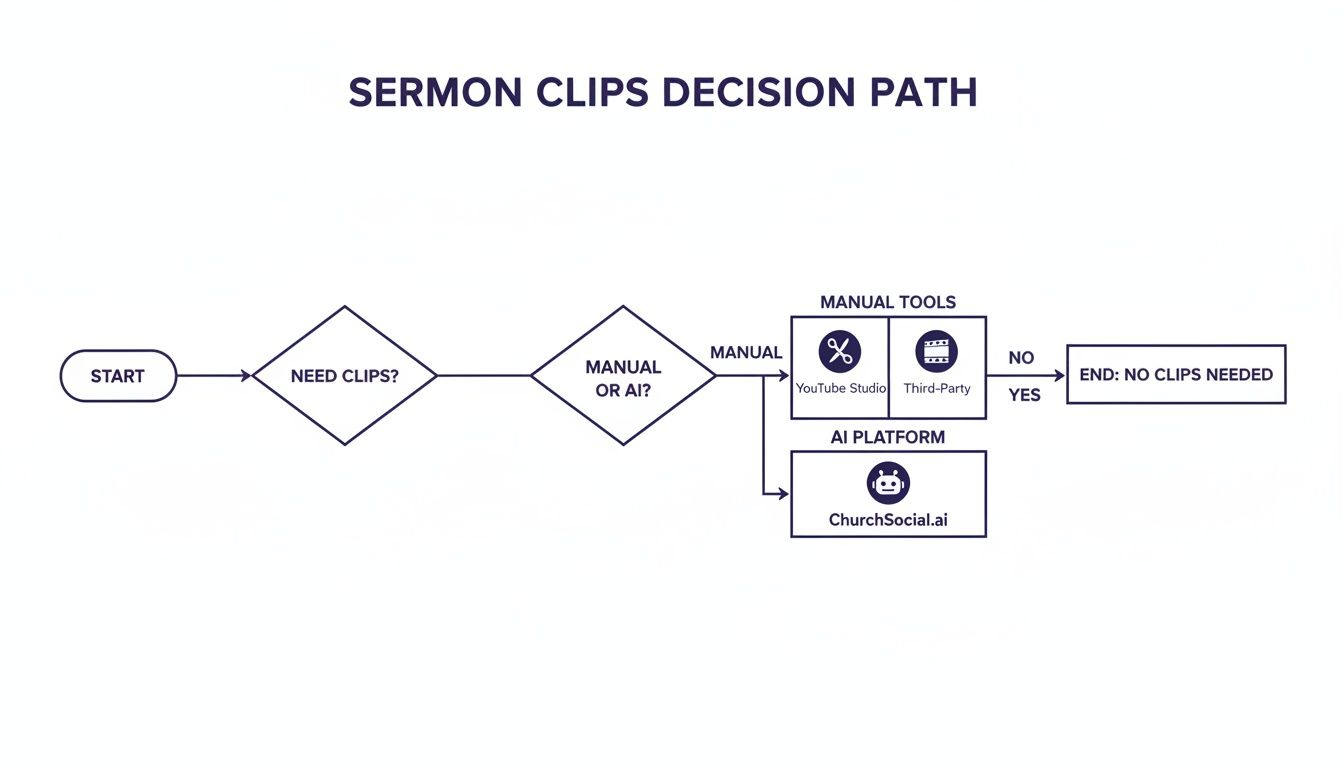
As you can see, while manual methods are always an option, the AI-powered path through ChurchSocial.ai is the straightest line to creating multiple, high-quality clips without the headache.
Branding and Captions Made Simple
Getting the clip is only half the battle. For it to actually work on social media, it needs to look like it came from your church and be easy for people to watch. We’ve built those steps right into the workflow.
- Professionally Designed Templates: Pick from a library of templates made just for churches. You can easily add your logo, brand colors, and fonts to make sure every clip looks polished and consistent.
- Automatic Captions: We all know it's true: up to 85% of social media videos are watched with the sound off. Captions aren't optional anymore. The platform automatically generates accurate, easy-to-read captions for every clip, making your message accessible to everyone.
- AI-Generated Post Text: Why stop at the video? ChurchSocial.ai can even write the social media post for you, suggesting a compelling caption and relevant hashtags to go with your clip.
It's an all-in-one system. You can go from a simple YouTube link to a fully branded, captioned, and ready-to-schedule video post without ever leaving the platform.
It's More Than Clips—It's a Content Engine
The real value here goes way beyond just making a few video clips. This approach turns your sermon into the hub for your entire week's content strategy. Once your sermon is in the system, you can also:
- Generate Blog Posts: Turn the main points of the message into a full-length blog post for your church's website.
- Create Social Graphics: Pull out powerful quotes and instantly turn them into beautiful, shareable images using our graphic templates and editor.
- Develop Small Group Questions: Let the AI generate thoughtful discussion questions based on the sermon for your small groups to use.
Better yet, you can manage all of this on our simple drag-and-drop calendar, giving you a bird's-eye view of your entire social media plan. This turns what used to be a content chore into a streamlined ministry opportunity.
Getting Your Clips Seen and Shared
Creating a solid clip from your YouTube sermon is a great start, but it's just that—a start. The real magic happens when people actually see it, engage with it, and feel moved by it. This is where we shift from the technical "how-to" to the strategic "what's next," making sure those powerful moments don't just get created—they create an impact.
This involves a few key steps. It’s about formatting your clip to look right on the platform you're using, making it accessible for everyone, and then sharing it in a way that sparks conversation. Think of it as preparing your message not just to be heard, but to be welcomed.
Format for Phones First
The very first thing to get right is the aspect ratio. Platforms like Instagram Reels, TikTok, and YouTube Shorts are built for vertical video. Dropping a horizontal, widescreen (16:9) clip into a vertical feed just looks off. It’s clunky, unprofessional, and instantly tells a viewer this content wasn't made for them.
To grab someone's attention as they scroll, your clips absolutely must be in a 9:16 vertical aspect ratio. This fills their entire phone screen, creating a much more immersive experience that's harder to ignore.
- Why it's a big deal: Vertical video feels natural on social media, making people far more likely to stop and watch. Those horizontal videos with the big black bars above and below? They get scrolled past without a second thought.
- How you do it: In most video editors, you have to create a new project with 9:16 dimensions and then painstakingly reposition your horizontal footage inside that frame to keep the speaker centered. It can be a real headache.
- The easy way: When ChurchSocial.ai creates clips from your sermon, it automatically formats them in the correct 9:16 ratio. It even intelligently frames the speaker, so you don't have to fuss with any of the technical stuff.
Add Captions. Always.
Here's a number that should change how you think about video: up to 85% of social media videos are watched with the sound off. People are scrolling in a quiet office, on the bus, or late at night after the kids are in bed. If you don't have captions, your message is completely lost on them.
Captions make your content accessible to the hearing-impaired, but they also make sure your message lands in any environment. They are absolutely non-negotiable for social media video today. Manually transcribing and timing captions for every clip is a huge time-suck for any church team.
"A video without captions is a message whispered into the wind. In a sound-off scrolling culture, captions are the voice of your ministry, ensuring every word is seen and understood."
This is another spot where automation can be a game-changer. Tools like ChurchSocial.ai automatically generate accurate, easy-to-read captions for every single clip. You can give them a quick once-over for accuracy and then move on, confident your message is reaching everyone, whether their sound is on or off.
Write a Caption That Connects
The video clip is the hook, but the post description (or caption) is what invites people into a conversation. This is your chance to add a little context, ask a thoughtful question, or give people a clear next step.
Don't just describe what's happening in the clip. Try to use the text to go a little deeper:
- Ask a Question: "What's one thing that helps you find peace in a chaotic week? Let us know in the comments."
- Provide Context: "This moment from Sunday's message on grace was a powerful reminder for all of us."
- Offer a Call to Action: "If this encouraged you, share it with a friend who might need to hear it today."
If you're pulling clips from a longer YouTube sermon, you can even use a YouTube comments analyzer to see what parts of the full message really connected with people. This can give you great ideas for writing more effective descriptions for your shorter clips.
A Quick Word on Copyright and Fair Use
Finally, a quick but important note on doing things right. When you create a clip from a YouTube video, you need to be sure you own the rights to that content.
For churches, this is usually pretty simple: you own your sermons. You can freely clip, edit, and share any part of your own worship services. Things get tricky when you start using content you didn't create, like a popular worship song or a scene from a movie. It's always safest to stick to your own original content. This ensures your ministry can share its message with both confidence and integrity.
Building a Cohesive Content Strategy from One Sermon
A powerful sermon clip should never just be a one-off post. When you create a clip from a YouTube video, think of it less as a finished product and more as the front door to a much bigger, more connected experience for your community.
An effective digital ministry doesn't just show up on Sunday—it nurtures people all week long. The secret is treating every sermon as the source for an entire week of content and engagement.
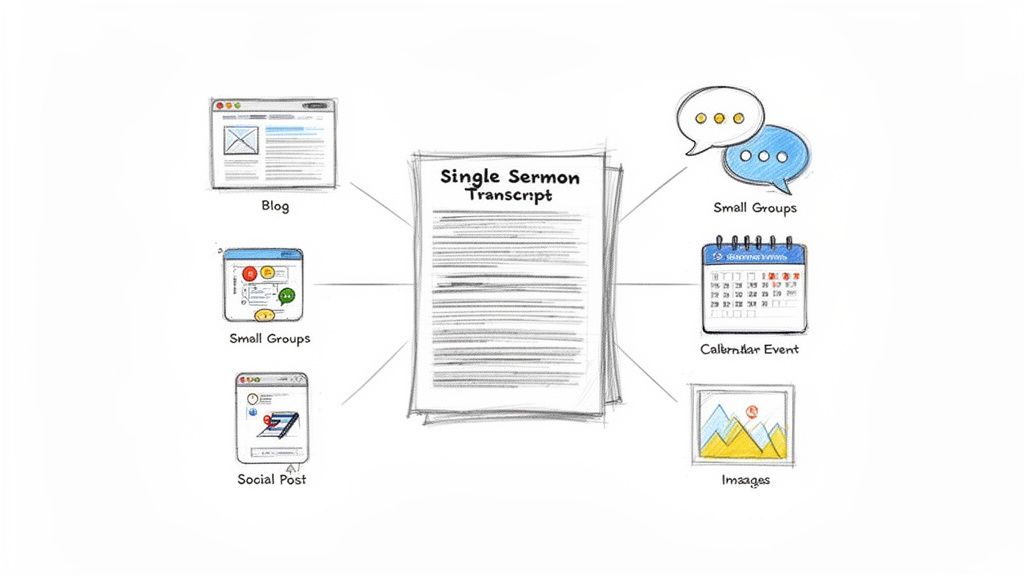
This simple shift changes your whole workflow. You're no longer scrambling for new ideas every day. Instead, you have a focused, purposeful strategy. The sermon transcript becomes the raw material for a rich, multi-platform experience that reinforces the core message in different ways, for different people, on different days.
Turning One Message into Many Touchpoints
Think bigger than just the video clip. A single sermon transcript can become the central hub for an entire content campaign, especially with a tool like ChurchSocial.ai that can analyze the text and help you generate all sorts of related materials.
Here’s what that looks like in the real world:
- In-Depth Blog Posts: Pull the key points from the sermon and draft a full blog post for your church website. This is a huge win for SEO and gives people who prefer to read a way to engage with the message. For more ideas on this, check out our guide to getting your sermon on video.
- Small Group Discussion Questions: Instantly generate thoughtful questions based on the sermon's themes. You can fire these off in an email to your small group leaders, giving them exactly what they need for a deeper conversation.
- Social Media Graphics and Carousels: Lift the most powerful quotes and drop them into branded templates for Instagram and Facebook. Suddenly, you have beautiful, shareable graphics without needing a design degree.
- A Series of Social Posts: You can even generate multiple social media captions from different angles of the sermon. Schedule them throughout the week on a simple drag-and-drop calendar, and your content plan is set.
Integrating with Your Church Calendar
A vibrant online presence feels connected to the actual life of your church. Your content shouldn't feel like it exists in its own separate world.
This is where integrating your content plan with your church calendar becomes a game-changer. Tools like ChurchSocial.ai can connect directly with Planning Center and other church calendars, letting you automatically create content for events.
When you do this, everything starts to feel connected. A post about an upcoming food drive can be thematically linked to last Sunday’s message on service. It builds a narrative where every piece of content—from a sermon clip to an event reminder—works together to point people toward your church's core mission.
This integrated approach is critical. YouTube users watch over 1 billion hours of content daily, and 62% are on the platform every single day. In a space that crowded, churches need a strategy that’s both consistent and compelling to make an impact.
From Content Creation to Community Building
Ultimately, this isn't just about filling a content calendar. It’s about creating a consistent, nurturing online presence that supports your community 24/7.
When someone sees a sermon clip, then later reads a related blog post, and then sees a graphic with a powerful quote from that same message, the message starts to sink in on a much deeper level.
To really nail this, you need to understand the bigger picture. We recommend checking out a complete guide to building a winning social media strategy to ensure every piece of content serves a larger purpose. It’s how you shift your social media from a series of disconnected announcements into an intentional discipleship tool, where every post works together to build a vibrant, engaged online faith community.
Common Questions About Creating Sermon Clips
Dipping your toes into the world of sermon clips always brings up a few questions. Trust me, you’re not alone! Many church leaders and volunteers I talk to wonder about the practical details of how to create a clip from a YouTube video the right way.
Let's walk through some of the most common questions we hear from churches just like yours.
Can I Legally Create a Clip from Any YouTube Video?
This is a big one, and thankfully, the answer is pretty straightforward. You can absolutely create and share clips from your own church’s YouTube videos. Since you own the original content—the sermon, the recording, the whole service—you have every right to repurpose it.
Things get murky when you start using content from other creators. While YouTube’s built-in “Clip” feature is generally fine for videos where the creator has enabled it, downloading and re-uploading someone else's content is a quick way to run into copyright trouble.
The safest and most ethical path is to only use content you own. Sticking to your own sermons keeps your ministry above reproach and steers you clear of any potential legal headaches.
What Is the Ideal Length for a Sermon Clip?
The golden rule for social media clips is to keep them short and punchy. For platforms like Instagram Reels, TikTok, and YouTube Shorts, you really want to aim for under 60 seconds.
The real sweet spot? That's usually between 15-45 seconds. This gives you just enough time to land a single, powerful idea, share a poignant story, or highlight a memorable quote without losing your viewer's attention. The goal is to deliver something concise that leaves a lasting impression.
A great sermon clip doesn’t try to teach the entire sermon. It focuses on delivering one powerful truth that sticks with someone long after they’ve scrolled past.
This is exactly what platforms like ChurchSocial.ai are built for—finding those potent, bite-sized moments for you, so you don't have to hunt through an hour-long message.
Do I Need Expensive Software to Make Good Clips?
Absolutely not. In fact, jumping into professional software like Adobe Premiere or Final Cut Pro is often total overkill for this task. The learning curve is steep, and it's just not necessary. On the other hand, while free mobile apps can handle basic trims, they usually fall short when you want to create a truly polished clip.
The most efficient solution is an all-in-one platform built for this exact purpose. A tool like ChurchSocial.ai gives your church everything it needs in one place. It bundles clip creation with professionally designed templates, automatic captioning, and branding tools into a system that’s both affordable and dead simple to use. It’s designed to help you create high-quality clips without needing a film degree.
How Do I Add Captions to My Video Clips?
Captions are non-negotiable. With so many people scrolling through their feeds with the sound off, they're often the only way your message gets through. You could add them manually in a video editor, but that process is incredibly tedious and will eat up your valuable time.
A much better approach is to use a platform that does the heavy lifting for you. For instance, the Sermon Clip Creator in ChurchSocial.ai automatically transcribes your video and generates accurate, synchronized captions in seconds. You can quickly review and edit them if needed, saving countless hours and making sure your message is accessible to everyone.
Ready to stop spending hours editing and start multiplying your ministry's reach? With ChurchSocial.ai, you can turn a single sermon into a week's worth of engaging social media content in just a few minutes. From AI-generated sermon clips and social posts to branded graphics and a simple drag-and-drop calendar, we give you everything you need to connect with your community online.


