
Somewhere between Sunday follow-up and Wednesday prep, TikTok usually turns into a last-minute task. A volunteer remembers the account hasn't posted. Someone scrolls the camera roll for a usable clip. A staff member types a caption in the church lobby while answering another question. The post goes up, but it feels rushed.
That rhythm wears people down.
Churches don't usually struggle because they lack meaningful content. They struggle because meaningful content is trapped inside busy weeks, scattered folders, and good intentions. Sermons happen. Events happen. Testimonies happen. But without a publishing rhythm, the team keeps starting from zero.
Moving Beyond In-the-Moment Posting
The problem with spontaneous posting isn't that it never works. Sometimes it does. A quick baptism video, a strong sermon line, or a volunteer moment can connect right away.
The problem is that in-the-moment posting can't carry a ministry long term. It depends on someone remembering, someone being available, and someone having enough creative energy left after other demands.
A small church volunteer often lives in that tension. They are passionate about the mission, but social media sits beside children's check-in, email follow-up, slides, announcements, and everything else. TikTok becomes one more thing to remember instead of one more way to serve people.
Practical rule: If your church only posts when someone feels inspired, your content calendar is already controlling you.
Scheduling changes the emotional tone of the work. Instead of asking, “What can we post today?” you begin asking, “What messages matter this week?” That's a better ministry question.
For churches, that usually means building around recurring moments such as:
- Sunday sermon clips that carry one clear idea into the week
- Event reminders that help people act before they forget
- Midweek encouragement that keeps your church present between gatherings
- Community-facing posts that help a new person understand who you are
Nonprofits and churches often face the same challenge here. They have a meaningful mission but limited time, limited staff, and a need for consistent communication. That's one reason Carlos Alba Media's guide for charities is worth reading. It frames digital communication as a stewardship issue, not just a marketing task.
The shift is simple. Stop treating TikTok as a daily emergency. Treat it as a planned ministry channel. Once that happens, scheduling becomes less about automation and more about making sure the right message is ready before the week gets busy.
Preparing Your Ministry Content for TikTok
Most churches already have enough raw material for TikTok. The challenge isn't scarcity. It's preparation.

Build from what already happens every week
A sustainable workflow starts with recurring content sources, not random ideas. In church ministry, the strongest ones are usually:
Sermon moments
Look for one idea that stands on its own without heavy setup. A good TikTok clip usually works because a viewer can understand the point quickly and feel invited into it.Event moments
Don't just post the date. Give the event a reason. A women's gathering, youth night, serving opportunity, or prayer meeting needs a short angle that answers why someone should care.Simple teaching prompts
A pastor's line, a Scripture reflection, or a question for the week can all become short-form content if the wording is clear and conversational.Announcement graphics and carousels
These work best when they're clean, readable, and limited to one purpose. Too much information makes people scroll away.
A content system helps here more than extra creativity. If you need help mapping recurring themes, this church social media content calendar guide gives a practical starting point.
Prepare captions before you schedule
Church teams often spend all their energy making the video and then rush the caption. That's backwards. The caption is where you direct attention.
A useful church caption usually does one of these jobs:
- Invites reflection with a short question
- Offers clarity about an event or next step
- Creates conversation without sounding forced
- Connects the clip to real life instead of church language only insiders understand
Try writing captions the way you'd speak to a first-time guest after service. Warm, clear, and direct.
Keep a small folder of ready-to-post captions, event blurbs, and sermon summaries. That saves more time than chasing fresh wording every day.
Make your visual library small but dependable
You don't need a giant asset library. You need an organized one.
A practical church folder system might include:
| Folder | What goes in it |
|---|---|
| Sermon clips | Short vertical videos pulled from Sunday messages |
| Event graphics | Youth, kids, groups, outreach, and special dates |
| Evergreen encouragement | Scripture graphics, quotes, prayer prompts |
| Brand basics | Logos, color references, approved fonts, intro screens |
That kind of structure matters because scheduling only works when the assets are ready before the posting window arrives. If your team is still hunting for files, you're not really scheduling. You're postponing the scramble.
Using TikTok's Native Scheduling Tool
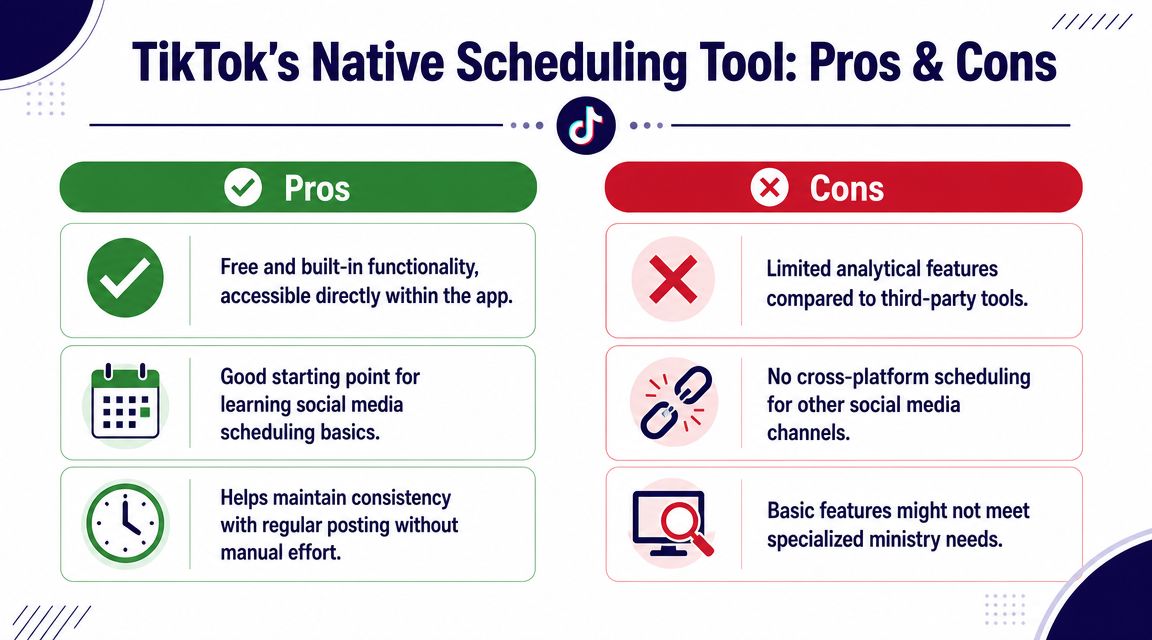
TikTok does include a built-in scheduler, and for many churches it's the easiest place to start. The key is knowing what it can do, and what it can't.
According to TikTok's original product announcement, the native scheduling feature launched in 2020 as Video Scheduler for Business Accounts, with scheduling available from 15 minutes to 10 days in advance on the web uploader in TikTok's Video Scheduler announcement.
How the native workflow works
If you're learning how to schedule posts on TikTok with the built-in option, the process is straightforward on desktop:
- Sign in on a desktop browser and open the upload flow
- Use a Business or Creator account, since scheduling depends on account type
- Upload your video, then add your caption, hashtags, cover, and settings
- Enable Schedule video, choose the publish date and time, and confirm
- Review scheduled posts in Drafts if you need to manage or remove them later
Brandwatch's walkthrough also notes that desktop is the practical home for this workflow, and that Personal accounts can run into restrictions that push them back to browser-based scheduling in Brandwatch's guide to scheduling TikTok posts.
Where native scheduling starts to break down
For a church, the native tool is fine for short-range planning. It works well when you already have a sermon clip ready and want it to publish later this week.
It becomes harder to manage when your ministry needs more than one channel, more than one content type, or more than a short runway. The limitation isn't just convenience. It's planning capacity.
As of 2026, TikTok Studio still supports scheduling up to 10 days ahead for Business and Creator accounts, and that native setup remains video only in Metricool's TikTok scheduling overview.
Native scheduling is useful for isolated posts. It's weak for a ministry calendar.
That distinction matters. A church communications rhythm usually includes sermon follow-up, event promotion, volunteer moments, holiday campaigns, and content across more than one platform. Once the calendar extends beyond the next few days, a desktop-only, short-window scheduler starts creating friction instead of removing it.
A Smarter Workflow with ChurchSocial.ai
Churches rarely need just a TikTok scheduler. They need a repeatable system that helps a small team move from Sunday content to weekday publishing without wasting time.

The workflow churches actually need
A practical ministry workflow usually includes four jobs:
| Job | What the team needs |
|---|---|
| Capture | Pull usable moments from sermons and ministry life |
| Create | Turn those moments into clips, captions, graphics, and posts |
| Schedule | Place content on a calendar before the week gets crowded |
| Manage | Adjust posts when events shift, services change, or priorities move |
That's where third-party tools start to matter. Hootsuite notes that outside schedulers can publish TikTok posts far in advance, while Buffer says its TikTok scheduling can reach up to 30 days through TikTok web browser or TikTok Studio flows, and Later supports either auto publishing or push-notification publishing depending on the setup in Hootsuite's comparison of TikTok scheduling options.
The bigger lesson isn't the exact window. It's that most ministry teams eventually outgrow the native limit because church communication doesn't run on a ten-day horizon. It runs on sermon series, seasonal ministry rhythms, special events, and recurring follow-up.
What changes when the workflow is built for churches
A ministry-focused system reduces the number of handoffs. Instead of clipping a sermon in one tool, writing captions in another, building graphics somewhere else, and trying to remember posting times later, the work stays connected.
ChurchSocial.ai fits into that workflow by giving churches a drag-and-drop publishing calendar, AI-generated sermon clips and written content from transcripts, template-based graphics and carousels, and calendar-driven event content through integrations such as Planning Center. That combination is useful when a church wants to plan TikTok alongside Instagram, Facebook, and other channels from one place. If you want a broader walkthrough on that process, this guide to scheduling social media posts shows the larger calendar approach.
A volunteer benefits most from reduced switching. A communications pastor benefits from visibility. A multi-campus team benefits from having one calendar instead of several unofficial ones.
Scheduling is only half the job. The real win is turning one sermon and one event calendar into a full week of usable content.
What doesn't work well
Even with a stronger tool, churches can still create avoidable problems:
- Overpacking the calendar so every post sounds like an announcement
- Scheduling too far out without review when dates or ministry details might change
- Using only polished content and leaving no room for timely, human moments
- Ignoring time zone settings before confirming posts
The best systems leave room for both planned content and live ministry moments. Schedule the evergreen and predictable pieces. Keep some flexibility for what happens in real time.
Best Times and Frequency for Church Audiences
Churches often ask for the best time to post on TikTok as if there's one universal answer. There isn't. What works for a clothing brand, restaurant, or media company won't always fit a church audience.
A church serves people inside a weekly rhythm. Families think about Sunday before Sunday arrives. Students check their phones during breaks. Working adults often respond differently on weekdays than they do on weekends. That means purpose matters more than generic peak-time advice.
Match timing to ministry intent
Here's a more useful way to think about posting times:
- Saturday evening works well for service reminders, event invites, and “we'll see you tomorrow” style posts because people are already planning the next day.
- Midweek lunch hours can be a natural place for short encouragement clips, prayer prompts, or one strong sermon takeaway. People often have a brief moment to pause, watch, and respond.
- Friday afternoon or evening can support reflection content that helps your church carry Sunday's message into the weekend.
- Sunday after service can work for recap-style content, but only if someone can post and respond without adding stress to the team.
This approach helps churches avoid chasing abstract “best times” and focus on best moments for the message.
Choose a frequency your team can sustain
A healthy TikTok rhythm for a church should feel consistent, not frantic. If a volunteer can only maintain a few strong posts each week, that's better than starting with an aggressive pace that collapses after two weeks.
A simple pattern often works better than a crowded one:
| Content type | Suggested rhythm |
|---|---|
| Sermon clips | Use these as your recurring anchor posts |
| Event reminders | Post them when people can still act on them |
| Encouragement posts | Use them between major church moments |
| Live or reactive content | Add only when the team has margin |
The main question isn't “How often can we post?” It's “How often can we post well?”
For a deeper church-specific timing framework, these best times to post on social media can help you shape a weekly rhythm around your audience, not just platform advice.
Use scheduling without losing responsiveness
Scheduled posts create consistency. Real-time posts create immediacy. Churches need both.
If every post is scheduled, the account can feel distant. If nothing is scheduled, the account becomes chaotic. The strongest church TikTok presence usually blends planned sermon and event content with occasional real-time ministry moments that reflect what's happening in the life of the church that week.
A Sample Weekly TikTok Schedule for Volunteers
A volunteer doesn't need a complicated production system. They need a repeatable week.
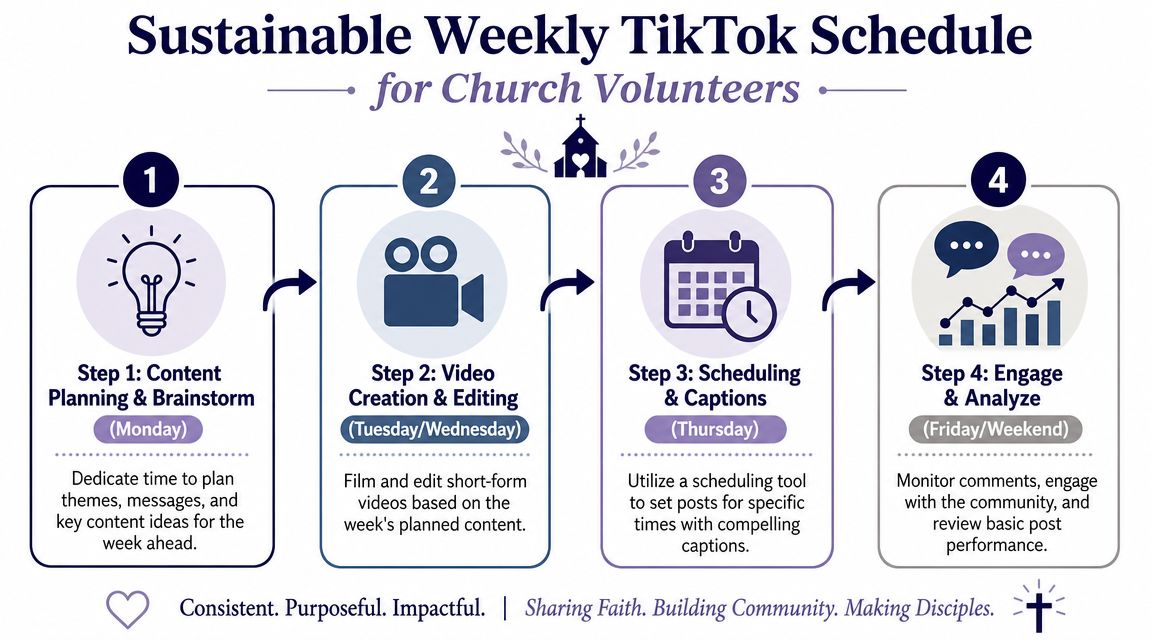
A simple ministry rhythm
Monday
Upload Sunday's sermon assets, organize clips, and identify a few moments worth turning into short-form video. If your church uses transcript-based content tools, this is also a good day to prepare captions, discussion prompts, and draft post ideas.
Tuesday
Create or finalize one event post. This might be a youth reminder, group announcement, volunteer callout, or weekend invitation. Keep the graphic clean and the message singular.
Wednesday
Schedule a sermon clip with a caption that invites response. Ask a real question. Don't just restate the sermon title.
Thursday
Schedule the event post for the point in the week when people can still take action. If the event is Sunday morning, Thursday or Saturday may make more sense than posting too early.
Friday
Schedule one more short encouragement clip for the weekend. This can be reflective, invitational, or Scripture-centered.
If a volunteer can prepare the week in one sitting, social media becomes manageable again.
What this schedule accomplishes
This kind of workflow does a few important things at once:
- It builds consistency without requiring daily creative effort
- It reuses sermon content wisely instead of letting Sunday disappear
- It keeps event communication visible while people still have time to respond
- It protects volunteer energy because the work is grouped instead of scattered
The point isn't to flood TikTok. The point is to help your church show up regularly with content that sounds like your ministry and serves real people.
If your church needs a simpler way to turn sermons, events, and weekly ministry moments into scheduled social content, ChurchSocial.ai brings planning, creation, and publishing into one workflow built for churches. It can help a solo volunteer or a larger team spend less time piecing tools together and more time communicating with purpose.


