
Monday feels fine. Tuesday is manageable. By Friday afternoon, church social media turns into a scramble.
A volunteer is texting for the sermon title. Someone else is hunting for last month's Easter graphic because it was “close enough.” The pastor wants a clip from Sunday's message. Youth ministry needs a post for Wednesday night. Nobody's sure what already got scheduled, what still needs approval, or who is answering Instagram messages. That's the pattern in a lot of churches, especially when communications lives on top of five other ministry jobs.
That pressure doesn't mean your team lacks commitment. It usually means your system is built around last-minute posting instead of sustainable nonprofit social media management.
Churches don't need more random content ideas. They need a workflow that fits real ministry life. Sermons happen every week. Events keep moving. Volunteers rotate. Priorities change fast. A workable social strategy has to survive all of that without burning out the people carrying it.
Beyond Burnout The Path to Sustainable Church Social Media
Most churches hit burnout the same way. They start with good intentions, open accounts on every platform, promise to post more often, and then run into the same wall. No time, no plan, no repeatable process.
That wall is especially common in volunteer-led ministries. Taproot Foundation warns that nonprofits without a focused strategy risk burnout and should narrow their effort to one or two platforms while repurposing content to stay consistent, as noted in Taproot Foundation's guidance on sustainable nonprofit social media strategy.
What burnout looks like in a church
Burnout in church communications rarely looks dramatic at first. It looks ordinary.
- The same few people do everything. One volunteer writes captions, another designs graphics, and a pastor still has to approve posts late at night.
- Posts get treated like chores. Social becomes a box to check after ministry is already done, instead of part of how ministry reaches people all week.
- Important content disappears fast. A strong sermon, a helpful testimony, or a meaningful event update gets one post and then vanishes.
That approach creates stress because every week starts from zero.
Practical rule: If your church is reinventing content every week, the problem isn't motivation. It's workflow.
What sustainable execution actually means
Sustainable nonprofit social media management for churches is simpler than many teams think. It means choosing fewer channels, deciding what each one is for, and building around content you already produce.
For most churches, the most valuable raw material is already there every Sunday. Sermons, announcements, event calendars, ministry moments, and discipleship language all give you source material. The problem isn't lack of content. The problem is that organizations often fail to turn that material into a repeatable system.
A healthy church workflow should let a team miss a day without the whole plan collapsing. It should work when volunteers rotate. It should let staff review content without chasing files through text threads. It should make social media feel like an extension of pastoral care, outreach, and discipleship.
That's when social stops being another Sunday-to-Sunday burden and starts acting like ministry infrastructure.
Build Your Social Media Ministry Strategy
Churches drift when every post asks a different question. Are we promoting an event? Encouraging members? Reaching guests? Teaching truth? Asking for support? If the answer changes every time, the feed starts to feel random.
A ministry-first strategy fixes that. Social media should support the mission of the church, not become its own disconnected activity.

Use four ministry lenses
A practical church framework is to sort content into four ministry purposes.
| Ministry goal | What it looks like on social |
|---|---|
| Engage | Member stories, volunteer highlights, prayer prompts, ministry wins |
| Inform | Event reminders, schedule changes, signups, ministry updates |
| Invite | Welcome videos, service times, new series announcements, first-visit information |
| Disciple | Sermon clips, Scripture reflections, devotional posts, discussion questions |
This keeps the team from posting just announcements. A church feed that only informs eventually sounds like a bulletin board. A church feed that engages, invites, and disciples starts to feel pastoral.
Tie every post to an action
Social media isn't only for awareness. In nonprofit research, 55% of people who engage with nonprofits on social media take action, and 59% of those action-takers donate money, according to Firespring's nonprofit social media analytics guide. For churches, that matters because it confirms what many ministry teams already suspect. Engagement can lead to real-world response.
That response might be a donation. It might also be an RSVP, a volunteer signup, a first-time visit, a sermon watch, or a request for prayer.
Churches should post with a next step in mind. Not every post needs a hard ask, but every post should know what response it's trying to encourage.
Audit what you're doing now
Before adding anything new, review your last month of content.
Ask these questions:
- Which category dominates the feed? If nearly everything is informational, your church probably isn't using social to build trust or deepen engagement.
- What would a first-time guest learn? They should quickly understand who you are, what matters here, and how to take a step toward community.
- Where is discipleship happening? If your strongest teaching only lives inside the Sunday room, social is underused.
A sound nonprofit social media management plan for churches isn't built on volume. It's built on clarity. Once the ministry purpose is clear, content gets easier to create, easier to delegate, and easier to measure.
Create Content That Connects and Converts
The hardest part of church social media is the blank page.
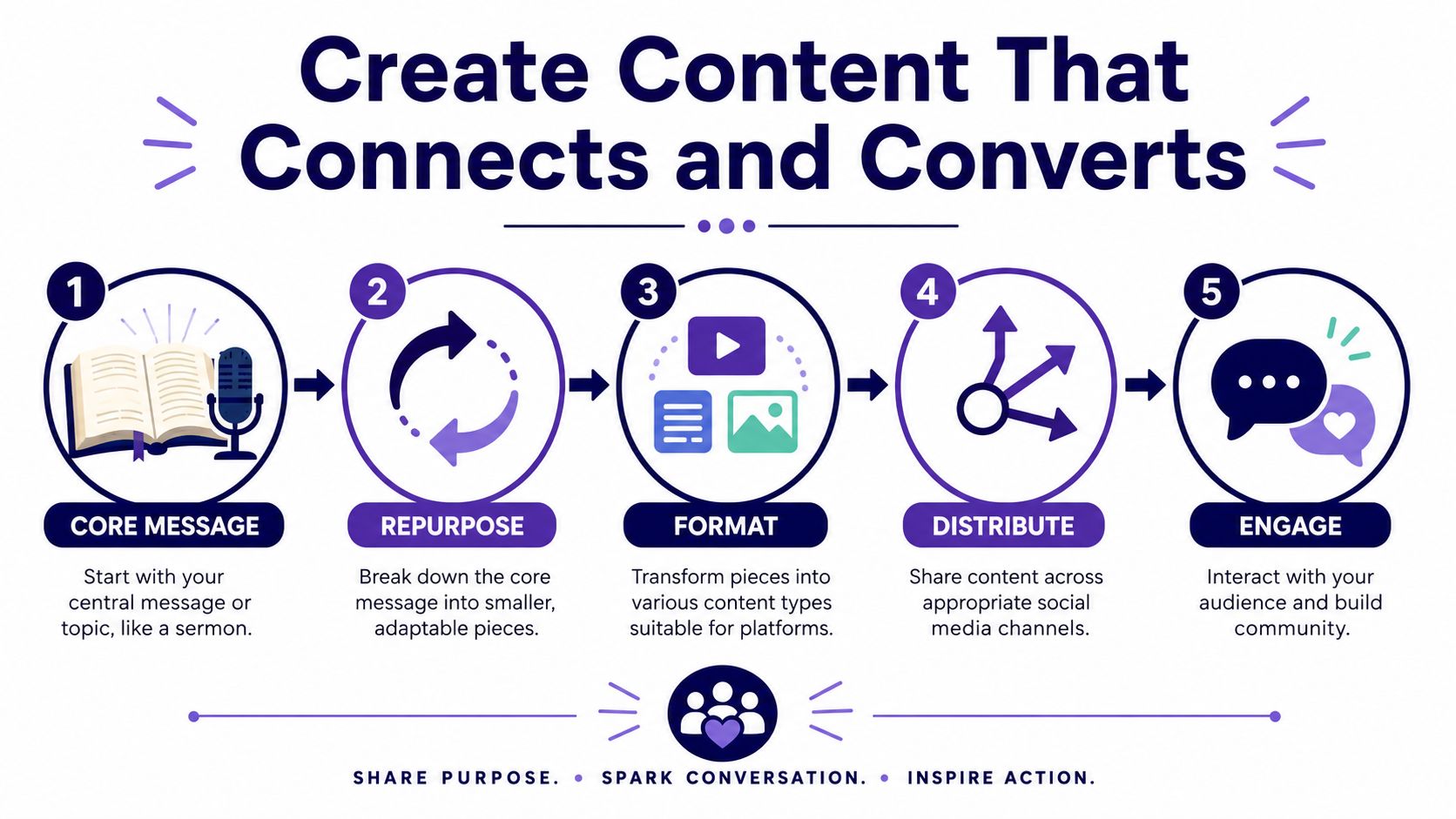
Teams often don't struggle because they lack ideas. They struggle because they think every post has to be created from scratch. That's slow, exhausting, and unnecessary. A better approach is sermon-centric content. Start with the message your church already prepared, preached, and recorded, then break it into formats people will consume during the week.
Start with the sermon, not the calendar
One sermon can become a full week of content if the workflow is intentional.
Here's a practical breakdown:
- Pull one strong clip. Find a moment with a clear takeaway, a pastoral challenge, or a line people will remember.
- Write short posts from the transcript. Turn a key point into a caption, prayer prompt, or Scripture reflection.
- Create a carousel or graphic. Pull one quote, one verse, and one application point.
- Build discussion content. Use the message for small group prompts or family discussion questions.
- Publish a blog recap. Some people won't watch a full sermon but will read a concise article.
That's a real ministry rhythm because it extends Sunday into the rest of the week.
Use formats that feel human
The strongest nonprofit social media now leans video-first and conversational. UNDP's guidance says social media needs to be “social” and “human,” with video storytelling playing a central role in trust-building and volunteer or donor recruitment, as described in UNDP's nonprofit social media tips.
Churches should take that seriously. Polished branding helps, but it won't replace clarity, warmth, and authenticity.
A few formats tend to work better than generic promotional graphics:
- Short sermon reels. Use a single focused idea, not a long summary.
- Behind-the-scenes clips. Show prep, setup, worship rehearsal, baptism prep, or outreach moments.
- Pastoral voice videos. A direct invitation from a pastor often lands better than a static event flyer.
- Volunteer spotlights. Let members describe why they serve.
- Simple teaching carousels. Break one theological idea into a few swipeable points.
Short-form video works best when it sounds like a person talking to people, not a department publishing at an audience.
Build from tools, not from scratch
Software can significantly reduce friction. ChurchSocial.ai can generate reels from sermon video, turn sermon transcripts into social posts, blogs, and discussion prompts, provide graphic templates for photos and carousels, and let teams schedule those assets from one platform. For a church team, that means the sermon becomes source material instead of a one-time event.
That matters even more for volunteer teams. A pastor can upload the message. A volunteer can review AI-generated captions. Another team member can adjust a template to match this week's series art. The work gets lighter because the workflow starts with existing ministry content.
Keep the content mix balanced
A church account gets stale when every post sounds the same. Rotate content types across the week.
| Content type | Ministry use |
|---|---|
| Sermon clip | Reinforces teaching and reaches people who won't watch the full message |
| Graphic or carousel | Teaches, reminds, or invites with clear visual structure |
| Event post | Drives attendance and reduces confusion |
| Story or behind-the-scenes post | Builds trust and shows church life beyond the stage |
| Question post | Creates conversation and helps people participate |
The goal isn't constant output. It's meaningful repetition with enough variety that people keep paying attention.
Plan Your Content with a Simple Calendar
Most church social media problems are planning problems.
The issue usually isn't whether the church has content. It's that content is scattered across text threads, email drafts, Canva links, Dropbox folders, staff meetings, and somebody's memory. That's why teams double-post, forget deadlines, or realize on Saturday night that no one created Sunday's invitation graphic.
A visual calendar solves more than scheduling. It gives the whole team one shared view of what's coming, what's missing, and what still needs approval.

Replace scattered planning with one weekly rhythm
A simple church planning workflow usually looks like this:
- Start with fixed moments. Sunday services, sermon series, youth nights, prayer gatherings, and seasonal events should go on the calendar first.
- Add supporting posts next. Build invitations, reminders, recap posts, and follow-up content around those moments.
- Assign ownership clearly. One person drafts, one reviews, one schedules, one responds to comments.
- Leave space for ministry reality. Prayer needs, urgent updates, and local events will still pop up.
That structure is easier to maintain than a giant monthly brainstorm.
A sample weekly church calendar
Below is a simple planning model that keeps the week balanced without requiring constant reinvention.
| Day | Theme | Facebook Post | Instagram Post |
|---|---|---|---|
| Sunday | Worship and welcome | Service recap with next steps | Sermon clip or story sequence |
| Monday | Reflection | Key sermon takeaway | Carousel with quote and Scripture |
| Tuesday | Community | Volunteer spotlight | Behind-the-scenes photo or reel |
| Wednesday | Midweek ministry | Event reminder for groups or students | Story reminder and signup prompt |
| Thursday | Discipleship | Blog or devotional link | Teaching graphic or reel |
| Friday | Invitation | Weekend service invite | Pastor invitation video |
| Saturday | Preparation | Tomorrow's service details | Story countdown and welcome note |
Churches that want a more detailed planning process can use a church social media content calendar guide to map recurring themes and event-driven posts in advance.
Let your church calendar do some of the work
The strongest scheduling systems connect social planning to the church's existing calendar. If your events already live in Planning Center or another ministry calendar, those dates shouldn't have to be retyped into a separate social workflow.
That's one of the biggest wins in purpose-built church tools. When event information feeds into the content process, teams spend less time copying details and more time shaping the message. A drag-and-drop calendar also helps non-technical volunteers contribute without needing to learn a complicated publishing stack.
A church calendar isn't just an admin tool. It's the starting point for more consistent communication.
Choose the Right Platforms for Your Ministry
Sunday ends. The sermon was strong, people responded well, and someone says, “We should put this everywhere.” By Tuesday, the volunteer who edits reels is unavailable, the admin is answering event questions on Facebook, and nobody has touched YouTube. That is how churches drift into platform overload.
Healthy church social media starts with a simpler question. Where can this ministry show up consistently, with the team it has?
Match each platform to a ministry job
Every channel asks for a different kind of effort. Choosing well saves time and usually improves results.
Facebook serves churches well when the goal is congregational communication. Service reminders, event details, ministry updates, and local outreach tend to fit there. It is often the easiest place to keep members informed and help regular attenders share posts with friends in the community.
Instagram works best for churches that can tell stories visually. Sermon quotes, volunteer moments, baptism photos, short reels, and behind-the-scenes ministry snapshots all fit naturally. A polished feed matters less than a steady stream of real church life.
YouTube is a strong fit when preaching and teaching are central to your digital ministry. Full sermons, testimony videos, and searchable teaching libraries continue serving people after Sunday ends. For many churches, this is also the easiest long-form platform to sustain because the core content already exists each week.
TikTok deserves consideration if your church can create short, native video with a clear voice. It is less forgiving of recycled announcement graphics or heavily scripted church language. Churches that do well there usually speak plainly, get to the point fast, and post often enough to learn what connects.
Build around content you already have
Churches have an advantage many nonprofits do not. A weekend sermon can become a full week of content if the workflow is set up right.
One message can turn into a sermon clip for Instagram, a full teaching archive on YouTube, a quote graphic for Facebook, and a short pastoral takeaway for TikTok or Reels. That approach is much more sustainable than trying to invent fresh content for every channel from scratch. It is also where a purpose-built system like ChurchSocial.ai helps volunteer-led teams keep momentum without adding another complicated tool stack.
If your team is weighing software for scheduling, approvals, and publishing across channels, this guide to social media management tools for nonprofits gives a useful comparison point.
Start with one primary platform and one support platform
Small church teams usually do better with a narrow focus.
Pick one platform that carries the main communication load. Pick a second that republishes or adapts the same core message for a different audience behavior. For example, Facebook plus Instagram is a practical pair for many churches. YouTube plus Instagram can work well for a sermon-driven strategy. TikTok only makes sense if someone on the team can keep up with the pace and format.
Use this test before adding a channel: Can we post there every week for the next three months without scrambling?
If the answer is no, wait.
- Choose Facebook for member communication, event visibility, and local connection.
- Choose Instagram for visual storytelling and short-form engagement.
- Choose YouTube for sermons, testimony videos, and teaching content that stays useful over time.
- Choose TikTok for direct, short video aimed at younger audiences, if your team can produce it consistently.
The churches that stay consistent online are not present everywhere. They choose the platforms that fit their mission, their people, and their actual capacity.
Manage Your Team of Staff and Volunteers
A church social media system doesn't need a big staff. It needs clean handoffs.
Many churches struggle because responsibilities are fuzzy. Everyone assumes someone else is handling the caption, approval, graphic, or publishing. Then the post goes up late, or not at all, and the team feels frustrated with each other when the actual problem is the process.
Give people narrow, clear roles
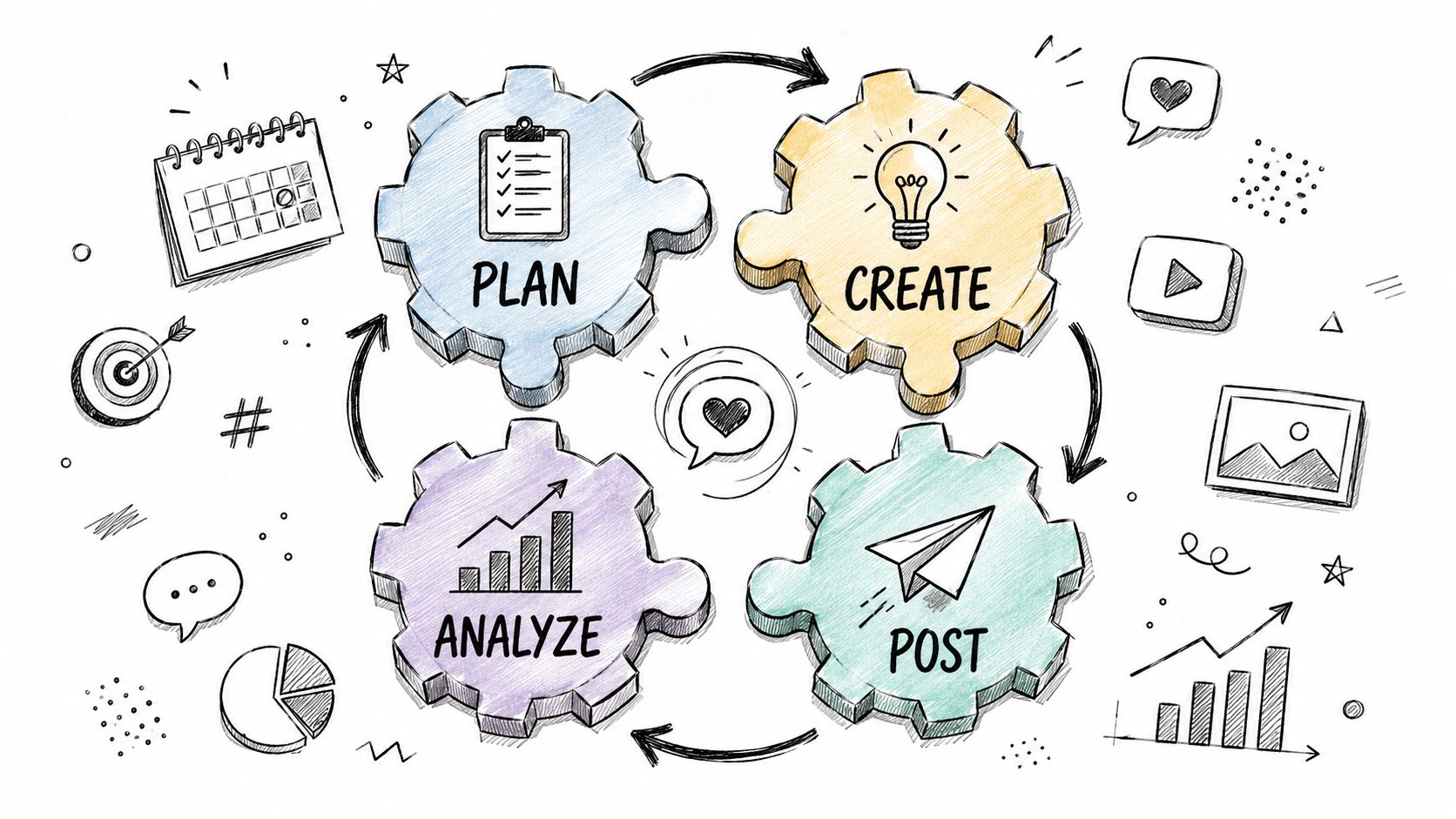
Small teams work better when each person owns a limited part of the workflow.
A practical setup might look like this:
- Content collector. Pulls sermon notes, event details, photos, and ministry updates.
- Content builder. Creates captions, clips, graphics, or carousels from that material.
- Reviewer. Checks tone, theology, details, and timing.
- Publisher and responder. Schedules posts and watches comments or messages.
One person may wear two of those hats. That's fine. The important part is clarity.
Build a system that survives volunteer turnover
Church volunteer teams change. Schedules shift. People go on vacation. Students graduate. The social workflow has to keep functioning anyway.
That's why centralization matters. Keep files, drafts, templates, and calendar visibility in one place whenever possible. Avoid systems that depend on one volunteer's personal device, one staff member's password vault, or a folder structure only one person understands.
The healthiest church communications teams don't rely on heroic effort. They rely on repeatable handoffs.
A pastor shouldn't need to become a video editor. A volunteer designer shouldn't have to chase sermon timestamps. A communications lead shouldn't need to re-explain the process every month. The more the workflow is documented and visible, the more new helpers can step in without chaos.
Measure What Matters for Ministry Growth
The wrong metrics can subtly distort a church's communication strategy.
If your team only celebrates likes, views, or follower counts, you'll eventually start making content that performs on platform but does less for ministry. Attention has value, but it isn't the whole story. Churches need to measure outcomes that connect to real mission movement.
Track ministry signals, not just platform signals
Start by asking what each type of content is supposed to do.
If the post invites people to Sunday, measure whether newcomers mention social media. If the post promotes a food drive, look for increased participation or giving response. If the content shares teaching, look for sermon watches, saves, replies, or follow-up engagement that shows people stayed with the message.
Useful questions include:
- Did this post lead to a real step? Registration, attendance, volunteering, giving, or a conversation.
- Did this content strengthen discipleship? People shared it, discussed it, or returned for more.
- Did this reduce confusion? Event posts often succeed by helping people show up informed.
- Did this expand reach with the right people? New families, local residents, or members who were previously disengaged.
Review patterns, then adjust
Analytics matter because they help ministry teams make better decisions, not because they make social media feel more corporate.
One church may discover that sermon clips outperform designed quotes. Another may find that simple pastoral invitation videos lead to more first-time visits than polished event graphics. A different church may realize Stories drive more event awareness while Facebook carries most of the practical reminders.
Use that information to simplify. Keep what leads somewhere. Reduce what only fills the feed.
Churches that need help structuring this review process can use a practical framework for measuring social media ROI without getting stuck on vanity metrics.
Nonprofit social media management works best when analytics serve discernment. The point isn't to chase numbers. The point is to see whether your communication is helping people take a next step toward community, generosity, service, and spiritual growth.
Churches that want a simpler way to turn sermons, events, and weekly ministry rhythms into scheduled social content can explore ChurchSocial.ai. It brings sermon-based content creation, graphic templates, calendar scheduling, and church calendar integrations into one workflow that fits staff teams and volunteers alike.


