
A lot of churches are sitting on a full library of helpful teaching and not using it beyond Sunday morning. The sermon gets preached, maybe recorded, maybe posted somewhere, and then the week moves on. Meanwhile, members want to revisit key points, guests want to learn what your church is like before visiting, and people in your city are searching for hope on the platforms they already use every day.
That's why sermons on line matter now. Not as a replacement for gathered worship, and not as a pressure campaign to become a media company. They matter because a sermon can keep serving people after the service ends, if the church has a practical way to record it, publish it, reshape it, and schedule it without burning out the staff or volunteer team.
The Digital Pulpit Awaits
Some churches hesitate to put sermons on line because they don't want to train people to stay home. That concern is real. Church life is embodied, local, and relational. A screen can't replace prayer with other believers, serving together, or being known by a pastor and a congregation.
But online preaching doesn't have to compete with the church gathering. It can extend it.
Research on online preaching suggests the digital sermon is still understood as a “divine encounter”, which means people don't experience it as a mere copy of the in-room moment. The format changes the pastoral experience, but it can still carry genuine spiritual weight, as noted in this discussion of online sermons and digital church access.
A healthy way to think about online sermons is this: they support attendance, discipleship, and outreach at the same time. Members use them to revisit the message. Families who missed a week use them to stay connected. New people use them to get a feel for your preaching and culture before ever walking through the doors.
What online sermons actually do well
A sermon archive helps in a few very practical ways:
- Serve your current church by giving people a simple way to catch up or listen again during the week.
- Lower the barrier for visitors who want to check your church before attending.
- Reach people outside your membership who may first meet your church through YouTube, social clips, or search.
- Create continuity through the week so Sunday isn't the only moment your church speaks online.
Online sermons work best when they point people back into real church life, not away from it.
Churches that handle this well usually stop thinking only in terms of “livestream or no livestream.” They start building a system where the sermon feeds multiple touchpoints. Full-length teaching for those who want depth. Short clips for discoverability. Follow-up posts for application. Event promotion that connects the message to the life of the church.
If your church is still sorting out what online ministry should look like, it helps to study how others approach online church services and digital engagement workflows in a way that supports, rather than substitutes for, gathered worship.
Your Online Sermon Starter Kit
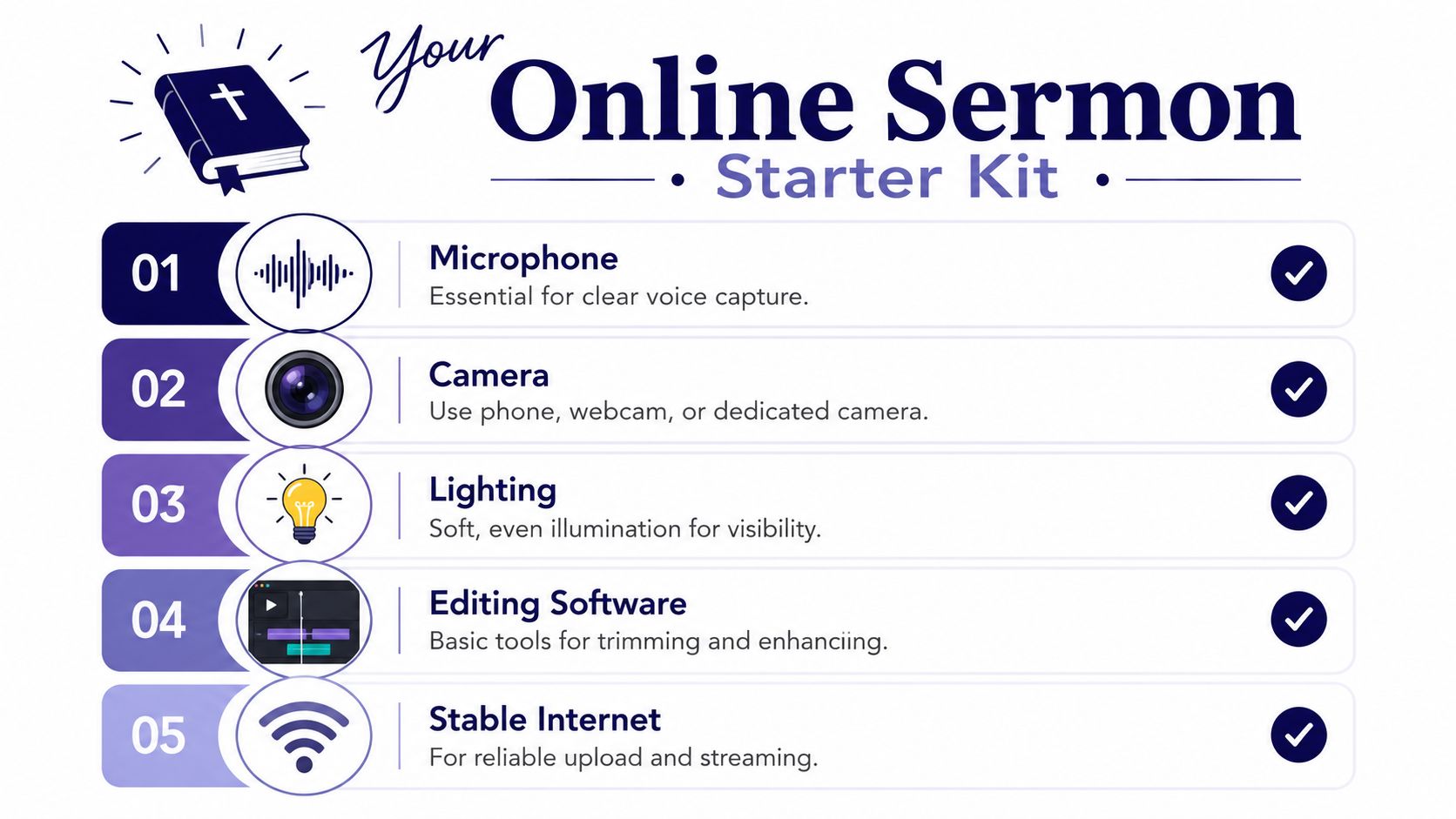
Most churches don't need a broadcast truck to start putting sermons on line. They need a setup they can trust every week. Reliability matters more than complexity.
A simple kit has five core parts. This visual is a good checklist to keep in front of your team.
Smartphone tier
This is the fastest path for a church with limited budget or limited volunteers. A current smartphone, locked on a tripod, can produce a solid sermon recording if the audio is clean.
Focus on these pieces first:
- Microphone first. Viewers will forgive average video before they forgive muddy sound. A lavalier mic, pulpit feed, or recorder near the pastor is worth more than buying a fancier camera first.
- Stable framing. Put the phone on a tripod, orient it horizontally for full-sermon recording, and keep the shot consistent.
- Simple lighting fixes. If the platform is dark, add soft front lighting instead of relying on room lights alone.
- Clean background. Remove clutter from the frame. A calm stage looks more intentional online.
This tier works well for churches that want an archive, sermon podcast audio, or a basic weekly upload.
Single-camera tier
A dedicated camera gives you more control. Skin tones usually look better, stage lighting is easier to manage, and the result feels less improvised.
A single-camera setup usually includes:
- One dedicated camera with clean output and long recording capability.
- A dependable audio input path from the soundboard or a separate recorder.
- A tripod that won't drift during the sermon.
- Basic editing software for trimming the start and end, correcting audio, and exporting files for web upload.
Practical rule: Upgrade audio before you upgrade lenses.
This level is ideal for churches that want a polished sermon library without taking on the volunteer load of live switching.
For teams evaluating equipment paths in more detail, this guide to the best camera for church live streaming is useful because it frames gear choices around ministry workflow, not just specs.
Multi-camera tier
Multi-camera makes sense when your church is treating online delivery as a regular broadcast workflow, especially for livestreaming. It creates visual variety, but it also creates more moving parts.
Here's what changes at this level:
| Setup area | What you'll need |
|---|---|
| Camera coverage | A wide shot plus one or more tighter angles |
| Audio | A managed board mix that translates well online |
| Switching | A person or system handling angle changes live |
| Team | Volunteers who can show up consistently and troubleshoot calmly |
Multi-camera looks better when it's staffed well. If it isn't, it can quickly become more fragile than a clean single-camera setup.
What to buy first
If your church is just starting, buy in this order:
- Clear audio
- Stable camera support
- Better lighting
- Editing software
- Additional camera complexity later
That order keeps your workflow realistic. The right setup is the one your team can run every week without panic.
Choosing Where Your Sermons Will Live
Recording the sermon is only half the decision. You also need to decide where the full message belongs. The right answer depends on what you care about most: discoverability, community interaction, branding control, or technical simplicity.
Some churches post everywhere without a plan. That usually creates extra work and scattered engagement. It's better to choose a primary home for the full sermon, then let other platforms support that main destination.
Sermon Hosting Platform Comparison
| Feature | YouTube | Dedicated Platform | |
|---|---|---|---|
| Discoverability | Strong for search and long-term discovery | Weaker for long-term search, stronger for social sharing among existing audiences | Usually depends on your own site traffic and promotion |
| Community features | Comments, playlists, subscriptions, easy embedding | Comments, shares, reactions, community interaction around existing followers | Often more controlled, but with fewer native discovery tools |
| Branding control | Limited by YouTube environment | Limited by Facebook environment | Stronger control over player, branding, and site experience |
| Technical stability | Generally dependable for hosting and playback | Useful for live engagement, but not always ideal as a long-term sermon library | Can be strong if the provider is good, but usually adds cost and setup |
| Best fit | Churches that want searchable archives and broad reach | Churches with an active Facebook audience | Churches that want tighter control and a branded viewing experience |
When YouTube makes the most sense
YouTube is usually the strongest default option for full sermons. It behaves like a search engine, it handles long-form video well, and it gives churches a durable library that can keep working long after the sermon date has passed.
That matters because many people won't start with your homepage. They'll search a topic, a Scripture passage, your church name, or a sermon series title.
When Facebook is enough
Facebook still matters for churches with an established local audience there. It works well for immediate engagement, especially if your congregation already watches updates and comments on posts from the church page.
But Facebook alone is rarely the cleanest long-term archive. Old sermons tend to get buried. Search behavior is different. Organizing messages into a stable library takes more effort.
If your church has to pick one home for full sermons, choose the platform that's easiest for new people to find and easiest for your team to maintain.
When a dedicated platform earns its keep
Dedicated streaming or hosting providers can make sense if your church needs more brand control, a cleaner embedded player, or tighter integration with your site. They can also be helpful if your team wants to reduce platform distractions around the sermon itself.
The trade-off is simple. You usually get more control, but less built-in discovery. That means your church has to do more of the work to bring viewers there.
For many churches, the practical setup is straightforward: host the full message on YouTube, use Facebook for community distribution, and embed the sermon where it fits on your church website.
Refining Your Message for an Online Audience
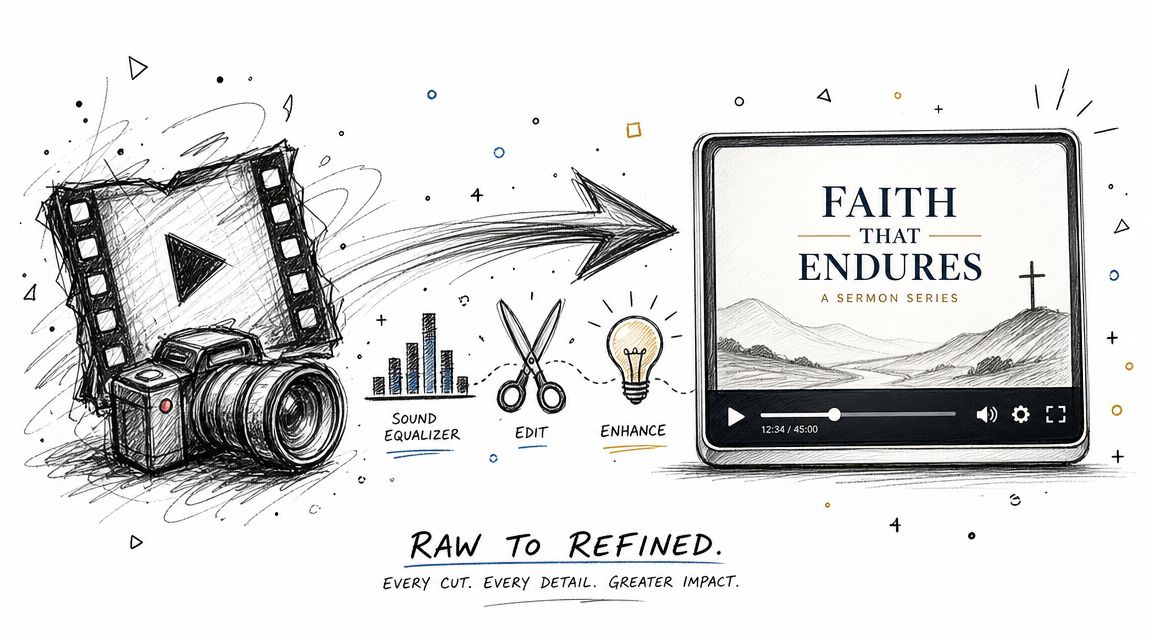
A raw recording usually isn't ready to publish. Even a good sermon can feel awkward online if the file starts with dead air, ends with volunteers walking in front of the camera, or sounds thin compared to what people expect from video.
That doesn't mean you need a cinematic edit. It means you need a clean one.
A useful baseline comes from Pew Research Center's analysis of online sermons. It found that the median length of an online evangelical sermon is 39 minutes in Pew's nationwide study of online sermons. That's long enough that editing discipline matters. You can publish the full message, but it should start cleanly, sound clear, and give viewers confidence right away.
The edit that most churches actually need
Keep the first pass simple:
- Trim dead space at the beginning and end.
- Normalize the audio so the pastor is easy to hear.
- Add a title screen with the sermon title, series, and church name if that helps orientation.
- Export in the right format for the platform where the message will live.
If your team is small, don't overbuild the edit. A steady, repeatable process beats a dramatic one-off.
Captions aren't optional
Captions serve people who are deaf or hard of hearing, and they also help anyone watching in a quiet room, noisy environment, or social feed with sound off. Churches sometimes treat captions as a bonus. They should treat them as part of the publishing process.
Captions also force a useful discipline: they push you toward a transcript.
The transcript is the hinge point
Once you have a transcript, the sermon stops being just a video file. It becomes source material.
A transcript lets your team pull key quotes, write small-group questions, create devotional follow-ups, build sermon summaries, and identify short sections worth clipping for social. Without one, every repurposing task starts from scratch.
A sermon transcript saves more time than almost any camera upgrade because it turns one message into usable text for the rest of the week.
A church that wants to improve its sermons on line shouldn't ask only, “How do we upload the video?” It should ask, “How do we turn this message into a searchable, accessible, reusable asset?”
That question leads directly to the next level of workflow.
Multiply Your Message with AI-Powered Content
Monday morning is where a lot of sermon workflows stall. The full message is uploaded, everyone is back to their regular jobs, and the transcript sits unused in a folder. Churches with small teams feel this pressure the most because every extra task competes with children's check-in, slides, email, and weekend prep.
The fix is to treat the sermon like a content batch, not a one-time post.
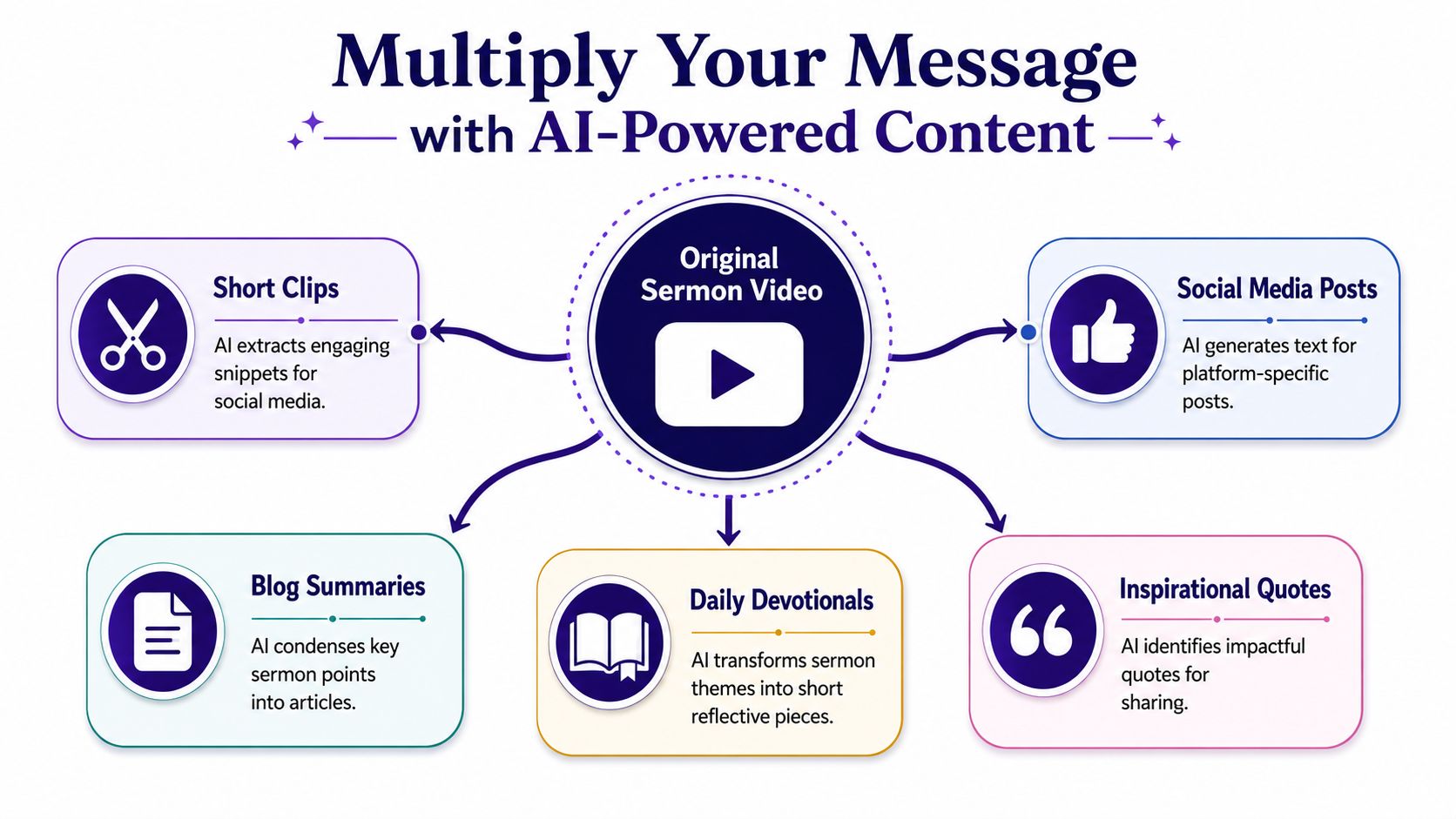
A useful benchmark comes from a church case study covered by Pro Church Tools. The team reviewed each weekly sermon, chose two 30 to 90 second clips, and posted them consistently. Over that window, follower growth ran 45% faster than the previous period, according to the church social clipping case study. The lesson was simple. Careful selection beat higher volume.
That trade-off matters. More clips create more editing time, more approvals, and more chances to post something that makes sense only to people who were in the room. A smaller set of stronger assets is easier to maintain and usually easier for new viewers to understand.
What to create from one sermon
One sermon can feed a full week of communication if the team knows what to pull from it.
The formats that tend to work best are:
- Short vertical clips for Instagram Reels, YouTube Shorts, TikTok, and Facebook
- Quote graphics built from one memorable line
- Caption-first posts that turn a sermon point into a clear takeaway
- Discussion questions for groups, volunteers, or midweek follow-up
- Blog summaries or devotional reflections drafted from the transcript
Each one serves a different use case. Full-sermon viewers want depth. Social scrollers need a fast, self-contained point. Small group leaders need prompts they can use without extra prep.
What to avoid
Two mistakes show up over and over.
The first is posting the same full-length file on every platform without adapting the format, title, or hook. That saves time in the moment, but it usually underperforms because people do not use YouTube, Facebook, and short-form video feeds the same way.
The second is clipping every decent moment. Teams start with energy, then create too much to review, caption, design, and schedule. Quality drops. Consistency usually drops right after it.
Post the clips people can understand in isolation. If the moment needs five minutes of setup, it probably belongs in the full sermon, not in a Reel.
Where AI helps
AI should handle the repetitive work that slows your team down, while pastors and communicators keep final judgment.
In practice, that usually means AI can:
- Spot likely clip moments from the transcript
- Draft social captions around the sermon's main ideas
- Turn the message into a blog recap or devotional draft
- Create first-pass assets that a volunteer or staff member can review and refine
- Queue content into a calendar so publishing does not depend on someone remembering every post
For smaller churches, the win is not novelty. The win is having one manageable system from upload to publishing. That is the difference between a sermon archive and a repeatable content engine. If you want a practical model, this guide on repurposing content with AI maps out how to turn one message into multiple pieces without adding a full-time editor.
If your team also writes article-style recaps, event explainers, or ministry updates, tools built for turning news to video can be a helpful reference for the same core idea. Start with one clear message, then adapt it into the formats people will watch, read, and share.
The goal is a workflow your church can keep running with limited staff, limited budget, and limited time. AI helps when it reduces handoffs between recording, editing, writing, design, and scheduling, all in one place.
Create a Sustainable Publishing Rhythm
The hardest part of sermons on line usually isn't recording the message. It's publishing consistently after the first burst of enthusiasm wears off. Churches rarely need a more ambitious strategy. They need a strategy they can still follow next month.
A repeatable workflow solves that.
A helpful industry observation is that churches still face a real content gap around discoverability and repurposing, especially when they need practical guidance for SEO, titling, and distributing one sermon across multiple platforms, as described in this overview of discoverability and sermon repurposing gaps. That's why consistency matters so much. A sermon archive by itself doesn't create discoverability. A workflow does.
A weekly rhythm that small teams can keep
A manageable pattern looks like this:
| Day | Task |
|---|---|
| Sunday | Record the sermon and save the master file |
| Monday | Generate transcript, trim full message, choose short clip candidates |
| Tuesday | Finalize clips, captions, and post copy |
| Wednesday | Publish one sermon-based social asset |
| Thursday | Publish a second asset such as a clip, quote graphic, or devotional post |
| Friday | Schedule weekend reminders and any event-related content |
That rhythm is simple on purpose. It creates momentum without requiring daily reinvention.
How to improve discoverability
Discoverability isn't mysterious. It usually comes down to packaging.
Use these habits:
- Write clear sermon titles that include the actual topic, passage, or series name.
- Add useful descriptions that summarize what the message is about in plain language.
- Match format to platform so clips feel native where they're posted.
- Keep one source of truth for what has been published, what is scheduled, and what still needs review.
If your team is experimenting with visual explainers or Scripture-based short video content beyond sermon clips, this guide on how to create Bible AI videos is a practical example of how churches can adapt biblical content into platform-friendly formats without turning every post into the same thing.
The calendar matters more than motivation
Most church teams don't fail because they don't care. They fail because content lives in too many places. The sermon file is in one folder, notes are in another app, clip ideas are in a text thread, and nobody knows what's already scheduled.
A drag-and-drop calendar fixes more problems than people expect. It gives the team one visible publishing rhythm. It also makes it easier to mix sermon content with event promotion, ministry reminders, and seasonal church communication. When a platform also connects with tools like Planning Center and other church calendars, you spend less time retyping event details and more time editing the message for actual people.
The churches that sustain this work aren't always the largest. They're the ones with a workflow simple enough to survive volunteer turnover, busy weeks, and limited budgets.
If your church wants one place to turn sermons into clips, transcript-based posts, blogs, graphics, and scheduled content, ChurchSocial.ai is built for that church workflow. It gives teams a way to upload a sermon, generate reusable content from it, organize posts on a visual calendar, and keep sermon communication connected with church events without needing a large media department.


