
A solid video recording system for church isn't just about broadcasting a Sunday morning service anymore. It’s the very foundation of a modern digital ministry, serving as a powerful engine for outreach and keeping your community connected. This is how you reach members who can't be there in person and share your church's message far beyond your physical walls.
Why Your Church Needs a Modern Video Strategy

Let's be real—a video recording system has shifted from a 'nice-to-have' luxury to the absolute core of how a church operates in a connected world. It's the starting point for building a vibrant online community that truly reflects your church's mission. It’s about so much more than just hitting 'record' on a Sunday.
The move to digital ministry has been massive. By early 2020, an incredible 97% of U.S. churches were broadcasting their services, a huge jump from just 22% the year before. The trend is global, too—in 2023, 53% of practicing Christians streamed services online, with younger generations leading the way. You can dig deeper into these church streaming findings to see just how much this impacts ministry today.
Having a dedicated video system brings a host of benefits that directly support your church's mission. It makes your ministry more accessible, expands your reach, and creates new opportunities for discipleship.
Church Video System Benefits at a Glance
Ultimately, a good video system isn't just about technology; it's a ministry multiplier that helps you serve your community more effectively.
From One Sermon to a Week of Impact
Start thinking of your recorded sermons not as a finished product, but as a deep well of content. Every single recording is a valuable asset you can transform into multiple touchpoints that engage your congregation all week long. This is where a strategic approach completely changes the game.
With a quality video recording in your hands, you can:
- Reach Beyond Sunday: Easily connect with sick-at-home members, travelers, and people in your community searching for a church online.
- Create Engaging Social Content: Turn key sermon points and worship moments into short, shareable clips for all your social media platforms.
- Develop Discipleship Resources: Use sermon segments as discussion starters and follow-up material for small groups or Bible studies.
- Build a Lasting Archive: Create an accessible, on-demand library of past messages for new members and ongoing spiritual growth.
Multiply Your Ministry with the Right Tools
The real magic happens when you pair your video recording system with smart tools built for churches. Instead of piling more tasks onto your plate, the right platform can automate and simplify your workflow, turning one sermon into a full week of outreach with very little extra effort.
Imagine your Sunday sermon automatically becoming a series of powerful Instagram Reels, a thoughtful blog post, and engaging social media captions—all before you even get to the office on Monday morning. That's the potential unlocked by a modern video strategy.
This is exactly where a tool like ChurchSocial.ai steps in. It takes the video you've already recorded and multiplies its impact across the board. You can use it to create AI-generated Reels from sermon clips, transform transcripts into blog posts, and design stunning graphics with professional templates. It even syncs with your church calendar to help you create content for upcoming events. It’s all about working smarter, not harder, to plan and manage your church social media.
Choosing the Right Gear for Your Church's Budget
Let’s be honest: navigating the world of tech gear can feel overwhelming, especially when you’re trying to be a good steward of your church’s budget. But I have some good news. You don’t need a Hollywood-level budget to create a high-quality video ministry that truly connects with people.
The secret is to start where you are and make smart, intentional upgrades over time. Remember, it's the message and the content that engages people, not the brand name on the camera. I’ve seen ministries reach thousands of people with setups that cost less than you’d think. It all comes down to choosing the right tools for the job.
The Absolute First Priority: Audio
Before you even think about 4K cameras or fancy lighting rigs, you must get your audio right. This is, without a doubt, the single most important part of your video system.
Think about it: viewers will forgive a slightly grainy video, but they will click away in a heartbeat if the audio is muffled, distant, or echoing all over the place. Bad audio makes your message impossible to receive.
Your number one goal should be to capture a clean audio feed directly from your church's soundboard. This is a non-negotiable. It ensures your online audience hears the same crystal-clear mix as the people sitting in the pews—from the pastor's mic to the worship team. This one step will improve your video quality more than any other purchase you could make.
Understanding Camera Options
Once your audio is solid, it's time to talk cameras. The best choice really depends on your budget, the complexity of your services, and—most importantly—who will be running the gear.
Smartphones: Don't sleep on the device in your pocket. A modern smartphone is an incredibly powerful and completely viable starting point. You'll just need a good tripod for a stable shot and a way to get that clean audio feed into the phone.
Camcorders: These are the reliable workhorses of the video world. They’re all-in-one solutions that are super easy for volunteers to pick up and use. They usually have great built-in zoom lenses and are designed to record for long periods without overheating.
PTZ (Pan-Tilt-Zoom) Cameras: This is where things get really exciting, especially for volunteer-run teams. PTZ cameras are robotic and can be controlled remotely by one person with a joystick or simple software. This means a single operator can manage multiple camera angles—a wide shot, a tight shot on the speaker, another on the worship team—all without leaving the tech booth. They are exceptionally volunteer-friendly. You can dive deeper into finding the best camera for church live streaming in our detailed guide.
DSLR/Mirrorless Cameras: These cameras give you that beautiful, cinematic look with a blurry background (what the pros call a shallow depth-of-field). However, they come with a steeper learning curve. They often have recording time limits, can overheat, and require specific, sometimes expensive, lenses, making them better for teams that already have some video experience.
From Simple to Complex: Putting It All Together
Your video recording system for church doesn't have to be built all at once. It's something that can, and should, grow with you. As your needs and budget expand, you can add components to create a more dynamic and professional production. The next logical step is usually a video switcher.
A video switcher is the piece of hardware that lets you cut between multiple cameras in real-time. Instead of one static, locked-off shot for the entire service, your operator can switch between a wide view of the stage, a close-up of the pastor, and maybe a shot of the congregation during worship. This simple change makes the viewing experience infinitely more engaging.
Key Takeaway: Start with one camera and perfect audio. Once you're comfortable, adding a second camera and a simple video switcher is the most impactful next step you can take to elevate your church's video production.
To help you see what this might look like at different budget levels, we've put together a few sample setups. Think of this as a roadmap for how your system can evolve.
Sample Equipment Setups by Budget
This table breaks down what you can realistically achieve at different price points.
Ultimately, the goal is to build a reliable system that empowers your ministry, not complicates it.
And once you’ve recorded your service, the work doesn't have to stop there. A platform like ChurchSocial.ai can turn that single video into an entire week's worth of content—from AI-generated Reels to social posts and blog articles, all managed from a simple calendar. This approach multiplies the impact of your investment, extending your reach far beyond Sunday morning.
Setting Up Your System for Reliable Sunday Mornings
Once the boxes arrive, the real work begins. It’s time to transform that collection of gear into a dependable video system that serves your ministry week after week.
The goal isn't just to make it work once. It's to build a system so solid and straightforward that your volunteers can run it with confidence. That way, they can focus on ministry, not on troubleshooting technical meltdowns mid-service.
Let's start with the most visible part of your system: the cameras. Where you place them has a massive impact on the final look of your recording.
Strategic Camera Placement for Engaging Video
You need to think in terms of shots, not just camera positions. You're trying to give your online audience a dynamic view that helps them feel like they're actually in the room. A multi-camera setup is perfect for this, but even a single camera can be powerful if you get the primary shot right.
For a foundational setup, try to capture these three key angles:
- The Wide Shot: This is your anchor. It captures the entire stage, including the worship team and any screens or banners. It gives people context and is the safe shot you can always cut back to.
- The Speaker Shot: This is a tighter, medium shot—usually from the waist up—focused on whoever is speaking. This is absolutely crucial for creating a personal connection and making the sermon engaging.
- The Crowd Shot: This angle is so often overlooked, but it's incredibly powerful. Capturing your congregation engaged in worship or reacting to the message brings energy and a sense of community to the online experience.
Make sure to mount your cameras high enough to shoot over the heads of a standing congregation. Use secure wall mounts or sturdy tripods placed well out of the main walkways.
This flow chart gives a great visual of how a church's tech investment often progresses from a simple starting point to a much more advanced setup.
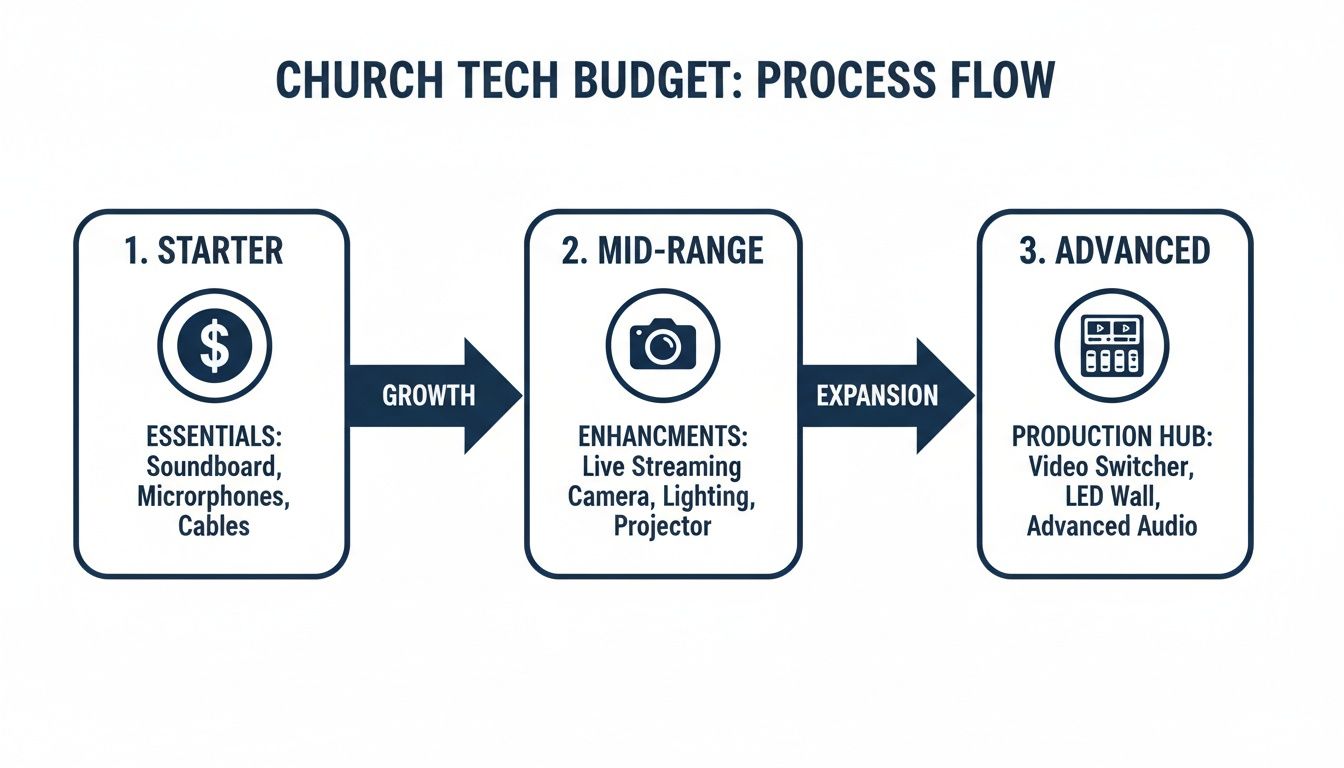
As you can see, ministries can grow their technical capabilities in logical stages. This ensures the investment actually aligns with their needs and the skill level of their volunteers.
Cabling and Connections The Right Way
With your cameras mounted, it's time to run the cables for video, audio, and power. This is the unseen backbone of your entire system, and doing it right prevents countless future headaches. Your focus here should be on safety, organization, and a clean signal.
Use gaffer tape—not duct tape—to secure any cables running across floors. Gaffer tape is strong but won't leave that awful sticky residue on your carpets or gear. Whenever you can, run cables along walls, through ceiling spaces, or in conduits to keep them completely out of foot traffic areas. This prevents tripping hazards and protects your equipment from being accidentally unplugged.
To guarantee crystal-clear audio free from distractions, it's worth exploring options for software noise cancellation. This can make a huge difference in the quality of your Sunday morning broadcasts and recordings.
Pro Tip: Label every single cable at both ends. Seriously. A simple label maker will do the trick. Clearly mark what each cable is for and where it's going (e.g., "CAM 1 - HDMI to Switcher"). This simple act will turn a future troubleshooting emergency into a minor five-minute fix.
That small investment of time upfront will pay off big time down the road, especially when a new volunteer is trying to figure out which plug goes where.
Creating a Pre-Service Checklist
The final piece of a reliable setup is creating a simple, repeatable process for your team. A pre-service checklist is the absolute best way to ensure everything is powered on, connected, and tested before the first worship song even begins. It removes all the guesswork and empowers volunteers by giving them a clear path to success.
Your checklist should be a simple, one-page document. Laminate it and keep it in the tech booth.
Include basic but critical steps like:
- Power On: List every piece of equipment that needs to be turned on, and in what order (e.g., soundboard, then cameras, then switcher, then computer).
- Check Inputs: Verify you have a video signal from every camera and a clean audio signal from the soundboard.
- Test Recording: Do a quick 30-second test recording to ensure the capture device is working and has enough storage space.
- Frame Shots: Confirm all cameras are framed and focused correctly for the start of the service.
This routine minimizes the chance of that last-minute panic. And once you have that reliable recording, the real ministry impact begins. With your high-quality sermon video, you can use a platform like ChurchSocial.ai to instantly create AI-generated Reels, pull quotes for social media posts, and even draft a blog recap. It connects your reliable Sunday morning setup to a full week of digital engagement, all managed from a simple drag-and-drop calendar.
Building and Empowering Your Volunteer Tech Team
The best gear in the world is useless without the right people behind it. Technology is just a tool; it’s your volunteers who bring your ministry’s vision to life on screen. This is where we get into the human side of church tech—recruiting, training, and empowering a team that feels valued and confident.
The goal isn't to find Hollywood-trained professionals. It’s about making tech ministry accessible and fulfilling for passionate people from your own congregation, equipping them with what they need to succeed, regardless of their background.
Recruiting Volunteers Who Are Eager to Serve
Finding volunteers can feel like the biggest hurdle, but you probably have more potential candidates sitting in your pews than you realize. You're looking for people who are reliable, teachable, and have a good attitude. Technical skill is a bonus, not a requirement.
Start by reframing what it means to serve on this team. It's not just about pushing buttons. It's a vital ministry that makes the Gospel accessible to hundreds, maybe even thousands, of people who can't be in the room.
- Look for the Faithful and Available: Who shows up consistently and seems to be looking for a way to get plugged in? These folks often make the best team members because they're already committed.
- Target Different Demographics: Think outside the box. Reach out to retirees with flexible schedules, high school students who are naturally tech-savvy, or even that quiet person who has an interest in photography or video.
- Make a Clear and Simple Ask: Instead of a vague "we need tech help," get specific. "We're looking for two people to learn how to operate our cameras for the livestream. No experience needed—we'll teach you everything."
Creating Clarity with Simple Role Descriptions
One of the fastest ways to scare off a potential volunteer is to be fuzzy about the commitment. Create simple, one-page role descriptions for each position on your team. This removes all the uncertainty and shows people exactly what they're signing up for.
Don't just list tasks; cast a vision for the role. A 'Camera Operator' isn't just pointing a camera; they are 'capturing moments of worship and connection that bring the service to life for our online viewers.'
For instance, a role description for a 'Stream Director' might look like this:
- Mission: To ensure a smooth, engaging online experience for our viewers by switching between camera angles at key moments.
- Time Commitment: Arrive 30 minutes before service, serve for the full service, and stay 10 minutes after. Just one Sunday a month.
- Key Responsibilities: Run the pre-service checklist, switch cameras during worship and the sermon, and start/stop the recording.
This kind of clarity builds confidence and helps people self-select for roles where they feel they can really succeed. For more ideas on keeping your team engaged long-term, check out our guide on powerful volunteer retention strategies.
Training That Builds Confidence, Not Fear
Great training isn't about handing someone a massive manual. It’s about hands-on, step-by-step guidance. Laminated checklists kept right in the tech booth are a volunteer’s best friend. Develop easy-to-follow guides for everything from setup to shutdown.
This becomes even more important as technology evolves. By 2026, AI-driven video recording systems are expected to dramatically simplify church operations. Projections show church tech spending rising 20% yearly, a trend fueled by PTZ and IP cameras that can automatically track speakers and adjust framing. This tech could reduce the need for large production teams by up to 60%, allowing a single volunteer to manage a professional-level stream. You can find more insights about the rise of automated church tech.
As your system grows, your training should too. Foster a team culture where it’s safe to ask questions and where mistakes are seen as learning opportunities, not failures. The real goal is to create a positive environment where your team feels supported, valued, and essential to the mission of the church. That empowerment is what turns a group of volunteers into a thriving ministry team.
Turning Your Sermon Into a Week of Content
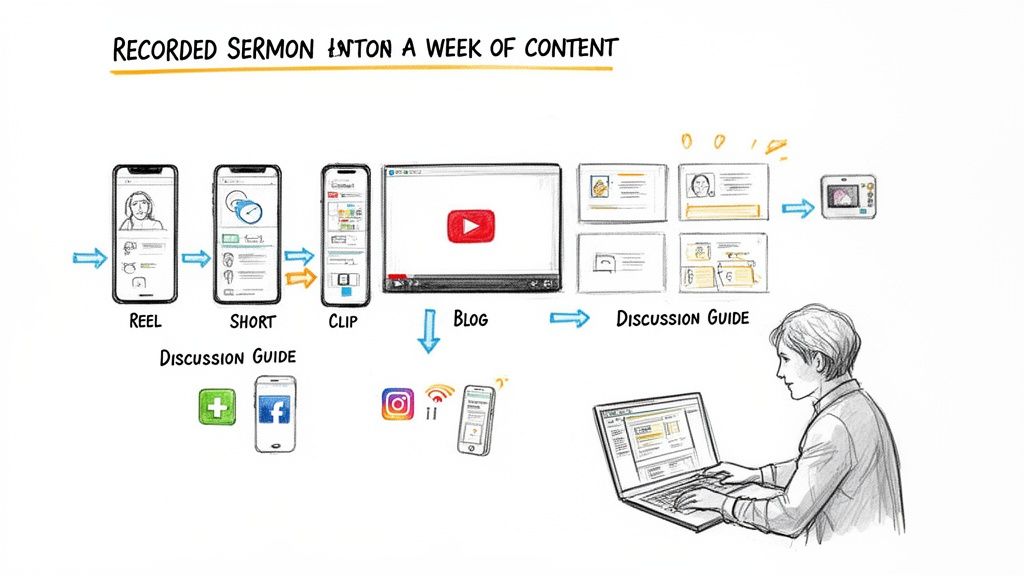
Here's the real game-changer: your Sunday recording isn't the finish line. It’s the raw material for an entire week of digital outreach. Once you have a solid video recording system for church in place, you’ve actually done the hardest part. The next step is to multiply that one hour of content into dozens of connection points that engage your community all week long.
This shift in thinking moves your ministry from a single event into a continuous conversation. The sermon becomes the central hub from which all your other digital content flows, ensuring your message resonates far beyond Sunday morning. The goal is to meet your congregation right where they are, on the platforms they’re scrolling through every single day.
Suddenly, your investment in a video system transforms from a Sunday morning utility into a full-time ministry engine.
From Sermon Video to Social Media Gold
The most powerful way to extend the life of your sermon is by creating short-form video clips. Platforms like Instagram Reels, TikTok, and YouTube Shorts are where the attention is, and a compelling one-minute clip from your sermon can reach people who might never watch the full service.
Imagine grabbing that powerful illustration, that key takeaway, or that moving worship moment and turning it into a standalone piece of content. This isn't just about reusing video; it's about re-packaging it for a different audience and a different purpose.
The most impactful moments of a sermon often last less than 60 seconds. By isolating these key points into short videos, you make your message more shareable, more memorable, and more likely to reach someone who needs to hear it.
This is exactly where a tool like ChurchSocial.ai becomes essential. Instead of a volunteer spending hours scrubbing through footage, the platform's AI can analyze your sermon and automatically generate dozens of viral-ready clips. It pinpoints the most compelling segments, adds captions, and prepares them for you to post. It turns a time-consuming task into an effortless win.
More Than Just Video Clips
Your sermon recording is rich with more than just video. The transcript of the message is a treasure trove of material that can be repurposed in countless ways to serve your congregation and expand your reach. With the right workflow, you can fuel your entire content calendar from that single recording.
Think about all the possibilities:
- Blog Posts: The sermon transcript can be easily edited into a thoughtful blog post, providing a great option for those who prefer to read or want to dive deeper.
- Social Media Updates: Pull out key quotes, stats, or challenging questions from the sermon to create engaging text-based posts or simple graphic images for Facebook and Instagram.
- Small Group Resources: Generate a list of discussion questions based on the sermon's main points, creating an instant curriculum for your small groups to use that week.
- Devotionals: Break down the sermon into smaller, bite-sized pieces that can be sent out as daily or weekly devotionals via email or your church app.
This whole process is about working smarter, not harder. You've already invested the time and resources into preparing and delivering a powerful message. Repurposing it shouldn't feel like another full-time job.
With a platform like ChurchSocial.ai, this workflow becomes almost automatic. You upload your sermon, and the AI gets to work, providing you with Reels, social posts, blog content, and more. It helps you produce professional-looking graphics with a library of templates and a simple editor, so everything stays on brand. It can even integrate with Planning Center and other church calendars to create content for your events.
By putting these tools to work, you can maximize the impact of every single sermon. If you're looking for more ways to get the most out of your recordings, check out our guide on how to turn your sermon on video into a week of engaging content. It’s all about building a system that allows one hour of recording to fuel an entire week of ministry, helping you connect with your community and reach new people in meaningful ways.
Integrating Security and Peace of Mind
Here's something a lot of churches miss: the video system you're setting up for Sunday services can pull double duty as a powerful tool for facility management and security. It’s a smart way to maximize your investment. Modern IP camera systems are built for exactly this, giving you peace of mind for your staff, congregation, and guests.
Thinking this way turns your video recording system for church into an act of good stewardship. Let's face it, our church buildings are busy hubs for youth groups, community events, and more, which creates unique security challenges. A solid system ensures your campus stays the safe, welcoming place it's meant to be.
Modern Features for a Secure Campus
The great thing about today’s security systems is that they pack in powerful features that are surprisingly simple to manage, even if you don't have a dedicated tech person on staff.
- Remote Monitoring: Need to check on the building? Just pull out your smartphone or tablet. A simple mobile app lets you see what's happening from anywhere.
- Secure Cloud Storage: Your footage is saved safely off-site. This is a huge plus because it protects your recordings from being lost if a recording device is ever stolen or damaged.
- Intelligent Motion Alerts: Get a notification sent straight to your phone when motion is detected in a specific area or after hours. This allows for a much quicker response when something's not right.
As you figure out how to weave robust security into your church’s video setup, it’s worth looking into guidance on choosing the best security camera systems for organizations like ours.
The world of church tech is moving fast, and these systems are no longer a "nice-to-have." With global spending on video surveillance expected to rocket past $32 billion by 2026, smart ministries are making the move from old-school CCTV to AI-powered, cloud-connected IP camera networks. Discover more insights on smart church security.
While your security cameras keep an eye on the physical building, ChurchSocial.ai can help you manage your digital presence. It gives you a simple drag-and-drop calendar to plan and schedule all your social media content—everything from AI-generated sermon Reels to event promos—keeping your online community vibrant and connected.
Answering Your Top Questions
Let's tackle some of the most common questions I hear from church leaders when they start thinking about a video system. Hopefully, these quick answers will give you the confidence to take the next step.
What's a Realistic Budget for a Church Video System?
This is the big one, right? The honest answer is, it varies wildly. You can absolutely get started for under $1,000 with a solid single-camera setup. On the other end, a professional multi-camera system with high-end switching can easily top $10,000.
Don't let the big numbers scare you. Go back and check out our 'Good, Better, Best' gear recommendations—we laid out specific options to help you find the right fit for your budget and ministry goals.
Can We Seriously Just Use a Smartphone to Start?
You absolutely can, and many churches do! A modern smartphone camera is a powerhouse. The trick isn't the phone itself, but how you use it.
Just focus on three things:
- Stability: Get it on a tripod. Shaky video is distracting.
- Audio: Don't use the phone's built-in mic. Get a clean feed from your soundboard or use a good external microphone.
- Internet: Make sure you have a rock-solid Wi-Fi or cellular connection before you go live.
Nail those three, and you'll have a fantastic starting point.
What's the Single Most Important Piece of Gear to Buy First?
It's not the camera. I know that sounds backward, but it's the truth.
Clear audio is what keeps people watching.
Think about it—viewers will forgive grainy or slightly off-color video, but they will click away in a heartbeat if they can't understand what's being said. Your very first investment should be figuring out how to get a clean audio signal from your main sound mixer into whatever you're using to record. That one upgrade will make the biggest impact, guaranteed.
Once you've captured your sermon, let ChurchSocial.ai help you turn it into a full week of ministry. Automatically create engaging sermon clips for social media, generate blog posts from the transcript, design graphics with easy templates, and manage it all on a simple drag-and-drop calendar. Visit ChurchSocial.ai to start multiplying your impact.


