

Content batching is a productivity method where you group similar tasks into one focused session, like writing all your week's social captions at once instead of starting from scratch every day. In practical use, many teams batch creative work in 2 to 4-hour blocks and start by planning just one week of content ahead so the system feels manageable.
If you serve in church communications, you probably know the feeling already. Saturday night gets busy. Sunday morning comes fast. Someone remembers the Facebook post, the Instagram story, the reminder about kids ministry check-in, or the sermon promo, and suddenly social media feels like one more ministry fire to put out.
That pressure wears people down. It drains volunteers, frustrates staff, and usually produces rushed content that doesn't sound like your church at its best. The problem usually isn't a lack of care. It's a lack of a simple system.
What is content batching? For churches, it's a repeatable way to plan, create, review, and schedule content before the week gets hectic. It's not a gimmick. It's a ministry workflow that helps you stay present online without living in panic mode.
The Sunday Morning Scramble Is Real
A lot of church social media doesn't fail because the church lacks good stories to tell. It fails because communication gets pushed to the edge of the week.
The worship team is rehearsing. The pastor is finishing sermon notes. A volunteer is answering texts about the nursery. Then somebody asks, “Did we post anything for tomorrow?” That question usually lands when nobody has the time or mental space to write clearly, find the right image, and make sure the message sounds warm and accurate.
Why this keeps happening
Churches often create content one post at a time. That sounds reasonable until you realize how many tiny decisions it requires.
You need an idea. Then a caption. Then a graphic. Then the right format for Instagram or Facebook. Then a review. Then scheduling. Even a simple post can turn into a chain of interruptions.
Practical rule: If your team creates social posts only when the deadline is already here, you don't have a posting problem. You have a workflow problem.
That's where batching helps. Instead of deciding everything in the moment, you group similar work together. You brainstorm several ideas in one sitting. You write captions in another. You design assets in another. You schedule them in one final pass.
What churches usually misunderstand
Some people hear “batching” and assume it means becoming robotic or filling a calendar with generic filler. That's not the goal.
A healthy church content system still leaves room for real-time moments. You can still post baptism photos, weather updates, a pastor video, or a spontaneous praise report. Batching just handles the repeatable parts early, so you're not using emergency energy for normal communication.
Here's the simplest way to understand it:
- Without batching: every post starts from zero
- With batching: your team works from a plan
- Without batching: social media interrupts ministry all week
- With batching: social media has a place on the calendar
For many churches, that shift alone lowers stress. It also helps your message sound more consistent from week to week, which matters when people are deciding whether to visit, return, or engage online.
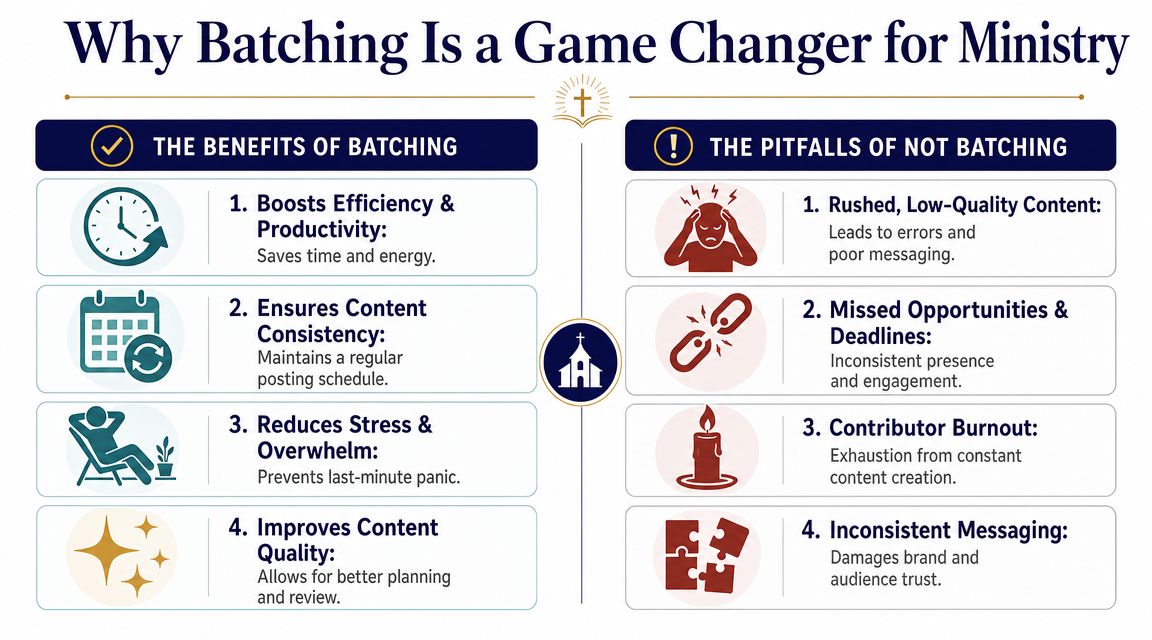
Why Batching Is a Game Changer for Ministry
Batching works a lot like meal prep. You don't cook one grain of rice every time someone gets hungry. You prepare the ingredients ahead of time so mealtimes are easier all week.
Church content works the same way. Your sermon series, church calendar, announcements, and ministry moments are the ingredients. Batching helps you prepare them before the week gets noisy.
It reduces the friction that slows your team down
One of the clearest explanations of batching comes from this guide on reducing context switching in content work. It describes content batching as a production-system approach, not just a scheduling habit, because it groups similar creative tasks into dedicated time blocks. The reason that matters is simple. Every time someone jumps from ideation to writing to design to publishing, they lose momentum.
Church teams feel that loss quickly because communications is rarely their only job. A children's director might also handle event reminders. An admin might post on social between phone calls. A volunteer might create graphics after work. Batching protects focus by letting one person stay in the same mode longer.
It helps your church show up consistently
Consistency matters because people often check your church online before they ever walk through the doors. They want to know what kind of church you are, what's happening this week, and whether your communication feels clear and welcoming.
Batching supports consistency in a few practical ways:
- It creates rhythm: You're not guessing each day what to post.
- It improves review: Staff can catch errors before content goes live.
- It protects volunteers: Social work stops feeling like a daily interruption.
- It sharpens messaging: Posts can reflect the same tone and mission across the week.
Batching doesn't replace creativity. It creates room for it by removing repeated setup work.
It's good stewardship, not just productivity
Churches aren't trying to win a content race. They're trying to communicate faithfully and clearly with limited time.
That's why batching fits ministry so well. It turns communication into a repeatable practice instead of a constant scramble. It also gives your team margin. When the week changes, and in church life it always does, you've already handled the routine content.
A calm system usually leads to better communication than a rushed one. And in ministry, calm is a gift.
A Simple Content Batching Workflow for Your Church
You don't need a full media department to batch content well. A solo volunteer, church administrator, or communications pastor can start with a simple rhythm and improve it over time.
A good starter model has four stages.
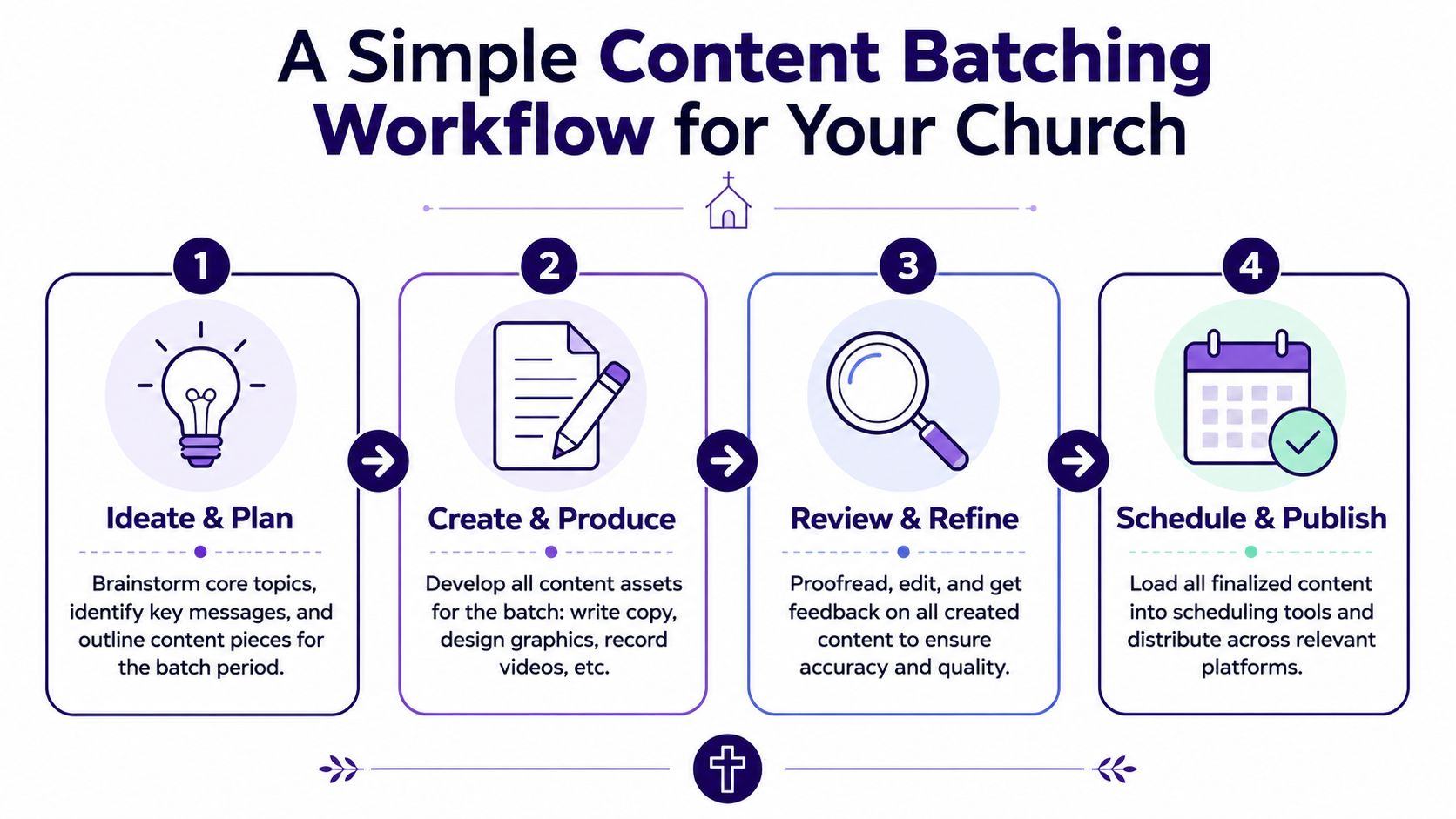
Ideate and plan
Start with what your church is already doing. Look at the upcoming sermon, current series, events, ministry reminders, and any seasonal moments on the church calendar.
Practical guidance from this content batching walkthrough for small teams recommends 2 to 4-hour blocks for creative work and suggests starting with one week of content in advance while focusing on one social channel at a time. That's especially helpful for churches where one person wears several hats.
A simple planning session might include:
- Sermon-based posts: Main theme, one key quote, one application question
- Church life posts: Event reminder, volunteer need, next steps prompt
- Community posts: Prayer encouragement, scripture reflection, welcome message
If you need help tightening your process, these top content creation practices are useful for thinking about repeatable habits, review, and clarity.
Create and produce
Once the plan is set, stay in one type of task as long as possible. Write captions together. Then gather images or build graphics. Then draft stories or short video scripts.
Many churches find this method saves the most energy. You stop asking, “What should I post today?” and start asking, “What do I need to finish in this work block?”
A simple example:
- Write all captions for the week.
- Design all matching graphics.
- Prepare video clips or story slides.
- Save everything in one folder or workspace.
If you want a helpful way to map this visually, a church social media content calendar can make your weekly flow easier to manage.
Review and schedule
Don't skip the review step. Churches communicate trust as much as information. Dates, names, scripture references, and tone all matter.
Leave a little white space in your calendar. A full queue is helpful. A completely rigid one isn't.
After review, schedule the finished pieces. Once they're loaded, your team is free to focus on conversations, ministry needs, and any live moments that deserve a spontaneous post.
If this feels new, keep it small. One week is enough to prove the concept. You can always expand later.
Turn One Sermon into a Week of Content
The easiest way to understand batching is to follow one piece of content through the week. For churches, that anchor piece is often the sermon.
A sermon already contains the core message, the teaching language, and the pastoral tone of your church. That means you don't need to invent fresh ideas from nothing every Monday. You can build from what was already preached.

One message, several formats
A helpful shift comes from this article on modern content batching workflows. It points out that older advice often treats batching as “write everything in one sitting,” but newer workflows batch at the level of ideas, scripts, clips, captions, and edits. That's especially relevant for churches because sermon content naturally breaks into those pieces.
Here's what one sermon can become during the week:
| Content type | Example church use |
|---|---|
| Short video clip | A strong sermon moment turned into a reel |
| Quote graphic | A memorable line from the message |
| Discussion prompt | A question for Facebook or small groups |
| Devotional caption | A practical takeaway tied to scripture |
| Blog summary | A written recap for your website or email |
This is one reason repurposing matters so much. If you want more ideas for stretching one message further, these strategies for boosting content reach offer useful ways to think across formats.
A realistic weekly example
Let's say Sunday's message is about peace in anxious seasons.
On Monday, you pull the sermon transcript and highlight a few strong sections. On Tuesday, you turn one of those sections into a reel, another into a quote graphic, and another into a caption that asks people how the church can pray for them. Midweek, you post a short written reflection. By Friday, you share a weekend invitation tied back to the sermon theme.
That's batching. Not one giant post factory. A thoughtful ministry rhythm that reuses what God is already doing in your church.
If you want more sermon-first examples, this guide on how to repurpose church content shows how one teaching moment can spread across your communication channels without feeling repetitive.
Where churches get stuck
Some teams worry that repurposing means repeating the exact same wording everywhere. It doesn't.
A reel needs a hook. An Instagram carousel needs visual structure. A Facebook discussion post needs a conversational tone. A blog summary needs clarity and context. The sermon stays central, but the packaging changes so the message fits the platform.
That's the power of batching. You create once with intention, then shape the message for the places your people engage.
Streamline Your Workflow with ChurchSocial.ai
Most churches don't struggle because they lack heart. They struggle because the workflow is scattered. Notes live in one place, graphics in another, calendars somewhere else, and scheduling gets done whenever someone has a spare moment.
That's why a batching system usually works better when it sits inside one clear process. One practical principle from this guide to content pillars and calendar-based batching is to build your workflow around a content calendar with defined pillars. In church life, those pillars might include sermons, events, discipleship, community stories, and invitations. Once those pillars are clear, batch sessions generate the assets and scheduling tools move them into a publication queue.
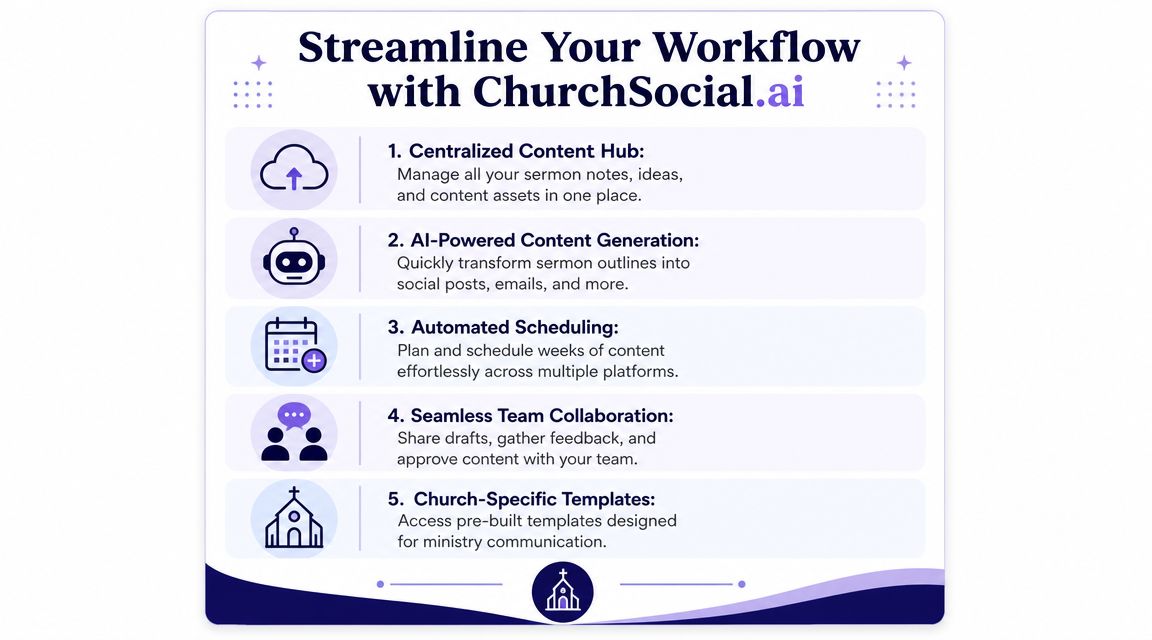
What this looks like in a church tool
A church-specific platform can connect the whole flow in one place. ChurchSocial.ai is one example. It can turn sermon transcripts into social posts, blogs, and other written assets, create sermon-based reels, provide graphic templates and editing tools for carousels and photos, and organize everything in a drag-and-drop calendar. It also connects with Planning Center and other church calendars so event-based content can be planned inside the same workflow.
That matters because batching isn't just about writing faster. It's about reducing the number of handoffs required to get from sermon to scheduled post.
Matching the tool to the ministry rhythm
Here's how a church might use a unified workflow:
- Monday: Import sermon content and sort ideas by content pillar.
- Tuesday: Generate draft captions, clip candidates, and blog notes.
- Wednesday: Build graphics and review wording.
- Thursday: Schedule everything on the calendar.
- Friday: Leave one or two open spots for live ministry moments.
If you're exploring that bigger idea, this article on what content automation means for churches is a useful companion.
A strong system doesn't remove the human voice of your church. It gives that voice a cleaner path from message to ministry touchpoint.
For small churches, this can make communication feel possible again. For larger teams, it can keep multiple contributors aligned without constant back-and-forth. In both cases, the point is the same. The more repeatable the workflow becomes, the less likely your team is to miss important moments or post in a rush.
Common Pitfalls and How to Succeed
The biggest mistake churches make with batching is assuming faster always means better. It doesn't.
A thoughtful warning comes from this look at the speed versus authenticity tradeoff in batching. It notes that explainers often overlook how speed can work against authenticity, especially for churches where trust and tone matter as much as volume. It also warns that reposting the same message everywhere can underperform unless you adapt it by platform and audience.
What to watch for
- Content feels stale: Leave room for live moments, prayer requests, and timely updates.
- Everything sounds the same: Rewrite posts to fit each platform instead of copying and pasting.
- The system feels overwhelming: Start with one week, one channel, and one repeatable content source.
- Review gets skipped: Build in a final check for names, dates, theology, and tone.
What success usually looks like
Success isn't filling every slot on the calendar. It's building a rhythm your team can sustain.
For many churches, that means batching the predictable content and staying flexible for the personal moments that make ministry feel real. You don't need a perfect system on day one. You need a workable one that lowers stress, supports your message, and gives your team margin to care for people.
If your church wants a simpler way to turn sermons, events, and ministry moments into planned social content, ChurchSocial.ai gives you one place to create, organize, and schedule that work without relying on last-minute scrambling.


