
Sunday ends, and you finally sit down. The service is over. The slides are put away. Someone still needs a post for Wednesday Bible study, a reel from the sermon, a reminder for the youth event, and maybe a graphic for Sunday's verse.
That work usually lands on the same person. Sometimes it's a communications pastor. Often it's a volunteer with a full-time job, a phone full of screenshots, and good intentions.
That's why so many churches ask a basic question: what is social media automation, really? Is it just scheduling posts ahead of time? Is it an AI writing captions? Is it a shortcut that makes your church sound robotic?
The short answer is this. Social media automation is a way to hand the repeatable parts of online ministry to software, so your people can spend more energy on the human parts. It can help you plan posts, turn sermons into social content, organize approvals, and track what's connecting with your church and community.
For churches, that matters because your communication load is already wide. Many churches manage 6 to 8 distinct communication channels, including email, text, social media, websites, apps, bulletins, slides, and verbal announcements, as noted in Ministry Automation's church communication guide. Social media isn't the only thing on your plate. It's one more thing sitting beside many others.
Used well, automation doesn't replace ministry. It protects it.
The Sunday Rush and the Monday Scramble
A lot of church social media looks the same behind the scenes.
Sunday morning starts early. Someone is checking classrooms, someone is solving a microphone problem, someone is greeting at the door. Then worship starts, the sermon begins, and a volunteer remembers, halfway through the message, that no one made this week's Instagram post.
By Monday, the pressure changes shape. You want to keep the message alive through the week, but now you're staring at a blank caption box. You know the sermon had strong moments. You know there's an upcoming event people need to hear about. You know consistency matters. You just don't have endless hours to make it happen.
Why the work piles up so fast
Church communication isn't usually one neat job. It's mixed into everything else.
- Sunday content is live and fast: Sermons, photos, announcements, and event reminders all happen at once.
- Midweek follow-up takes focus: A post about a sermon point sounds simple until you need the right wording, graphic, format, and timing.
- Volunteers wear multiple hats: The same person may help with kids ministry, slides, and social posts in the same week.
That's where automation starts to make sense. Not as a gimmick. As help.
Small-to-midsize business teams, which are often similar in size to church staff teams, save an average of 6.3 hours per week by using social media automation for tasks like scheduling and performance tracking, according to this roundup of social media automation statistics. For a church volunteer, that kind of recovered time can mean the difference between scrambling and planning.
Practical rule: If a task feels repetitive every single week, it's a good candidate for automation.
What churches usually need is not more hustle
Most churches don't need another lecture about “posting more.” They need a calmer system.
Think about the difference between cooking dinner one pan at a time and using a crock-pot. You still choose the ingredients. You still decide what you're making. But once things are set up well, the process keeps moving without constant attention.
That's what automation can do for social media. It can queue up the routine work so your team can focus on conversations, prayer requests, follow-up, and actual ministry.
A volunteer shouldn't have to choose between replying to a member in need and resizing a sermon quote graphic. Automation helps move those repetitive tasks out of the way.
Understanding Social Media Automation
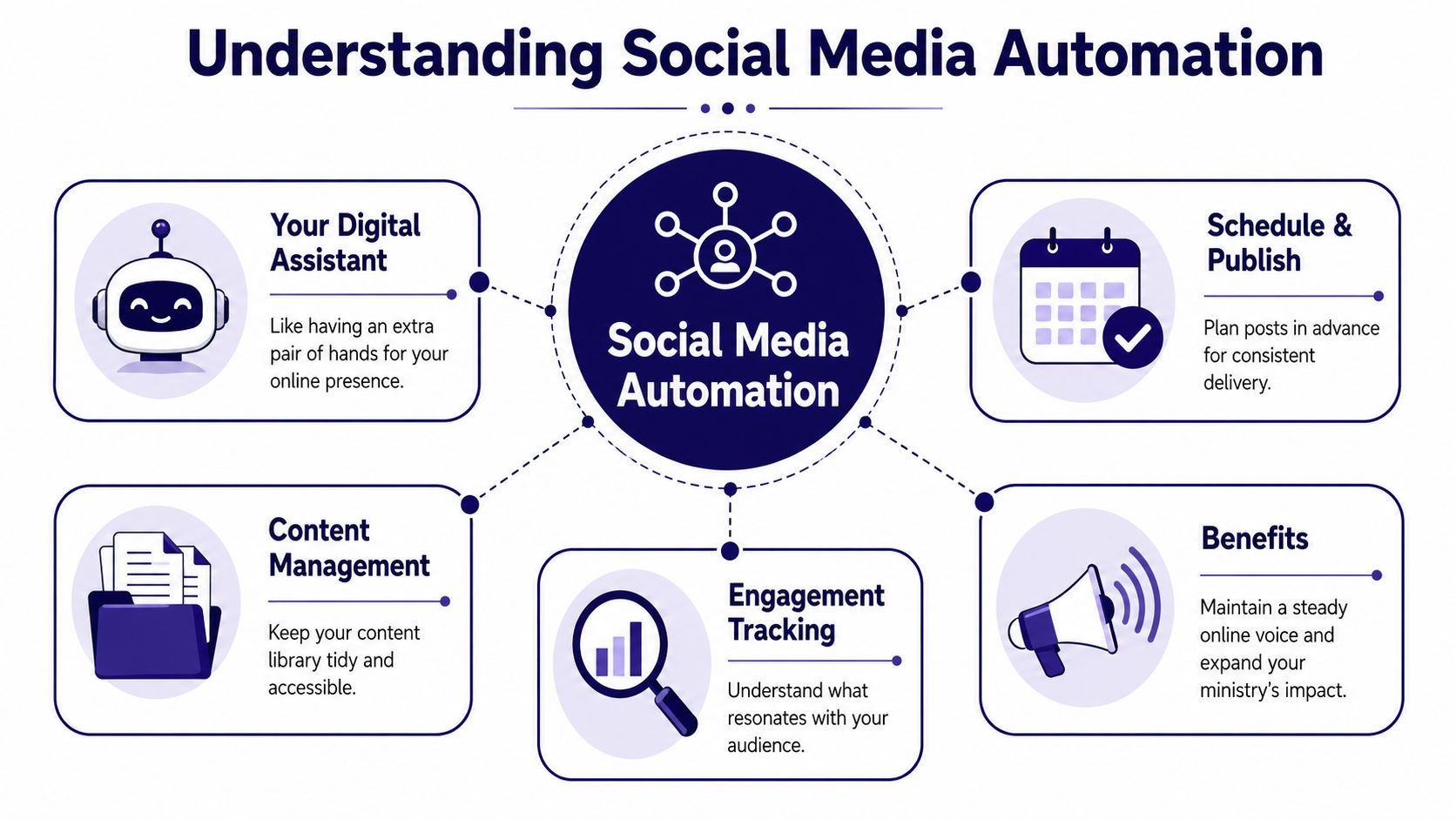
Social media automation is easiest to understand if you stop thinking of it as a robot and start thinking of it as a digital assistant.
It doesn't replace your church's voice. It helps carry the boxes. You still decide what message matters. You still review what gets posted. The software handles the repeatable steps that usually eat your time.
A simple analogy works here. Social media automation is like a crock-pot for your content. You prepare the ingredients, set the timing, and let the system handle the slow, steady work in the background.
The three parts that matter most
At the technical level, social media automation works on three levels: distributing content through scheduling, managing workflows for approvals, and collecting data for analytics, which helps reduce manual errors, according to Mixpost's social media automation guide.
Here's what that looks like in church language.
| Part | What it means | Church example |
|---|---|---|
| Distribution | Posts go out on a planned schedule | Sunday sermon clip publishes on Tuesday afternoon |
| Workflow | Drafts move through a simple review process | A staff member checks a post before it goes live |
| Data collection | Results are gathered in one place | You can see which sermon topics drew the most response |
Where people get confused
Many people hear “automation” and think only of scheduling. Scheduling is part of it, but it's not the whole thing.
Automation can also help with:
- Drafting content: turning a sermon idea into a caption or short devotional post
- Organizing approvals: making sure the right person reviews a post before it goes live
- Tracking results: showing what people watched, liked, shared, or ignored
That broader picture is why the phrase What is social media automation matters more than ever. It's not just “post later.” It's a system for reducing friction around your church's weekly communication rhythm.
Automation handles the repeatable work best. Human leaders still provide tone, discernment, and care.
If you want a broader look at how these tools support sustainable posting and planning, this platform for real audience growth gives a useful outside perspective on how automation supports consistency without turning content into spam. For a church-specific angle, ChurchSocial.ai's guide to what content automation means helps connect the idea to sermon-based ministry content.
The True Benefits of Automation for Your Ministry
The obvious benefit of automation is time. The deeper benefit is what that time gets turned into.
When a church reduces repetitive content work, the gain isn't just efficiency. It's margin. Margin for follow-up. Margin for care. Margin for better communication that stays present through the week instead of disappearing after Sunday lunch.
Consistency helps people stay connected
Most church members don't only need encouragement on Sunday morning. They need reminders of truth on Tuesday. They need to hear about the prayer night on Thursday. They need to know the church is active, welcoming, and paying attention.
Automation helps a church show up steadily.
A scheduled stream of sermon clips, event reminders, scripture graphics, and reflection prompts keeps your ministry visible between gatherings. That steady rhythm also helps newcomers. Someone who hasn't visited yet may still watch a clip, see an event announcement, or read a short post that makes the church feel approachable.
Repurposing ministry content saves real effort
Churches already create meaningful content every week. The sermon is the clearest example.
By using AI to repurpose sermon content and automate posts for events, church teams can save over 15 hours of work each week, according to Ministry Automation's overview of church social media management tools. That time can be put back into pastoral care and community engagement instead of caption writing and asset wrangling.
Here's why that matters so much. You're not inventing content from scratch every week. You're extracting more value from ministry work you're already doing.
Volunteers can help without burning out
Church communication often depends on willing people, not large teams. Automation gives those people a more realistic job.
- Batch work becomes possible: A volunteer can prepare several posts in one sitting instead of interrupting every day.
- Repeat formats become easier: Weekly verses, event reminders, and sermon follow-ups don't have to start from zero.
- The ministry voice stays active: Even when staff are busy, posts can still go out at the right time.
A church doesn't need to become a media company. It needs a dependable system that keeps good ministry content moving.
That's the essential value. Automation lets your church keep speaking during the week without asking your team to be online all the time.
Practical Automation Workflows for Your Church
General marketing articles often talk about scheduling and generic content repurposing. Churches need something more specific. They need a way to turn Sunday's message into weekday ministry content without building a full media department.
That's where church-focused workflows matter.

Sermon to social
One of the biggest gaps in most automation guides is this: how do you turn long-form spoken content into short-form video clips viewers will engage with? That gap is specifically noted in Socialnomics' discussion of overlooked automation practices, which points out the growing demand for tools that convert long-form spoken content into short-form clips.
For churches, this workflow matters more than almost anything else because the sermon is your core content source.
A practical sermon workflow looks like this:
- Upload the sermon recording or transcript.
- Identify strong moments such as a clear teaching point, a memorable line, or a pastoral encouragement.
- Turn those moments into multiple formats like short reels, quote graphics, blog drafts, or discussion questions.
- Schedule each format across the week so one sermon supports several touchpoints.
This is also where a church-specific tool can fit naturally. ChurchSocial.ai can create AI-generated reels from sermons, generate social posts and blog-style content from sermon transcripts, use built-in graphic templates and an editor for photos and carousels, provide a drag-and-drop calendar for planning posts, and integrate with Planning Center and other church calendars to create event content.
If you want practical help with the publishing side of this workflow, this guide on how to schedule social media posts gives a helpful next step for turning prepared content into a real calendar.
Event promotion from your calendar
Churches often repeat the same manual process for events. Someone checks Planning Center. Someone writes a caption. Someone forgets to make the reminder post until the day before.
Automation makes this smoother.
A synced calendar can trigger draft posts for:
- Upcoming events: youth nights, prayer gatherings, classes, holiday services
- Date-based reminders: registration deadlines, volunteer signups, special weekends
- Follow-up content: thank-you posts, recap carousels, next-step invitations
That means your event communication starts from existing church data, not from someone's memory.
Creative production without starting over
Templates matter more than many teams realize. A good template system keeps branding consistent and removes repeated setup work.
You might prepare:
- a sermon quote square
- a reel cover
- a midweek reminder graphic
- a Sunday invitation carousel
Then you update the message and image instead of redesigning everything from scratch.
For churches running paid outreach alongside organic content, tools outside the church space can also be useful in specific cases. For example, ShortGenius automated ad generation is worth a look if your team wants AI help creating short promotional video assets for campaigns and event awareness.
Navigating the Risks and Maintaining Authenticity
The biggest fear churches have about automation is usually the right one.
They don't want to sound fake.
That concern shouldn't be brushed aside. In a church setting, tone matters. Nuance matters. Timing matters. A clumsy automated reply to a prayer request doesn't just feel awkward. It can damage trust.
The authenticity ceiling is real
In niche communities like churches, where trust is central, purely automated replies can cause a 30% drop in meaningful engagement because AI lacks the nuance needed for sensitive conversations, according to SocialRails' guide to automated social media posting.
That number puts words to what many ministry leaders already sense. People can tell when a response is processed instead of pastoral.
A church can automate reminders, drafts, clips, and scheduling. It should be very careful about automating intimacy.
Use automation to prepare the conversation, not to fake the relationship.
What to automate and what to keep human
A simple boundary helps.
| Good to automate | Keep human-led |
|---|---|
| Event reminders | Prayer request replies |
| Sermon clip announcements | Sensitive pastoral conversations |
| Scripture graphics | Crisis communication |
| First-draft captions | Personal follow-up messages |
Many teams find peace here. You don't have to automate everything for automation to help a lot.
A safe church framework
If you're unsure, use this filter before turning on any workflow.
- Automate repetitive communication: weekly reminders, post scheduling, graphic generation, transcript-based drafts
- Review anything that carries pastoral weight: grief, conflict, counseling, correction, prayer, personal care
- Pause during sensitive moments: if a local tragedy or church crisis happens, queued posts may need to wait
A healthy system doesn't hide the church behind software. It gives the church more capacity to show up personally when people need that most.
How to Start Automating Your Church Social Media
Most churches don't need a huge rollout. They need a first win.
Start with one friction point that keeps happening. Maybe it's the weekly sermon follow-up. Maybe it's event reminders. Maybe it's the fact that no one remembers to post until the day is almost over.
Start with one clear goal
Don't begin with “we want full automation.” That's too broad.
Try one of these instead:
- Promote one recurring ministry: youth nights, women's Bible study, recovery group
- Repurpose one weekly content source: the sermon transcript
- Standardize one visual format: a weekly verse post or event reminder graphic
A narrow goal makes setup easier and review simpler.
Build around templates and triggers
Template systems work well because they remove repeated design effort. Automation triggers help because they connect content creation to something already happening, like a date on the church calendar.
As noted in Storyteq's overview of automated creative production, implementing template systems with automation triggers can significantly reduce production time and increase creative output. For a church, that can look like a reusable event graphic that updates when an upcoming date approaches, or a sermon post format that's ready every Monday.
Keep the first setup simple
You don't need a perfect system. You need a trustworthy one.
Try this sequence:
- Choose one toolset that covers planning, creation, and scheduling in one place.
- Load a few repeatable templates for sermon clips, announcements, and verse graphics.
- Schedule one week ahead, then review what felt easy and what still felt clunky.
- Add one more workflow only after the first one feels normal.
If you're comparing options, this overview of social media automation tools for churches can help you think through what features matter for a ministry team instead of a general brand.
Measuring Your Success and Taking the Next Step
Church social media success shouldn't be measured only by vanity numbers. Likes can be nice. They aren't the whole story.
A healthier question is this: are people engaging, are more people seeing the message over time, and is your team able to stay consistent without burning out?
For church content, a solid organic engagement rate is 3 to 5%. If you're seeing 6% or more, your audience is highly engaged. If you're seeing 1 to 2%, the content likely isn't connecting well, according to Story and Stone's church social media strategy guide.
That gives you a practical benchmark.
- Watch engagement quality: comments, shares, saves, and meaningful responses matter more than empty reach
- Look for steady growth in reach: healthy progress beats random spikes
- Measure team health too: if your system saves time and reduces last-minute stress, that counts as success
If you want a broader outside perspective on AI-assisted content planning, this guide to social media AI for marketers is a useful companion read.
Social media automation works best when it does one simple thing well. It frees your people to do the work software can't do. Care for people. Follow up personally. Share hope with discernment and warmth.
If your church wants a simpler way to turn sermons into reels, create posts from transcripts, design graphics, plan content in a drag-and-drop calendar, and keep event promotion moving from your church calendar, ChurchSocial.ai is built for that kind of workflow. Start small, automate the repetitive parts, and give your team more time for ministry that only humans can do.


