

Your lobby board probably looks familiar. A few flyers are curling at the corners, last month's event is still pinned up, and a volunteer is trying to squeeze one more announcement into a space that already feels crowded. Meanwhile, your church Instagram sits quiet until someone remembers to post on Saturday night.
That disconnect is where a lot of churches get stuck. The board inside the building serves the people who already showed up, but your digital channels are what carry the same message to members during the week and to people who may never walk through the door unless something online catches their attention. One branding critique puts it plainly: churches that stay trapped in “bulletin board Christianity” often stop at internal announcements and miss the kind of targeted content that reaches people beyond the room, including those who won't visit a church website unless prompted by the right content first, as described in this church content analysis.
Church bulletin boards still matter. They're visible, local, and personal. They also fit a broader communications category that continues to grow. The global bulletin boards market is projected to reach USD 3.60 billion in 2026 and USD 6.32 billion by 2036, with a projected 5.8% CAGR, according to Future Market Insights' bulletin boards market outlook.
The smarter move isn't choosing physical or digital. It's making the physical board the starting point for digital content that ChurchSocial.ai can help you create, schedule, and manage. If your team already has sermons, events, volunteers, and stories, you already have content. You just need a better system.
1. Sermon Series Spotlight Board

A sermon board works best when it looks intentional, not overloaded. Pick one visual direction for the full series, keep the color palette tight, and give each week its own small panel with the title, key verse, and a scannable next step. If you redesign the whole board every Sunday, your team will burn out fast.
ChurchSocial.ai is especially useful here because one sermon can become several assets without extra design labor. You can take the sermon transcript, turn it into social captions or blog content, create AI-generated reels from the sermon, and build matching graphics with templates that carry the same look from the board to Instagram or Facebook.
Keep the board simple and the weeklong content active
Most churches update their bulletins weekly because monthly formats get stale and slower cadences don't keep up with member expectations, according to CHMeetings' church bulletin board guide. Your sermon board should follow that same rhythm. Leave the framework in place for the full series, but refresh the weekly snippet every Sunday afternoon or Monday morning.
A practical setup looks like this:
- Series anchor graphic: Use one strong series image on the physical board and build matching posts with church sermon graphics templates.
- Weekly clip prompt: Add a QR code that sends people to the newest sermon reel, not to your homepage.
- Monday follow-through: Schedule the sermon clip and quote graphics in ChurchSocial.ai's drag-and-drop calendar so the conversation starts after Sunday, not just during it.
Practical rule: If someone can't understand your current sermon series in five seconds from six feet away, the board is too busy.
What works is one message repeated well. What doesn't work is treating church bulletin boards like scrapbook walls. A clean board with one strong series theme creates better recall, and that same discipline makes your social feed stronger too.
2. Event Announcement Board

If your church runs more than a handful of ministries, your event board should function like a command center. A calendar grid is the clearest format for that. Color-code by ministry area, reserve a larger feature block for the next major event, and keep your QR codes in a consistent place so people know where to look.
The physical-digital bridge saves staff time. When an event is already on your ministry calendar, ChurchSocial.ai can help your team turn it into actual content. If you integrate with Planning Center and other church calendars, your event flow becomes less manual from the start.
Make one board feed multiple posts
Church bulletin boards are often strongest when they focus on event invitations. In one analysis of posted messages in physical board settings, about 43.8% came from associations, including religious communities, and event invitations were the most common message type, as reported in this bulletin board messaging study. That tracks with what many churches already experience. Events are the category people ask about most.
Try this structure:
- Top row priority: Put this week's highest-priority event across the top.
- Middle grid clarity: Use clear categories like worship, students, outreach, care, and classes.
- Bottom row action: Add QR codes for registration, volunteer signup, or reminders.
Use church event calendar ideas to shape the physical board and then mirror the same categories in social carousels. One carousel can cover the week's top three events. A second post can spotlight one event in more detail. A Reel can use a pastor or ministry leader voiceover with simple motion graphics.
What doesn't work is packing every event onto the board at the same visual weight. Not every announcement deserves equal space. If everything is urgent, nothing feels urgent.
3. Scripture Memory Wall
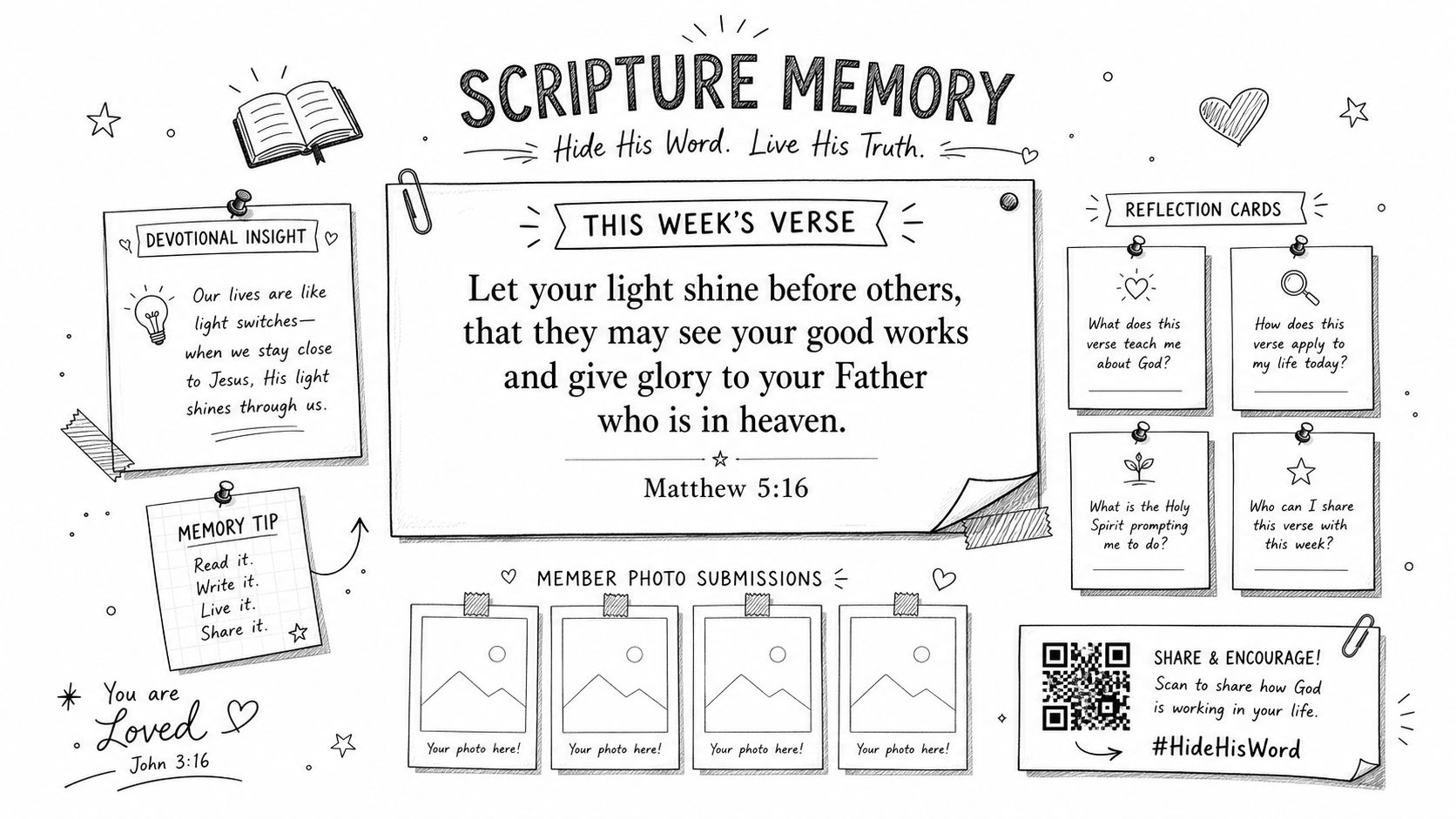
A Scripture memory wall shouldn't feel like classroom decor transplanted into the lobby. It should invite participation. One weekly passage, one short reflection prompt, and one digital next step is enough.
This kind of board works especially well in churches that want to extend Sunday teaching into the week. Put the verse at the center. Add two or three prompts around it, such as “What word stands out?” or “Where do you need this truth this week?” Then carry those exact prompts into social Stories, captions, and discussion posts using ChurchSocial.ai.
Turn one verse into a week of engagement
The board gives people a physical moment. Social gives them repetition. That combination matters because church communication often gets discarded when it stays print-only. Approximately two-thirds of congregations waste printed church bulletins because people throw them away rather than engaging with them, according to this church bulletin waste analysis.
That's why a memory wall should never end at the wall.
- Sunday prompt: Reveal the verse and post a matching graphic that morning.
- Midweek discussion: Use ChurchSocial.ai to generate reflection questions from the sermon transcript.
- Weekend recap: Share member responses in a simple carousel or Story sequence.
A good Scripture board gives people one clear verse to carry, not ten verses to skim.
What works is consistency. Use the same title treatment every week, the same hashtag if your church uses one, and the same rhythm for posting. What doesn't work is changing the visual system every time a new volunteer helps. Familiarity helps people participate without needing instructions.
4. Community Impact Board
Some of the best church bulletin boards aren't about what's happening inside the building. They show the work your people are doing in the city. A community impact board should highlight service projects, nonprofit partnerships, donation drives, and clear volunteer pathways.
Use photos carefully. Whenever possible, show hands serving, packed supplies, work tables, tools, collection bins, and prepared spaces instead of close-up faces. That approach fits privacy concerns better and usually communicates action more clearly anyway.
Document the work and extend the story online
A lot of outreach boards fail because they read like internal reports. They list ministry names and dates, but they don't tell the story of what changed. Your board needs three things: what the church is doing, where someone can help next, and where they can see more.
One useful pattern is pairing the board with a monthly social series. ChurchSocial.ai can help you create a short blog recap from ministry notes, build matching graphics in the template editor, and schedule a Reel or carousel after each outreach moment while the story is still fresh.
Use this balance:
- Show the mission: Name the partnership or project clearly.
- Show the action: Include one image or visual element that reflects the work.
- Show the next step: Add one QR code to volunteer, give, or learn more.
If you need inspiration for social proof and visual storytelling, how to build a testimonial wall offers a useful framing for gathering and displaying community response, even though your church application will be more ministry-focused than commercial.
What doesn't work is vague language like “making a difference.” Be specific about the ministry action. Pack meals. Tutor students. Stock the food pantry. Host respite care. Specific ministry language gives your social posts traction because people understand what they're being invited into.
5. Discipleship Pathway Board
A discipleship board does a different job than an event board. It answers the question people rarely ask out loud: “If I want to go deeper here, what am I supposed to do next?” That's why the strongest version is linear and simple.
Map your actual pathway, not your idealized one. If your church really offers guest reception, membership class, small groups, serve team onboarding, and leadership development, put those on the board. If you don't currently have a formal next-steps class, don't invent a stage just because it looks nice in a diagram.
Clarity beats creativity here
A pathway board should feel less decorative and more instructional. Use arrows, numbered stages, or stacked panels. Add one QR code per stage if you can maintain them. If not, use a single landing page that routes people to the right next step.
ChurchSocial.ai helps because this board naturally multiplies into digital content. Each stage can become a month of posts. Sermon transcript themes can support the discipleship emphasis. The graphics editor can give each step a consistent visual identity, and the content generator can turn ministry notes into blog posts, carousels, or short reels.
A useful sequence looks like this:
- Stage one welcome: Who this is for and what happens first.
- Stage two belonging: Groups, classes, and consistent attendance.
- Stage three serving: Practical volunteer pathways.
- Stage four leading: Training, mentoring, and ministry ownership.
Don't build a discipleship map around church jargon. Build it around decisions real people understand.
What works is visible progression. What doesn't work is abstract church language such as “engage, equip, uplift” without explanation. If a newcomer can't tell what action each stage requires, the board is decorative but not useful. Church bulletin boards are most effective when they reduce confusion.
6. Welcome and Newcomer Board
Your welcome board should be placed where a first-time guest naturally pauses. Near the main entrance is usually best. It needs to answer basic questions quickly: where to go, what time things happen, where kids check in, and how to connect after today.
This board should also begin digital onboarding immediately. Add a QR code to a welcome video, a simple newcomer page, and your primary social channels. ChurchSocial.ai can help you repurpose that same welcome content into a short Reel, branded graphics, and scheduled follow-up posts that reinforce the first impression.
Reduce uncertainty in the first five minutes
A lot of church communication assumes too much background knowledge. Newcomers don't know your abbreviations, building layout, or ministry names. They're scanning for reassurance. Keep the board visually calm and write in plain language.
One practical addition is a short “what to expect” panel. It's especially helpful in churches with a less familiar liturgy or service flow. You can also make your digital follow-up stronger by linking to a page with service times, parking notes, kids ministry info, and next steps.
ChurchSocial.ai fits well here because your welcome assets shouldn't be trapped in print. Use the graphics templates to create matching welcome posts, build a short social video from your pastor's message, and place all of it in the drag-and-drop calendar so your team isn't rebuilding the same materials every week.
What works is one clear invitation such as “Start here” or “New here?” What doesn't work is making first-time guests choose between seven different cards, counters, or brochures. The board should lower pressure, not increase it.
7. Missions and Global Impact Board
A missions board needs more than flags and map pins. Those visuals can help, but they aren't the story. The stronger approach is to feature one partner, one place, or one ministry focus at a time so the congregation can pray with clarity and respond with purpose.
The physical board can hold the anchor story, the prayer focus, and the giving or update QR code. The digital side can carry the longer form content. ChurchSocial.ai is useful here because missionary updates often arrive as rough notes, emails, or photos. Those can become blog posts, prayer graphics, short reels, and scheduled posts without requiring a designer to rebuild everything manually.
Use story structure, not information overload
Long missions boards often fail because they try to summarize every global partnership at once. Instead, rotate emphasis monthly or quarterly. Feature one region with a short ministry update, one prayer need, and one clear way to respond.
Historically, bulletin boards have always been part of larger information-sharing habits. One older measure from the digital side of that history is notable: InfoWorld estimated that in 1994 there were 60,000 Bulletin Board Systems serving 17 million users in the United States alone, as summarized in the Bulletin Board System overview. Physical church bulletin boards have always played a local version of that communication role. The difference now is that your church can connect local display with global digital reach much more effectively.
Use a simple editorial pattern:
- Current partner: Name the missionary or ministry partner.
- Current need: Share one prayer or practical need.
- Current response: Link to a prayer guide, update post, or giving page.
What works is narrative clarity. What doesn't work is a wall of disconnected facts. If you want people to care, give them one story to follow this month and let your social media keep that story visible all week.
8. Children and Youth Program Board
For kids and student ministries, the board serves two audiences at once. Children notice color, characters, and energy. Parents need pickup details, dates, forms, and clarity. If you only design for one of those audiences, the board underperforms.
Use illustrated elements more than photos whenever possible. That keeps the board consistent, avoids unnecessary privacy complications, and gives you a design language that can extend into handouts and social graphics. Separate sections by age group if your ministry is large enough to need it.
Build for parents, not just for the hallway
Youth and children's communication needs more care than many churches realize. Recent ministry conversations have pushed churches to think beyond “fun” boards and include safer pathways for feedback, crisis support, and privacy-aware communication practices, as discussed in these church youth bulletin board ideas.
That doesn't mean every board needs to feel heavy. It means your systems should be responsible. If you include prayer request walls, response cards, or feedback prompts, make sure your team knows how those are monitored and where sensitive concerns should be routed.
A strong setup includes:
- Parent essentials: Dates, drop-off and pickup notes, what to bring, and who to contact.
- Program identity: Age-group visuals, curriculum themes, or monthly focus.
- Digital connection: QR codes to forms, parent updates, and social channels.
ChurchSocial.ai helps by turning ministry updates into scheduled parent-facing posts, reels from approved ministry footage, and matching carousel graphics that explain what kids are learning. If your team already uses sermon or teaching transcripts, the platform can also generate recap content and blog-style summaries for families.
What works is consistency and clarity. What doesn't work is relying on one volunteer's memory to keep parents informed. Church bulletin boards can support family ministry well, but only when the same information is also easy to find online.
8-Point Church Bulletin Board Comparison
| Board | 🔄 Implementation Complexity | ⚡ Resource Requirements | 📊 Expected Outcomes (⭐) | ⭐ Ideal Use Cases | 💡 Key Advantages |
|---|---|---|---|---|---|
| Sermon Series Spotlight Board - Modern Minimalist Design with Weekly Social Snippets | Medium, weekly updates, Planning Center + ChurchSocial.ai setup | Foam board, printed graphics, ChurchSocial.ai subscription, volunteer time, reliable internet/QR testing | High ⭐⭐⭐, boosts social engagement and consistent messaging across channels | Churches running multi-week sermon series, social-first outreach, multi-site branding | Automates series graphics, syncs physical + social, drives social traffic via QR codes |
| Event Announcement Board - Dynamic Calendar Layout with Cross-Platform Promotion | Medium, calendar design + ongoing maintenance | Large foam board, color-printed event cards, staff for updates, Planning Center integration | High ⭐⭐⭐, reduces no-shows, increases registrations and clarity | Churches with many programs/events, community centers, busy volunteer schedules | Clear scheduling, color-coded navigation, QR registration reduces friction |
| Scripture Memory Wall - Interactive Learning Display with Social Engagement Component | Medium, weekly scripture rotation, manage submissions | Fabric-backed board, large-format text, reflection cards, staff to moderate physical/digital submissions | High ⭐⭐⭐, deepens engagement, grows small groups and UGC | Discipleship-focused churches, small groups, youth ministries | Encourages reflection and participation, AI-generated discussion prompts, creates UGC |
| Community Impact Board - Service & Outreach Highlights with Social Media Documentation | Medium, monthly rotation, photo/metric collection | Durable board, action photography, impact stats tracking, volunteer photographer/analyst | High ⭐⭐⭐, increases volunteer recruitment and awareness, strengthens mission identity | Churches active in outreach, social-justice ministries, volunteer-driven programs | Showcases impact, creates storytelling pipeline, boosts recruitment and giving |
| Discipleship Pathway Board - Progressive Learning Track with Digital Resources | High, strategic mapping, backend sign-up systems required | Textured backing, stage cards, QR-linked landing pages, integration with signup/CRM systems | High ⭐⭐⭐, clarifies next steps, increases class/group signups and leadership development | Churches aiming for intentional member growth and leadership pipelines | Creates clear funnels, measurable progression, consistent messaging across channels |
| Welcome & Newcomer Board - First-Time Visitor Experience with Digital Onboarding | Low–Medium, placement + quality video production for QR destination | Foam board, welcome cards, welcome video, landing page, multilingual assets (optional) | High ⭐⭐⭐, improves return rates and follower growth when onboarding is strong | High-traffic churches, diverse communities, churches prioritizing visitor retention | Eases visitor anxiety, bridges to digital onboarding, easy monthly updates |
| Missions & Global Impact Board - Story-Driven International Partnership Showcase | Medium, partner coordination, sensitive content curation | Durable backing, maps/graphics, partner updates, donation QR plumbing, careful approvals | Medium–High ⭐⭐⭐, increases prayer/giving and global awareness when fed regularly | Churches with active international partnerships or mission emphasis | Drives giving/prayer signups, extends mission storytelling via carousels and blog posts |
| Children & Youth Program Board - Age-Appropriate Engagement with Parent Communication Hub | Medium, multi-audience design, monthly updates | Colorful printed graphics, illustrated characters, curriculum summaries, permission forms via QR | High ⭐⭐⭐, improves parent communication, volunteer recruitment, youth engagement | Churches with active children/youth ministries, emphasis on parent communication | Inclusive illustrated design (avoids photo permissions), reduces friction for forms, supports volunteer signup |
Unify Your Message, Amplify Your Mission
Sunday morning often exposes the gap. A volunteer puts real effort into a bulletin board on Friday, people stop to read it on Sunday, and by Monday the message has gone no further than the church hallway. Good content gets trapped in one place.
Church bulletin boards work best as the front door to a wider communication plan. The physical display grabs attention in the building. The digital follow-up carries that same message into the week. A sermon series board can produce short-form video clips, quote graphics, and discussion prompts. An event board can support registration posts, reminder stories, and last-minute volunteer asks. A Scripture memory wall can supply a month of captions and daily reflection posts.
That approach saves time because the team is not inventing separate campaigns for the lobby and for social media. It is building one message package, then publishing it in both places with the same visuals, same wording, and same call to action. That consistency matters. People recognize the message faster, and staff spend less time reworking assets every few days.
A platform built for churches addresses this challenge. ChurchSocial.ai helps teams turn sermons into reels, convert transcripts into posts and blog drafts, design matching graphics for boards and feeds, and schedule everything in a drag-and-drop calendar. Planning Center and other church calendar integrations also make event updates easier to keep accurate, which is one of the first places church communications break down.
Start with one board that carries the most ministry weight right now.
For one church, that may be the welcome board because guest follow-up needs work. For another, it may be the sermon board because weekend teaching drives the rest of the ministry calendar. For another, it may be kids or missions because those ministries already have strong stories and clear next steps. The trade-off is simple. Trying to refresh every board at once usually creates extra design work and inconsistent upkeep. Starting with one high-impact board gives the team a repeatable system it can maintain.
Build the board. Create the matching digital assets from the same source material. Post them on a schedule your team can sustain. That is how a church bulletin board stops being a static display and starts working like a content engine from the lobby wall to the social feed.


