
A family moves into your town on Saturday. By Sunday morning, they're searching on their phone for a church nearby, checking service times, looking for kids ministry information, and trying to figure out whether your church is active, welcoming, and easy to find. They may never see your roadside sign. They will almost certainly see search results first.
That's why local search optimization matters so much for churches. It isn't about sounding like a business. It's about removing friction for people who are already looking for a place to gather, attend, pray, volunteer, or reconnect.
Most churches don't need a more complicated outreach strategy. They need a clearer digital front door.
Why Local Search Is Your Churchs Digital Front Door
A church can be faithful, active, and firmly rooted in its neighborhood, yet still be nearly invisible online. That disconnect hurts first-time guests more than it hurts search rankings. If someone can't quickly confirm your location, service times, or upcoming events, they often move on to the next result.
Local search optimization fixes that gap. It helps your church show up when nearby individuals are seeking with real intent.
A key reality frames the whole conversation: 97% of all online searches are explicitly directed toward finding a local business or organization (local search behavior data from SEO Tribunal). For churches, that means local visibility directly affects whether people can find service times, event details, and contact information.
Search is now part of hospitality
Church leaders often think of hospitality as parking teams, greeters, signage, and coffee. All of that matters. But digital hospitality starts earlier.
It starts when someone searches:
- “Church near me”
- “Sunday service in [city]”
- “Volunteer opportunities church [neighborhood]”
- “Youth group [town name]”
If your church doesn't appear clearly in those moments, your ministry is harder to access than it needs to be.
Practical rule: If a guest has to hunt for your address, service times, or children's ministry details, your church feels harder to visit than the church next door.
Churches compete differently
A church isn't trying to win a shopping comparison. People aren't looking for a discount code. They're looking for trust, clarity, and relevance.
That changes how local search optimization should be approached. The goal isn't to stuff pages with “best church near me.” That usually backfires. The goal is to help search engines understand three simple things:
| What people need | What your church should show clearly |
|---|---|
| Where you are | Accurate location and map details |
| What happens there | Service times, ministries, events, next steps |
| Why you're part of the community | Local partnerships, outreach, volunteering, neighborhood presence |
Churches that treat search visibility as ministry usually make better decisions. They update event details. They keep their website current. They answer reviews kindly. They publish useful local content. Those actions don't feel like marketing tricks because they aren't. They're acts of clarity.
The missed opportunity is usually basic
Most churches don't have a visibility problem because they lack heart. They have it because no one owns the details. The profile is unclaimed. The address is inconsistent. Easter service info is still live in July. The website looks fine on desktop but feels clumsy on a phone.
That's all fixable. And for a busy volunteer, that should be good news.
Claiming and Perfecting Your Google Business Profile
For most churches, the fastest local win is a fully managed Google Business Profile. When someone searches your church name, or looks for a church nearby, this profile often appears before they ever click your website.
Churches with a claimed and optimized Google Business Profile receive 7x more clicks than those with an unclaimed listing, and a complete profile is the most important ranking factor for appearing in the Google Local Pack, according to these local SEO statistics collected by RGC Digital Marketing.
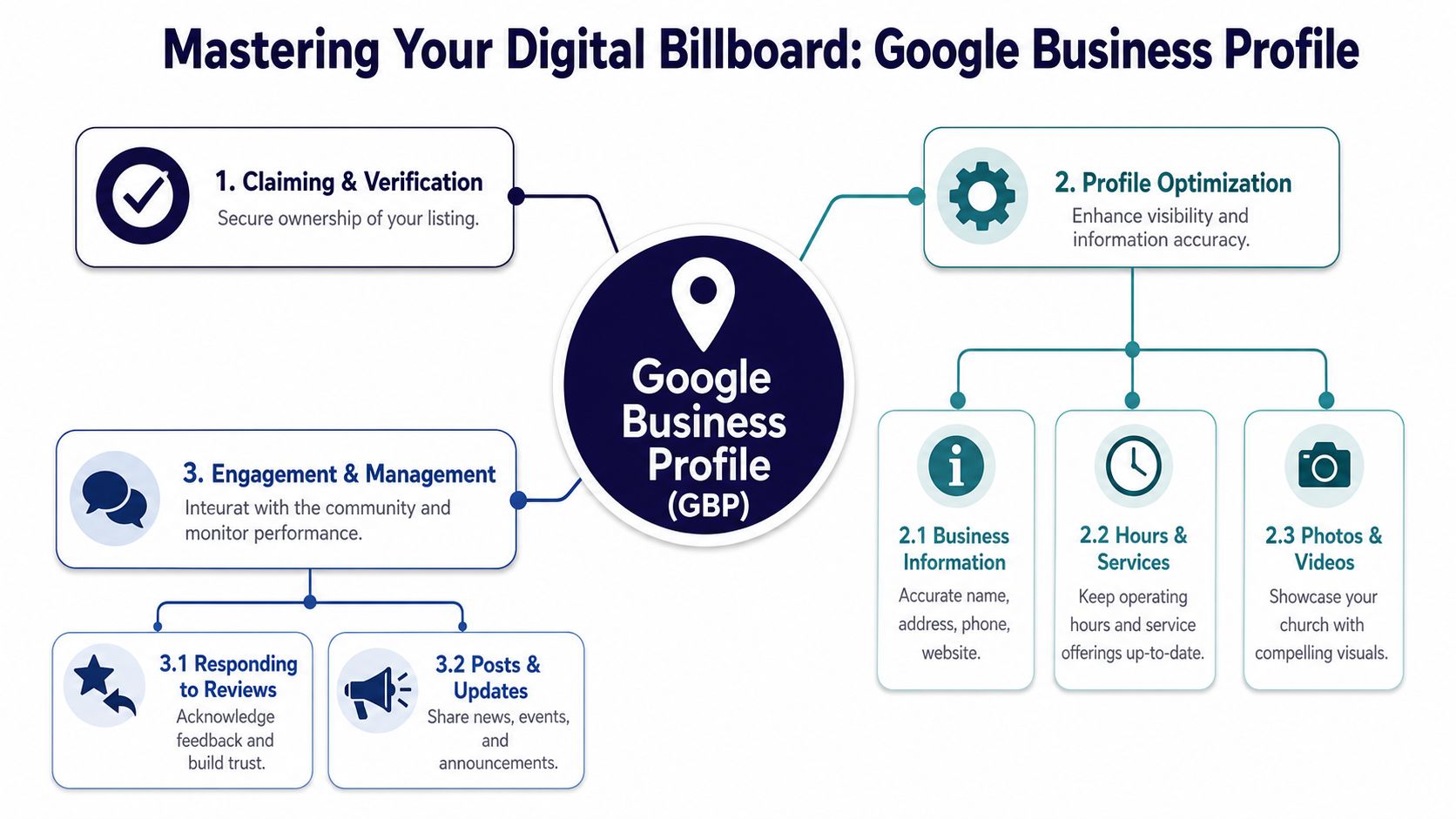
Start with ownership, not cosmetics
Before you worry about photos or posts, make sure your church controls the listing. If an old staff member, agency, or volunteer set it up years ago, clean that up first.
Use this order:
- Claim the listing if no one has.
- Verify access so current staff or trusted volunteers can manage it.
- Confirm core details before adding anything else.
The basics matter more than clever wording. A profile with accurate information beats a polished one with wrong information every time.
Fill out the fields people actually use
Churches often leave half the profile blank. That's a mistake because your Google Business Profile acts like a mini website inside search.
Focus on these areas:
Church name
Use your real public name. Don't add extra keywords to the title.Primary and secondary categories
Pick categories that match what your church is, not what you hope to rank for.Address and phone number
These must match your website and directory listings exactly.Hours
Add office hours if appropriate, but make service times obvious in posts, description, and website links.Website link
Send people to the page that helps them most. Sometimes that's the homepage. Sometimes it's a Plan Your Visit page.Photos
Use clean, welcoming images of your building, kids check-in area, parking entrance, sanctuary, and event signage. Images should not have people whenever possible, and text should only appear where it naturally belongs, like on signage, paper, or whiteboards.
A strong church profile answers the guest's first questions before they ask them.
Use features many churches ignore
A lot of churches stop after the setup. That leaves useful visibility on the table.
Here are the features worth maintaining:
| Profile feature | Why it matters for churches |
|---|---|
| Posts | Promote sermon series, VBS, food drives, Easter, Christmas, support groups |
| Q&A | Answer common guest questions about parking, kids check-in, dress, accessibility |
| Photos | Reduce uncertainty for first-time visitors |
| Reviews | Show warmth, reliability, and real community experience |
If you want a detailed setup walkthrough, this Google Business Profile setup guide for churches is a practical companion to the checklist work.
For a broader reference, Polaris Marketing Solutions has a helpful guide to unlock local SEO with GMB tips that can help you spot fields many teams skip.
What works and what doesn't
Some churches overcomplicate this. Others neglect it completely. The middle path works best.
What works
- Posting event updates consistently
- Using accurate categories
- Uploading current exterior and interior photos
- Reviewing Q&A for outdated answers
- Keeping seasonal details current
What doesn't
- Keyword stuffing the business name
- Leaving holiday events live long after they end
- Using blurry graphics as profile photos
- Linking every searcher to a generic homepage
- Treating the profile like a one-time setup task
A simple monthly rhythm
You don't need a dedicated SEO department. You need a repeatable check-in.
Try this monthly routine:
- First week check service times, office hours, and website links
- Second week upload a few current building or campus photos
- Third week publish an event or ministry post
- Fourth week review questions, reviews, and outdated info
That rhythm is realistic for a volunteer and strong enough to keep your profile alive.
Building Trust with Citations and NAP Consistency
A family searches for your church on Saturday night, taps Apple Maps, and drives to an address your church left behind two years ago. That is not an SEO problem first. It is a ministry friction problem.
Citations are the places online where your church's basic contact details appear, including Apple Maps, Yelp, Bing Places, Facebook, and local directories. NAP stands for Name, Address, and Phone. Those details need to match everywhere people might find you.
Search engines use those listings to confirm that your church is real, active, and located where you say it is. Guests use them to decide whether they can trust what they found. If one directory shows the office line, another shows an old campus number, and a third drops part of the address, both people and platforms hesitate.
Consistency builds confidence
Churches often inherit listing problems slowly. A volunteer updates the website but forgets Apple Maps. A staff member shortens the church name on Facebook. Someone creates a Yelp profile during VBS season and uses a different phone number.
None of those errors feels dramatic on its own. Together, they create uncertainty.
I usually recommend treating your church's contact details like approved brand copy. Pick one official version and reuse it everywhere. That matters even more for churches than for businesses because your goal is not only discovery. Your goal is helping someone attend, ask for prayer, find the office, or show up for a community event without confusion.
Run a simple citation audit
This can be done in one focused work session.
Start with the places guests are most likely to check:
- Your website
- Google Business Profile
- Apple Maps
- Bing Places
- Yelp
- Facebook Page
Open each listing side by side and compare every field.
Standardize these details
Church name
Use one official name everywhere. Decide whether you will include words like “Church,” “Ministries,” or a campus identifier, then keep it consistent.Street address
Match the formatting each time. If you use “Street” on your site, do not switch to “St.” in half your listings unless the platform forces a format.Phone number
Choose the number a new guest should call and keep that as the public number across directories.Website URL
Use one preferred version of your URL so listings do not point to mixed versions of the site.Service or office details
If a directory allows extra fields, make sure office hours, worship times, and campus notes reflect current reality.
What to fix first
If your team is short on time, fix accuracy before you chase reach.
Wrong address beats weak wording as a problem to solve. Wrong phone number beats missing photos. A church can still appear plain online and be easy to find. It cannot serve neighbors well if its listings send them to the wrong place.
This is also a good spot to collect approved wording your volunteers can reuse later for review requests, event pages, and directory descriptions. A few strong church testimonial examples that sound natural and specific can help your team keep public-facing language clear and consistent.
Keep it maintainable for volunteers
The best citation system is the one your church can maintain. A shared document with the approved church name, address, phone, website URL, and hours is often enough. Store it where volunteers can find it.
If your church already uses ChurchSocial.ai to plan event promotion and scheduling, add citation checks to the same monthly communications workflow. Put a recurring task on the calendar to review one or two listings at a time. That keeps local search upkeep realistic for a busy volunteer team and supports the main goal here. Helping people in your community find your church, trust what they see, and show up with confidence.
Generating Reviews and Creating Local Content
Reviews and local content work together. Reviews show that real people experience your church as a real community. Local content gives search engines and neighbors more context for what your church does.
For churches, this requires a different mindset than commercial SEO. Existing guides often miss how non-transactional organizations like churches can rank. The key is to optimize for “gather,” “attend,” or “volunteer” queries and focus content on local partnerships and events, as explained in WordLift's discussion of local SEO for non-transactional entities.

Ask for reviews that reflect real participation
A church review shouldn't sound like a product testimonial. It should sound like a person describing their experience.
Better prompts include:
- What made you feel welcome
- What helped your family on your first visit
- How a ministry, event, or volunteer opportunity impacted you
- What someone new to the church should know
That kind of language creates reviews with local relevance and human warmth. “We attended the food pantry outreach in downtown Springfield” is more useful than “Great church.”
If you need examples of how to guide people toward authentic language, these church testimonial examples can help your team shape better prompts.
Respond to every review like a pastor, not a brand
Many churches either ignore reviews or reply with canned phrases. Neither helps.
A good church response should be:
| Review type | Strong response style |
|---|---|
| Positive | Thank them personally and mention the ministry or event they referenced |
| First-time guest | Acknowledge their visit and welcome them back |
| Concern or criticism | Respond calmly, avoid defensiveness, invite offline conversation when needed |
Pastoral response: Thank people in a way that sounds like your church actually knows how to care for people.
That public response matters because future guests read it. They're not just evaluating the original review. They're evaluating your tone.
Build content around local ministry, not generic inspiration
Churches often post encouraging quotes but never publish pages or posts that reflect local mission. That's a missed opportunity.
Useful local content includes:
- Event pages for VBS, recovery groups, holiday services, and volunteer days
- Neighborhood-focused blog posts about community partnerships
- Ministry highlights tied to a local school, shelter, or food distribution effort
- FAQs such as parking, kids ministry check-in, service length, accessibility, or what to expect
This kind of content helps people searching for participation, not purchases.
Use sermons as source material
Most churches already have enough raw material. They just don't have time to repurpose it.
One 45-minute sermon typically yields 6–12 social clips, 3–5 quote graphics, and 1 full-length YouTube upload, according to Ruah Creative House's church social media strategy article. That matters because the sermon often contains the exact themes your local audience needs to hear, and it can also support event, ministry, and volunteer content throughout the week.
A practical content rhythm for churches is the 70/20/10 Ratio, where 70% of posts are educational or inspiring, 20% are community-focused, and 10% are promotional, as described by ChurchSocial.ai's overview of social media analytics for nonprofits. For volunteer-led teams, 3–4 posts per week on 1–2 platforms is sustainable, and short video content like Reels and sermon clips often outperforms static graphics and event announcements, based on Widefoc.us guidance for church social media.
That combination is useful for local search too. Consistent sermon clips, event posts, and ministry recaps create a stronger public footprint around your city, neighborhood, and church activities.
Optimizing Your Website for Local Discovery
A parent may hear about your VBS from a neighbor, search your church name on a phone in the school pickup line, and land on your website before they ever visit your building. In that moment, the site needs to answer practical questions fast. Are you nearby? When do you meet? Where should they park? Is there something for their kids?
Your Google Business Profile can get the click. Your website has to confirm that your church is active, local, and ready to welcome people into real community.
Put your location into the page itself
Church websites often miss local discovery in ordinary places. The homepage headline says “Welcome Home,” but the page never names the city, neighborhood, or part of town you serve. Search engines get less context, and first-time guests have to work harder than they should.
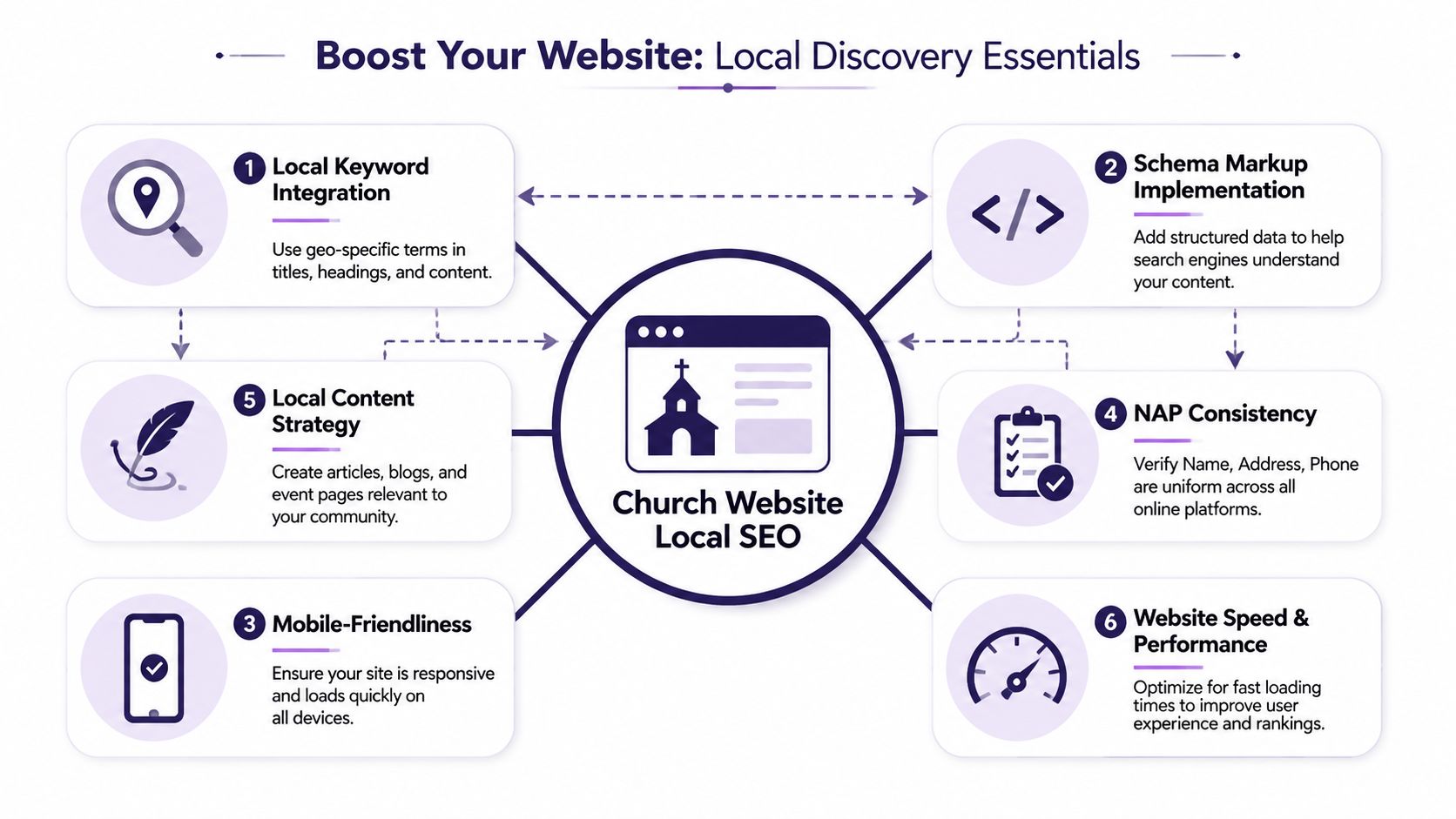
State your location clearly in places such as:
- Homepage H1
- Page titles
- Meta descriptions
- Event pages
- Contact page copy
- Ministry landing pages when relevant
For multi-campus churches, each campus needs its own page with its own details. Service times, kids check-in notes, parking instructions, nearby landmarks, and ministry offerings should reflect that specific location. Swapping out the city name on duplicate text usually creates thin pages that help neither search visibility nor guests.
Structured data helps search engines read your site correctly
Schema markup is structured information in your site code. It tells search engines that your organization is a church, where you meet, and which events belong to you.
For churches, the practical use is straightforward. Add organization details to your main site, include campus-specific information on location pages, and use event markup where your calendar or major events are published. A developer or website volunteer can usually handle this through your CMS, theme settings, or an SEO plugin, but it still needs a quick review to make sure the details match what people see on the page.
A healthy setup usually includes:
| Website element | Why it helps |
|---|---|
| Local headings | Connects the page to nearby searches |
| Location pages | Clarifies each campus or neighborhood presence |
| Embedded maps | Confirms physical relevance for visitors |
| Structured data | Helps search engines interpret your church and events |
Mobile experience shapes first impressions
Church search often happens in rushed moments. Between errands. Before Sunday. While someone is trying to decide whether to visit this week.
If your site is hard to use on a phone, people may never reach the page that explains your ministries or events. Analysts at Terra's local SEO checklist point out common problems such as weak location-specific pages, poor mobile responsiveness, missing local page signals, and neglected review visibility. Churches feel those problems in a different way than businesses do. The missed action is not a purchase. It is a family that never finds the service time, the student who gives up on the directions page, or the neighbor who never sees the event they would have attended.
Check these basics on a real phone, not just your desktop browser:
- Tap targets should be easy to press
- Fonts should be readable without zooming
- Service times should appear near the top of the page
- Directions should open cleanly in map apps
- Page speed should feel quick enough that people stay
If your church site runs on WordPress and technical upkeep keeps slipping down the list, WordPress security and maintenance services can help prevent speed, update, and stability issues from hurting the guest experience.
Church teams also need a workflow they can sustain. If one volunteer has to write every event page from scratch, local website updates usually stall. A practical system is to turn sermons, ministry updates, and upcoming events into simple local pages and posts, then schedule them in batches. This broader guide to digital marketing for nonprofits gives useful context for connecting your website, outreach content, and community mission. Tools like ChurchSocial.ai can lighten the load by helping volunteers draft, organize, and schedule that content without losing the local details that make it useful.
A church website does not need to impress everyone. It needs to reassure the person who is deciding whether to show up.
Your Sustainable Local Outreach Workflow
The churches that do this well usually aren't the ones with the largest staff. They're the ones with a repeatable rhythm.
A sustainable local search optimization workflow is simple enough to survive vacations, volunteer turnover, and busy ministry seasons.
Weekly rhythm
Use one short session each week to handle the visible parts:
- Check reviews and reply with warmth
- Update one event or announcement if something has changed
- Publish one local piece of content such as an event post, ministry recap, or volunteer invitation
- Confirm service times and links are still accurate
Monthly rhythm
Once a month, do the deeper cleanup work:
- Audit your Google Business Profile for outdated details.
- Review your major directory listings for NAP consistency.
- Add fresh photos of the building, campus, or ministry spaces.
- Update one website page that serves first-time guests.
A volunteer can manage that. A communications pastor can delegate it. A multi-site team can standardize it.
Keep the process lighter than the mission
This work should support ministry, not bury it. If your workflow depends on heroic effort every week, it won't last. The best system is one your church can still follow in ordinary weeks.
Local search optimization works the same way church hospitality works. Small acts of clarity build trust over time. A correct address. A timely event post. A kind review response. A mobile-friendly plan-your-visit page. Those details make it easier for someone nearby to take one step toward community.
ChurchSocial.ai helps churches turn that weekly rhythm into something manageable. You can create AI generated reels from sermons, turn sermon transcripts into social posts and blogs, design photos and carousels with built-in templates and an editor, and organize everything in a simple drag and drop calendar. It also integrates with Planning Center and other church calendars to create content for events, which makes it much easier for busy volunteers to keep social media active while supporting local visibility. If your church wants one place to plan, create, schedule, and manage outreach content, explore ChurchSocial.ai.


