
Does your church's social feed get plenty of likes but very few sign-ups, first-time guests, or volunteer responses? That gap usually isn't a content problem alone. It's a call to action problem. A strong CTA turns passive attention into a next step, whether that's attending Sunday service, joining a small group, submitting a prayer request, or sharing a sermon clip with a friend.
Most advice about call to action best practices is built for ecommerce. Churches need something different. Your goal usually isn't a purchase. It's participation, trust, and movement toward community. That's why a generic “Click Here” post often stalls, while a specific next step tied to ministry purpose gets traction. If you want a useful baseline for improving call to action buttons, start with clarity, relevance, and timing.
ChurchSocial.ai makes that practical. You can turn sermons into AI-generated reels, create AI-generated posts and blogs from sermon transcripts, use graphic templates and an editor for photos and carousels, and manage everything in a drag-and-drop calendar. It also integrates with Planning Center and other church calendars, which makes event-driven CTA planning much easier. Here are eight ways to put that workflow to work.
1. Create Urgency-Driven CTAs with Sermon-Linked Timing

A lot of churches post the sermon clip and stop there. That misses the moment when attention is highest. The better move is to connect the clip to a clear next step while the message is still fresh.
ChurchSocial.ai helps by turning sermon audio or video into short reels with animated captions. That matters because 80% of social media video viewers watch without sound. If your clip can still be understood visually, your CTA has a better chance of being seen and understood.
Match the CTA to the message window
A stewardship message should lead naturally to a giving or generosity CTA. A sermon on community should be followed by “Join a group this week,” not a broad “Learn more.” A missions sermon should lead to a volunteer or outreach sign-up, not a generic homepage link.
That sounds obvious, but churches often weaken strong content with weak follow-up. The post says something meaningful, then asks for something vague.
Practical rule: Write the CTA before you schedule the post. If you can't name the next step in one sentence, the audience won't know what to do either.
ChurchSocial.ai's Sermon Clip Creator and calendar make this easier because you can extract the moment, generate caption options, and place the CTA on the calendar while the sermon theme is still top of mind.
What works better than “Don't miss it”
Use urgency when there's a real reason to act now. Sunday worship, volunteer deadlines, event registration windows, and seasonal campaigns all create natural momentum. Forced urgency wears people out. Ministry urgency tied to a specific date or need feels honest.
A practical workflow looks like this:
- Pull the transcript quickly: Upload the sermon transcript into ChurchSocial.ai so the platform can generate caption drafts tied to the message.
- Create multiple CTA options: Use the AI Caption Writer to draft a few variants such as “Join us this Sunday,” “Sign up for the outreach team,” or “Watch the full message.”
- Schedule around attention peaks: Drop the sermon reel first, then schedule the follow-up CTA post the same day or within the next day while engagement is still warm.
- Batch the month: Use the drag-and-drop calendar to build sermon-linked CTA campaigns for several weeks at once.
Churches don't need more random reminders. They need better-timed asks connected to what people just heard.
2. Use Multi-Platform CTA Customization with One-Click Publishing

The same CTA rarely works the same way everywhere. A Facebook event post can carry a direct registration push. An Instagram carousel usually needs a softer step. A TikTok clip often performs better when the ask feels conversational and native to the format.
That's where churches burn time. Someone rewrites the same announcement for every platform, changes the graphic size, fixes the caption, and still ends up with messaging that feels copied and pasted.
Keep the campaign consistent, not identical
ChurchSocial.ai solves that bottleneck by letting you build one campaign, then tailor it for each channel from the same workspace. You keep the ministry message aligned while changing the delivery.
One Easter campaign, for example, can become:
- Facebook: A direct event CTA with registration language
- Instagram: A carousel with a softer “Plan your visit” or “Save this for Sunday”
- TikTok: A short sermon-adjacent or invite-style reel with an action in the caption
- YouTube: A community post or short with a link-oriented next step
- Email-supporting creative: Matching visuals generated from the same campaign assets
That's the right kind of consistency. Same goal. Different wording.
Churches don't need uniform captions across platforms. They need unified intent across platforms.
ChurchSocial.ai's templates, graphic editor, and publishing flow make that manageable even for a solo volunteer.
Build once, adapt quickly
Use platform differences to your advantage instead of treating them like a burden.
- Start from a campaign template: Choose a giving, event, volunteer, or prayer-request template inside ChurchSocial.ai.
- Adjust the ask by platform: Use direct language where links and events are natural. Use lighter-friction prompts where users are less ready to leave the app.
- Match visuals to format: Create vertical reels, square graphics, and carousel slides in the same branded workspace.
- Publish from one calendar: Schedule all versions together so your team can see the whole campaign at a glance.
When churches do this well, followers don't feel spammed. They feel guided.
3. Implement Value-First CTAs Using AI-Generated Supporting Content
Why do some church CTAs earn replies, saves, and sign-ups while others get ignored? In many cases, the issue is not the topic. It is that the post asks for commitment before it gives people a reason to care.
Value-first CTAs solve that problem. They pair the ask with something immediately useful, such as a devotional summary, discussion guide, prayer prompt, or sermon takeaway. For churches, that matters because a large share of the audience is still deciding whether to take a deeper step. A newcomer may not register for an event today, but they may read a reflection on anxiety, save it, and come back next week.
ChurchSocial.ai helps teams build that kind of path from content they already have. A single sermon transcript can become a blog post, small group questions, a short devotional, and caption-ready social copy. That turns one Sunday message into several value-first entry points, each with a CTA matched to the content itself.
If your team wants a clearer picture of that workflow, ChurchSocial.ai's guide to AI copywriting for church content explains how to turn sermon material into usable ministry copy. You can also review this guide to the best social media calendar app for churches if you need a better system for planning those follow-up posts across the week.
A sermon on anxiety can produce:
- a blog post with “Read the full message”
- a devotional carousel with “Save this for later”
- small group questions with “Use this with your group this week”
- a prayer post with “Send us your prayer request”
Those CTAs work because the value is clear before the action is requested.
There is a trade-off. Value-first CTAs usually create slower response than a direct event registration push. They often produce better trust, more repeat engagement, and warmer next-step behavior from people who are still early in the relationship. That makes them a strong fit for sermon-based content, pastoral care topics, and midweek posts that keep your church present between Sundays.
Use a direct ask when the action is simple and time-sensitive. Use a value-first ask when the goal is to help people engage before they commit.
If your team is also reviewing CTA load and how much asking is too much in one campaign, this resource can help you uncover CTA optimization insights.
One practical rule helps. Match the CTA to the benefit the person receives in the post. If the content teaches, invite them to read more. If it supports prayer, invite them to submit a need. If it helps a group leader, invite them to download or save it. That is how ChurchSocial.ai turns abstract CTA advice into a repeatable church workflow instead of another writing task your team never gets to.
4. Optimize CTA Placement and Frequency Using Calendar-Based Testing
Many churches don't have a CTA problem. They have a testing problem. They run one version of a post, get a weak response, and assume the offer wasn't interesting. Sometimes the issue is placement, timing, or how often the audience sees the ask.
The fix isn't endless experimentation. It's simple, controlled testing.
Change one variable at a time
ChurchSocial.ai's visual calendar is useful because it shows your CTA plan as a system instead of a pile of isolated posts. That makes it easier to test one difference at a time. Move the CTA higher in the caption. Try a direct phrase against a softer one. Schedule the same message on different days. Then compare.
If your team needs a framework for organizing those tests, this article on the best social media calendar app for churches is worth reviewing.
A disciplined testing rhythm usually looks like this:
- Week one tests wording
- Week two tests timing
- Week three tests caption placement
- Week four reviews what earned clicks, replies, or sign-ups
That's enough structure to learn something without making the process heavy.
Field note: If you test wording, timing, and creative all at once, you won't know why the winner won.
Frequency matters more than many teams think
A good CTA can underperform because it appeared once and disappeared. Another can fail because the church repeated it so often that followers tuned it out. The right frequency depends on the urgency and the audience.
For major events, repeated asks make sense if the message evolves. For weekly ministry rhythms, constant repetition can feel robotic. In such situations, teams should uncover CTA optimization insights and then adapt them with ministry judgment rather than copying brand tactics.
A practical church approach:
- High-priority events: repeat with different angles and visuals
- Ongoing ministries: rotate asks across weeks
- Evergreen actions: use softer recurring CTAs such as prayer requests, sermon views, and group exploration
Testing helps you stop guessing. Calendar-based testing helps you do it without chaos.
5. Build Sequential CTAs That Guide Audiences Through Engagement Funnel
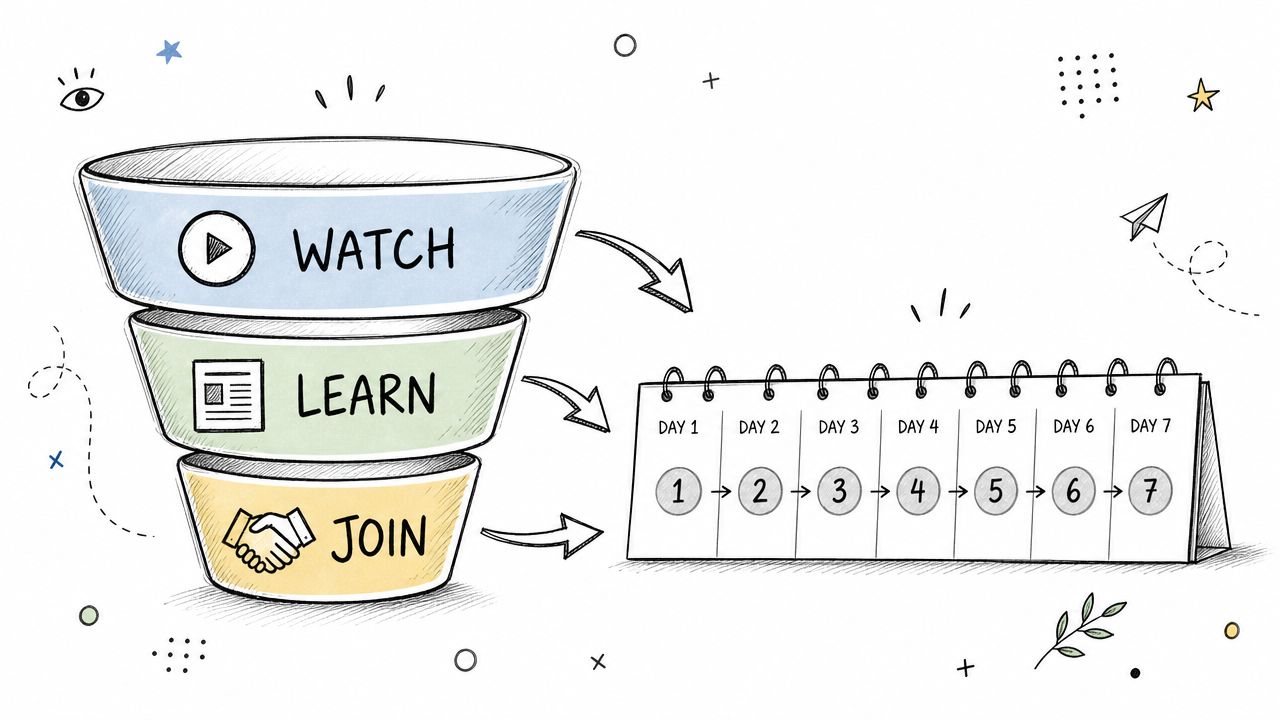
Not every follower is ready to act today. Some need to watch first, then explore, then decide. Churches often skip that process and jump straight from “Here's a sermon clip” to “Volunteer now.” That can work for committed members, but it usually misses newer people.
Sequential CTAs solve that by giving your audience a path instead of a single leap.
Build a weekly progression
A simple church funnel might look like this across one week:
- Awareness: Watch this reel from Sunday's message
- Consideration: Read more about our church or beliefs
- Connection: Join a small group or submit a prayer request
- Commitment: Attend service or sign up for an event
ChurchSocial.ai's drag-and-drop calendar is ideal for this because you can see the sequence, not just the individual posts. Planning Center and church calendar integrations also help because your CTAs can line up with real events and ministry opportunities, not generic content slots.
This approach respects where people are. It also helps staff and volunteers avoid pushing a high-friction ask too early.
Personalization matters here
One-size-fits-all CTAs leave a lot on the table. Personalized CTAs deliver 202% higher conversion rates than generic versions. For churches, that can mean changing the next step based on who the content serves. A local family might need “Plan your visit this Sunday.” A distant viewer might need “Watch the latest sermon.”
That doesn't require a massive tech stack. It starts with segment thinking:
- newcomer vs member
- local audience vs wider online audience
- volunteer-ready vs still exploring
- event interest vs spiritual care interest
A church's CTA funnel works better when each step answers one question clearly: what should this person do next, given what they already know?
ChurchSocial.ai makes that practical because the same sermon or event campaign can be adapted into several next-step options and placed in sequence across the week.
6. Repurpose Sermon Content Into Multiple Micro-CTAs Throughout the Week
Most churches squeeze one or two posts out of a sermon and move on. That leaves a lot of useful content untouched. A single message often contains several angles, several emotional moments, and several audience-specific entry points.
ChurchSocial.ai is built for that exact problem. It can turn sermon clips into reels, generate captions and blogs from transcripts, and help your team create matching graphics and carousels without starting from scratch every day.
One sermon, many next steps
The strongest repurposing plans don't repeat the same CTA over and over. They spread smaller asks across the week so the audience gets fresh entry points.
A realistic pattern might be:
- Monday: a reel with “Watch this moment again”
- Wednesday: a transcript-based blog with “Read the full reflection”
- Friday: a devotional carousel with “Share this with someone who needs it”
- Saturday: an invite post with “Join us tomorrow”
That's manageable because the sermon is already the source material. ChurchSocial.ai's guide on how churches can repurpose content with AI shows how to turn one message into a broader publishing workflow.
Avoid repetition fatigue
Repurposing doesn't mean posting the same thing in five formats. It means changing the angle while keeping the message coherent.
Use these filters when you create micro-CTAs:
- Theme filter: pull one clip on hope, another on action, another on prayer
- Audience filter: write one post for members, another for visitors
- Format filter: rotate reels, graphics, carousels, and text-based captions
- Response filter: vary between watch, read, share, attend, and reply
A church social feed feels stronger when followers can respond in different ways throughout the week. That variety is one of the most practical call to action best practices for ministry teams with limited time. It keeps the content calendar active without forcing your team to invent brand-new ideas every day.
7. Leverage Event Integration for Automated, Timely Event CTAs
Event promotion usually breaks down in predictable ways. The event gets added to Planning Center or another calendar. Staff assumes social will cover it. Social assumes the ministry lead will send details. Then promotion starts late, the messaging is inconsistent, and reminders show up after people have already made other plans.
ChurchSocial.ai removes a lot of that friction by integrating with Planning Center and other church calendars so event content can start from the event data itself.
Let the calendar trigger the campaign
When your event schedule is connected to your content workflow, you don't have to rebuild every CTA manually. The team can create an event once, then generate a sequence of promotional content around it. That's especially helpful for recurring ministry rhythms, seasonal outreach, conferences, youth events, and holiday services.
A better event CTA sequence usually includes:
- early awareness posts
- mid-cycle explanation posts
- deadline or reminder posts
- final service-time or attendance prompts
This protects churches from two common mistakes. The first is promoting too late. The second is posting the same “Don't forget” graphic again and again with no new value.
Keep automation under human review
Automation is useful, but event CTAs still need ministry judgment. A VBS registration ask should sound different from a prayer night invite. A campus-specific event should reflect that campus. A church-wide event should keep the brand consistent while allowing local details where needed.
That matters even more as teams experiment with dynamic content. Recent 2025 data says AI-powered CTAs that adapt based on behavior increase click-through rates by 27%, while many organizations still struggle with implementation and privacy questions. Churches should take the lesson without overcomplicating it. Use AI to speed drafting and scheduling. Keep human oversight on tone, theology, and privacy.
Automation should handle repetition. Staff and volunteers should handle discernment.
With ChurchSocial.ai, the practical win is simple: your team can connect the calendar, generate event assets faster, and keep promotion timely without living inside a spreadsheet.
8. Create Consistent CTA Branding and Testing Framework for Long-Term Optimization
A church's CTA strategy usually starts to drift in small ways. A volunteer writes “Sign up.” Another writes “Join us.” A designer changes colors for one event, then a different team member swaps the button style the next week. None of that breaks a campaign on its own, but over time it makes your asks feel less familiar and harder to recognize at a glance.
ChurchSocial.ai helps teams standardize those decisions inside one workflow. Instead of relying on memory, your team can build repeatable CTA patterns into templates, graphics, captions, and publishing steps.
Define a few CTA categories and assign clear rules
Start small. Four CTA categories are enough for many churches:
- Attend: service invites, event attendance, plan-a-visit posts
- Join: groups, volunteering, classes, teams
- Give: generosity campaigns and project support
- Learn: sermon clips, blogs, discussion guides, belief pages
Then set the rules for each category:
- brand colors
- button or text placement
- caption voice
- level of directness
- destination page or reply path
This saves time, but the bigger gain is clarity. Volunteers no longer have to guess how a giving ask should look compared with a group signup ask.
Build the framework inside the tool, not in a forgotten document
Style guides often fail because they live in a PDF no one checks before publishing. Put the framework where the work happens. In ChurchSocial.ai, that means creating reusable templates, naming conventions, and approval habits your team can follow every week.
For example, a church might decide that every "Attend" CTA uses one color treatment, one headline format, and one final line in the caption. Every "Join" CTA might use warmer language and point to a ministry leader or signup page. The point is not rigid sameness. The point is making each CTA type instantly recognizable while keeping room for ministry context.
Test one variable at a time
Consistency matters. Testing matters too.
The mistake is changing everything at once, then learning nothing. If one post uses a new design, new wording, and a different destination page, your team cannot tell what caused the result. Use ChurchSocial.ai to keep the template stable and test one variable at a time, such as:
- button text
- first caption line
- image layout
- CTA placement in the caption
- follow-up timing
A simple review rhythm works well:
- Monthly: compare results by CTA category
- Quarterly: revise wording or visuals based on recurring patterns
- Seasonally: adjust templates for Easter, Christmas, summer events, and ministry launches
- During onboarding: train new volunteers before they publish live posts
Church teams often struggle with phrasing because every congregation responds to different language. A testing framework gives volunteers a starting point, reduces random variation, and makes improvement possible over time.
The long-term value is practical. Your church gets a branded CTA system that feels familiar to your audience, easier training for volunteers, and cleaner performance data for future decisions.
8-Point CTA Best Practices Comparison
| Strategy | 🔄 Implementation complexity | ⚡ Resource requirements | 📊⭐ Expected outcomes | 💡 Ideal use cases | ⭐ Key advantages |
|---|---|---|---|---|---|
| Create Urgency-Driven CTAs with Sermon-Linked Timing | Medium, set up transcript/video uploads and scheduling | Low–Medium, sermon media + calendar integration | High short-term conversion spikes (registrations, giving) | Time-sensitive campaigns, stewardship, last-minute signups | Capitalizes on engagement peaks; automates CTA timing |
| Use Multi-Platform CTA Customization with One-Click Publishing | Medium–High, template & platform rules setup | Medium, graphics/templates + platform-specific formats | Strong cross-platform lift (40–60% reported) | Multi-channel launches, simultaneous platform campaigns | Saves reposting time; platform-optimized CTAs for each channel |
| Implement Value-First CTAs Using AI-Generated Supporting Content | Medium, content workflow and quality checks | Medium–High, produce/approve supporting assets | Slower immediate conversions; stronger long-term trust & SEO | Nurture sequences, list building, educational resources | Builds credibility; multiplies conversion touchpoints from one sermon |
| Optimize CTA Placement and Frequency Using Calendar-Based Testing | Medium, design tests and monitor analytics | Low–Medium, time for A/B tests and analysis | Measurable performance gains; needs 4–8 weeks for significance | Improving timing/wording, data-driven optimization | Removes guesswork; reveals best timing, placement, and messaging |
| Build Sequential CTAs That Guide Audiences Through Engagement Funnel | High, map funnels and schedule sequences | Medium, audience segments + calendar management | Higher lifecycle conversion across stages; slower ramp | Multi-week nurturing, new-attendee journeys, follow-up flows | Guides progression; reduces CTA fatigue and improves conversions |
| Repurpose Sermon Content Into Multiple Micro-CTAs Throughout Week | Low–Medium, clip extraction and batch scheduling | Medium, quality recordings/transcripts and thumbnails | More weekly touchpoints; extended reach and engagement | Small teams needing more content from single message | Multiplies content output; extends sermon's lifespan with minimal effort |
| Leverage Event Integration for Automated, Timely Event CTAs | Low–Medium, Planning Center sync and audit | Low (after setup), calendar accuracy required | Increased event attendance; fewer missed promos | Event promotion (VBS, holidays, registration-driven events) | Auto-generated, timed CTAs; audience targeting reduces manual work |
| Create Consistent CTA Branding and Testing Framework for Long-Term Optimization | Medium, define framework, templates, and rules | Medium, brand kit, templates, team training | Improved recognition and sustained CTR increases over time | Organizations seeking brand consistency and scalable testing | Consistency enables clearer testing and stronger brand recall |
Your Next Action A Simple Checklist for Your Team
Transforming your church's social media starts with a clear, consistent, and actionable strategy. A good post gets attention. A good CTA turns that attention into attendance, response, and community participation. If your team has been posting regularly but seeing weak follow-through, the fix often isn't more content. It's better direction.
The strongest call to action best practices for churches are simple to recognize. Keep the ask singular. Tie it to real value. Match it to the platform. Put it where people will see it. Schedule it when the message is most relevant. Then test and improve without making the system so complicated that volunteers stop using it.
For your next volunteer meeting, use this short review:
- Is our CTA clear and singular?
- Is it tied to value for our community?
- Is it optimized for the platform it's on?
- Is it easy to find and click?
- Is it scheduled at the right time?
That kind of checklist sounds basic, but basic systems are what keep church communication healthy week after week. Teams don't need a perfect content strategy. They need one they'll follow. Churches that use well-designed marketing checklists usually make fewer preventable mistakes because the decision process is visible, repeatable, and easier to hand off.
ChurchSocial.ai fits naturally into that workflow. It gives churches one place to turn sermons into reels, generate transcript-based posts and blogs, create graphics and carousels, schedule content in a drag-and-drop calendar, and connect event planning through Planning Center and other calendars. That combination is useful because CTA quality doesn't depend on copy alone. It depends on whether your team can plan, create, schedule, and repeat the process consistently.
If you want better social results, don't start by asking how to get more reach. Start by asking what you want people to do next, and whether your content makes that step obvious. That question will improve your posts faster than another round of random design tweaks.
If your church needs a simpler way to turn sermons, events, and weekly ministry rhythms into clear next steps, take a look at ChurchSocial.ai. It gives churches a practical workflow for creating content, scheduling posts, and building stronger CTAs without managing separate tools for clips, graphics, captions, and calendars.


