
If you're the person who got handed the church Instagram login because you're "good with computers," this is for you.
You're probably not just running social media. You're also helping with slides, answering texts from ministry leaders, chasing down event details, and trying to turn a full Sunday sermon into something people will stop and read mid-scroll.
That pressure is real. So is the temptation to post one graphic, type "Join us Sunday," and call it done.
A better option is the ai carousel maker workflow. It gives you a way to turn one sermon, one event, or one ministry idea into a clear, swipeable story that feels thoughtful without taking your whole evening.
Why AI Carousels Are a Game-Changer for Ministry
Most church volunteers don't have a design team behind them. They have a sermon doc, a phone full of half-finished ideas, and maybe an hour between work and rehearsal.
That matters because content format affects whether your message gets seen at all. Carousels significantly outperform single-image posts, driving 1.5-3x higher engagement rates according to PostNitro's carousel analytics guide. The reason is practical. A carousel gives people something to do. They pause, swipe, save, share, and comment.
Why the format fits ministry work
A single image can announce something. A carousel can teach, invite, and guide.
That makes it useful for church communication, where you're rarely posting just to entertain. You're helping people remember a scripture, understand a sermon point, register for an event, or feel confident enough to visit.
Three church-specific strengths stand out:
- It slows people down: A swipe sequence creates a natural path through your message.
- It gives context: You can explain the why behind an event, not just the date and time.
- It stretches one idea further: A sermon takeaway can become several clear slides instead of one crowded graphic.
Practical rule: If your post needs more than one sentence of explanation, it probably wants to be a carousel.
Why volunteers should care
The biggest challenge in church communications usually isn't lack of ideas. It's lack of capacity.
Carousels help because they let one good idea do more work. Instead of posting a verse graphic on Monday, an event reminder on Wednesday, and a sermon quote on Friday, you can build one post that carries a stronger message from start to finish.
That doesn't mean every post should be a carousel. If you're posting a quick reminder, a candid moment, or a timely update, a simple image or reel may still be the better choice. If you're weighing those formats, this guide on reel vs carousel for church social media is worth reading.
What doesn't work
I've seen volunteers get excited about carousels and then make them too dense. They try to fit half the sermon manuscript into seven slides. People won't read that.
What works is simpler:
- One core idea: Not the whole message. The clearest takeaway.
- Short slide copy: One thought at a time.
- A real next step: Save this, share this, register, pray, read, join.
A good ai carousel maker doesn't replace discernment. It removes the design bottleneck so you can focus on the message.
From Sermon to Social Story
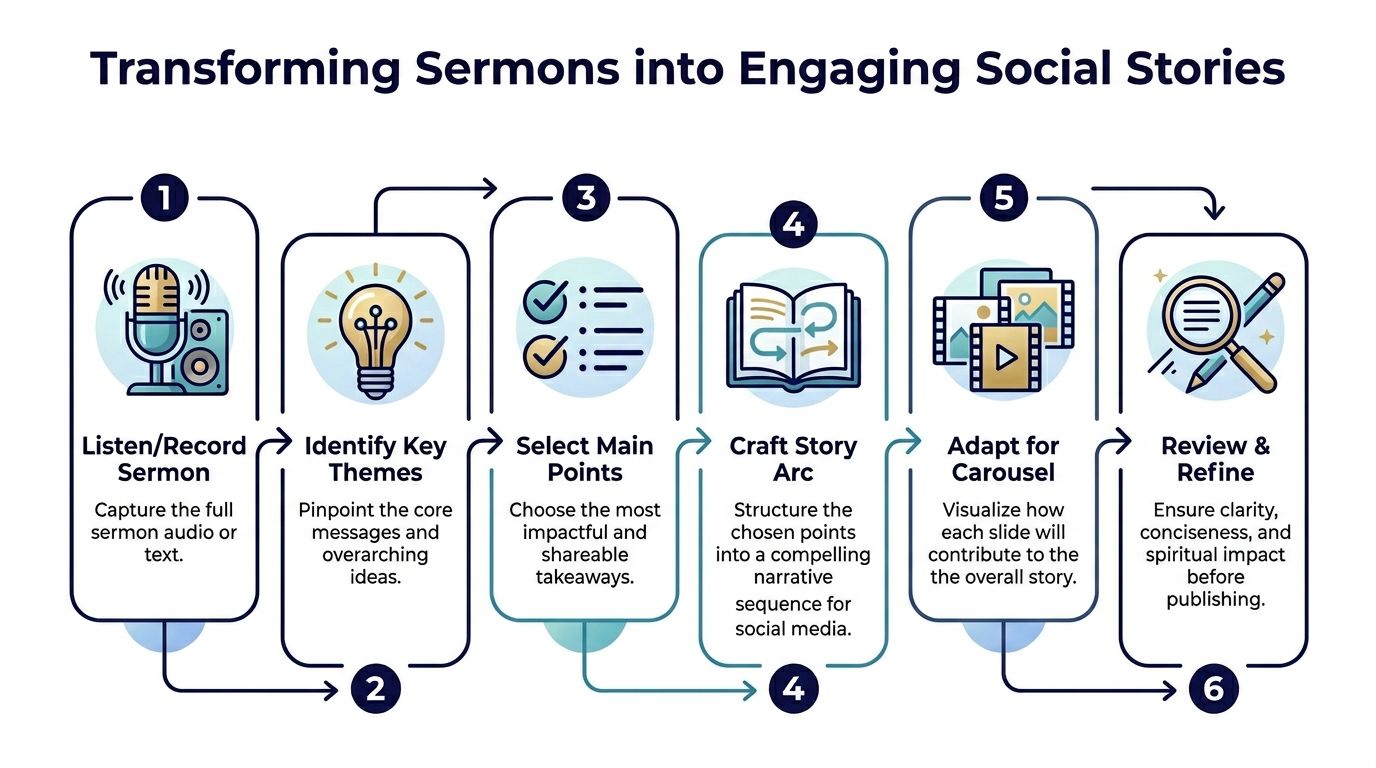
A strong carousel doesn't start with design. It starts with deciding what story the slides need to tell.
Most sermons already have structure. There's a tension, a truth, an explanation, and a response. Your job isn't to shrink a sermon word-for-word. It's to pull out the line people need to remember on Tuesday.
Find the one takeaway worth swiping through
Start with one question.
What do you want someone to remember after they close the app?
Not five things. One thing.
That could be:
- A sermon truth: God meets people in ordinary faithfulness.
- A scripture insight: This passage isn't just a comfort verse. It's a call to trust.
- An event invitation: This night isn't just another meeting. It's a place to belong.
Once you have that, the carousel gets easier to shape.
Use a simple story arc
AI carousel tools often build around a familiar content structure. According to PostNitro's guide to outperforming manual designs, these tools use natural language processing to extract key themes and suggest slide breakdowns, typically 6-10 slides, often with a hook slide, 1-2 steps per slide, and a final CTA slide. That same source notes that Instagram carousels can yield 3.1x more engagement and 1.4x wider reach than single images.
For church use, I usually simplify that into a tighter flow:
Hook
Lead with a sentence that creates recognition or curiosity.Tension
Name the struggle, question, or need.Truth
Put the main biblical insight in plain language.Support
Add one or two short supporting points.Response
Give a practical next step.CTA
Invite the reader to act.
That structure works because it respects how people scroll. They need a reason to keep swiping.
A sermon transcript is raw material. A carousel is edited ministry.
Example from a Sunday message
Say the sermon theme was trusting God in uncertainty.
A weak carousel would use six disconnected sermon quotes.
A stronger one might look like this:
- Slide 1: "When you can't see what's next, you can still trust who's leading."
- Slide 2: "Uncertainty doesn't mean God is absent."
- Slide 3: "Faith isn't having every answer."
- Slide 4: "Faith is taking the next faithful step."
- Slide 5: "What's one place you need to trust God this week?"
- Slide 6: "Save this and send it to someone who needs the reminder."
That feels coherent because it carries one idea from beginning to end.
Let AI help with the first draft
Here, AI becomes useful without taking over. A solid tool can scan a transcript, surface recurring themes, and suggest a cleaner slide sequence than most volunteers could produce from scratch in a short sitting.
If you're already thinking about how to turn sermons into multiple formats, this article on repurposing church content with AI is a helpful next read.
The point isn't to hand ministry language to a robot and hope for the best. It's to let the tool do the sorting so you can do the shepherding.
Creating Content with the ChurchSocial.ai Carousel Maker
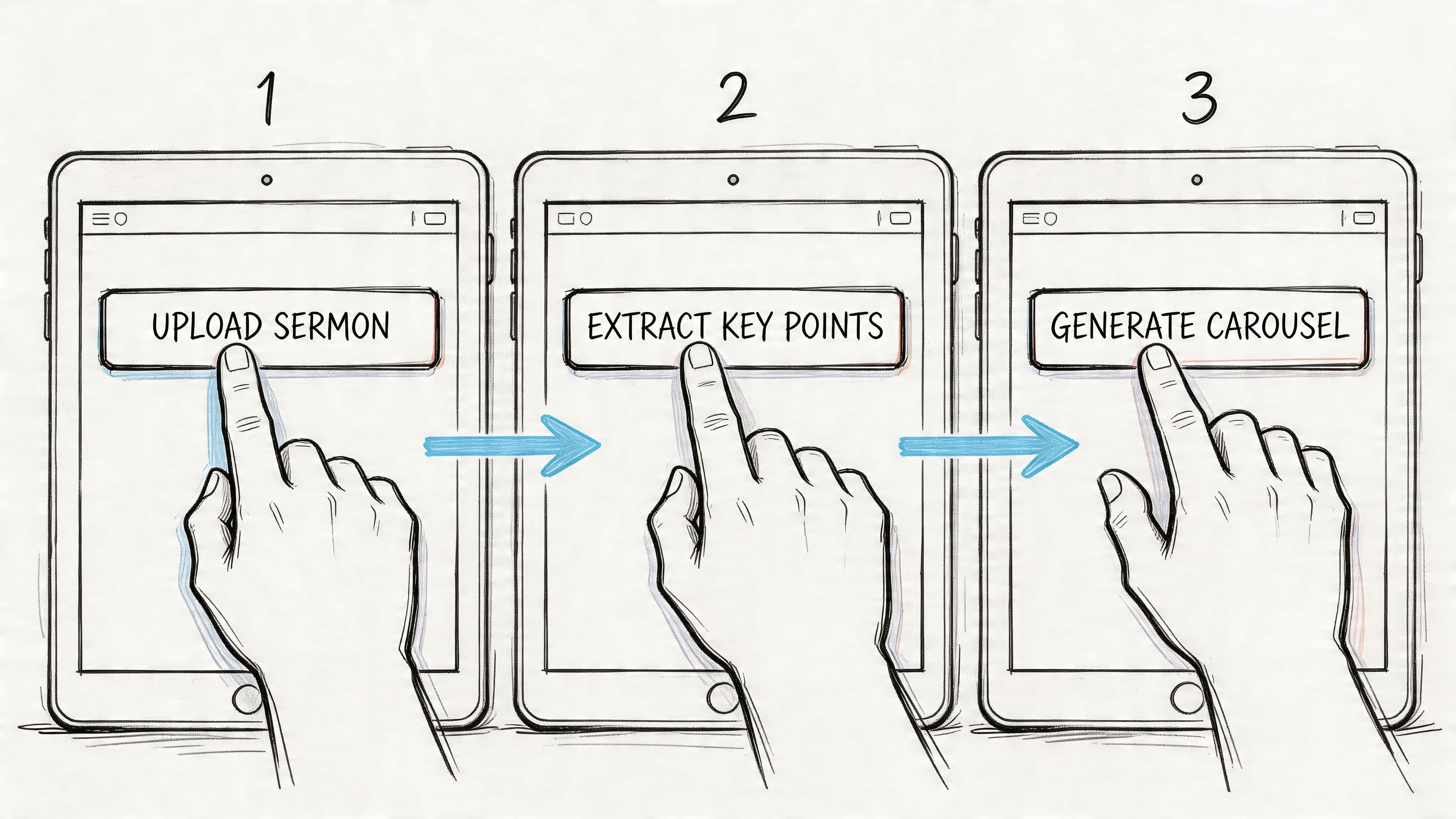
The actual build process should feel boring in the best way. You don't want drama. You want a repeatable system that helps you go from raw church content to a publish-ready carousel quickly.
That's where a focused workflow matters.
Start with the right source material
Don't open a blank canvas first. That's how volunteers waste time.
Begin with one of these:
- A sermon transcript: Best for teaching carousels, scripture reflections, and weekly takeaways.
- An event from your church calendar: Best for invitation posts and ministry reminders.
- A ministry note or outline: Best for announcements, volunteer recruitment, or discipleship prompts.
If your church already keeps event details organized in Planning Center or another church calendar, pulling from those assets is far easier than chasing people in a group chat for final details.
Generate the slide outline before you design
The smartest move is to ask the platform for slide-by-slide copy first.
That gives you a draft structure such as:
- slide one hook
- middle slides with key points
- final slide with a next action
This order matters. If you design first, you'll end up forcing words into layouts. If you shape the message first, the design supports the message.
A lot of general tools can help with Instagram posting. If you need a broader walkthrough on platform basics, AdStellar AI has a useful guide on how to create a carousel post on Instagram. For church teams, the difference is that your source material often starts with sermons and calendars, not product launches.
Edit for pastoral clarity
AI draft copy is a starting point, not a final draft.
Check three things before you approve any slide:
- Theology: Is the wording accurate to what was preached?
- Tone: Does it sound like your church, not a generic motivational account?
- Length: Can someone grasp the point in a quick swipe?
Here, volunteers add real value. The machine can summarize. It can't discern nuance like a pastor, ministry leader, or engaged church communicator can.
Don't ask AI to write your doctrine. Ask it to organize your draft so you can review it faster.
Choose visuals that support the message
Church accounts often fall into one of two visual traps.
The first is cheesy stock photos with forced smiles and no connection to the message. The second is text-heavy slides with no breathing room.
A better path is usually one of these:
| Visual approach | Best use | What to avoid |
|---|---|---|
| Abstract textures and shapes | Sermon takeaways, scripture reflections | Busy backgrounds behind long text |
| Photos of buildings, objects, stage details, open Bibles, paper notes | Event invites, worship recaps, ministry updates | Generic stock images with obvious marketing vibes |
| Clean text-forward template slides | Teaching content and quotes | Tiny paragraphs people can't read on mobile |
If you use AI image generation, keep prompts grounded and simple. Ask for environments, objects, textures, or symbolic imagery. In church content, images usually work better without people whenever possible, especially when the point is teaching rather than documenting a real moment.
Good prompt direction sounds like this:
- minimal church bulletin on a wooden table, soft natural light
- open Bible with notebook and pen, clean composition
- abstract light and shadow, calm neutral tones
- church exterior signage at dusk, no people
That gives you visuals that feel intentional without looking fake.
Apply your templates and brand kit
At this point consistency saves time.
Once your fonts, colors, logo treatments, and preferred layouts are loaded into your system, the ai carousel maker becomes much more useful. You stop redesigning every post from scratch. You start selecting from proven structures.
That matters because the efficiency gains in AI carousel tools are real. According to a report on Insta Posts' launch, early users cut carousel production from over two hours to under five minutes, which the report describes as a 10x reduction in manual effort for users creating branded carousels from one idea via Barchart's coverage of Insta Posts.
You still need review. You still need judgment. But you no longer need to build every slide one text box at a time.
Finish with a volunteer-friendly checklist
Before publishing, run through this:
Is slide one strong enough?
If it doesn't earn the swipe, the rest doesn't matter.Does each slide hold one idea?
Split crowded slides.Is the final slide actionable?
Tell people what to do next.Do the visuals match the message?
Clean, readable, on-brand.Would a first-time guest understand it?
Remove insider language where needed.
The best workflow isn't the one with the most features. It's the one a volunteer can repeat next week without dread.
Carousel Ideas for Every Aspect of Church Life
A lot of volunteers stall because they don't need more theory. They need examples.
Here are four formats that work well in church communications. None of them require a graphic design background. They just require a clear message and a repeatable pattern.
Worship recap
This works well on Sunday afternoon or Monday.
Instead of posting a single quote from the sermon, build a short recap that helps people revisit what they heard.
Example flow
Slide one hooks attention with the main takeaway. Slides two through four carry the key idea, one supporting scripture insight, and one practical response. Slide five asks the reader to save or share the post, or to listen back to the full message.
Event promotion
Most event graphics fail because they start with details. People need the invitation before they need the schedule.
Lead with the reason the event matters. Then give the basics.
If your event carousel answers only what, when, and where, you've made an announcement. If it also answers why, you've made an invitation.
Scripture deep dive
This is one of the best uses of an ai carousel maker for churches.
Pick one verse or short passage. Use the slides to slow people down and help them reflect. One slide can hold the passage. Another can explain context. Another can ask a discussion question. The final slide can invite prayer or journaling.
Weekly announcements
These work best when you don't cram every ministry update into one giant slide.
Break announcements into digestible pieces. Highlight one item per slide, and end with a slide that tells people where to find the full calendar.
Church Carousel Micro-Templates
| Carousel Type | Slide 1 (Hook) | Slide 2-4 (Body) | Slide 5 (CTA) |
|---|---|---|---|
| Worship Recap | Main sermon takeaway in plain language | Key point, scripture reminder, practical response | Save this post or listen to the full sermon |
| Event Promotion | Why this event matters | What it is, who it's for, when and where | Register, invite a friend, or learn more |
| Scripture Deep Dive | One verse or one big question | Context, interpretation, reflection prompt | Comment, save, or pray through it this week |
| Weekly Announcement | "Here's what's happening this week" | One ministry update per slide | Visit the church calendar or share with someone |
One more note. Different ministries can use different voices within the same church brand. Youth may sound warmer and quicker. Women's ministry may be more reflective. Missions may be more story-driven. That's fine. The structure can stay consistent even when the tone shifts.
Publishing Your Carousel for Community Growth
Making the carousel isn't the finish line. Publishing is where ministry intent meets actual behavior.
A post can look polished and still go nowhere if the caption is vague, the CTA is weak, and nobody on the team checks what happened afterward.
Write captions that complete the message
Your caption shouldn't repeat every slide.
Use it to do one of three things:
- Add context: Explain why the message matters now.
- Invite response: Ask a simple question people can answer.
- Direct action: Point people to sign up, attend, listen, or pray.
Short captions often work well when the slides do the heavy lifting. Longer captions can work when the post needs pastoral warmth or event detail. Either way, don't bury the invitation.
Examples of useful church CTAs:
- Save this for later this week.
- Share this with someone who needs encouragement.
- Join us this Sunday.
- Register through the link in bio.
- Send this to your small group.
Schedule with ministry rhythm in mind
Church content works better when it matches the life of the church.
A sermon carousel posted soon after Sunday can reinforce the message while it's still fresh. An event carousel should go out early enough for planning, then again near the deadline with a different angle. A scripture reflection might work midweek when people need encouragement.
A drag-and-drop calendar helps by allowing you to see the full week at a glance and make sure sermons, events, reels, announcements, and reminders aren't competing with each other.
Track what actually helped
A lot of teams stop at "people liked it." That's not enough.
The bigger issue with AI-generated carousels isn't creation. It's iteration. According to a cited summary in a YouTube research note, a 2026 Socialinsider study found that 70% of AI carousels underperform without analytics-driven iteration, which is why churches need to connect engagement to ministry actions such as event sign-ups and other meaningful outcomes as referenced in this research note.
That means you should review posts like this:
| What to review | Why it matters |
|---|---|
| Saves and shares | Shows whether people found the post worth keeping or passing along |
| Comments and replies | Reveals whether the message sparked conversation |
| Clicks or registrations | Tells you if the post moved people toward action |
| Topic patterns | Helps you spot which themes your church responds to most |
Good church analytics don't ask, "Did this go viral?" They ask, "Did this help people take a next step?"
When you measure that way, social media stops feeling like busywork. It becomes part of how your church communicates care, clarity, and invitation.
Empowering Your Ministry with Smarter Social Media
The best use of an ai carousel maker isn't replacing a volunteer. It's protecting a volunteer from burnout.
Church social media gets heavy when every post starts from scratch. It gets lighter when you can turn sermons, events, and ministry rhythms into repeatable workflows that still feel thoughtful and faithful.
You don't need to be a designer to do this well. You need a clear message, a simple process, and tools that respect the way churches work. If you want a broader look at that shift, this guide on AI for churches is a strong starting point.
The heart behind the work still matters most. AI can't pastor people. It can't pray with someone after service. It can't know the tone your church needs in a hard week.
What it can do is remove friction. And when the friction goes down, consistency goes up. That gives your team more margin to care for people instead of fighting with layouts, captions, and deadlines.
Your Questions on AI Carousels Answered
Do I need design experience to use an ai carousel maker
No. That's one reason this matters for churches. A niche research summary notes that U.S. church social media usage grew 25% in 2025, with 68% of small congregations relying on volunteers who lack design skills, while many general AI tools still don't include church-specific templates or safeguards according to ZenCreator's content gap analysis.
Will AI make our content sound generic
It can, if you publish the first draft untouched. Keep a human review step for theology, tone, and ministry context.
Can multiple staff and volunteers collaborate
Yes, if your workflow is organized. Shared calendars, saved templates, and approval habits matter more than fancy terminology.
Should I learn other AI tools too
It's helpful to understand the broader context. If you want a broad roundup outside the church niche, TimeSkip's overview of best AI tools for content creators gives useful context.
How do we protect our church's voice
Build from your own sermons, event details, and ministry language. AI should shape your source material, not replace it.
If you're ready to spend less time wrestling with graphics and more time helping your church communicate clearly, take a look at ChurchSocial.ai. It gives church teams one place to turn sermons into social content, build carousels and graphics, create reels, organize posts on a simple calendar, and connect ministry communication with tools like Planning Center.


