

Most churches don't break down because people stop caring. They break down because too many caring people are trying to coordinate ministry through texts, spreadsheets, Sunday hallway conversations, and memory.
That's especially true with volunteers. The nursery lead needs coverage. The greeter team needs confirmations. The worship team needs a clean schedule. The social media volunteer is still waiting to hear whether this week's event is happening and what time to promote it. Nobody is lazy. Everybody is busy.
Church volunteer management software matters because it reduces friction around ministry. Used well, it doesn't turn church life into a corporate process. It gives your people a dependable system so they can spend less energy on logistics and more energy serving.
The Sunday Morning Scramble You Know Too Well
You know the rhythm. Saturday night is quiet until someone texts that they're sick. Early Sunday morning, another volunteer can't make it. A ministry lead opens an old spreadsheet on their phone, realizes it isn't current, and starts sending messages to three different group chats. By the time first service starts, somebody has filled the gap, but everyone arrived a little more stressed than they should have.
That kind of scramble feels normal in a lot of churches. It shouldn't.
The actual problem usually isn't a lack of willing people. It's a lack of shared visibility. When schedules live in one person's notebook, or in a spreadsheet only one admin understands, the whole system depends on heroic effort. Heroic effort works for a while. It doesn't scale, and it burns out the people you depend on most.
Where the stress actually comes from
A few patterns show up again and again:
- Last-minute substitutions: Nobody knows who is available, qualified, and already serving elsewhere.
- Confusing communication: One volunteer checks email, another responds to text, and someone else only sees the church app.
- Unclear ownership: Staff assume a ministry leader handled it. The ministry leader thought the office did.
- Volunteer fatigue: Faithful people get asked too often because they're the first names everyone remembers.
Practical rule: If your volunteer system only works when one highly organized person is in the building, you don't have a system. You have a bottleneck.
This is why software has become a practical ministry decision, not just a tech upgrade. The broader church operations category keeps growing. A market report valued the global Church Management Software market at USD 285.37 million in 2026 and projected USD 301.06 million in 2027, or about 5.5% year-over-year growth, which points to continued demand for tools that coordinate people and operations across churches (church management software market projection).
That doesn't mean every church needs a giant platform tomorrow. It does mean churches everywhere are trying to solve the same operational pain.
If your team is still recruiting and replacing volunteers in the middle of chaos, it's worth tightening both ends of the process. Better scheduling helps retention, and stronger recruiting gives scheduling room to breathe. A practical place to start is this guide on church volunteer recruitment.
What Exactly Is Church Volunteer Management Software
Church volunteer management software is a central operating system for serving teams. It helps churches organize who serves, when they serve, how they're contacted, and what information leaders need to keep ministries running smoothly.
It's more than a calendar.
A basic calendar tells you that children's ministry needs people on Sunday. Good volunteer software helps you assign the right people, notify them, let them accept or decline, track who served, and reduce the amount of manual follow-up your staff has to do.
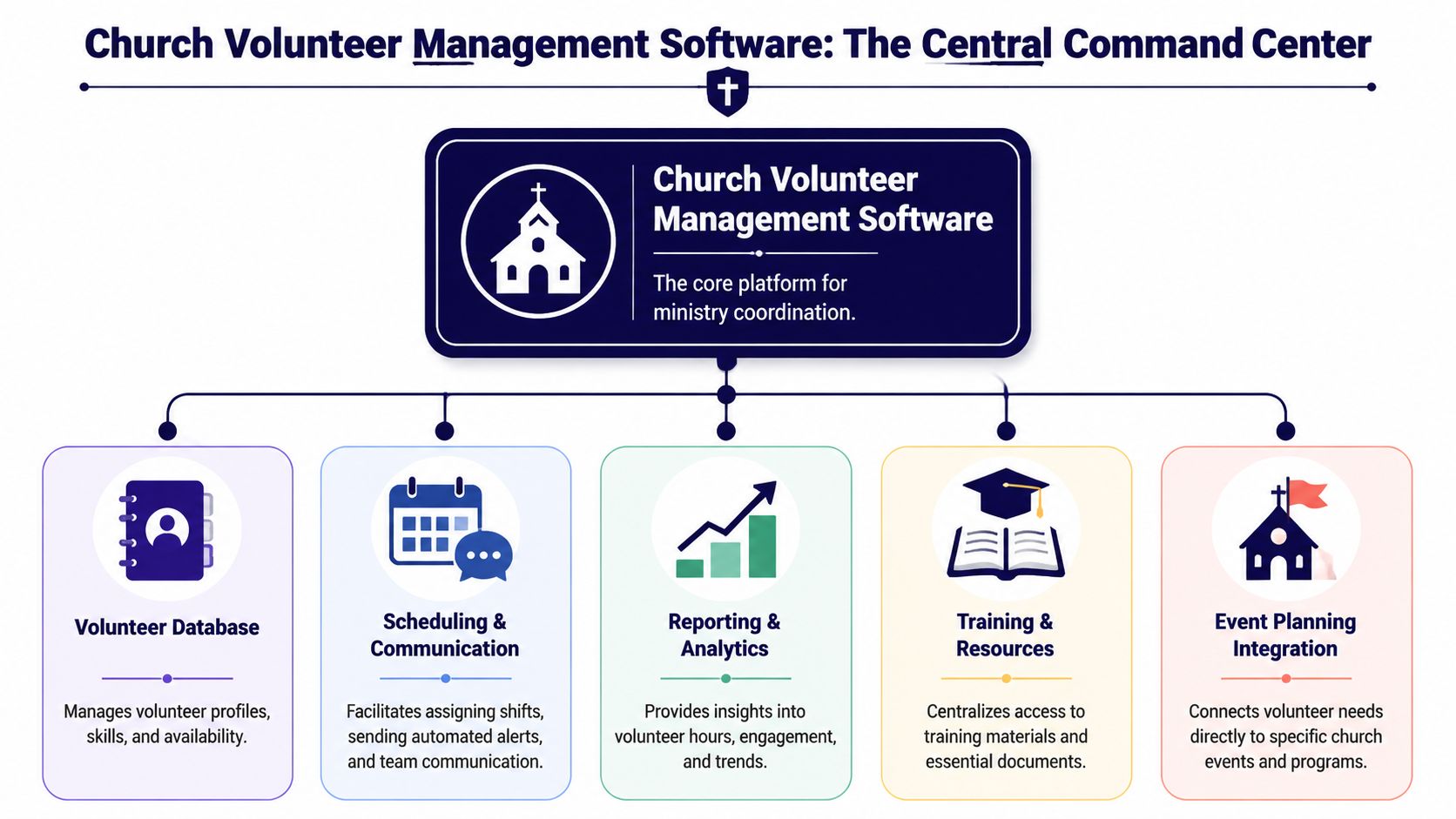
The core functions you should expect
Foundational feature sets in this category consistently include volunteer scheduling, centralized communication, self-service sign-ups, automated reminders, and reporting, all aimed at reducing paperwork and improving coordination (ParishSOFT feature guide for church volunteer management software).
In real church life, those functions look like this:
- Scheduling: You can build service teams, assign recurring roles, and avoid double-booking people who serve in multiple ministries.
- Centralized communication: Team messages go out from one place instead of being scattered across personal text threads and email chains.
- Self-service sign-ups: Volunteers can claim open opportunities on their own time instead of waiting for an office admin to update a sheet.
- Automated reminders: The system prompts people before they serve, which cuts down on forgotten shifts and Saturday-night chasing.
- Reporting: Leaders can see patterns. Which teams are always short? Who serves often? Which roles are hard to fill?
What this looks like on an ordinary week
Say your church is planning a midweek meal ministry, a Sunday welcome team rotation, and a youth event on the same weekend. Without a system, each ministry leader may build their own list, send their own reminders, and discover conflicts too late.
With a good platform, volunteers update their availability once. Leaders can see open positions. Reminders go out automatically. A report shows which ministry keeps relying on the same few people.
That matters because ministry coordination is also people care. When volunteers know where they're serving, who they're serving with, and what's expected, they're more likely to feel confident and useful instead of confused and overextended.
Clear systems don't remove the human side of ministry. They protect it by removing avoidable confusion.
What it is not
It's not a magic fix for weak leadership. If role descriptions are vague, if no one trains new people, or if expectations change every week, software won't solve that.
It also isn't just for Sunday roles. Churches often get the most value when they use these tools beyond greeters and nursery teams. Event support, setup crews, meal trains, communications volunteers, and digital ministry teams all benefit from the same clarity.
That last group often gets overlooked. A social media volunteer still needs schedules, deadlines, approvals, event details, and a consistent communication path. If you don't build those into your volunteer system, digital ministry becomes one more last-minute scramble.
Key Benefits for Every Role in Your Church
Church volunteer management software matters for different reasons at different levels of the church. Senior leaders look for fewer preventable problems. Ministry coordinators need less manual follow-up. Volunteers need clarity they can trust.
That is why a long feature list rarely settles the decision. Churches adopt tools when each role can see a clear win in daily ministry.

For pastors and executive leaders
Pastors rarely ask for another platform. They ask for fewer Saturday night surprises and fewer Sunday morning staffing gaps.
A healthy volunteer system gives leaders a clearer view of where ministry strain is building. If one team is always short-handed, or the same reliable people keep filling last-minute needs, that pattern becomes visible early enough to address. The result is better care for volunteers and better stewardship of staff time.
It also improves the quality of leadership conversations. Instead of asking whether a slot got filled, pastors can ask why a ministry keeps struggling to recruit, retain, or prepare people for that role.
For ministry coordinators and admins
This is usually where the return shows up first.
Coordinators and admins carry a surprising amount of invisible work. They answer texts about arrival times, fix schedule changes, resend reminders, and patch over confusion before anyone else notices. Good software reduces that repetitive load so they can spend more time training volunteers, checking in with people, and improving the ministry instead of constantly rescuing it.
A few practical gains tend to matter most:
- Less rework: One schedule change updates the right people in one place.
- Better visibility: Availability, notes, and assignments stay attached to the volunteer record.
- Cleaner communication: Leaders contact the right team quickly without rebuilding lists every week.
- Stronger planning: Gaps show up earlier, which gives ministries time to solve the right problem instead of rushing into coverage mode.
Churches weighing volunteer tools against broader church systems should also review a church management software comparison for ministry workflows. The right fit depends on how tightly volunteer scheduling needs to connect with the rest of your church operations.
For volunteers themselves
Volunteers do not experience software as an efficiency project. They experience it as a sign of whether the church respects their time.
People serve with more confidence when the basics are easy to find:
- Where they are serving
- When they should arrive
- Who else is on the team
- How to decline or request a swap
- What preparation they need before they show up
That clarity lowers friction for new volunteers and reduces fatigue for experienced ones. It helps serving feel organized instead of fragile.
The best volunteer systems reduce uncertainty so people can focus on ministry.
For the social media volunteer you may be overlooking
Digital ministry often gets treated like an extra task instead of a real volunteer role. That is a mistake.
A social media volunteer still needs deadlines, approvals, event details, sermon context, graphics, and a predictable handoff from the church calendar. Without that structure, the role becomes reactive. Posts go up late. Announcements get missed. The volunteer ends up guessing, waiting, or apologizing for things that were never clearly handed off in the first place.
Providing the right tools changes that. Put the role on the schedule. Connect it to ministry plans. Build a repeatable approval process. Then make sure the volunteer has a tool designed for church social media work itself. ChurchSocial.ai supports sermon-based content creation, reels, graphics, post scheduling, and calendar-based planning, including integrations with Planning Center and other church calendars. That gives a social media volunteer a real system for doing the work well, not just a reminder that they are assigned to it.
How to Choose the Right Software for Your Ministry
Most churches don't need the platform with the longest feature list. They need the one that fits their ministry rhythm.
That sounds obvious, but churches often buy software the way they buy office equipment. They compare features, look at price, and hope adoption takes care of itself. It rarely does. Volunteer software works when leaders choose based on workflow, not just capability.
A useful place to start is the basic fork in the road. Some churches need a dedicated volunteer tool. Others are better served by an all-in-one church system. Recent comparison content makes that trade-off plain: the right choice depends on whether your church needs deep volunteer scheduling or broader ties to member records, communication, and giving (comparison of dedicated volunteer tools and all-in-one church systems).
Start with your ministry realities
Ask practical questions before you look at demos:
- Who will use it weekly
- Which ministry creates the most scheduling pain
- Whether volunteers will log in and respond
- How much coordination happens across campuses or departments
- Whether volunteer records need to connect tightly with wider church data
If your church mainly needs better recurring schedules for hospitality, kids, worship, and events, a dedicated volunteer platform may be enough.
If your team needs volunteer activity tied closely to member profiles, attendance, communication history, and giving records, an all-in-one church management system may be more sensible.
What to evaluate before you commit
| Evaluation Criteria | What to Look For | Your Notes |
|---|---|---|
| Ease of Use | Simple setup, clear volunteer experience, easy mobile access, minimal training burden | |
| Fit for Your Workflow | Strong recurring scheduling, event-based assignments, role tracking, communication flow | |
| Integration Needs | Works with your calendar, ChMS, or ministry tools already in place | |
| Reporting | Useful visibility into schedules, service patterns, and team gaps | |
| Administrative Load | Reduces duplicate entry and manual follow-up instead of adding more work | |
| Volunteer Experience | Easy sign-up, reminders, confirmations, and schedule changes | |
| Budget Clarity | Transparent pricing, clear limits, no surprises as teams grow |
Dedicated tool or all-in-one system
This decision trips up a lot of churches, so keep it grounded.
A dedicated volunteer platform often makes sense when your biggest pain is assigning people, handling recurring rotations, and keeping ministry leaders from chasing responses manually. It can be a strong fit for small churches that need simplicity or for ministries with specialized volunteer processes.
An all-in-one system usually makes sense when volunteer coordination needs to sit inside a broader people database. That can help multi-site teams, churches with complex follow-up workflows, or staff who don't want records spread across separate systems.
Buy for the process your team repeats every week, not the edge case that only comes up twice a year.
If you're comparing systems more broadly, this guide to church management software comparison can help you sort volunteer needs from wider church operations needs.
What usually does not work
The wrong choice often looks like one of these:
- Too much software for the team you have: Volunteers ignore it because it feels heavy.
- Too little structure for the ministry you run: The platform can't handle recurring complexity, so leaders fall back to side spreadsheets.
- No implementation plan: Staff buy the tool but never define ownership, training, or timeline.
- A poor mobile experience: Volunteers won't keep checking a system that feels clunky on a phone.
Churches don't fail at software because they care too little. They fail because they choose based on aspiration instead of current habits. Pick the system your people can use next month.
Connecting Your Software for Greater Kingdom Impact
Volunteer software does its first job when it helps you staff ministries. It does a better job when it connects with the rest of your church systems.
That's when coordination starts to feel coherent instead of fragmented. Events, service plans, communications, and volunteer needs stop living in separate silos. People know what's happening because the systems agree with each other.
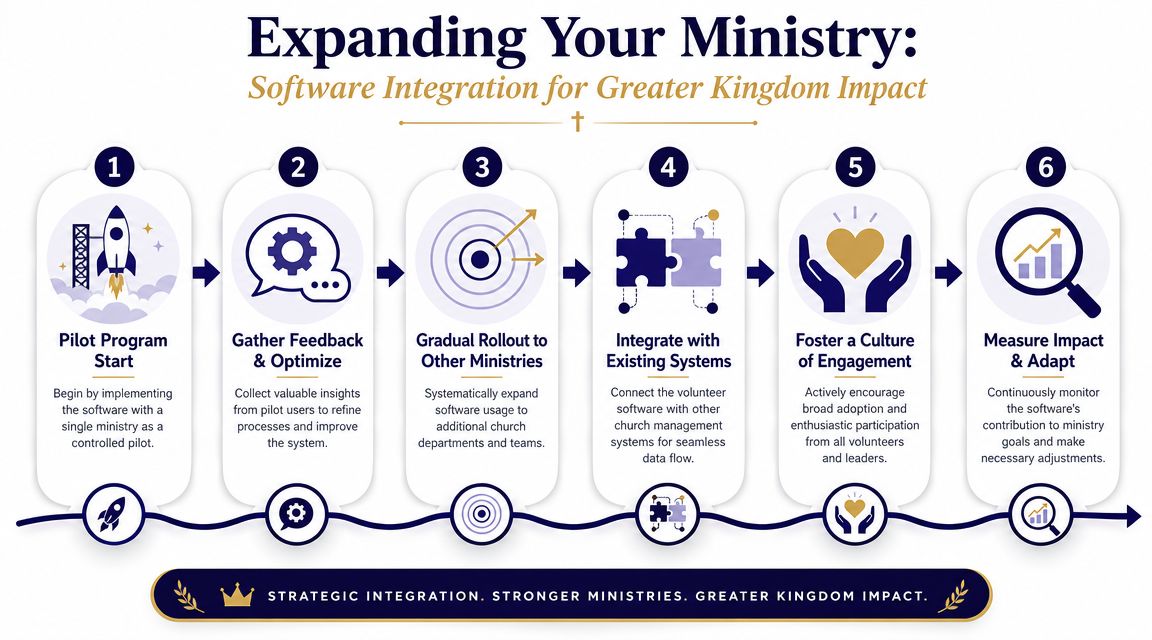
Start with one ministry, not the whole church
The cleanest rollouts usually begin with one team. Pick a ministry that has recurring volunteer needs and a leader who will use the platform. Children's ministry, hospitality, and production teams are common starting points.
Run the pilot long enough to surface friction. Where do people get stuck? Which notifications help? What information should live in the volunteer profile? Once those answers get clearer, expand to the next ministry.
A staged rollout protects your team from the common mistake of trying to standardize everything at once.
Integration is where the real leverage shows up
A volunteer platform becomes more useful when it connects to the calendar and planning tools your church already trusts. If your event lives in one place but the volunteer ask lives somewhere else, someone has to manually reconcile the difference.
That's why calendar integrations matter. If your church plans an outreach night, a women's event, or a community meal through Planning Center or another central calendar, volunteer needs can align with the actual event record instead of depending on copied details and memory.
For churches already thinking about connected workflows, this overview of Planning Center integrations is a practical next step.
Good integration removes duplicate typing. Great integration removes duplicate thinking.
The missing link for communications volunteers
Here's where a lot of churches still have a gap.
You schedule volunteers for an event. You assign setup, hospitality, and follow-up. But your social media volunteer still has to ask for the title, graphic, description, timing, and signup details. Internal planning is organized. External promotion is still improvised.
A better workflow connects those dots. If your event calendar is already feeding your ministry operations, your communications team should be able to build from the same source. That's especially important for volunteers, because they often serve in short windows and need clear inputs fast.
In practice, that can look like this:
- Event appears on the church calendar
- Volunteer roles are assigned through your staffing workflow
- Communications volunteer sees the same event details
- Promotional content gets built from real ministry information, not a last-minute text
That's one reason churches often pair internal systems with a specialized digital ministry tool. When your social team can turn sermon transcripts into posts, create reels from teaching, build event graphics, and plan content on a drag-and-drop calendar that also connects with church scheduling tools, your communications volunteer stops functioning like a scavenger hunter and starts functioning like a minister with a system.
Real-World Examples and Red Flags to Avoid
The clearest way to judge software is to watch what happens after the demo.
One church I've seen followed a simple pattern. They started with a single ministry, cleaned up role descriptions, and used the software to centralize reminders and confirmations. Nothing about it was flashy. The win was that leaders stopped guessing who had seen the schedule, and volunteers stopped getting surprised by assignments they had forgotten.
Another church made the opposite mistake. They bought a platform with layers of options their volunteers never asked for. It looked impressive in training. In practice, leaders kept using private text threads because they were faster, volunteers ignored the system, and the church ended up paying for a tool no one had adopted.
What healthy adoption tends to look like
You can usually spot a good fit quickly:
- Leaders stop maintaining backup spreadsheets: The system becomes the definitive source of truth.
- Volunteers respond without coaching every week: They understand how to confirm, decline, or check details on their own.
- Staff spend less time translating information: One update reaches the right people in a usable format.
Red flags worth taking seriously
Before you commit, pay attention to warning signs that often predict frustration later.
- Pricing that gets murky fast: If you can't tell what you'll pay as more volunteers join, budgeting gets harder than it needs to be.
- A weak phone experience: Most volunteers won't manage schedules from a desktop.
- Feature overload in the demo: If the salesperson shows everything except the core workflow you need, that's a problem.
- No clear ownership on your side: Software with no internal champion usually drifts.
- Poor support during evaluation: If communication is slow before purchase, don't expect it to improve later.
- No easy way to handle schedule changes: Ministry life changes too often for rigid systems to work well.
Choose the tool your volunteers can use at their most distracted, not the one that looks impressive in a conference room.
Software should reduce the number of workarounds your church depends on. If it creates new ones, keep looking.
From Volunteer Management to Ministry Multiplication
The point of church volunteer management software isn't tighter administration for its own sake. It's better stewardship of people.
When churches organize volunteer systems well, they honor time, reduce confusion, and lower the stress that drains ministry leaders and faithful servants alike. That matters for the nursery coordinator, the greeter lead, the worship director, and the volunteer trying to run your church's Instagram account after work.
Good systems don't replace relationships. They make room for them. They remove repetitive friction so leaders can train, encourage, and disciple people instead of constantly patching holes in the schedule.
That's the shift worth aiming for. Not management alone, but multiplication. Build dependable workflows for your in-person ministry teams. Then equip your digital ministry volunteers with tools that help them plan ahead, create content from what God is already doing in your church, and communicate it clearly beyond Sunday.
If your church has a volunteer or small team managing social media, ChurchSocial.ai gives them a workflow built for church communications. They can turn sermon transcripts into social posts, blogs, and reels, create graphics and carousels with templates, manage everything in a drag-and-drop content calendar, and pull event context from tools like Planning Center so promotion stays aligned with ministry plans.


