

If you're the person posting for your church between answering emails, setting up slides, and helping with Sunday details, social media can feel like one more job that never stays done. You post the service time, remind people about Wednesday night, maybe share a verse, and then the week is gone.
That approach isn't failure. It's just what happens when a small church tries to communicate with limited time, limited help, and too many tools. The good news is that small church social media doesn't need a bigger team nearly as much as it needs a cleaner system. When you build around your sermon, choose the right channels, and use AI to handle the repetitive work, social media starts serving ministry instead of draining it.
Beyond Announcements Rethinking Your Social Media Purpose
Most church feeds start as digital bulletin boards. Service times. Potlucks. Registration links. Weather updates. All of that matters, but if that's all people see, your feed trains them to think of your church as a place that posts logistics instead of a community that speaks hope all week.
That shift matters because your social channels are often the first place someone encounters your church. They also become the easiest place for members to stay connected between Sundays. Social media works best when it extends pastoral presence, not when it only repeats the bulletin.
Stop treating the feed like a notice board
A lot of churches still center their efforts on Facebook, and that isn't surprising. Almost 85% of churches use Facebook as their primary online communication tool, with 84% of Protestant pastors reporting its use in 2017, while newer platforms like TikTok and Instagram see usage by approximately 13-16% of churches according to Capterra's church social media statistics. For a small church, that concentration can be helpful. It gives you permission to simplify.
The mistake isn't using Facebook. The mistake is using Facebook only to announce.
Use your feed for three ministry functions:
- Care for your current people: Share encouragement, reminders of truth, and stories that help members feel seen midweek.
- Welcome new people: Answer the questions visitors often have. What kind of church is this? Are there real families here? Will I know where to go?
- Keep the conversation going: Sunday shouldn't be the only moment your church communicates with clarity and warmth.
Social media isn't replacing in-person ministry. It's extending the voice of the church into the hours between gatherings.
A better goal than keeping up
A healthy goal for small church social media is simple: post content that helps people belong, believe, and take a next step. That mindset changes what you create. A sermon clip can encourage someone on Tuesday. A behind-the-scenes photo can make a guest feel less nervous before Sunday. A post about a baptism or youth night can remind members that God is active in your church right now.
If you want a useful outside perspective on building a repeatable content engine, SupaBird's guide to Twitter growth is worth reading, not because churches need to become Twitter brands, but because the discipline of creating consistent, audience-aware content translates well to ministry contexts too.
A practical church version of that mindset shows up in this look at social media as ministry. The core idea is straightforward. You don't need to be everywhere. You need to be present with purpose.
Build Your Content Plan in Under an Hour
A strong plan for small church social media should fit on one page. If it needs a strategy deck and a committee meeting every week, it won't survive contact with real church life.
For smaller churches with limited capacity, the clearest framework is also the most usable. For churches under 200 attendees, the recommended method is to choose exactly two platforms, typically Facebook and Instagram, and post at least three times per week using one Benefit post, one Community post, and one Invitation post according to Story & Stone's church social media strategy guide.
Here's what that looks like in practice.

Use three pillars and stop guessing
The reason this framework works is that each post has a job.
| Post type | What it does | Example |
|---|---|---|
| Benefit | Serves people directly | A short devotional thought, sermon takeaway, prayer prompt, or Scripture reflection |
| Community | Shows real church life | Volunteer moments, kids ministry setup, worship team rehearsal, baptism recap |
| Invitation | Helps people act | Sunday service reminder, women's gathering, youth event, prayer night |
If your feed leans too hard toward Invitation posts, people start tuning out. If it only shares inspiration, people may feel encouraged but uninformed. If it only shows community moments, guests may enjoy the vibe but still not know what to do next. The mix matters.
Build the week in one sitting
A one-hour workflow is usually enough when you use the same structure every week:
- Pick your two platforms: For most churches, Facebook and Instagram are enough.
- Choose this week's Benefit post: Pull one helpful insight from Sunday's message.
- Select one Community moment: Use a real photo from church life, not a stock image whenever possible.
- Add one Invitation post: Feature the next clear next step.
- Schedule it all at once: Put the whole week on the calendar and move on.
That system gets even easier when your events already live somewhere else. ChurchSocial.ai can pull event details from Planning Center and other church calendars, which makes Invitation posts easier to create and keep updated. It also gives teams a drag-and-drop calendar so the plan is visible at a glance instead of buried in text threads and draft docs.
For a broader look at how content planning frameworks transfer across platforms, this LinkedIn posting strategy is a helpful read. The audience is different, but the planning principle is the same. Consistency comes from repeatable categories, not constant reinvention.
A simple planning template like the one in this church social media plan guide helps turn those pillars into a weekly rhythm you can sustain.
Practical rule: If a volunteer can't understand your posting plan in five minutes, the plan is too complicated.
Create a Week of Content from One Sermon
The sermon is usually the richest piece of content your church produces all week. It's your clearest teaching, your most prayerful preparation, and often the strongest expression of your church's voice. Yet many churches let it end the moment the service does.
A better approach is to treat the sermon as the source, then turn it into several smaller pieces that meet people throughout the week.
Start with one message and pull the threads
Here's a simple example. Sunday's sermon includes a memorable line, a strong closing challenge, a story, and a passage that speaks directly to anxious people. That one message can become a full week of content without forcing anyone to invent new ideas from scratch.
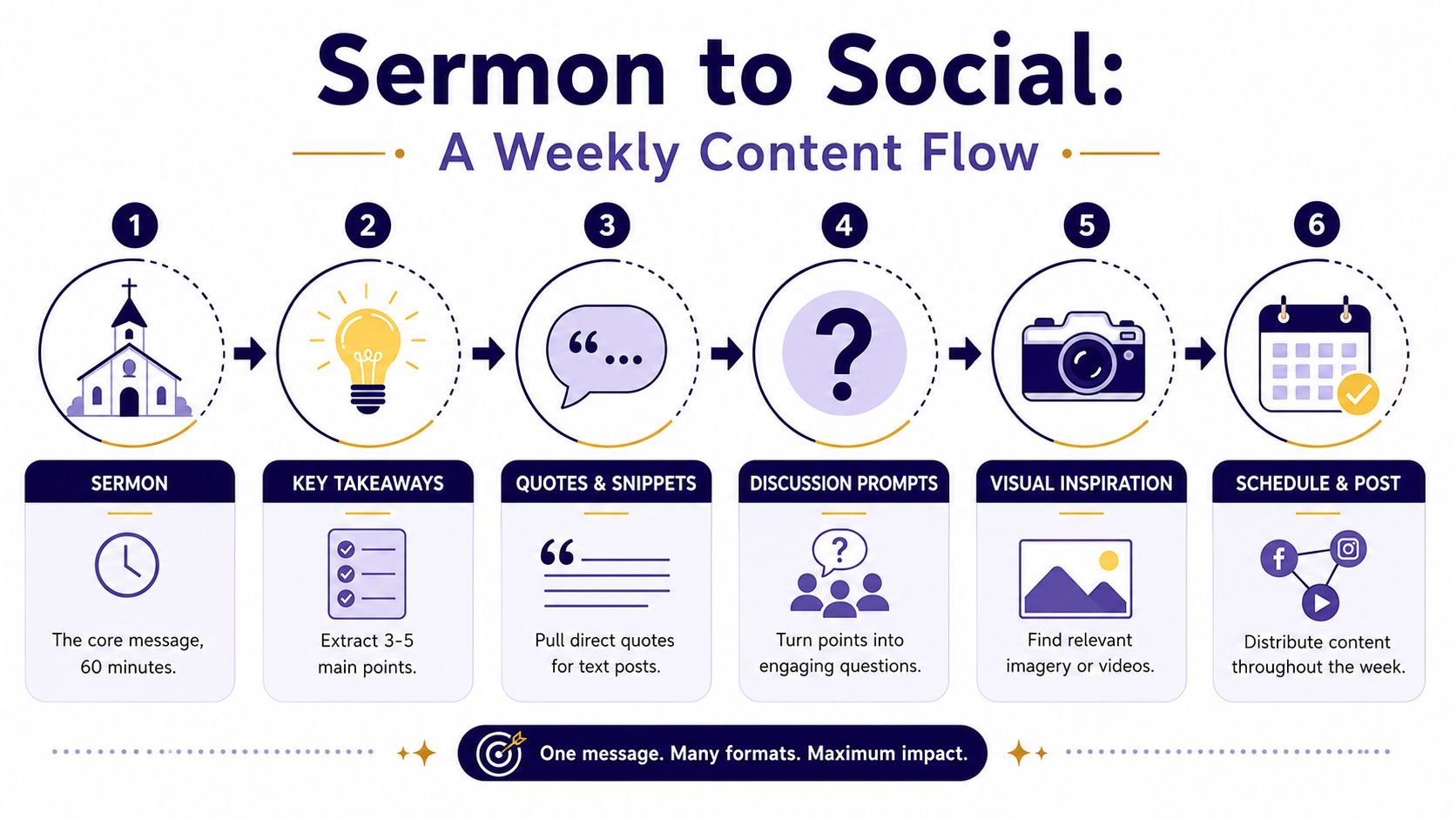
The sermon can become:
- A short reel: Clip one strong moment where the pastor says something clear and memorable.
- A quote graphic: Pull a single line that stands on its own and pair it with a clean template.
- A caption post: Summarize the main takeaway in plain language.
- A discussion prompt: Ask one question that helps people respond.
- A blog or devotional: Expand a key point for people who want to reflect further.
That is content repurposing at its best. Not recycling for the sake of output, but extending the life of something that already carries pastoral weight.
Why short clips matter
Short-form video gives smaller churches a realistic way to reach beyond their current audience. Small churches can reach their first significant "Viral For Me" post in approximately 90 days by staying consistent with two posts per week for 90 days and repurposing two 30-90 second sermon sections into vertical videos for TikTok, Instagram Reels, and YouTube Shorts, according to Pro Church Tools on how small churches grow using social media.
That doesn't mean every church needs to chase trends. It means a short sermon clip can travel farther than a static announcement because it carries voice, tone, and conviction in a format people already consume.
A good sermon clip doesn't need studio polish. It needs one clear thought, a clean crop, and a reason someone would stop scrolling.
Let AI do the first draft work
For a time-strapped church, the workflow changes. Instead of manually clipping video, transcribing audio, writing captions, designing graphics, and building a calendar in separate tools, you can upload the sermon once and turn it into multiple assets inside one system.
ChurchSocial.ai can create AI generated reels from sermons, generate social posts and blog-style content from the sermon transcript, and help turn those outputs into scheduled posts. That matters for small churches because the bottleneck usually isn't ideas. It's time.
A practical sermon workflow looks like this:
- Upload the sermon audio or video
- Review the transcript for key moments
- Select a few clips that work as vertical video
- Generate supporting captions, quotes, and discussion prompts
- Schedule those pieces across the week
If you want a tighter process for this, this guide on repurposing church content lays out the workflow in a useful, ministry-specific way.
Design Graphics Without a Design Degree
A lot of volunteers tend to assume they aren't "creative enough" to handle church social. Usually what they mean is this: they don't know Photoshop, Canva still feels clunky, and they don't want to publish graphics that look homemade in the wrong way.
That concern is real. Design can eat hours when the tool fights you. But good church graphics don't start with design talent. They start with restraint, consistency, and a template that already understands church communication.
What strong church graphics actually do
The best graphics for small church social media are clear before they're clever. They help someone understand the message quickly and feel the tone of your church without visual clutter.
That usually means:
- Use simple layouts: One focal image, one short line of text if needed, and enough spacing to breathe.
- Choose relevant imagery: Buildings, open Bibles, communion elements, candles, paper notes, or ministry spaces often work better than generic stock photos of smiling crowds. Images should not have people whenever possible.
- Keep text intentional: Text belongs where it makes sense, such as on paper, on a whiteboard, or as a clear overlay added afterward. Don't scatter words into random parts of the image.
Templates beat starting from scratch
Most volunteers don't need more options. They need fewer decisions. A template solves the hardest design problems before you touch the screen: spacing, hierarchy, font pairing, and alignment.
A practical rhythm looks like this:
- Pull an AI-generated quote from the sermon transcript.
- Drop it into a prebuilt church template.
- Add your logo if needed.
- Adjust the image so it fits the tone of the message.
- Export and schedule.
That isn't cutting corners. That's using a system that protects quality. For churches, the goal of design isn't artistic self-expression. It's clarity, warmth, and trust. If a member shares your post or a guest sees it for the first time, the visual should feel calm, readable, and recognizably connected to your church.
Schedule Empower Volunteers and Measure What Matters
A small church usually does not have a social media manager. It has a pastor, a volunteer, or a staff member fitting posts into the edges of a full week. That reality shapes the system. The goal is to make publishing predictable enough that the ministry stays active even when life gets busy.
Put the week on the calendar
Set one weekly planning block and protect it. For many churches, 30 to 45 minutes is enough to review the sermon, confirm upcoming events, schedule posts, and note anything that still needs approval. Once the week is mapped out, volunteers stop guessing what to post and start following a clear plan.

A visible calendar also prevents duplicate work. One person can see that Sunday's sermon clip is ready, Wednesday's event reminder still needs details, and Friday's invitation post is approved. That kind of clarity matters even more when two or three volunteers share the load.
ChurchSocial.ai shortens this process by keeping content creation, scheduling, and review in one place. Small churches do better with one system than with a patchwork of design apps, caption docs, and separate schedulers.
Give volunteers smaller jobs
Clear roles help volunteers serve well. "Can you handle our Instagram?" often feels bigger than the actual work. A narrower assignment is easier to own and easier to repeat next week.
Use roles like these:
- Content collector: Takes photos of church spaces, printed signs, setup moments, or ministry details during the week.
- Caption reviewer: Checks posts for warmth, clarity, and accuracy before they go live.
- Event updater: Confirms times, locations, and registration information.
- Community responder: Replies to comments and messages with a helpful, pastoral tone.
This approach also protects continuity. If one volunteer is out for a week, the whole system does not stop. Someone else can cover a single task without learning every tool.
Measure what actually reflects ministry impact
The numbers that matter are the ones tied to response. Look for comments, shares, saves, direct messages, and simple signs that people are paying attention or reaching back. A post with fewer likes but several thoughtful comments often did more ministry work than a polished graphic that earned quick taps and no conversation.
Use the results to make small weekly adjustments. If sermon clips consistently start conversations, schedule more of them. If event posts get ignored, tighten the wording, lead with the clearest next step, or change the image. If people message your church after behind-the-scenes posts, keep showing the life of the church.
Keep review simple. Check what people responded to, note what led to connection, and build next week's calendar from that.
Your Sustainable Social Media Ministry Starts Now
The healthiest approach to small church social media isn't doing more. It's choosing what matters, building around what your church already creates, and removing as much friction as possible.
That means fewer random posts. Fewer last-minute graphics. Fewer weeks where someone stares at a blank caption box trying to invent something meaningful on Thursday afternoon. It means one sermon can fuel multiple posts. One planning session can cover the week. One visual system can keep your feed clear and consistent.
This is also why AI matters so much for smaller churches. Not because ministry should sound robotic. It shouldn't. But because volunteers and staff members need help with the repetitive parts. Drafting captions, pulling transcript highlights, clipping reels, building event posts, and laying out graphics are all valuable tasks. They just shouldn't require a full communications department.
A sustainable digital ministry is possible when the system respects your limits. You can show the life of your church, invite people into community, and keep the message moving through the week without living inside five separate apps.
If your current process feels scattered, that's not a sign to give up on social media. It's a sign to simplify it. Start with two platforms. Build from your sermon. Post with purpose. Let the tools handle the heavy lifting so your team can focus on people.
If you're ready to make church social simpler, ChurchSocial.ai gives your team one place to turn sermons into AI generated reels, create posts and blogs from transcripts, design graphics with templates and an editor, manage everything in a drag-and-drop calendar, and pull event content from Planning Center and other church calendars. It's a practical way to replace a messy tool stack with a workflow a small church can maintain.


