
So, you have a camera roll or a shared church drive overflowing with incredible photos. Baptisms, small group gatherings, Sunday services, outreach events—all powerful moments frozen in time. But when you post them, they barely make a ripple in the fast-moving currents of social media feeds.
Sound familiar? You're not alone.
The hard truth is that a single, static photo just doesn't have the stopping power it used to. The way people connect and consume content has shifted dramatically toward short, dynamic video. This is exactly why learning how to create Reels from photos is no longer a "nice-to-have" skill for ministry leaders; it's a game-changer. It’s your chance to breathe new life into your existing assets and meet your community where they are.
The Shift to Video Is Real (and It’s Huge)
Don't just take my word for it—the numbers are staggering. The dominance of short-form video isn't a fad; it's the new reality.
According to 2026 data, Instagram Reels now capture 50% of all time spent on the platform. That’s a massive leap from just 37% in 2024. In only two years, we've seen a 35% increase in user attention flocking to video.
For your church, this means if you're only posting photos, you're likely invisible to at least half of your online audience. You can find more details on these powerful engagement statistics to see just how critical this shift is.
This simple animation shows how still photos can be transformed into an engaging video Reel for your church's social media.

The image perfectly captures the core idea: turning yesterday's memories into content that moves people today.
The gap in impact between a standard photo and a Reel made from photos is significant. We're talking about a real difference in how many people you can reach and how deeply your message resonates.
Static Photos vs Reels From Photos A Ministry Impact Comparison
| Metric | Traditional Photo Post | Reel From Photos |
|---|---|---|
| Algorithm Priority | Lower | Higher |
| Average Reach | Limited, primarily followers | Wider, including non-followers |
| Engagement | Likes, a few comments | Likes, comments, shares, saves |
| Storytelling Power | Single moment | A complete narrative or feeling |
| Lifespan in Feed | Short | Longer, often resurfaces |
This isn't about ditching photos entirely. It's about being strategic and repurposing them into a format that the algorithm—and your audience—loves.
A Simple Path for Overwhelmed Church Leaders
I get it. The idea of adding "video producer" to your already long list of responsibilities feels daunting. But you don't need a film crew or a massive budget.
The beauty of turning photos into Reels is that the hard part—capturing the moments—is already done. Now, you just need a simple process to string them together.
With a platform like ChurchSocial.ai, you can turn your sermon transcripts into AI-generated Reels, use graphic templates to brand your content, and manage your entire social media calendar from one place. It removes the technical headache so you can focus on the message.
The bottom line is simple: learning to create Reels from photos is one of the most effective and efficient ways to amplify your ministry's voice in today's digital world. Let's walk through how to do it.
How to Storyboard Your First Photo Reel
Hold on. Before you even think about opening an editing app or picking a song, let's talk about the most important part: the story. This is what separates a forgettable slideshow from a powerful piece of ministry content. The best way to create Reels from photos is to start with a simple narrative.
A storyboard doesn't need to be some complex, artistic production. Seriously, a few notes on a piece of paper or in your phone will do. You’re just mapping out a beginning, a middle, and an end to tell a micro-story in 15-30 seconds.
Find Your Narrative Arc
Every good story has a flow. For your church Reels, this is easier than you think. Think about these simple arcs:
- The "Before and After": Start with a shot of an empty fellowship hall, then cut to photos of it buzzing with people during a community dinner.
- A "Day in the Life": Walk people through a Sunday morning. Show the behind-the-scenes setup, a powerful moment from worship, and the handshakes and hugs happening afterward.
- The Thematic Recap: Pull together key images from a recent sermon series that drive home its central message.
Giving your Reel a narrative purpose like this helps people feel like they're on a small journey with you. You need to grab their attention right away, of course. For some great ideas on how to nail those first few seconds, check out our guide on proven hooks for Instagram Reels.
The real goal here is to make someone feel something—joy, a moment of reflection, excitement, or gratitude. A photo of hands clasped in prayer followed by a picture of a joyful baptism tells a much richer story than either image could on its own.
Align Your Story with Your Church Calendar
Your most relevant and timely content ideas are probably sitting right on your church’s schedule. When you create Reels that tie into upcoming events or current sermon topics, your social media feels alive and connected to what’s actually happening in your church.
This is where a little planning goes a long way. A platform like ChurchSocial.ai can be a game-changer, integrating with Planning Center and other church calendars to create content for your events. You can see what’s coming up at a glance, making it incredibly simple to storyboard Reels that support your ministry's focus.
Here’s a peek at how the ChurchSocial.ai simple drag-and-drop calendar helps you manage and update all of your social media.
Using a tool like this means you can plan out Reels weeks in advance, making sure every photo you share is perfectly in sync with the rhythm of your church.
Storyboarding isn’t about being an artist; it’s about being an intentional communicator. When you think through the narrative first, you guarantee that every photo you pick has a purpose.
This simple planning step is what transforms a random folder of pictures into a focused, compelling message. It’s how you make sure your efforts to create reels from photos lead to content that genuinely deepens your connection with your community.
Alright, you’ve got a powerful story brewing with your photos. Now it’s time to get into the nitty-gritty of turning those static images into a moving, engaging Reel.
Don't let the technical side of things intimidate you. Once you get the hang of a few key principles, you'll be creating polished videos for your ministry in no time. Let's walk through the essential elements.
Getting the Setup Right
First things first, let's talk about the canvas you're working on. Reels are made for phones, which means they need to be vertical and full-screen to really capture someone's attention.
The non-negotiable rule here is the aspect ratio. Your Reel absolutely must be a 9:16 vertical video. This is what allows it to fill the entire phone screen, creating that immersive feeling you're going for. If you just drop a horizontal photo in there, you’ll get those ugly black bars on the top and bottom, which is a dead giveaway of an amateur video.
Most editing apps, including Instagram's native editor, will automatically set this up for you. Even better, if you're using a tool like ChurchSocial.ai, the design studio has pre-sized templates ready to go, so you don't even have to think about it.
Now, what about timing? How long should you show each photo? It all depends on the vibe you want.
- For fast-paced, trending audio: Keep it quick. Aim for 0.5 to 1.5 seconds per photo. This creates that high-energy, quick-cut feel that works so well with popular music.
- For a more emotional or narrative Reel: Slow it down. Give each photo 2 to 3 seconds on screen. This gives your audience a moment to actually see the image and connect with the story you’re telling.
The real trick is to time your photo changes to the beat of the music or the cadence of your voiceover. When the visuals and audio line up, it's incredibly satisfying to watch.
Adding That Professional Polish
A static photo in a video clip can feel a bit... well, static. The magic really happens when you introduce a little bit of motion.
This is often called the Ken Burns effect, and it’s simply adding subtle pans and zooms to your images to make them feel dynamic. You can slowly zoom in on a smiling face during baptism or pan across a group of volunteers packing food boxes. It’s a tiny detail that makes a huge impact, turning a simple slideshow into a living memory.
Transitions are another tool in your belt. Instead of just a hard cut from one photo to the next, try using a simple dissolve or a gentle fade. This helps guide the viewer smoothly from one moment to the next without any jarring cuts. Just be sure to avoid the flashy, over-the-top transitions—your goal is to enhance the story, not upstage it. If you're looking to apply these skills elsewhere, learning how to create a stunning background image slideshow can be a great next step for your church's website or service announcements.
Pro Tip: Always mind the "safe zones." Instagram places its interface elements, like the caption and engagement buttons, at the bottom of the screen. Keep any important text, like your call to action or church logo, in the middle part of the frame so it doesn't get covered up.
To be super specific, the ideal dimensions for a Reel are 1080 x 1920 pixels. The maximum length is currently 90 seconds. And that "safe area" we just talked about? It’s a space of about 1080 x 1440 pixels in the center of your screen. Keeping your key elements within this zone is the best way to make sure everyone sees what you want them to see.
Choosing Audio and Music That Connects
If your photos are the body of your Reel, the audio is its soul. The right sound is what turns a slideshow into a story and an update into an experience. When you create Reels from photos, the audio you choose is every bit as critical as the images themselves.
Think about it. A high-energy, trending track can make a youth camp recap feel like an epic adventure. A simple, reflective piano piece can bring a profound sense of peace to photos from a baptism service. The audio sets the emotional stage for everything your audience sees.
Leveraging Trending Audio for Reach
Want a straightforward way to get your Reel in front of more people? Use trending audio. When you hop on a sound that’s gaining traction, the Instagram algorithm takes notice and is far more likely to share your content with people who don't follow you yet. It's one of the simplest ways to open your church's digital front door a little wider.
Finding the right trending sound is easier than you think.
- Just scroll the Reels feed. What songs are you hearing over and over? Pay attention to the ones on videos with lots of views.
- Look for the arrow. Instagram puts a small, upward-pointing arrow next to any audio that’s currently trending.
- Save sounds for later. Hear a track that feels right for your church? Tap "Save Audio." You’ll build a go-to library of pre-vetted options for your next project.
Once you’ve found the perfect track, making it fit seamlessly with your photo timings is the next step. Digging into some professional reels audio editing tips can make a huge difference in the final polish of your video.
The Power of Original Audio
Trending audio is great for getting seen, but nothing connects quite like your own, original audio. This is where the unique heart of your ministry can truly be heard. Imagine taking a powerful, 15-second clip from your pastor's message and laying it over photos of your congregation living out that very teaching.
Now that's content that hits differently. You're no longer just borrowing a popular song—you're sharing the authentic voice of your church. It's personal, powerful, and deeply resonant.
With ChurchSocial.ai, this isn’t a complicated process. The AI can scan your sermon transcripts and instantly generate short, compelling AI-generated Reels. It finds those perfect soundbites for you, turning your pastor’s message into the soundtrack for your ministry moments.
This method allows you to create Reels from photos that are more than just visually appealing; they're spiritually nourishing. You can transform a simple photo collection into a mini-sermon, an encouraging word, or a heartfelt welcome, all in a voice your community already knows and trusts. By pairing authentic moments from your church with audio straight from your pulpit, you create something truly unique that no one else can replicate.
A Smarter Workflow for Your Entire Social Media
Making one great Reel from your photos is a win. But the real test for most churches is keeping that energy going, week after week, without burning out your team. The secret isn't just about working harder—it’s about having a smarter system that ties your whole content process together.
Let’s be honest, consistency is what makes a social media account grow instead of just sitting there. But when you’re already juggling sermon prep, planning events, and caring for your community, social media often feels like the one thing you can’t quite get to. That’s where a solid workflow becomes your best friend.
Go from Sermon to Social Post in Minutes
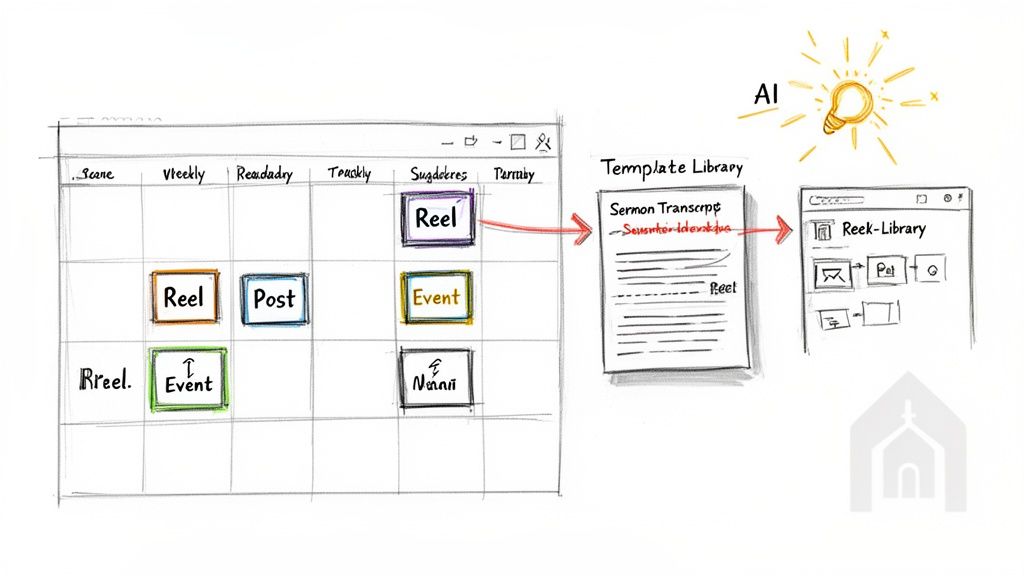
What if you could take this Sunday's sermon transcript and, with just a few clicks, have a full week of social media content ready to go? This isn't some futuristic idea; it’s exactly what an AI-powered tool like ChurchSocial.ai does. Our platform can look at a single transcript and automatically suggest:
- AI-Generated Reels: The AI finds powerful quotes and touching stories from your sermon, perfect for short videos.
- Social Posts: It crafts engaging captions and posts to go with your photo Reels or graphics.
- Blog Posts: The AI can even take a point from the sermon and expand it into a full blog post for your website.
This method—turning one big piece of content into many smaller ones—is a game-changer for any social media strategy. If you want to dig deeper into this, check out our guide on how to repurpose content for your church. It’s all about getting the most out of every single message you prepare.
One Place for Your Entire Ministry's Content
The old way of managing church social media can be a real headache. You might edit photos in one app, write captions in a separate document, and then try to remember to post everything to each platform manually. It’s fragmented and stressful. ChurchSocial.ai puts everything you need in one place.
To illustrate the difference, let's compare the old, manual approach to a more integrated one.
The Old Way vs The ChurchSocial.ai Way
| Task | Manual Process | With ChurchSocial.ai |
|---|---|---|
| Content Ideas | Brainstorming sessions, searching for inspiration | AI suggests ideas from your sermon transcript |
| Graphic Design | Using separate tools; inconsistent branding | Built-in editor with branded graphic templates |
| Caption Writing | Writing from scratch for each post in a doc | AI-generated captions, ready to edit and use |
| Posting | Manually uploading to each platform one by one | Schedule once to all platforms from a single drag-and-drop calendar |
| Repurposing | Manually cutting up long content, a slow process | Automatically generate posts, Reels, and blogs from one source |
This simple shift means you spend less time jumping between different tools and more time connecting with your community.
The platform is built to be an all-in-one command center. You can use our graphic templates and editor to create and post photos and carousels, ensuring your church's logo and colors are consistent.
From there, our simple drag-and-drop calendar lets you schedule it all ahead of time. Plan your entire month of Reels, posts, and Stories for all your social accounts in one sitting. This is how you get hours back in your week and build a sustainable plan without the constant pressure.
It’s no secret that the internet is all-in on short-form video. In fact, more than 50% of all Instagram ads will run on Reels in 2025—a huge 43% jump from the year before. And with Reels getting between 140 and 200 billion daily plays, it's clear where people's attention is. Your church doesn't need to feel left behind by this shift. When you have the right tools, it's easy to adapt.
By adopting a unified workflow, you stop just reacting to the daily grind of social media and start proactively sharing your ministry’s story with the world.
Common Questions About Making Reels From Photos
Getting started with video can feel a little intimidating. As your church begins turning photos into Reels, it's natural to have questions about the right way to do things. Let's walk through some of the most common ones we hear from ministry leaders.
These are the quick, practical answers you need to start creating with confidence.
How Many Photos Should I Use in a Single Reel?
There isn't a hard and fast rule, but a great target is somewhere between 5 to 15 photos for a standard 15 to 30-second Reel. The right number really comes down to the pacing you want to create.
- For fast, trending audio: You might use more photos, flashing each one for just 0.5 to 1 second. This creates a high-energy feel that grabs attention immediately.
- For a slower, story-driven Reel: Use fewer photos, but keep each on screen for 2-3 seconds. This gives people a moment to really see the image and connect with what's happening.
A great pro-tip is to time your photo changes to the beat of the music. The goal is to keep things interesting without feeling chaotic. Experiment a bit to find a rhythm that feels right for your message.
Do I Need to Be a Design Expert to Make Good Reels?
Not at all. This is probably the biggest myth that holds churches back from creating great video content. You absolutely do not need a design degree to make an impact.
The most important element is authentic storytelling, not complex visual effects. A simple, heartfelt Reel made from genuine photos of your church community will always connect more deeply than something over-produced that feels impersonal.
This is exactly why we built tools like ChurchSocial.ai. It’s made for people who aren't designers. You get professional templates where you just drag and drop your photos, add your logo, and apply your church's brand colors with one click. We handle the tech so you can focus on the ministry.
What Kind of Photos Work Best for Creating Reels?
Variety is key. To make your Reels visually engaging, you need to mix up your shot types. Think about pulling together a combination of these:
- Wide Shots: Perfect for setting the scene. Think of a photo showing your entire sanctuary on a Sunday morning or a big group at a community cookout.
- Medium Shots: These work well for focusing on small groups of people, like a few members chatting over coffee or a small group praying together.
- Close-Ups: These capture emotion. A smiling face, hands held in prayer, or small details from a baptism or special event all work beautifully.
The most critical thing is to use high-quality, clear photos. Go through your existing photo library from services, youth events, and outreach projects. The real story of your church is already there.
Can I Schedule Reels to Instagram and Facebook at the Same Time?
Yes, and this is a massive time-saver for any church communications team. Using an all-in-one platform like ChurchSocial.ai means you can create your photo Reel once and schedule it to post across Instagram, Facebook, and any other social media profiles you've connected.
You can post it right away or schedule it for a specific date and time on a simple calendar. This workflow lets you plan your content weeks in advance, giving you a consistent presence online without the daily scramble to post manually.
Ready to stop juggling multiple apps and bring all your church's social media content into one simple, powerful platform? With ChurchSocial.ai, you can transform your sermons into Reels, design branded graphics in minutes, and schedule everything with a drag-and-drop calendar. Start simplifying your ministry's outreach today at https://churchsocial.ai.


