
Most churches already have a digital front door. The problem is that nobody on staff is fully tending it.
A family searches for a church near them. They don't start on your website. They start on Google Maps, scan your hours, look at your photos, read a few reviews, and decide whether your church feels active, clear, and welcoming. If your profile is incomplete, outdated, or missing entirely, you can lose that visit before they ever hear a sermon.
That's why learning how to optimize Google Business Profile matters for churches. This isn't just local SEO jargon. It's practical outreach. A strong profile helps your church show up clearly, answer basic questions fast, and lower the friction for someone who's thinking about visiting this Sunday.
Claiming Your Digital Cornerstone
Your Google Business Profile is your church's digital front door. Before you think about posts, photos, or reviews, you need control of the listing itself.
If you haven't checked lately, search your church name in Google Search and Google Maps. In many cases, Google has already created a listing from public information. If that listing exists, claim it instead of creating a duplicate. If another former staff member or volunteer controls it, request access and sort ownership out now. This is admin work, but it's foundational.
Start with your core details
Google needs to trust the basic facts about your church. That means your name, address, and phone number, often called NAP, need to match everywhere they appear online.
Third Marble notes that success rates for profiles with verified NAP consistency across major directories like Yelp and BBB, plus organic mentions via press releases, are significantly higher in local search rankings, and that incomplete profiles are a primary reason for poor visibility in local search (Third Marble Marketing).
For churches, that usually means checking:
- Church name formatting: Use one official name everywhere. Don't switch between abbreviations and full names unless there's a clear reason.
- Street address: Match your website, directory listings, and Google exactly.
- Main phone line: Use the number a newcomer should call, not a personal cell number from a pastor or volunteer.
- Hours: Include office hours if they're consistent, and use special hours when needed.
Practical rule: If a first-time guest sees one address on Google and another on your website, Google isn't the only one who gets confused.
Verification is worth doing right
Google may offer postcard, phone, or email verification. The method can vary, so don't assume every church gets the same options. Follow the prompts inside the profile, complete the method Google gives you, and document who owns the account when you're done.
This matters more than most churches realize. If ownership lives in one staff member's personal inbox and that person leaves, your church can lose control of reviews, updates, and profile edits.
A simple handoff document should include:
- Primary owner email
- Backup manager accounts
- Login recovery details
- Who updates hours and event information
If you want a practical outside checklist, this guide on how to optimize your Google Business Profile is useful because it reinforces the operational side, not just the marketing side.
For a church-specific walkthrough, it also helps to keep a dedicated setup reference handy, especially if a volunteer is doing the work. Church teams can use this Google Business Profile setup guide for churches as a cleaner starting point.
Building Your Profile Foundation
Once the listing is claimed, fill it out like someone new to church is reading it with zero context. Because they are.

A half-finished profile creates work for the visitor. They have to guess what kind of church you are, whether you're active, whether your building is accessible, and whether they're even looking at the right location. Good optimization removes those guesses.
Choose categories that match how people search
Your primary category tells Google what your church is. This is not the place to be clever.
If your organization is a church, use the most literal category available that matches what people would search for. Secondary categories can support special functions, such as wedding venue or nonprofit organization, if they accurately describe what happens on site. The key is relevance, not creativity.
A lot of churches make the same mistake businesses make. They choose something broad, aspirational, or brand-heavy instead of something search-friendly. That weakens the profile. If you want another practical checklist for the category and completion side, Transactional LLC's GMB guide is a solid companion resource.
Use attributes and description space well
Attributes are often overlooked, but they answer the questions new visitors care about before they call. Think through your profile from a newcomer's point of view.
Helpful church examples include:
- Accessibility details: Wheelchair accessible entrance, seating, or parking
- Service format: In-person services, livestream availability, family-friendly environment
- Planning details: Parking availability or whether appointments are used for counseling or office visits
Then write the business description carefully. Haley Marketing notes that maintaining a 750-character business description that includes both location and core services directly correlates with higher visibility, and that businesses using this full-length description report up to 40% more profile views than those with shorter descriptions (Haley Marketing).
What a strong church description includes
The best church descriptions are warm, specific, and readable. They don't sound like keyword soup.
Use your description to include:
| Focus area | What to include |
|---|---|
| Location | City, neighborhood, or area you serve |
| Core ministries | Sunday worship, kids ministry, youth ministry, small groups |
| Visitor clarity | What a first-time guest can expect |
| Distinctives | Livestream, community outreach, counseling, prayer gatherings |
Put your clearest details early. The opening lines do the heaviest lifting when someone is scanning quickly.
A weak description says, “We are a church that loves Jesus and serves the community.” True, but generic.
A stronger one says your church is located in a specific city, offers Sunday services, kids ministry, youth gatherings, Bible studies, and welcomes first-time visitors with clear next steps. Same heart. Better usability.
Showcasing Your Ministry and Events
A claimed profile with solid basics is only the starting point. What makes a church profile feel alive is activity.
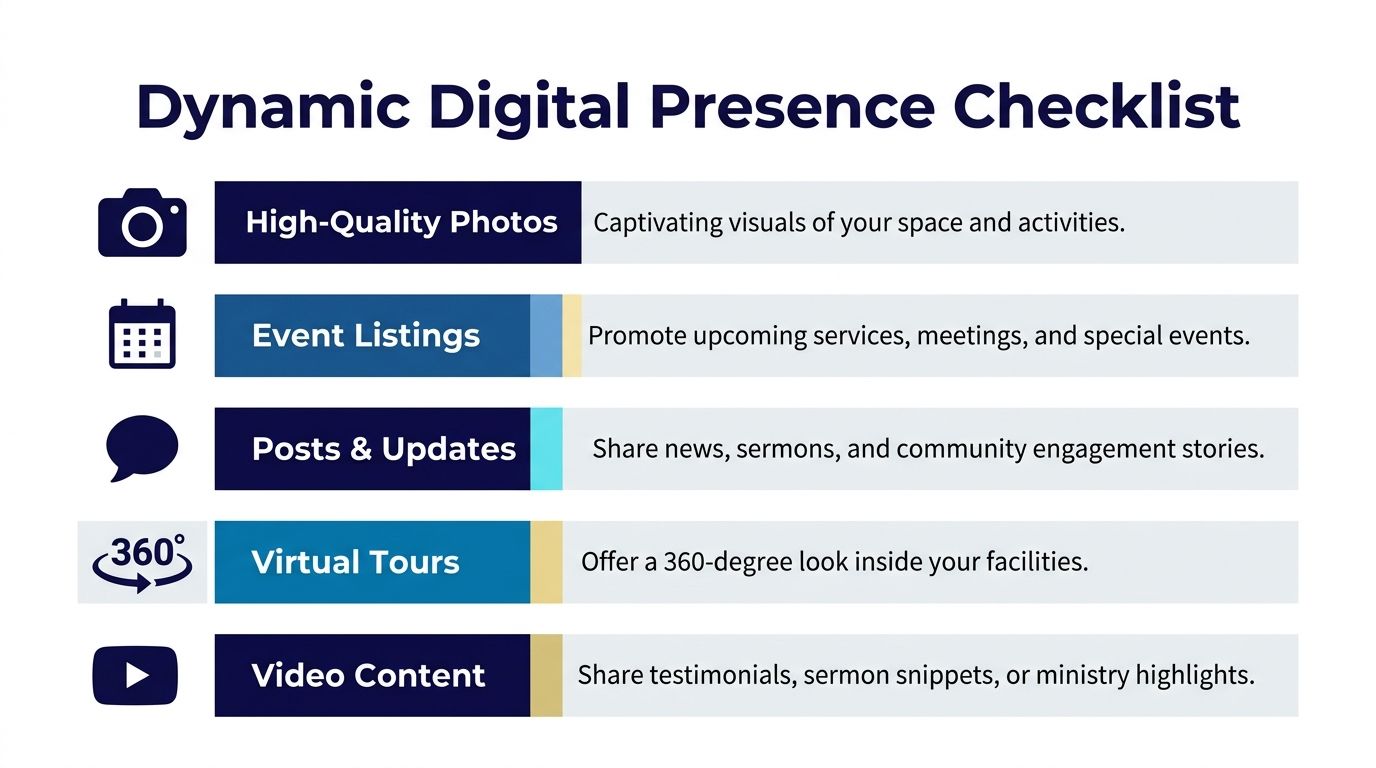
Static profiles don't reassure people. Fresh profiles do. They show that services are happening, events are real, and the ministry is active in the community. That's especially important for churches because visitors often want proof that the information is current before they make the drive.
Photos do more work than churches think
Google states that businesses that upload high-quality photos at a minimum of 720x720 pixels and add new images weekly see increased visibility, and that posting updates at least once a month helps keep the profile lively and improves lead generation (Google Business Profile Help).
For churches, the right visuals are usually simple:
- Exterior photos: Help people recognize the building when they arrive
- Interior photos: Sanctuary, lobby, kids check-in, fellowship hall
- Event visuals: Baptism setup, seasonal decor, outreach tables, sermon slide screen from a distance
- Ministry environment: Spaces for youth, small groups, prayer gatherings, community meals
Keep the images clean and current. Whenever possible, use images without people. If text appears, it should make sense naturally on signs, paper, screens, or whiteboards. Random text floating in an image usually looks sloppy.
Fresh, accurate visuals reduce anxiety for first-time guests. They can see where they're going before they walk through the door.
Use Google Posts like a church bulletin board
Many churches treat Google Posts as optional. That's a mistake. This is one of the easiest ways to show active ministry right inside search results.
Good post topics include:
- Sunday reminders with service times and parking notes
- Seasonal events such as VBS, Easter, Christmas Eve, or community outreach days
- Sermon highlights with a short takeaway and a link to learn more
- Ministry announcements for youth nights, women's study launches, or support groups
A post doesn't need to sound polished. It needs to sound current and useful.
If your church runs frequent events, it helps to study broader event promotion patterns outside church communications too. Ticketsmith's event promotion guide offers practical event framing ideas that translate well to church calendars, especially when you're trying to make an event feel timely and worth attending.
What works and what doesn't
Here's the trade-off many organizations run into. The churches that keep their profiles fresh tend to win attention, but the manual process gets neglected fast.
What works
- Posting on a repeat rhythm
- Updating photos regularly
- Promoting real events, not generic inspiration
- Using clear calls to action such as learn more, plan your visit, or register
What doesn't
- Uploading a batch once and disappearing for months
- Using blurry, outdated photos
- Posting flyer graphics with too much tiny text
- Treating Google like an afterthought compared with Instagram or Facebook
Google rewards signs of life. Visitors do too.
Engaging Your Community and Welcoming Newcomers
A church in town can have a strong website and still feel unwelcoming on Google if the review section is neglected and the Q&A area is empty.
That sounds small until you look at how people behave. A first-time guest reads a couple of reviews, scans for practical answers, and decides whether they'll be comfortable visiting. That moment is less about branding and more about reassurance.
Reviews are public hospitality
When someone leaves a review, they're not just talking to you. They're talking to the next family who finds your church in search.
That's why response habits matter. Google explicitly says that complete, accurate information helps local discovery, and active engagement on the profile supports visibility. In practice, churches should reply quickly and thoughtfully, especially when the reviewer mentions specific ministries, service experience, or location details.
A useful pattern is simple:
- Thank positive reviewers specifically: Mention the service, ministry, or experience they referenced.
- Address concerns calmly: Don't get defensive in public replies.
- Write for the reader behind the review: The future guest matters as much as the original reviewer.
If a review says, “We loved the kids ministry and the welcome team,” don't answer with “Thanks.” Respond like a real church. Thank them for visiting, mention the kids ministry if appropriate, and reinforce that families are welcome.
Seed your Q&A before people ask
One of the most underused church tactics in Google Business Profile is proactive Q&A. Rio SEO recommends proactively seeding the Q&A section with real, frequently asked customer questions using natural language and keyword-rich answers, because it builds trust, improves local SEO, and addresses friction points for new visitors (Rio SEO).
For churches, this is digital hospitality in plain form.
Questions worth seeding include:
- What time does Sunday service start
- What should I wear
- Do you have childcare or kids ministry
- Is the building wheelchair accessible
- Where do I park
- Do you livestream services
- When does youth group meet
The best Q&A entries sound like a friendly front-desk volunteer, not a marketing department.
A good answer is short, natural, and specific. “Yes, we have kids ministry during our Sunday morning service, and our welcome team can help you check in when you arrive” works better than a vague ministry statement.
A real-world church scenario
A church can look active on social media and still miss newcomers because Google leaves too many basic questions unanswered. The opposite happens too. A modest church with a carefully managed profile often feels easier to visit because the essentials are clear.
That's why review replies and Q&A shouldn't be seen as cleanup work. They are part of welcoming people before they ever enter the building.
If your church wants to rank for local intent and lower anxiety for first-time guests, this is one of the simplest wins available.
Connecting Your Tools for Seamless Outreach
Churches rarely struggle because they lack ideas. They struggle because the information lives in five places and no one has time to keep them aligned.
The Google Business Profile says one thing. The website says another. Planning Center has the accurate event schedule. Social media has the latest sermon clips. The result is drift. And drift hurts local visibility and newcomer trust.

Connect each profile element to the right destination
One advanced tactic matters more than most churches realize. If your profile lists services or ministries, don't send every one of them to the homepage.
An expert analysis notes that linking each service in your Google Business Profile to a unique, topic-specific landing page rather than the homepage can significantly boost visibility for those specific keywords in Google Maps (YouTube expert analysis).
For churches, that can look like this:
| Service or ministry in GBP | Better link destination |
|---|---|
| Youth Ministry | Youth ministry page |
| Community Outreach | Outreach or serve page |
| Pastoral Counseling | Care or counseling request page |
| Women's Bible Study | Women's ministry page |
This is one of those details that separates generic setup from intentional optimization. If someone searches for a specific ministry, Google has a much easier time understanding what page best matches that intent.
Build one content system instead of five separate tasks
The smartest church teams turn one ministry moment into multiple assets. A sermon becomes a blog summary, a few social posts, a short Google update, and a future FAQ answer. An event in Planning Center becomes website copy, social promotion, and a timely profile post.
That only works when your tools connect.
A strong workflow usually includes:
- Calendar source: Planning Center or another church calendar for event truth
- Website pages: Dedicated landing pages for ministries and next steps
- Google Business Profile: Local discovery and practical visitor info
- Social channels: Ongoing visibility and community engagement
If your church uses Planning Center heavily, it's worth tightening that handoff between event planning and communications. This overview of Planning Center integrations for church communications is helpful for seeing how calendar-driven content workflows can stay more consistent.
Where ChurchSocial.ai fits
For church teams, ChurchSocial.ai is built to reduce the manual load behind all of this.
It can create AI-generated reels from sermons, generate social posts and blogs from a sermon transcript, provide graphic templates and an editor for photos and carousels, and give your team a simple drag-and-drop calendar to manage social media updates. It also integrates with Planning Center and other church calendars to create content for events.
That matters because Google Business Profile optimization isn't a separate ministry task. It's downstream from the rest of your communication system. When your sermon content, event calendar, and visual assets are already organized, keeping Google current becomes much easier.
Measuring What Matters and Next Steps
The final mistake churches make is treating optimization like a one-time project. It's closer to groundskeeping. You don't build it once and walk away.
The good news is you don't need to drown in analytics to improve. You only need to watch a few signals consistently and make practical adjustments.
Watch the metrics tied to real-world ministry
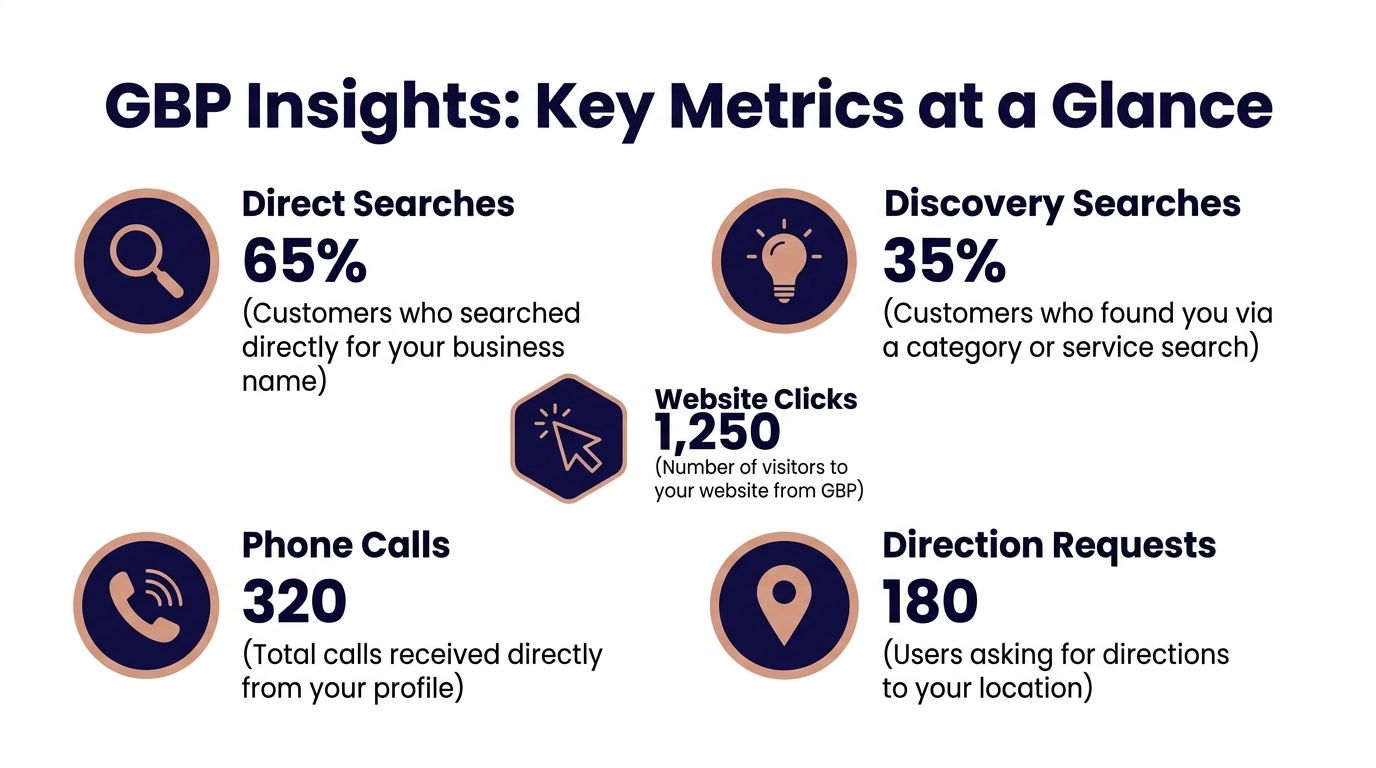
Inside Google Business Profile Insights, focus on the actions that reflect actual community movement.
Look at:
- Search discovery: Are new people finding the church through category and local searches
- Website clicks: Are profile visitors moving deeper into your site
- Calls: Are people using the listing to ask questions
- Direction requests: Are more people preparing to visit in person
- Photo performance: Which images earn attention and which ones get ignored
Not every metric has equal value for a church. A direction request may matter more than vanity impressions if your goal is Sunday attendance or event turnout.
Use data to sharpen what you publish
Insights tell you what reduced friction and what didn't.
If photos of your building and lobby perform better than generic graphics, upload more of those. If direction requests rise around holiday events, tighten your event posting rhythm and make parking details clearer. If certain ministry pages get more clicks from profile links, invest in those pages and improve the related services listed in Google.
For church teams that also want to understand what's working across social channels, this guide to measuring social media engagement for churches is a useful companion because it helps connect local discovery with broader communications performance.
Don't measure activity just to prove you posted. Measure whether a newcomer can find you, trust you, and take the next step.
The churches that do this well usually aren't the ones with the biggest team. They're the ones with the cleanest system. Accurate profile details, useful pages, fresh media, thoughtful replies, and regular review of what people do. That's the playbook.
ChurchSocial.ai helps churches turn that playbook into a repeatable system. You can create AI-generated sermon reels, turn sermon transcripts into social posts and blogs, design branded photos and carousels with built-in templates, and manage everything from a simple drag-and-drop calendar. Because it integrates with Planning Center and other church calendars, your team can keep events, social media, and outreach aligned without adding more manual work. If you want a simpler way to stay visible and consistent, explore ChurchSocial.ai.


