

A lot of church social media teams live in the same weekly loop. You post a sermon clip, a volunteer shoutout, an event graphic, maybe a prayer prompt. Then you open Instagram or Facebook analytics and see likes, views, reach, and a few comments. The numbers are there, but the key question still hangs in the air. Is any of this helping people take a next step in faith?
That question matters more than most marketing advice admits. Churches aren't trying to win a popularity contest. You're trying to help people feel seen, invited, grounded in Scripture, connected to community, and ready to respond. Raw engagement can hint at that, but it doesn't prove it.
Measuring social media engagement for a church works best when you treat analytics as a ministry tool, not a scoreboard. Some metrics help you see what's resonating. Others tell you almost nothing on their own. The goal isn't to chase bigger numbers. It's to understand whether your content is helping real people move toward real connection.
Moving Beyond Likes to Measure Ministry Impact
A volunteer finishes scheduling posts on Sunday night, checks the dashboard on Tuesday, and sees what most of us have seen. One post has strong likes. Another has decent reach. A Reel got more views than expected. But then someone asks, “Did any of that help people show up, ask for prayer, or join a group?” That's where the usual dashboard stops being helpful.

Churches feel this gap more sharply than brands do. A coffee shop can look at sales. A church is trying to notice belonging, trust, curiosity, prayer, attendance, service, and discipleship. That doesn't mean social metrics are useless. It means they need interpretation.
What vanity metrics can and can't tell you
Likes can show quick approval. Shares can show that a message felt worth passing along. Comments can reveal whether a topic opened a conversation. Those are useful signals.
They're just not the whole story.
A post about Easter service times might get modest engagement but still help a family decide to visit. A pastoral clip on anxiety might get saved and replayed later by someone who never comments. A volunteer recruitment post might underperform publicly while still generating direct messages from people who are ready to help.
Practical rule: Don't ask, “Did this post perform?” Ask, “What kind of response was this post trying to create?”
That's also why churches benefit from learning from broader creator ecosystems while keeping ministry goals in view. If your team is trying to improve video conversation and retention, this guide on how to gain loyal YouTube fans is useful because it focuses on building an actual audience relationship rather than only chasing views.
A better question for church teams
The healthier question is this. Which online behaviors seem to lead toward offline ministry outcomes?
That shift changes everything. You stop treating every post the same. You stop comparing a prayer carousel to an event registration post as if they should produce the same response. And you start noticing that engagement is most valuable when it points to the next pastoral step.
Here's what usually doesn't work:
- Tracking everything: Too many numbers create confusion fast.
- Judging single-post spikes: One big post can distract you from what works consistently.
- Using generic benchmarks: Church content has different goals than ecommerce content.
What works is a simple framework. Pick the ministry outcome. Choose a small set of signals. Review them consistently. Then connect those signals to real church actions like attendance, replies, sign-ups, or follow-up conversations.
That's how engagement starts becoming ministry insight.
Defining Your Church's Social Media Goals and KPIs
Most church teams don't have a measurement problem first. They have a goal problem. If the goal is fuzzy, the reporting will be fuzzy too.
When a church says, “We want better engagement,” that usually means one of several different things. You may want more local awareness. You may want stronger online conversation. You may want more event registrations, more volunteer interest, or more people moving from watching to visiting. Those are different goals, so they need different KPIs.

Start with ministry objectives, not platform metrics
A strong workflow starts by mapping the social objective to a narrow KPI set, then segmenting results by platform and content type so you can see which formats drive better engagement over time, not just one-off spikes, as noted in this social media measurement framework.
That matters for churches because one broad mission often turns into several practical communication goals.
For example:
Reach new people in your city
Look at reach, shares, profile visits, and responses from non-regular attenders.Help members stay connected during the week
Watch comments, saves, direct messages, and repeat engagement on devotional or sermon-based content.Increase event participation
Track clicks to event pages, registrations, and the posts or formats that consistently lead to action.
Keep the KPI set narrow
You don't need a giant spreadsheet full of every metric available in Meta Business Suite, YouTube Studio, or TikTok analytics. Most churches do better with a short list tied to one clear outcome.
A simple way to build that list:
Name the ministry objective
Example: help new families feel comfortable visiting.Choose one social goal
Example: get more people to view and click the newcomer pathway.Pick a few KPIs
Example: link clicks, direct messages, shares of the welcome post, and completion of a newcomer form.Review by content type and platform
Short video may work better on Instagram. Clear event graphics may work better on Facebook.
A narrow KPI set is easier to manage, easier to explain to staff, and much easier to improve.
Make church reporting easier to maintain
This is also where systems matter. If your church already plans sermons, events, and ministry moments ahead of time, your social reporting should connect to that rhythm instead of sitting in a separate silo. A helpful starting point is understanding what social media analytics means for churches, especially if you're trying to simplify reporting for volunteers.
Good KPIs don't make ministry mechanical. They make your communication more intentional. They help you answer a much better question than “How did social do?” They help you answer, “Did our content support what the church was trying to do this month?”
Key Social Media Metrics Every Church Should Track
Once your goals are clear, the metrics stop feeling intimidating. Most volunteers don't need a marketing dictionary. They need plain language and a reason each number matters.
The biggest mistake is treating every metric as equally important. It isn't. Some metrics show exposure. Some show response. Some suggest deeper interest. For churches, that distinction matters because a saved post or a direct reply can mean more than a quick like.
The metrics that deserve your attention
For engagement-rate math, it's recommended to normalize total interactions by either follower count or reach and express the result as a percentage. Reach-based rates are especially useful when follower totals are less meaningful than actual exposure, as explained in Adverity's guide to measuring social media engagement.
That's a practical relief for churches, because follower counts often don't reflect who saw the post. A seasonal visitor, a local parent, or a person invited by a friend may see your content without following your account closely.
Here's a simple reference point.
| Metric | What It Is | Why It Matters for Your Church |
|---|---|---|
| Reach | The number of unique people who saw a post | Helps you understand how far your message traveled, especially for invitations, sermon clips, and community announcements |
| Impressions | The total number of times a post was displayed | Useful for noticing repeated exposure, especially when people may see the same event post more than once |
| Likes or reactions | Quick, low-effort responses | A light signal of interest, but not enough on their own to judge ministry impact |
| Comments | Public written responses | Show conversation, questions, encouragement, or objections that may need pastoral follow-up |
| Shares | When someone sends your post to others or reposts it | Often the clearest sign that someone thought the content was worth passing along |
| Saves | When someone bookmarks the content | Important for devotional content, sermon clips, Scripture graphics, or practical teaching people want to revisit |
| Direct messages | Private replies or questions | Often where ministry begins online because people ask quietly before they engage publicly |
| Clicks | Taps on a link, profile button, or event page | Matter most when you want someone to register, learn more, or take a next step |
| Watch time or retention | How long people stay with a video | Helps you tell whether your sermon clips and reels are holding attention |
| Engagement rate | Total interactions divided by followers or reach, shown as a percentage | Gives a more balanced view than raw counts when comparing posts or platforms |
How churches should read these numbers
A few practical translations help.
A save can mean reflection
Someone may want to come back to a prayer prompt, Bible verse, or clip from Sunday's sermon.A share can mean trust
People don't usually pass along church content unless they believe it could help someone else.A click shows intention
It doesn't guarantee action, but it signals movement beyond passive scrolling.
If a post gets modest reach but strong saves and thoughtful comments, don't dismiss it. That may be one of your most meaningful pieces of content.
What to avoid when reading metrics
Don't compare every post against the same standard. A worship photo, an event registration graphic, and a sermon reel each have different jobs.
Also, don't let raw counts lead the conversation. A post with more likes isn't automatically better than a post that led to messages, sign-ups, or a pastoral conversation. Measuring social media engagement well means reading the metric in context of the post's purpose.
Building Your Simple Church Social Media Report
Most church teams don't need a complicated reporting system. They need one they'll keep using.
A simple report beats an ambitious one that gets abandoned after two weeks. If a volunteer has to pull data from four platforms, copy it into a spreadsheet, explain it to staff, and still create next week's content, measurement quickly becomes the first thing to drop.
What a workable report looks like
Keep your report short enough to review in one sitting. One page is often enough.
Include:
The goal for the month
Example: promote a newcomer lunch, strengthen midweek engagement, or support a sermon series.A few core metrics
Reach, engagement rate, clicks, messages, saves, or watch time. Pick only what matches the goal.Top posts by type
Note whether clips, carousels, photos, or event graphics performed better.A short interpretation
What likely worked. What likely missed. What should change next month.One ministry note
Add qualitative insight such as common questions, repeated prayer needs, or strong response to a specific theme.
A sample reporting rhythm
You can build this in a spreadsheet or shared doc with columns like these:
| Category | Example entry |
|---|---|
| Objective | Help people take a next step after the sermon series |
| Platform | |
| Content type | Short sermon clip |
| Primary KPI | Saves |
| Secondary KPI | Comments |
| Observation | The practical application clip drew the most thoughtful responses |
| Next action | Create more short clips with a clear question in the caption |
That kind of report gives your team something much better than numbers alone. It creates a record of what's helping people respond.
Why automation matters for church teams
Manual reporting is possible. It's just hard to sustain, especially when one person is also writing captions, gathering media, posting stories, and answering messages.

Tools can reduce that load by bringing publishing, planning, and performance into one place. If you're comparing options, this roundup of social media analytics tools for churches helps clarify what to look for.
One church-specific option is ChurchSocial.ai. It combines planning, content creation, scheduling, and analytics in a single workflow. That matters if your team is building sermon-based posts, using templates for graphics and carousels, organizing content in a drag-and-drop calendar, or pulling event context from Planning Center and other church calendars. Instead of stitching together separate tools, the reporting can sit closer to the actual ministry calendar.
A report should help your team decide what to do next. If it only proves that you were busy, it isn't doing enough.
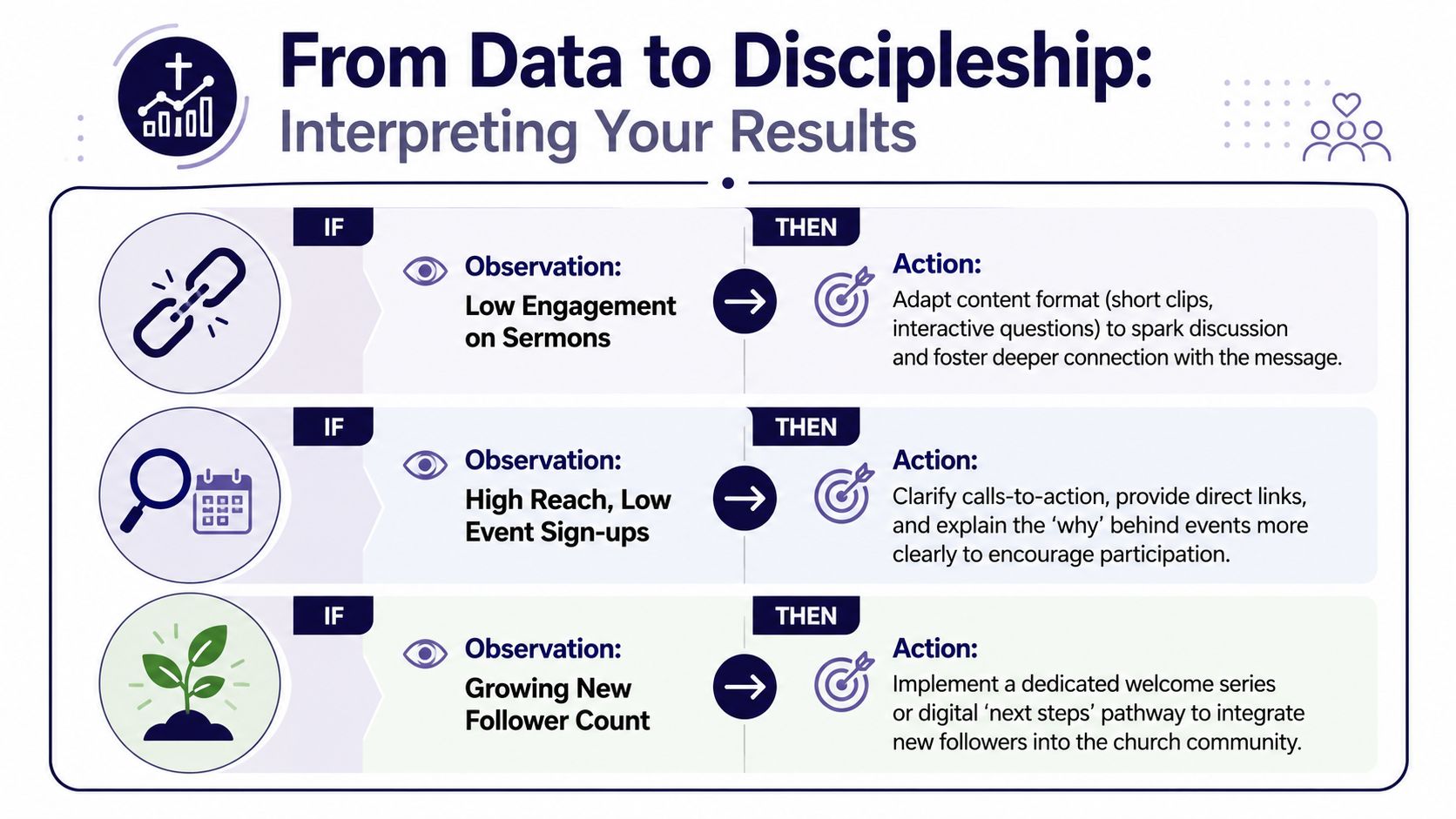
From Data to Discipleship Interpreting Your Results
A report becomes useful when it changes your next decision. In this scenario, measuring social media engagement starts serving discipleship instead of documentation.
Numbers don't tell the whole story, but they do point. They show patterns in attention, response, confusion, and readiness. The key is to pair those patterns with the pastoral outcomes you care about.
Read the signal behind the number
If a sermon clip gets strong watch time but weak comments, the content may be resonating without inviting response. That doesn't mean it failed. It may mean the caption needs a better question, or the clip needs a more focused takeaway.
If an event post reaches a lot of people but gets few clicks, the problem may not be the event. The call to action may be vague. The graphic may communicate what the event is without communicating why it matters.
If new followers keep arriving but don't move any further, your church may need a better digital welcome pathway. New people often need a simpler next step than “join us Sunday.”
Practical if-then examples for church teams
Use patterns like these when reviewing your monthly report:
If sermon clips on one topic keep getting saved
Turn that theme into a short devotional series, blog post, or discussion prompt for small groups.If parenting or marriage posts draw comments and messages
Build more practical, pastoral content around everyday discipleship, not just announcements.If volunteer posts get attention but little follow-through
Simplify the next step. Reduce the number of clicks and make the ask more specific.If event awareness is high but sign-ups are low
Rework the creative, clarify who the event is for, and make the invitation feel personal.
The most useful question after any report is, “What should we make, change, repeat, or stop?”
Connect engagement to ministry outcomes
Churches need one additional layer that many business guides skip. Tie online response to pastoral feedback whenever possible.
That can look like:
- Survey responses after an event asking how people heard about it
- Connection card questions that mention social content
- Volunteer follow-up notes about what prompted someone to serve
- Small group leader feedback on topics people are already discussing
If you're trying to connect content performance to broader ministry value, this guide on how churches can measure social media ROI is a helpful companion.
The point isn't to force spiritual growth into a spreadsheet. It's to stop pretending that a like and a life change are the same thing. Social data can't measure the whole work of ministry. It can, however, help you see where attention is opening a door.
Creating a Sustainable Rhythm for Measurement and Growth
The fastest way to make analytics unhelpful is to turn them into pressure. Volunteers burn out when every post feels like a test and every low number feels personal.
A healthier rhythm keeps measurement light, consistent, and connected to actual ministry goals. You don't need to check performance every hour. You need a repeatable habit that helps you notice patterns without draining energy.
A weekly rhythm that doesn't take over
Keep the weekly check-in short.
Review your recent posts
Look for early signals. Which post types drew replies, saves, or clicks?Scan for pastoral follow-up
Check comments and messages for prayer needs, questions, or opportunities to respond.Note one takeaway
Write a single sentence. Example: short clips with a direct question are creating more conversation.
This keeps your team attentive without becoming obsessed.
A monthly review that leads to better decisions
Once a month, spend a little longer looking at the bigger picture.
Compare content types
Which formats consistently help your goals? Not which post spiked once.Look at ministry alignment
Did your strongest content support the church's actual priorities this month?Choose one adjustment
Don't overhaul everything. Make one clear change to the next month's plan.
Consistency beats intensity. Churches grow healthier social habits when they measure a little, learn a little, and improve a little.
The aim isn't viral fame. It's faithful communication. If your social presence helps one more family feel comfortable visiting, one more member stay connected midweek, or one more person ask for prayer, that matters.
And if your current process feels too fragmented, too manual, or too dependent on one tired volunteer, it's worth simplifying the system so the team can spend less time wrangling tools and more time serving people.
If you want one place to plan, create, schedule, and review church social content, ChurchSocial.ai is built for that workflow. It helps churches turn sermons into reels and written content, create graphics and carousels, organize posts in a visual calendar, and keep content tied to events and ministry rhythms without adding more admin to a volunteer's week.


