
If you've ever been holding a phone in one hand, a baby bottle or a bulletin in the other, and trying to get a Reel out while worship is still happening, you already know the core problem. The issue isn't how to make a Reel, it's how to keep Instagram from becoming one more Sunday fire drill.
For churches, how to schedule Instagram Reels is really a workflow question. It's about getting sermon clips, event reminders, and volunteer shout-outs lined up before the week starts, then publishing them at the right hour without asking one person to live inside Instagram all day. That matters even more now that scheduling windows and timing strategy are changing, with recent data showing there isn't one universal best time to post Reels.
Why Scheduling Reels Changes the Game for Churches
A comms volunteer shouldn't be standing in a lobby at 11:42 a.m., trying to crop a Reel while people are asking where the kids' check-in line is. That kind of last-minute posting drains attention from the actual ministry moment, and it's exactly where scheduling earns its keep. It turns Instagram from a daily scramble into a weekly planning rhythm.
From Sunday Chaos to Weekly Order
When Reels are scheduled, a church team can batch work around real deadlines instead of social media interruptions. One person can pull sermon clips on Monday, write captions on Tuesday, and line everything up for the week before Wednesday night rehearsal. That's a calmer operating model for volunteers who already carry too much.
The other advantage is timing. Recent scheduling data suggests there's no single universal best time for Reels, but it does show that the strongest engagement can happen outside business hours, including late night and very early morning windows. That means a church doesn't have to post in the middle of a service or staff meeting just to stay current.
Practical rule: schedule the content in batches, then let the calendar handle the timing. Don't let the timing interrupt the ministry work.
Scheduling also gives you room to protect people from burnout. Instead of asking a volunteer to remember a post every day, you can build a repeatable process that keeps content moving even when the week gets messy. For multi-site churches, that matters even more, because the person managing Instagram may also be coordinating sermon graphics, event reminders, and service photos across campuses.
The big assumption this article challenges is simple. Scheduling is not just a button tap. It's a full pipeline, and the rest of this guide treats it that way.
Scheduling Reels Directly in the Instagram App
Instagram's native scheduler is the simplest place to start if you want to keep the workflow inside the app. Meta's help center documents a stepwise mobile flow that ends with Schedule this reel under More options for scheduled posts and Reels, so the path is straightforward once you know where the setting lives. The catch is that it only works cleanly when the account is set up correctly.
The Mobile Flow That Actually Works
Start by creating your Reel in the Instagram app, then add the media and make your edits. When you're on the final screen, open More options, switch on Schedule this reel, choose your date and time, then tap Back and Schedule to confirm. That sequence sounds small, but it's the difference between a draft sitting in limbo and a post that's ready to publish.

There's one detail that catches teams off guard. The schedule uses the phone's timezone, so a volunteer in California scheduling a 7 p.m. East Coast service clip needs to think in the device clock, not just the event time. For distributed churches, that's a real operational detail, not a minor setting.
How Far Ahead You Can Plan
One published guide says the in-app scheduler can go up to one month in advance Brandwatch's scheduling guide. Another guide reports a longer window of up to 75 days in advance and notes the same mobile workflow Postplanify's explanation of Instagram Reel scheduling. The practical takeaway is still the same. If you're planning around sermon series, holidays, or event launches, check the scheduling window inside your current app version before you build a big batch.
If Schedule this reel doesn't appear, the account is usually on a personal profile instead of a professional one. That's the first thing to fix before you waste time hunting through menus.
Using Meta Business Suite on Desktop for Reel Planning
Desktop planning is where most church comms teams breathe easier. You can see a whole week at once, compare service graphics to sermon clips, and avoid the tiny-screen trap of tapping through one post at a time. Meta Business Suite handles that better than the phone, as long as the account is connected the right way.
The Setup People Miss
The key prerequisite is the one that trips people up most often. The Instagram account needs to be tied through the correct business portfolio to a Facebook Page, otherwise the planner won't surface the Reel tools. SocialBee's guide on scheduling Reels notes that you have to select the right business portfolio and then use Content or Planner to create and schedule the Reel SocialBee's desktop workflow.
Once that connection is in place, the flow is direct. Open Meta Business Suite, choose the portfolio linked to the church's Facebook Page and Instagram account, go to Content or Planner, create the Reel, then pick Schedule and set the date and time. That structure is useful for multi-site churches because more than one admin can look at the same calendar without asking who posted what and when.
A lot of teams still mention Creator Studio out of habit, but the useful question is whether the current planning dashboard gives you visibility and control. Meta Business Suite is the one that matters now for most desktop scheduling work.
The desktop planner saves the most time when one person approves content and another person publishes it.
For teams managing multiple campuses, the benefit isn't just convenience. It's coordination. A campus pastor can review the post order, the comms director can confirm the caption, and the volunteer can stop worrying about posting from a phone between meetings.

What to Expect Operationally
One published guide says native scheduling can go up to 75 days ahead, while another shows a shorter window in Meta's ecosystem depending on the tool and workflow Postplanify's scheduling notes. That's why the exact limit matters less than the planning habit. Build your schedule around the window your tool accepts, then keep the draft queue clean so the calendar doesn't fill with stale content.
If the business portfolio isn't right, the Reel options usually don't show up. That's not a content problem, it's a setup problem.
When a Third-Party Scheduler Is Worth the Subscription
A Reel is ready, the caption is approved, the cover image is set, and then someone notices the post still needs a volunteer reminder and a sermon-series tag. That is usually the point where native scheduling starts to feel tight and a third-party scheduler starts to make sense. The value is not abstract feature count, it is fewer handoffs, fewer missed details, and less time spent repairing a post after it has already been drafted.
The Three Reasons Teams Upgrade
A paid scheduler makes sense when you need one calendar for multiple accounts, a shared approval process, or unified analytics across Instagram and Facebook. Those needs show up fast in church communications, especially when one person writes the copy, another person checks the theology and timing, and a third person is lining up posts with Sunday and midweek events. Native tools can handle pieces of that, but they often feel built for posting, not for a team that has to coordinate.
Integrations matter too. A scheduler that connects with Planning Center or other church calendars lets sermon series, volunteer reminders, and event promotions flow into content planning without retyping the same details every week. ChurchSocial.ai is one option in that space because it combines a drag-and-drop calendar with sermon-to-Reel creation and church-calendar integrations.
| Method | Best For | Key Limitation |
|---|---|---|
| Instagram app | Solo posting and quick fixes | Limited team visibility |
| Meta Business Suite | Desktop planning for Facebook and Instagram | Requires the correct business portfolio |
| Third-party scheduler | Multi-account workflows, approvals, calendar integrations | Adds subscription cost and another tool to maintain |
For a broader comparison of planning tools, a comparison of the 10 best social media calendar apps can help you sort out which features are useful and which ones only look good in a demo.
How to Decide Without Overbuying
Stay native if you only need to schedule a small number of Reels and one person owns the account from start to finish. Move to a paid scheduler when the church needs review steps, campus-level coordination, or one calendar that brings social posts and ministry dates into the same view. The right tool should remove decisions from the week, not add another dashboard your team has to babysit.
A good test is whether your current process keeps breaking at the same points. If drafts go stale, approvals live in email threads, or you keep losing track of which campus is posting what, the subscription is usually paying for itself in saved time and fewer mistakes. If your workflow is still simple, stay with the native options and keep the stack light.
For teams trying to compare options without buying the first polished demo, the best time to post reels on Instagram question belongs in the same conversation as scheduling software. The schedule matters, but the workflow has to support it first.
Best Times to Publish Reels in 2026
A Reel that lands at the right moment can fit naturally into how people already use Instagram, while a poorly timed post can disappear into a crowded feed before your team even checks the results. That is why timing matters for churches that are planning around sermons, weekday ministry reminders, and event promotion at the same time. Later's 2026 timing analysis found that 12:00 a.m. was the strongest overall posting point, with Monday as the top day and the strongest engagement concentrated between 12:00 a.m. and 6:00 a.m. Later's 2026 timing analysis. Church teams also need to weigh that against another pattern, since publishing crowds often build around noon ET, a point highlighted in the timing roundup from Adobe.
What the Timing Data Means
Those findings do not cancel each other out. They show that a high-traffic hour and a high-performing hour are not always the same thing, which is why church teams should test their own account instead of copying someone else's calendar. Buffer's 2026 analysis places its strongest window at 6 p.m. to 11 p.m. on Wednesdays and Thursdays, while other timing studies point to weekday morning and early afternoon patterns, especially Monday through Thursday Buffer's 2026 analysis.
Church audiences are rarely uniform. Students, night-shift workers, parents, and people following your ministry from other time zones may engage when your office is closed and the feed is quieter. That makes the old assumption that Instagram only works as a daytime channel a weak planning rule for church accounts.
Working rule: use borrowed timing data as a starting point, then let your own insights decide the final slot.
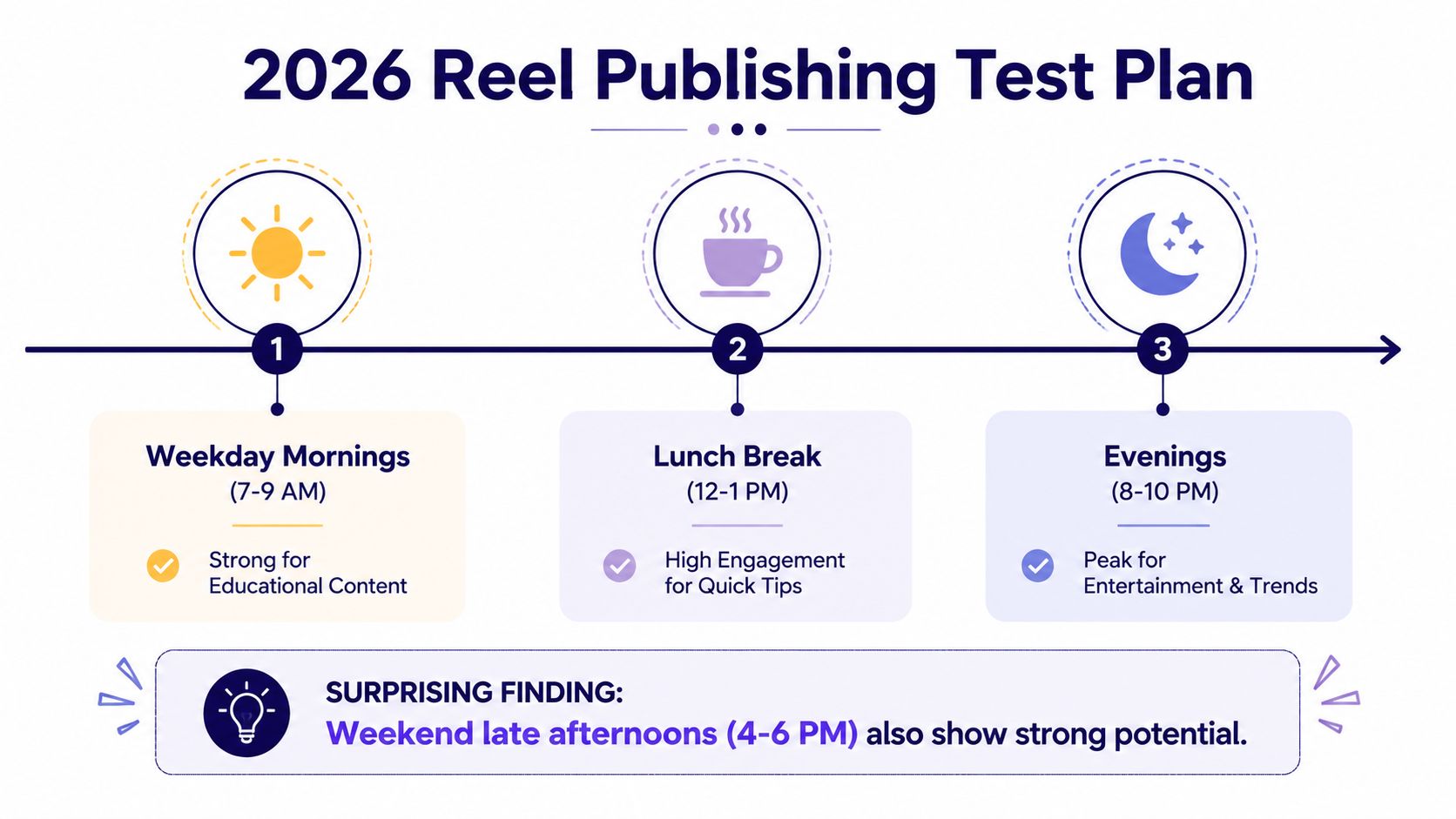
A practical test plan helps here. Week one, schedule one Reel in a late-night slot and one in an early-morning slot. Week two, move the same style of content into a weekday midday slot. Week three, compare a Monday post with a Thursday post. Week four, keep the content type steady and change only the hour, so you can read the results without guessing which variable moved the numbers.
For local context, the best time to post reels on Instagram question belongs in the same conversation as timing tests and account behavior, because broad benchmarks only help if they translate to your audience. If you want a narrower lens on hour-by-hour behavior, the best time of day to post a Reel guide is a useful companion when you are comparing your own results against broader timing patterns.
Preparing Reels Assets Before You Schedule Anything
Scheduling works best when the Reel is already finished before it touches the calendar. If the edit is rough, the cover is off-brand, or the caption is still half-written, the schedule just becomes a holding tank for unfinished work. The churches that stay consistent treat the Reel as the last step, not the first.
Build the Reel Like a Complete Package
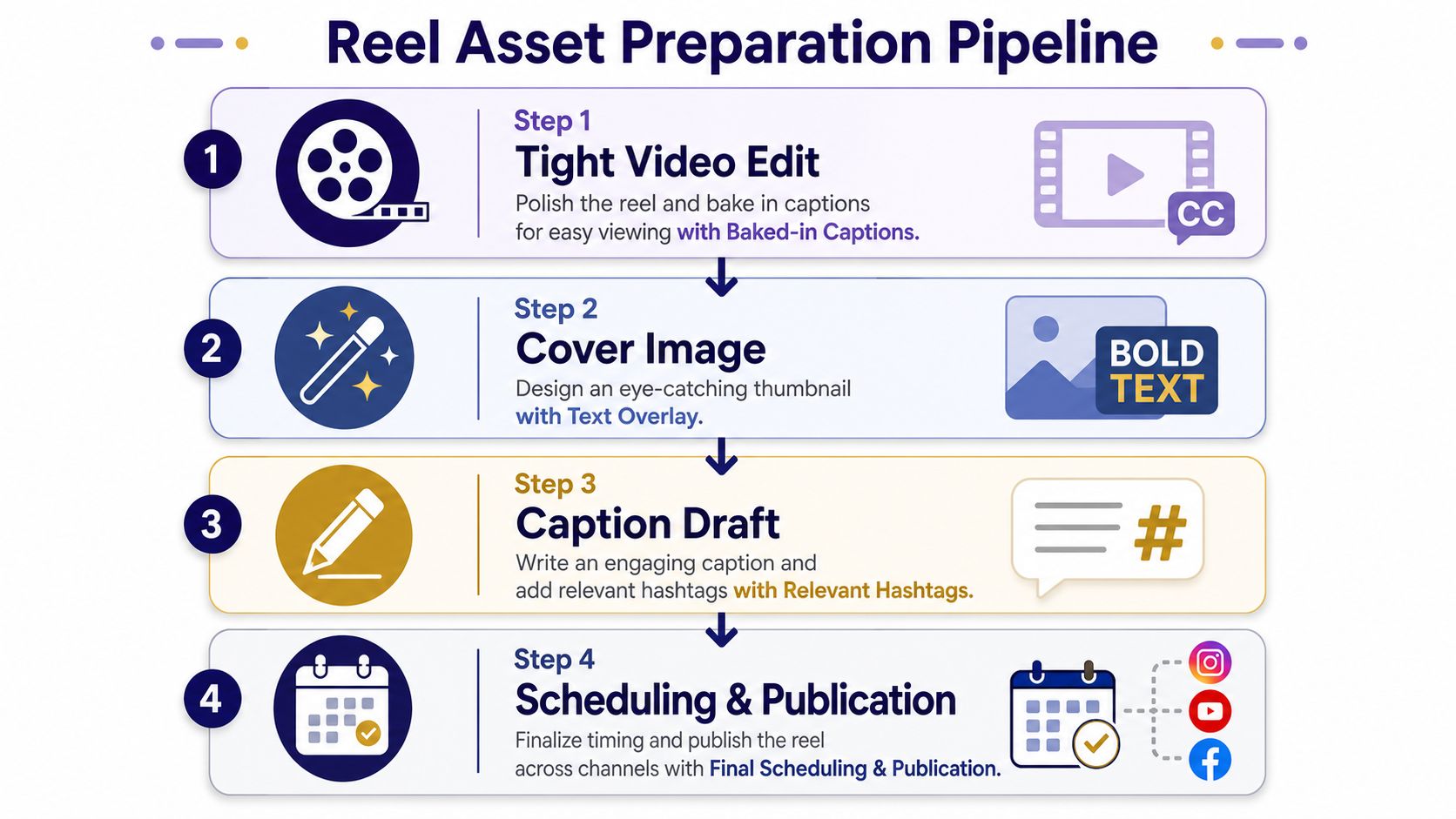
Every scheduled Reel needs four things. First, a tight video edit with captions baked in for sound-off viewing. Second, a cover that matches the sermon series or event branding. Third, a caption with a clear hook and a specific call to action. Fourth, a hashtag set that mixes broader reach tags with local or ministry-specific tags.
That asset stack is where batch work pays off. A sermon transcript can become multiple short clips in one sitting, especially when the source content is already structured around one message and a few repeatable points. Church teams using sermon repurposing workflows can move those clips into a drag-and-drop calendar alongside photos, carousels, and event posts instead of building everything from scratch every time.
If you want a focused workflow for cutting those clips, the video clips for Reels article is a helpful companion.
Keep the Calendar Tied to Ministry Life
Church content gets easier when the calendar reflects real ministry moments. Planning Center integration helps tie service topics, volunteer reminders, and event dates into the planning flow so the social calendar isn't separate from the church calendar. That means a youth retreat announcement, a sermon recap, and a volunteer onboarding reminder can all live in the same planning view.
For churches that want a single workspace for this pipeline, ChurchSocial.ai supports sermon-based Reel creation, drag-and-drop scheduling, graphic templates, and calendar planning connected to church events. That kind of workflow matters because the Reel should fit the ministry calendar, not fight it.
Does Scheduling Actually Hurt Reel Reach
This is the question most scheduling guides skip, and it's the one comms directors need answered. Scheduled Reels are useful, but the strategy changes if a post depends on urgency, trend alignment, or a same-day moment. Instagram's native scheduler gets the Reel into the queue, but it doesn't change the fact that early engagement in the first hour still matters for discovery, which is why timing and freshness still matter so much.
What Should Stay Scheduled and What Should Stay Live
Evergreen clips, sermon takeaways, event reminders, and recap content are good candidates for scheduling. They're planned, they're stable, and they don't need a last-minute sound change to make sense. Time-sensitive content is different. If the Reel depends on trending audio, a current event, or a live ministry moment, post it manually after a final check.
That audio question comes up constantly. If a Reel already needs a new trend sound or a last-minute remix, scheduling can create friction because the post may need a mobile-side edit or a fresh upload to stay relevant. The same is true for churches trying to publish a clip that only works if it lands on the same day as the event.
A Rhythm a Small Team Can Actually Keep
A sustainable weekly cadence looks like this. Monday is the planning block, where the sermon transcript gets clipped and the week's ideas get drafted. Tuesday is the prep block, where covers, captions, and final edits get cleaned up in the graphics studio. Wednesday or Thursday is the load-in block, where everything gets scheduled in the chosen planner.
Useful policy: schedule the repeatable content, post the moment-sensitive content live.
Multi-site churches also need timezone discipline. If campuses span regions, keep the scheduling clock aligned to the audience you want to reach, not just the person clicking publish. If a scheduled Reel doesn't publish, the first things to check are the account connection, the draft state, and whether the time was saved in the correct timezone.
One sermon can fuel a full week of content when the transcript is broken into clips, the assets are prepped, and the calendar is clean. That's the advantage of learning how to schedule Instagram Reels well. You stop reacting to the app and start building a repeatable content system.
If your church is ready to turn sermon clips, event posts, and Reels into a repeatable calendar, ChurchSocial.ai gives you the tools to plan, create, and schedule that work in one place. You can map content on a drag-and-drop calendar, generate Reels from sermons, and keep ministry dates connected to your social plan. Visit ChurchSocial.ai and build a workflow that lets your team post with less scrambling and more consistency.


