

You've got the email drafted, the chairs counted, and the team's prayerfully optimistic. Then the weekend comes, and the room still isn't as full as it should be, because the problem usually wasn't the final reminder, it was everything that happened before that reminder ever landed.
Church attendance doesn't rise because you post more. It rises when you remove friction in a sequence people can follow, from first click to front door. The churches that win seats treat attendance like a four-phase funnel, not a one-time announcement, and they build each phase on purpose, registration, anticipation, activation, and arrival (boost conversions with social leads).
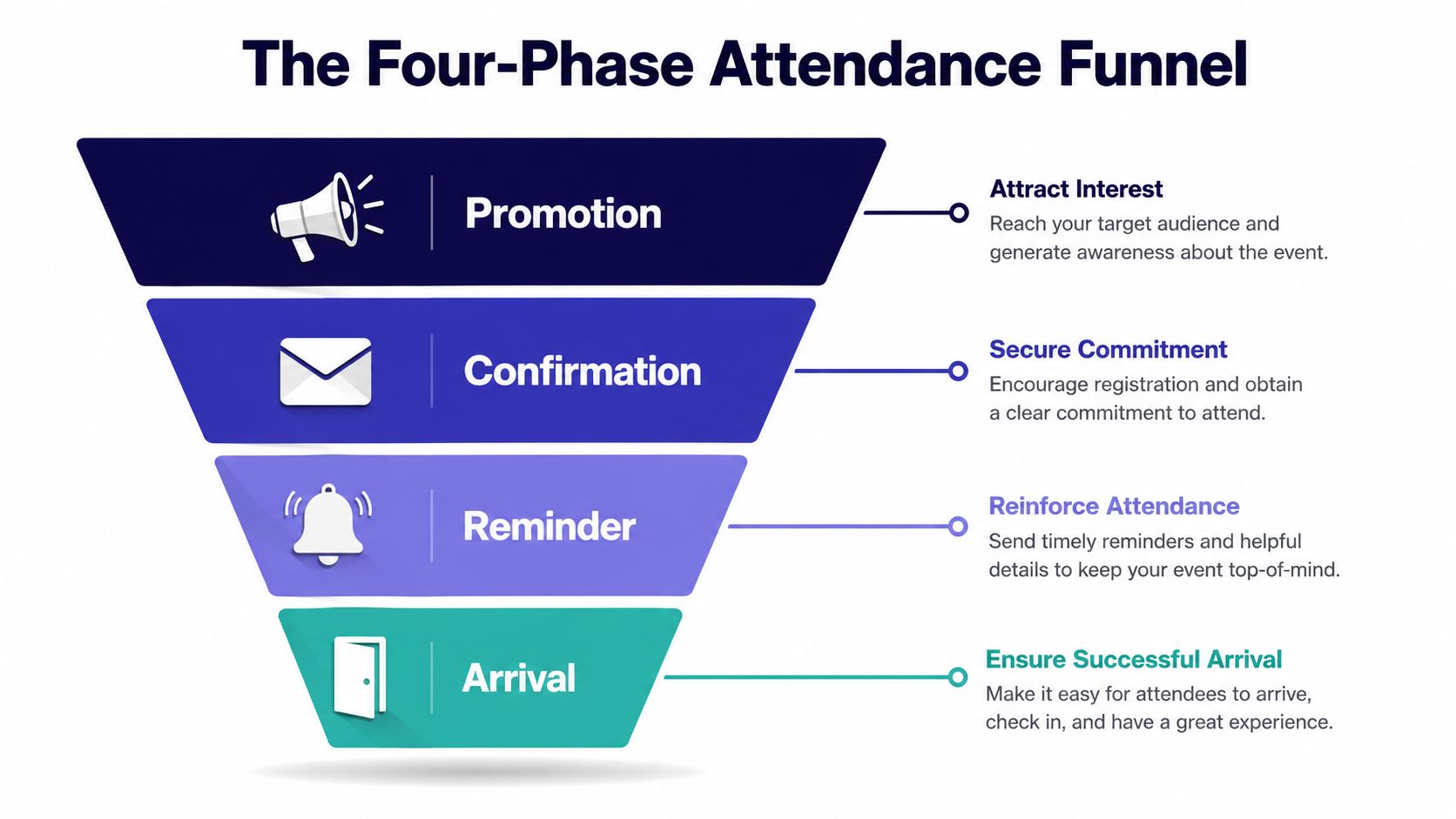
Use that funnel as your filter. If registration is clunky, people drop. If anticipation is vague, registrants go quiet. If activation is weak, they forget. If arrival is confusing, they still don't show up even after they meant to.
That's why the smartest event teams build a stepwise commitment flow, one-click registration, immediate calendar-add, then a pre-event sequence with agenda, travel, and networking details. Tools matter here because the same workflow has to feed planning and posting, and platforms that sync calendars, generate sermon-based content, and keep graphics and scheduling in one place reduce the amount of manual cleanup your team has to do.
Why Most Church Events Underperform and How a Funnel Fixes It
Many church events underperform when the church treats awareness as the finish line. People hear about a cookout, women's night, serve day, or youth rally, but they still have not answered the private questions that decide attendance, is this for me, do I know what happens, will I feel awkward, and will getting there be simple?
That is why I do not start with more promotion. I start with the funnel. The four phases that matter are registration, anticipation, activation, and arrival. In registration, collect only the essentials first and push optional details later so you do not create unnecessary drop-off. In anticipation, use personalized content and social proof because registrants often go quiet there. In activation, put your highest-frequency messaging into the final week because that is where response is strongest per message sent. In arrival, remove last-mile friction, confusing parking, vague entrances, and unclear building flow still suppress attendance after someone has already committed.
What the funnel changes in practice
A church that gets this right stops sending generic blasts and starts building commitment. The better pattern is simple, one-click registration, immediate calendar-add, then an event sequence that adds agenda, travel, and networking details instead of just repeating the flyer. That is the difference between “we announced it” and “people are preparing to come.”
Practical rule: if your sign-up form asks for everything up front, you are not collecting data, you are creating resistance.
Use boost conversions with social leads as a reminder that the first response matters. The first click should feel easy, the next step should feel obvious, and every follow-up should reduce uncertainty instead of adding noise.
The church-specific reason this works
Church events fail when they assume familiarity. A first-time guest does not know what “meet us in the fellowship hall” means. A newer attendee does not know whether to bring kids, where to park, or how long the event will run. A volunteer may know all the answers, but the person reading your post does not.
ChurchSocial.ai fits this model because it can turn sermon transcripts into posts, reel clips, and blog content that keeps the event message consistent across channels, while the visual calendar keeps the whole sequence visible. If you are running multiple ministries, that matters more than clever copy. Consistency wins when the room is full of people deciding whether to show up.
Positioning Your Church Event So People Want to Show Up
Vague invitations underperform because they don't answer the only question that matters, “Why should I give this evening, this Saturday, or this Sunday afternoon to this?” A line like “Join us for a special service” asks for trust before it has earned it. A line like “Bring a friend to a free community cookout with live worship” gives people a picture, a reason, and a low-friction next step.
Build a one-page event brief before you promote anything
Keep the brief painfully simple.
- Title options: write three versions, one formal, one warm, one invitational.
- Hook line: say what the event gives, not just what it is.
- Who it's for: name the audience plainly, families, men, students, new guests, volunteers, or the whole church.
- What they walk away with: use an outcome, connection, encouragement, resources, food, prayer, or clear next steps.
- Call to action: decide the exact action, register, bring a friend, RSVP, or show up by a specific time.
If you can't fill that page, you're not ready to promote.
A good brief also gives your sermon or series language a job. If the weekend message is already pointing toward hospitality, hope, or community, let your event copy borrow that vocabulary. Then the AI caption writer in ChurchSocial.ai can stay aligned with the sermon transcript instead of inventing a new tone every time somebody posts.
Run every event through this checklist
- Clear promise: would a stranger understand the benefit in one glance?
- Clear audience: would the right people know this is for them?
- Clear format: do they know whether it's casual, formal, kid-friendly, or outreach-focused?
- Clear barrier removal: have you named parking, childcare, dress, or check-in details?
- Clear next step: is there one obvious action, not three competing ones?
People don't attend an event they can't mentally picture. Give them a picture, then a reason.
That's the core of positioning. If the promise is fuzzy, no amount of posting will fix it. If the promise is sharp, the rest of your promotion gets easier because every caption, story, and reel is reinforcing the same idea.
Building a 30-Day Promotional Content Calendar with ChurchSocial.ai
Your promotion should start a month out, not a week out. Churches that treat event publicity like a last-minute scramble usually end up asking the social team to “just post something” three days before the date, and that's exactly how events sound forgettable. The fix is a clean calendar, a clear message stack, and one place where dates, copy, and graphics all live together.
ChurchSocial.ai's drag-and-drop calendar, combined with Planning Center sync, makes this easier because your event date, location, and timing don't have to be retyped into every post. That matters when volunteers change and staff are juggling multiple ministry deadlines. The calendar keeps the plan visible while the sync helps prevent mismatched details.
Build the 30-day sequence around sermon content
Start with the sermon transcript. Pull a theme line, a quote-worthy phrase, and one practical takeaway, then turn those into a teaser reel, a few social posts, and a short blog announcement. If your weekend message is about hospitality, for example, your event teaser should sound like an extension of that message, not a disconnected announcement.
Use the sermon clip creator to pull a short reel that previews the mood or topic. Then use the transcript-based caption writer for the supporting posts. The graphic templates and editor handle the carousel and announcement art, which is exactly what most churches need when they have the message but not a designer on staff.
Reusable copy snippets
Facebook event post:
“You're invited to a church event that's built for connection, encouragement, and a clear next step. Bring a friend, come as you are, and join us for an evening designed to help our church family and community connect.”
Instagram carousel outline:
Slide 1, event name and date. Slide 2, who it's for. Slide 3, what people can expect. Slide 4, practical details. Slide 5, RSVP or save the date.
Website banner blurb:
“Join us for a church event where community, worship, and practical next steps come together in one place.”
Short email teaser:
“We've got something special coming up, and we want you there. Save the date, invite someone, and watch for more details this week.”
For more format ideas, the internal guide at ChurchSocial.ai's event promotion article is worth keeping bookmarked when you're building the post mix.
A simple posting rhythm
Use the month to move from awareness to commitment. Early posts should explain the event. Midpoint posts should show people why it matters. Final-week posts should reduce uncertainty and tell them exactly what to do next.
That's where the sermon transcript matters again, because it gives you repeated phrasing for captions, reels, and blog copy without forcing your team to rewrite the same message three different ways. Once the content is in the calendar, execution gets a lot less chaotic.
The Confirmation and Reminder Sequence That Actually Drives Attendance
The best reminder sequence starts the moment someone registers. If your confirmation email is vague, you've wasted the best attention you'll get. That first message should do real work, directions, entrance instructions, calendar link, and a sense that their spot is secured.
From there, use a multi-touch sequence: instant confirmation, then reminders roughly one week, one day, and one hour before the event for online formats, with SMS or WhatsApp when appropriate to boost visibility (Artisan on increasing attendance at events). A useful technical benchmark is RSVP reconfirmation two to three days before the event, because that's where commitment gets tested without feeling naggy.

Copy that gets opened
Confirmation email subject line:
“You're registered, here's everything you need”
Preview text:
“Check your calendar, find the entrance, and get the details in one place.”
Confirmation body snippet:
“Thanks for registering. We're glad you're coming. Add this to your calendar now, then use the directions and check-in notes below so arrival is easy.”
For the one-week reminder, keep it brief and specific. For the one-day reminder, repeat the practical details, not the whole pitch. For the one-hour reminder, say exactly where to go and what to expect at the door. If you're using SMS or WhatsApp, keep it even tighter.
Segment by audience, not by guesswork
First-time guests need reassurance. Regular attenders need a nudge and a sense of ownership. Volunteers need logistics and a clear arrival time. The content should change based on who's receiving it, not just on where they are in the calendar.
Here's the part churches miss most often, calendar integration and logistics. If parking is weird, say so. If the building has a side entrance for guests, name it. If childcare check-in is in a different hallway, spell it out. The reminder sequence is not just about attendance, it's about removing the last bits of uncertainty so people don't back out.
If you make the next step obvious, you make attendance easier to complete.
That's why the confirmation email matters so much. It's the first moment after commitment, and it should make that commitment feel simple, not burdensome.
Mobilizing Volunteers and Optimizing the Onsite Experience
The arrival phase decides whether your promotion pays off. By the time someone is standing in your parking lot, you're not trying to persuade them anymore, you're trying to remove friction before they feel it. Confusing check-in, unclear signage, or a lonely front door can still suppress attendance even after the person has already decided to come.
Put people in the right roles before the doors open
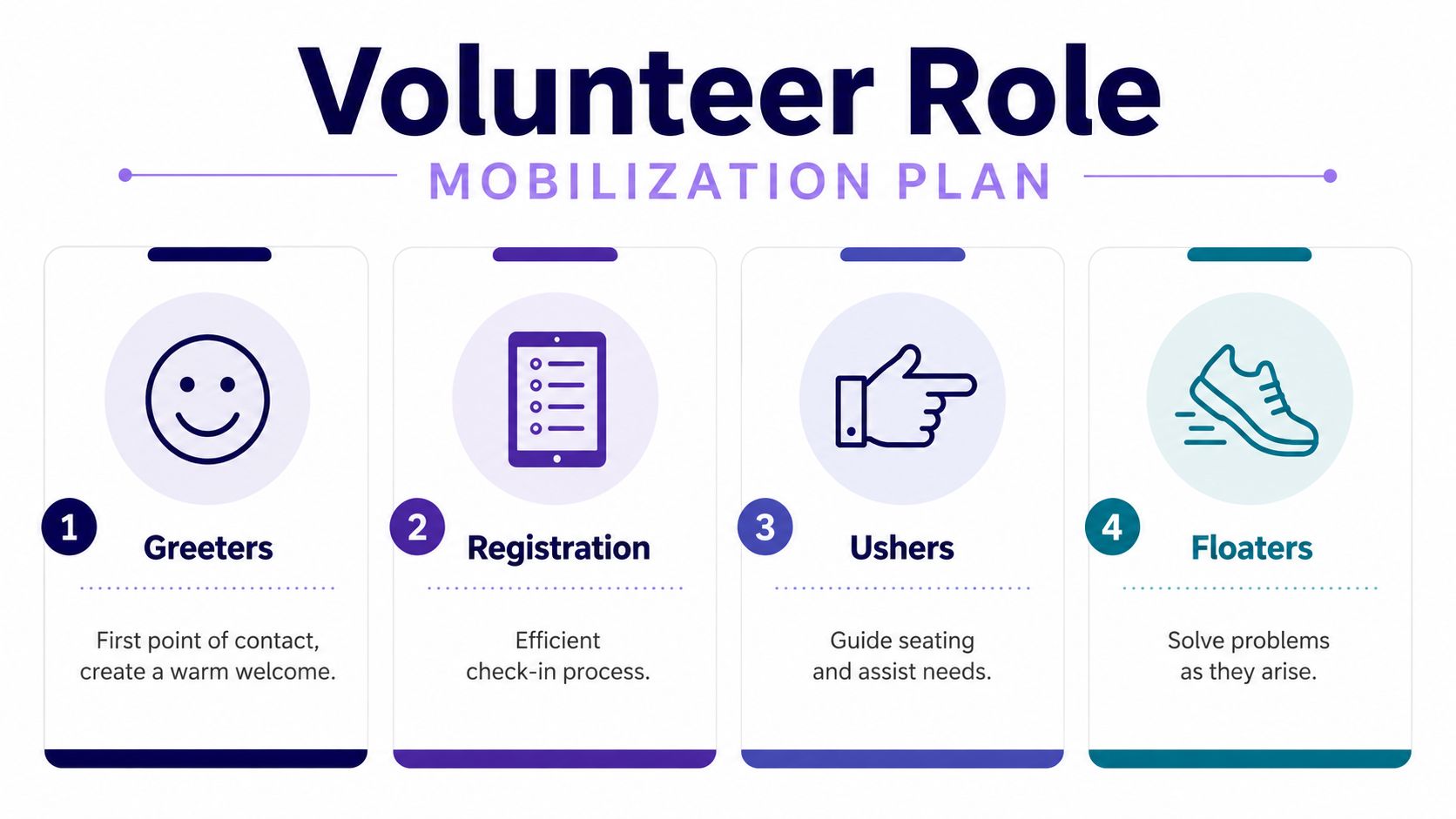
Build the team around four jobs, not “everyone help where you can.”
- Greeters: first point of contact, warm welcome, quick directional help.
- Registration: fast check-in, name tags, clear handoff.
- Ushers: seating help, crowd flow, answers to basic questions.
- Floaters: solve problems as they come up, from missing supplies to a lost guest.
If you want a deeper volunteer workflow reference, ChurchSocial.ai's volunteer management guide pairs well with a simple team plan because it helps you think about roles instead of just filling slots.
Use a one-page run-of-show
Write down when volunteers arrive, when doors open, when each station is staffed, and who handles issues. Keep the document short enough to print and hand to someone at the door. If the team leader can't scan it in 20 seconds, it's too complicated.
A strong onsite experience also needs tiny comforts. Clear signs matter. A visible host matters. A short welcome card matters. So does a low-pressure follow-up text the next day, because first-time guests often need one more gentle touch before they feel connected.
For churches with a content plan, don't stop at the event itself. Draft thank-you reels, recap posts, and photo carousels in the same calendar so the next event starts with momentum instead of silence. ChurchSocial.ai can hold that post-event content in the same workflow as the promotion, which keeps your team from treating follow-up like an afterthought.
Practical rule: if guests have to ask three different people where to go, your event isn't ready yet.
That onsite readiness is what turns interest into attendance you can count on next time.
Measuring Attendance Rate and Learning From Every Event
Raw headcount is useful, but it's not the cleanest way to judge whether your event worked. The standard formula is Attendance Rate = (Total Attendees ÷ Total Registrants) × 100 (Umbrex on event attendance rate analysis). That number tells you how well your registration, reminder, and arrival systems performed.
Track the right metrics
| Metric | What It Measures | Why It Matters |
|---|---|---|
| Attendance rate | Attendees compared with registrants | Shows whether people who said yes actually showed up |
| Show-up rate by source | Which invitation source produced attendance | Helps you see what channel brought committed people |
| Email opens | Whether your reminders were seen | Tells you if subject lines and timing worked |
| Reel views | Reach and attention on short-form video | Shows which teaser clips pulled interest |
| First-time guest return | Whether new people came back | Reveals if the event created future connection |
For a broader measurement framework, ChurchSocial.ai's community engagement metrics guide fits well beside your event review, especially if you're trying to connect social content with attendance and follow-up.
Run a 30-minute review the week after
Pull registration data from Planning Center. Pull content performance and schedule notes from ChurchSocial.ai. Then ask three blunt questions, which source brought people, which reminder got action, and where did guests get stuck?
Ignore vanity metrics that don't help you plan the next event. A post can look good and still fail to move people toward registration. A reel can perform well and still not produce turnout. What matters is whether the content, sequence, and onsite experience produced actual attendance.
If you want a practical planning sheet for the next cycle, use ABC Hire's checklist as a simple reference point, then adapt it to your church workflow so the review turns into action instead of another document in a folder.
Your Church Event Growth Plan and Common Pitfalls to Avoid
Start with the brief, build the calendar, launch the sequence, then review the numbers. That's the whole loop, and it gets better when you repeat it on purpose. Month one, standardize your brief and calendar. Month two, launch the confirmation and reminder sequence. Month three, study the attendance rate and tighten the funnel.
Don't keep making the same mistakes
- Overloaded registration form. Ask for less up front and gather extras later.
- Only one reminder. Use a real sequence, not a single nudge.
- Ignoring first-time guest anxiety. Spell out parking, entrances, and expectations.
- One-week promotion sprint. Build a 30-day runway so people can plan.
The full funnel only works when every phase gets a job. Registration should be easy. Anticipation should be personal. Activation should be timely. Arrival should be obvious. If one of those fails, your attendance suffers even if the other three are strong.
Repeat the cycle with every event, and keep the same planning board visible so your team doesn't improvise from scratch each time. That's how churches stop chasing turnout and start building it.
ChurchSocial.ai helps churches turn sermons, event details, and calendar dates into a consistent promotion system without adding more manual work. If you want your next event to feel planned, clear, and easier to fill, visit ChurchSocial.ai and build the content calendar, reels, and reminder flow around the event before the first post goes live.


