
Monday morning at a small church can feel like three jobs at once. A volunteer opens a sermon transcript, a staff member pings them about an event flyer, and a pastor wants a draft post reviewed before lunch. The work isn't hard because the ideas are complicated, it's hard because every step lives in a different place and somebody has to remember every handoff.
That's where workflow automation helps. In plain English, it means using software to run a repeatable sequence of work according to set rules, so people don't have to keep sending reminders, moving files, or updating records by hand each time. For church communications, that can mean a sermon request, an event notice, or an approval flow moves forward in a steady pattern instead of depending on whoever happened to be online that day.
A Monday Morning at a Small Church
The quickest way to understand what is workflow automation is to start with the kind of morning many volunteer social media managers already know. A sermon transcript lands in one inbox, a flyer sits in another, and a comment thread contains three different approval notes, each written by a different person. By the time anyone gathers the pieces, the post that should have gone out early in the day is still sitting in draft.
From scattered tasks to a repeatable path
Workflow automation doesn't replace judgment. It handles the repetitive movement around the judgment, the part where a person would otherwise say, “Now send this over there, then wait for that reply, then copy the approved version into the scheduler.” That is why a clear definition matters. Workflow automation is the use of software to execute, coordinate, and monitor a sequence of actions according to predefined rules, so a process can run automatically without an employee manually sending reminders, transferring files, or updating records each time. Ringover's overview of workflow automation puts the core idea in that same direction.
For a church, that can be as simple as this. A sermon transcript arrives, a draft caption is created, a graphic request is routed, and a scheduled post waits for approval. No one has to chase each step in a chat thread because the path already exists.
Practical rule: if a person is doing the same handoff over and over, software can usually carry that handoff.
Why this matters in ministry communications
Church communications often depend on volunteers, informal memory, and good intentions. Those are strengths in ministry, but they're weak as a system. One person knows where the transcript is, another knows who approves graphics, and a third knows when the weekend content needs to go live.
Workflow automation gives those people a shared path. It doesn't need to be flashy. It just needs to make the next step obvious and automatic so the team can focus on the message instead of the mechanics.
How Workflow Automation Actually Works
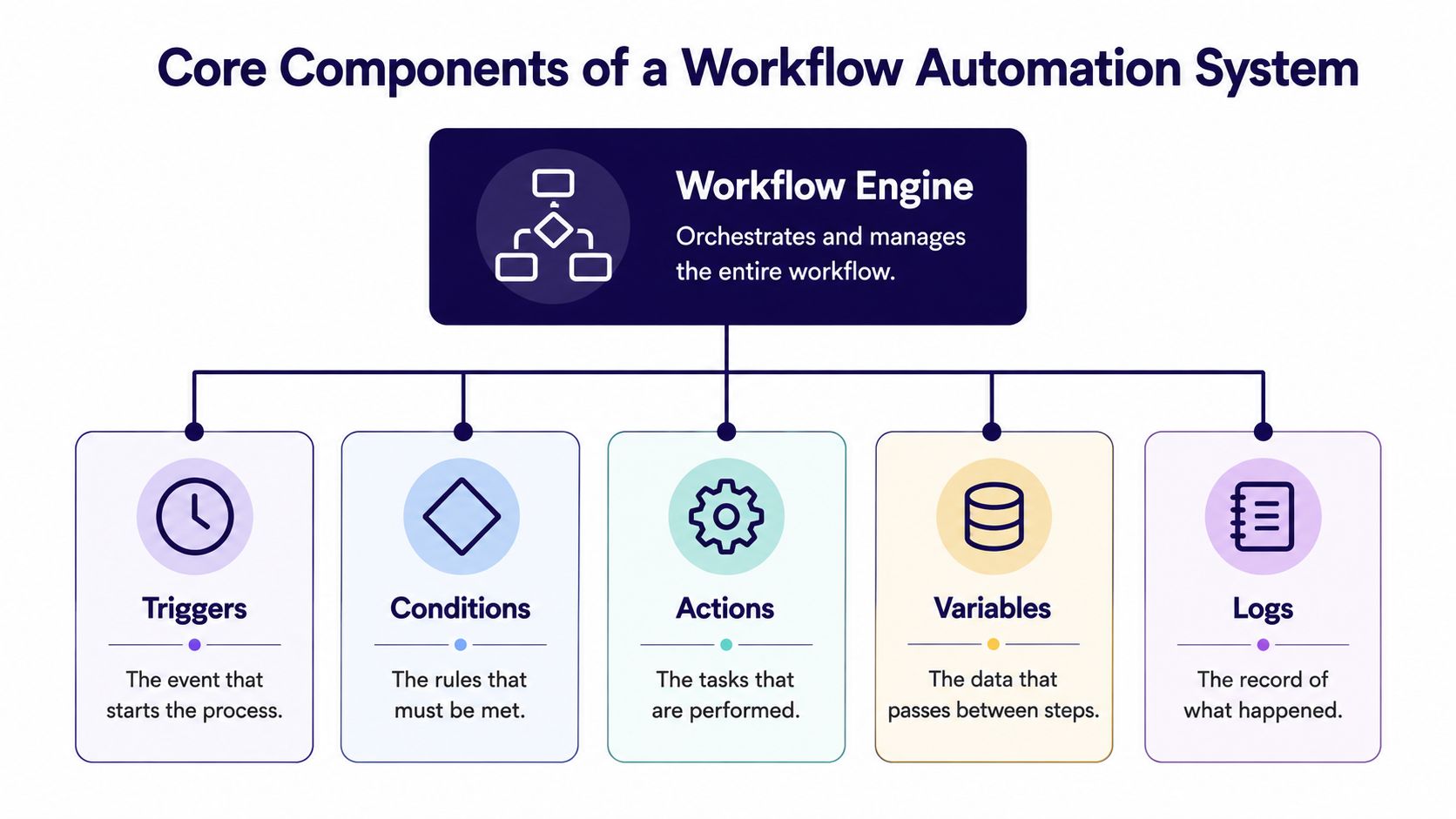
The basic pattern is easier to remember than the name suggests. Think in three beats, trigger, condition, action. A trigger starts the flow, a condition checks whether the next step should happen, and an action carries out the task.
A sermon workflow in three beats
A pastor uploads a sermon transcript. That upload is the trigger. The system checks whether the transcript is complete and whether the file matches the expected format. Those checks are the conditions. If the rules are met, the workflow creates a clip draft, writes a caption, and queues the post for review. Those are the actions.
That structure matches the event-condition-action model used by major workflow systems. In the technical definition, a trigger starts the flow, conditions evaluate routing logic, and actions execute tasks such as updating records, assigning work, or calling APIs. Rework's process management guide describes that core pattern clearly.
A church team can use the same pattern for a photo request, an event announcement, or a volunteer handoff. The software doesn't need to understand the ministry context. It just needs to follow the rules you define.
Why multi-step matters more than one-off automation
Single-task automation does one thing, then stops. Workflow automation links several steps together so the process keeps moving. That's the value for church comms, because most tasks aren't isolated. A sermon clip leads to a caption, which leads to review, which leads to scheduling.
A good workflow feels quiet. If people keep asking, “Who's got this now?”, the workflow isn't finished yet.
Once you can spot the trigger, the condition, and the action, you can look at any recurring church task and map it in your head. That's the foundation for choosing tools without getting lost in feature lists.
Core Components of a Workflow Automation System
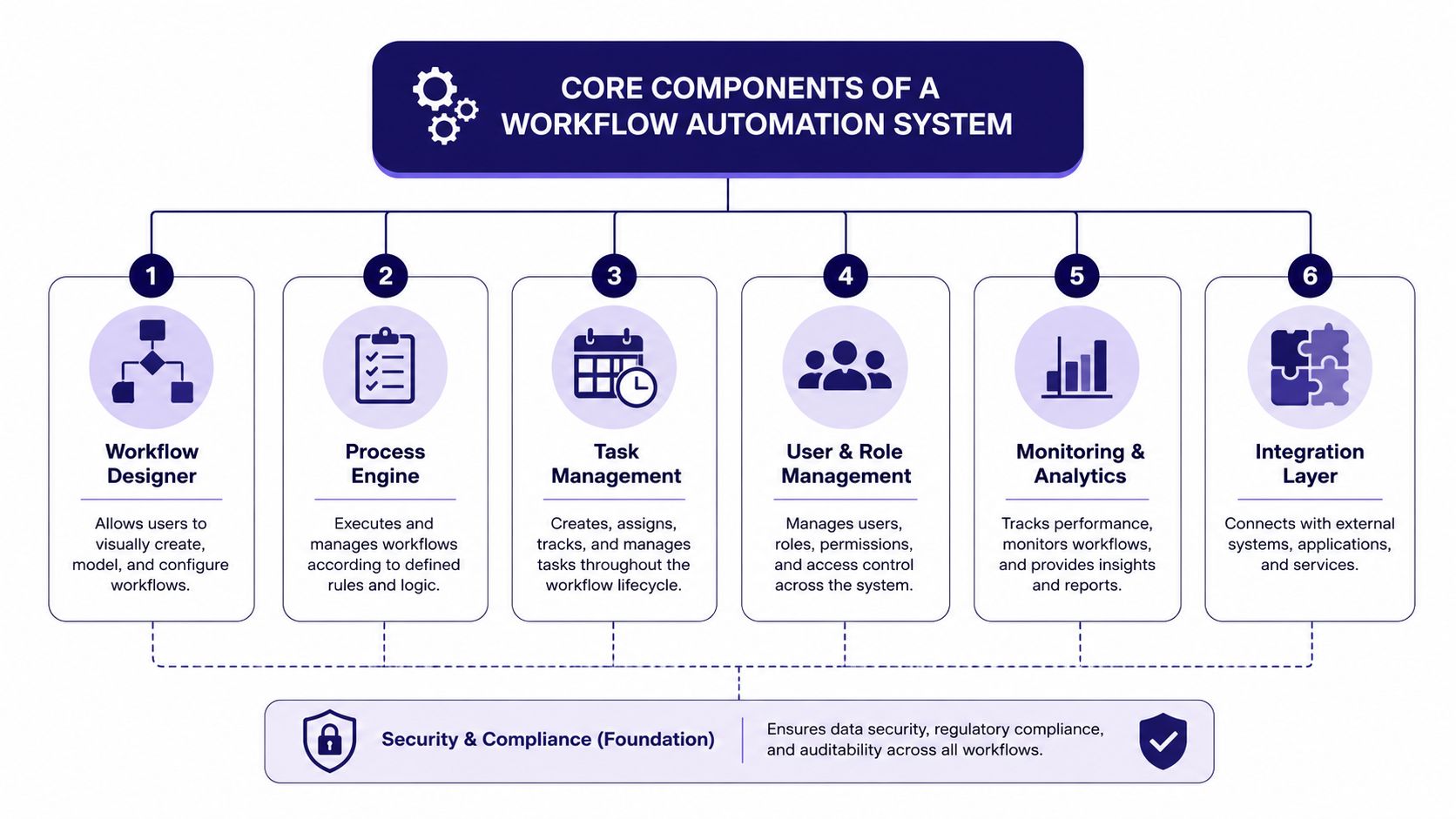
A useful workflow system behaves less like a single app and more like a small operations team. Each part has a job. Some parts move data, some decide what happens next, and some keep a record when something goes wrong.
The five jobs the software has to do
Triggers start the process, just like a volunteer hitting submit on a sermon request. Conditions check the details, such as whether the content is approved or the right file is present. Actions do the work, like creating a draft post, assigning a reviewer, or sending data to another system.
Then come the parts that keep the system reliable. Data mapping moves information between platforms so a title, date, or caption lands in the right field. Monitoring and logs track what happened, which matters when the process needs attention later. These are the quiet pieces that save the most time because they prevent the team from rebuilding the same step by hand.
Why exceptions matter in real church life
Modern workflows are built to handle failures without stopping the whole chain. They can transform data between systems, surface missing fields or API limits, and support replay and monitoring so the process keeps moving even when one step fails. Celigo's workflow automation article explains that exception handling is part of the design, not an afterthought.
That matters in ministry because a church week is full of interruptions. A transcript may be incomplete, an event field may be missing, or a calendar entry may need a second review. A reliable system doesn't pretend those problems won't happen. It shows the error, records it, and lets the team fix only the broken step.
ChurchSocial.ai's unified calendar and content tools fit that pattern well, because the same workflow mindset can carry a sermon draft, a graphic request, and a scheduled post through a clear path. ChurchSocial.ai Planning Center integrations are especially relevant when events already live in another church system.
Church Workflows You Can Automate This Week
A volunteer doesn't need a massive system to get value from automation. One clean workflow can remove a lot of friction. The most useful place to start is usually the work that already repeats every week.
Sermon to social content
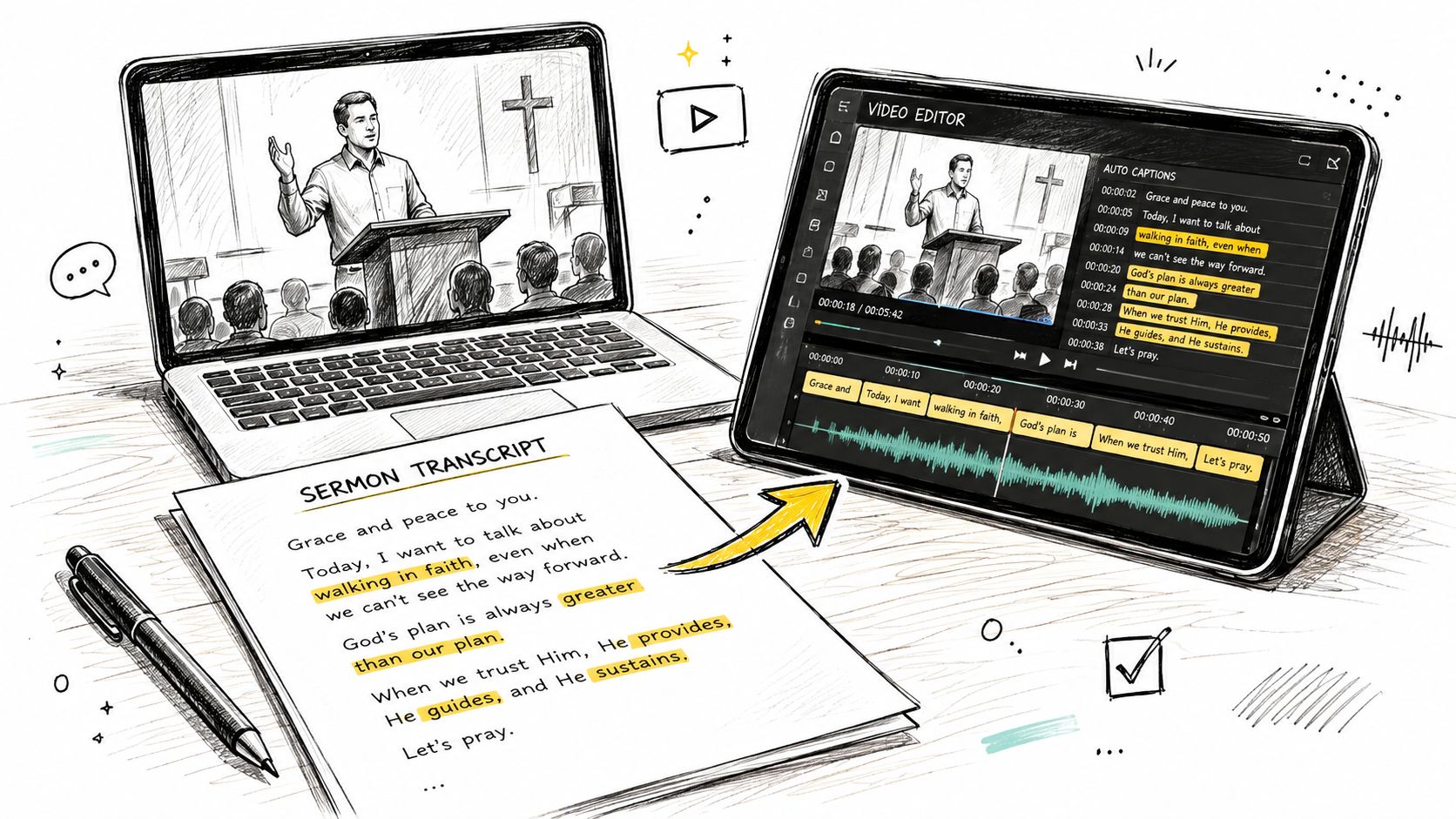
A Sunday sermon finishes, and the transcript is ready by Monday. Instead of turning that transcript into one post at a time, a workflow can generate a short clip draft, suggest a caption, and prepare a blog-style recap or discussion question set for review. The pastor or communications volunteer still approves the final version, but the first draft is no longer a blank page.
That is where ChurchSocial.ai becomes a practical option, because it can turn sermons into clips and create social content from the transcript, including posts and blog-style material. What social media automation means for churches is a useful companion read if you want to connect the idea of automation to daily posting.
Event to announcement
A church event doesn't need three separate announcements built from scratch. A calendar entry can become a social draft, a branded graphic, and a reminder sequence. If the event already lives in Planning Center or another church calendar, the workflow starts from a trusted source instead of a copy-pasted reminder in someone's notes.
IBM notes that low-code and drag-and-drop interfaces are common in modern workflow software, which is why this kind of process can be set up visually instead of with custom code for every step. IBM's workflow automation overview describes that visual approach well. For volunteers, that matters because a simple calendar can be easier to maintain than a system nobody wants to touch.
Approval to publish
A volunteer drafts the post. A staff member reviews it. The scheduler holds it until the set time, then publishes it without anyone chasing the last approval in a group chat. That is workflow automation at church scale, predictable, calm, and mostly invisible.
The goal isn't to automate every decision. It's to automate the handoff so the right person only has to answer once.
Why Automation Breaks and How to Prevent It
Automation fails most often when the process was fuzzy before the software ever touched it. Different people approve content in different ways, key details sit in spreadsheets or email, and nobody can agree on the exact sequence. When that happens, software doesn't create order, it copies the confusion faster.
Start with the process, not the platform
Operations guidance points to the same failure pattern repeatedly, automation breaks when teams have different process definitions, approval rules vary by person, and key data is trapped in spreadsheets, email, chat, or personal notes. TwendeeSoft's workflow definition guidance makes that problem explicit.
The fix is straightforward, even if the work takes time. First, map the current workflow. Then standardize it. After that, structure the data so the same field names and decisions are used every time.
A church-ready sequence that prevents silent failure
- Map the current workflow. Write down who does what with the sermon transcript, the event request, or the approval thread.
- Standardize the steps. Decide who approves first, who reviews second, and what counts as final.
- Structure the data. Keep dates, titles, captions, and file names in consistent places.
- Automate only predictable steps. Leave unusual judgment calls in human hands.
- Monitor exceptions. If something breaks, make the error visible instead of letting it disappear.
That sequence protects volunteers from the most common frustration, a workflow that looks automated but still depends on someone remembering a hidden step. It also keeps a church from overbuilding before the process is stable.
Measurable Outcomes Churches Should Track
A church doesn't need a complicated dashboard to know whether automation is helping. It just needs a few honest numbers and a clear baseline. The point is to learn where the workflow is working and where people are still getting stuck.
The numbers that actually tell the story
One useful starting point is adoption context. A 2026 statistics roundup reports that only 4% of businesses have fully automated their workflows, while 31% have automated at least one function, and 76% of companies use automation to standardize daily workflows. DocuClipper's workflow automation statistics roundup suggests most teams are still in partial automation, which fits the reality of church communications too.
For a church team, the better question is not “Are we fully automated?” It's “Did this workflow remove friction where we needed it most?”
| Metric | Manual baseline | 90-day target |
|---|---|---|
| Draft-to-review time | A volunteer waits on messages and file handoffs | A clear same-day review path |
| Posting consistency | Posts happen when someone remembers | Posts follow a steady weekly rhythm |
| Approval cycle | Approvals bounce through chat threads | Approvals move through one defined route |
| Volunteer confidence | People ask where the content is | People know the next step without chasing |
| Error recovery | Mistakes are fixed manually from scratch | Exceptions are logged and replayed |
What good looks like after a few months
The best sign isn't perfect speed. It's fewer surprises. When a workflow is healthy, the team stops asking basic status questions and starts focusing on message quality, audience fit, and better content. That's a better use of ministry energy than chasing missing attachments.
Your First Automated Church Workflow This Week
The first workflow should be small enough to finish and useful enough to keep. Pick one repeatable process, usually a sermon clip, an event announcement, or an approval path that keeps getting stuck. Draw it on paper first, because a rough map makes the hidden steps obvious before software gets involved.
Build the simplest version first
Start with the input. A sermon transcript, event detail, or graphic request enters one place. Then decide what the software should do next, such as create a draft caption, route the item for review, or place it on a calendar. Keep the first version narrow so you can see where the process bends.
ChurchSocial.ai is a practical example of how that can look in one place. Its drag-and-drop calendar, Sermon Clip Creator, AI Caption Writer, graphic templates, and Planning Center integration can sit inside one continuous content flow instead of separate tools each handling one piece. What content automation means for churches pairs well with this because it helps you think about content as a repeatable system, not a one-off task.
Keep one eye on the workflow, not just the post
Don't automate the parts that still need human judgment. Let a staff member approve tone, theology, or event wording when that matters. Automate the steps that are boring, repeatable, and easy to define.
If the first workflow misbehaves, look for the weak link in the order of work. Missing fields, unclear ownership, and inconsistent approvals are usually the problem. Once those are fixed, the workflow gets easier to trust and easier to expand.
If your church is still juggling sermon clips, event graphics, and post approvals across text threads and spreadsheets, ChurchSocial.ai can help turn those handoffs into one organized workflow. It gives churches a way to plan, create, schedule, and publish social content from one place, with tools built for sermons, graphics, calendars, and event-based content. Visit ChurchSocial.ai to see how it can support your next church communications workflow.


