
How do you share a timeless message in a world of fleeting attention spans? For many churches, YouTube Shorts can feel like one more platform to manage, one more trend to chase, and one more demand on an already stretched staff or volunteer team. That's usually the wrong starting point.
A better question is this. How can short-form video become a practical extension of pastoral care, outreach, and discipleship?
Used well, Shorts can function like a new kind of pulpit. They let your church meet people on their phones with a Scripture reflection, a sermon moment, an invitation to prayer, or a simple word of encouragement. You don't need a studio or a full media department. You need a repeatable system, a clear editorial standard, and a willingness to learn what holds attention.
That matters because the best practices for YouTube Shorts are not the same as the best practices for Sunday livestreams, sermon archives, or announcement videos. Short-form rewards clarity, speed, and strong editing decisions. It also forces churches to think carefully about what to trim, what to highlight, and how to stay faithful without becoming formulaic.
If your team has been posting clips randomly and hoping one catches on, it's time to tighten things up. If you've avoided Shorts because they seem too shallow, you can approach them more thoughtfully. For a broader look at short-form strategy across platforms, this roundup on TikTok video marketing trends is a helpful companion.
1. Hook Viewers in the First 3 Seconds
The opening decides whether your Short gets watched or swiped away. Independent Shorts guidance consistently recommends putting the strongest moment in the first 3 seconds, keeping the video focused on one clear idea, and treating pacing like an editing discipline rather than an afterthought, as outlined in this Shorts retention guide.

A lot of church clips fail here because they begin with context instead of tension. The pastor says, “Today I want to talk about…” and the viewer is already gone. A better start is the emotional or revealing line itself. “Some of you are exhausted, and you think that means you're failing spiritually.” That gives the viewer a reason to stay.
What a strong church hook looks like
Relevant church hooks usually come from one of four places:
- A felt need: “What do you do when God feels silent?”
- A sharp statement: “Busyness can look like faithfulness, but it isn't always.”
- A Scripture tension point: “This verse comforts people, but it also confronts them.”
- A visible emotional beat: a pastor pausing, reacting, or leaning into a hard truth
Churches often have these moments already sitting inside sermon recordings. They just aren't clipped tightly enough. If your team wants a framework for stronger openings, this guide to hooks for Reels applies well to Shorts too.
Practical rule: Don't spend the first few seconds explaining the clip. Spend them proving the clip is worth watching.
One trade-off is tone. Some hooks feel manipulative. Others feel clear. Churches should avoid bait-and-switch intros that promise controversy and deliver something unrelated. A strong hook should create curiosity without misrepresenting the message. That balance matters more in ministry than in entertainment.
2. Optimize for Vertical Video Format 9:16 Aspect Ratio
Does your Short look like it was made for a phone, or cropped out of the back row of the sanctuary?
That difference shows up fast. Churches often start with a wide sermon recording, trim out a strong quote, and force it into a vertical frame. Sometimes that works. Often it creates a cramped shot with a tiny face, busy background, and captions fighting for space. The message may be strong, but the viewing experience feels secondhand.
Frame for the phone, not the room
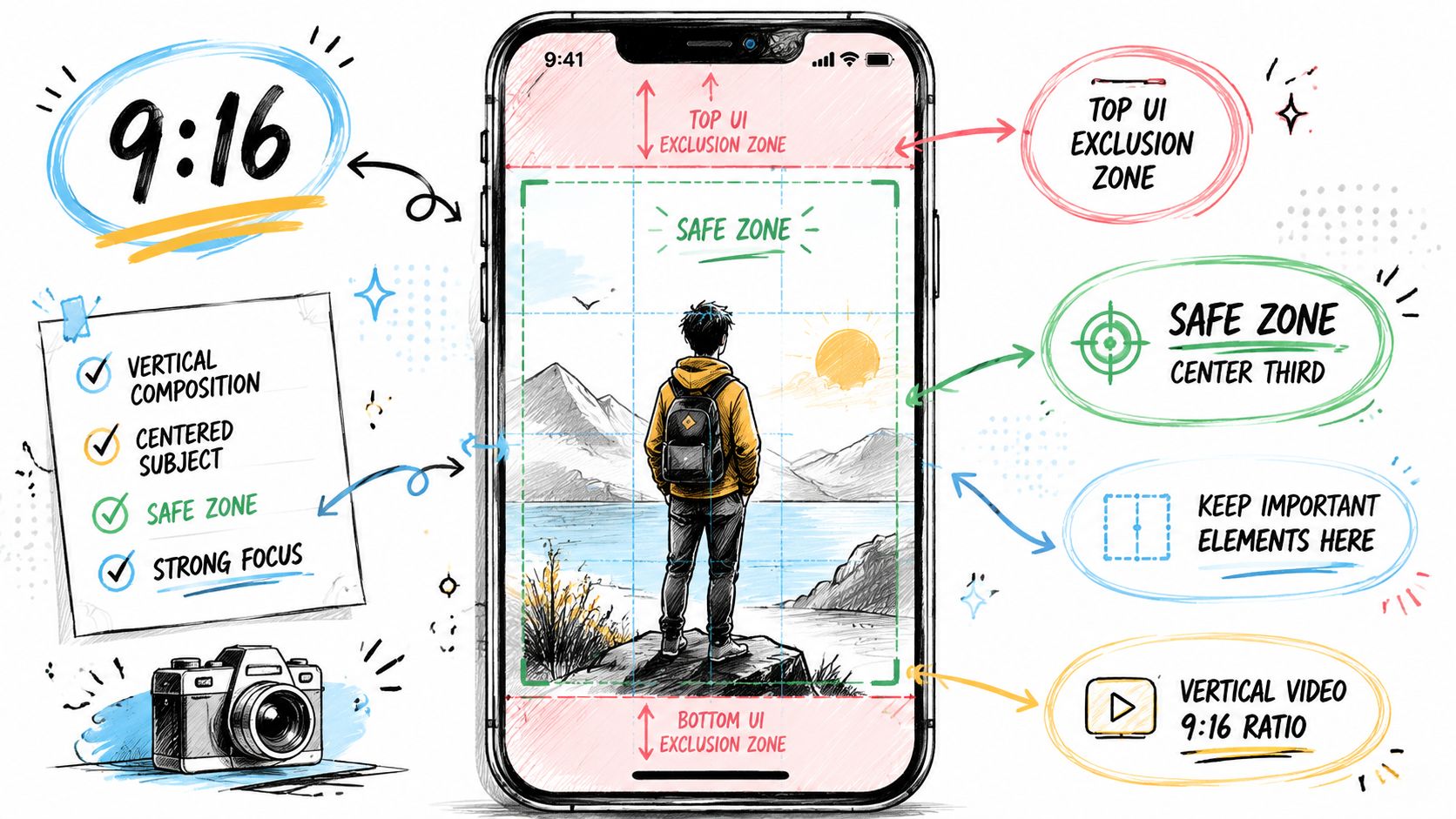
A good Short makes the subject readable immediately on a small screen. The pastor's face should be clear. Hand gestures should stay inside the frame. Background elements should support the clip, not compete with it.
If your team is filming with Shorts in mind, use a tighter composition than you would for Sunday livestream coverage. If you are repurposing existing footage, choose moments where the speaker is already isolated enough to crop cleanly. A powerful line from the sermon is not automatically a usable Short if the framing falls apart in vertical.
A few practices make this easier:
- Keep the speaker large in frame: Facial expression carries trust and attention.
- Protect the lower portion of the screen: Captions and platform UI need space.
- Check the crop on an actual phone: Desktop preview misses clutter that feels obvious on mobile.
- Use repeatable templates: ChurchSocial.ai gives ministry teams a practical way to format sermon clips, event promos, and volunteer-created content for vertical posting without rebuilding each edit from scratch.
There is a trade-off here. Tight framing feels more native to Shorts, but it can remove some of the room energy that helps a sermon clip feel alive. Churches should choose based on the goal of the clip. If the point is personal encouragement, a close crop usually works better. If the point is showing congregational response, baptism, worship, or an event moment, a slightly wider vertical composition may carry more context.
Teams should also document simple framing rules for volunteers. That saves time every week. One phone height, one caption-safe area, one preferred crop for the pastor, and one export preset will prevent a lot of avoidable rework. If your editors are also handling music choices, keep the process clean and documented so they can avoid copyright strikes with music while finishing Shorts for the week.
Vertical video works best when the frame feels intentional. One clear subject. One focal point. One mobile-first composition that serves the message.
3. Leverage Trending Audio and Music with Rights Awareness
Music can help a Short feel current, but churches need to be more careful than typical creators. A trend might boost familiarity, but the wrong sound can distract from the message, undercut the tone, or create rights issues your team didn't intend.
That's why audio should support the clip, not become the clip.
A sermon excerpt about grief, prayer, or repentance usually doesn't need an aggressive trend track underneath it. In many cases, clean room audio, subtle melodic support, or no music at all works better. For testimony content, worship moments, or youth content, background music can add movement and help pacing, but it still needs to fit the emotional register of the message.
What works better than chasing every trend
If your team uses audio strategically, stay close to these practices:
- Use platform-cleared music: Start with YouTube's own audio options rather than pulling random sounds from elsewhere.
- Favor non-lyrical backing tracks: Music without lyrics often preserves focus better than lyrical tracks.
- Match the tone to the message: A clip on suffering, confession, or prayer needs restraint.
- Document your source choices: Clear internal notes save confusion later.
For churches trying to avoid preventable problems, this explainer on how to avoid copyright strikes with music is useful background.
Churches don't need to sound trendy to reach people. They need to sound trustworthy.
The trade-off is reach versus integrity. Some trending sounds can help distribution. But if the audio makes a sermon clip feel forced or unserious, it weakens trust. In ministry content, trust is harder to rebuild than reach is to regain.
4. Use Text Overlays and Captions Strategically
Many people encounter Shorts in environments where sound isn't practical. Even when they do listen with audio, captions make the message easier to follow and easier to remember. This is especially important for sermon excerpts, Scripture clips, and testimony videos where one sentence carries most of the weight.
Text overlays also help churches solve a common attention problem. A spoken line may be meaningful, but if the visual frame is static, viewers can miss the point. Good text direction tells the eye where to look and what to hold onto.
Make the text do one job
Don't turn every clip into a wall of words. Captions should support comprehension. Overlay text should emphasize the one line that matters most.
Use overlays for things like:
- The central takeaway: “God isn't absent in your waiting.”
- The Scripture reference: short, readable, and timed with the spoken verse
- A pastoral question: “Have you been carrying this alone?”
- A simple invitation: “Prayer request in comments”
A few practical habits improve readability fast:
- Use large, clear fonts: Decorative fonts usually fail on phones.
- Keep contrast high: White text over bright footage often disappears.
- Limit line length: Short caption blocks are easier to process.
- Place text intentionally: Don't bury key words under platform interface elements.
ChurchSocial.ai can help teams turn sermon transcript content into short-form assets, which is useful when volunteers need help drafting caption lines, pull quotes, or supporting copy from the same message.
The trade-off here is density. More text feels informative to the person editing. To the viewer, it often feels busy. Short-form works best when the text clarifies the clip instead of competing with it.
5. Build Series and Maintain a Consistent Schedule
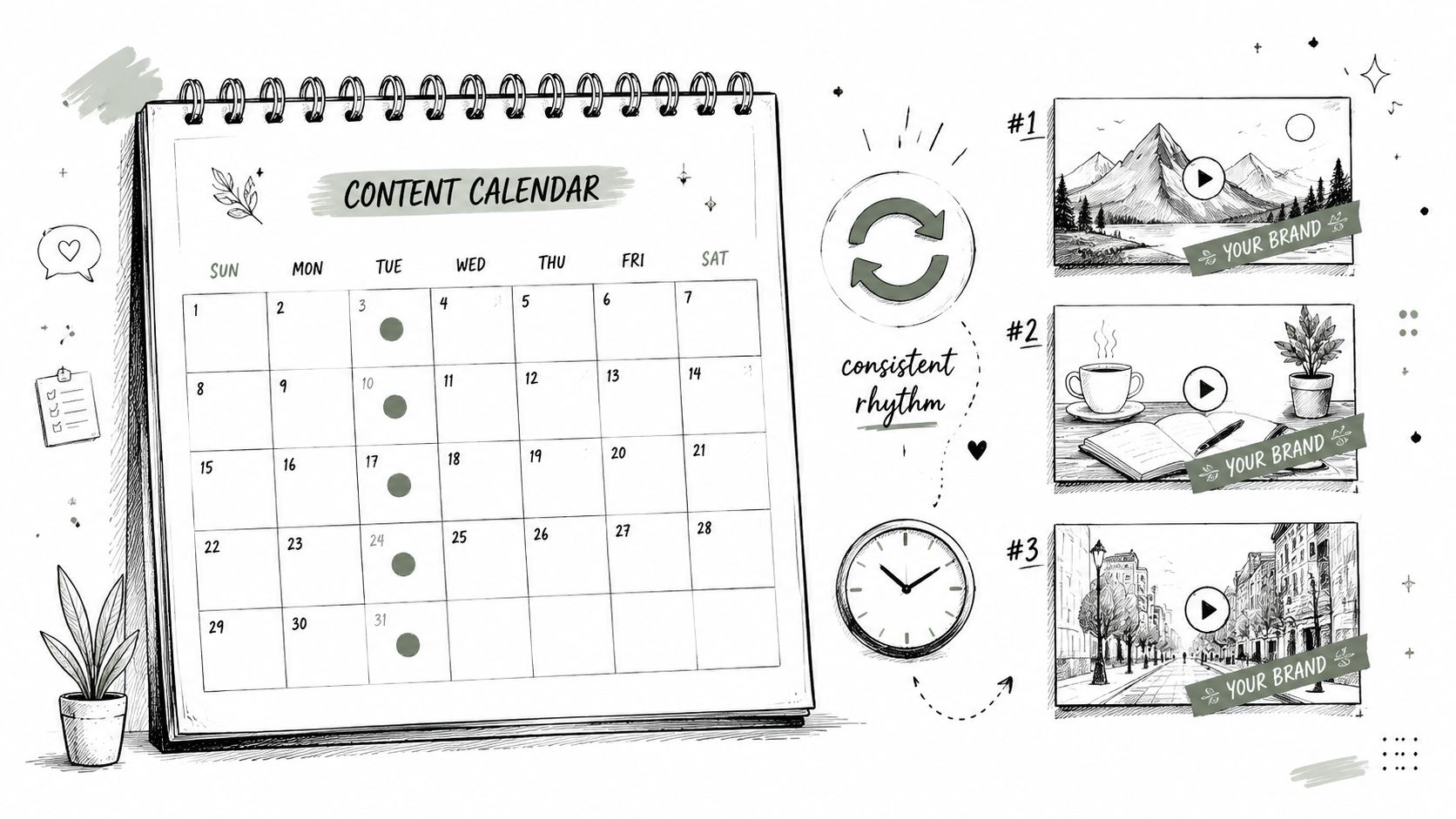
Consistency matters, but consistency doesn't mean posting random clips every day. It means giving people a recognizable rhythm. A church that publishes a recurring format trains its audience to expect something specific.
That's where series outperform one-off posting. “Monday Prayer,” “Ask the Pastor,” “Verse for the Week,” “Sunday Clip of the Week,” and “Midweek Encouragement” all give structure to your workflow and clarity to your audience.
Repeatable beats reduce volunteer burnout
Most church teams don't struggle because they lack content. They struggle because they recreate the process from scratch every week. A series fixes that.
A simple church Shorts rhythm might look like this:
- Sermon clip series: one high-impact quote from Sunday
- Devotional series: one pastor or leader speaking directly to camera
- Community series: volunteer spotlight, event reminder, ministry update
- Question series: common pastoral questions answered briefly
ChurchSocial.ai's drag-and-drop calendar and scheduling workflow are useful here because they let staff and volunteers plan content in a visual rhythm instead of juggling disconnected drafts, folders, and reminders. Integrations with church calendars such as Planning Center also help teams turn upcoming events into planned content instead of last-minute posts.
Ministry workflow insight: The best posting schedule is the one your church can sustain without exhausting the people behind it.
One practical caution. Don't choose a frequency that sounds impressive and collapses after two weeks. A reliable cadence with clear formats builds more trust than an ambitious burst followed by silence.
6. Implement Call-to-Action Cards and Links Strategically
What should a viewer do after a 20-second Short from your church?
Answer that before you publish. Shorts work best as entry points into a larger ministry path. A strong clip can spark interest, but the CTA determines whether that interest turns into a sermon view, a prayer request, an event registration, or a first visit.
Church teams often post good content and leave the next step vague. That costs momentum. If the video is about Easter, point people to the Easter page. If it is a prayer clip, send them to a prayer request form. If it is a sermon moment, direct them to the full message. Clear alignment matters more than clever wording.
Choose one next step
Strong CTAs in church Shorts are usually simple:
- Watch the full message
- Plan your visit
- Submit a prayer request
- Register for the event
- Join us this Sunday
One ask is usually enough. A Short is a small piece of attention on a mobile screen. Asking viewers to subscribe, comment, visit the site, sign up, and share all at once weakens the response. Pick the action that fits the clip and the ministry goal behind it.
The destination matters as much as the CTA itself. Send people to a page built for phones, with one clear button and no searching. “Learn more” is generic. “Watch the full sermon” or “Register for the marriage workshop” gives people a specific reason to tap.
For church staff and volunteers, this is also a workflow issue. ChurchSocial.ai helps teams organize Shorts around sermon series, events, and ministry campaigns so the CTA is planned with the content instead of added at the last minute. That is especially helpful when different people handle editing, posting, and follow-up.
If your team is also trying to improve how people find these videos in search, AI SEO software can help shape clearer phrasing for titles and supporting page copy.
7. Optimize Titles and Hashtags for Discoverability
Metadata won't rescue a weak Short, but it can help the right people understand what they're seeing. Good titles and hashtags matter most when your content appears outside the main feed, on your channel page, in search, or alongside related content.
Churches often make one of two mistakes. They either write titles that are too vague, like “Sunday Message Clip,” or titles that sound artificial and overhyped. Neither helps.
Name the problem or promise clearly
A stronger church Short title is concrete and human:
- “How to Pray When You're Exhausted”
- “What Jesus Says About Worry”
- “A Short Prayer for Anxiety”
- “Why Forgiveness Still Feels Hard”
Hashtags should stay relevant and restrained. A small set of clear terms usually works better than a cluttered stack. If your team is building a searchable content library, use a blend of topic tags and your church's own branded tag.
A few patterns tend to work well:
- Lead with the topic: prayer, anxiety, forgiveness, Scripture
- Use natural search language: “how to,” “what the Bible says,” “short prayer”
- Stay honest: don't write titles your clip doesn't deliver on
- Keep branding secondary: the message matters more than the internal sermon series name
If your church wants extra help thinking through discoverability and keyword phrasing, an overview of AI SEO software can spark ideas for headline structure and search intent.
The trade-off is simple. Search-friendly titles need clarity. Ministry language often prefers subtlety. On Shorts, clarity wins.
8. Repurpose and Reformat Content Across Multiple Platforms
Churches usually don't need more raw material. They need better use of the material they already have. A single sermon can become a Short, a Reel, a TikTok, a quote graphic, a devotional caption, a blog post, and an event invitation if the workflow is set up well.
That's why repurposing is one of the most practical best practices for YouTube Shorts. It saves time, reduces creative fatigue, and helps your church stay consistent across platforms without inventing new ideas for every channel.
Don't copy blindly. Adapt deliberately
The same core clip can work on YouTube Shorts, Instagram Reels, TikTok, and Facebook, but it shouldn't always be posted identically. Captions, CTA language, and publishing rhythm can all change by platform.
Useful repurposing patterns include:
- One sermon, multiple clips: pull different angles from the same message
- One event, multiple assets: teaser Short, announcement graphic, reminder post
- One transcript, multiple formats: short video, carousel, blog, devotional text
- One calendar moment, coordinated rollout: publish support content before and after the event
If your team needs a clearer workflow, this guide on how to repurpose content is directly relevant.
ChurchSocial.ai is particularly useful here because it combines sermon-based content generation, clip creation, templates for static posts and carousels, and multi-platform scheduling in one church-focused workflow. That matters for small teams because repurposing often fails when the process is split across too many tools.
9. Engage with Comments and Community Features
Short-form can attract attention quickly. It can also expose your church to questions, pain, hostility, spam, and sincere spiritual curiosity in the same comment thread. If your church posts Shorts but never responds, you leave a lot of relational value on the table.
This part matters more for churches than for many brands. A comment section can become a ministry touchpoint. It can also become a mess if nobody owns it.
The strongest practice is simple. Assign someone to watch the conversation. That doesn't mean answering everything instantly. It means making sure genuine comments don't sit unanswered while low-value noise dominates the thread.
Pastoral engagement needs boundaries
Here's what tends to work:
- Respond to sincere questions: even a brief, thoughtful reply helps
- Acknowledge prayer requests carefully: offer warmth without overpromising
- Pin helpful comments: this sets the tone for the thread
- Moderate aggressively when needed: remove spam, abuse, and bad-faith derailments
Some of the most meaningful ministry online happens after the video ends.
You can also extend engagement through YouTube's broader community features when appropriate. Ask a simple question connected to the clip. Invite prayer needs. Point viewers to a full message or upcoming event. Keep the tone pastoral, not performative.
A practical caution matters here. Public comments are not private pastoral counseling. If a viewer shares something serious, move them toward an appropriate offline or direct support channel instead of handling a complex care situation in the thread itself.
10. Analyze Performance Data and Iterate Based on Analytics
What should your team do after a Short goes live. Guess less and review the numbers.
Churches rarely struggle from a lack of ideas. The primary gap is a repeatable review process. Analytics will not measure prayer, conviction, or long-term discipleship. They will show whether people paused, watched, and stayed long enough to hear what your church was trying to say.
A useful pattern is simple. Strong Shorts usually earn attention early and hold it long enough to create a next step. If a sermon clip feels meaningful to staff but viewers skip in the opening seconds, the issue is usually packaging, not doctrine. The message may be sound. The edit may still need work.
Review the signals that help you decide what to make next
For church teams, the most practical questions are not complicated:
- Opening hold: do viewers stay past the first few seconds?
- Retention drops: where does attention fall off?
- Topic fit: do testimony clips, prayer moments, event invites, or sermon excerpts keep attention best?
- Length fit: do tighter edits perform better than longer cuts?
- Next-step response: do viewers click through to a sermon, event page, or prayer form?
One caution matters here. Metrics are only helpful if someone owns them. If analytics live in a dashboard nobody checks, they do not improve anything.
For ministry teams with limited time, workflow is essential. Set one weekly review block, even 20 minutes. Look at your last 5 to 10 Shorts, note what held attention, and choose one change for next week. Change the hook. Trim dead space. Test a shorter cut. Post the same core idea with a different opening line. ChurchSocial.ai can help teams turn those findings into a manageable publishing plan, especially when staff and volunteers share the workload.
If your team needs a stronger measurement process across platforms, this guide to best social media analytics tools for churches and ministry teams offers a useful starting point.
Use analytics to sharpen judgment, not replace it. If prayer clips consistently hold attention and lead people to respond, make more of them. If announcements lose viewers quickly, rewrite them or move them into a different format. Over time, this habit helps your church post Shorts with more clarity, less guesswork, and a better use of your team's energy.
10-Point YouTube Shorts Best Practices Comparison
| Strategy | 🔄 Implementation Complexity | ⚡ Resource Requirements | 📊 Expected Outcomes | ⭐ Key Advantages | 💡 Quick Tips |
|---|---|---|---|---|---|
| Hook Viewers in the First 3 Seconds | Medium–High (creative testing & editing) | Editing time, creative talent, multiple takes | Higher completion rates, better watch time | Strong algorithmic promotion potential | Use bold text overlays, music cues, show expressive faces, A/B test hooks |
| Optimize for Vertical Video Format (9:16) | Low–Medium (change in framing/composition) | Smartphone filming, vertical templates | Full‑screen engagement, reduced letterboxing | Easy repurposing across short‑form platforms | Film natively vertical, keep subject in safe zone, preview on phone |
| Leverage Trending Audio and Music (with Rights Awareness) | Medium (trend monitoring + rights checks) | Access to audio libraries, legal awareness | Short‑term reach boosts when trend is active | Algorithmic uplift via trending sounds, legal safety if licensed | Use YouTube Audio Library, layer instrumentals, document sources |
| Use Text Overlays and Captions Strategically | Medium (additional editing) | Captioning tools, design templates, review time | Improved clarity, accessibility, and engagement | Reaches muted viewers and improves retention | Large readable fonts, 1–3 lines, avoid YouTube UI area |
| Build Series and Maintain a Consistent Schedule | Medium–High (planning & commitment) | Content roadmap, scheduling tools, batch production | Habit formation, higher total watch time | Predictable growth and easier production workflow | Batch create, use consistent branding, schedule posts reliably |
| Implement Call-to-Action (CTA) Cards and Links Strategically | Low–Medium (placement & testing) | Landing pages, tracking (UTMs), link management | Measurable conversions (donations, signups) | Directs viewers to deeper engagement and actions | Limit to 1–2 CTAs, use pinned comment, test wording and placement |
| Optimize Titles and Hashtags for Discoverability | Low (writing + basic research) | Keyword tools, testing time | Better search visibility and discoverability | Attracts intent‑driven viewers beyond subscribers | Front‑load keywords, use 3–5 relevant hashtags, test variations |
| Repurpose and Reformat Content Across Multiple Platforms | Medium (customization per platform) | Cross‑posting tools, slight edits per platform | Multiplied reach and improved ROI per asset | Maximize audience reach from single asset | Customize captions/hashtags, stagger posting times |
| Engage with Comments and Community Features | Medium–High (ongoing moderation) | Dedicated time or moderators, community guidelines | Stronger relationships and improved engagement signals | Builds loyalty and feedback loops for content | Reply within 24h, pin constructive comments, assign moderators |
| Analyze Performance Data and Iterate Based on Analytics | Medium (data interpretation skills) | Analytics tools, regular review time, reporting | Data-driven content improvements, better ROI allocation | Objective insight into what resonates and why | Check analytics weekly, A/B test one variable at a time |
| Repurpose: (note: core duplication), combine with vertical & multi‑platform | Medium (see above) | See vertical & multi‑platform resources | Increased impressions across networks | Efficient content reuse and omnichannel presence | Create platform‑specific intros/outros and track per platform |
Your Next Step Turn Strategy into Action
Mastering YouTube Shorts isn't about turning your church into a media brand. It's about learning how to deliver real spiritual value in a format people already use every day. When churches approach Shorts with that mindset, the work gets clearer. You stop chasing trends for their own sake and start building content that fits both the platform and the mission.
The best practices for YouTube Shorts are practical. Start strong. Frame vertically. Keep each Short focused on one idea. Use captions that clarify the message. Build repeatable series instead of posting randomly. Create a clear next step when it makes sense. Review the results and refine what you publish next. None of that requires a massive team. It requires consistency and a workflow that ordinary staff members and volunteers can maintain.
That's where many churches either gain momentum or stall out. The challenge usually isn't a lack of sermon material, ministry moments, or event opportunities. The challenge is turning all of that into a manageable content system. Sermons need clipping. Transcripts need reshaping. Graphics need branding. Posts need scheduling. Events need promotion at the right time, not three days late because no one had space to build the assets.
A church-focused workflow helps close that gap. ChurchSocial.ai is one relevant option because it allows churches to create AI-generated sermon clips, generate content from sermon transcripts such as social posts and blogs, design graphics and carousels with templates, and manage publishing through a drag-and-drop calendar. It also integrates with church calendars such as Planning Center so event-driven content is easier to plan in advance.
That combination matters because good Shorts strategy depends on execution speed. If every clip takes too long, your team won't test enough ideas to learn what works. If every post lives in a separate tool, consistency breaks down. If the workflow is simple, your church can keep showing up online without letting content production take over ministry life.
Start with one sermon this week. Pull one strong moment. Edit it for a phone screen. Add readable captions. Publish it with a clear title. Then repeat with slightly better judgment next time. That's how churches get better at short-form video. Not by trying to go viral overnight, but by building a faithful system that reaches people from pew to phone.
If your church wants a simpler way to turn sermons, events, and ministry moments into short-form content, take a look at ChurchSocial.ai. It can help your team create sermon-based clips, generate social content from transcripts, design branded posts, and manage publishing from one calendar built for church workflows.


