
You finish Sunday service, the band sounded strong, the message connected, and your volunteer hits “end stream” feeling relieved. Then the email lands. Your livestream was flagged. Audio may be muted. A clip you posted to social gets limited or blocked.
That moment confuses a lot of churches because the ministry use feels obviously legitimate. You weren't selling tickets. You weren't reposting a concert. You were worshiping and trying to serve people online.
The problem is that church music licensing stops being simple the moment your service leaves the room. A church can be fully sincere and still be exposed legally if its team doesn't understand the difference between live worship, lyric projection, recording, streaming, and later social media reuse. That's where many church media teams get stuck, especially when sermon clips, reels, and social calendars now matter as much as the Sunday broadcast itself.
Why Your Livestream Got a Copyright Strike
Sunday ends. The service went well, the stream stayed live, and your team starts pulling sermon moments for Instagram and YouTube Shorts. Then the platform notice shows up: copyrighted audio detected, replay blocked, monetization disabled, or audio muted.
That surprise usually comes from a bad assumption. Churches do have a narrow worship-service exemption under U.S. copyright law, but it does not follow your content onto YouTube, Facebook, archived video, or short-form clips. It also does not cover every other use that surrounds a service, including lyric display, recording, and distribution.
The exemption stops well before your media workflow does
The legal protection applies to a live, in-person worship service. Church media teams rarely stop there.
Your risk changes as soon as the service becomes media your team stores, posts, edits, republishes, or clips for social. Common trigger points include:
- Projecting lyrics on screens
- Printing lyrics in bulletins or handouts
- Recording the service for replay
- Livestreaming to YouTube, Facebook, or another platform
- Posting sermon clips or worship moments after Sunday
A platform strike often has less to do with your intent and more to do with which copyright rights were involved once the music was fixed in video or transmitted online.
I see this mistake all the time with churches that are careful on Sunday but casual on Monday. They may have permission for congregational use, yet still publish a sermon clip with a worship bed underneath it, or trim a powerful altar moment for social without removing the licensed track in the background. That is the legal gap many sermon clip creators miss.
If your church has already received a claim, read this guide on how to handle a YouTube copyright claim dispute before filing an appeal or reposting the same video.
Licensing now affects every repost, clip, and recap
Churches are not only streaming services. They are also cutting sermon excerpts, volunteer recaps, event promos, baptism testimonies, and reels for the week ahead. Music can show up in any of those assets on purpose or by accident.
That changes who needs to understand licensing. It is no longer limited to the worship pastor or production lead. The social media manager, video editor, communications director, and volunteer who makes sermon clips all need clear rules for what audio can stay and what must be replaced.
Cover songs create a separate layer of confusion. Recording or streaming your version of a song does not automatically become permitted because your church performed it live. This guide to licensing cover songs helps explain that distinction.
The practical issue is simple: your church may be compliant in the room and exposed online. That is why teams need a repeatable process for identifying music, removing risky audio from sermon clips, and creating social content that serves ministry without creating avoidable copyright problems. ChurchSocial.ai fits that day-to-day need by helping churches turn sermons into social content without carrying hidden music problems into every post.
The Four Key Music Licenses Your Church Needs
The easiest way to understand church music licensing is to stop treating it like one permission. It isn't. Think of it as four separate doors. Gaining access to one door doesn't open the others.
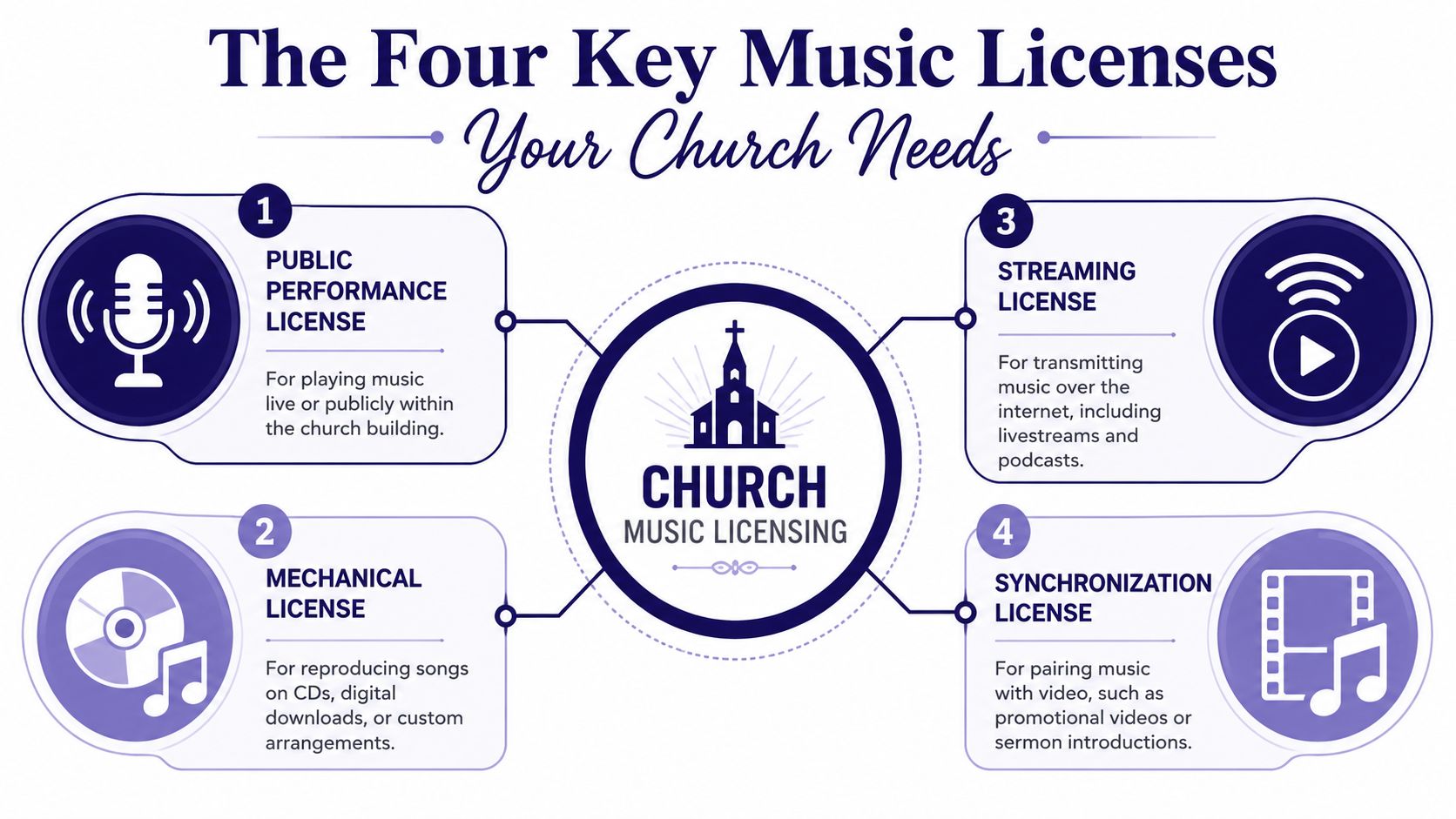
Public performance license
This is the permission often considered first. It covers playing or performing music publicly.
For churches, this category gets confusing because U.S. Copyright Act §110(3) permits live performance of music during physical worship services, but that same exemption strictly excludes displaying lyrics or any form of recording or live-streaming. It also means projecting lyrics counts as reproduction, which requires a separate CCLI Church Copyright License, according to UCC's copyright compliance basics for churches.
A simple way to think about it is this: live worship in the room may be protected, but the moment your media team adds screens, files, archives, or distribution, you've stepped outside that narrow shelter.
Mechanical license
A mechanical license covers reproduction of a song in copies or distributed audio formats. Churches feel this less often in everyday Sunday workflows than artists or labels do, but it still matters when music is duplicated, recorded, or packaged in certain ways.
If your team ever creates custom recordings, distributes audio, or starts producing more formal music content, this category becomes relevant quickly. If you want a practical creator-side explanation of where reproduction rights fit when recording someone else's song, this guide to licensing cover songs is useful background.
Streaming license
A streaming license is your internet permission. This covers transmitting music to people who are not physically in the room.
That's why churches get tripped up by hybrid ministry. A worship team can lead a song legally in person, then trigger a platform issue the second that same moment is sent online. Streaming isn't just “church, but digital.” Legally, it's a different act.
Synchronization license
A sync license is what you need when music and video are joined together. Think of it as the legal step that “marries” a song to moving images.
This matters for things like:
- Sermon intro videos
- Conference promos
- Testimony films
- Christmas invitation reels
- Social clips that keep the worship pad or song underneath the speaker
If your church editor drops a worship song under b-roll and exports a video, that's not the same as singing live in the room. It's sync use.
Practical rule: Ask one question before posting. “Are we performing music live in the room, or are we reproducing, transmitting, or pairing it with media?” If it's the second category, the in-person exemption won't save you.
A quick way to map the four
| License type | What it generally covers | Common church example |
|---|---|---|
| Public performance | Playing or performing music publicly | Music used live in a physical gathering |
| Mechanical | Reproducing or distributing recorded song copies | Custom recordings or distributed audio |
| Streaming | Sending music over the internet | Livestreamed services or online broadcasts |
| Synchronization | Pairing music with video | Promo videos, reels, sermon bumpers |
Church teams don't need to become copyright attorneys. They do need this mental model. Once your staff can identify which door they're trying to open, the licensing conversation gets much easier.
Decoding the Major Music Licensors
Monday morning often starts the same way. The worship pastor asks why last Sunday's stream was muted on Facebook, the editor is cutting sermon clips for Instagram, and nobody is sure whether the church's current license covers either one. That confusion usually starts here, with the assumption that one licensor handles all church music use.
They do not.
Each licensor covers a different slice of the rights picture, and the gaps show up fast once your team starts repurposing sermons, publishing reels, or keeping worship audio under short-form video.
CCLI covers a common church use case, not every use case
CCLI is often the first licensing provider churches know because it fits the weekly worship workflow. It helps churches handle common congregational song uses such as lyrics, song reporting, and permissions tied to a large worship catalog.
That makes it a practical starting point for many evangelical churches. It also creates a common mistake. Teams start treating CCLI like blanket protection for every platform and every edit.
It is not.
If your media team clips the sermon, leaves a worship pad underneath the pastor, and posts that video to social, the question is no longer just “Do we have CCLI?” The actual question is whether your current permissions cover that specific use on that specific platform. That is the legal gap many sermon clip creators miss.
OneLicense is often the better fit for liturgical churches
OneLicense serves a different part of the church world. Churches in Catholic, Lutheran, Episcopal, Anglican, and other liturgical traditions often rely on it for hymnals, printed worship aids, and sacred music catalogs that are less central in contemporary worship planning.
A church can use OneLicense heavily and still need to review other music uses separately. The same church may be fully set for a printed service guide on Sunday and still have a problem if the communications team adds recorded music to an event recap on Tuesday.
That distinction matters in real ministry work. The worship office, communications team, and volunteer video editor are often using music in different ways, with different rights attached.
PROs handle another layer
ASCAP, BMI, and SESAC are performing rights organizations. They manage public performance rights across broad music catalogs, including many songs outside the church worship catalog your team uses on Sunday morning.
These organizations tend to matter more when a church steps outside normal congregational use, such as:
- Concerts
- Ticketed events
- Community gatherings
- Conferences
- Background music in non-worship settings
- Special productions using mainstream music
Churches run into trouble when they buy one license, file it away, and assume the issue is settled across every ministry department.
A practical way to sort the major players
| Licensor | Best known for | Where churches often use it |
|---|---|---|
| CCLI | Common worship song permissions and reporting | Lyrics, worship planning, standard contemporary church music use |
| OneLicense | Liturgical, choral, and hymn-based catalog coverage | Traditional worship services, printed worship aids, hymn use |
| ASCAP, BMI, SESAC | Public performance rights for wider song catalogs | Events, concerts, non-service music use, broader catalog coverage |
The right mix depends on how your church publishes content. A church with one Sunday service and no editing needs a different setup than a church posting weekly sermon reels, conference promos, and recap videos.
That is why licensing decisions should include the person creating clips, not just the worship leader or administrator. If your team is also using film or TV clips in sermons, the same rights-first review applies to movie clips in sermons and church media.
Churches do not need to become copyright specialists. They do need a clear map of which licensor handles which use, and where sermon repurposing creates extra risk. Tools like ChurchSocial.ai help by making the content workflow easier to manage, but the first step is still knowing which permissions your church has.
Your Guide to Getting and Staying Compliant
Church music licensing becomes manageable once one person owns the process. Confusion usually starts when the worship leader assumes the media director handled it, the media director assumes the admin office renewed it, and the volunteer editor assumes “the church probably has that.”
Start with an honest usage audit
Begin with what your church does, not what you think it does.
Write down every music use across a normal month:
- Live worship in the room
- Lyrics on screens
- Printed or digital bulletins
- Archived services on your website or YouTube
- Livestreams
- Short-form sermon clips
- Event promos with background music
- Children's ministry or student ministry media
There is no exemption from copyright law for churches regarding any form of reproduction, including live streaming, YouTube uploads, or lyric projection, and permission must be obtained whenever a copyrighted work is reproduced, as noted by UCC's guidance on copyright and the church.
Assign one person to verify coverage
Don't make licensing a group assumption. Make it one person's responsibility to verify what is covered, what isn't, and when renewals happen.
That person should keep a simple record of:
- Which licenses the church currently holds
- Which song catalogs are included
- Which online uses are allowed
- Reporting requirements
- Renewal dates
- Platform issues already received
A small church can do this with a shared document. A larger church may need a more formal workflow inside its communications or operations team.
Build review into content production
The easiest way to stay compliant is to review music before content is published, not after a claim arrives.
Use a checkpoint before any video, reel, or promo goes live:
- Identify the music in the asset, including background tracks and ambient worship audio.
- Confirm the intended use. Livestream, archive, social clip, promo, or announcement all carry different implications.
- Verify the church has permission for that exact use.
- Replace the music if the answer is unclear.
If your team also uses film scenes or cinematic sermon intros, this guide on using movie clips for sermons helps your staff think the same way about adjacent copyright risks.
The safest workflow is boring on purpose. Document the song, confirm the permission, archive the record, then publish.
Budget for this annually, not reactively
Licensing shouldn't sit in the “surprise expense” category. Put it in the annual ministry budget and review it whenever your media strategy changes.
A church that adds livestreaming, launches a podcast, or starts posting daily clips has changed its copyright exposure. The licensing plan has to change with it. That's what keeps compliance from becoming a scramble every time a volunteer wants to post something new.
Navigating Music on Social Media and Livestreams
Most church copyright confusion lives here. Teams assume that if a song was okay on Sunday morning, it must also be okay on YouTube, Facebook, Instagram, or TikTok. That assumption breaks fast.
Platform permission is not church permission
A social platform may have its own music arrangements, but that doesn't mean your church is automatically covered for worship content, archived services, or repurposed clips.
For hybrid services involving livestreaming, the U.S. worship exemption provides zero coverage, and standard CCLI licenses often exclude streaming to remote audiences, which is why churches may need a specialized streaming license, as explained in this discussion of church livestream licensing risk.
That's the part many volunteer teams miss. The platform can still detect and act on your content even if your church thought it had general permission.
Live band versus pre-recorded track
Churches also tend to group all music together, but social and streaming workflows don't treat every use the same way.
Consider these common cases:
| Scenario | Risk level | Why it gets flagged |
|---|---|---|
| Live worship band in a livestream | Significant | Remote digital distribution still needs proper coverage |
| Pre-recorded track played during stream | High | Multiple rights may be implicated at once |
| Sermon clip with music still audible underneath | Significant | The clip contains copyrighted audio in a new published asset |
| Promo reel with a commercial song under b-roll | High | Music is being paired with video for social distribution |
If your church creates social content regularly, your team should also understand broader creator-side basics around copyright-safe music choices. This overview of music licensing for creators is helpful for thinking through why “royalty-free” and “licensed” are not the same thing.
The social clip problem most churches overlook
The danger zone isn't only the livestream itself. It's what happens later.
A volunteer downloads Sunday's service, trims a strong sermon moment, and posts it as a reel. The pastor's words are excellent. But underneath them, a worship pad, intro song, altar music, or post-service background track is still present. That clip can trigger the same copyright issues, and often with less clarity because it's no longer a full service context.
That's why your online ministry needs a content workflow, not just a streaming workflow. The same attention you give to camera framing and captions needs to be applied to music review.
If your church is refining its online workflow as a whole, this guide to online church streaming service planning pairs well with licensing review because it forces your team to think through the full digital pipeline.
Social platforms don't care that your clip came from a sermon. If copyrighted music is embedded in the file, the platform may still treat it like any other upload.
Create Compliant Social Content with ChurchSocial.ai
The hardest part of church music licensing today isn't Sunday worship. It's the content multiplication that happens after Sunday. One service becomes a replay, a YouTube upload, a Facebook clip, an Instagram reel, a TikTok excerpt, and a set of quote graphics. Each step creates another chance to carry copyrighted music into a use your team didn't mean to create.
The legal gap around sermon clips
This is the area where churches need to slow down. The most underserved part of current guidance is the gap around social media repurposing of sermon clips. Existing guidance confirms that the worship exemption disappears once content is webcast, livestreamed, or recorded, but it doesn't clearly answer whether a standard streaming add-on covers short clips extracted from a service and published later on social platforms. That unresolved issue leaves teams using tools such as a Sermon Clip Creator at risk, as noted in GCFA's discussion of common church copyright myths.
That means the workflow matters as much as the theology. If your sermon clip includes copyrighted music, even faintly, your church may be creating a new problem asset.
What compliant repurposing looks like
The safe approach is to treat sermon clips as their own media category. Before publishing, your team should ask:
- Is any copyrighted music audible in the clip
- Was the clip pulled from a recorded service rather than a live-only moment
- Is the clip being posted days later as a fresh asset
- Does the church have clear permission for that exact use
If the answer is unclear, edit the audio, remove the music bed, or use approved music you know fits your rights.
Here's the kind of workflow churches need to support that discipline:
- Clip the sermon carefully, paying attention to room audio and underscoring.
- Review the waveform and playback, not just the transcript.
- Swap in safe music or no music where needed.
- Package the message for each platform without carrying accidental worship audio forward.
- Schedule and track posts in one place so volunteers aren't exporting random versions from multiple devices.

Why an integrated workflow matters
A platform built for church communications becomes useful operationally. Churches need one place to plan posts, manage sermon-derived assets, coordinate calendars, and reduce the volunteer habit of posting directly from a phone without any compliance review.
A modern church social workflow works best when the team can:
- Create AI-generated reels from sermons
- Generate AI-written social posts, blogs, and other content from the sermon transcript
- Use graphic templates and an editor to build photos and carousels
- Manage publishing through a simple drag-and-drop calendar
- Pull in Planning Center and other church calendar events to create content around ministry moments
That kind of system doesn't replace licensing. It gives licensed churches a cleaner way to execute ministry without scattering files, approvals, and last-minute edits across text threads and volunteer laptops.
Good tools don't remove legal responsibility. They make it easier to apply that responsibility consistently.
Checklist and FAQs for Social Media Managers
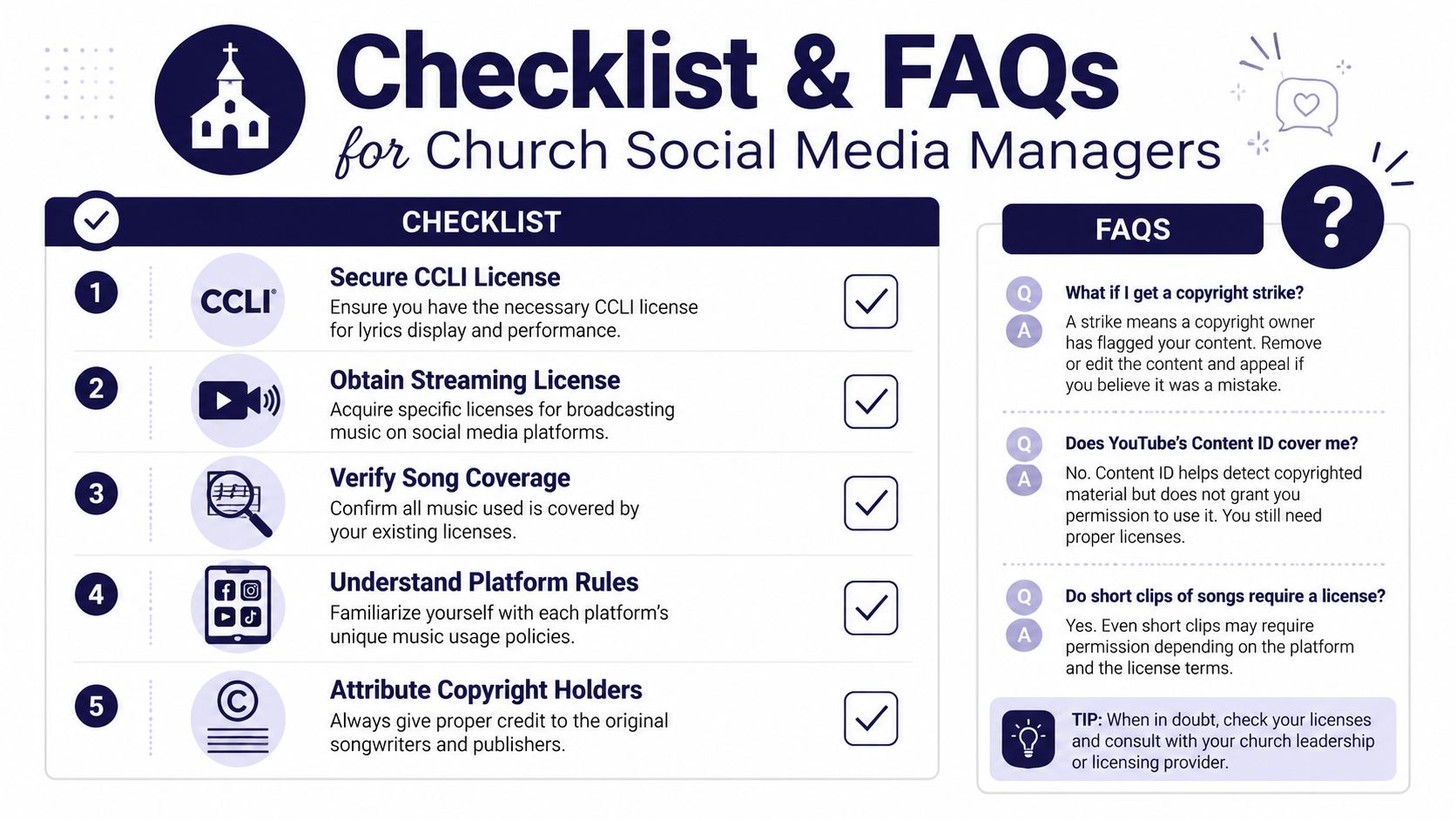
If you manage church social media, you don't need to memorize every copyright doctrine. You need a repeatable checklist and a few hard boundaries your team won't cross.
Weekly checklist
- Review this week's content queue and identify any post containing worship audio, background tracks, countdown music, or service clips.
- Confirm license fit before publishing. Don't assume Sunday coverage equals social coverage.
- Check clip audio, not just visuals because a clean-looking sermon reel can still include copyrighted music underneath.
- Keep one record of permissions so volunteers know what is approved.
- Train the team to ask first whenever they want to post a spontaneous clip, event reel, or testimony video with music.
Fast answers to common questions
Can I use a 15-second clip of a worship song on an Instagram Reel?
Short length doesn't create automatic safety. If the clip contains copyrighted music, your church still needs the right permission for that use.
We finished our CCLI reporting. Can we post sermon clips on TikTok now?
Not automatically. Reporting songs and having a church license do not guarantee that later social repurposing is covered.
What if the music is only in the background of the sermon clip?
Background audio still counts. If copyrighted music is audible, the clip can still trigger a claim or create infringement risk.
Does YouTube Content ID protect us if it doesn't block the video?
No. A platform not blocking a video immediately doesn't mean your church has the legal right to use the music.
How do we schedule posts featuring music clips without getting blocked?
The safer approach is to remove copyrighted worship audio from clips unless your permissions clearly cover that exact use. Build a review step before anything gets scheduled.
The operating principle
Church music licensing is easiest to manage when your social team treats music as a rights issue, not just an editing detail. Once that mindset is in place, volunteers make better decisions before they ever tap “publish.”
Churches that want a simpler way to turn sermons into social content can use ChurchSocial.ai to plan and manage their church social media in one place. The platform helps teams create AI-generated reels from sermons, generate AI content from sermon transcripts such as social posts and blogs, build photos and carousels with graphic templates and an editor, and organize publishing with a simple drag-and-drop calendar. It also integrates with Planning Center and other church calendars so churches can create content for events without piecing the workflow together manually.


