
You finish uploading Sunday’s service. The thumbnail looks good. The sermon audio is clean. You send the link to the pastor, maybe even drop it into the church Facebook page, and then the email shows up.
A copyright claim was created for content in your video.
That message can make a volunteer feel like the whole channel is in danger. In most church settings, that fear gets worse because the person handling YouTube is often also running slides, fixing microphones, and answering a text about next Sunday’s announcement loop. Copyright language lands hard when you’re already stretched.
The good news is that a youtube copyright claim dispute is usually a workflow problem, not a catastrophe. Most of the time, YouTube is flagging a song, a backing track, a bumper, or a short piece of content that matched something in its system. That’s very different from a full legal takedown. It still matters, especially if your livestream is blocked or your sermon replay loses monetization, but it’s manageable.
Churches run into a few patterns again and again. A worship set includes licensed music, but the recording still gets flagged. A sermon clip uses a short excerpt for teaching or commentary, and the claim looks stronger than it really is. A volunteer exports a recap video with stock music from the wrong source. None of that means your ministry is reckless. It means YouTube’s copyright system is automated, fast, and often blind to context.
What helps is staying calm, reading the claim details closely, and choosing the right response based on what was flagged and why.
That Sinking Feeling a YouTube Copyright Claim Arrives
A church volunteer usually reads that email in one of two moods. Either they’re relieved the upload is done, or they’re already behind on three other tasks. In both cases, the claim feels personal, even when it isn’t.
I’ve seen pastors assume the channel is about to be deleted. I’ve seen volunteers immediately unlist a sermon because they think they broke the law. Neither reaction helps. A standard Content ID claim is often just YouTube saying that someone’s registered audio or video appears to match part of your upload.
What that email usually means
For churches, the most common trigger is music. It might be the worship team’s live performance, a background music track under announcements, or walk-in music that was audible before service started. Sometimes the issue is more surprising, like a bumper video, a clip played during the sermon, or a track buried under room noise that still got detected.
A claim can affect your video in different ways:
- Tracking only: The claimant wants viewership data.
- Monetization change: Ad revenue may go to the claimant.
- Blocking: The video may be restricted in some regions or entirely.
That range matters. A blocked Easter service demands a faster response than a weekday upload that stays live but loses ad revenue.
Practical rule: Don’t react to the email. React to the details inside YouTube Studio.
Why churches feel this more than other channels
A church channel often mixes live music, teaching, scripture reading, event promos, and volunteer-made graphics in one file. That combination creates more opportunities for copyright friction than a simple talking-head video.
There’s also a stewardship layer. Churches want to honor creators, obey licensing terms, and avoid legal drama. That’s good. But the pressure can make people overcorrect and stop posting altogether.
That would be the wrong lesson. The better lesson is this: build a repeatable process. Know what counts as a claim, know when to dispute, and know when to trim or replace the flagged portion. The churches that stay healthy on YouTube aren’t the ones that never get claims. They’re the ones that handle them without panic and improve their content planning each month.
Decoding the Claim in Your YouTube Studio
The first job is simple. Stop looking at the inbox and open YouTube Studio.

Claim versus strike
A Content ID claim is the common one. It usually means YouTube matched part of your video against copyrighted material in its database and applied the claimant’s chosen policy.
A copyright strike is much more serious. That usually involves a formal takedown process, and your video is removed. If you’re helping a pastor or volunteer, make sure they understand this difference immediately. Most church upload issues start as claims, not strikes.
That distinction lowers the temperature in the room. It also helps you choose the right next step. You don’t need a legal panic response to every claim notification.
Where to look and what to read
Inside YouTube Studio, go to Content, find the affected video, and open the copyright details. Focus on four things before you touch the dispute button:
- Who made the claim: Is it a music publisher, distributor, label, or someone you recognize from a licensed source?
- What part was flagged: YouTube usually gives timestamps. Check the exact segment.
- What policy was applied: Track, monetize, or block.
- Whether the whole video is affected or only one section: A short music bed needs a different response than a sermon segment blocked in multiple regions.
At this point, volunteers usually regain control. Once you can see the timestamps, the problem gets smaller.
A lot of claims come from automated matching. If you want a better mental model for how YouTube detects songs and snippets, Mogul has a useful explanation of audio fingerprinting technology. It helps explain why even brief background audio can trigger a match.
Why reading the details matters
YouTube handles claims at huge scale. In the first half of 2021, the platform processed over 729 million total claims, and creators disputed only about 0.5% of them, according to Digital Music News reporting on YouTube’s copyright transparency data. That tells me two things. Claims are common, and many uploaders don’t challenge them even when they may have a valid reason.
That’s especially relevant for churches. A volunteer sees official-looking language and assumes the system must be right. Sometimes it is. Sometimes it isn’t.
Read the timestamp before you read your emotions. Most church copyright problems become clearer the moment you identify the exact segment YouTube matched.
A quick diagnosis table
| What you see in Studio | What it usually means | Best next move |
|---|---|---|
| Monetized by claimant | A rights holder is collecting revenue | Decide whether the claim is valid or worth disputing |
| Blocked video | The claimant restricted viewing | Act quickly, especially if it’s a sermon archive or livestream replay |
| Short flagged segment | A specific song or clip triggered the claim | Consider trim, replace, or targeted dispute |
| Unknown claimant on original material | Possible mismatch or rights confusion | Gather proof before disputing |
The point of this stage isn’t to win yet. It’s to diagnose correctly. Once you know what was flagged and what the consequence is, the rest of the youtube copyright claim dispute process gets much easier.
Choosing Your Response Dispute Trim or Accept
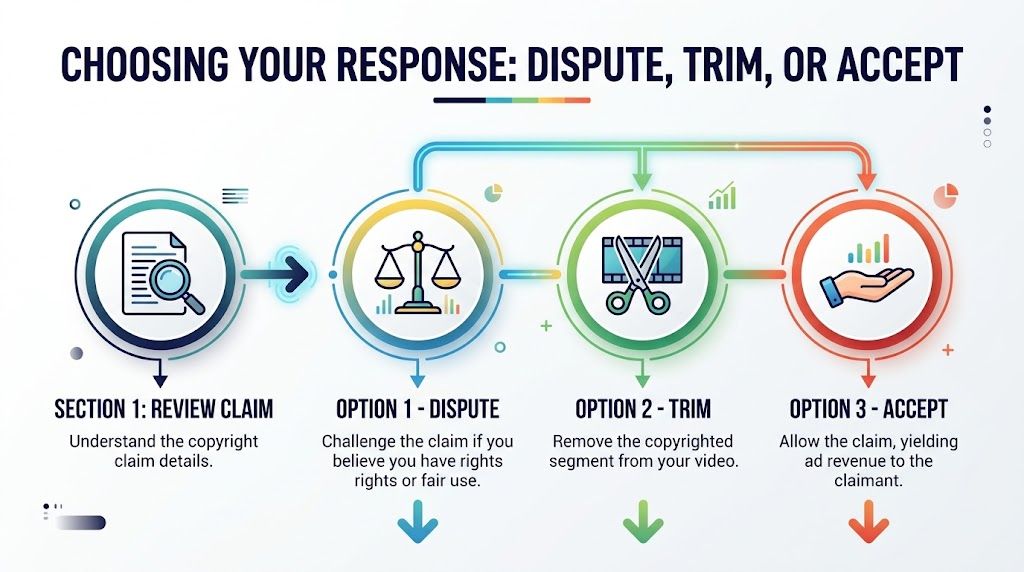
Three buttons usually matter most. Dispute. Trim. Accept. The right one depends on what the claim touches, how urgent the video is, and whether your church can prove it has the rights or a valid use.
When dispute is the right move
Dispute a claim when your church has a real basis to do so. That usually falls into a few categories.
- You have a valid license: If your church has the necessary rights for the use in question, gather the paperwork and point to it clearly.
- The claimant identified the wrong material: This happens more than people expect with automated systems.
- The use substantially reworks the source material: Some sermon uses add commentary, teaching, or criticism in a way that may support a fair use argument.
- You created the material yourself: Original video or audio can still get flagged incorrectly.
A dispute is not a complaint box. It’s a rights statement. If your basis is weak, don’t file an emotional response and hope for mercy.
When trim is the smartest answer
Some churches argue with every claim. That’s exhausting and often unnecessary.
If the flagged part is a walk-in song, a short outro, or a brief element that doesn’t matter to the message, trimming is often the cleanest solution. YouTube’s built-in editor can remove the claim-causing segment and save your team time. If your channel publishes a lot of sermon clips, this can be faster than waiting through a dispute window.
This is one reason clip planning matters. If your team regularly repurposes messages into short videos, it helps to build clips around clean speech segments instead of around transitions, music swells, or mixed-audio moments. Churches doing that kind of editing at scale often benefit from workflows like auto-trimming clips for social publishing, because cleaner source material means fewer claim headaches later.
When accepting the claim is reasonable
Accepting a claim is not surrender. Sometimes it’s just realism.
If the claim is legitimate and the video stays live, accepting it may be the right stewardship decision. This is common when:
- The music used is owned by the claimant.
- The effect extends solely to monetization.
- The highlighted section does not warrant re-editing.
- The church requires the sermon to be immediately accessible, avoiding any waiting period.
That’s especially true for smaller churches that care more about reach than ad revenue. If your sermon stays accessible to your congregation, the practical cost may be low.
A valid claim doesn’t always need a fight. Sometimes the best response is to preserve the ministry outcome and clean up the process for next week.
Side by side decision guide
| Option | Best for | Upside | Trade-off |
|---|---|---|---|
| Dispute | Invalid claim, licensed use, original content, strong fair use case | Can remove the claim and restore control | Requires evidence, careful wording, and patience |
| Trim | Nonessential flagged segment | Fast resolution | You may lose part of the service or transition |
| Accept | Legitimate claim with limited impact | No extra work, video can remain live | Claimant keeps control over the claimed portion |
What usually does not work
Churches waste time when they choose the wrong response for the wrong reason. These are the patterns that tend to fail:
- Arguing from sincerity: “We’re a church” isn’t a copyright defense.
- Claiming fair use without explanation: If you can’t describe the commentary or teaching purpose, your dispute is weak.
- Disputing licensed music without documentation: If you have a license, say which rights you have and attach the evidence.
- Fighting over a harmless claim on a minor clip: Not every issue deserves a long paper trail.
The practical goal is not to win every dispute. It’s to respond in a way that protects the message, respects rights, and keeps your team from burning out.
How to File a Winning YouTube Copyright Claim Dispute
If you’re going to dispute, do it carefully. The strongest church disputes are specific, calm, and documented.
The click path inside YouTube Studio
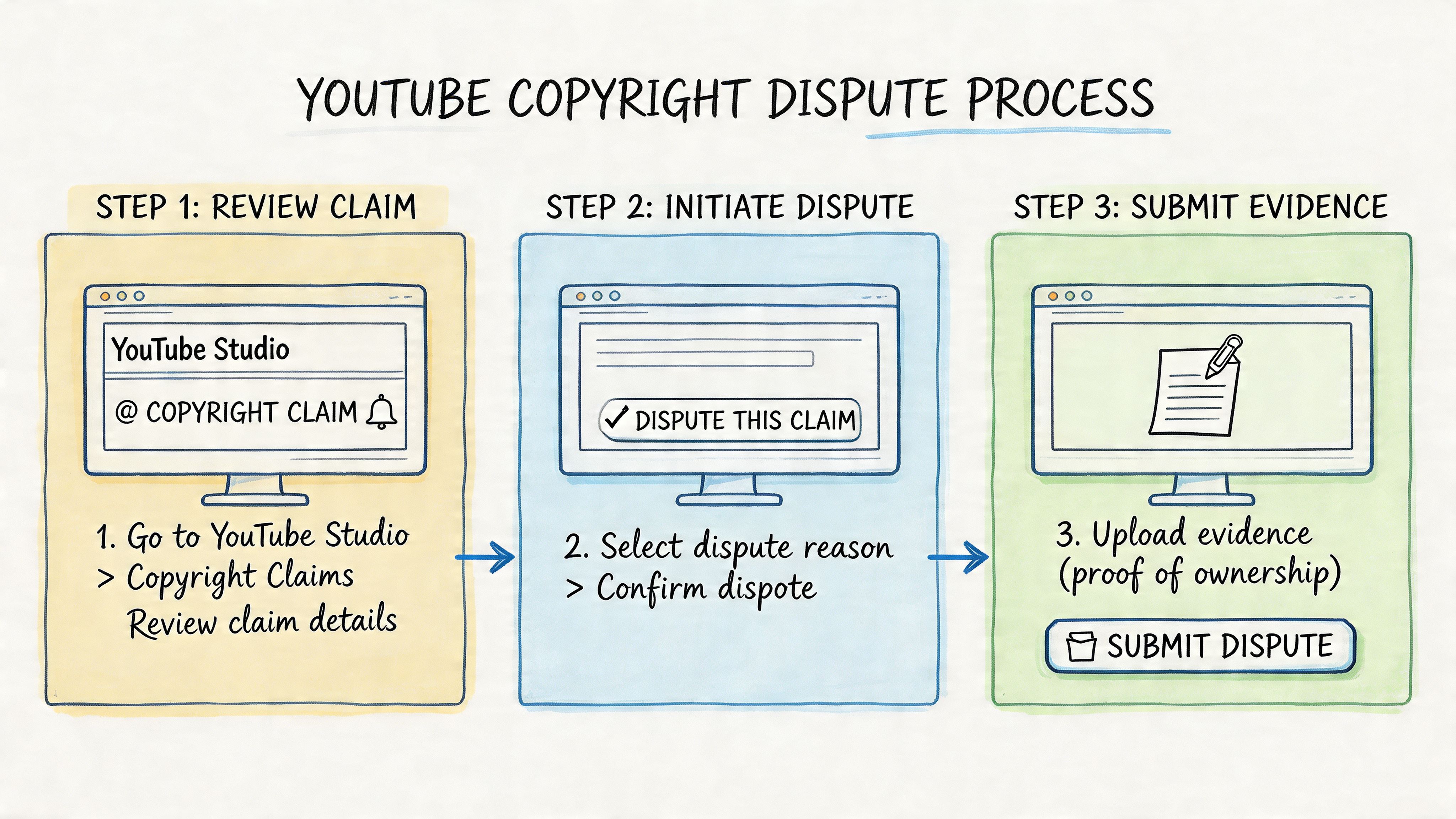
Open YouTube Studio, then:
- Go to Content
- Select the affected video
- Click the Copyright or claim notice details
- Review the claimant, timestamps, and policy
- Click Dispute
- Choose the reason that best matches your situation
- Enter your explanation and submit
That sounds simple, but the text box is where most disputes fall apart.
According to Tubefilter’s coverage of YouTube’s copyright transparency reporting, specificity is key, vague claims of fair use are often rejected, and 60% of the 3.7 million disputed claims in 2021 were resolved in favor of the uploader, often because the claimant released the claim or failed to respond within YouTube’s 30-day window. That should encourage churches to dispute invalid claims, but only with a focused explanation.
What to gather before you type
Don’t open the form and start improvising. Have your proof ready first.
- License records: Streaming or usage permissions, purchase receipts, or emails confirming rights
- Timestamps: The exact segment used in your video
- Context statement: A short explanation of how the content was used
- Ownership proof: Raw footage, project files, or source exports if the material is yours
- Public domain support: Notes showing that the composition is public domain and that your recording is original, if that’s your basis
If your evidence is scattered across email threads and shared drives, the dispute will feel harder than it is. Good recordkeeping wins time back.
What a strong dispute sounds like
A strong youtube copyright claim dispute is direct. It doesn’t ramble and it doesn’t threaten. It identifies the basis, references the exact content, and names the proof.
Use this standard: One clear reason, one factual explanation, and one list of supporting evidence.
Here are practical templates churches can adapt.
Template for licensed worship music
If your church has the necessary rights for the use at issue, write with precision:
Our church has the necessary license/permission for the claimed material used in this video. The claimed segment appears at [insert timestamp]. This use is covered by our church’s valid license for this content. We can provide license documentation and related records upon request. Please review and release this claim.
Keep it factual. Don’t add unrelated ministry language. The claimant needs a rights explanation, not your mission statement.
Template for sermon commentary or teaching use
Use this only if the clip is genuinely part of commentary, criticism, or teaching and not just background entertainment:
The claimed segment appears at [insert timestamp] and is used within a sermon/teaching context for commentary and explanation. The material is not presented as a substitute for the original work. It is incorporated into a broader teaching message with added spoken analysis and ministry context. Please review this use and release the claim.
This works better when the sermon interacts with the content. If the pastor just played the material without comment, the argument is weaker.
Template for original church-created content
When the flagged material is yours:
We are the original copyright owner of the claimed content appearing at [insert timestamp]. This material was created by our church media team and uploaded by the rights holder. The claim appears to be a misidentification. Please review and release the claim.
If you have project files or original recordings, keep them ready.
Template for public domain hymn with original recording
This issue trips up churches all the time. An old hymn may be public domain as a composition, but a modern recording of it may still be protected. If your church performed and recorded the hymn itself, say that clearly:
The underlying composition used in this segment is in the public domain, and the recording used in this video is our church’s original performance/recording. The claim appears to be based on a mistaken match. Please review the timestamp at [insert timestamp] and release the claim.
What not to write
Weak dispute language usually sounds like one of these:
- “This is fair use.” Too vague.
- “We’re nonprofit.” Not enough by itself.
- “Remove this immediately.” Aggressive and unhelpful.
- “We have permission somewhere.” If you can’t name it, the dispute looks thin.
The claimant doesn’t know your church workflow. They only know what you state and support.
What happens after you submit
Once you file the dispute, the claimant has 30 days to respond, as noted in the Tubefilter reporting above. They can release the claim, reject it, or fail to answer in time. If they don’t respond, YouTube can automatically release the claim.
That means patience is part of the process. Don’t submit a dispute and then immediately start editing the same section unless the block is harming something time-sensitive.
If the dispute is rejected
You may get the option to appeal. Churches will need restraint at this point.
An appeal is a stronger escalation step. If you keep pushing a weak case, you increase risk and stress. Use appeals when your rights basis is solid and your documentation is organized. If the issue is small and the claim’s impact is limited, trimming or accepting may be wiser than escalating further.
A practical way to consider this:
| Situation | Best posture |
|---|---|
| Clear license and clear mismatch | Dispute confidently |
| Strong original ownership proof | Dispute confidently |
| Gray-area sermon use | Dispute carefully and factually |
| Valid music claim with little impact | Accept or trim |
| Minor nonessential segment | Trim first |
The church workflow that makes disputes easier
The churches that handle claims best usually do one quiet thing well. They keep a simple rights log.
That log can be a shared spreadsheet or a planning document with:
- song title
- source
- license info
- who approved it
- where it was used
- whether it caused a claim before
Once you have that, filing a youtube copyright claim dispute becomes admin work instead of detective work.
Building a Copyright-Proof Content Strategy for Your Church
The healthiest church YouTube channels don’t rely on dispute skill alone. They reduce avoidable claims before upload day.

Start with a simple content filter
Before publishing, run every video through three questions:
- Is this original?
- Is this licensed for this exact use?
- If neither, do we have a strong reason to include it?
That filter catches most avoidable trouble. It also forces better planning during the week instead of emergency editing after service.
The hardest lesson for churches is that permission and detection are not the same thing. Even when your team has the right license, automated matching can still trigger claims. As explained by iMusician’s guide to handling YouTube copyright claims, false positives from Content ID are common, especially with licensed worship music and AI-generated clips that resemble copyrighted styles. Their practical advice is sound: keep your license information ready, but build more verifiably original content so you’re not constantly forced into retrimming and muting workarounds.
Build around original ministry assets
Churches have more original material than they think.
A sermon transcript can become social captions, blog posts, email devotionals, discussion prompts, and short videos without importing risky outside media. A clean camera recording of the pastor can become multiple clips. An event calendar can drive original announcements, graphics, and reminders without relying on borrowed promotional assets from random corners of the internet.
That’s a better long-term play than stuffing every upload with popular songs, movie references, or downloaded graphics. If your content engine depends on borrowed material, claims are going to keep interrupting your week.
Original ministry content ages better than borrowed media. It’s easier to repurpose, easier to archive, and easier to defend.
Know the weak points in church production
These are the places I’d audit first on a church channel:
- Pre-service and post-service audio: Walk-in music gets captured more often than teams realize.
- Announcement videos: Background tracks and stock visuals are frequent offenders.
- Sermon bumpers: Motion packages often carry music licensing baggage.
- Clips from movies or TV: Even short sermon illustrations create risk. If your team uses them, review guidance like this article on using movie clips for sermons before making them part of a recurring workflow.
- Volunteer-made recap videos: Good intentions, messy sourcing.
If a claim keeps appearing, the answer usually isn’t “write a stronger dispute next time.” The answer is “remove that source from the weekly process.”
Choose visuals that don’t trigger extra problems
A lot of churches solve one copyright issue and then create another by grabbing random graphics online. Better to use tools that help you create original visuals from text you already own, like scripture, sermon points, and event information.
For scripture-based graphics, ClearBible's Verse Image Creator is a good example of a tool that keeps the content centered on the message rather than on reused third-party artwork. That kind of workflow is more sustainable than searching social media for images and hoping nobody notices.
A practical planning model for church teams
Here’s the model I recommend for smaller teams:
| Content type | Safer source | Why it works |
|---|---|---|
| Sermon clips | Original sermon footage and transcript | High value, low licensing confusion |
| Event promos | Church-created graphics and photos | Clear ownership and easier branding |
| Scripture posts | Original designs built from Bible references | Strong ministry fit without borrowed media |
| Worship highlights | Only if rights and publishing plan are clear | Music is the most frequent claim source |
The goal isn’t sterile content. It’s intentional content. You can still publish worship moments, testimonies, and sermon media. Just stop building the calendar around assets your church can’t clearly trace.
Sustainable beats clever
A lot of church media systems break because they reward urgency over clarity. Someone needs an Instagram reel by Monday, so they grab a trending song. Someone needs a YouTube short, so they screen-record a clip from another account. It works for an hour and creates cleanup work for a month.
The stronger model is slower at first and faster later. Build templates. Keep license records in one place. Record clean source material. Repurpose sermons into formats your church fully controls. That’s how a church grows online without making every upload feel like a legal gamble.
After the Dispute Protecting and Growing Your Channel
Once the claim is resolved, don’t just move on and hope it never happens again. Use the result to improve your channel.
If your dispute succeeds, save the wording you used and store the supporting documents in a shared folder. If the claim is upheld, treat that as useful feedback about your current process. Either way, your next step is operational, not emotional.
What to do after the outcome
If the claim is released, check the video one more time in Studio and confirm the restriction is gone. Then note what caused the issue and how you fixed it.
If the claim stays, choose one of three paths:
- Leave the video as is: Fine when the impact is limited.
- Edit or replace the flagged segment: Good for evergreen content you want to keep clean.
- Adjust future production habits: Best if the same type of issue keeps recurring.
Audit older uploads before they bite later
Most church channels have older videos with hidden copyright landmines. Look through archived livestreams, conference sessions, and event recaps. Pay attention to music-heavy openings, countdowns, and transition videos.
A simple quarterly review helps. So does building an actual planning system for content instead of posting ad hoc. If your team needs a framework for that, this guide on how to create a content strategy is a useful place to start.
Don’t measure channel health only by what you post this week. Measure it by how few preventable problems your archive creates next month.
Keep the risk in perspective
YouTube’s claim system is intimidating because the language sounds legal, but churches shouldn’t assume every claim is a sign to stop publishing. According to TorrentFreak’s reporting on YouTube’s 2024 transparency data, fewer than 1% of YouTube’s 2.2 billion annual Content ID claims were disputed, and over 65% of those disputes were resolved in the uploader’s favor. That doesn’t mean every church should dispute every claim. It does mean valid challenges often succeed.
That’s the right closing perspective for a volunteer pastor or media leader. Stay respectful. Keep records. Use disputes when you have a real basis. Stop importing avoidable copyright risk into the weekly workflow.
A calm church team with a clean process will almost always outperform a frantic one that keeps solving the same claim over and over.
Churches don’t need a bigger media team to stay consistent online. They need a simpler system. ChurchSocial.ai helps churches plan, create, and schedule content from one place, including sermon-based posts, AI-generated reels, transcript-driven blogs and captions, event graphics, and a drag-and-drop calendar that works with Planning Center and other church calendars. If your team wants fewer last-minute scrambles and a more sustainable social media workflow, it’s worth a look.


