
Sunday afternoon, a volunteer notices a parenting photo on the church Facebook page beside an emotionally charged comment thread. She taps Share, realizes the photo wasn't cleared for broader distribution, and panics. Parents email the pastor, deacons call an emergency meeting, and someone deletes the post without saving a screenshot or recording who approved it.
Over the next 72 hours, the church makes phone calls, prepares an apologetic statement, audits youth ministry communications, and tries to explain why a routine post became a trust problem. The pastor keeps asking the same question: why didn't anyone see this coming?
A written church social media policy wouldn't eliminate every difficult conversation. It would prevent many avoidable ones. Three assigned roles, a visible pre-approval queue, documented consent, and private defaults for youth groups could stop an unguarded tap before it becomes a public incident. The policy has to function as an early-warning system, not a document stored in a folder nobody opens.
The Moment Every Church Dreads
The original problem usually isn't malicious intent. It's an ordinary volunteer working quickly, using an account with too much access, while assuming that a photo already approved for a ministry presentation is also approved for public social media. That assumption can expose a child, identify a location, or attach the church to a comment nobody meant to endorse.
The volunteer may delete the post, but deletion doesn't erase the need for a response. People may already have seen it, saved it, or shared it. Without a policy, leaders have to reconstruct what happened while emotions are rising.
Practical rule: If your team can't identify who drafted, reviewed, approved, and published a post, your workflow is already too loose.
Rewind the scene. The church has a written policy that names an account owner, a content reviewer, and a safeguarding approver. The volunteer can prepare the post but can't publish it alone. The item enters a queue where the reviewer checks the caption, image permissions, audience setting, and links before publication. Youth content defaults to a closed group or stays unpublished until the designated approver confirms the release.
That system changes the conversation from blame to procedure. A pastor doesn't need to ask every volunteer to remember every rule from memory. The team follows a repeatable path, and the platform records the decision.
A church social media policy protects more than the church's reputation. It protects volunteers from making decisions they weren't trained or authorized to make, and it protects families from discovering that a ministry moment traveled farther than they expected.
What a Church Social Media Policy Really Is
A church social media policy is a written operating guide for how staff, volunteers, ministry leaders, and authorized representatives communicate through Facebook, Instagram, YouTube, TikTok, X, and related channels. It defines who can access official accounts, what content requires review, how the church handles personal information, and who responds when a post creates concern.
The need became practical as church use of social platforms moved into the mainstream. Lifeway Research reported that 47% of churches had a Facebook page in 2010, rising to 84% by 2017. The same 84% level matched the share of churches with a website, showing that Facebook had become part of standard church communications rather than a niche experiment. Lifeway also reported that churches using social media primarily used it for event promotion at 97%, congregation interaction at 87%, and engagement with outsiders at 86%. Read the full Lifeway Research analysis of church social media strategy for that context.
The policy isn't a snarky comment ban, a legal contract, or a one-page reaction to the last controversy. It's a shared manual for five audiences:
- Pastors: Know when a ministry issue needs pastoral judgment.
- Staff: Understand publishing authority and personal account boundaries.
- Volunteers: Work from approved templates, queues, and escalation routes.
- Members: Know how the church handles photos, comments, and inquiries.
- Outside stakeholders: Receive a consistent, accountable public voice.
The outcomes are straightforward: consistent voice, faster approvals, reduced legal exposure, and protected relationships. A practical approval framework should make those outcomes visible in daily work. Churches building that process can also use this guide to a safe content approval process as a useful reference for assigning reviews and documenting decisions.
| Misconception | Reality |
|---|---|
| A policy exists to silence disagreement. | It defines official communication boundaries and protects respectful engagement. |
| Only the communications director needs to read it. | Anyone with publishing, moderation, messaging, or account access needs clear expectations. |
| A policy is complete once leadership signs it. | It must appear in the queue, calendar, permissions, training, and review routine. |
| Deleting a post solves the problem. | The team also needs documentation, escalation, communication, and follow-up. |
The Seven Pillars of a Strong Policy
A strong policy has seven pillars, but each pillar matters only when it changes what someone does inside the publishing workflow.
Roles and permissions
Assign access by responsibility. An Admin controls account ownership and recovery, an Editor reviews and publishes approved work, a Contributor drafts content, and a Read-only user can inspect the calendar without changing anything. A volunteer who creates sermon captions shouldn't automatically have permission to publish a youth event photo.
ChurchSocial.ai can support this kind of role-based workflow by keeping creation, review, scheduling, and publishing responsibilities distinct inside one operating environment. The rule belongs in the policy, while the permission setting enforces it.
Content standards
Write down the church's voice, theological boundaries, visual standards, accessibility expectations, and position on political endorsements. Define the difference between explaining a ministry position and endorsing a candidate. Use a short style guide inside the content workspace so volunteers don't have to search an employee handbook before drafting a caption.
Approval workflows
Every post should move through draft, review, and publish stages. Keep the queue visible on one screen. A sermon clip can be reviewed for accuracy and tone, a graphic can be checked for branding and readability, and an event post can be matched to the correct date before it reaches the calendar.
ChurchSocial.ai's AI tools can turn a sermon transcript into social posts, blog drafts, discussion questions, and other formats, while its sermon tools can create AI-generated reels from sermons. Those outputs still need human approval. Automation should increase production capacity, not remove pastoral judgment.
Safeguarding
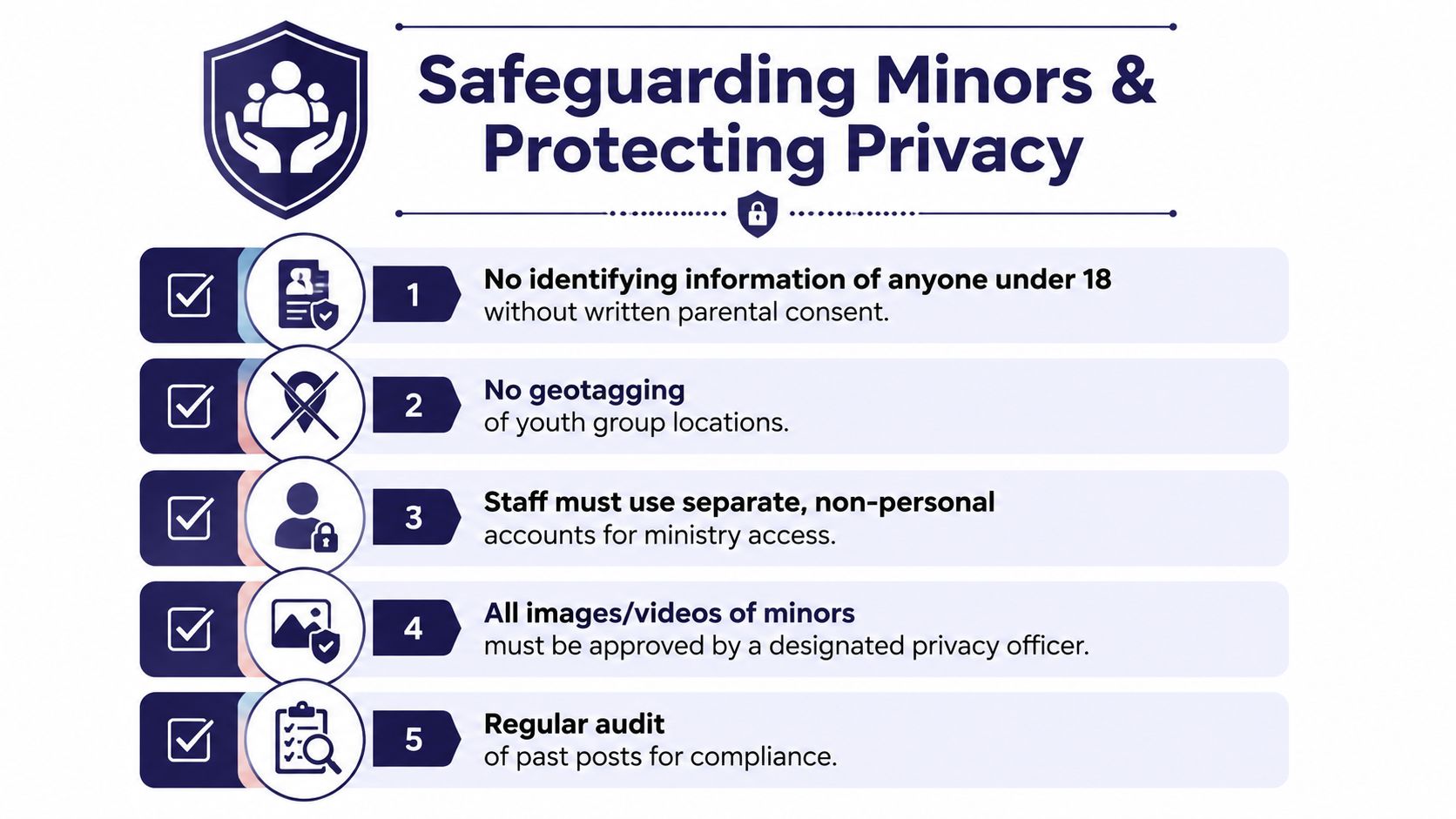
Require written parental consent before publishing identifying photos or videos of minors. Use blurred faces when an image must communicate an event without identifying children, and default youth ministry spaces to private or closed settings. The Indiana United Methodist Church guidance says adults must not post photos or videos identifying children, youth, or vulnerable adults without written consent from a parent or legal guardian, and that youth-related social groups should be closed. Review the Indiana United Methodist social media and internet guidance before adapting local language.
Privacy and data
Treat member directories, prayer requests, email lists, pastoral conversations, and outside inquiries as controlled information. Don't move a sensitive question into an informal personal account. Route it to the designated pastor or ministry leader, and record only what the church is authorized to retain.
Crisis response
Name the first responder, the incident commander, the deletion approver, the spokesperson, and the person who contacts legal counsel when necessary. The policy should also state when scheduled posts pause across all channels.
Training and review
Train staff and volunteers on the actual queue, not just the document. Refresh the policy regularly, review permissions, and audit old content. ChurchSocial.ai's drag-and-drop calendar, templates, editor, and approval workflow give the team a practical place to apply those rules instead of relying on memory.
| Pillar | Real action |
|---|---|
| Roles and permissions | Assign access by job, not convenience. |
| Content standards | Store voice and visual rules beside draft content. |
| Approval workflows | Require review before publication. |
| Safeguarding | Match every minor's image to documented consent. |
| Privacy and data | Route sensitive inquiries to authorized leaders. |
| Crisis response | Pause, document, assign, and communicate through named roles. |
| Training and review | Revisit permissions, examples, and incidents on a set rhythm. |
Safeguarding Minors and Protecting Privacy
Minor protection is the spine of the policy, not an appendix. The church should adopt one clear rule: no image, video, or identifying information about anyone under 18 goes public without a signed photo release on file. The release must be reconciled against the scheduled post before publication, not checked after a parent complains.
The Diocese of Jefferson City's parish policy states that communications created, sent, received, or stored on parish communication assets are parish property and may be reviewed or tracked for compliance. It also says personnel shouldn't use personal accounts to communicate with youth, and that social media communication should come from a group account associated with the parish. That structure creates an auditable record and reduces hidden one-to-one channels. Churches can also consult this resource on safeguarding children online when developing family-facing practices.
Put consent inside the queue
A release folder isn't enough. The person approving a post needs a clear status attached to the content item:
- Consent confirmed: The child's approved image matches the release record.
- Consent unclear: Remove the identifying image or hold the post.
- Consent absent: Don't publish.
- Audience restricted: Use the approved private or closed group only.
A post featuring minors should receive two-person approval. Strip name tags, school identifiers, precise locations, and unnecessary schedule details from captions. Don't geotag youth group meetings or reveal where children regularly gather.
Private groups need their own controls. Youth, children's ministry, and small-group spaces should default to closed settings, with administrator rosters reviewed regularly. A private label isn't a substitute for oversight. Remove former volunteers, confirm current leaders, and avoid treating a group as safe solely because it isn't public.
Handle tags without public conflict
If a family member tags a child in a church photo, don't confront them in the comment thread. Contact the family privately, explain the church's consent standard, and remove or restrict the church's copy when requested. The goal is correction without embarrassment.
ChurchSocial.ai can make the approval checkpoint part of the content routine. Before a scheduled item goes live, the reviewer should confirm release status, group visibility, audience tags, caption identifiers, and account ownership. The church's own privacy practices should also align with its technology provider's published information, including the ChurchSocial.ai privacy policy.
Crisis Response When Posts Go Wrong
Most church policies are good at prevention and weak at the moment prevention fails. They say “be respectful,” “don't post confidential information,” and “contact leadership if needed.” Those rules don't tell anyone what to do when a comment thread, hacked account, or misinformation post spreads across Facebook, Instagram, TikTok, YouTube, and private messages.
A viral reply can move faster than a Sunday announcement. Silence creates its own interpretation, so the church needs an escalation path that starts immediately and assigns one official voice.
The first 24 hours
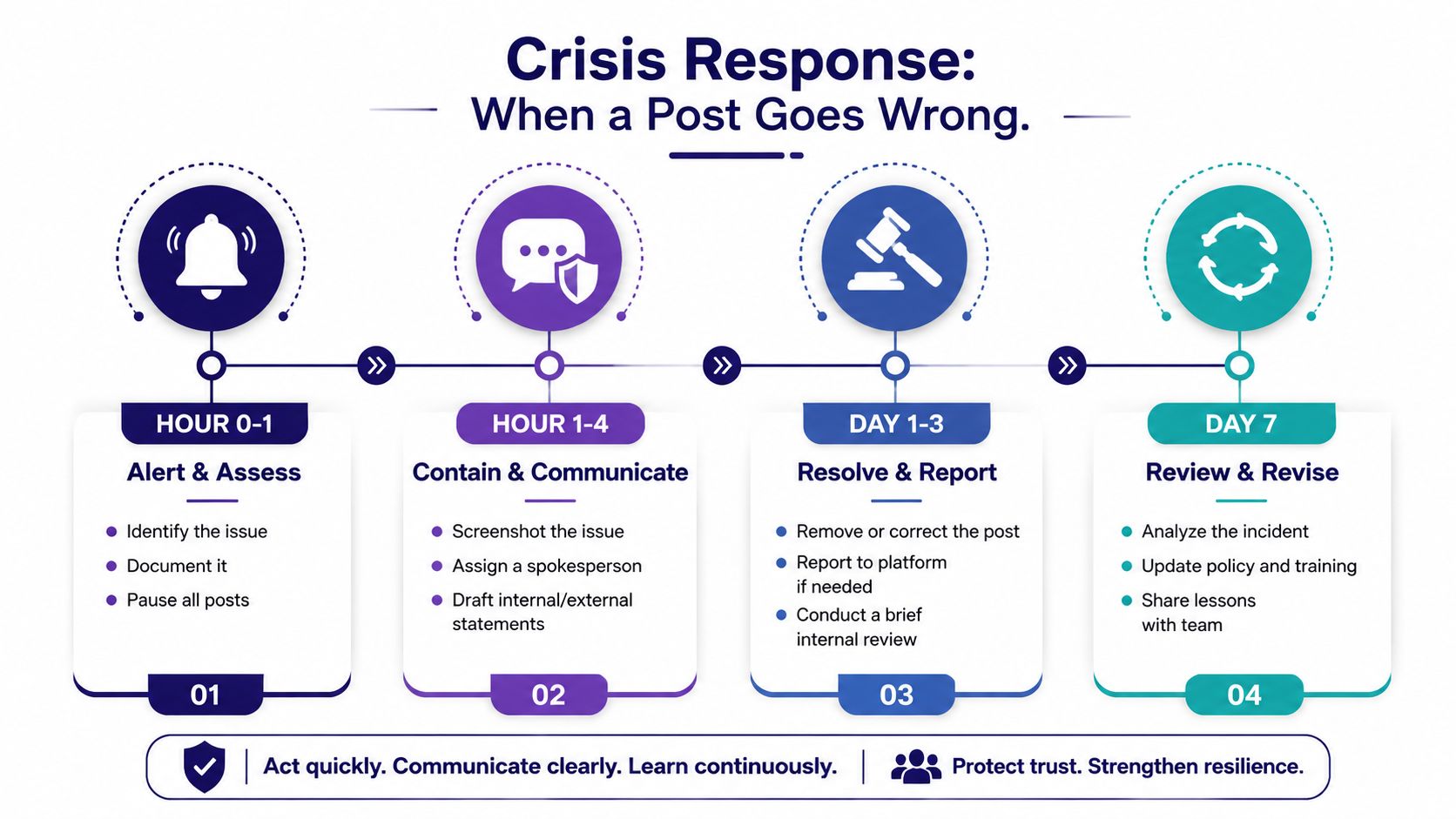
Hour 0 to 1, alert and assess: The first person who sees the problem screenshots it, captures the post URL, records the account and time, and alerts the incident commander. If the account may be compromised, pause publishing and secure access.
Hour 1 to 4, contain and communicate: The incident commander decides whether the issue is a misunderstanding, a harmful disclosure, a security problem, or a potential legal matter. One spokesperson drafts the internal update and, if needed, a holding statement. Personal accounts stay quiet.
By the end of the first day, resolve and report: Choose one response mode. Acknowledge and clarify when the post is inaccurate but the conversation remains manageable. Correct and remove when the content violates privacy, safeguarding, or church standards. Escalate to legal counsel when the matter involves threats, harassment, possible unlawful content, or significant exposure.
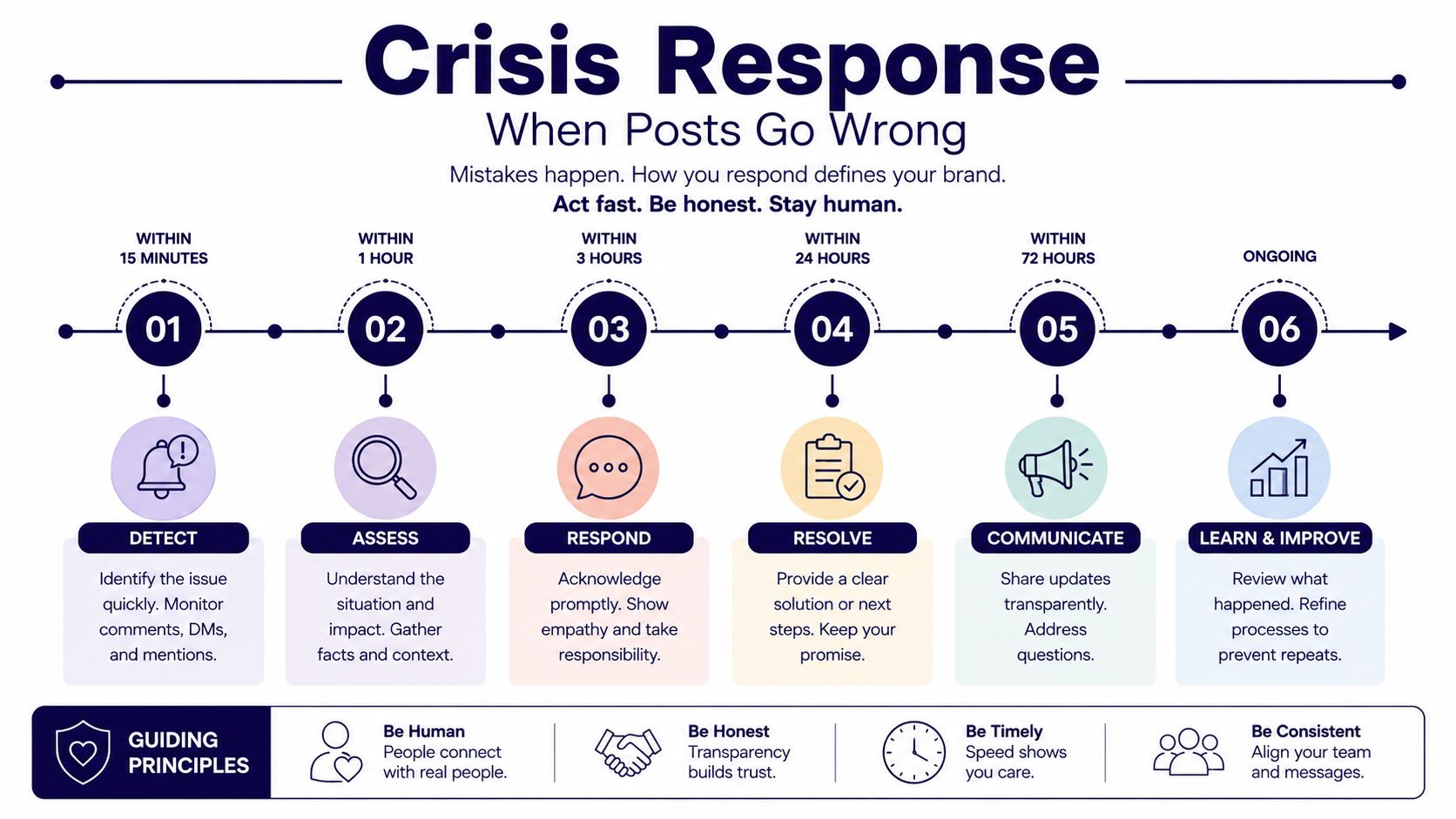
Keep a private leadership channel updated at regular intervals, and preserve the evidence before deleting anything. The 2026 crisis advice from Press Release Zen can help leaders think through holding statements and public response discipline.
A quarterly rehearsal should use a realistic scenario, such as an unauthorized youth photo, a hacked account, or a hostile comment aimed at a pastor. Store the response checklist beside the content calendar so the person managing the queue can pause scheduled posts and notify the right leaders without improvising. For practical guidance on public replies, use this guide to responding to feedback.
Three Policy Clauses You Can Copy Today
The clauses below should be adapted to your bylaws, employment practices, safeguarding requirements, and local legal advice. Their value comes from connecting each rule to a visible workflow.
Account ownership and access
Account Ownership and Access: All official ministry social media accounts, pages, profiles, recovery methods, content libraries, and publishing permissions belong to the church. Authorized users must use approved security controls, and leadership will review administrator, editor, contributor, and moderator access on a regular schedule. Departing staff and volunteers must lose access as part of the offboarding process.
The point is ownership, not distrust. Close the loophole where a volunteer creates a page with a personal email address, keeps the only recovery method, or leaves with unpublished drafts and account control. In ChurchSocial.ai, connect the clause to named roles and a permissions audit. The Admin owns the account relationship, Editors manage approved publishing, Contributors draft, and Read-only users observe.
Content standards and approval
Content Standards and Approval: Official church content must reflect the church's approved voice, protect confidential information, avoid personal attacks, and avoid presenting theological disputes or political candidate endorsements as official church communication without authorization. Any post connected to a scheduled event, featuring a minor, or using externally supplied media must complete the assigned review before publication.
This language closes the “I thought the event organizer approved it” loophole. Event approval and content approval aren't the same thing. Use the calendar item as the workflow hook, attach the draft, confirm image rights and consent, then require the designated reviewers to approve the post before it moves to publishing.
Response and engagement boundaries
Response and Engagement Boundaries: Official accounts must not insult, threaten, ridicule, or disclose private information about commenters, members, staff, or critics. Staff and volunteers must route serious complaints, safeguarding concerns, threats, and requests for pastoral care to the designated leader rather than handling them through personal direct messages. The crisis response plan controls decisions about correction, removal, escalation, and public statements.
This clause prevents the common mistake of treating every comment as a debate invitation. It also gives moderators a clear exit from a volatile conversation. The queue or moderation workspace should record the issue, assign an owner, and preserve the relevant context before a response or removal occurs.
| Clause | Core trigger | Workflow hook |
|---|---|---|
| Account ownership and access | A user needs account or publishing access. | Assign a role, document ownership, and review permissions. |
| Content standards and approval | A post includes sensitive, event, or external content. | Attach the item to the calendar and route it through review. |
| Response and engagement boundaries | A comment involves conflict, privacy, threat, or pastoral care. | Assign an incident owner and follow the escalation plan. |
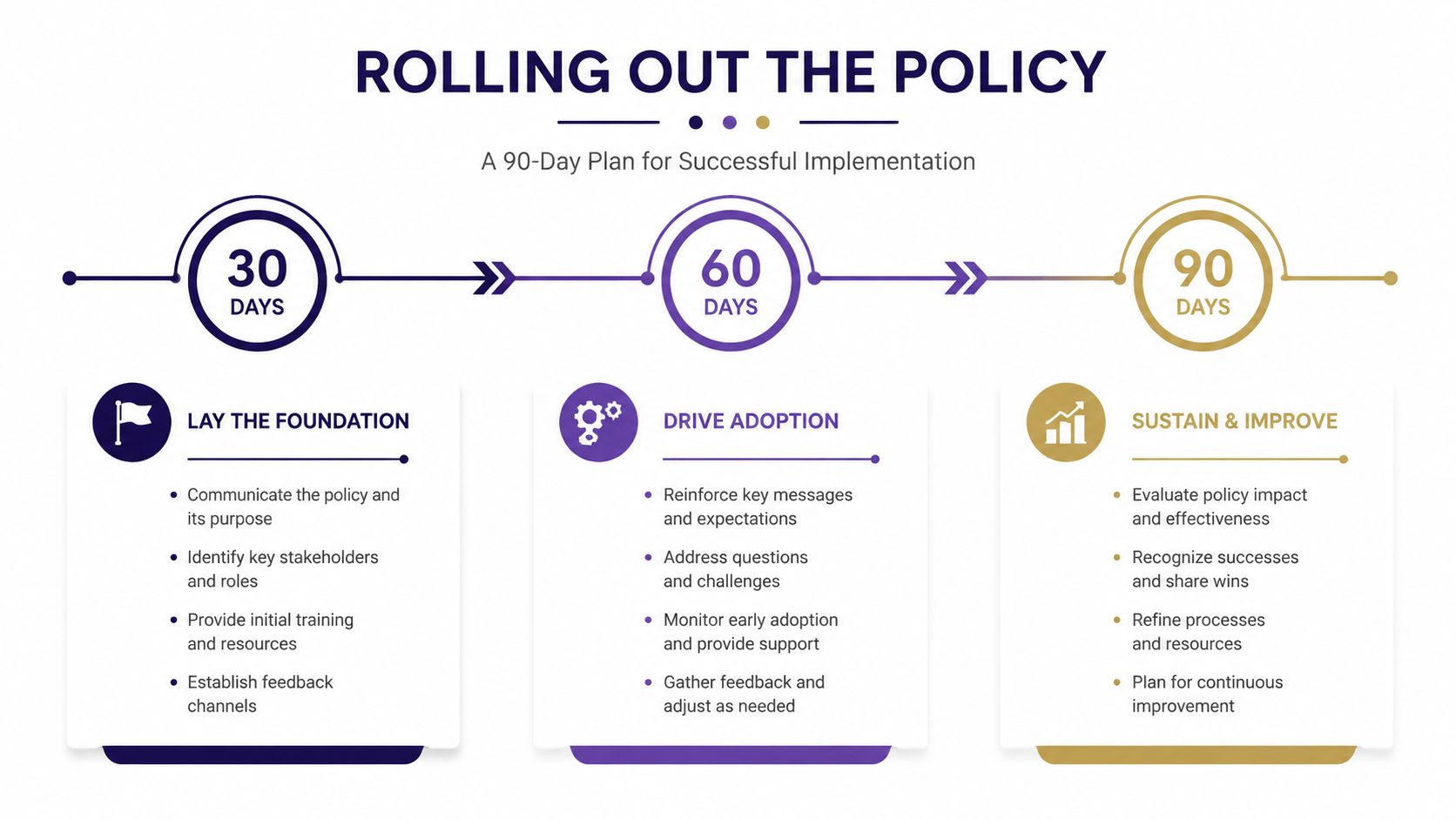
Rolling Out the Policy in 30, 60, and 90 Days
A signed document won't change behavior by itself. The rollout must put the policy into the tools, meetings, and decisions people already make.
Days 1 through 30, audit and align
Start with an account inventory. List every official page, profile, channel, group, recovery method, and person with access. Assign each account owner, map permissions to the role matrix, and move the publishing schedule into one visual calendar.
Confirm photo release records for youth content and identify which groups should be private or closed. Review existing posts for obvious privacy, consent, and ownership issues. Planning Center's Calendar can publish events to Church Center and a church website through an embeddable calendar. Its help documentation says the calendar must be published first, then shared through Actions, Share events, Embed, with Script, URL, or iFrame options available. See the Planning Center Calendar embed instructions.
Phase checklist:
- Documentation: Account inventory, role matrix, policy draft, consent records.
- Training attendance: Record who reviewed access and safeguarding rules.
- Metric review: Check whether every scheduled post has an owner and status.
Days 31 through 60, train the people
Run one live workshop for staff and another for volunteer moderators. Use real examples from the crisis plan, including an unauthorized image, a hostile comment, and a mistaken event detail. Give every participant a one-page decision tree that answers three questions: can I post, must I escalate, or should I stop and document?
Show volunteers how to draft without publishing, request review, respond through the official account, and hand pastoral conversations to authorized leaders. Keep training inside the content workflow rather than treating it as a lecture.
Days 61 through 90, institutionalize the rhythm
Activate approval workflows, schedule monthly content reviews, and run a tabletop drill using a simulated negative comment. Planning Center also supports connecting an event to a group by searching for the group and selecting it, which can tie event promotion to ministry follow-up. Its event and group sharing guidance shows how that connection works.
A Planning Center integration can also sync calendar events into a social media content calendar and recommend posts from upcoming events, as demonstrated by the Planning Center integration example. That event-driven approach is more reliable than asking volunteers to remember dates from separate spreadsheets.
Bringing It All Together With the Right Tools
A policy is ministry infrastructure. The seven pillars, consent rules, crisis plan, and copy-ready clauses protect people only when staff and volunteers can follow them during a busy week.
ChurchSocial.ai provides a working environment for planning and managing church social media accounts, with AI-generated sermon reels, sermon-transcript content such as social posts and blogs, graphic templates, an editor for photos and carousels, and a drag-and-drop calendar. It can also connect with Planning Center and other church calendars so event information can feed content planning. Use image rules alongside the workflow: choose people-free images whenever possible, and place text only where it naturally belongs, such as on a paper, whiteboard, sign, or deliberate post-publication overlay.
The platform doesn't replace pastoral judgment or safeguarding review. It gives the team a place to assign ownership, prepare drafts, route approvals, schedule content, and keep event communication connected. That's the difference between a policy in a binder and a policy that operates every week.
For a broader view of how these functions fit together, read this guide to social media management for churches. Then download your clause library, schedule the 30-day account audit, and pilot the workflow with one ministry team before expanding it across the church.
ChurchSocial.ai helps churches turn sermons into reels and posts, create branded graphics and carousels, and manage approvals and publishing from a visual calendar connected to church events. Visit ChurchSocial.ai to set up a practical social media policy workflow your staff and volunteers can use every week.


