
A volunteer social media manager opens the church's Facebook page after Sunday lunch and sees a critical comment under a sermon clip. The comment questions the message, mentions a frustrating experience at the church, and already has a few reactions. The volunteer feels defensive, but also knows that ignoring it could look careless. Should they reply publicly, send a private message, hide the comment, or wait for a pastor to decide?
That moment captures the challenge of how to respond to feedback on church social media. The answer isn't just to be polite. Your team needs to decide what deserves action, who should respond, where the conversation belongs, and how the issue should influence future content.
Why Feedback Response Matters for Church Social Media
A critical comment on a sermon post rarely reaches only the person who wrote it. Members, visitors, former attendees, and people discovering the church for the first time may all read the exchange. They're evaluating more than the original criticism. They're watching whether the church listens, responds with care, and treats difficult questions with dignity.
That makes feedback response part of ministry communication, not just reputation management. A thoughtful reply can reassure a concerned member, clarify a misunderstanding for a newcomer, or show a quiet observer that the church welcomes honest conversation. Silence can leave people to fill in the gaps themselves.
A widely cited customer feedback benchmark gives church teams a useful operating standard. 53% of customers expect a response to a negative review within one week, and roughly one-third want a reply within three days, according to customer feedback statistics from WiserReview. The same source reports that 45% of consumers are more likely to visit a business that responds to negative reviews, while businesses responding to customer feedback reportedly see a 30%+ lift in customer trust and brand perception.
These figures come from broader customer research, not church-specific measurement, so they shouldn't be treated as a prediction of attendance or giving. They do show why response behavior matters. Church communities are often highly engaged, and people notice whether leaders follow up when concerns surface.
Practical rule: Respond quickly enough to show attention, but never so quickly that a volunteer answers before understanding the issue.
A useful way to strengthen your listening process is to review resources such as best feedback questions for leaders. Questions that uncover the underlying concern are more useful than questions that merely collect approval or disapproval. Your team can apply that same discipline when reviewing comments, direct messages, and public reviews.
Church trust grows through repeated, visible actions. Your social presence should support that work, alongside the wider practices described in how to build trust online. A response doesn't need to solve everything in public. It does need to communicate that a real person read the concern and knows what happens next.
Triage Your Feedback by Visibility and Urgency
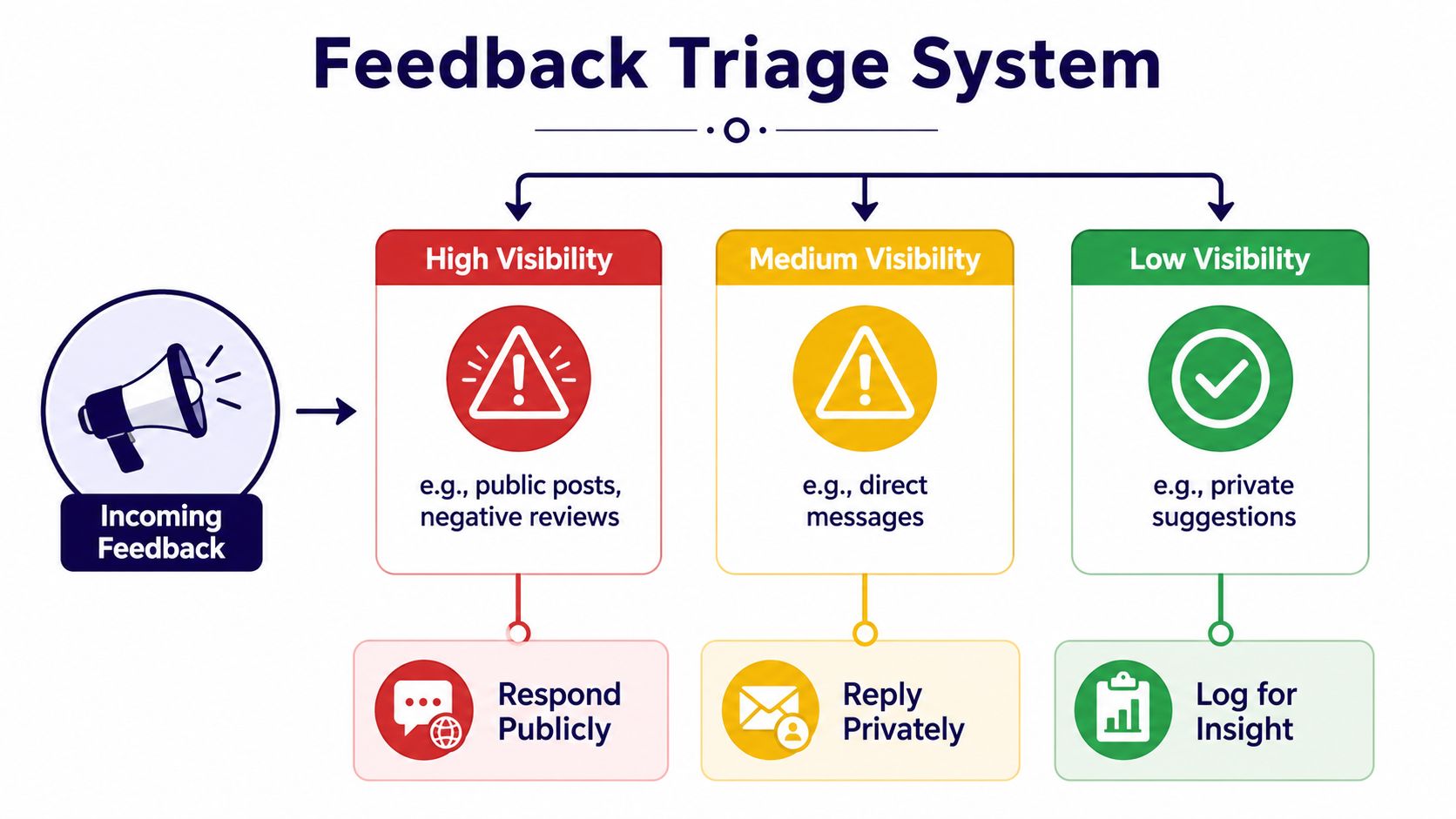
The first decision isn't “What should we write?” It's “What kind of situation is this?” A triage system prevents volunteers from treating a harmless suggestion like a crisis, while also stopping serious concerns from getting lost in a busy comment feed.
Start with visibility
High-visibility feedback includes public comments, public posts, and negative reviews. Reply where people can see the response when the issue is suitable for a calm public answer. A short acknowledgment can prevent the church from appearing indifferent, even when the detailed conversation needs to move elsewhere.
Medium-visibility feedback includes direct messages, emails sent through social platforms, and replies visible only to the sender. These conversations usually call for a personal response. Don't copy a private concern into a public thread without permission, especially when it includes pastoral, family, health, or personal information.
Low-visibility feedback includes private suggestions, internal notes, and informal comments that don't require a direct response. Log these for pattern recognition. A suggestion can still influence a future post, event explanation, or content calendar without receiving a public reply.
Add urgency before choosing an action
Urgency depends on potential harm, not emotional intensity. A strongly worded complaint about a caption may be routine. A vague message suggesting a safety concern requires prompt escalation, even if the sender writes calmly.
Use three questions:
- Could someone face immediate harm, privacy exposure, discrimination, or legal risk? Escalate to the appropriate church leader instead of improvising.
- Does the feedback identify a fix that fits the post's purpose or the church's mission? Act on it, or explain the next step.
- Is the suggestion outside the content's purpose, unsupported, abusive, or aimed at provoking an argument? You may partially adopt it or decline to engage.
A useful decision test is:
- Act on it when the concern is specific, relevant, and reasonably within the church's control.
- Partially adopt it when the feedback reveals a valid need but the proposed solution doesn't fit the church's goals.
- Ignore or moderate it when it's spam, personal abuse, unsafe, or unrelated to the conversation.
A structured approach like the 2024 REACT framework, Review, Evaluate, Address, Communicate revision, and Thank reviewer, reflects the value of repeatable feedback handling in another setting, as described in the scholarly guidance on responding to feedback. Churches can adapt the principle without copying the academic context: read carefully, assess fairly, explain the decision, and thank people when appropriate.
Crafting the Right Tone and Wording
Tone isn't the same as friendliness. A warm reply can still sound dismissive if it skips the actual concern. A professional reply can still feel cold if it reads like a legal statement. Church teams need language that is pastoral without becoming vague, and confident without becoming defensive.
Compare these two responses to a comment saying the church's event details were confusing.
Defensive version:
“All the information was already in the post. Please read it carefully before commenting.”
Constructive version:
“Thanks for pointing that out. The timing wasn't clear enough in the graphic, so we've added the full schedule to the caption. If you're still unsure about arrival or parking, please send us a message and we'll help.”
The second reply does three jobs. It acknowledges the feedback, identifies a concrete correction, and offers a next step. It doesn't blame the reader for missing information.
Acknowledge without making promises you can't keep
Use language that shows you understood the concern:
- “Thanks for taking the time to explain this.”
- “We understand why that felt unclear.”
- “You're right that the post didn't explain that detail.”
- “We've shared this with the team responsible for the event.”
Avoid claiming that the church will make a change before the right person has approved it. “We'll look into this” is safer than “This will never happen again” when you don't yet know the cause or solution.
Separate empathy from agreement
You can recognize someone's experience without agreeing with every conclusion. “I'm sorry this interaction felt dismissive” validates the experience. It doesn't automatically confirm an accusation that you haven't investigated.
Evidence reviews on performance feedback emphasize that useful feedback is specific, task-focused, and future-oriented, while vague or person-focused criticism commonly creates problems. The CIPD evidence review on performance feedback also highlights the importance of focusing conversations on future plans rather than only analyzing the past.
That principle works well for church replies. Don't label a commenter as “negative” or “disrespectful.” Address the post, the information, the event process, or the question. When disagreement remains, explain the church's purpose and invite a suitable private conversation.
Your team's voice should remain recognizable across Facebook, Instagram, YouTube, and review platforms. The practical guidance in understanding tone of voice can help your team define how warmth, clarity, humility, and theological confidence should sound before a difficult comment arrives.
Reply Templates for Every Feedback Type
Templates reduce hesitation, but they shouldn't produce identical replies. Replace the bracketed details, mention the actual concern, and remove any sentence that doesn't fit the situation.
| Feedback Type | Template Structure | Key Phrases | Customization Tips |
|---|---|---|---|
| Positive response | Thank the person, name what they appreciated, invite continued engagement | “Thanks for sharing this,” “We're glad,” “You're welcome to join us” | Refer to the sermon, event, or ministry mentioned |
| Neutral question | Answer directly, clarify missing information, offer a contact route | “Here's the current detail,” “Thanks for asking,” “Message us if you need help” | Confirm dates, locations, accessibility, or registration details before replying |
| Practical suggestion | Acknowledge the idea, explain whether it will be reviewed, record it for follow-up | “That's helpful feedback,” “We'll share this with the team” | Don't promise a change that requires leadership or budget approval |
| Negative criticism | Recognize the concern, express appropriate regret, move sensitive details private | “We're sorry this was your experience,” “We'd like to understand more” | Avoid arguing in public or revealing personal information |
| Theological disagreement | State the church's position briefly, respect the person, invite a fuller conversation | “We understand that Christians may read this differently,” “We'd be glad to discuss this further” | Ask a pastor or ministry leader to approve the wording |
| Facility complaint | Acknowledge the practical issue, identify the responsible team, offer a direct route | “Thanks for flagging this,” “We'll pass this to our facilities team” | Don't discuss security, access, or personal circumstances publicly |
For a positive comment such as “The sermon clip helped me think about forgiveness,” try:
“Thanks for sharing that. We're glad the message encouraged you, and we'll pass your note along to the teaching team.”
The reply reinforces the connection without turning a personal response into a promotional announcement.
For a neutral question, use:
“Thanks for asking. The community meal begins at [time] in [location], and registration is available through [approved route]. Please message us if you need help with access or transportation information.”
The structure works because it answers first. Don't make someone search through a paragraph for the detail they requested.
For criticism, use:
“Thank you for sharing this. We're sorry the experience didn't reflect the welcome we want people to receive. We'd like to understand what happened and connect you with the right person, so please send us a private message with a way to reach you.”
If the issue concerns a public misunderstanding rather than a personal complaint, add one factual clarification and stop there. Long point-by-point rebuttals usually invite a second round of public argument. The strongest reply is often short, specific, and connected to an action your team can take.
Escalation and Moderation Workflows
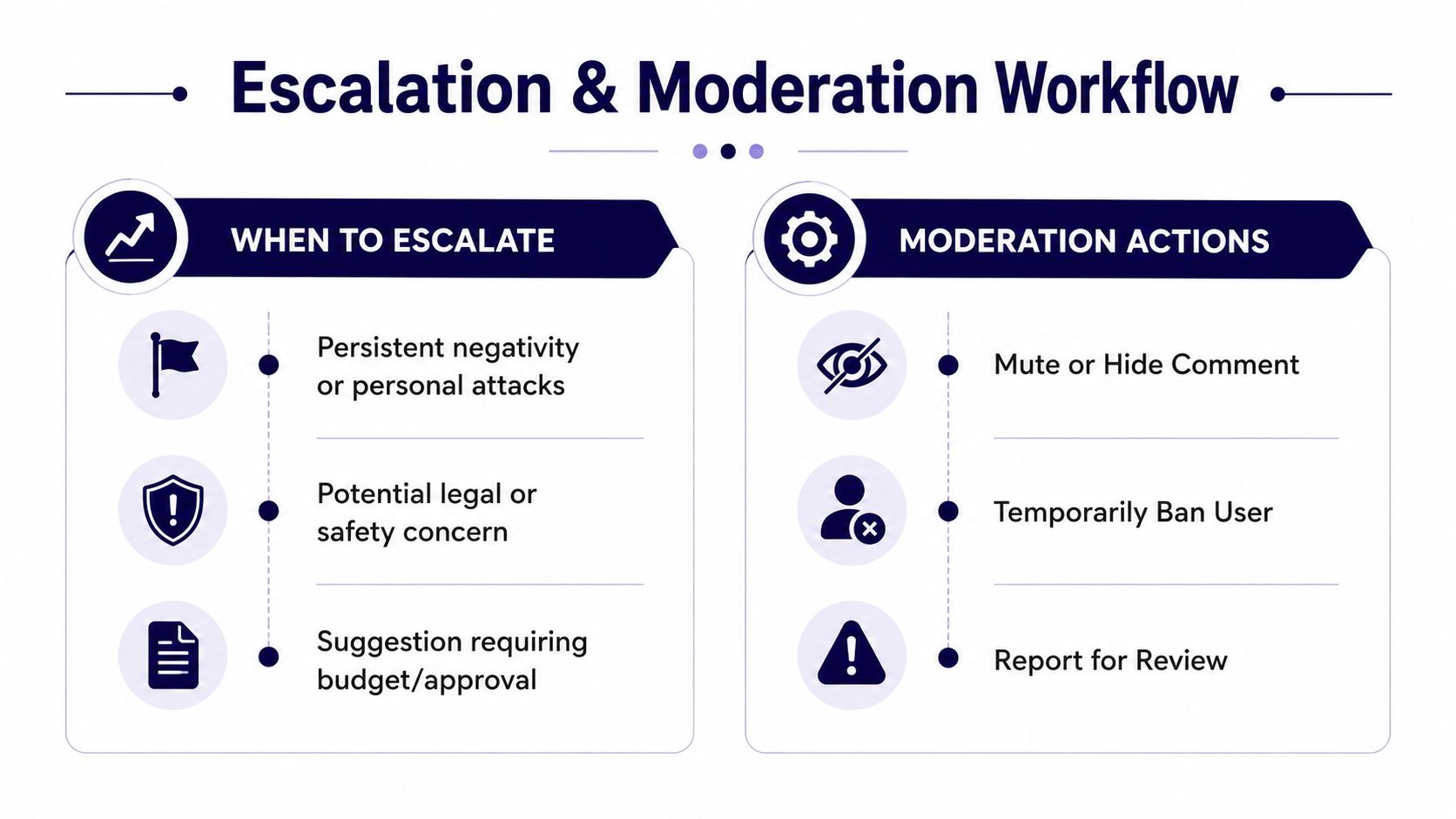
A volunteer shouldn't have to decide alone whether a comment involves safety, legal exposure, pastoral care, or a theological dispute. Church leadership needs to define handoff rules before a difficult situation appears.
Escalate the right situations
Send the issue to a pastor, safeguarding lead, senior communications owner, or legal contact when it includes:
- Safety concerns: Threats, suspected abuse, dangerous facilities, or information suggesting someone may be at risk.
- Legal or privacy concerns: Allegations that could create legal exposure, requests for private records, or personal information posted publicly.
- Theological disputes: Questions that require an official doctrinal explanation rather than a volunteer's personal interpretation.
- Financial or operational decisions: Suggestions involving budget, staffing, building changes, or commitments that need approval.
- Persistent personal attacks: Repeated targeting of staff, volunteers, or community members after a boundary has been stated.
Record the original message, the platform, the date, the person responsible for the handoff, and the agreed next action. Keep sensitive details in an approved internal system, not in a public comment or an informal group chat.
Moderate consistently
Delete or hide content for a clear reason, such as spam, threats, private information, harassment, or repeated personal attacks. Don't remove a respectful theological disagreement because it's uncomfortable. A short public moderation policy can explain that the church welcomes questions but won't keep abusive or unsafe content visible.
Take a conversation offline when personal details are involved or when resolution requires context. A public bridge can be simple:
“We'd like to discuss this with you directly so we can understand the situation properly. Please send us a message, and we'll connect you with the appropriate person.”
For routine information requests, setting up automated direct messages can help your team acknowledge receipt and direct people toward the correct contact route. Automation should confirm that the message was received, not pretend that a pastoral concern has already been resolved.
After leadership handles the issue, close the loop publicly when appropriate. You might say that the concern was shared with the relevant team and that updated information is now available, without exposing the person's private circumstances.
Follow-Up Tracking and Preventative Content Practices
A reply is only useful if the church remembers what it promised. Track feedback in a simple log with the post, concern, visibility level, owner, decision, and follow-up date. Look for recurring questions about parking, childcare, livestream access, sermon context, registration, or event timing.
Then turn patterns into content. If people repeatedly ask where to enter the building, create a clear graphic or carousel. If a sermon clip lacks context, pair future clips with a short caption explaining the message and inviting respectful questions. Keep images uncluttered, avoid people whenever possible, and place text only where it belongs, such as on a paper, whiteboard, sign, or intentional overlay. Text over images should meet a minimum contrast ratio of 4.5:1 for regular text and 3:1 for large text, with accessibility guidance for text over images recommending overlays or simple backgrounds to improve readability.
Add concise, factual alt text to supported images, and repeat essential graphic text in the caption or alt text so screen-reader users receive the same information, following UC Davis social media accessibility guidance. Avoid busy backgrounds behind text, as recommended by UMass Dartmouth's social accessibility guidance.

A shared calendar makes this cycle sustainable. Use how to track content performance to connect feedback patterns with future posts, then assign ownership so follow-up doesn't depend on one heroic volunteer. ChurchSocial.ai can help churches turn sermon transcripts into social posts, blogs, and discussion prompts, create AI-generated sermon reels, design photos and carousels with templates and an editor, and manage updates in a drag-and-drop calendar. Its Planning Center and church calendar integrations can also help teams create content around events before common questions become public complaints.
ChurchSocial.ai gives your church one place to create sermon clips, generate transcript-based content, design accessible graphics and carousels, schedule posts, and track follow-up across a shared calendar. Visit ChurchSocial.ai to build a calmer feedback workflow that helps volunteers respond consistently and keeps your church's online communication clear, welcoming, and accountable.


