
Tuesday night arrives, the church office is quiet, and a volunteer or pastor is hunched over a laptop trying to make Sunday's message work on social media. The sermon still needs attention, family responsibilities are waiting, and someone has sent the familiar text: “Who's doing social this week?” A generic graphic appears, a verse caption gets written in ninety seconds, and the team hopes it reaches somebody.
That cycle produces the same symptoms: inconsistent posting, recycled graphics, rushed captions, unclear ownership, and no reliable answer to whether the work led anyone toward a visit, registration, conversation, or next step. The problem isn't a lack of care. It's that the church is treating social media as a series of isolated tasks instead of a small ministry system.
Social media management for churches should make weekly communication easier, not add another emergency to the ministry calendar. The practical aim is simple: turn Tuesday night from a crisis into a focused planning session, then connect content to the ministries your church already runs. The workflow below uses clear platform roles, sermon-based content, responsible AI, a calendar connected to Planning Center, and a short list of meaningful KPIs.
The Tuesday Night Posting Problem Every Church Faces
The Tuesday-night social scramble usually starts with good intentions. A pastor remembers an important line from Sunday's sermon, a volunteer finds an old background image, and a ministry leader forwards an event flyer that needs to go live immediately. Nobody has enough context to decide what belongs on Facebook, Instagram, YouTube, or the church website, so the same announcement gets copied everywhere.
Then the week moves on. Wednesday's post is forgotten, Thursday's caption is delayed, and Friday's event reminder competes with a dozen other urgent requests. By Sunday morning, the social account may contain a polished service graphic, an unrelated quote, and no clear path for a visitor who wants to know where to park or what to expect.
The symptoms point to a system problem
A church can have committed volunteers and still produce a weak social presence when nobody has defined the operating rhythm. Common warning signs include:
- Last-minute production: Captions, graphics, and event reminders are created in one rushed sitting.
- Repeated visuals: The account cycles through the same three templates because no one has time to make alternatives.
- Unclear ownership: Volunteers don't know who writes, approves, schedules, responds, or checks links.
- No ministry connection: The team tracks likes but can't tell whether anyone asked about visiting, registered for an event, or joined a group.
- Volunteer fatigue: Social media becomes the task people avoid because every post requires starting from zero.
The fix isn't asking the team to post more often. It's creating a repeatable path from sermon and calendar to draft, review, publishing, and measurement. A healthy system gives each person a defined responsibility and keeps content close to the church's actual ministry life.
Practical rule: If a post requires a fresh brainstorm every time, the church doesn't have a content system yet.
Make Tuesday a planning block
Set aside a short, protected work session for the coming week. During that session, the team should review the sermon transcript, upcoming events, ministry updates, and any pastoral priorities. The result should be a small group of approved drafts, not a promise to “try to post something.”
ChurchSocial.ai can support that workflow by turning sermon material into social posts and reels, providing reusable graphics and carousel templates, and placing scheduled content on a drag-and-drop calendar. The tool matters only when it serves a clear process. Start with ownership, a weekly rhythm, and a definition of success. The software can then remove much of the repetitive work that made Tuesday night miserable.
What Social Media Management for Churches Actually Means
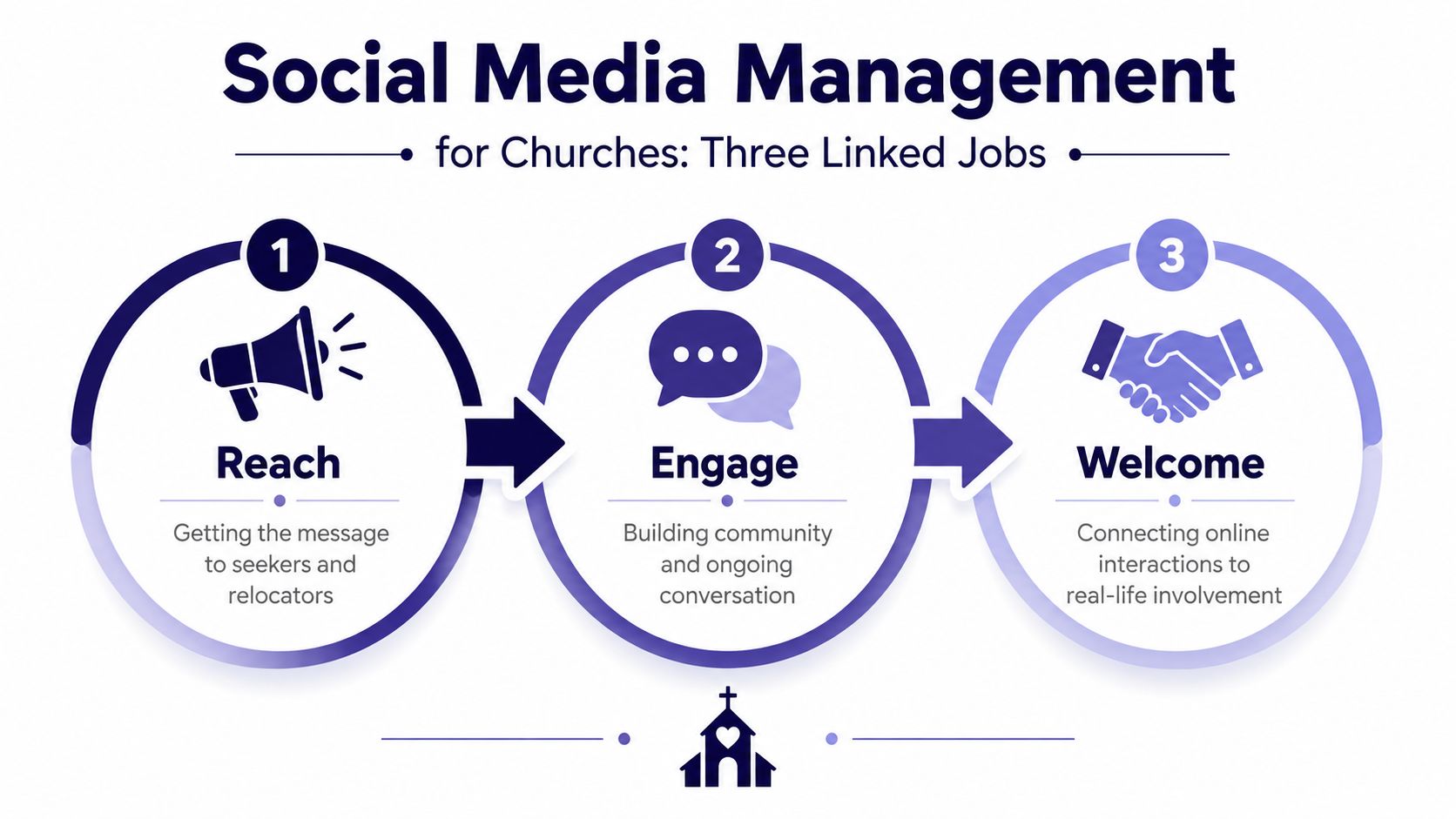
Social media management for churches has three linked jobs. Treating every post as the same kind of broadcast creates confusion, while separating these jobs gives a small communications team a practical decision filter.
Reach people who aren't in the room
The first job is discovery. Your church needs content that can reach seekers, people who've moved into the area, former attenders, and neighbors who aren't searching for a sermon yet. Short teaching clips, community-facing posts, testimony excerpts, and clear invitations can introduce the church before someone knows its name.
Video now deserves a central role in that discovery work. A major 2026 benchmark on church social media found that the top 100 churches had 171 million combined followers, with YouTube representing 91.2 million subscribers, or 53% of the total audience. Facebook accounted for 39.4 million followers, or 23%, Instagram for 35.0 million, or 21%, and TikTok for 5.3 million, or 3% in the same analysis (church social media benchmark). The lesson isn't that every church needs every channel. It's that video-first discovery and concentrated platform strategy deserve deliberate attention.
Deepen connection between Sundays
The second job serves people already connected to the church. Devotional reflections, prayer prompts, ministry stories, event reminders, and member updates help the congregation remain aware of one another during the week. These posts don't need to chase broad reach. They need to sound like the church and create useful opportunities for response.
Pew Research reported in 2023 that 17% of Americans post or share religious content on social media, including people who do so daily, weekly, or less often. The same research found that about a quarter of U.S. adults regularly watch religious services online, while 21% use apps or websites for scripture reading (Pew-related church social media statistics). Digital engagement is already part of faith-community behavior, so churches should plan for it as ministry communication rather than an optional extra.
Welcome visitors through the public front door
The third job is practical hospitality. A curious visitor often checks social profiles before attending. They want to find service times, location, children's ministry information, accessibility details, parking guidance, and an honest sense of what Sunday feels like.
Use audience clarity for every post decision. Ask who needs this message, what they should do next, and which platform gives them the clearest path. Most churches don't need to chase virality. They need to manage these three jobs consistently and connect online attention to real-world involvement.
Choosing the Right Platforms for Your Church
Every platform has a different ministry role. A church that copies the same post across every network wastes time and loses the opportunity to match format, audience, and next step.
| Platform | Audience age skew | Primary content type | Best ministry job |
|---|---|---|---|
| Older and established community members | Events, community updates, live video, conversations | Deepen connection and support event participation | |
| Younger visual audiences and local discovery | Reels, carousels, Stories, concise announcements | Reach and welcome | |
| YouTube | People searching for teaching and services | Sermons, sermon clips, Shorts | Build a searchable teaching archive |
| TikTok | Discovery-oriented viewers | Short creative clips and testimonies | Experiment with reach |
| Google Business Profile | People actively searching locally | Service information, updates, directions, reviews | Serve as the practical front door |
Facebook works best as a community hub. Keep event information current, respond to comments, share service updates, and use video when the congregation is already gathering around a moment. Instagram should carry the visual front door, especially through concise Reels, Stories, sermon excerpts, and well-designed carousels.
YouTube earns its place when the church can maintain a dependable sermon archive or produce useful teaching clips. Its content can remain discoverable after the original service has ended. TikTok is optional for a resource-stretched church. Add it when a volunteer has the creative energy and judgment to make native, authentic clips rather than reposting every announcement.
Google Business Profile is essential. Correct service times, address details, holiday changes, photos, and responses to questions reduce friction for people who are already looking for a church nearby.
“Don't distribute effort equally. Assign each platform a job.”
Church teams comparing scheduling and publishing options can also review this practical overview of the best social media tools for solo creators. For most small churches, the default order is clear: clean up Facebook and Instagram, claim and maintain Google Business Profile, add YouTube when sermon clips are sustainable, and treat TikTok as an experiment rather than an obligation.
Building a Weekly Content Engine That Does Not Burn Out
A sustainable church content engine begins with a limited set of repeatable pillars. Choose four or five, then let the week's ministry activity fill them. The strongest mix usually includes weekend service reminders, sermon clips, family or community stories, event promotion, and devotional or quote content.
The sermon is the most dependable source because the church already creates it. Don't invent an unrelated idea every Monday. Pull a meaningful moment from the transcript or recording, pair it with a clear hook, and adapt it for the platform where it will appear.
A workable sermon-to-social rhythm
Use the following sequence as a starting point:
- Monday: Select a short sermon moment and identify its central idea.
- Tuesday: Draft the caption, opening line, call to action, and accessibility text.
- Wednesday: Review the clip and schedule it for Facebook, Instagram, and YouTube Shorts.
- Thursday or Friday: Publish a related question, carousel, or practical reflection.
- Saturday: Share a community, prayer, or service-preparation post.
A realistic church cadence is four to six posts per week plus one or two Reels or Shorts, rather than one post every day on every platform. A church-focused guide reports that Reels and Shorts can reach 2–3x more people than static image posts, while video content can generate 53% more engagement than text or graphic posts (church short-form video guidance). Use those findings to prioritize video, but don't let them pressure the pastor into turning every sermon into a teaser.
ChurchSocial.ai can generate AI reels from sermons, create social posts and blog drafts from a sermon transcript, and provide graphic templates and an editor for photos and carousels. Keep the visuals disciplined. Use church colors, readable fonts, consistent safe zones, and lower-third titles. Images should show places, objects, hands, rooms, printed materials, or other visual details whenever possible. Don't place random text on walls, clothing, buildings, or unrelated parts of an image. Use text overlays only when they look intentionally added after the image was created, and put text on objects such as paper or a whiteboard only when it makes sense.
The Friday handoff
By Friday at noon, the team should know:
- Content owner: Who drafted or supplied each post.
- Reviewer: Who checks theology, dates, links, and tone.
- Publisher: Who schedules or posts the approved material.
- Responder: Who monitors comments and direct messages.
- Event owner: Who confirms registration details and capacity.
Batching helps volunteers complete related tasks together instead of reopening the same project every day. This guide to content batching offers a useful framework for grouping sermon, event, and devotional production into focused sessions.
Measuring What Matters Beyond Likes and Followers
A church social account can grow while producing little ministry movement. Follower count and impressions may help diagnose distribution, but they don't tell leaders whether someone found service information, started a conversation, or registered for an event.
Use a small scorecard built around the church's current ministry goal. A practical set includes:
- Reach among potential first-time visitors, especially on local discovery content.
- Engagement rate per post, separated by platform and format.
- Clicks to event pages or connection forms, which show intent.
- Downstream actions, such as registrations, visit conversations, or group interest.
The last category requires coordination between social, website, registration, and hospitality teams. Don't claim that social caused every new visitor. Instead, ask new guests how they heard about the church and record social as one possible path.
Read leading and lagging indicators differently
Leading indicators show immediate interest. Saves, shares, profile visits, link taps, direct messages, and comments can tell you whether a post created attention or prompted a question. Lagging indicators show whether that attention became action, such as an event registration, group inquiry, or first-time attendance.
Platform benchmarks provide context, not a universal target. One nonprofit benchmark reports median engagement rates of 0.56% on Instagram, 0.05% on Facebook, 0.02% on X, and 3.04% on TikTok by followers (nonprofit social media benchmarks). Another church-focused benchmark cites Facebook engagement at 0.18%, Instagram at 1.35%, and video completion at 38% (church engagement measurement guidance). These figures differ because platforms, audiences, formats, and calculation methods differ. Use them as directional reference points, not promises.
Review Meta Business Suite, Instagram Insights, and YouTube Studio once a month. Spend fifteen minutes asking three questions: what should we repeat, what should we drop, and what should we test next? Churches that want to reduce manual spreadsheet work can explore options to automate engagement reporting in 2026, but automation shouldn't replace pastoral interpretation.
How ChurchSocial.ai Fits Into a Church Workflow
The useful role for ChurchSocial.ai is not replacing the communications team. It's connecting the calendar, content production, approvals, and publishing steps that usually live in separate documents and message threads.
Planning Center Calendar can connect events with Registrations, Groups, and Services, while admins can create or import events and share them through Church Center or an embedded calendar (Planning Center Calendar). Specific events must be published to Church Center before they become publicly visible in an embedded calendar, and the system supports campus and category filters plus Script, URL, and iFrame embed formats (Planning Center calendar embed guidance). That structure gives a church one event source to check before promoting dates online.
ChurchSocial.ai can connect that event information to a visual drag-and-drop social calendar. A service, sermon series, or registration event becomes the starting point for a draft rather than another copy-and-paste assignment. The platform also supports publishing and planning across church social accounts, including Facebook, Instagram, TikTok, and YouTube.
Delegate production, retain judgment
Use AI for repetitive first drafts, not final pastoral decisions. A sermon transcript can become candidate captions, discussion prompts, blog content, or short-form reel ideas. The church still decides which excerpt is faithful, whether the hook is honest, and whether the invitation fits the congregation's voice.
A practical division of labor looks like this:
- Platform: Generate caption options, format announcements, suggest hashtags, propose alt text, create reel drafts, and place posts on the calendar.
- Volunteer: Supply context, verify names and dates, select useful visuals, and flag sensitive material.
- Communications lead: Edit tone, check accessibility, approve layouts, and coordinate campaign timing.
- Pastor or ministry leader: Sign off on sermon clips, theological wording, and high-sensitivity announcements.
- Human responder: Handle direct messages, pastoral concerns, complaints, and questions that require discernment.
ChurchSocial.ai's social media management product is one option for bringing these functions into a church-specific workflow. Teams evaluating broader automation categories can compare best workflow automation platforms, but a church should prioritize approval clarity and ministry context over raw feature count.
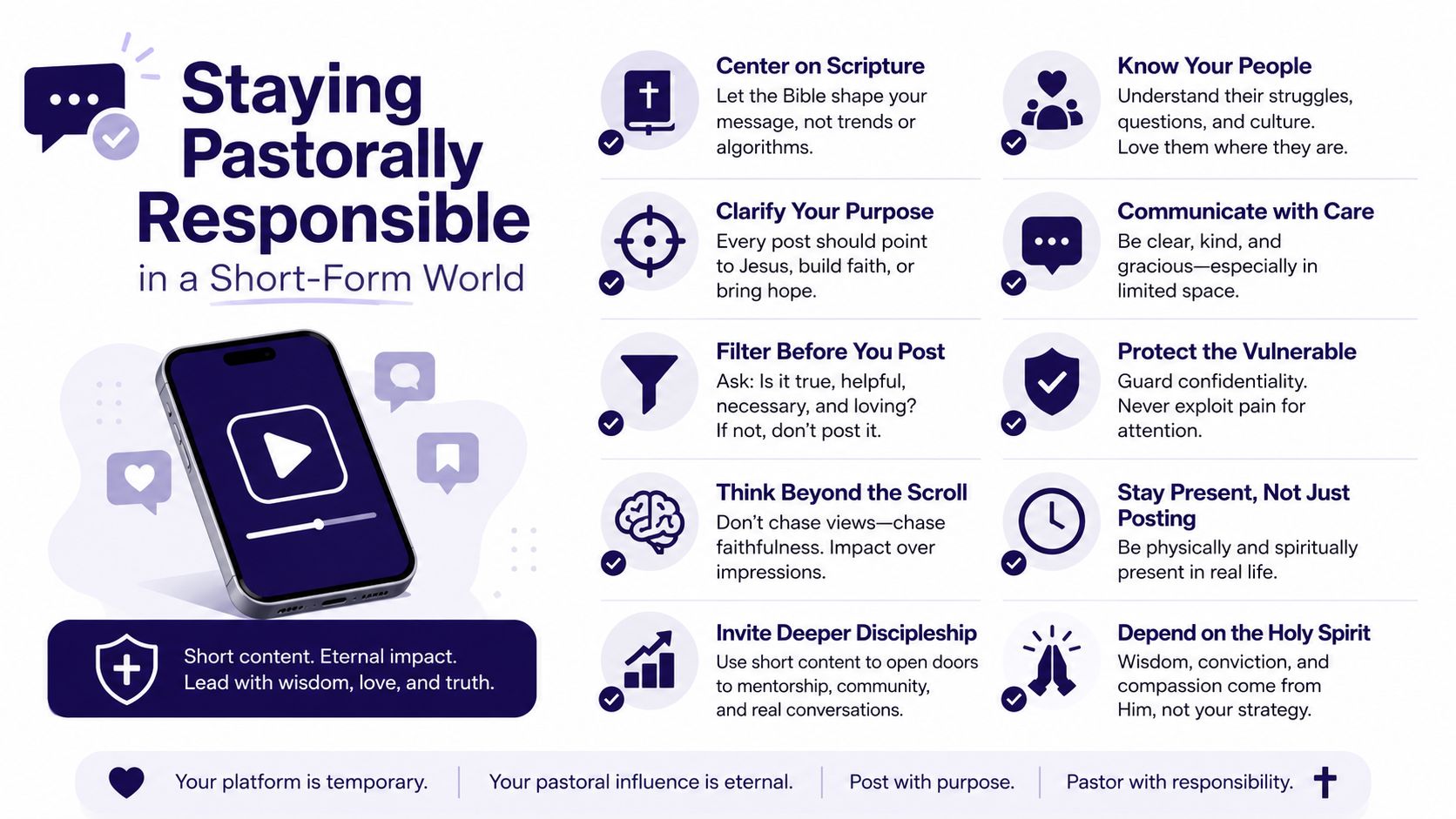
Staying Pastorally Responsible in a Short-Form World
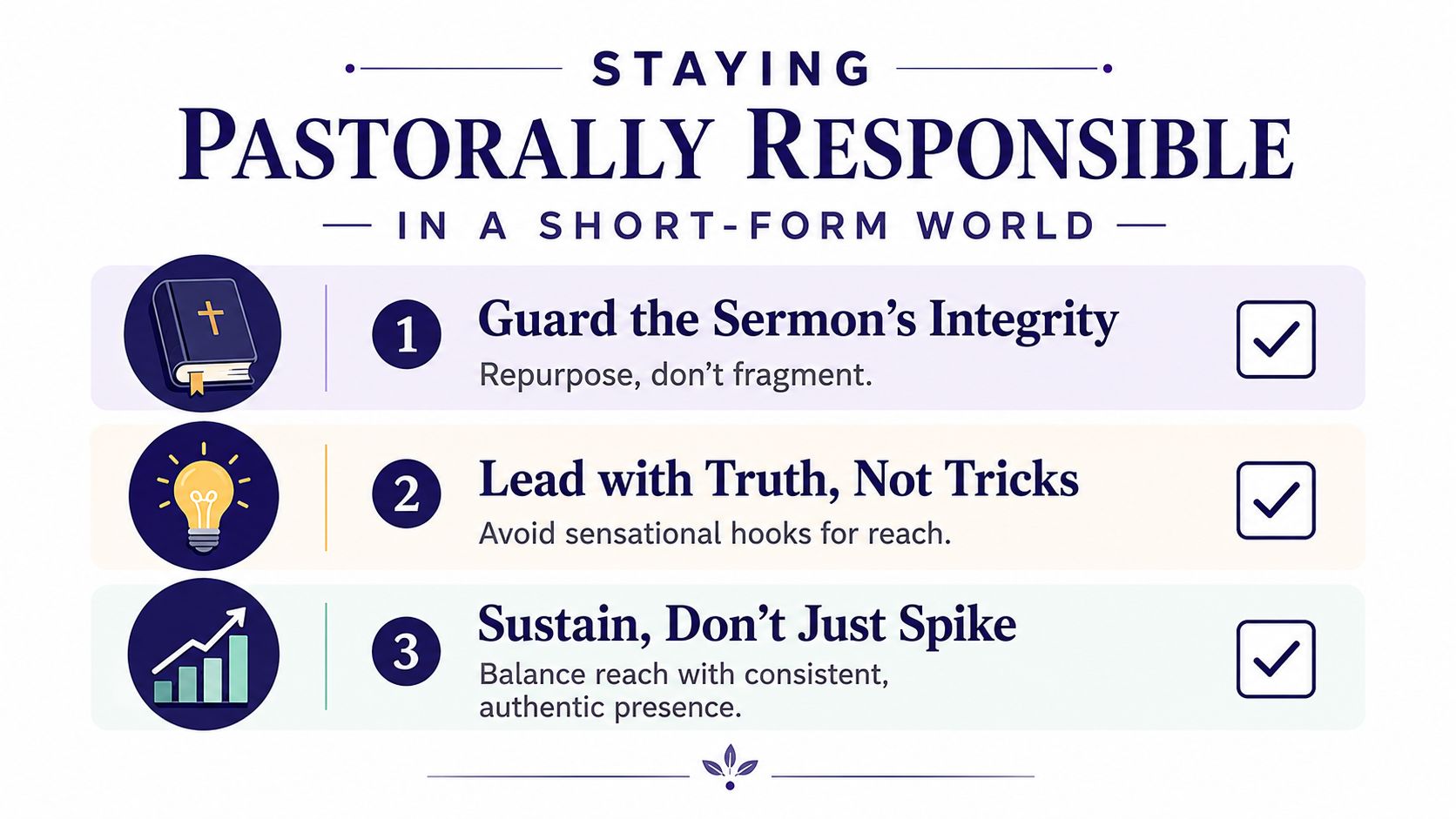
Watch time matters for distribution, but it isn't the church's highest authority. A short clip that earns attention by exaggerating a sermon's point may perform well while weakening trust. The communications team should optimize for clarity and faithful invitation, not for sensationalism.
Short-form religious content can also flatten theological nuance and amplify polarization. The church needs guardrails that volunteers can apply before publishing:
- Check representation: Does the post describe the church, sermon, event, and people accurately?
- Protect dignity: Could this image or caption embarrass, expose, or identify someone in a vulnerable situation?
- Preserve context: Does the clip represent the sermon's meaning, or does the edit create a misleading conclusion?
- Separate voices: Is this the pastor's teaching, the church's announcement, or the social team's conversational caption?
Consent needs its own written workflow. INUMC guidance says churches shouldn't post photos or videos identifying children, youth, or vulnerable adults without written parental or guardian consent, and minors' photos should be published only after a signed photo release (church social media consent guidance). Use a media-release template, keep records where authorized staff can find them, blur children's faces by default when consent is uncertain, and don't tag minors by name.
Publish a short comment policy covering harassment, threats, personal information, and theological disagreement. For skeptical inbox messages, train responders to acknowledge the question, answer what they can, and invite a private conversation when the issue involves pastoral care. Don't let a volunteer argue on behalf of the church from a phone in the parking lot.
Your 30-60-90 Day Social Media Roadmap
A church can establish a functioning system without waiting for perfect branding, a larger team, or a year of planning. Roll out the work in stages, and make sustainability the condition for expansion.
Days 1 to 30
Choose one primary platform based on where your congregation and local audience already engage. Clean up the profile, confirm service details, define three content pillars, and establish a weekly rhythm of three or four posts with one short video. Assign one person to own the calendar and one person to approve sensitive material.
Days 31 to 60
Build a 30-day calendar in ChurchSocial.ai. Connect Planning Center so service and event information can support timely content, then write down the handoff from ministry leader to social volunteer. Create reusable templates for sermon quotes, events, prayer prompts, and registration reminders. Review every draft for dates, links, accessibility, consent, and pastoral tone.
Days 61 to 90
Review the four KPIs on one page. Keep the content pillar that produced the most meaningful response, revise or remove the one that created little value, and add a second platform only if the first workflow is stable. A larger audience shouldn't come at the cost of missed messages, inaccurate event details, or exhausted volunteers.
Use a monthly ninety-minute review meeting with this agenda:
- First part: Review reach, engagement, clicks, registrations, and visitor feedback.
- Second part: Examine the strongest and weakest posts, including format and audience.
- Third part: Choose what to repeat, stop, and test.
- Final part: Confirm owners and deadlines for the next calendar.
The church doesn't need a complicated media department to communicate well. It needs a clear ministry purpose, a dependable content engine, responsible approvals, and a calendar people will use.
ChurchSocial.ai turns sermons into AI-assisted reels and social content, provides graphic templates and an editor for branded posts and carousels, and connects church events with a drag-and-drop publishing calendar. Visit ChurchSocial.ai this week, connect your calendar, and build the first month of posts around the ministries your church is already doing.


