
Sunday's sermon has just ended. By afternoon, a volunteer communications lead is searching through notes for one usable caption, checking which photo can be posted, and wondering whether anyone remembered the church app. By Wednesday, the same rushed announcement lands on Instagram, Facebook, and another channel with little connection to the sermon, the coming events, or the people the church hopes to reach.
That pattern doesn't mean the team lacks commitment. It means the church is asking individual volunteers to make planning decisions in the busiest moments of the week. Content calendar creation gives those decisions a shared home. Done well, it protects volunteer time, creates a dependable ministry rhythm, and makes room for sermon teaching instead of allowing announcements to consume every available slot.
Why Most Church Social Media Starts With a Post, Not a Plan
A post-first process usually begins with a reasonable question: “What should we publish today?” The problem is that the answer gets shaped by urgency rather than purpose. An upcoming event feels more immediate than a sermon reflection, a ministry leader sends a photo without context, and a volunteer fills the next empty space because the calendar has no agreed structure.
The resulting feed may be active, but it often feels disconnected. Newcomers see isolated announcements instead of a clear picture of the church. Regular attenders receive repeated reminders while meaningful teaching disappears. Volunteers inherit unfinished work because nobody knows whether a post needs a caption, an image, approval, or scheduling.
The hidden cost of unclear responsibility
Volunteer teams don't usually fail because nobody cares. They fail at handoffs.
One person assumes the ministry leader supplied the final details. Another assumes the communications lead will check the date. A third sees a draft in a chat thread but doesn't know whether it's ready to publish. When that happens repeatedly, volunteers either compensate with extra unpaid hours or stop taking ownership altogether.
Practical rule: Every calendar item needs one accountable owner, even when several people contribute.
A calendar also prevents the weekly feed from becoming an announcement board. Announcements matter, but they should sit beside content that teaches, welcomes, reassures, and invites conversation. Sermon clips, devotional thoughts, small group questions, prayer prompts, community stories, and ministry moments give the church a recognizable voice beyond event promotion.
Build a system people can maintain
Start with the church's existing sources of truth. Planning Center or another church calendar should supply event names, dates, and core details. The social calendar should then decide how those events become useful content, including the audience, platform, format, owner, and approval path.
A practical church calendar doesn't need to schedule every possible idea. It needs to make the next handoff obvious. A four-week planning horizon, clear roles, and room for reactive content can replace the weekly scramble with a rhythm that survives holidays, volunteer turnover, and busy ministry seasons.
Setting Goals and Content Pillars for Church Content
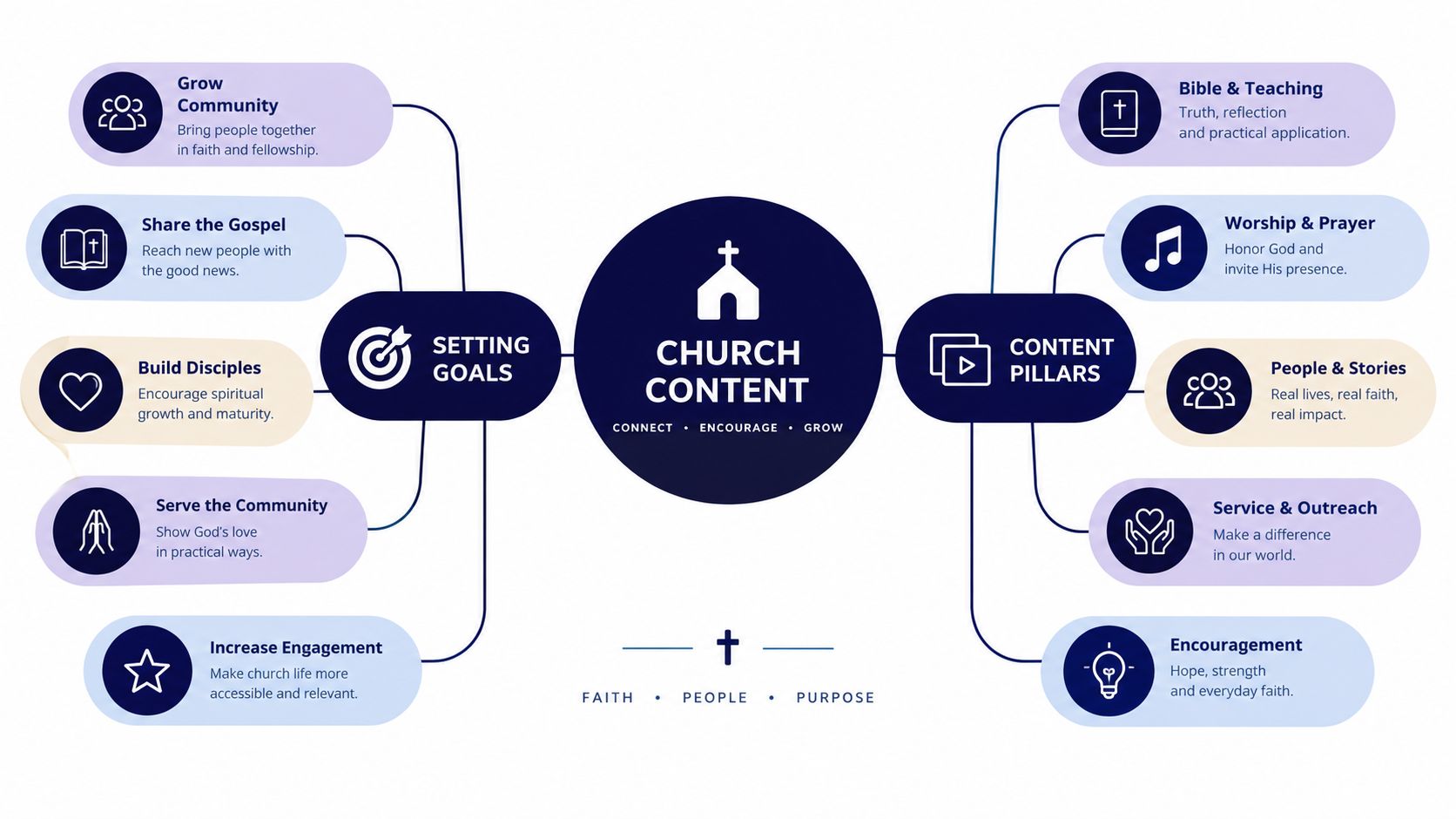
Begin with goals, not categories. Ask what the calendar must accomplish in the life of the church. The answer might include helping newcomers understand the congregation, encouraging regular attenders to engage with teaching, supporting events, or giving ministries visibility. Write each goal in plain language, then choose one signal that will help you judge whether the content is serving it.
For example, a newcomer-focused goal might use meaningful profile visits or direct inquiries as a signal. An engagement goal might examine comments, replies, or discussion participation. An event goal might track registrations or attendance information gathered through the church's normal process. The point isn't to turn ministry into a scoreboard. It's to give the team a shared definition of useful work.
Turn goals into three to five durable pillars
Once the goals are clear, choose three to five content pillars. A pillar is a recurring subject area that helps the team decide whether an idea belongs on the calendar.
A sermon-teaching pillar could include:
- Weekly sermon clips: Short excerpts that carry one complete idea.
- Devotional reflections: A written thought adapted from the sermon transcript.
- Small group prompts: Questions that help people continue the conversation during the week.
An outreach pillar should feel different. It might include community stories, invitations to upcoming gatherings, serving opportunities, and practical explanations for people who aren't familiar with the church. The teaching pillar helps believers keep engaging with the message. The outreach pillar lowers the barrier for seekers and neighbors who may be learning about the church for the first time.
Let the goals determine the mix
Pillars shouldn't receive equal attention by default. If the church is preparing for a major community event, outreach content may receive more space temporarily. If the congregation needs deeper engagement with a teaching series, sermon-derived content can carry more of the weekly rhythm.
The calendar becomes more useful when every entry has both a pillar and a purpose. This guide to creating a content strategy can help your team connect those decisions before anyone starts drafting captions. That small discipline keeps the feed from filling with whatever request arrived most recently.
The Calendar Structure That Keeps a Small Team on Track
A church calendar should show the work, not just the publishing date. The columns below are enough for most small teams to coordinate without recreating an agency project-management system.
| Field | What it prevents |
|---|---|
| Date | Unclear timing during planning |
| Platform | Copying the wrong format across channels |
| Pillar | An announcement-heavy content mix |
| Post copy or hook | Drafting decisions at the last minute |
| Asset link | Lost files in chat threads |
| Owner | “I thought you had it” handoffs |
| Status | Half-finished posts being treated as ready |
| Publish date | Confusing a working deadline with live content |
The asset link should point to the actual image, video, design, or working folder. Don't make volunteers search a messaging thread for the latest version. The owner is the person responsible for moving the item forward, not necessarily the person writing every word. The status should make the next action visible.
Use statuses that match real work
Color coding helps when it reflects a simple workflow:
- Draft: The idea or copy still needs work.
- In review: The assigned reviewer needs to approve or request changes.
- Scheduled: The post is queued for its planned time.
- Posted: The content has appeared on the channel.
That final distinction matters. A scheduled post isn't proof of publication, especially when a platform connection, asset, or permission fails. Keep the owner and status visible in the same view so a volunteer can triage the week without opening several conversations.

Avoid the columns that cause confusion
The common mistakes are operational, not creative. Teams skip the owner field, paste asset links into chat, and mark a post “done” when it's only been drafted. They also create a calendar that records what should be published but not who reviews the wording or confirms the final details.
A good calendar should be easy to scan and easy to change. A visual drag-and-drop system can help volunteers move a post when an event changes, while a clear template keeps the underlying information consistent. Teams that already think in structured planning may also find plan your novel with Storyloft useful as a broader example of organizing creative work before execution. For a church-specific starting point, use this social media calendar template, then remove any field your team won't maintain.
Building a Repeatable Four-Week Workflow With Real Roles
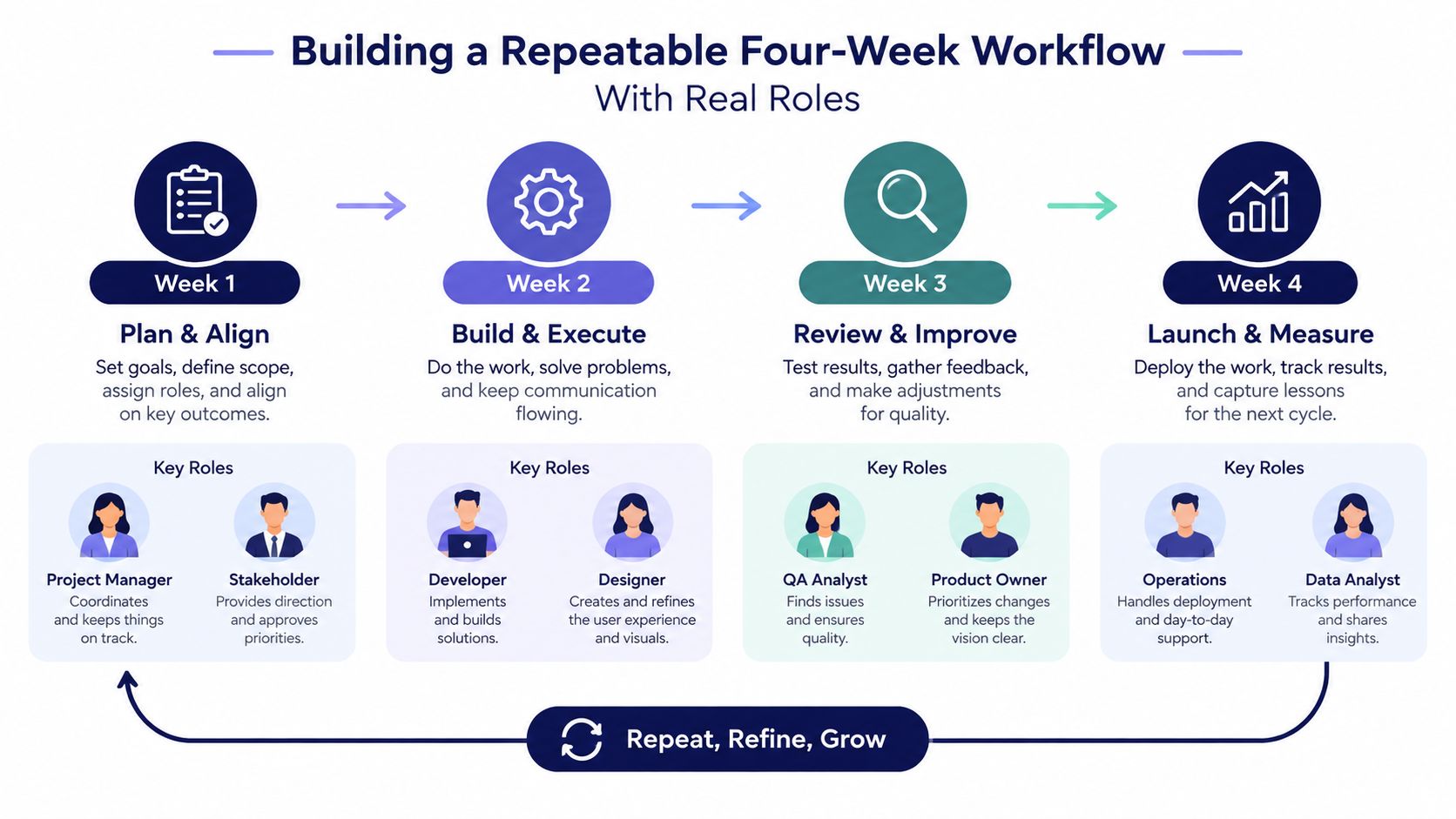
A rolling four-week workflow gives volunteers enough visibility to prepare without pretending every detail is fixed. Use Monday as the planning day and Thursday as the publishing day. The exact day can change for your church, but the repeatable handoff matters more than the label.
Assign three roles:
- Creator: Turns the sermon, event, or ministry idea into copy and an asset.
- Reviewer: Checks accuracy, tone, dates, links, and pastoral fit.
- Publisher: Confirms the final item and schedules or publishes it across the selected channels.
The roles can belong to staff or volunteers. They can also rotate. What shouldn't rotate from post to post is the expectation that one person owns each stage.
Put the four weeks to work
On the planning Monday, review the upcoming month, pull in church events, and choose the content that needs production. Keep the firm details close enough to verify, while using the broader view for themes, campaigns, and sermon series. A practical workflow keeps about 15% to 20% of calendar slots available for reactive or trending content, as recommended by this four-week content calendar workflow. That space can absorb a timely community response or an unexpected ministry opportunity without forcing the team to delete prepared work.
The weekly rhythm might look like this:
- Monday: Creator drafts the next set of posts and adds assets.
- Tuesday or Wednesday: Reviewer checks details and requests one clear round of changes.
- Thursday: Publisher schedules approved content for Instagram, Facebook, the church app, and other selected channels.
- During the week: The team uses reserved space for timely content, not for work that should have been planned.
A Sunday sermon transcript can become Monday's draft. Midweek review can catch language that sounds too technical, misses the pastor's intended emphasis, or needs a clearer invitation. Thursday's publisher can then schedule the approved content instead of beginning from an empty screen.
Have a rule for an empty role
Volunteer schedules change. If the reviewer is unavailable, the post should move to a named backup, not sit in an unmonitored queue. If no qualified reviewer is available for sensitive content, postpone it or choose a safer evergreen post.
Use the same status language throughout the process, Draft, Review, Scheduled, Posted. Planning guidance reports that structured calendar operations can save social media managers 6 to 10 hours per week compared with ad hoc planning, and recommends an outline one month ahead, completed copy and creative two weeks ahead, and approved, scheduled work one week ahead. Those benchmarks appear in this content calendar operations guide, but the deeper lesson for churches is simpler: predictable handoffs protect people from heroic last-minute work.
Comparing the Calendar Tools Churches Actually Use
Church teams usually choose among three practical approaches. A shared Google Sheet is familiar and inexpensive, a generic scheduler such as Buffer or Hootsuite adds publishing features, and ChurchSocial.ai provides a church-focused environment for sermon content, visual planning, and church calendar connections.
| Criteria | Google Sheet | Buffer / Hootsuite | ChurchSocial.ai |
|---|---|---|---|
| Ease of onboarding | Familiar to most volunteers | Requires learning a scheduler | Built around church social workflows |
| AI assistance | Usually manual or added separately | Depends on the plan and setup | Includes AI tools for captions and sermon-derived content |
| Planning Center integration | Usually requires manual updates or separate workflows | Not inherently church-specific | Integrates with Planning Center and other church calendars |
| Volunteer permissions | Basic sharing controls | Team permissions vary by plan | Supports role-based collaboration for church teams |
| Cost per channel | Low direct cost, higher manual effort | Often shaped by channels and team needs | Church-focused platform with feature and add-on considerations |
| Sermon-driven content | Requires manual transcription and repurposing | Scheduling is stronger than ministry context | Supports transcript-based posts, reels, graphics, and carousels |
Choose based on the team's actual constraints
A spreadsheet works when one person owns most of the process and the church has limited channel complexity. It breaks when several volunteers edit at different times, assets live elsewhere, or nobody can tell whether a post is approved.
A generic scheduler is useful when the central need is cross-platform publishing and the team already has a reliable content-production process. It may feel polished, but it generally assumes that a marketer is supplying the strategy, copy, visuals, and review rules.
ChurchSocial.ai is designed for churches that want the calendar, content creation, and publishing workflow in one place. It offers sermon-derived posts, AI-generated reels, graphic templates, a design editor, and integrations with Planning Center and other church calendars. The trade-off is that volunteers need to become comfortable with an AI-first platform and still need to review the output carefully.
For a solo volunteer, start with the simplest system that will be updated. For a mid-sized church with staff, volunteers, sermon content, and several channels, a church-specific tool can reduce the number of handoffs. For a multi-site organization, prioritize permissions, shared standards, event synchronization, and a process that each campus can follow without losing its local voice.
Turning Sunday Sermons Into a Week of Content Automatically
The sermon is usually the church's richest recurring source of original content. The mistake is treating it as one Sunday post instead of a source that can serve several distinct moments throughout the week.
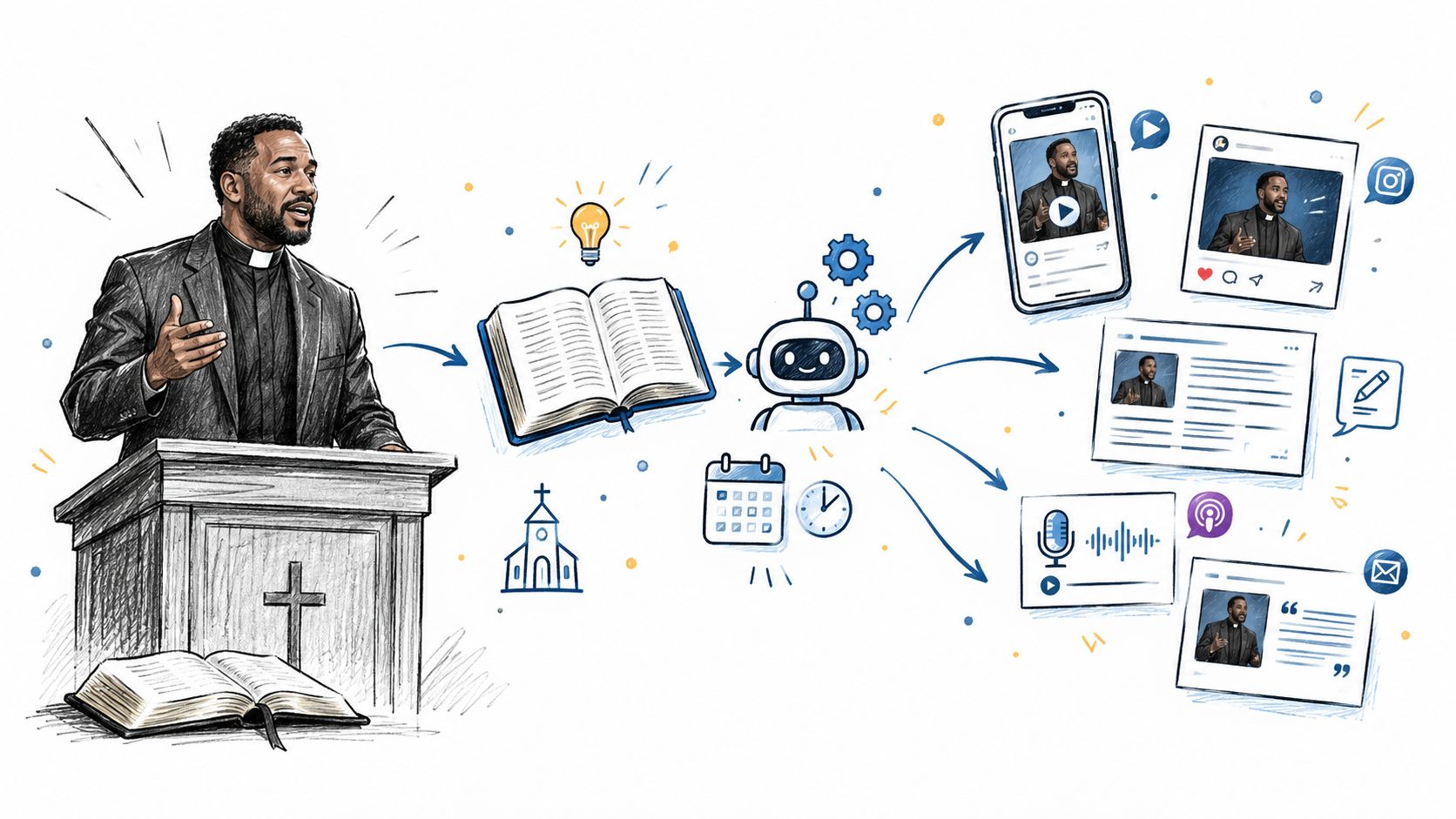
Start Monday by uploading the sermon transcript or audio file to ChurchSocial.ai. The platform's transcript-to-post workflow can identify usable themes and turn the source into different formats. Ask for a pull quote, a short reel script, a written devotional caption, and a midweek discussion question. Each output should express one idea rather than reproduce the entire sermon.
Assign each format a job
A sermon-to-content pipeline might place the outputs like this:
- Monday recap: A concise reflection that helps people remember the central teaching.
- Tuesday sermon clip: A short video built around one complete thought.
- Thursday devotional: A written application for personal reflection.
- Saturday discussion question: A prompt that invites replies before the next gathering.
ChurchSocial.ai's Sermon Clip Creator can support the short-form video step, while its AI Caption Writer and transcript-to-post tools can help reshape the same source for different channels. The platform can also generate discussion questions, blog posts, and custom formats from the transcript. For a more video-focused approach, churches can review this sermon-on-video resource.
Keep the human review visible
AI can identify themes and produce a useful first draft, but it doesn't know whether a phrase fits the pastor's intent, whether a theological distinction needs context, or whether a personal example should remain private. The reviewer should check the transcript source, the selected clip, the caption's tone, and every call to action before the publisher schedules it.
A focused batch can take about 30 minutes of preparation instead of five hours of fragmented work, based on the workflow described here. Treat that as a practical planning estimate, not a promise. The gain comes from keeping the source in one place and giving each output a defined calendar slot, rather than asking a volunteer to invent four unrelated posts throughout the week.
Scaling and Automating Without Losing the Human Voice
A healthy calendar reduces bottlenecks without turning ministry communication into unattended publishing. Automation can handle repetitive work, such as pulling sermon clips, generating captions, preparing posts for Facebook, Instagram, and YouTube, and scheduling approved content. People still need to handle prayer requests, pastoral replies, sensitive stories, and anything that names a real person or family.
Set a simple guardrail. Every automated item receives a 10-second pastoral review before publication. If the content involves a named person, a family crisis, or sensitive doctrine, keep the entire process manual. Speed is useful, but trust is harder to rebuild after a careless post.
Start this week with a smaller system
Use this checklist as the first version of the calendar:
- Choose two pillars: Pick one teaching pillar and one outreach pillar.
- Assign three roles: Name a Creator, Reviewer, and Publisher, plus a backup where possible.
- Batch one sermon: Turn one transcript or recording into several distinct formats.
- Plan four weeks ahead: Keep firm content closer to publication and leave flexible space for changes.
- Review performance: Look at what earned useful engagement, questions, attendance interest, or pastoral follow-up, then apply that learning to the next cycle.
Content calendar creation works when it makes responsibility visible and production repeatable. The church doesn't need more posts to fill a grid. It needs a dependable system that gives volunteers clarity, gives pastors a review point, and gives the congregation a consistent invitation to learn, participate, and respond.
ChurchSocial.ai brings a drag-and-drop church social media calendar together with AI caption writing, sermon-to-post workflows, sermon clip creation, graphic templates, carousels, and Planning Center or other church calendar integrations. If your team is ready to replace Sunday-afternoon scrambling with a manageable content rhythm, visit ChurchSocial.ai and build the first four weeks around the ministry content you already have.


