
Saturday afternoon is when a lot of church social media problems show up.
You’ve got tomorrow’s sermon link ready. The message is solid. The notes are written. The post should be quick. Then Facebook or your email builder pulls in a muddy preview image, or YouTube grabs a frame where the speaker is mid-blink and the stage lighting looks harsh. Suddenly the post feels thrown together, even when the ministry behind it isn’t.
That’s why it helps to know how to extract thumbnail from youtube video content quickly and use the best version of that image on purpose. For churches, that small workflow change saves time, makes sermon promotion cleaner, and gives volunteers a better starting point for graphics, reels, email headers, and event promotion.
Why Your Sermon Post Needs a Better Image
A church volunteer usually doesn’t have a design team on standby. They have a sermon link, a few minutes, and a real desire to represent the church well online. When the default preview image looks weak, the post often goes out anyway because Sunday is coming whether the graphic is ready or not.
That’s where thumbnail extraction becomes practical, not technical. Every YouTube video already has a thumbnail asset attached to it. Pulling that image gives you something far better than a random platform preview. It gives you a clean starting point for a sermon invite, a midweek clip, or a series reminder.
Why thumbnails matter more than teams expect
On YouTube, the image is often doing more work than the caption. In major markets like the US (122 million monthly users) and India (491 million), thumbnails drive 70% of clicks according to a Backlinko analysis of more than 1 million videos, and poor design can lead to a 50% loss in click-through rate (Backlinko YouTube stats).
That doesn’t just matter on YouTube itself. Churches reuse sermon visuals everywhere. The same thumbnail can become a Facebook post image, an email banner, a slide for the lobby screen, or the visual base for a sermon quote graphic.
Practical rule: If your sermon image looks accidental, people assume the post was accidental too.
What usually goes wrong
Most churches run into one of these problems:
- Auto-previews pick the wrong frame and the image feels dim or awkward.
- Screenshots look soft because someone grabbed the image from the player instead of the original file.
- Brand consistency disappears when every sermon post starts from a different visual quality level.
- Volunteers waste time rebuilding graphics from scratch when a usable thumbnail already exists.
A stronger thumbnail won’t fix weak communication, but it does remove friction. It makes the post look cared for.
If you want a deeper look at what makes sermon visuals stand out, this guide on eye-catching thumbnails for church content is worth keeping handy.
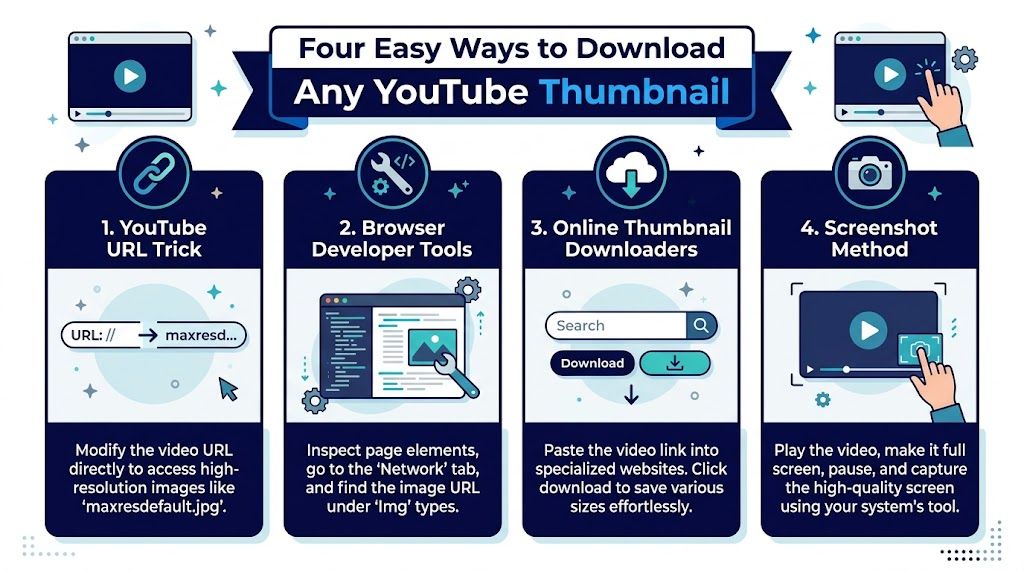
Four Easy Ways to Download Any YouTube Thumbnail
There isn’t one perfect method for everyone. The best option depends on whether you need one thumbnail right now, a reliable way to verify quality, or a process that fits a larger content workflow.
Use the direct YouTube image URL
This is the fastest method, and for most church teams it’s the one to remember.
YouTube provides standardized thumbnail URLs that you can build manually without API authentication, using the pattern https://img.youtube.com/vi/{VIDEO_ID}/maxresdefault.jpg. That method bypasses the Google YouTube Data API v3 quota system and allows unlimited retrieval for display purposes (Latenode community discussion on YouTube thumbnail retrieval).
Here’s how it works:
- Open the YouTube video.
- Copy the video ID from the URL. In a standard watch link, it’s the value after
v=. - Paste that ID into the direct thumbnail pattern.
- Open the image URL in your browser.
- Save the image.
If your sermon URL is a normal watch page, this method usually takes less time than opening a design app.
Try a thumbnail downloader website
Some teams prefer a visual tool instead of editing URLs by hand. That’s fair, especially if volunteers rotate often and you want the easiest possible process.
A thumbnail downloader site usually asks you to paste the YouTube link, then it shows available image sizes for download. The upside is convenience. The downside is that these tools vary in reliability, and some are cluttered with distractions or extra features your team doesn’t need.
A good rule is simple. If the site makes the process harder than the direct URL method, skip it.
Use your browser’s Developer Tools
This method is more technical, but it’s useful when you want to verify what YouTube is serving.
Open the video page, launch Chrome Developer Tools, go to the Network tab, and filter for requests related to thumbnails. You’ll usually see image requests ending in .jpg or .webp, often with /vi/ in the path. That makes it helpful for checking whether the image being delivered matches what you expected.
If a thumbnail looks sharp in one place and blurry in another, the Network tab can tell you whether the problem is the source image or the way your platform is pulling it.
This is not the everyday method I’d hand to a volunteer team. It is the method I’d use when a website preview keeps looking wrong and I want the exact file YouTube is calling.
Use the screenshot method only as a last resort
You can pause the video and take a screenshot. It works. It’s also the weakest option most of the time.
A screenshot often includes player compression, interface clutter, or softer detail than the original thumbnail asset. It can be good enough for a quick internal draft, but it’s rarely the best image for public-facing promotion.
Here’s a quick comparison:
| Method | Best for | Main trade-off |
|---|---|---|
| Direct URL | Fast single downloads | Requires copying the video ID correctly |
| Downloader website | Volunteer-friendly use | Quality and site clutter vary |
| Developer Tools | Verification and debugging | More technical |
| Screenshot | Emergency use only | Lower quality and inconsistent framing |
Programmatic extraction for bigger workflows
If your church manages lots of sermon clips, playlists, or multiple campuses, manual downloading starts to drag. That’s where programmatic extraction helps.
The YouTube Data API v3 includes thumbnail objects in the snippet.thumbnails property, with standardized sizes returned based on the video’s available resolutions. Developers can pull those images directly in apps and automations instead of downloading them one by one.
For church staff, the practical takeaway isn’t that everyone needs to code. It’s that the thumbnail system is consistent enough to build dependable workflows around. That’s why automation tools can reliably fetch and organize these assets in the background.
Ensuring You Get the Highest Quality Thumbnail
Not all YouTube thumbnails are equal. You can extract the right image and still end up with the wrong version.
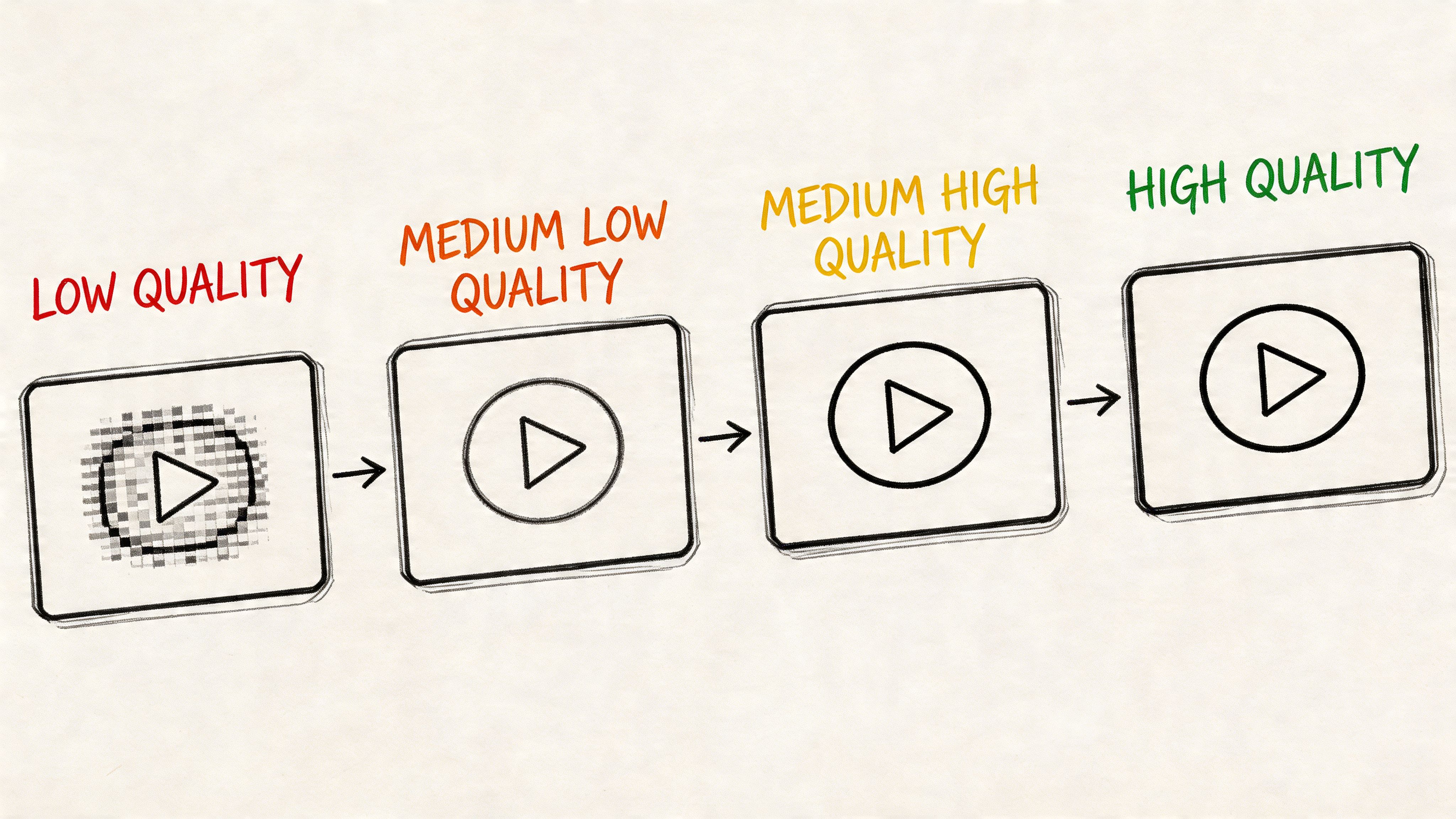
YouTube’s Data API documentation lists standard sizes that include default (120x90), medium (320x180), high (480x360), and maxres (up to 1280x720), all automatically generated based on the original video’s resolution (YouTube Data API thumbnails documentation).
Start with max resolution
If you only remember one filename, remember maxresdefault.jpg.
That version gives you the best chance at a sharp image for sermon graphics, event posts, blog headers, and social repurposing. It’s the first file to try because it gives you the most flexibility when cropping or layering text.
If maxresdefault.jpg isn’t available, move down through the available sizes rather than settling for a screenshot.
A simple fallback order
Use this order when checking versions:
- Maxres first with
maxresdefault.jpg - High next when the maximum version isn’t there
- Medium after that for smaller display needs
- Default only if necessary for tiny previews or placeholders
That sequence keeps your church from building polished graphics on top of a thumbnail that was never meant for larger display.
Best practice: Download the largest version first, then resize down for each platform. Going the other direction almost always looks worse.
Why this matters for church design work
A sermon thumbnail rarely stays in one place. You may use it for a Facebook event, then crop it for Instagram, then add a title card for a sermon quote carousel, then place it above a blog recap. Starting with a larger file gives your team room to edit without the image breaking apart.
If you want a practical design reference on optimal YouTube thumbnail size, Vidito’s overview is a useful companion for understanding how sizing affects different use cases.
For churches building reusable graphics each week, a collection of free thumbnails for YouTube ministry content can also help spark ideas for cleaner layouts and better visual consistency.
Streamline Your Workflow with Batch and Automated Options
Downloading one thumbnail is easy. Downloading a whole sermon series that way gets old fast.
A lot of churches start with a manual process because it feels simple. Then the backlog grows. Wednesday recap clip, Sunday livestream, sermon series promo, event reminder, small group follow-up. Suddenly someone is opening the same browser tab over and over, saving image files with inconsistent names, and trying to remember which campus version belongs where.
When batch work starts to matter
The moment your team handles recurring content, a repeatable system matters more than the extraction trick itself.
For more technical teams, command-line tools and scripts can speed this up. Some people use utilities like yt-dlp or custom scripts to process playlists and grab media assets in bulk. That can work well if someone on staff is comfortable maintaining it.
For most churches, though, custom scripts create a hidden cost. If the volunteer who set it up leaves, the workflow often leaves with them.
A better question than which tool
The better question is this. Do you want your team learning one more workaround, or do you want your content system to handle assets behind the scenes?
That distinction matters. Manual extraction is fine for occasional use. It’s not ideal as the backbone of a ministry content calendar.
Here’s where verification still helps. Advanced extraction can be checked in Chrome Developer Tools by filtering the Network tab for thumbnail-related requests and looking for .jpg or .webp files with /vi/ in the path. That’s useful for validating the actual delivery mechanism when something looks off (Developer Tools thumbnail verification walkthrough).
What works in practice
For a church team, the strongest workflow usually looks like this:
- Use manual extraction for exceptions when you need a single image quickly.
- Avoid screenshot-based habits because they create inconsistent quality over time.
- Centralize assets so volunteers aren’t saving duplicate files across laptops and desktops.
- Build around a calendar because thumbnails only help when they connect to publishing.
If your team is comparing broader social media automation tools for churches, pay attention to whether the platform reduces repetitive asset handling instead of just adding another dashboard. That’s where time savings become real.
Churches don’t usually need more content ideas. They need fewer repetitive steps between sermon and publish.
Best Practices for Using Thumbnails in Your Ministry
Once you’ve extracted the image, the next step is stewardship. A thumbnail is a ministry asset, not just a file download.
Start with content you have the right to use
The safest practice is to use thumbnails from your own church’s videos unless you have clear permission for anything else.
That sounds obvious, but it matters. A lot of online guides focus on how to download thumbnails and barely touch the ministry side of responsible use. If your team is repurposing sermon visuals, stay close to assets that belong to your church, your speakers, and your events.
Repurpose with intent
A thumbnail doesn’t need to stay a thumbnail. It can become the base layer for several ministry uses:
- Sermon quote graphics with a short takeaway over the image
- Event announcement visuals when the sermon ties into a class, outreach, or series launch
- Email header images for weekly newsletters
- Blog featured images for sermon recaps or transcript-based posts
- Series consistency pieces that visually tie several weeks together
Church teams can level up efficiently. Instead of creating every post from scratch, they start from a real sermon asset and adapt it for each channel.
Be careful with assumptions about performance
There’s a real gap in public guidance here. Guides explain how to extract high-quality thumbnails, but they provide zero guidance on whether downloading, modifying, and re-uploading them as custom thumbnails affects discoverability or click-through rates (Simpliconvert’s note on the gap in best practices).
That means churches should stay practical and cautious. Use extracted thumbnails as creative starting points. Test what looks clear, consistent, and honest. Don’t assume that every edited version will behave the same way inside YouTube just because it looks better in a design editor.
Keep the promise of the sermon in the image. If the post feels dramatic but the message feels ordinary, trust drops.
Keep the branding steady
A sermon series should feel like a series, not like unrelated posts from week to week. That doesn’t mean every image must match perfectly. It means people should recognize the visual family.
Try these habits:
- Use the same logo treatment across the series.
- Keep typography consistent.
- Repeat a small set of brand colors.
- Crop images in a similar style.
- Use the same placement for date, speaker, or title text.
If your team also wants a broader publishing strategy around the video itself, these YouTube SEO optimization tips are a useful companion to the visual side of the work.
Frequently Asked Questions for Church Communicators
Can I extract a thumbnail from a YouTube Short
Usually yes, but guidance here is thinner than it should be. Some tools say they work with public YouTube content across regular videos, Shorts, and live streams, yet there’s still a significant lack of detailed best practices for thumbnails specifically tied to Shorts and live streams (vidIQ thumbnail downloader discussion).
The practical church answer is to test the same direct URL method first. If the highest version doesn’t appear, try the available fallback sizes. For Shorts, also check whether the image still makes sense when used outside the Shorts feed.
What about past livestreams
Past livestreams often behave like normal uploaded videos once processing is complete, but quality can vary depending on what YouTube generated from the source. If the highest-resolution file isn’t available, use the best fallback image and avoid stretching it into larger designs.
If the livestream thumbnail looks weak, it may be better to use the extracted image as a background element and place clean branding or sermon text over it.
Why does maxresdefault not always work
Because not every video has a max-resolution thumbnail available. YouTube generates thumbnails based on the original video’s resolution, so some videos won’t provide that top version.
When that happens, don’t force it. Move down to the next available size and build your graphic from there.
Should we use screenshots instead
Only when speed matters more than quality and you know the image is temporary. For sermon promotion, screenshots usually look less polished than the original thumbnail asset.
What’s the simplest workflow for a volunteer team
Keep it lightweight:
- Save the YouTube link
- Try the direct image URL
- Download the largest available version
- Store it in the same folder as your weekly social assets
- Reuse it across sermon, email, and event promotion
That process is simple enough for a volunteer and structured enough for a staff team.
Is there one tool that can connect this with the rest of our church content
Yes. The primary win isn’t just learning how to extract thumbnail from youtube video posts. It’s putting that asset into a system where it supports clips, graphics, captions, scheduling, and church events without bouncing between disconnected tools.
Church teams already have enough to juggle. ChurchSocial.ai helps simplify the whole workflow by giving you one place to turn sermons into short clips, create social posts and blogs from transcripts, design graphics with templates, and schedule everything on a drag-and-drop calendar built for ministry. If you’re tired of patching together sermon promotion one file at a time, it’s a much cleaner way to plan, create, and publish across your church’s channels.


