
You posted the sermon clip on Monday night, the youth retreat promo on Wednesday, and a quick volunteer appreciation video before Sunday. A few people liked them. One person shared the retreat post. Someone from another city commented with a praying hands emoji. Then the same question hits: Is this working?
That's where a lot of church teams get stuck. The content is real. The mission is real. The effort is real. But the feedback feels thin, and likes alone don't tell you whether people are hearing the message, recognizing your church, or taking a next step.
If you're trying to learn how to check analytics on TikTok, the goal isn't to become obsessed with numbers. The goal is to stop guessing. Analytics help you see whether your short sermon clips hold attention, whether your event invites travel beyond your existing congregation, and whether your posting schedule matches the way your community uses the app.
Beyond Likes Moving from Hope to Strategy
A church volunteer can spend a full week making content and still feel blind. The post looked good. The caption sounded warm. The video had a clear point. But if all you check is likes, you'll miss the deeper story.
A sermon clip might get fewer likes than a funny behind-the-scenes moment and still be far more valuable. Why? Because the clip may hold attention longer, generate thoughtful comments, or prompt shares from people who want someone else to hear it. For ministry, that matters more than surface reaction.
What likes can't tell you
Likes are easy to notice because TikTok puts them front and center. They're also incomplete. They don't tell you:
- How long people stayed on the video
- Which videos are gaining traction fastest
- Whether people visited your profile after watching
- Who your audience is and when they're online
- Whether your message spread through shares
That's why social media analytics matters for churches. If you want a helpful primer on the bigger picture, this guide on what social media analytics means for ministry teams gives useful context.
Practical rule: Don't ask, “Did people like it?” Ask, “Did people stay, respond, and pass it along?”
What strategy looks like in ministry
A church account doesn't need viral chaos. It needs clarity. A strong TikTok strategy helps you answer practical questions:
| Ministry question | TikTok analytics clue |
|---|---|
| Are people hearing the message? | Watch time |
| Are people interested in our church? | Profile views |
| Are people joining the conversation? | Comments |
| Are people helping spread it? | Shares |
| Are we posting at the right time? | Follower activity patterns |
Once you start reading your dashboard through a ministry lens, TikTok stops feeling random. You begin to see what content serves people, what timing helps, and what should be repeated.
Unlocking Your Analytics Dashboard
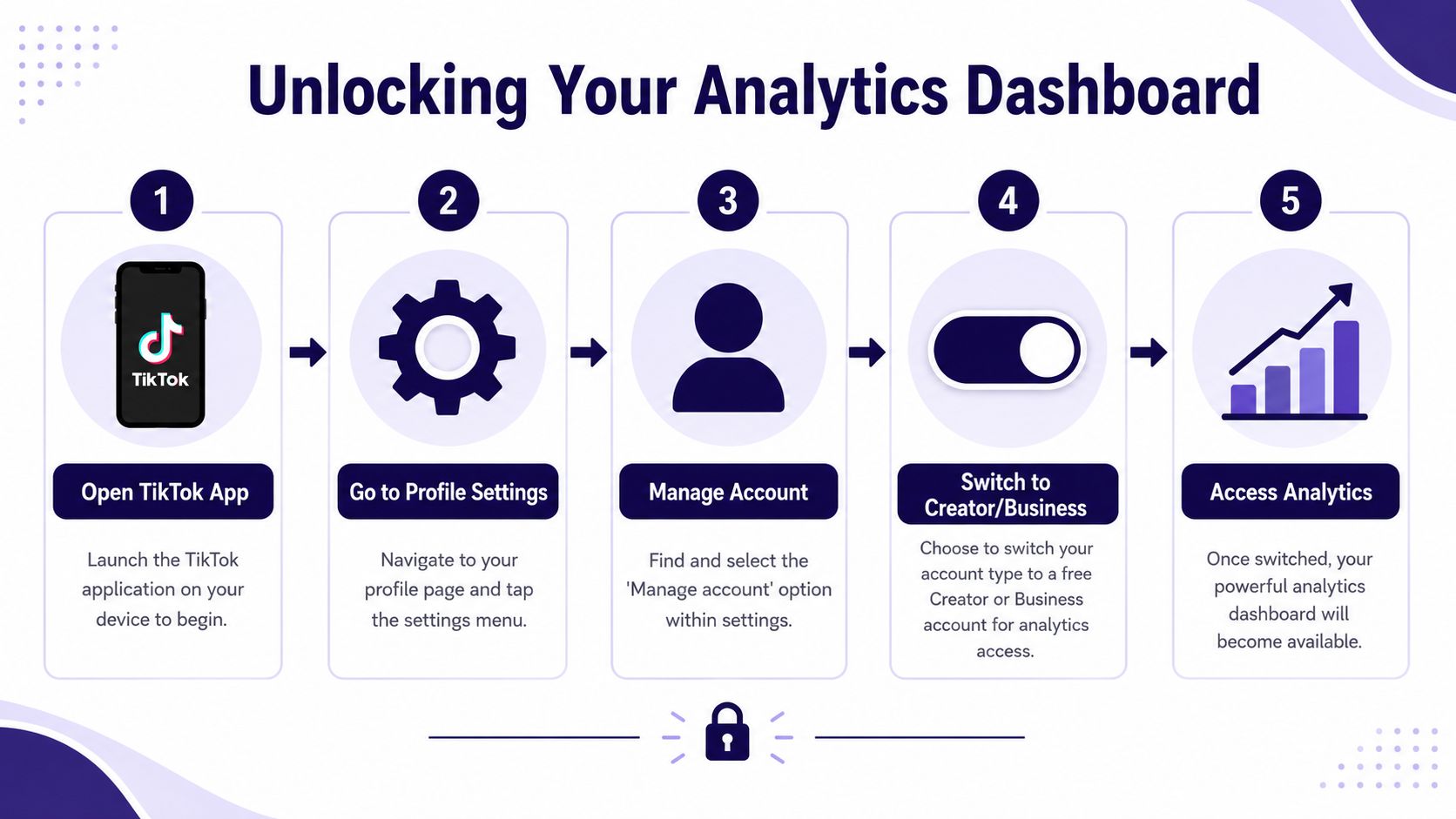
Before TikTok shows you any meaningful data, you need the right account type. Personal accounts don't provide default analytics access. To access analytics, you must switch to a Creator or Business account, and TikTok may take 24 to 48 hours to populate data, with some sources noting a full 7-day wait for complete visibility, as explained in VEED's TikTok analytics guide.
Switch your account first
On mobile, the process is simple:
- Open TikTok and go to your profile.
- Tap the three-line menu.
- Open your settings and account options.
- Choose to switch to a Creator or Business account.
- Finish the prompts, then return to your profile tools.
If your church is posting sermons, events, volunteer moments, and community updates, either option gives you access to the data you need. The important part is making the switch.
Find analytics on mobile and desktop
Once your account is set correctly, look for analytics in these places:
- Mobile access: Profile > menu > Creator Tools or TikTok Studio > Analytics
- Desktop access: sign in and go to TikTok analytics on desktop
On desktop, TikTok also gives you a cleaner view when you're reviewing patterns over time. That helps when you're sitting down to plan the next month of content instead of checking numbers quickly on your phone between meetings.
If you switch accounts and see an empty dashboard, don't panic. New access often starts with little or no visible data until TikTok has enough activity to display.
A lot of church teams assume they did something wrong because nothing appears immediately. Usually, the issue is just timing. Keep posting consistently and come back after TikTok has had time to gather enough information.
If you're comparing platforms and trying to build a smarter reporting process, this roundup of social media analytics tools for churches and teams is a useful next read.
Decoding Key Metrics for Your Ministry
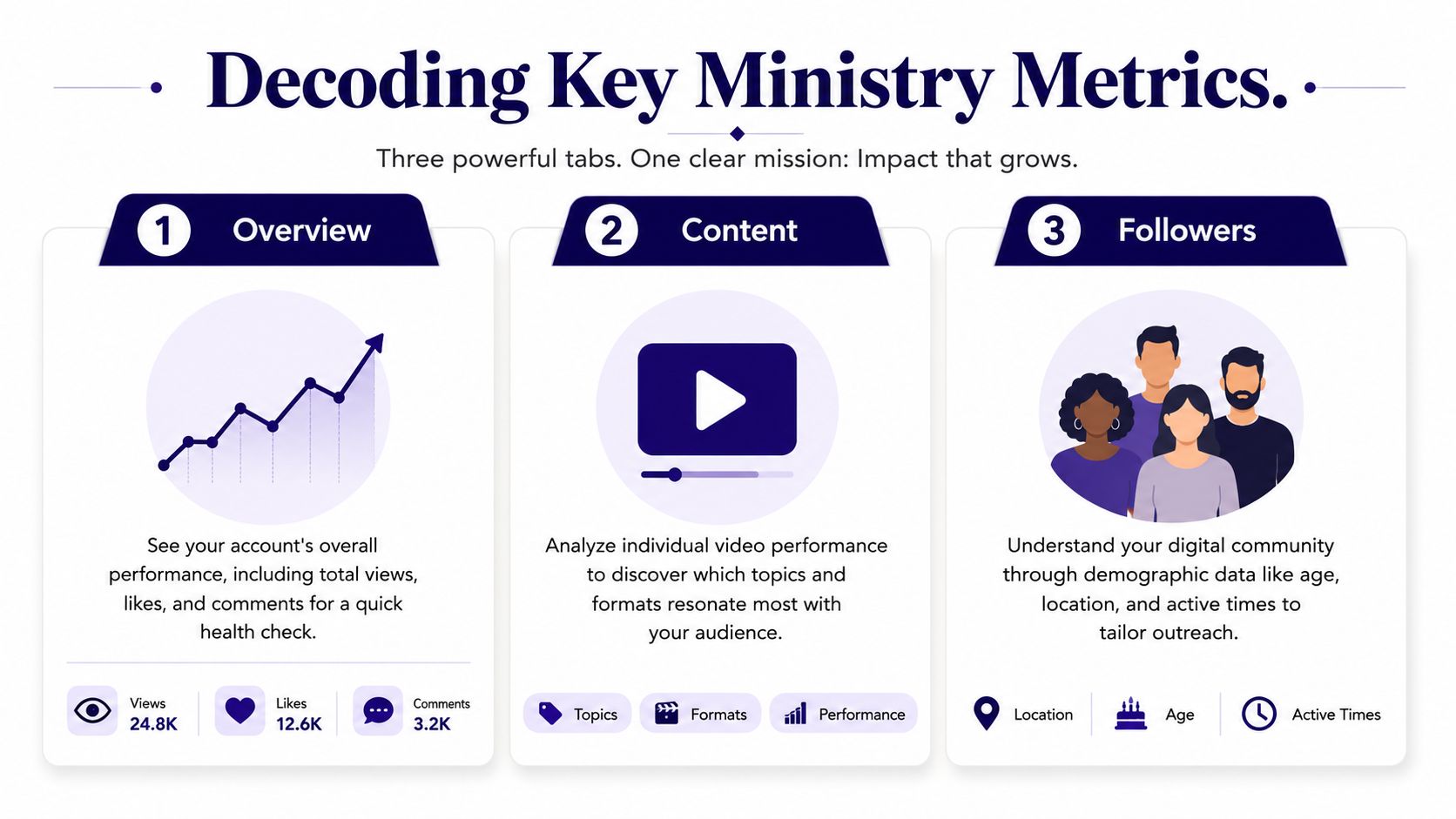
Once the dashboard opens, TikTok organizes analytics into three core sections: Overview, Content, and Followers. The Overview section shows broad account performance such as total views and followers. Content shows individual video performance from the last seven days and identifies the top nine trending videos. Followers shows audience growth and demographics, according to TikTok's official product tutorial on analytics.
Overview tells you whether the account is healthy
The Overview tab is your weekly pulse check. It helps you answer whether your church's account is generally moving forward or stalling.
Look here for broad movement, not final conclusions. A rise in views with flat engagement can mean your content is getting initial distribution but not enough response. A steady increase in profile views can suggest people want to know who you are after watching a video.
Some church teams also ask questions about visibility and profile activity on other platforms. If you've ever wondered about that broader issue, this explainer on does X show profile views gives helpful context on how profile visibility works in a different social environment.
Content tells you what people actually received
The Content tab is where ministry insight gets concrete. This is the tab I'd check first after posting sermon clips, testimony moments, or invitation videos.
Focus on these signals:
- Video views: Useful, but incomplete. Views tell you something was served and started. They don't tell you if the message landed.
- Average watch time: For church content, this is one of the strongest indicators of message reception. If people stay, they're listening.
- Comments: Comments often show reflection, questions, agreement, or emotional response.
- Shares: A share is digital word-of-mouth. Someone decided the message was worth placing in front of another person.
- Trending videos: TikTok highlights your faster-growing videos. That helps you identify topics or formats that deserve a follow-up post.
A sermon clip with solid watch time and a handful of shares usually tells you more than a flashy post with shallow reactions.
Followers gives your data ministry meaning
The Followers tab is where numbers become people. It adds audience context to your performance metrics so you can ask better questions.
Are younger viewers responding more to Q&A clips than sermon excerpts? Are local followers active at a different time than you assumed? Those aren't vanity questions. They shape outreach, scheduling, and content style.
If you want a broader framework for interpreting these reactions and patterns, this article on measuring social media engagement for churches is worth bookmarking.
Knowing Your Digital Congregation and Community
A church TikTok account usually serves more than one audience at the same time. You have members who already know your rhythms. You have local people who may be curious but uncommitted. You may also have viewers far outside your city who connect with a sermon clip, worship moment, or pastoral encouragement.
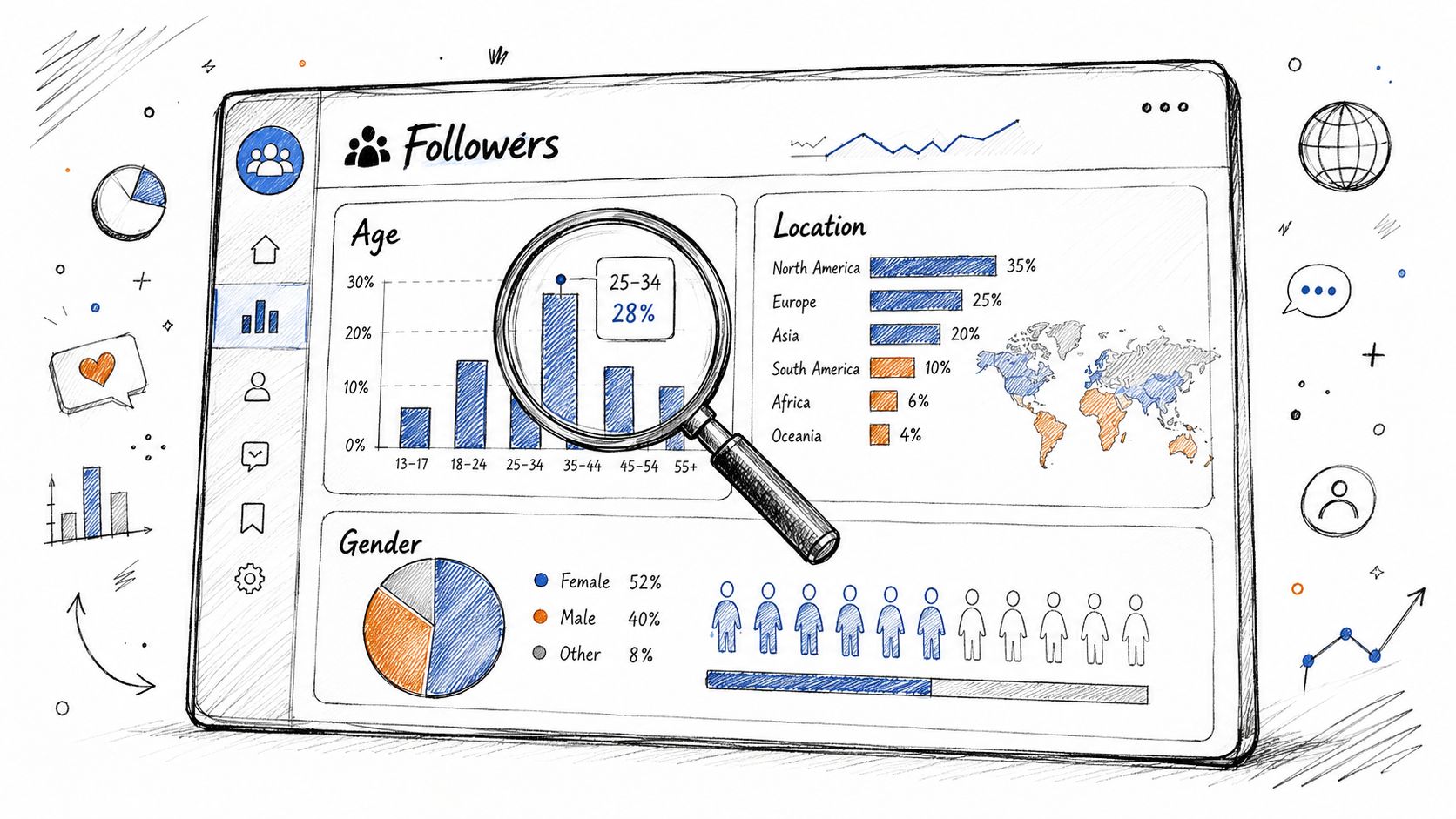
That's why the Followers area matters so much. It helps you understand not just what performed, but who is gathering around your content and when they're most likely to respond.
Read follower data like a ministry map
When you review follower demographics, don't treat them like abstract marketing segments. Use them like a map for ministry attention.
Ask practical questions such as:
- Are we reaching local people? If your church is focused on community outreach, local audience patterns matter.
- Who responds to which content style? A devotional thought may connect differently than a volunteer recap or event invitation.
- Are we speaking to our actual audience? If your tone, references, and posting times assume one group while your analytics show another, adjust.
Stop posting only when the church building is active
One of the most useful but often ignored insights is active hours. A church can post a strong video at the wrong time and wonder why it falls flat.
A key gap in most tutorials is applying active-hour data to church strategy. One source notes that peak TikTok usage is often in the evening from 6 to 9 PM, while many churches continue posting during traditional service windows and office rhythms, which can reduce visibility, as discussed in this church-focused breakdown of TikTok timing.
Post when your community is scrolling, not only when your staff is working.
That doesn't mean every church should blindly post at night. It means you should compare your own follower activity with your posting habits. If your church always uploads sermon clips on Sunday morning but your audience is most active on weekday evenings, the issue may not be the message. It may be the timing.
From Insights to Impact with ChurchSocial.ai
Analytics only help if they change what you make next.
A church that reviews TikTok data well starts seeing patterns quickly. Short sermon clips may hold attention better than long talking-head videos. Testimony moments may generate more conversation than announcement posts. Event invitations may get passed along when the wording feels personal and local. Once those patterns become clear, your next challenge isn't interpretation. It's execution.
That's where ChurchSocial.ai becomes useful for church teams that need to move from insight to action without adding a pile of manual work.

Turn strong sermon performance into more content
If your TikTok analytics show that sermon clips keep people watching, that's a clear signal. Make more clips from the sermon.
With ChurchSocial.ai, churches can create AI generated reels from their sermons instead of manually trimming videos one by one. That matters for smaller teams because the insight is only half the job. The other half is producing enough content to act on what the dashboard is telling you.
A practical workflow looks like this:
- Review high watch-time clips: Identify what held attention. Was it a strong opening line, a pastoral question, a story, or a direct encouragement?
- Pull more moments from the same sermon: Use that pattern to generate multiple short videos from the original message.
- Repost with intention: Package similar clips around the topics your audience is already proving they care about.
Build a full content stream from one sermon
A lot of churches treat the sermon as a one-time Sunday event. That leaves too much value on the table.
ChurchSocial.ai helps teams create AI generated content from the sermon transcript like social posts, blogs, and other formats. If a sermon clip performs well on TikTok, you can extend the same message into short captions, carousel copy, follow-up discussion prompts, or a church blog post without staring at a blank document.
That kind of repurposing is especially helpful when your communications team is one staff member, one volunteer, or a mix of both.
Good analytics reduce waste. Good systems help you act on that reduction.
Match scheduling to real follower behavior
If your TikTok data shows your audience is more responsive in the evening, your planning process should reflect that. Many churches often lose momentum here. They learn something helpful from analytics but still schedule content informally, or post whenever someone remembers.
ChurchSocial.ai gives churches a simple drag and drop calendar to manage and update social media across channels. That makes it easier to place sermon clips, event promotions, and weekday encouragement posts into the time windows that fit audience behavior.
It also helps if your church wants one coordinated calendar rather than scattered reminders, text threads, and last-minute uploads.
Create event content without rebuilding the wheel
Churches also need more than sermon content. You're promoting prayer nights, student gatherings, conferences, volunteer signups, outreach projects, and seasonal events.
ChurchSocial.ai includes graphic templates and an editor to create and post photos and carousels, which is useful when your TikTok analytics show that community-facing posts drive conversation or profile visits. The platform also integrates with Planning Center and other church calendars to create content for events, which cuts down the back-and-forth that often slows down ministry teams.
Instead of learning one thing from TikTok and then scrambling across multiple tools to do something with it, you can connect the insight directly to creation, scheduling, and publishing.
Troubleshooting and Advanced Reporting
Sometimes the dashboard doesn't cooperate. You switch account types, open analytics, and see little or nothing. Usually that doesn't mean the setup failed. It often means the account is new, the content volume is still light, or TikTok hasn't gathered enough activity to display useful reporting yet.
The right response is consistency, not panic. Keep posting. Give the platform time to collect enough signals to show patterns.
Fix the most common reporting issues
A few practical checks help:
- Check the date range: TikTok often defaults to a short window. That can distort your read on what's working if one unusual post skews the view.
- Compare broader periods: Looking at a longer range can reveal steadier themes instead of short-term spikes.
- Review on desktop when possible: The larger layout makes trend analysis easier, especially if you're reporting to staff or volunteers.
Export data when you need a longer view
On desktop, TikTok lets users download and export full analytics reports, a capability documented in official tutorials and especially useful for long-term analysis or for combining TikTok performance with wider content reporting, as noted in this TikTok analytics desktop export guide.
That export can help if you're trying to answer questions like these over time:
| Reporting need | Why export helps |
|---|---|
| Monthly ministry review | You can compare content themes across weeks |
| Cross-channel planning | You can line up TikTok performance with Instagram or YouTube activity |
| Team handoff | Staff and volunteers can review the same historical data |
| Leadership reporting | You can move beyond anecdotes and show patterns clearly |
Exporting reports is useful. It's also one more task. If your church already feels stretched, the bigger win is creating a rhythm where planning, content creation, and scheduling are organized well enough that your reporting doesn't become a separate part-time job.
Church teams don't need more content chaos. They need a practical system. ChurchSocial.ai helps churches turn sermons into AI generated reels, create social posts and blogs from sermon transcripts, design photos and carousels with built-in templates, and manage everything in a simple drag and drop calendar. It also connects with Planning Center and other church calendars so event content doesn't have to start from scratch. If your TikTok analytics are showing opportunities, ChurchSocial.ai helps your team act on them with less friction.


