
If you're trying to keep Facebook updated, Instagram looking alive, YouTube consistent, and a Sunday announcement from slipping through the cracks, you already know the core problem. It isn't that your church lacks good news to share, it's that the work gets scattered across too many tabs, too many logins, and too many people. The fix is a system that treats social media like ministry operations, not random posting.
Start with a Purposeful Social Media Audit
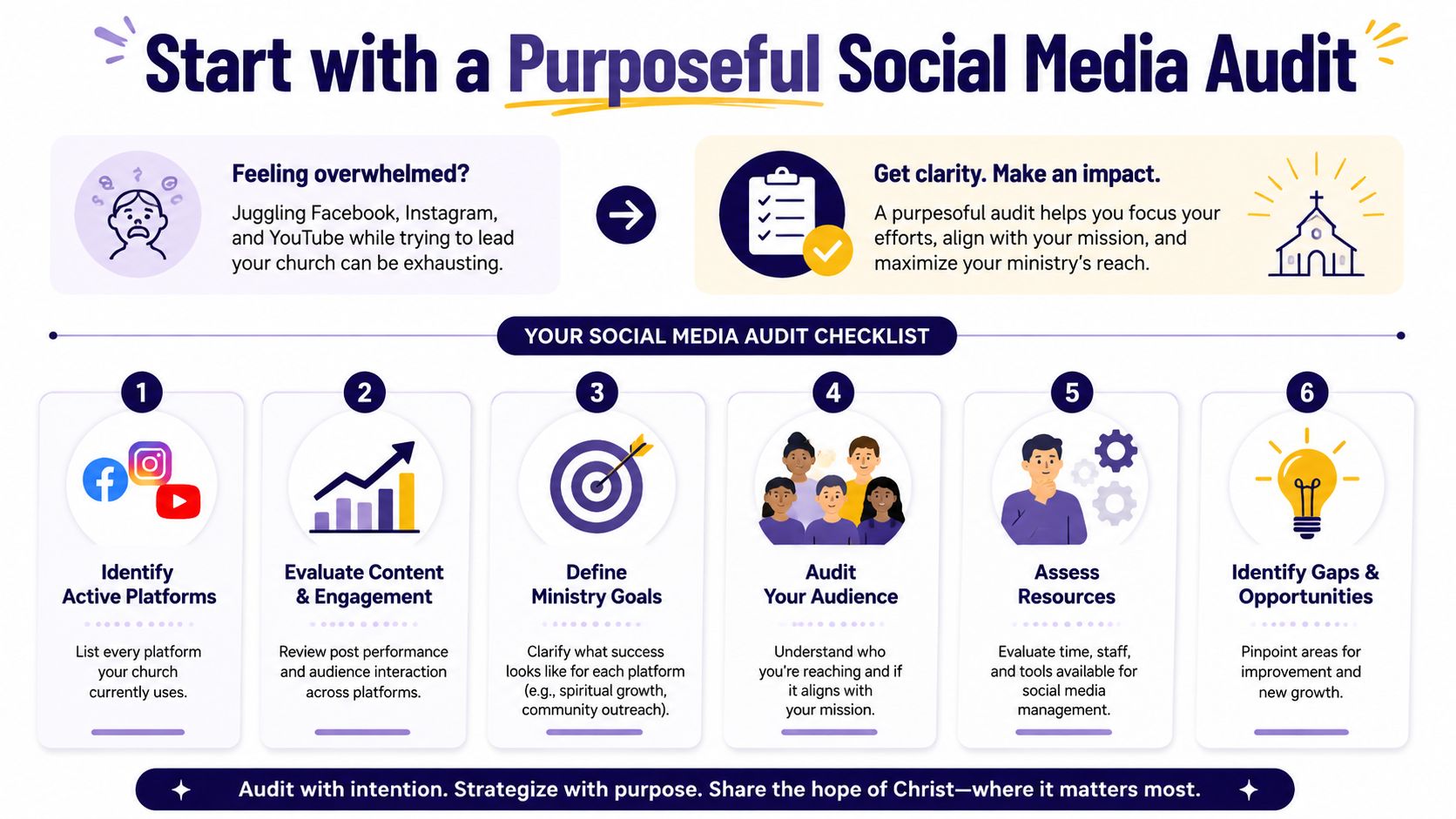
The first move is not writing more captions. It's finding out what is happening across your accounts so you can stop feeding platforms that aren't serving your church. A volunteer can do this with a notepad, a spreadsheet, or a planning tool, but the goal stays the same, bring order to the noise.
A helpful way to think about it is an online presence health check. The phrase fits churches well because the audit isn't just about numbers, it's about whether your digital presence still reflects your mission. A practical checklist for that kind of review is spelled out in revid.ai's social media online presence health check, and the logic is simple, you need a clear snapshot before you make changes.
Audit the accounts you already have
Start by listing every active profile, including the ones that were created for a past ministry event and then forgotten. Note which platforms are effectively reaching your community, and be honest about the ones that only add work. The most effective approach is to connect everything into one place, then decide what each account is for instead of treating every channel the same way (Entrepreneur).
For a church, that purpose should be specific. Facebook might carry events and service reminders. Instagram might carry encouragement, testimony snippets, and sermon visuals. YouTube might hold sermon content and clipped moments for people who couldn't be there in person. If a platform doesn't have a clear ministry role, it's a candidate for simplifying.
Practical rule: If you can't explain what one platform does for your church in one sentence, the account probably needs attention before it needs more posts.
Use a simple checklist before you post again
A strong audit looks at profile completeness, brand consistency, and audience engagement. Check whether your bio still matches your current service times, whether your logo and colors are consistent, and whether recent posts sound like the same church. Then review which posts sparked comments, shares, DMs, or clicks, because those responses tell you more than a vanity count ever will.
Once the audit is done, set ministry-oriented goals. That might mean helping newcomers find your service times, making events easier to share, or turning sermon content into something people can revisit during the week. If you want a deeper framework for that process, the internal guide on what a social media audit is pairs well with this first pass.
Build Your Sustainable Content Workflow
Churches usually do not need a bigger pile of ideas. They need a repeatable way to turn what is already happening in ministry into posts without wearing out the people doing the work. A workflow matters more than inspiration because it keeps the church visible even when the week fills up with planning, pastoral care, and last-minute changes.
The strongest raw material is often the sermon. One message can become a short reel, a quote graphic, a discussion prompt, a blog-style recap, and an event tie-in for the following week. Repurposing content in that way keeps a small team from starting from scratch every time the feed goes quiet.

Turn sermons into a content engine
The basic workflow is straightforward. Record or upload the sermon transcript, then create several content formats from one source file. A tool like ChurchSocial.ai can generate AI reels from sermons, pull social posts, blogs, and discussion questions from the transcript, and give your team a starting point instead of a blank page.
That matters because managing multiple accounts gets easier when content is produced in batches instead of pieced together on the fly. Centralized scheduling, engagement, and analytics also reduce the back-and-forth of posting inside each app, which is the direction many social media tools have taken over time (Entrepreneur, Sprout Social). For a church team, that shift is less about fancy software and more about removing friction.
A good workflow also includes your church calendar. Planning Center and other ministry calendars already know what is coming, so those events should feed your content plan instead of being retyped from memory. If a retreat, baptism Sunday, or outreach night is on the church calendar, it should already be on the social calendar too.
Sermons create the message. The calendar tells you when that message needs to be seen.
Keep the work repeatable, not heroic
A sustainable workflow usually has three parts, capture, transform, schedule. Capture the sermon and event details. Transform them into captions, clips, graphics, and blogs. Then schedule everything from one place so you are not scrambling on Tuesday night because Sunday's post never got written.
The internal guide on content batching is worth a look if your team keeps trying to do too many small tasks at once. Batching turns ministry communication from constant interruption into a manageable routine. It also helps volunteers know exactly what to do when they log in, which lowers confusion and cuts down on mistakes.
Unify Your Efforts with a Central Content Calendar
Daily posting sounds diligent until the week gets messy. Then one sick volunteer, one late sermon edit, or one last-minute event change can throw the whole schedule into chaos. A central content calendar solves that by giving your church one visible place to plan, adjust, and publish.
Hootsuite recommends planning major posts, such as campaigns, announcements, and seasonal content, 2–4 weeks ahead of time, and that rhythm fits church life well because so much of church communication follows a known calendar. Sermon series, holiday services, VBS, retreats, and recurring outreach events are all easier to manage when they're planned before the week gets urgent (Hootsuite).
Build the calendar around ministry rhythms
A church content calendar works best when it matches the actual pace of ministry. Start with the big weekly anchors, Sunday sermon, midweek event, volunteer needs, and next-step invitations for newcomers. Then fill in the rest with supporting pieces like Scripture graphics, sermon clips, reminders, and community updates.
A drag-and-drop calendar makes that much easier because posts can move when ministry changes. ChurchSocial.ai offers that kind of visual planning in one place, which is useful when your team needs to shift a caption from Thursday to Friday without rebuilding the whole schedule. The point isn't just organization. It's flexibility without chaos.
A simple weekly structure might look like this, without forcing every account to post the same thing:
- Sunday: Sermon clip, Scripture graphic, and a welcome post for first-time guests.
- Monday: Recap quote or reflection from the message.
- Wednesday: Event reminder or volunteer need.
- Friday: Weekend invitation or prayer prompt.
- Saturday: Light, encouraging post that keeps the feed active without extra pressure.
Leave room for real life
Planable's guidance to keep 70% of posts about a week ahead and leave 30% unscheduled is especially useful in church ministry because last-minute changes happen often, and they matter (Planable). Weather cancellations, guest speaker updates, and urgent prayer requests can't wait for next month's schedule.
That mix of planned and flexible content keeps your church from sounding robotic. It also protects your team from the trap of trying to invent something new every day. If your calendar is built well, your volunteers know what's coming, your staff knows what can move, and your congregation sees a consistent voice across platforms. For a tighter planning framework, the internal guide on social media content calendar is a solid companion resource.
Empower Your Team with Clear Roles and Permissions
Church social media gets messy fast when everybody can post, nobody knows who approves, and the brand voice changes depending on who had time that day. That's not a content problem. It's a governance problem. The fix is a simple role structure that fits a volunteer-heavy ministry team.
Generic social media advice often skips this part, even though role design is one of the biggest gaps for churches. Buffer points out that most guidance doesn't answer who should approve posts or how volunteer access should work, and that's exactly where many church teams get stuck (Buffer). When a church relies on part-time staff and volunteers, permission structure matters as much as caption quality.
Match responsibilities to the size of the team
A small church doesn't need a corporate org chart. It needs clarity. One person can draft content, another can approve it, and the same volunteer can still help with replies or simple graphics without being allowed to publish live.
| Role | Small Church (1-2 Volunteers) | Large Church (Comms Team) |
|---|---|---|
| Content Creator | Drafts captions, pulls sermon quotes, gathers event details | Writes platform-specific copy and repurposes sermon content |
| Graphic Designer | Edits templates and creates simple image posts | Builds branded graphics, carousels, and campaign visuals |
| Scheduler / Approver | Reviews posts before publishing and checks dates | Manages approvals, scheduling, and final publishing |
| Community Engagement Lead | Replies to comments and DMs during set windows | Monitors messages, routes questions, and tracks follow-up |
That table isn't about bureaucracy. It's about protecting your church from avoidable errors and awkward handoffs. A volunteer can do meaningful work without having full publishing access, and a staff member can keep oversight without having to create every post.
Use permissions to protect voice and trust
A good system separates drafting from publishing. That keeps a post from going live before a typo is caught, a service time is corrected, or a sensitive detail is reviewed. It also helps if your church has multiple ministries posting inside one shared presence, because each ministry can contribute without changing the voice of the whole church.
ChurchSocial.ai supports this kind of workflow by letting teams manage posts from one place with permissions that fit a church's approval process. Use that structure to assign ownership clearly. One person writes, one person checks, one person publishes. That pattern sounds simple because it is, and simple is what makes it sustainable.
Measure What Matters for Ministry Growth
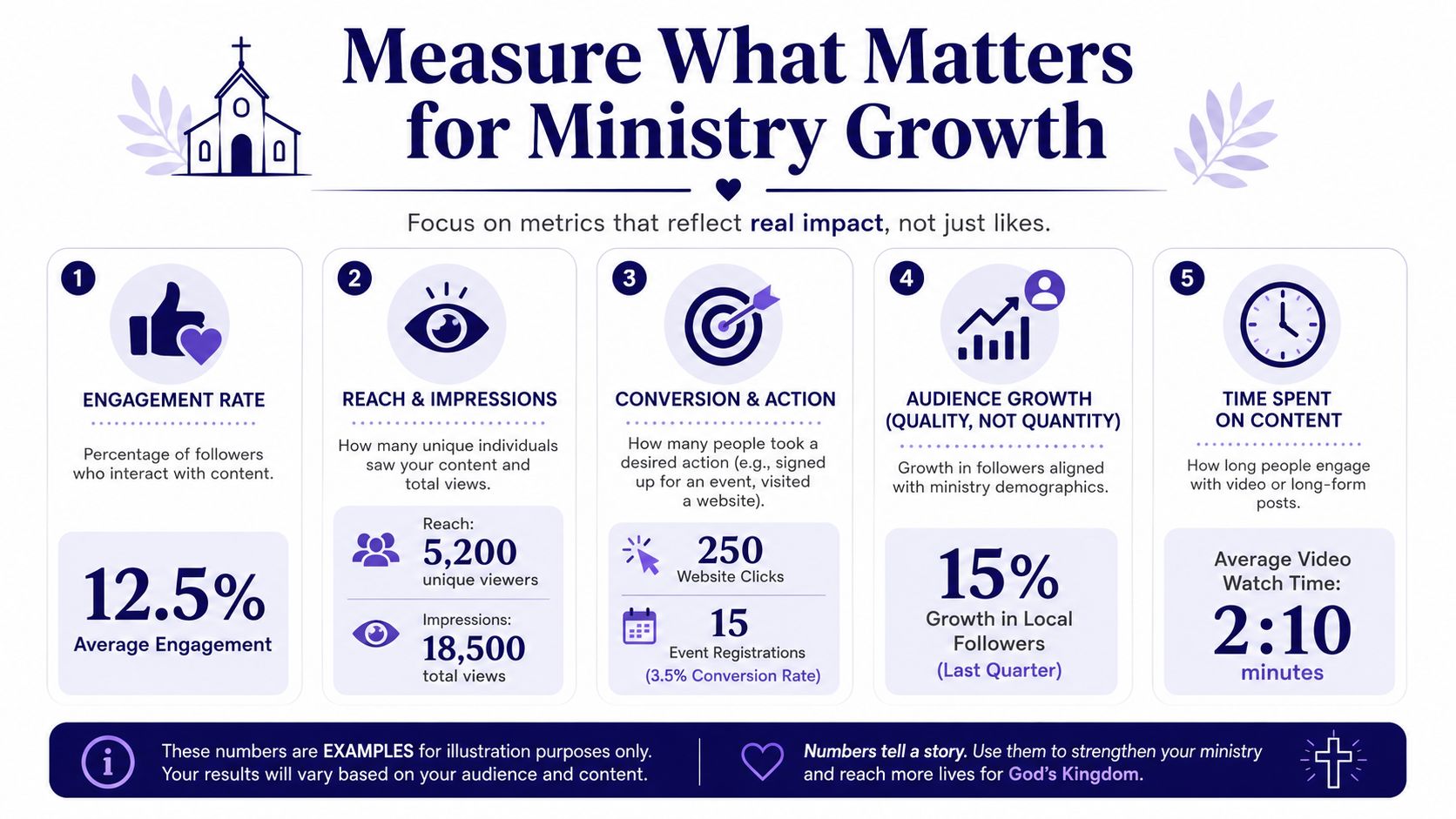
Analytics become overwhelming when churches try to watch everything. A cleaner approach is to track a few indicators that tell you whether people are connecting with your ministry online. The best practice is to focus on 3 to 5 metrics per platform maximum, so your reporting stays useful instead of becoming a second job (ONSAAS).
Track ministry signals, not vanity noise
For churches, the right metrics are usually tied to action. Did someone register for an event? Did a newcomer click the “New Here” page? Did a person ask about service times in a DM? Did a sermon clip hold attention long enough to matter? Those signals tell a better ministry story than a pile of likes.
A simple monthly report can organize those signals into a useful narrative. Keep the report short, consistent, and honest. The goal is to show church leadership what content is helping people move closer to worship, community, or a next step.
Use one dashboard and one template
A unified dashboard saves time because all the important numbers live together. That matters for lean teams, since nobody wants to collect screenshots from six apps just to tell the same story each month. A consistent template also helps, because month-to-month comparisons are easier when the layout never changes.
Here's a practical way to keep the report focused:
- Engagement: Which posts prompted replies, saves, shares, or comments.
- Reach: Which platforms delivered the message to people.
- Action: Which posts led to registrations, visits, or direct questions.
- Audience fit: Whether the people interacting match the community you're trying to serve.
- Content attention: Whether people stayed with video or long-form content long enough to matter.
That kind of reporting turns social media into a stewardship conversation. It also helps a church decide what to do more of, what to trim, and what to stop forcing. When the numbers are simple and the dashboard is unified, the team can spend more time serving people and less time decoding charts.
Your Path to Organized and Effective Digital Ministry
Managing multiple social media accounts gets a lot easier when the church stops treating each platform like a separate emergency. The better system starts with an audit, builds around sermon and event content, uses one calendar, assigns clear roles, and measures only the metrics that matter. That's how a small volunteer team stays consistent without being swallowed by the work.
The hard parts don't disappear, though. Negative comments still need a calm response, last-minute changes still happen, and some weeks will feel too full. The difference is that a good system absorbs those moments instead of breaking apart, because the process already tells people what to do.
A church doesn't need a marketing department to communicate well online. It needs a repeatable workflow, clear approvals, and tools that fit ministry life rather than fighting it. When those pieces are in place, social media stops feeling like clutter and starts serving discipleship, outreach, and welcome in a practical way.
If your church is ready to stop juggling accounts one app at a time, ChurchSocial.ai gives you a unified way to plan, create, schedule, and publish from one place. It can turn sermons into reels and posts, connect with Planning Center and other church calendars, and help your team keep every account moving without adding more admin work. Visit ChurchSocial.ai and see how it fits your church's social media workflow.


