
A volunteer opens Facebook after Sunday's sermon clip starts circulating. One comment says the message was “out of touch.” Another accuses the church of ignoring people in the community. A third person piles on with a sarcastic remark about the worship team. The volunteer's first instinct is understandable: delete the thread, defend the pastor, and move on.
That reaction can turn one difficult comment into a larger public conflict. Churches need a calmer process for deciding how to respond to negative comments, because criticism can represent a genuine concern, a misunderstanding, a policy violation, or an attempt to provoke a reaction. The right response protects the church's witness without treating every hostile thread as an opportunity to maximize engagement.
Why Your Response Matters More Than You Think
A sermon clip or community-event post can attract criticism while the people most affected remain silent. They may read the original post, scan the replies, and decide what kind of church they are seeing. Public judgment often forms through the church's handling of disagreement, not only through the complaint itself.
A 2025 Wharton Marketing study found that more than 50% of respondents read social media comments often or very often (Wharton Marketing study). One reply therefore addresses more than the commenter. Members, visitors, former members, local residents, and people encountering the church for the first time may all be watching.

The comment thread becomes part of the church's public record
A large 2024 MISQ study analyzed 10,312 firm posts from 37 U.S. retailers and more than 1 million user comments. Researchers found that companies replied to negative comments more often than to positive or neutral comments. Prompt, distinctive replies were associated with more subsequent comments and more negative sentiment in those comments.
For churches, the lesson is practical: replying does not guarantee reputation repair. A response may extend the conversation and increase scrutiny. A defensive answer can supply fresh material for criticism. A measured reply can show observers that the church listens, explains its decisions, and treats people with dignity.
Practical rule: Write every public reply as though a person unfamiliar with your church will read it without any additional context.
RNC Group's guide to building a crisis strategy for 2026 offers a useful discipline for this work. Churches do not need to label every negative comment a crisis, but they can establish roles, define escalation points, and agree on language before emotions take over.
The question shifts from disappearance to service: what response best protects truth, safety, and the people watching? That may mean answering publicly, setting a boundary, hiding a comment that violates policy, or inviting the commenter into a private conversation. Reply when a clear explanation helps the wider audience. De-escalate when public exchange is feeding conflict, and move offline when privacy, pastoral care, or personal details are involved.
Triage Framework for Categorizing Negative Comments
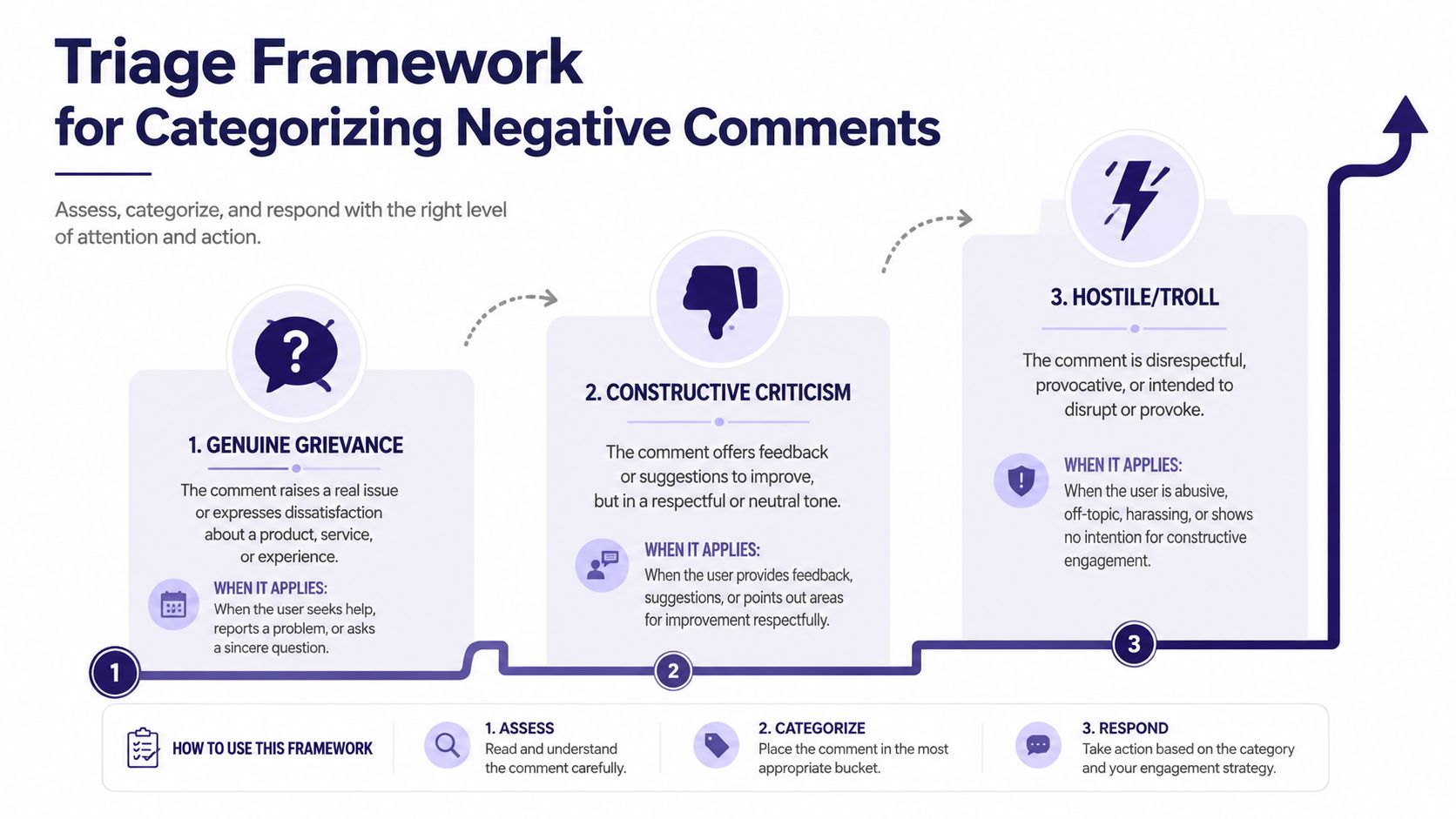
A comment arrives during a controversial sermon, while volunteers are answering event questions and staff are already under pressure. Replying immediately can turn one complaint into a larger public exchange. Classify the message first, then choose whether to reply, set a boundary, remove it, or move the conversation offline.
Use three categories.
Clear policy violations
Remove or report comments containing threats, targeted harassment, hate speech, doxxing, spam, impersonation, or repeated abusive attacks. A church page must not become a public venue for threats against staff, volunteers, visitors, or other commenters.
Before removal, document the comment, including the date, platform, post, and reason for action. Do not delete a difficult theological disagreement just because it makes the church uncomfortable. Moderation should protect people and keep the community usable, while still leaving room for criticism.
Gray-area criticism
Gray-area comments are tense without being clearly abusive. They may contain sarcasm, borderline insults, sweeping accusations, or criticism whose meaning depends on context. Examples include:
- Theological disagreement: “This sermon completely misses what the Bible says.”
- Event frustration: “Your church keeps making families jump through hoops to attend.”
- Leadership criticism: “The elders clearly don't care what members think.”
- Snark: “Great, another announcement about serving while nobody answers emails.”
These messages require judgment. A moderator might correct an inaccurate detail, explain a policy, remind the commenter of page rules, or invite a private conversation. Moderator research on gray-area comments describes how professionals distinguish clear violations from ambiguous cases and often use explanations, rule reminders, or corrective replies instead of automatic deletion.
Public engagement has a cost. A reply may clarify the issue for observers, yet it can also keep an unproductive argument visible. De-escalate when the exchange is becoming performative, and move offline when privacy or pastoral care is involved.
Constructive feedback and genuine grievances
Engage when a comment describes a specific experience or requests a reasonable explanation. “The livestream audio dropped during the message, and people watching from home couldn't hear the conclusion” gives the church an actionable problem. So does, “The registration page didn't explain that childcare was unavailable.”
Start with the facts. Acknowledge mistakes plainly. If someone misunderstood, clarify without belittling them. Keep public replies brief when the issue involves pastoral care, personal conflict, or sensitive information, then invite a private conversation.
Churches can review guidance on responding to feedback before creating a decision tree.
- Is the comment unsafe or clearly prohibited? Document, remove, and escalate when necessary.
- Is it tense but potentially redeemable? Reply with a boundary, explanation, or correction.
- Does it identify a real problem? Acknowledge it, state the next action, and follow up privately when appropriate.
Tone Guidelines and Response Templates
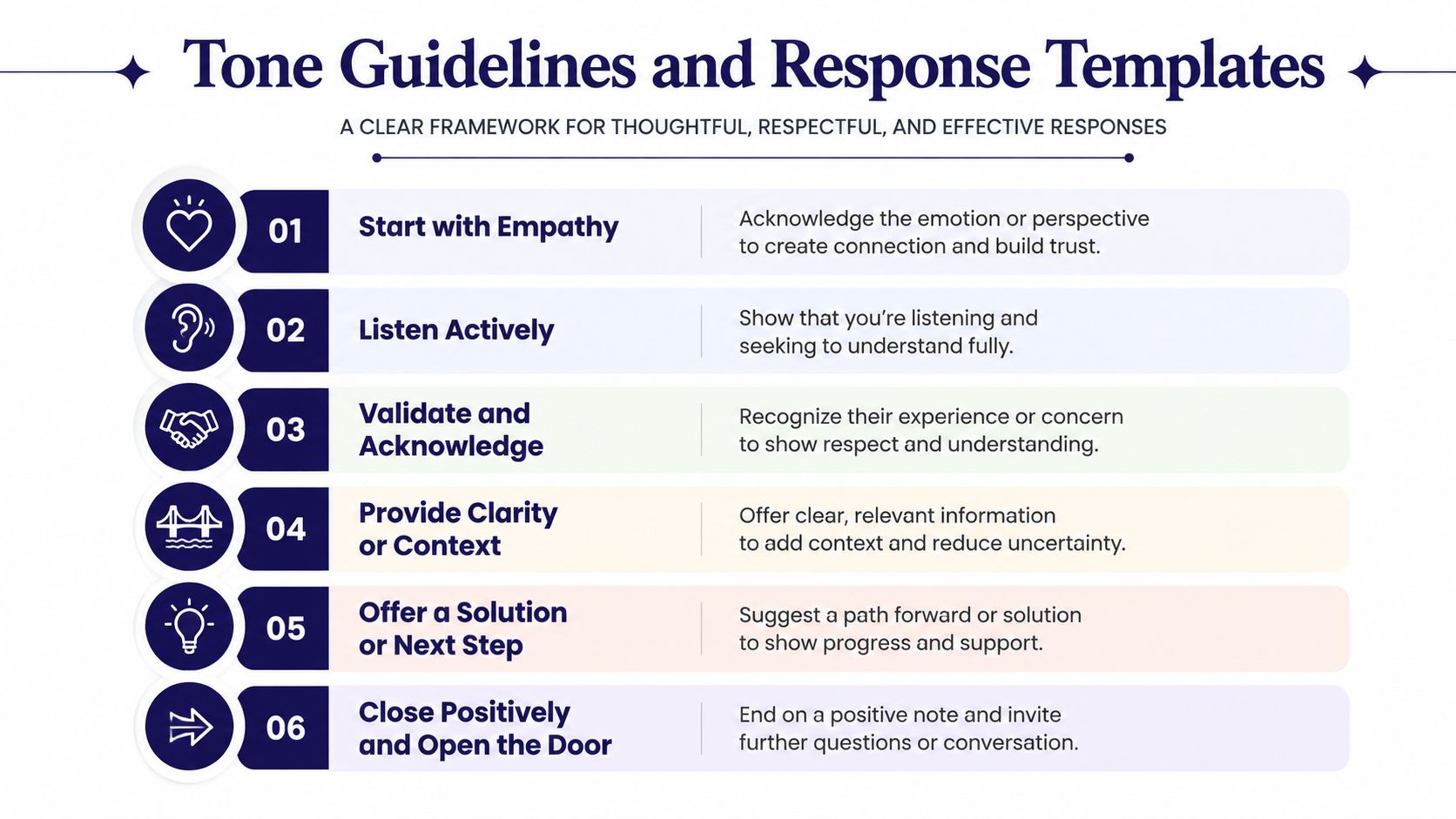
Once a comment has been categorized, choose language that lowers the temperature without giving the most provocative wording extra attention. A dependable structure is acknowledge the concern, show empathy, provide a concrete action or correction, and personalize the reply.
The same moderator research cited in the triage section connects acknowledgment and action with stronger responses, while also pointing to reminders of rules, corrections, and explanations for comments in gray areas. A generic “We're sorry you feel that way” fails because it neither recognizes the issue nor tells people what happens next.
Acknowledge before you explain
Name the actual concern before defending the church, even when the criticism includes an error.
For a sermon complaint:
“Thank you for raising this. We understand why that part of the message felt dismissive, especially for people who have experienced that situation personally. We're reviewing the wording with the preaching team and want to learn from the concern.”
For an event problem:
“You're right that the announcement didn't make the parking changes clear. We're sorry for the confusion. We've updated the event details and will add the information to the next reminder.”
For a factual misunderstanding:
“Thanks for asking about this. The event is open to the community, and registration is only needed for childcare. We've updated the caption so that distinction is easier to see.”
Specific language shows that someone read the comment rather than selected a stock reply.
Move toward a concrete next step
Empathy without action can sound performative. Explain what the church can do, who will follow up, or where the person can continue the conversation.
For a policy concern:
“We hear your concern about the policy. The public comment doesn't give us enough room to discuss the circumstances carefully, so please send us a direct message with your contact information. A member of our pastoral team will follow up.”
For a leadership disagreement:
“We recognize that this decision affects people differently. The leadership team can explain the reasoning, but we don't want to discuss personal details in a public thread. Please contact the church office so we can listen properly.”
For a complaint after a community event:
“We're sorry the welcome table did not have the information you needed. Please message us with the event name and a way to reach you. Our events coordinator will review what happened and follow up.”
Keep the reply human and proportionate
Don't copy and paste the same response under every criticism. Use a prepared structure, then change the wording to reflect the actual comment. Avoid sarcasm, legalistic language, vague assurances, and claims that the commenter is “confused” or “misinformed.”
A prompt, individual response can keep a concern from feeling ignored, but speed should not replace care. ReviewTrackers reports that 53% of consumers expect a response to a negative review within one week, while about one-third expect a reply within three days (ReviewTrackers customer review statistics). For church teams, that supports a practical standard: monitor consistently, acknowledge urgent concerns quickly, and escalate sensitive matters instead of improvising under pressure.
Churches can refine shared language with guidance on understanding tone of voice, particularly when several volunteers write from the same account.
The Hidden Tradeoff Between Engagement and Mission Impact
A 2026 experimental study found that adversarial comments on organizational social posts increased reactions, comments, shares, and clicks by roughly 45%, while link clicks rose by about 15%. Yet people formed less favorable opinions of the organization and reported a 7.3% lower likelihood of donating (analysis of opposing comments and organizational outcomes). For a church, a highly active thread can therefore signal conflict rather than connection.

Choose the outcome before choosing the reply
If the church's goal is transparency, a concise public answer may serve the mission. A factual correction under a widely viewed announcement can prevent confusion. A calm explanation of a facility change can show accountability without exposing private details.
Pastoral care usually belongs in a different channel. A brief acknowledgment can show that the concern was seen, followed by an invitation to direct message, email, or speak with a pastor. If a thread becomes repetitive, personal, or dominated by accusations, stop giving it fresh material.
Use these signals to decide whether to continue publicly:
- Public value: Will other readers benefit from the answer?
- Privacy: Does resolving the issue require personal, pastoral, or family information?
- Safety: Does the thread include threats, harassment, or identity-based abuse?
- Mission effect: Is the conversation clarifying the church's position, or merely extending conflict?
- Next step: Can the church name a real action, or would another reply only repeat itself?
A public reply can serve the mission, and silence can too. The difference lies in what each choice advances. Preserve legitimate criticism, enforce clear boundaries, and choose the channel that protects people and improves understanding. If a reply makes the thread more hostile without adding clarity, state a respectful boundary and move the matter elsewhere.
Building Your Church Moderation Policy and Escalation Procedures
Volunteers shouldn't have to invent moderation decisions at midnight after a controversial sermon. A written policy gives them authority to act consistently and protects them from feeling personally responsible for every conflict.
Start with a short definition of acceptable participation. Include harassment, threats, discriminatory attacks, personal information, spam, impersonation, and repeated disruption. State that disagreement about sermons, doctrine, music, leadership, or church policy isn't automatically removable. Explain that the church may hide or remove comments that violate the rules, while preserving criticism that can remain part of a respectful conversation.
Assign ownership before the crisis
Your policy should identify who can:
- Remove or report: Usually a trained communications lead or designated moderator.
- Approve sensitive replies: A pastor, ministry leader, or communications director.
- Handle personal concerns: A pastoral contact who can move the discussion offline.
- Review legal or safety issues: The appropriate church authority or professional adviser.
- Update the policy: A named owner who records changes and trains the team.
Set a response expectation that matches the team's capacity. A small church may need scheduled monitoring, while a larger congregation may assign platform coverage across staff and volunteers. Don't promise immediate answers if nobody can provide them. A reliable acknowledgment is better than a rushed explanation that contains errors.
Document decisions and protect people
Save screenshots or internal notes for removed comments, especially when a threat, impersonation, or serious allegation appears. Record the reason for the action and any escalation. This creates consistency when another volunteer encounters a similar situation.
Images require the same care as comments. A church social media guide from the Diocese of Link recommends written permission for close-up photos of identifiable people and a signed parent or guardian release for minors (Diocese of Link social media guide). When possible, select images that don't feature people. Use buildings, worship spaces, hands, objects, or event details instead. If people are necessary, crowd images where no one is singled out or distinguishable can reduce permission concerns.
Train volunteers with real examples from the church's own channels. Review what should be deleted, what requires a public answer, and what belongs in a private conversation. A consistent policy helps the church respond with one voice without forcing every volunteer to sound identical.
Streamlining Your Workflow with ChurchSocial.ai
Comment moderation works better when it sits alongside a dependable content workflow. Churches need to know what was posted, which event it supports, who approved it, and whether a response belongs to a sermon, ministry announcement, or community gathering.
ChurchSocial.ai's social media management platform lets churches create AI-generated reels from sermons, turn sermon transcripts into social posts and blogs, and use graphic templates and an editor to produce photos and carousels. Teams can schedule and publish content across their social accounts from a visual workspace, which makes it easier to keep messaging consistent when several volunteers share responsibility.
The platform's drag-and-drop calendar can connect with Planning Center products such as Registrations, Groups, and Services. Planning Center Calendar also supports iCal imports, and its setup flow includes people, rooms, resources, approval groups, and event creation or import (Planning Center Calendar). That connection helps communications teams prepare event content before announcements go live, reducing the confusion that often generates avoidable criticism.
Published Planning Center Calendar events can be shared to Church Center, while only events published in Church Center are public. Churches can embed month, list, or gallery views and apply campus and category filters using Script, URL, or iFrame options (Church Center Calendar embedding).
Use the workflow to support moderation, not replace judgment. Review recurring complaints, note unclear announcements, and adjust future captions or graphics. For images, choose people-free visuals whenever possible, and add text only when it belongs naturally in the scene, such as writing on a paper sign or whiteboard. Overlay text can be added after the image is created, but random text placed on unrelated objects usually creates confusion.
ChurchSocial.ai helps churches turn sermons into reels and written content, build branded graphics and carousels, and manage scheduled posts with a drag-and-drop calendar connected to church events. Visit ChurchSocial.ai to organize your content workflow so your team has more time to respond to difficult comments with clarity, empathy, and good judgment.


