
Sunday night usually starts with good intentions and ends with three tabs open, one missing graphic, and a midweek post nobody can find. Someone in the church office remembers the announcement too late. A volunteer is waiting on approval. The sermon clip still hasn't been cut, and the caption draft lives in someone's text messages.
That's what most church social schedules look like before they become a real content calendar. The goal isn't to post more for the sake of posting more. The goal is to build a calm, repeatable system that lets your church communicate without the weekly scramble.
Why Most Church Content Calendars Fall Apart by Wednesday
The breakdown almost always starts with the same mistake. A church treats the calendar like a list of things to publish, not a production system with owners, lead time, and a finish line. That works for about two days, then the whole thing starts depending on memory, favors, and last-minute creativity.
A better calendar starts with the work, not the date. Search Engine Land recommends a staged workflow, beginning with a content audit, then theme and topic planning, then explicit action dates and stage owners for each asset. Its production blocks also make the hidden problem obvious, because drafting, review, visuals, CMS build, and edits add up to a full cycle before anything goes live, which is why so many church teams feel busy but still ship late. Search Engine Land's content calendar guide makes that point clearly, and it's exactly why a calendar needs ownership as much as it needs ideas.
A calendar without owners becomes a hope list.
That's the part church teams feel most on Wednesday. Monday had energy. Wednesday has a gap. Friday has guilt.
What chaos looks like in real church life
The usual pattern is easy to spot:
- One person owns everything. If that person is out, the calendar stalls.
- Every post needs a fresh design. No template means every asset starts from zero.
- Approvals happen late. The pastor sees the draft after the deadline, not before it.
- Events get promoted too late. The first announcement lands when people are already making other plans.
That's why a tool like ChurchSocial.ai can help when it's used as a workflow, not just a scheduler. It gives churches a place to hold the plan, move assets through production, and keep social content connected to the ministry calendar instead of the other way around. If you want a broader framework for shaping the messaging before you build the calendar, the church content strategy guide pairs well with this process.
The calm outcome is simple. Everyone knows what's being made, who's touching it, and when it has to move. That's what makes the calendar usable on Thursday, not just inspiring on Monday.
Setting the Foundations Before You Open a Calendar
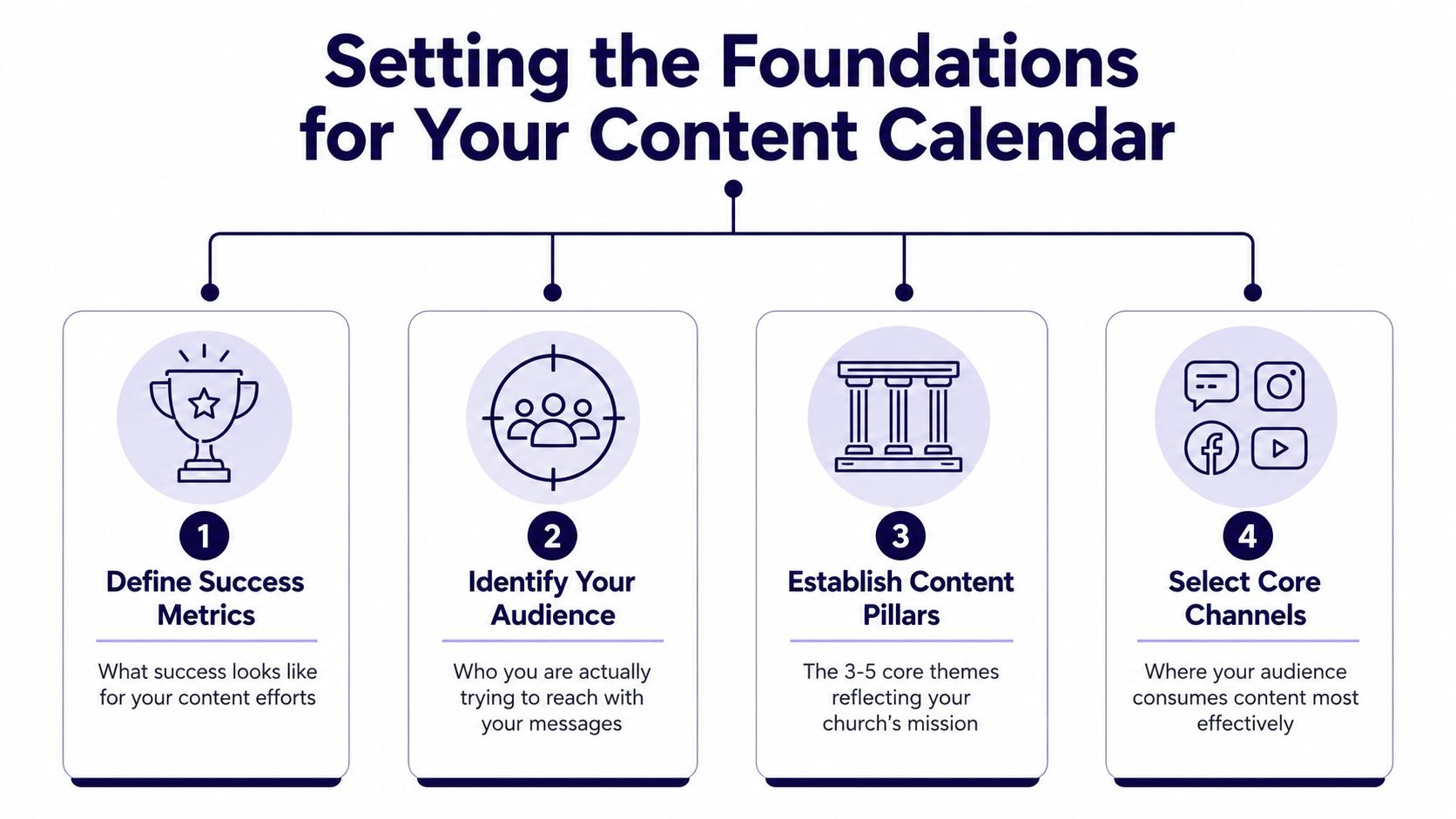
Before you fill in dates, decide what the calendar is for. A church that skips this step usually ends up with a dumping ground for random announcements, sermon leftovers, and one-off ideas that never repeat. A stronger calendar starts with four decisions, and they should fit on one page.
Start with success, not activity
Success has to mean something specific. For one church, it might be more consistent event promotion. For another, it might be clearer Sunday recap content that supports discipleship during the week. The point is to name the outcome before deciding on posts, because otherwise every idea feels equally important.
That's where many teams drift. They confuse “we posted something” with “we made progress.” A calendar that tracks success keeps the church from filling every slot with whatever feels urgent that morning.
Name the audience you're actually serving
Church communication usually tries to speak to everyone at once. That sounds inclusive, but it makes the message flatter. A calendar works better when you decide whether the primary audience is seekers, regular attenders, parents, volunteers, students, or the wider community.
If the goal is to welcome new people, the calendar should lean into clarity, environment, and next steps. If the goal is to serve regular attenders, the calendar can carry more pastoral tone, group reminders, and discipleship language. The audience choice changes the content, the caption style, and the visual approach.
Set three to five content pillars
Industry guidance commonly recommends 3 to 5 content pillars before the calendar fills up, and that advice holds up in church communications too. Storyflow says to establish the three-to-five core topics first, and ScaleGrowth recommends the same range while starting with about 4 weeks of topics. The Bible Seminary's communication strategies is a useful companion read here because it reinforces the value of a clear communication framework before content starts piling up.
For a church, the pillars might be Sunday recap, devotional life, community impact, events, and volunteer stories. That mix keeps the feed from becoming a bulletin board.
Choose only the channels you can sustain
The last foundation decision is practical. A small team can't carry every platform well, and an overbuilt calendar quickly becomes unmanageable. Optimizely describes a content calendar as a structured planning tool that tracks what gets published, when it goes live, and where it appears, and that same logic applies here. Its definition of a content calendar fits church work because the calendar has to coordinate production and publishing across channels, not just collect ideas.
If your team can sustain only two channels, pick two. A good calendar on two channels beats a messy one stretched across five.
For churches building this foundation in a simple workspace, the ChurchSocial.ai content strategy article is a practical companion to the planning step, especially when the team needs a repeatable process instead of a blank spreadsheet.
Choosing a Realistic Posting Cadence
Cadence breaks more church calendars than bad ideas do. The problem isn't that teams lack content. It's that they promise a rhythm they can't maintain once sermon prep, events, and volunteer schedules collide. A realistic cadence protects the church from burnout and keeps the feed from going silent.
Match the rhythm to the team size
A solo volunteer at a small church should usually aim for 1 to 2 posts per week, with the focus on key messages and the most important ministry touchpoints. That's enough to stay visible without creating a weekly backlog.
A mid-sized church with a small communications team can often handle 3 to 5 posts per week, mixing core content with engagement pieces, event reminders, and sermon follow-up. That range gives the team room to vary format without forcing every post to be a polished production.
A larger or multi-site team can support 5 to 7+ posts per week across multiple channels, especially when responsibilities are distributed and templates are already in place. At that point, the primary challenge is coordination, not raw output.
Practical rule: set the cadence around your most ordinary week, not your best week.
Leave space for reactive content
Brandwatch recommends leaving 20% to 30% of calendar slots open for reactive content like trends, breaking news, or timely ministry moments, and that flexibility matters in church life too. Brandwatch's content calendar guidance also recommends a weekly review, which is the habit that keeps the calendar alive when the week changes.
For churches, those open slots usually absorb prayer requests, last-minute event changes, community updates, or a Sunday moment that deserves a fast response. Without that space, every new need becomes an interruption instead of part of the plan.
Review the calendar weekly
The weekly review doesn't need to be long. It just needs to happen. Check what slipped, what's still waiting on approval, and what needs to be moved into one of the open slots. That one habit keeps the calendar from hardening into a rigid schedule that breaks the moment ministry gets busy.
The point of cadence is not volume. It's steadiness. A church that can post predictably will usually feel more organized to its people than a church that posts more often but constantly misses its own deadlines.
Building the Calendar Itself With the Right Columns

The calendar gets useful when it tracks the details that make work visible. Date and topic alone are too thin. They don't show who's responsible, whether something is ready, or what still needs to be created. A church calendar should behave more like a production board than a list of posts.
The columns that prevent chaos
These fields do the heavy lifting:
- Date, so the team knows when the item goes live.
- Channel, so the same piece doesn't get posted in the wrong place.
- Pillar, so the feed stays balanced instead of drifting into random topics.
- Owner, so someone is accountable when the asset stalls.
- Status, so the team can see whether it's drafted, designed, reviewed, or scheduled.
- Asset link, so no one wastes time hunting for the file.
- Caption draft, so approval happens against the actual copy, not a memory of it.
Each one prevents a familiar failure. Missing owner fields create bottlenecks. Missing status fields create duplication. Missing asset links create frantic message threads five minutes before publish time.
Why sermon-to-social belongs in the calendar
A healthy church calendar doesn't start from scratch every week. It should pull from the sermon pipeline. One sermon can become a clip, a quote graphic, a discussion post, and a follow-up reminder without needing a separate brainstorming meeting for each format. That's where the calendar stops being a scheduling sheet and starts becoming a repurposing system.
If your team needs a template for that structure, the ChurchSocial.ai social media calendar template is a helpful reference point because it reflects the same basic logic, date, channel, owner, and status, but inside a visual workflow.
Templates keep non-designers moving
Church teams lose time when every post needs a new visual decision. Templates reduce that friction. A built-in editor gives volunteers a way to create branded photos and carousels without jumping between tools, and a drag-and-drop calendar lets them move items around without breaking the whole plan. That matters in churches where the person posting on Tuesday may not be the same person editing on Friday.
When the calendar is built this way, it stops acting like a storage sheet. It becomes the place where ideas, captions, graphics, and approvals come together.
Running a Production Workflow That Actually Ships
A church calendar starts working when it follows a production rhythm the team can repeat. Monday shouldn't feel like discovery day. Friday shouldn't feel like a rescue mission. The strongest teams lock the sermon early, draft content midweek, review before the weekend, and schedule before the pressure hits.
Use a staged handoff
Search Engine Land's lead-time breakdown is useful because it shows how quickly the calendar turns into a bottleneck if every task waits on the next person. Its sequence, first draft in 3 to 4 days, expert review in 1 to 2 days, visuals in 3 to 5 days, CMS or platform build in 2 to 3 days, and content-plus-visual edits in 1 to 2 days, adds up to roughly 11 to 16 working days before publication if handled sequentially. That's a key reason so many church posts feel rushed. The work needs more runway than teams give it. Search Engine Land's guide to content calendars lays out the structure clearly.
For a church, that means the sermon outline should be locked early in the week, the first draft should be moving by midweek, and design plus review should happen before the last-minute rush. The calendar should show each handoff, not just the final publish date.
The publish date is not the start date. It's the finish line.
Let events flow in automatically
Planning Center integration pays off. Instead of waiting for someone to notice an upcoming event and then build the post on the spot, the event can enter the calendar earlier and trigger promotion work in time. That shifts the burden from memory to workflow.
When the event data is already in the system, the communications team can draft captions, prep graphics, and choose channels before the event becomes urgent. That's the difference between planning and reacting.
Hold the team to visible checkpoints
A shared workflow only works when the status fields mean something. If something is marked drafted, it should be drafted. If it's marked approved, it should be safe to schedule. That clarity protects volunteers from endless revision cycles and gives staff a real view of what still needs attention.
Churches that use this kind of process usually discover something simple. The calendar isn't just helping them publish. It's helping them finish.
Spreadsheet vs AI Powered Calendar Tools
A spreadsheet can absolutely work. For some churches, it's the right starting point because it's free, familiar, and easy to share. The question is not whether spreadsheets are allowed. The question is whether they carry the load your team has.
| Criterion | Spreadsheet Calendar | ChurchSocial.ai |
|---|---|---|
| Time spent each week | More manual setup, more copy and paste, more chasing files | More of the workflow stays inside one visual calendar |
| Design quality | Depends on who has design skill and how much time they have | Templates and an editor help non-designers produce branded assets |
| Sermon repurposing | The team has to cut clips, write captions, and assign formats by hand | Sermons can be turned into clips, posts, blogs, and other formats from the same source |
| Multi-channel scheduling | Possible, but usually scattered across separate tools | Scheduling can stay unified across Facebook, Instagram, TikTok, and YouTube |
| Analytics feedback | Often lives in separate reports and gets checked less often | Planning and publishing sit closer to performance tracking and iteration |
A spreadsheet is fine if your team wants a simple planning grid and doesn't mind doing everything else elsewhere. It gets harder when the same volunteer is also expected to design graphics, cut video, write captions, and remember which version goes where. That's where a purpose-built tool starts saving real friction.
ChurchSocial.ai fits that second workflow because it combines a visual calendar, AI caption writing, sermon clip creation, templates, and publishing in one place. For teams comparing tools more broadly, the best social media calendar app overview is a useful companion because it helps frame the decision around actual workflow, not just feature lists.
The trade-off is straightforward. Spreadsheets keep the plan visible. AI-powered tools keep the plan moving.
Your First 30 60 and 90 Days With a New Calendar
The easiest way to kill a new calendar is to try to build everything at once. Churches do better when they roll it out in stages. The first month sets the foundation, the second month hardens the workflow, and the third month turns on the tools that save the most time.
First 30 days
Start by locking the pillars, choosing two channels, and filling 4 weeks of content from the foundation brief. That gives the team a finite target instead of an open-ended planning project. It also keeps the calendar from becoming overstuffed before anyone has used it.
Days 31 to 60
Add the production workflow next. Assign owners, define status fields, and connect Planning Center so upcoming events start flowing into the calendar earlier. This is when the church stops treating social as an afterthought and starts treating it like a managed part of ministry communication.
Days 61 to 90
Turn on the AI features after the process is stable. Sermon clip generation, caption writing, and template-based design help most when the team already knows what belongs in the calendar. Then run the first performance review and look at what themes, channels, and formats got attention.
A simple troubleshooting list helps in month one:
- Approval is getting skipped. Recheck the status fields and who signs off before scheduling.
- The pillars are drifting. Tighten the topic list and cut the random one-offs.
- Too many channels are in play. Trim back to the two the team can sustain.
A phased rollout keeps the calendar usable. It gives the church a Monday-morning plan instead of a vague intention, and it creates enough structure for the team to keep going when the first busy week hits.
If your church is ready to stop improvising every post, ChurchSocial.ai can help you turn sermons, events, and recurring ministry themes into a manageable workflow. Visit ChurchSocial.ai to build a visual calendar your team can keep up with, then use it to plan, create, and schedule content without rebuilding the process every week.


