

Think of a reel shot guide service as a creative partner who understands your ministry's DNA. They help you plan, film, and produce short-form videos tailored specifically for your church. It’s all about taking your message and community life and turning it into compelling video content for social media—a job that can quickly overwhelm busy church staff and volunteers.
The New Digital Pew: Why Video Matters for Your Ministry

Short-form video isn't just a trend anymore; it's become the digital front door for your church. Platforms like Instagram Reels and TikTok are now crucial mission fields, giving you a direct line to people who might never walk into a physical building. Through short, authentic videos, you can share hope, show your church's heart, and build real connections far beyond your local area.
The problem is, creating consistent, high-quality video takes time, technical skill, and a solid plan—resources that are often in short supply at a church. This is where a dedicated reel shot guide service becomes so valuable. You don’t just need a videographer; you need a solution that gets the unique rhythm and purpose of church life.
Bridging the Gap Between Ministry and Media
So many churches feel stuck. They want to engage people online but are stretched thin by their limited capacity. You have powerful sermons, vibrant community events, and incredible life-change stories, but turning all that into social media content feels like a mountain to climb.
This is the exact problem we built ChurchSocial.ai to solve.
We serve as your specialized guide for creating church-focused video, simplifying every part of the process. Our platform is designed to empower your ministry, not add another complicated tool to your plate.
With ChurchSocial.ai, your church can:
- Create AI-Generated Reels from Sermons: Automatically turn your sermon recordings into engaging, shareable video clips, complete with captions.
- Repurpose Content Effortlessly: Generate social media posts, blog articles, and small group questions directly from your sermon transcript with a single click.
- Design Stunning Graphics: Use our library of professional templates and a simple editor to create beautiful graphics for any announcement or event.
- Manage Your Calendar with Ease: Our drag-and-drop social media calendar allows churches to easily manage and update all of their social media.
- Integrate with Your Church Life: Connect with Planning Center and other church calendars to seamlessly create content for upcoming events.
ChurchSocial.ai is designed to be the ultimate reel shot guide service for your ministry. It removes the technical barriers and time constraints, letting your team focus on what really matters: shepherding your community and sharing the Gospel. We turn complex video production into a manageable, automated workflow.
Planning Your Reels for Authentic Connection
Before your church hits record, let's talk strategy. A powerful Reel always starts with a clear purpose, and for churches, that purpose is all about authentic connection, not just chasing viral fame. A good video plan doesn't just think about cameras and lighting; it starts with the heart behind the content.
The goal here is to move past simple announcements. You want to create small moments—under 90 seconds—that truly reflect your church’s unique personality and mission.
Think about the stories you can tell. A quick devotional from a pastor, a behind-the-scenes look at your youth group setting up for an event, or a highlight reel from a recent outreach. These small windows into your ministry are often far more engaging than a polished promo because they feel real and personal.
Brainstorming Content That Resonates
The best place for your church to start is with a simple question: "What do we want our community to feel or know after watching this?" This one question will sharpen your focus like nothing else.
If your team is looking for a shortcut to figuring out what people are actually watching, you can even explore how to create viral Reels with AI to get a feel for current trends.
Consider these core content ideas as starting points for your church:
- Encouragement: A 30-second clip sharing a verse and a brief thought for the week.
- Community: A short interview with a volunteer about why they love serving.
- Invitation: A fast-paced peek at a fun VBS or community block party in action.
- Behind-the-Scenes: The worship team rehearsing a new song or the staff praying together before service.
The most effective church Reels don't just inform; they invite people into the story of your church. They show the 'why' behind what you do, fostering a sense of belonging and shared purpose even for those who have never stepped through your doors.
From Idea to Actionable Plan
Once your church has landed on a great idea, it’s time to create a simple shot list. This doesn't need to be a complex production document. It can be a three-point outline on a phone: an opening shot (establishing the room), a main shot (the person speaking), and a closing shot (a detail like a Bible or smiling faces).
When it comes to scripting, focus on authenticity, not a perfect performance. Encourage speakers to use their natural voice and talk from the heart. Often, a few bullet points are much better than a word-for-word script, which can sound stiff.
This whole planning phase can feel like a lot, but it doesn't have to be. We built ChurchSocial.ai to handle the heavy lifting for you.
By integrating with Planning Center and other church calendars, our platform transforms your existing schedule into an endless content engine. It automatically scans your events, services, and sermon topics, then suggests Reel ideas so your team is never staring at a blank page. Think of it as your built-in reel shot guide service that handles the planning, freeing your church up to focus on the ministry itself.
Church Reel Content Idea Matrix
This table is a quick reference guide for your church to generate impactful Reel ideas based on ministry goals and the tools you have right inside ChurchSocial.ai.
Your church can use this matrix as a springboard. The best content comes from combining these ideas with the unique stories happening in your church every single week.
Filming High-Quality Video on Any Budget
Your church doesn't need a Hollywood budget or a full-blown production studio to create professional-looking videos. The most powerful tool you have for capturing incredible footage is probably already in your pocket: your smartphone.
The secret isn’t fancy gear; it’s mastering a few fundamentals. These simple techniques are what will take your videos from a quick recording to a polished, engaging piece of content that truly connects.
Many ministries get hung up on the technical side of video, but it’s far more accessible than you might think. Getting past those initial hurdles is the first real step toward producing videos that match your church's standard of excellence. With a little guidance, any staff member or volunteer can start capturing beautiful, compelling footage.
This kind of practical knowledge is exactly what a good reel shot guide service provides. But your church can make a huge difference on its own by focusing on three key areas: framing, lighting, and audio.
Mastering the Visuals with Framing and Light
First up, let's talk about framing your shot. It's a natural instinct to put your subject dead center, but you can create a far more dynamic and visually appealing image by using the rule of thirds.
Just imagine your screen has a 3x3 grid laid over it. Instead of centering your subject, try placing them along one of the vertical lines or at a point where the lines intersect. It’s a small shift that makes a massive difference.
Next, find good light. Forget expensive light kits for now—natural light is your best friend and it's free! Position your speaker so they are facing a window. This will give you soft, even light on their face. Whatever you do, avoid filming with a bright window or light source behind them. This creates a silhouette, hiding their facial expressions and making it hard for viewers to connect.
Ensuring Your Message Is Heard Clearly
This might be the most important tip for your church: audio is more critical than video quality. Viewers will forgive a slightly shaky shot, but they will swipe away in a heartbeat if they can't clearly hear what’s being said.
Your phone’s built-in microphone is designed to pick up sound from all directions. That’s great for a phone call, but terrible for video, as it captures every echo, chair squeak, and background whisper in the room.
The fix is simple and cheap. Invest in an inexpensive lavalier microphone, which is a small mic that clips onto a person's shirt. This one tool will make your audio sound a hundred times more professional by isolating the speaker's voice from all that distracting background noise.
Here's a simple workflow we use to keep reel planning on track.

This process—brainstorm, outline, record—provides a foundational workflow for any video project. It’s a great way to ensure your church moves from a rough idea to a finished product without getting lost along the way.
Mobile Camera Settings and Directing Volunteers
Before you hit that red button, take 30 seconds to adjust your phone’s camera settings. Always film with the rear-facing camera; it has a much higher quality sensor than the selfie cam. Then, lock your focus and exposure by tapping and holding on your subject's face until you see a yellow box appear. This simple step prevents the camera from distractingly changing focus or brightness in the middle of a great take.
When you’re filming volunteers, your main job is to be a good director, which really just means helping them feel relaxed.
- Give clear, simple instructions. Instead of a vague direction like "be more authentic," try asking a specific question: "Just tell me why you love serving in the kids' ministry."
- Have a conversation. Don’t make them recite a script. Ask questions and let them respond naturally. The best stuff comes from genuine conversation.
- Shoot more than you need. The magic often happens once people warm up and forget the camera is even there. Keep rolling!
While these tips will get your church started, a platform like ChurchSocial.ai can act as your digital guide. It helps generate ideas, repurpose sermon content, and provides templates—taking the guesswork out of the creative process so you can focus on capturing those great moments for your church.
Turning Sermons Into Shareable Social Media Moments
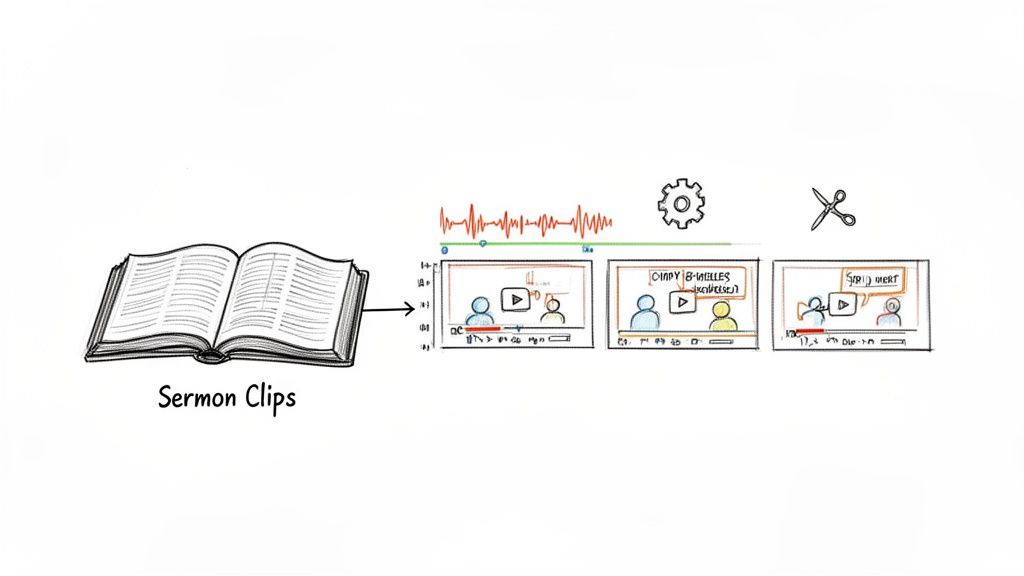
Your weekly sermon is a goldmine of powerful, ready-to-share content just waiting to be discovered. Inside every message are memorable quotes, relatable stories, and key biblical insights that can encourage people far beyond your church walls. The real challenge? Figuring out how to turn a 30-minute teaching into a handful of compelling, 60-second video clips for social media.
This very process is the core function of a specialized reel shot guide service for ministries. It’s about so much more than just trimming a video. It's about finding the most impactful moments that can stand on their own and stop someone from scrolling. But doing this by hand is incredibly time-consuming for your church staff.
Pinpointing the Most Impactful Moments
Repurposing sermons effectively starts with learning to listen for the "golden nuggets." These are the moments that make you lean in—a powerful one-liner, a vulnerable story, or a profound truth explained in a simple, down-to-earth way. Those are the clips people will actually share.
A great strategy for expanding your church's reach is understanding how to make reels with existing video and transforming those longer sermons into captivating social media clips. But even with the best strategy, the manual labor can quickly overwhelm busy church staff and volunteers. This is where automation can be a complete game-changer for your ministry.
Automating the Sermon-to-Reel Workflow
What if your church had a tool that could act like a personal content expert, listening to every sermon and handing you ready-made Reels? That’s exactly what we built into ChurchSocial.ai with our Sermon Clip Creator. We designed it from the ground up to eliminate the most tedious parts of creating content for churches.
Here’s a look at how our AI automates the whole process for you:
- AI-Powered Transcription: First, our AI transcribes your entire sermon, creating a searchable text document of the message.
- Impactful Segment Identification: It then scans the transcript to pinpoint the most engaging parts—the powerful statements, compelling stories, and key teaching moments.
- Automatic Clip Generation: Finally, ChurchSocial.ai creates multiple short video clips, complete with dynamic, animated captions to grab attention, even for viewers watching with the sound off.
This intelligent system transforms a time-sucking task into a streamlined, automated workflow. Instead of your team spending hours hunting for one or two clips, you get a whole selection of high-potential moments delivered in minutes.
With ChurchSocial.ai, you’re not just trimming videos; you're multiplying your ministry's reach. You can learn more about how our AI gets this done in our deep-dive on how to auto-trim clips from sermons. Think of this tool as the ultimate guide, ensuring your message of hope consistently reaches your online community.
Polishing and Publishing Your Reels
Your church has captured some fantastic footage. Now what? Getting your video edited, captioned, and scheduled is the final—and most crucial—step to making an impact. This is where your hard work really connects with your online community.
Too often, this is where church communicators get stuck, burning precious hours on tedious tasks. A good process (or a great partner) helps you finish strong. The goal isn't just to post a video; it's to make this last mile as simple and effective as possible.
The Final Touches Before You Post
Before your church hits "publish," a few key details can make or break your Reel's performance. Don't skip these.
- Captions Are a Must: So many people scroll with the sound off. Adding clear captions ensures your message actually lands, no matter how someone is watching. It’s also a simple, powerful way to make your content accessible to everyone.
- Choose Your Audio Carefully: Trending audio can give you a quick visibility boost, but it has to fit the moment. Does the sound match your church’s tone and the video's message? Sometimes, the most powerful audio is the authentic voice from the original clip. Trust your gut.
- Write a Caption that Connects: Your text should do more than just describe what’s happening in the video. Ask a genuine question. Encourage people to tag a friend who needs to hear it. Invite them to share their own experience. This turns passive scrolling into active engagement.
Think of it like setting the table before a meal. You’ve prepared a wonderful dish (your video), but the presentation and the invitation are what make people feel welcome and eager to dive in.
From Raw Footage to Scheduled Post
This is exactly where we designed ChurchSocial.ai to step in, acting as your all-in-one content hub. We've built in all the tools your church needs to take raw footage and turn it into a polished, scheduled post in minutes, not hours.
Instead of jumping between different apps for editing, graphic design, and scheduling, our platform puts everything in one place for your church. It’s about making an expert-level process accessible to everyone.
With ChurchSocial.ai, your church can:
- Create Professional Graphics & Carousels: Use our built-in graphic templates and editor to design eye-catching covers, photos, and carousels for your Reels and posts. This gives your entire feed a clean, cohesive, and professional look.
- Generate Post Copy with AI: Stuck on what to write? Our AI can draft compelling captions based on your video's content, saving your team a ton of time and creative energy.
- Schedule Everything with Ease: Our simple drag-and-drop calendar lets you visually plan out all your church's social media content, including Reels, across every platform you use.
If you’re just getting started and need a solid primer on the fundamentals, be sure to check out our complete guide on video editing for beginners. We built our system to empower your church to consistently share its message with excellence and ease.
Common Questions About Church Video Ministry
Jumping into video ministry for your church can feel like a huge step, and it's totally normal to have a few questions. Let's tackle some of the most common concerns we hear from church leaders and volunteers just like you.
How Much Time Will This Actually Take?
Let's be honest, the old way of making a Reel could eat up an entire afternoon. Your team would have to re-watch the sermon, hunt for the perfect clip, edit it down, add captions, and then finally get it posted. It’s a ton of work.
We built ChurchSocial.ai specifically to solve that problem. Our AI Sermon Clip Creator can pull several powerful, shareable clips from a single sermon in just a few minutes. Combine that with our templates and simple content calendar, and your church can map out its whole week of social media in less than an hour.
Do We Really Need a Fancy Camera?
Absolutely not. The smartphone in your pocket is a powerhouse. It shoots incredible, high-quality video that's more than good enough for social media. This guide is all about teaching your church the techniques to make the gear you already have look professional.
Key Takeaway: Clear audio and good lighting will make a much bigger difference than an expensive camera. A simple clip-on microphone is one of the best investments your church can make to instantly boost its video quality.
What If No One on Our Team Is a "Tech Person"?
That’s exactly who we designed ChurchSocial.ai for. We built it for ministry teams, not for IT experts. If you can handle writing an email, you have all the skills you need to use our platform.
From the one-click AI content creation to the visual drag-and-drop calendar, every feature is designed to be straightforward. We wanted to tear down the tech hurdles that keep so many churches from connecting with their community online. Think of it as your own digital reel shot guide service, built right into the software.
How Do We Make More Than Just Sermon Clips?
Sermons are a fantastic source of content, but they're just the beginning. ChurchSocial.ai is a complete content tool for your church. You can easily create all sorts of posts to show what your church is all about.
- Graphic Templates: Jump into our library of professionally designed templates to create beautiful graphics for event announcements, volunteer thank-yous, or shareable quotes. No graphic design skills required.
- Calendar Integration: We connect directly with church calendars like Planning Center. This lets our AI suggest content ideas for your upcoming services, small groups, and outreach events, so your social media always feels fresh and timely.
Ready for your church to get back the hours you've been spending on social media and start seeing a bigger impact? ChurchSocial.ai is the all-in-one platform built to serve your church. Start your free trial today and see how easy it can be.


