
Think of a sermon video illustration as a powerful, bite-sized highlight reel from your weekly message. It’s a short, engaging video clip built specifically for social media. Its job is to grab attention, drive home a single important truth, and carry your church's message well beyond your building's walls.
Why Your Church Needs Short-Form Video
Let's be honest: in a world of endless scrolling, getting someone to pause and listen is a real challenge. That's why short, compelling video content has become one of the most important tools for modern ministry. It's not just a passing trend—for many people online, it's the new front door to your church.
We know what you might be thinking. For churches with smaller teams or volunteer-run media, the idea of adding "video producer" to the job list feels completely overwhelming. But what if we saw it not as another burden, but as a massive opportunity for outreach?
The Undeniable Power of a Share Button
The numbers behind video’s reach are hard to ignore. Video content is a staggering 1200% more likely to be shared on social media than text and images combined. That makes it a true powerhouse for spreading your message.
On top of that, studies show that nearly 70% of people who watch religious videos do so every single week. There's a huge, spiritually hungry audience out there actively looking for encouragement online.

Making Video Ministry Simple for Any Church
This is exactly why we built ChurchSocial.ai. We saw this challenge and created a platform to solve it for churches just like yours. You shouldn't need a big production team or fancy software to create meaningful content.
With ChurchSocial.ai, your church can:
- Create AI-generated reels right from your sermon transcript or audio file.
- Generate an entire week of content—including social posts, blogs, and more—from a single sermon.
- Use our graphic templates and editor to create and post stunning photos and carousels.
- Easily manage and update all your social media with our simple drag-and-drop calendar, which integrates with tools you already use like Planning Center.
Our mission is to empower any church volunteer or staff member—no matter their tech skills—to plan and manage their social media in minutes, not hours. A dynamic video ministry should be achievable for every church.
By turning your weekly sermon into shareable social media clips, you amplify its impact far beyond Sunday morning. If you want to dig deeper into this, take a look at our full guide on creating powerful videos of sermons for your ministry.
Finding the Golden Nugget in Your Sermon
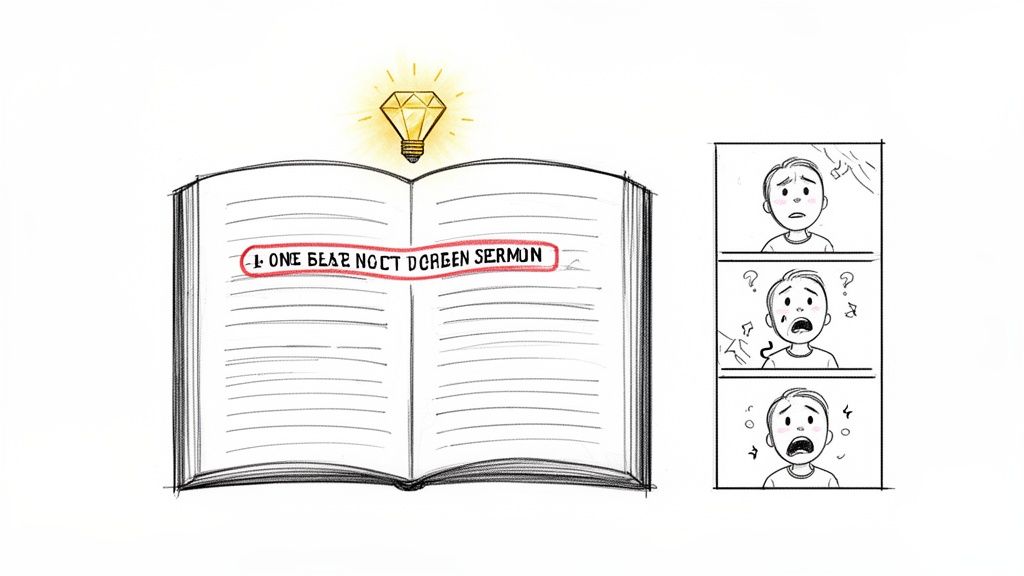
Every sermon has at least one "golden nugget"—that one powerful, self-contained moment perfect for a sermon video illustration. But how do you spot it in a 30 or 40-minute message? The trick is to stop thinking about the sermon as a whole and start listening for the parts that make you lean in.
These moments are usually built around a single, compelling takeaway, a deeply personal story, or a question that just hangs in the air long after it’s asked. These are the pieces that truly connect with people, whether they're in the pews or scrolling through their phones.
What to Listen For
As you review the sermon recording or transcript, keep an ear out for a few specific triggers. Don't worry about finding a long segment; the best clips are often short, sweet, and to the point.
- A powerful story: A raw, personal anecdote or a biblical narrative told with fresh eyes creates an immediate emotional hook.
- A single, clear takeaway: Look for that one sentence that beautifully sums up the entire point in a way people will remember.
- A challenging question: A question that makes someone pause and reflect is the ultimate scroll-stopper.
Of course, manually digging through a full sermon transcript is a huge time sink for any church team, big or small. This is exactly where modern tools can completely change the game for your ministry.
The goal isn't just to find a clip, but to find the right clip—the one that feels like a complete thought and offers real value to someone scrolling their feed, all in under 60 seconds.
With a platform like ChurchSocial.ai, the AI does the heavy lifting for you. It analyzes your sermon transcript and automatically suggests the most powerful, shareable segments. This feature alone can give hours back to your staff or volunteers, freeing them up to focus on ministry instead of media management. If you want a deeper dive, check out our guide on how to create powerful clips from your sermon video.
From Nugget to Narrative
Once you've got your golden nugget, the next step is to frame it with a simple narrative structure. Even a 30-second video needs a beginning, a middle, and an end to feel satisfying. This is where a quick storyboard comes into play.
A storyboard doesn't need to be some complex, artistic endeavor. It can be as simple as three boxes sketched on a whiteboard to map out the flow.
To make it even easier, here's a checklist you can use to walk through the planning process. Think of this as your pre-production guide to make sure you're heading in the right direction before you ever hit "record" or "export."
Sermon Illustration Planning Checklist
| Phase | Action Item | Tool/Tip |
|---|---|---|
| Concept | Identify the core message or "golden nugget" from the sermon. | Listen for a personal story, a key takeaway, or a powerful question. |
| Hook | Brainstorm the first 3 seconds. How will you grab attention? | Start with the question, a bold statement, or intriguing B-roll footage. |
| Body | Outline the main point or story being told in the clip. | Keep it concise. Focus on delivering one clear idea effectively. |
| Call to Action | Decide on the final message. What do you want viewers to do or feel? | This could be a simple "Think about it," a website link, or service times. |
This simple planning process ensures your sermon video illustration doesn't just start and stop out of nowhere. By integrating with tools like Planning Center, ChurchSocial.ai helps you align your social media content with upcoming sermon series and church events, making your entire communications strategy feel cohesive without the extra administrative headache.
Creating Stunning Videos Without a Production Team
Many churches believe that producing a high-quality sermon video illustration demands expensive cameras and a skilled production crew. The good news is this is no longer the case. You can create engaging videos for your ministry with minimal equipment.
For years, the standard advice for DIY video has been to use your smartphone. Simple techniques like facing a window for natural light and using a small microphone can greatly improve video quality. These small changes make a significant difference.
However, this process still requires shooting, transferring files, and editing. These are all time-consuming steps that busy church staff may not have time for.
The Ultimate Production Shortcut
It is now possible to bypass the entire production process. You can create a visually appealing video without using a camera, setting up a microphone, or opening any editing software. This is achievable through modern technology.
The real breakthrough for small churches is realizing you don’t have to shoot video at all to create compelling visual content.
This is where ChurchSocial.ai becomes a valuable partner for your ministry. Our platform was built to solve this problem, allowing anyone on your team to create videos in minutes.
From Transcript to Video in Minutes
The AI Sermon Clip Creator is a powerful tool within ChurchSocial.ai. It changes the workflow for creating sermon video illustrations. Instead of filming, you can simply upload your sermon's audio file or a text transcript.
The AI then generates a complete video. Features include:
- Dynamic text animations that highlight key phrases.
- Engaging background visuals that match your message.
- Automatic captions for silent viewing on social media.
This transforms a complex task into a simple, three-step process: upload, generate, and share. You no longer need a media team to produce consistent video content. With ChurchSocial.ai, you can repurpose a sermon into an entire library of social media content, from AI-generated reels to graphics, using our templates. It can all be managed in our drag-and-drop calendar, which integrates with Planning Center to make social media management effortless.
From Clip to Polished Post in Minutes
Alright, you’ve picked out the perfect clip from the sermon. Now what? This is where the magic really happens—transforming a simple recording into a polished, shareable sermon video illustration that’s ready for your church's social media feed.
In the past, this step was a massive time sink. It often required hours of fiddling with complex software and a pretty steep learning curve. Honestly, it was a major roadblock for many churches.
But today, AI-powered tools have completely flipped the script on this process. Instead of manually slicing clips, painstakingly adding captions, and reformatting for every platform, you can get it all done with just a few clicks. This shift makes creating consistent, high-quality video content a reality for any church, no matter how small your team or budget.
The AI-Powered Editing Advantage
Imagine dropping a full sermon transcript into a tool and, just a few minutes later, getting back a handful of short, dynamic videos. They’re already perfectly formatted for Instagram Reels, TikTok, and YouTube Shorts. That's exactly what ChurchSocial.ai's AI Sermon Clip Creator is built to do.
The AI isn’t just randomly chopping up your pastor’s message. It’s been designed to think like a communications director:
- It finds the best moments: The system scans the entire transcript to pinpoint the most compelling quotes, powerful stories, and impactful one-liners—the stuff you'd look for yourself, but it does it in seconds.
- It adds dynamic captions: We all know most people watch videos on social media with the sound off. The AI automatically generates engaging, easy-to-read captions to make sure the message lands.
- It formats for every platform: It automatically creates vertical videos optimized for mobile viewing, saving you the headache of re-editing the same clip over and over for different channels.
For so many churches, the time savings are game-changing. What used to be a multi-hour project for a skilled volunteer is now an automated task that takes less time than making a pot of coffee.
If you're looking for more ways to turn your sermon notes into compelling visuals, you can find some great ideas in guides for an AI video generator from text. These resources can offer a fresh perspective on bringing your words to life.
Why Speed and Brevity Matter
This isn't just about working faster; it's about connecting with your audience on their terms. We’re all fighting for attention in a fast-scrolling world. Research continually shows that the average human attention span is shrinking, which means a short, powerful sermon clip has never been more vital for churches. These concise videos are perfectly suited to capture attention and deliver a meaningful message quickly, as this research on video engagement highlights.
Keeping Your Church’s Brand Identity Consistent
Creating a great video is only half the job. You also need to make sure it clearly looks and feels like it came from your church. When your social media feed is a jumble of different fonts, random colors, and inconsistent logos, it can look chaotic and unprofessional.
Consistent branding, on the other hand, helps your content stand out and builds instant recognition with your community online.
With a tool like ChurchSocial.ai, you can lock in a polished, consistent look across all your content. The platform has built-in graphic templates and a simple editor that lets you:
- Add your church’s logo to every single video.
- Set your specific brand colors and fonts.
- Create a cohesive visual style for everything you post.
This all-in-one approach ensures that every sermon video illustration, graphic, and post you publish is instantly recognizable and professionally branded, strengthening your church’s presence online. You can dive deeper into this by checking out some of the best AI video editing software designed for ministries like yours.
Multiplying Your Message Across All Platforms
Creating a powerful sermon video illustration is a huge accomplishment, but the work isn't over once the video is exported. A great video only makes an impact if people actually see it. Now, it's time to shift from creation to smart distribution, turning one Sunday sermon into a full week of outreach.
Scheduling posts across different social media platforms—each with its own ideal posting time—can feel like a full-time job. With a tool like ChurchSocial.ai, however, this becomes much more manageable. You can use our simple drag-and-drop calendar to plan, create, and schedule your finished video and all other content across Facebook, Instagram, TikTok, and YouTube in minutes, not hours.
Beyond the Video: The Power of Repurposing
The real potential is unlocked when you start to see your sermon as more than just a single video. Your pastor's message is a rich source of content that can be transformed into various formats, each designed to connect with different people on different platforms.
We call this content multiplication. Inside ChurchSocial.ai, you can upload a single sermon transcript and let our AI generate an entire suite of assets. This is how you can get the most mileage out of your pastor’s message and give your communications team or volunteers hours of their week back.
Your sermon is the wellspring. From one message, you can create a week's worth of blog posts, social media updates, graphics, and discussion points, ensuring the core truth reaches people long after Sunday is over.
From One Sermon to a Full Week of Content
So what does this actually look like day-to-day? Imagine you upload your sermon transcript on Monday morning. By lunchtime, you could have an entire week of content ready and scheduled.
- An SEO-Optimized Blog Post: The AI can generate a thoughtful blog post from the sermon’s main points, perfect for your church website. This helps your site show up in local search results when people in your community are looking for answers.
- Engaging Social Posts: Pull out key quotes or ask thought-provoking questions from the sermon to create text-based posts. These are great for starting conversations on Facebook or X (formerly Twitter).
- Beautiful Carousel Graphics: Use the built-in graphic templates and editor to design stunning carousels for Instagram, highlighting the sermon's most powerful statements.
- Small Group Discussion Questions: The AI can even draft a list of questions based on the sermon, giving your small group leaders an instant resource for their next meeting.
The diagram below shows how AI can help streamline the initial video creation itself, which is the starting point for this whole content strategy.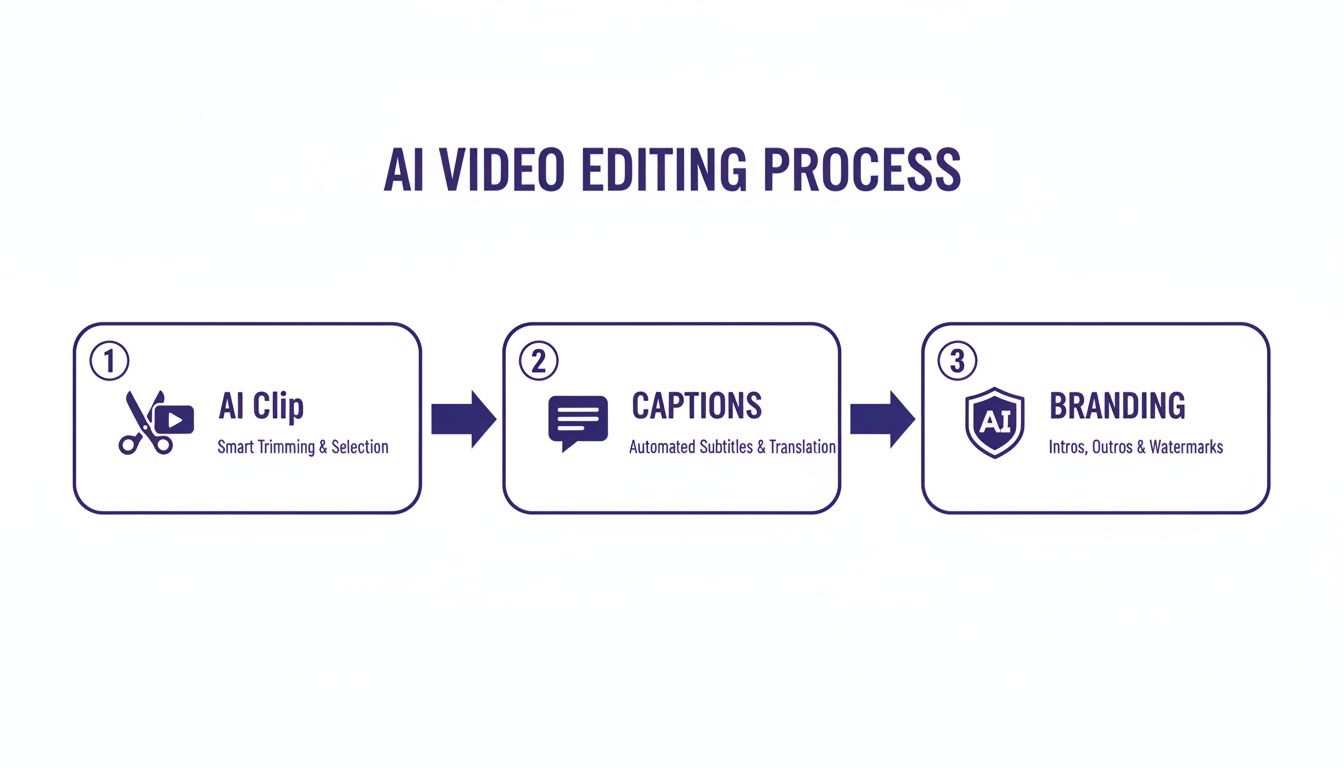
This kind of automated workflow—from creating a clip to adding branding—frees you up to focus on strategy instead of tedious tasks. To truly maximize your reach, it's worth exploring different methods for linking social media platforms like Instagram and TikTok to work together.
This integrated approach is more important than ever. In 2023, only 1% of pastors felt their churches were 'very effective' at evangelism, a steep decline from 13% in 2015. Short-form sermon videos are 1200% more shareable than other content types, offering a tangible way to push back against this trend and extend your church's reach. Learn more about these urgent trends from a recent ministry report. This is how you make one Sunday message work for your ministry all week long.
Frequently Asked Questions
Jumping into a sermon video illustration strategy can feel like a huge undertaking, but it’s probably more manageable than you think. Let's walk through some of the most common questions we hear from ministry leaders just like you.
We Have Zero Video Experience Can We Still Do This
Yes, absolutely. This is the exact reason tools like ChurchSocial.ai exist. You don't need a background in video production to create powerful, moving content for your church.
Our AI Sermon Clip Creator is built to handle the technical work for you. Just upload your sermon audio or transcript, and our AI will generate dynamic AI Reels. From there, you can use our templates and editor to create graphics and carousels, then schedule everything on our easy-to-use calendar.
How Long Should Our Sermon Clips Be
For platforms like Instagram Reels and TikTok, the sweet spot is between 30 and 90 seconds. This length is perfect for capturing someone's attention and making a point before they scroll to the next video.
The AI inside ChurchSocial.ai is trained to find those powerful, self-contained moments from your sermon that fit right into this timeframe. It ensures every clip you post is short, punchy, and built for impact.
The goal is to deliver a complete, meaningful thought that resonates with someone in under a minute and a half. This brevity is key to effective digital outreach.
How Do We Choose the Best Part of a Sermon
You're looking for the "golden nuggets"—those moments that stand on their own. Think about a single, powerful takeaway, a short and compelling story, or a question that makes people stop and think.
Of course, you can also let technology find them for you. The AI in ChurchSocial.ai analyzes your sermon transcript and automatically suggests the most shareable and impactful segments. This feature alone can save your team hours of sifting through recordings to find that one perfect moment.
Is Managing Video for Social Media Too Time-Consuming
If you're doing it all by hand, it can definitely feel that way. Juggling different video specs, writing captions from scratch, and sticking to a consistent posting schedule is a big job for any team, especially volunteers.
This is where an all-in-one platform really makes a difference. With ChurchSocial.ai, you can create, schedule, and manage all your church's social media in one place. Our simple drag-and-drop calendar allows you to plan out your content weeks in advance, so you spend less time on administration and more time on ministry.
Ready to stop spending hours on social media and start multiplying your message? ChurchSocial.ai gives you all the tools you need—from AI-generated reels and blog posts to professional graphics and an easy-to-use calendar. Discover how ChurchSocial.ai can transform your church's social media today.


