
Saturday night always looks the same in a church office. Someone is still tweaking the event graphic, the announcement slide is already locked for Sunday, and the pastor is asking why the youth rally, ladies' brunch, or outreach day feels like it appeared out of nowhere. That's not a motivation problem. It's a workflow problem.
Social media for event promotion works when it starts from the calendar and sermon assets your church already has, then turns them into a repeatable sequence of posts instead of a weekly scramble. The churches that fill seats usually don't post more by accident. They plan earlier, choose fewer platforms, and reuse the content sitting in Planning Center, sermon archives, and volunteer design files. With that in place, one planning session can drive the whole run-up to the event, from awareness to reminder posts to recap content.
Why Most Church Events Get Lost on Social Media
The most common failure point is timing.
A team posts about the event on Tuesday, finishes the graphic on Thursday, and hopes people remember by Sunday. That creates activity, but it usually arrives too late to build interest. Event guidance repeatedly recommends starting social promotion 6 to 8 weeks before launch for larger events, then maintaining 2 to 3 posts per week, with teaser content first and more detailed speaker, session, or giveaway posts later, because social media works best as a build-up channel rather than a last-minute bulletin board. The same practical logic applies to church events, whether it's a conference, worship night, youth gathering, or outreach day. Zoho Backstage's timing framework points in that direction.
The actual problem lies in the handoff
Most churches already have the raw material. The calendar has the event date. The pastor has the sermon. The youth pastor has the key moments. The volunteer designer has the template. What's missing is a system that turns those pieces into scheduled content before anyone feels rushed.
Practical rule: if the event details live in one place and the social copy lives in another, the team will always feel behind.
That is why this playbook starts with the church calendar, not the finished post. A Planning Center event, a sermon clip, a speaker quote, and a registration link can all become a post sequence if the process is designed once and reused. Churches often waste time rebuilding the same assets each week, while the better path is to turn what already exists into ready-to-publish content. Tools like ChurchSocial.ai fit that workflow in a practical way, because they help churches pull event details and sermon assets into one place instead of starting over every week.
What the payoff looks like
A solid church event system does more than produce extra posts. It gives people a cleaner path from awareness to attendance. The earliest posts establish that the event exists. The middle posts answer questions and build trust. The final posts create urgency, show activity, and give people a reason to register now.
The sections ahead follow that sequence, starting with the decision points, then the platform mix, then the timeline, the copy, the measurement, and finally the volunteer workflow. Once those pieces are in place, one planning session replaces the weekly scramble, and the content you already have is enough to keep the event moving.
Set Goals and Audience Before You Write a Single Caption
Before anyone opens a caption draft, the church team needs plain answers to four questions. What is the one outcome? Who exactly is being invited? What action do you want them to take? What would success look like a week after the event? If those aren't clear, the captions drift, the visuals drift, and the post choices drift too.
Four questions that sharpen every post
A youth rally usually has a different goal than a seniors' luncheon or a community outreach day. The youth rally might aim to pack the room and get students to bring friends. The luncheon might aim to make older members feel personally invited and cared for. The outreach day might aim to recruit volunteers and help the neighborhood understand the church's presence. Same church, different ask, different tone, different visuals.
The action step should be just as specific. “Come if you can” is weak. “Register your student,” “Reserve a meal seat,” or “Sign up for a volunteer slot” gives the post a job. Success also needs a simple definition. For one event it might be conversations started. For another it might be first-time guests. For another it might be volunteer turnout or a smoother check-in line.
Matching the message to the audience
Audience clarity changes more than the caption. It affects the platform, the format, and the design style. A youth event can lean on short video, reels, and energetic stories. A churchwide conference might need Facebook event posts, carousel slides, and a clear event page. A seniors' luncheon may work better with simple graphics, email, and a private group post where members already pay attention.
That's also where church calendars matter. If Planning Center already lists the date, audience, location, and registration details, the writer doesn't start from a blank page. The brief is half-built already. A drag-and-drop calendar in ChurchSocial.ai can surface those event details alongside the sermon assets and schedule, so the team spends time shaping the message instead of hunting for facts.
Useful filter: if you can't say who the post is for in one sentence, the post is probably trying to talk to everyone and persuading no one.
A short planning brief is enough. Write the event name, one sentence on the goal, one sentence on the audience, one action, and one success marker. That one page makes the rest of the content easier to approve, easier to schedule, and much harder to muddle.
Pick Two or Three Platforms That Fit the Event
Church teams lose time when they try to keep every channel active for every event. The better move is to choose the few platforms that fit the audience and the content you can produce. A social intranet can help internal coordination, which is why resources like Pebb's definition of a social intranet are useful when a church needs a private place for volunteer communication, while public promotion should stay focused on the channels that move attendance.
Platform fit for church events
| Platform | Best event type | Strongest format | Suggested cadence |
|---|---|---|---|
| Community-wide events, churchwide gatherings, registration-driven events | Event pages, carousels, live updates | Start early, then steady posts several times a week as the event gets closer | |
| Youth audiences, visual storytelling, behind-the-scenes promotion | Reels, stories, carousels, polls | Use teaser content and a consistent story rhythm leading up to the event | |
| TikTok | Sermon-derived reels, quick behind-the-scenes clips, reach beyond the congregation | Short vertical clips | Use short clips regularly when you have strong sermon or rehearsal footage |
| YouTube Shorts | Sermon clips, testimony snippets, bite-size teaching moments | Short-form video | Post when you can reuse sermon material cleanly |
| YouTube long-form | Worship nights, teaching events, extended recaps | Longer video | Use for the few events where longer content actually adds value |
| Email and private group | Current members, volunteers, logistics, internal reminders | Direct updates, sign-up links, coordination posts | Send as needed for coordination, not broad discovery |
Facebook still works well for event pages because people know where to look for details. Instagram is better for making the event feel alive, especially when the audience is younger or more visually driven. TikTok and YouTube Shorts are strong when the church can repurpose sermon clips or backstage footage, which is why sermon-based content is such a practical advantage for churches. YouTube long-form makes more sense when the event itself has teaching or worship content worth watching in fuller form.
The format matters as much as the platform
Carousels are useful when the event needs more than one idea, such as schedule, speaker, and registration in one package. Short reels work when you already have footage that can stop the scroll. Live updates matter during the event because they show momentum to people who are still deciding, and they give attendees social proof that the room is active.
Practical rule: pick the platforms that support your actual content pipeline, not the platforms that sound impressive in a meeting.
That's the key trade-off. A church with strong sermon footage and a small team can usually do better with three disciplined channels than with six neglected ones. If the goal is to fill seats, reduce friction, and keep volunteers sane, selective consistency beats scattered presence every time.
Your Six to Eight Week Promotional Timeline
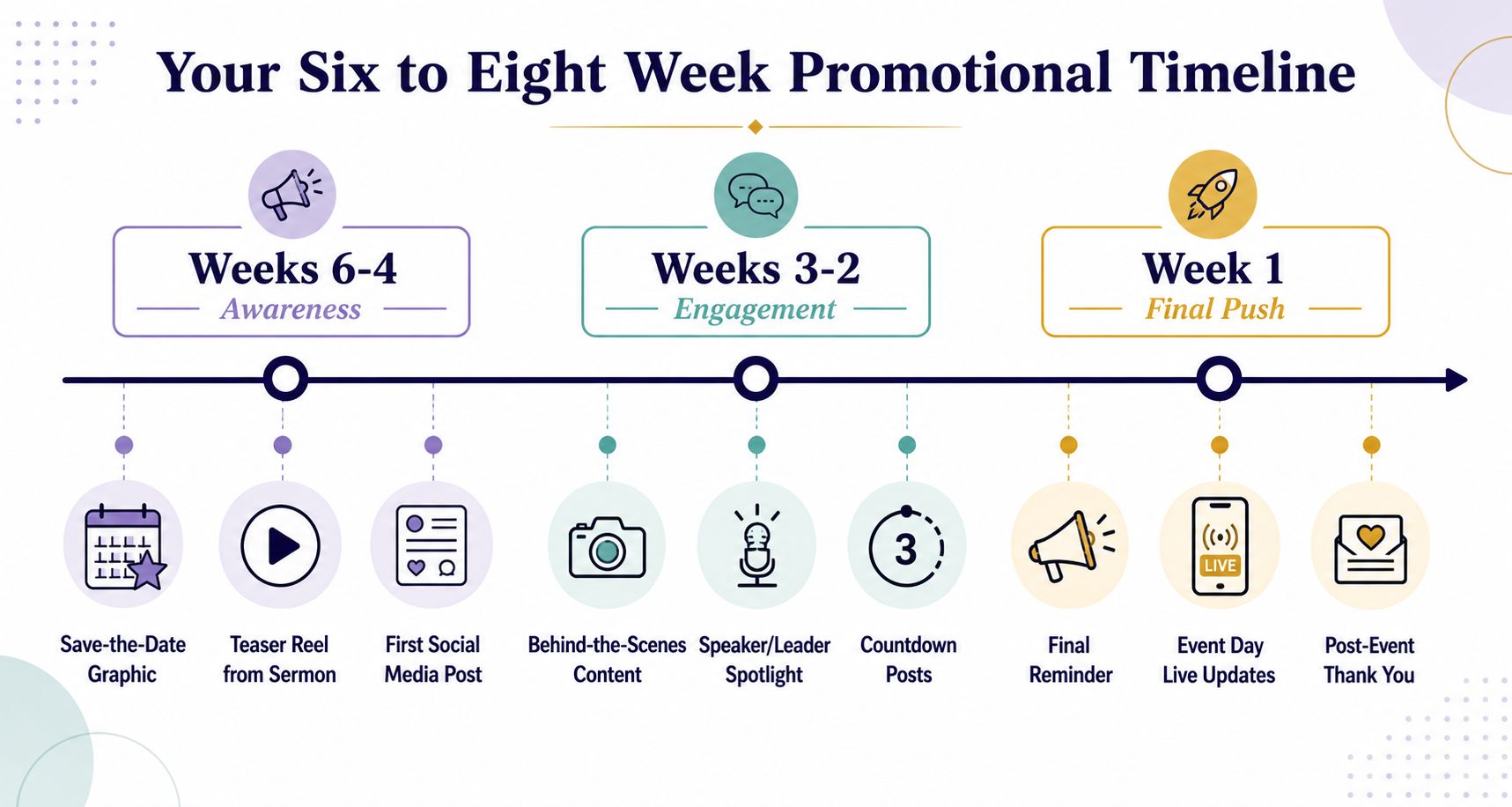
The strongest event promotion does not start with a post. It starts with a sequence. For larger church events, the safer move is to begin the push 6 to 8 weeks ahead, then keep a steady pace instead of waiting for a burst of inspiration. The week-by-week structure below keeps the work moving without turning every post into a new project. Early-start guidance and a steady cadence are consistent with Zoho Backstage's event-marketing timing guide and Success's social-media event guidance.
Weeks six to four build awareness
Start with a save-the-date graphic, then publish a teaser reel pulled from a recent sermon or a clip from the leader hosting the event. Follow that with a “why this matters” post that connects the event to a real need in the church or community. If the event came from Planning Center, the date, time, location, and audience are already sitting in the system, so the first few posts can focus on clarity instead of backfilling details.
Short teaser video earns its place. Event promotion guidance usually favors concise clips because they stop the scroll without asking for much attention. For churches, that often means using one strong sentence from a sermon transcript or a direct invitation from the pastor, then letting the visual do the rest.
Weeks three to two add detail
Once people know the event exists, they need reasons to care. Use this stretch for speaker or leader spotlights, schedule carousels, registration pushes, and any incentive you want to attach to early action. A giveaway can work if it is simple and tied to the event's purpose. A sign-up deadline can work if it gives people a clear next step.
Use transcript snippets here too. A good line from Sunday's sermon can become a caption hook, a quote graphic, or the opening sentence of a reel. That kind of repurposing keeps the content grounded in something the church already produced instead of forcing new filming every time. For churches that want to turn a sermon moment into a stronger promo asset, a short announcement video church clip can carry the message without adding much production load.
Week one and event week create urgency
The final stretch is about momentum. Countdown posts, last-chance reminders, rehearsal clips, and setup footage all help the event feel close and real. On event day, post live updates, attendee shoutouts, and story takeovers. The point is not polish. The point is proof that the room is filling and something worth attending is happening now.
The day after keeps the event from disappearing
Recap content should go live quickly. Thank-you posts, a few testimonials, and one or two moments that show impact help the church extend the life of the event. That recap also becomes the first seed for the next gathering, because people remember what they saw, not just what was announced.
Working rule: if a post can be reused in the next event cycle, it should be saved, tagged, and scheduled into the archive instead of being treated as one-and-done content.
Sample Copy, Captions, and Visual Templates You Can Reuse
Most church teams don't need more inspiration. They need caption forms that are easy to fill in under pressure. The cleanest structure is simple, a hook, a value line, and a clear action. When that pattern is repeated across the event cycle, the team moves faster without sounding repetitive.
Four caption formulas that cover most church events
- Save-the-date: “Mark your calendar for [event name]. This is a night for [audience] to [main outcome]. Tap the link to register or save your spot.”
- Leader intro: “Meet [name], who will be leading [event name]. They'll help us focus on [value topic], and you won't want to miss what they'll share.”
- Countdown: “We're getting close to [event name]. If you've been meaning to register, now's the time to take the next step.”
- Live update: “We're live at [event name], and the room is already moving. If you're still on the way, come join us, and if you're following online, keep watching for more highlights.”
Each one can be tightened into a short hook of about a sentence, then expanded with one line of meaning and one line of action. That keeps the copy readable on mobile and easier for volunteers to review quickly.
Keep visuals intentional
Images should avoid people whenever possible, especially when the event can be represented by a clean graphic, a sermon slide, a sign, a whiteboard, a notebook, or a printed flyer. Text belongs where text makes sense, on a paper handout, a whiteboard, a sign, or as a post-production overlay. Random words floating in random places make the design look busy, not clear.
That's where reusable templates help. A volunteer can drop in the event name, date, and CTA without redesigning the post from scratch. If the church is using a sermon transcript as the source, the AI Caption Writer in ChurchSocial.ai can take a short bulletin blurb and turn it into a week's worth of caption options, while the Sermon Clip Creator can turn one Sunday message into multiple reels and quote graphics without extra filming. If you want a practical example of how churches think about announcement-style video, this church announcement video guide is a useful companion piece.
Hashtags should be simple and searchable
Keep the event hashtag short, memorable, and pre-tested for uniqueness before launch. Event promotion guidance also suggests using a mix of 1 to 2 popular hashtags and 1 to 2 niche hashtags based on social search volume rather than guessing, then placing the chosen tag everywhere attendees can see it. Eventbrite's social-media event guidance makes that case plainly.
A caption system like this does two things. It speeds up publishing, and it keeps the visual style consistent enough that people recognize the event at a glance. That recognition matters more than perfect originality.
Measure What Predicts Attendance
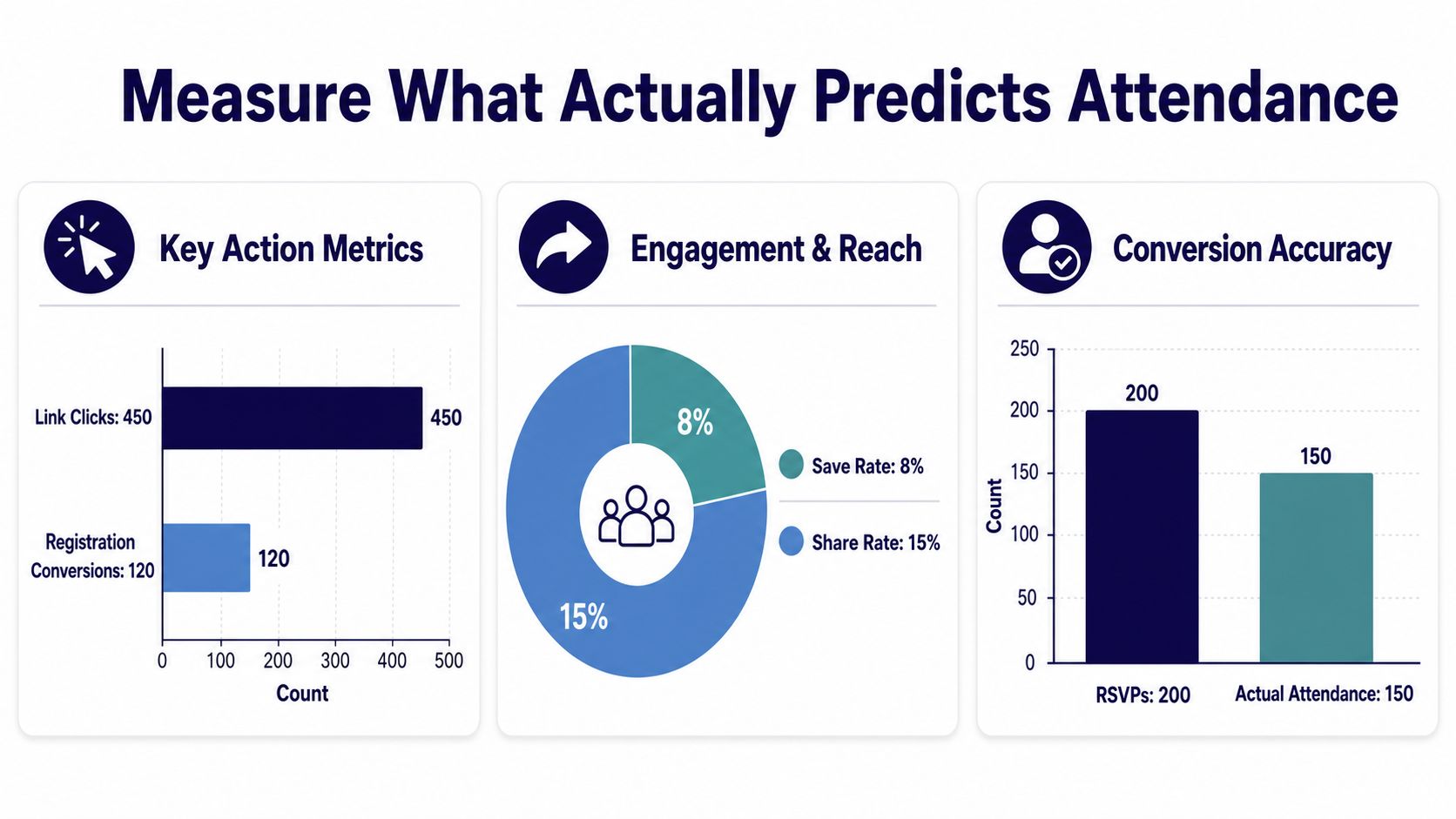
Likes are easy to celebrate and hard to trust. For church events, the cleaner question is whether a post helped someone take the next step. That means watching link clicks or registration conversions, save and share rates, and attendance versus RSVPs, then using those numbers to decide what to repeat next time. Event marketing guidance from Sociallyin points to the same gap, because too many teams stop at tactics like reels, hashtags, and live updates without connecting them to registration or attendance. Sociallyin's event strategy guide is useful precisely because it highlights that measurement gap.
Track the channel, not just the post
Eventbrite recommends using unique tracking links for each channel, including email, social media, display ads, and blog posts. That is a simple habit with a big payoff, because it lets a small church answer the question everyone asks after an event, which post or channel brought the guests. Eventbrite's master marketing guide also recommends keeping the event listing clear and easy to scan with location, time, category, and a brief description.
A basic UTM pattern can do the same job if the team is not using a formal event platform. The point is not advanced attribution. The point is separating Facebook from Instagram, reels from carousels, and email from organic reach so the next round of promotion starts with evidence instead of guesswork.
Pay attention to the signals that predict behavior
Instagram saves matter because they show someone thought the post was worth returning to. Facebook event responses matter because they show intent, even if the final turnout is imperfect. YouTube watch time on teaser reels matters because it tells you whether the clip held attention long enough to justify more of that format. Ignore vanity chatter that does not connect to an action.
A practical review with volunteer teams after an event keeps the focus on what to keep, cut, or test next.
- What worked: note the post, format, and platform that drove the clearest action.
- What flopped: identify the posts people ignored or the ones that looked good but did not move anyone.
- What to test next: pick two experiments, not ten, so the next event has a cleaner learning loop.
Practical rule: if a metric cannot help you choose the next post, it is probably not the metric the team needs.
A dashboard that folds these signals into the same calendar view used for planning keeps the review process visible. That matters for churches, because the same people who schedule the posts usually have to explain what happened after the event too.
For teams that want a clearer way to read those signals, measuring social media engagement for church events gives a useful starting point.
A Workflow That Fits a Volunteer Team
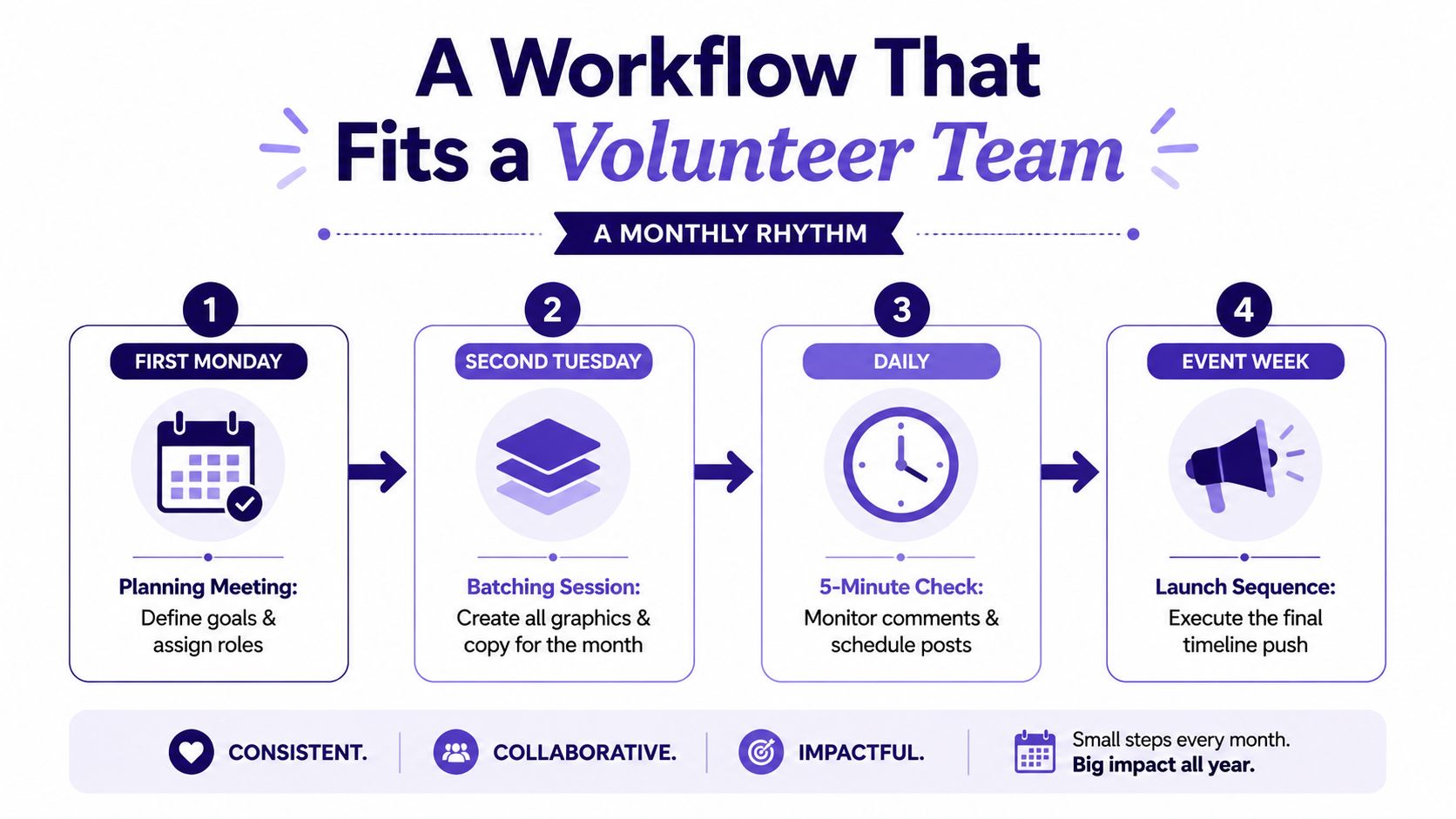
A volunteer team doesn't need a complicated marketing machine. It needs a rhythm it can repeat without burning out. The cleanest monthly pattern is one planning meeting on the first Monday, one batching session on the second Tuesday, five-minute daily checks for comments and DMs, and one Friday review to see what needs to change. That structure keeps the event calendar moving without asking volunteers to live inside it.
One calendar view is enough
When the church's Planning Center events flow into a drag-and-drop calendar, the team can turn one event into a draft post, a sermon clip, and a set of graphics without rebuilding the basics every time. The Sermon Clip Creator can fill the reels column, and the graphic templates can fill the rest. That means one volunteer can realistically draft a month of social content in a few focused hours instead of piecing it together across the week.
For churches evaluating software, this church event management guide is a good reference point for how event workflow and social planning can sit in the same system.
The checklist that keeps the next event sane
- Goal defined: one outcome, not five.
- Audience named: the exact group being invited.
- Platform picks made: two or three, not every channel.
- Captions drafted: save-the-date, leader intro, countdown, and live update.
- Visuals ready: templates, overlays, and sermon clips queued.
- Tracking link live: one link per channel.
- Post-event recap scheduled: thank-you and follow-up content already on the calendar.
When that checklist is printed and pinned, the next event starts from momentum instead of memory. The same playbook can be reused for conferences, worship nights, outreach days, and ministry launches because the workflow is built around the calendar and the assets churches already have.
If your church is tired of rebuilding event promotion from scratch, ChurchSocial.ai gives you one place to plan posts, turn sermons into reels and captions, manage templates, and keep the calendar tied to your event workflow. Visit ChurchSocial.ai to see how it can help your team turn existing sermon and Planning Center assets into a consistent social media system for your next event.


