
Saturday night, a church volunteer is still at the kitchen table, phone in hand, trying to turn Sunday's sermon into a clip before morning. A full-time job, family responsibilities, worship planning, and last-minute announcements have already filled the week. The volunteer wants to serve faithfully, but social media keeps becoming another place where the church feels behind.
That struggle usually isn't a lack of dedication. It's a lack of a dependable system. Social media management software gives a church one place to create, review, schedule, publish, and measure content instead of asking one person to remember every platform, image, caption, and event.
The right system works like a well-prepared service plan. It helps the team know what's coming, who's responsible, and what needs attention. The following guide explains how the category works, what churches should evaluate, and how ChurchSocial.ai fits sermon repurposing, church calendars, visual planning, and volunteer-friendly publishing.
Why Your Church Social Media Feels Overwhelming
At 10:45 on Saturday night, a volunteer opens the sermon recording on a phone. They scrub through the video, search for a sentence that might work as a short clip, take a screenshot for a quote graphic, and write a caption while trying not to wake anyone else in the house.
The post finally goes live. Sunday arrives. Then Monday brings a youth gathering announcement, Tuesday brings a small-group reminder, and Wednesday brings a request for a graphic promoting the next outreach event. Each task seems manageable on its own. Together, they create a constant stream of unfinished work.
The real problem is scattered work
Many churches manage social media directly inside each native app. A volunteer logs into Facebook for one post, Instagram for another, TikTok for a video, and YouTube for the sermon recording. Event details may live in Planning Center, images may sit in a shared drive, and approval may happen through text messages.
That arrangement makes the volunteer carry the whole system in their head. They must remember which post is approved, which event details changed, and which platform still needs content. If the volunteer gets sick, travels, or has a demanding week, the church's online presence slows down with them.
Practical rule: If a ministry task depends on one person remembering every detail, the church needs a process, not more guilt.
A social media calendar creates that process. Instead of opening several apps and wondering what to post, the team can view upcoming content in one visual workspace. A calendar entry can show the date, platform, caption, creative, approval status, and event connection. The volunteer can drag content into place and adjust it when the service schedule changes.
Presence matters more than frantic activity
Church social media isn't only promotional. It can remind a parent about children's programming, help a newcomer understand Sunday worship, extend a sermon conversation, or make a community event easier to find. Those ministry outcomes become harder to support when the communications team spends all its time copying and pasting.
Software doesn't replace pastoral judgment or a church's voice. It removes repetitive handling so volunteers can spend more attention on meaning, accuracy, replies, and people. The rest of this guide builds the idea step by step, from the basic definition to a practical church workflow.
What Social Media Management Software Actually Is
Think of social media management software as the church office's online control room. A Sunday service run sheet tells the worship team when the welcome begins, when the music changes, and who handles each transition. A social media calendar does something similar for digital communication.
The calendar becomes the hub. Facebook, Instagram, TikTok, and YouTube become connected destinations, or spokes. Content moves from one organized workspace to those channels, while the team keeps a record of what has been created, approved, scheduled, and published.
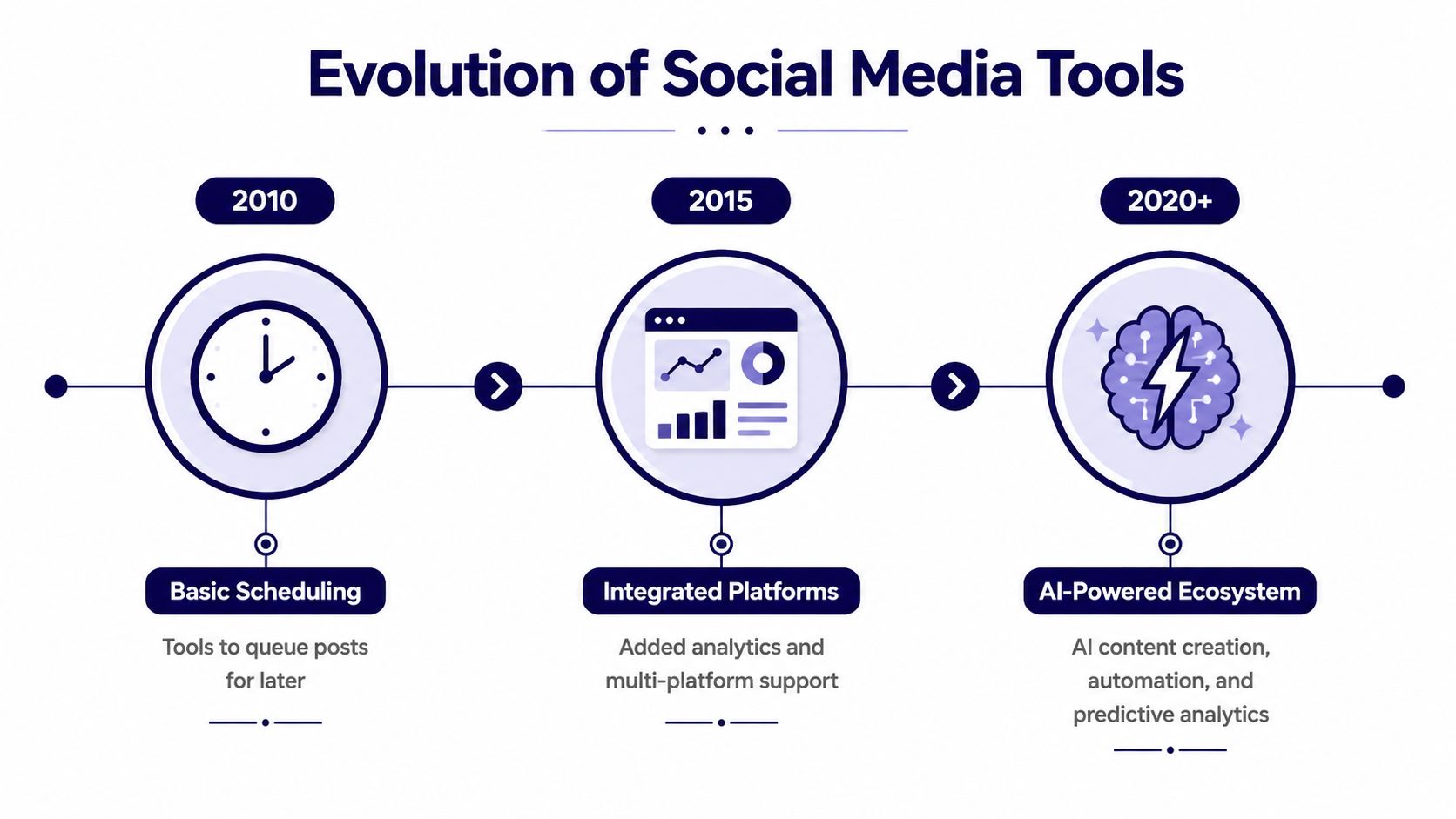
The category has grown from simple queues into broader publishing and measurement systems. One industry estimate projects the market rising from USD 31.72 billion in 2024 to USD 36.23 billion in 2025, then to USD 144.60 billion by 2034, implying a 16.62% CAGR over 2025–2034. That expansion helps explain why churches can now find tools that combine scheduling, content creation, and analytics in one environment. Market research on social media management software
The main features in plain language
Drag-and-drop calendar: The team sees the month as a ministry communication plan. For example, a volunteer can place a baptism announcement after the relevant service and move it when the date changes.
Scheduling and publishing: A post is prepared once and assigned a future publishing time. A communications pastor can schedule a weekend invitation while the staff is focused on worship preparation.
AI caption writing: An AI assistant turns a short prompt or sermon idea into a draft caption that a human can edit. A volunteer can start with a sermon theme instead of facing a blank text box.
Sermon clip creation: A recorded sermon and transcript can become short-form video ideas or clips. One message can support a week of conversation instead of appearing only as a full-length recording.
Graphic templates and editing: The team uses reusable designs for event invitations, quote graphics, and carousels. A volunteer without design training can work inside a consistent visual style.
Analytics dashboards: The church reviews reach, impressions, and engagement in an organized view. The team can compare content types and decide which messages deserve more attention.
Churches evaluating the wider category can also consult Gainsty's social media tools guide to understand how general platforms differ in scheduling, analytics, collaboration, and publishing. For a church-specific explanation of automated workflows, see social media automation for churches.
The important distinction is that the software isn't a faster way to post. It connects creation, planning, publishing, and review so the church can operate from a shared plan.
How Social Media Management Tools Evolved
The first generation of social media tools solved a narrow problem: publish a message later instead of opening an app at the exact moment it needed to appear. That was useful, but it left much of the work untouched. Someone still had to write every caption, create every image, remember every event, and inspect each platform separately.
As social networks became important channels for organizations, software makers added shared calendars, cross-platform publishing, reporting, approvals, and media libraries. The tool began to resemble a communications workspace rather than a simple alarm clock. Churches experienced the same shift because online channels became part of how people find services, receive reminders, and continue conversations during the week.
The growth of the category reflects that broader operational need. Industry reporting says the market was worth USD 17.5 billion in 2022 and was projected to exceed USD 51.8 billion by 2027, with a 24.2% CAGR. That forecast indicates that adoption accelerated in the early 2020s, rather than appearing only recently. Market growth analysis from MarketsandMarkets
Why AI changes the church workflow
The newest shift concerns content production. A general scheduler waits for someone to supply a finished post. An AI-enabled platform can help transform a sermon transcript into draft captions, discussion questions, blog content, and short-form video concepts.
That distinction matters for a small congregation. A volunteer may understand the church's voice and theology but lack video editing experience. AI can handle a first pass, while the volunteer checks the wording, selects the strongest moment, adds captions, and confirms that the final clip represents the message accurately.
The same development helps communications pastors manage volume without turning every idea into a separate project. A sermon can become a central source document, while the team adapts each output for its platform rather than copying one block of text everywhere.
Churches still need judgment. AI may miss context, flatten a nuanced teaching, or suggest language that doesn't sound like the congregation. The mature workflow therefore combines automation with review. Software handles repetition and organization. People protect accuracy, pastoral tone, and sensitivity.
A Week in the Life of a Church Using Social Media Software
Consider Harbor Fellowship, a fictional mid-sized church with one communications staff member and several volunteers. The team doesn't lack ideas. It lacks enough uninterrupted time to turn those ideas into finished, scheduled content.
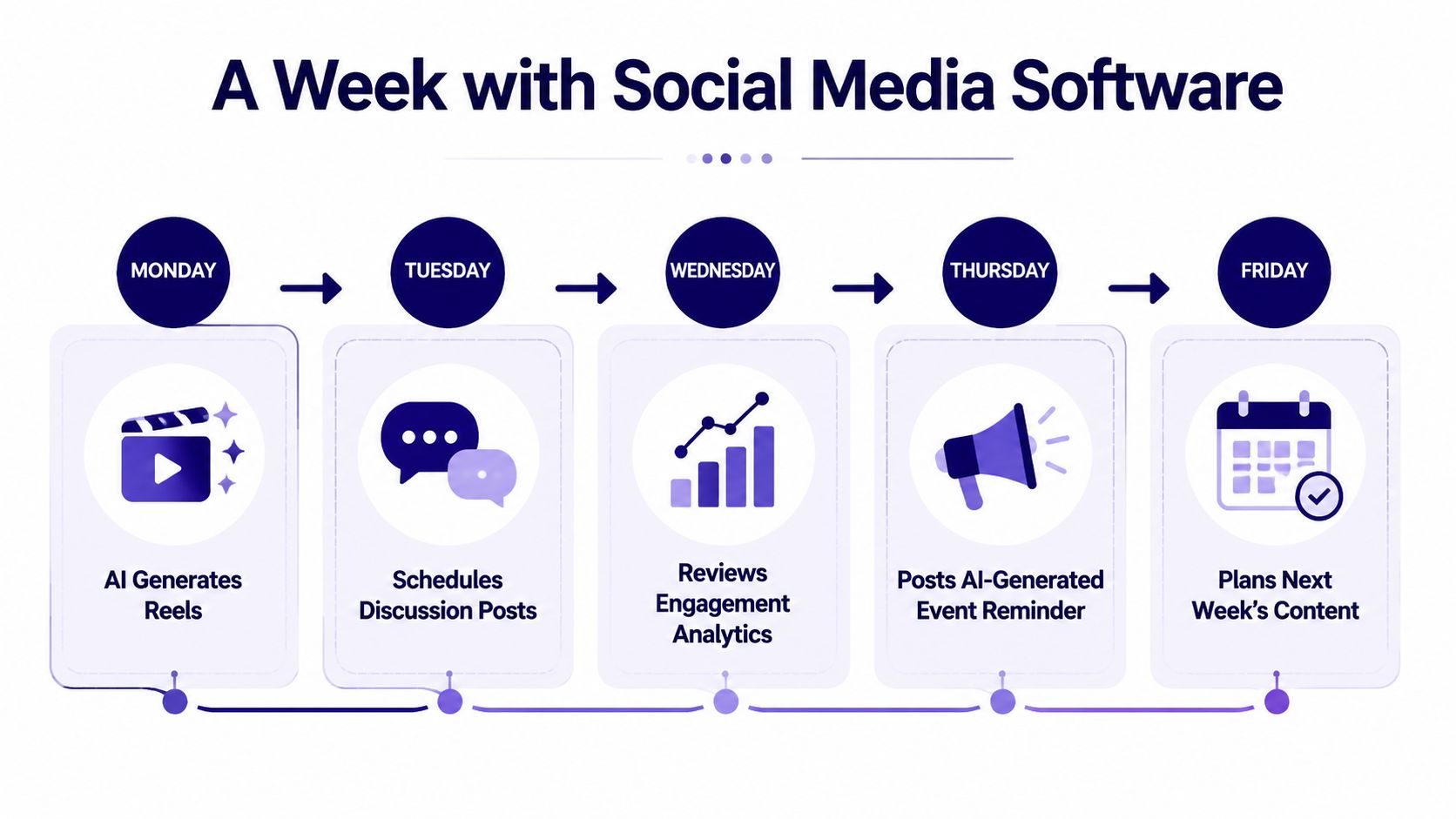
On Monday, the communications lead uploads the pastor's sermon recording to ChurchSocial.ai. The sermon transcript becomes the working source for several drafts, including social posts, discussion questions, a blog post, and short video content. The team reviews the suggestions and chooses the pieces that fit the church's voice and the week's priorities.
On Tuesday, a volunteer opens the graphics studio and selects a template for an upcoming community meal. They adapt the colors, replace the wording, and create a carousel with the event information. The volunteer isn't trying to design a new visual identity. They're using a repeatable format that keeps the announcement clear and recognizable.
The calendar becomes the shared run sheet
On Wednesday, the team checks the church calendar. Planning Center Calendar supports connections to products including Registrations, Groups, and Services, and its workflow lets users centralize event details in one calendar before linking them to other event-management tools. Planning Center Calendar's event workflow
That connection reduces retyping. If the church has a registration event, group gathering, or service-related detail, the communications team has a better starting point for turning it into public-facing content. A person still reviews the wording, but they aren't rebuilding the basic event information from memory.
On Thursday, the volunteer arranges the week's content on the drag-and-drop calendar. The sermon reel, discussion post, event carousel, and weekend invitation sit in a visible sequence. Staff can review the entries, request edits, and approve the posts before publishing.
A good calendar lets volunteers see the whole week before the week starts.
On the publishing days, approved content goes to the connected channels, including Facebook, Instagram, TikTok, and YouTube. The team can adapt captions and formats for each destination instead of treating every network as identical. Afterward, the communications lead checks the analytics and records what deserves another attempt.
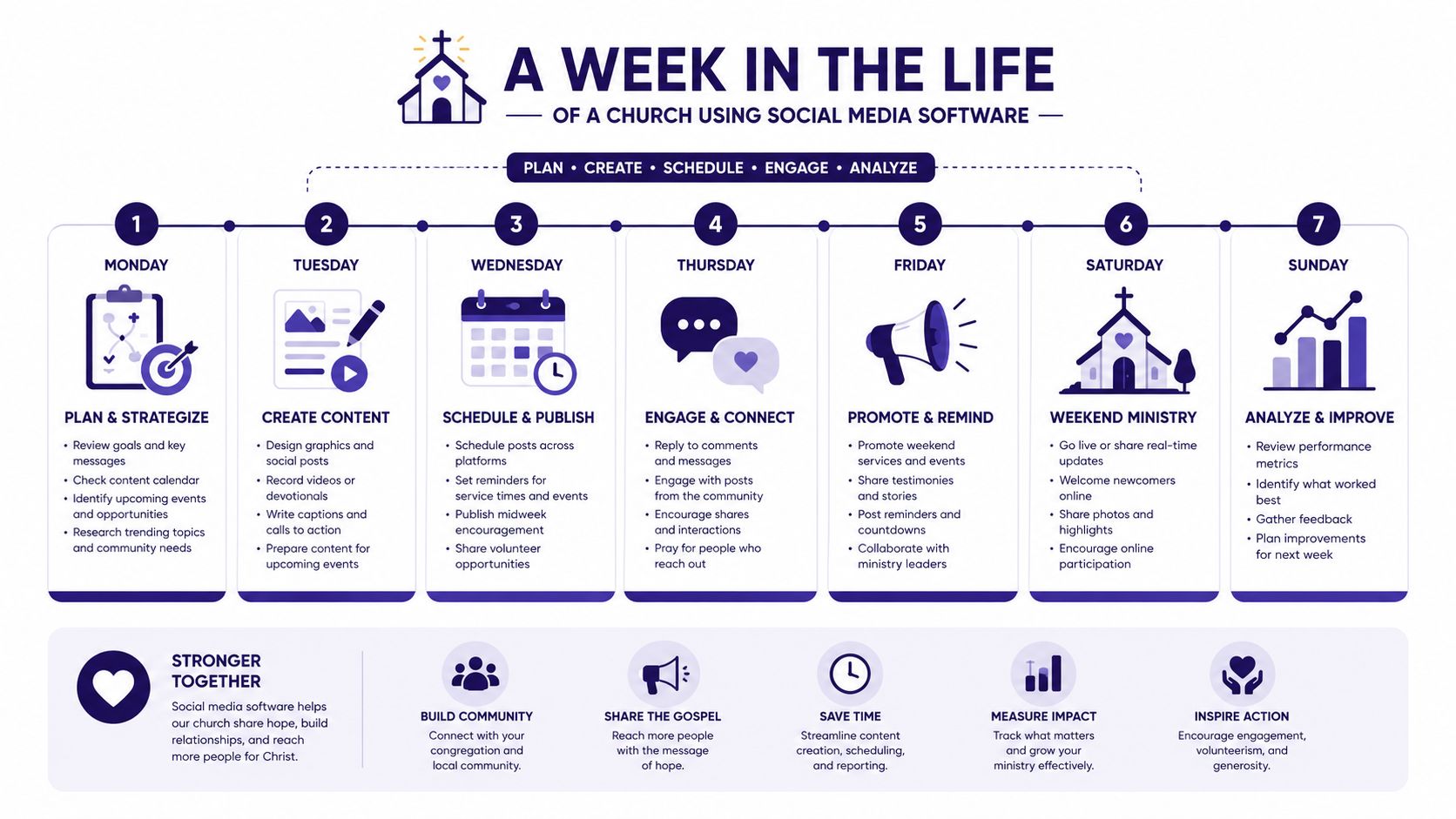
The result isn't a week without work. It's a week where work happens in the right order: source material, creation, review, scheduling, publishing, and learning.
How to Choose the Right Software for Your Church
A volunteer opens the church calendar and finds a registration change, an upcoming service, and a sermon ready to repurpose. The right social media management software helps that person turn those details into reviewed, scheduled content without retyping everything or keeping separate notes.
Start with the systems that already hold ministry information. Planning Center may contain registrations, groups, services, and other event details. Google Business may support public-facing information. A useful platform connects with those sources, reduces duplicate entry, and leaves clear points for a person to verify names, dates, locations, and wording.
Four questions for a staff meeting
Can it connect to church calendars? Look for integrations with Planning Center and the calendars your team already maintains. Ask what information transfers, how updates appear, and which details require manual review. A calendar connection should work like a reliable handoff between ministry teams, not another place for volunteers to check constantly.
Can it repurpose sermons? Test whether the software can work from a transcript or recording. A sermon may become a short reel, a social post, or blog content, but a pastor or ministry leader should review the wording before publication. ChurchSocial.ai supports AI-generated reels and content derived from sermon transcripts.
Does the price match the team? A solo volunteer needs a manageable entry point rather than an enterprise implementation. ChurchSocial.ai offers pricing starting at $15 per month, with modular add-ons for sermon and design studios. Use this church social media management tools comparison to frame questions about subscriptions, features, and ministry fit.
Can people work with clear roles? Check whether a volunteer can create a draft, a pastor can review sensitive wording, and a communications lead can approve publishing. Larger churches may also need permissions for multiple campuses or ministries, without giving every user unrestricted access.
Generic tool versus church-specific platform
| Criterion | Generic Tool | ChurchSocial.ai |
|---|---|---|
| Integrations | Often connects with major social networks and selected business tools | Integrates with Planning Center and Google Business, with church workflow in mind |
| Automation | May assist with captions, scheduling, or general content ideas | Creates AI-generated sermon reels and content from sermon transcripts |
| Pricing | Plans and features vary widely by provider | Starts at $15/month, with modular sermon and design add-ons |
| Team roles | Collaboration features depend on the plan | Designed for volunteers, staff, and growing church communications teams |
| Visual content | May include a media library or external design integration | Includes graphic templates and an editor for photos and carousels |
The table does not require every church to reject a general platform. A church with unusual reporting needs or a large communications department may prefer a broader system. A church built around sermons, volunteers, event calendars, and straightforward visual workflows should test software against those daily realities.
Bring four sample tasks to a trial: repurpose a recent sermon, create an event carousel, connect a calendar, and move an approved post through review. Notice where the volunteer hesitates, where a pastor can review wording, and where information must be entered twice. If the workflow is difficult to understand, a longer feature list will not solve the adoption problem.
Implementation Tips and Accessibility Best Practices
A successful rollout should feel more like training a ministry team than installing another complicated system. Start with a small workflow, document it, and let people gain confidence before adding more channels or automation.
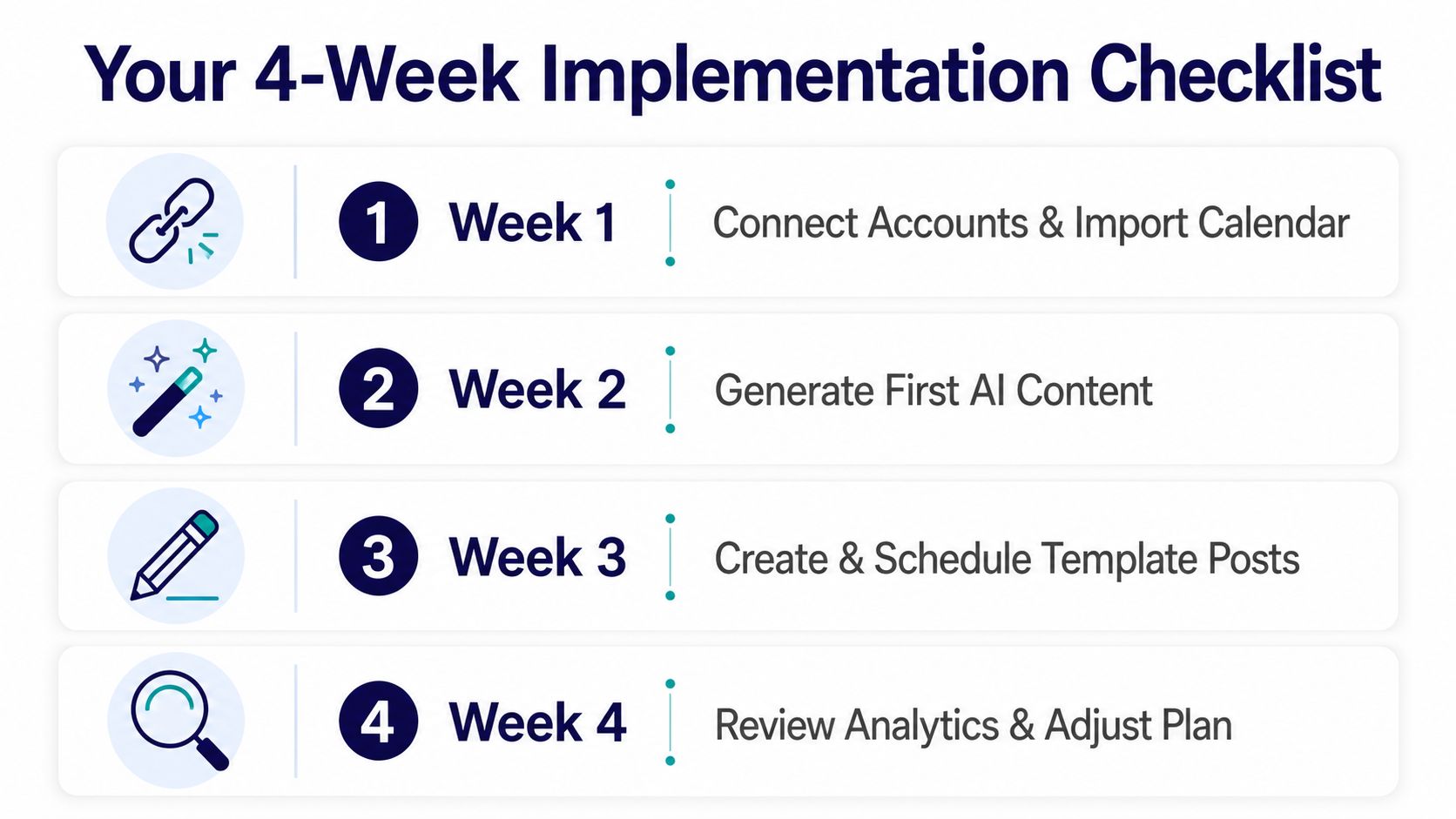
Use a four-week launch plan
Week one, connect the foundations. Link the church's social accounts and import the church calendar. Confirm names, dates, locations, registration details, and account permissions before creating a large content queue.
Week two, use one recent sermon. Generate a first set of AI-assisted content from a sermon transcript. Have a pastor or ministry leader review theological wording, then save the approved drafts as reusable examples.
Week three, establish a rhythm. Build a small collection of template posts for worship invitations, prayer prompts, events, and sermon follow-up. Place them on the drag-and-drop calendar so the team can see how content fits together.
Week four, review and adjust. Examine the available analytics and ask practical questions. Which messages received meaningful engagement? Which posts helped people understand an event? Which formats took too much effort for the value they provided?
Assign ownership before the calendar fills up. One person can create, another can approve, and another can monitor comments and messages. At a small church, one volunteer may hold several roles, but the team should still name each responsibility so nothing disappears between conversations.
Make graphics understandable
Church graphics often contain event details, sermon quotes, or calls to action. Accessibility guidance says text-heavy images shouldn't carry essential information by themselves. Put the key who, what, when, where, and how in the post text, then use the image to reinforce the message. Forum One's alt text guidance
Write alt text that communicates the graphic's main message without repeating every nearby word. The guidance recommends keeping alt text succinct, under 250 characters, while including image-based text when that wording is essential. A graphic can say “Community Meal” on a readable sign or paper, but text shouldn't be placed randomly in a scene just to fill space.
For generated images, choose visuals without people whenever possible. Use text only when it serves a clear purpose, such as writing on a whiteboard, printed announcement, or paper sign. If an overlay is added after the image is created, place it deliberately, with enough contrast and space to remain readable.
For video accessibility, review how to add captions to videos before publishing sermon clips. Captions help people follow the message when sound is unavailable and give the team another opportunity to catch transcription errors.
Getting Started with Confidence
Church social media doesn't need to become a contest for viral attention. Consistency beats occasional inspiration because people often encounter a church through a small sequence of ordinary reminders, helpful explanations, and genuine invitations.
A calendar gives the volunteer a place to begin. Sermon repurposing gives the team a source of meaningful content. Templates reduce design friction, while analytics help the church notice what people respond to and what needs adjustment. None of those tools replaces prayer, discernment, pastoral care, or personal conversation. They protect time for those things by reducing avoidable repetition.
A solo volunteer can start with one recent sermon and a few upcoming events. A communications pastor can create a review process that includes ministry leaders. A multi-site team can use shared standards while allowing each campus to speak to its own community.
The emotional concern is understandable. Automation can sound impersonal when ministry depends on relationships. But the purpose isn't to make the church sound mechanical. The purpose is to help the church maintain a dependable presence where people already look for information, encouragement, and connection.
Begin with one calendar, one sermon, and one clear approval path. As the team learns from its analytics, it can refine the message, the format, and the publishing rhythm with greater confidence.
Visit ChurchSocial.ai to organize your church's social media on a unified visual calendar, create AI-generated sermon reels and transcript-based content, and design posts, photos, and carousels with templates and an editor. Start with the platform's $15/month entry pricing, connect your church calendars, and give your volunteer team a simpler way to plan, review, and publish consistently.


