
Sunday morning starts with good intentions. By Saturday night, the children's ministry spreadsheet has three empty spots, the welcome team group text has gone quiet, and someone on the tech team just remembered they'll be out of town. Now a staff member, ministry leader, or faithful volunteer coordinator is trying to patch the whole thing together with texts, calls, and a prayer that everyone shows up.
Most churches know this pattern. The problem isn't a lack of willing people. It's that the system holding those people together is often a mix of memory, goodwill, and scattered tools that were never built to work as one ministry hub.
That's where volunteer management software starts to make sense. It doesn't replace relationships. It supports them. It gives your church a clearer way to recruit, schedule, communicate with, and care for volunteers so leaders can spend less time chasing logistics and more time discipling people.
Why Your Church Needs a Better Volunteer System
A lot of churches aren't struggling with vision. They're struggling with coordination.
One person keeps the nursery schedule in a spreadsheet. Another uses text threads for the worship team. The parking team gets reminders through email. The event signup sheet still lives on a clipboard in the lobby. None of that feels terrible until the same Sunday includes a baptism, a guest family at check-in, and two absent volunteers who forgot they were serving.
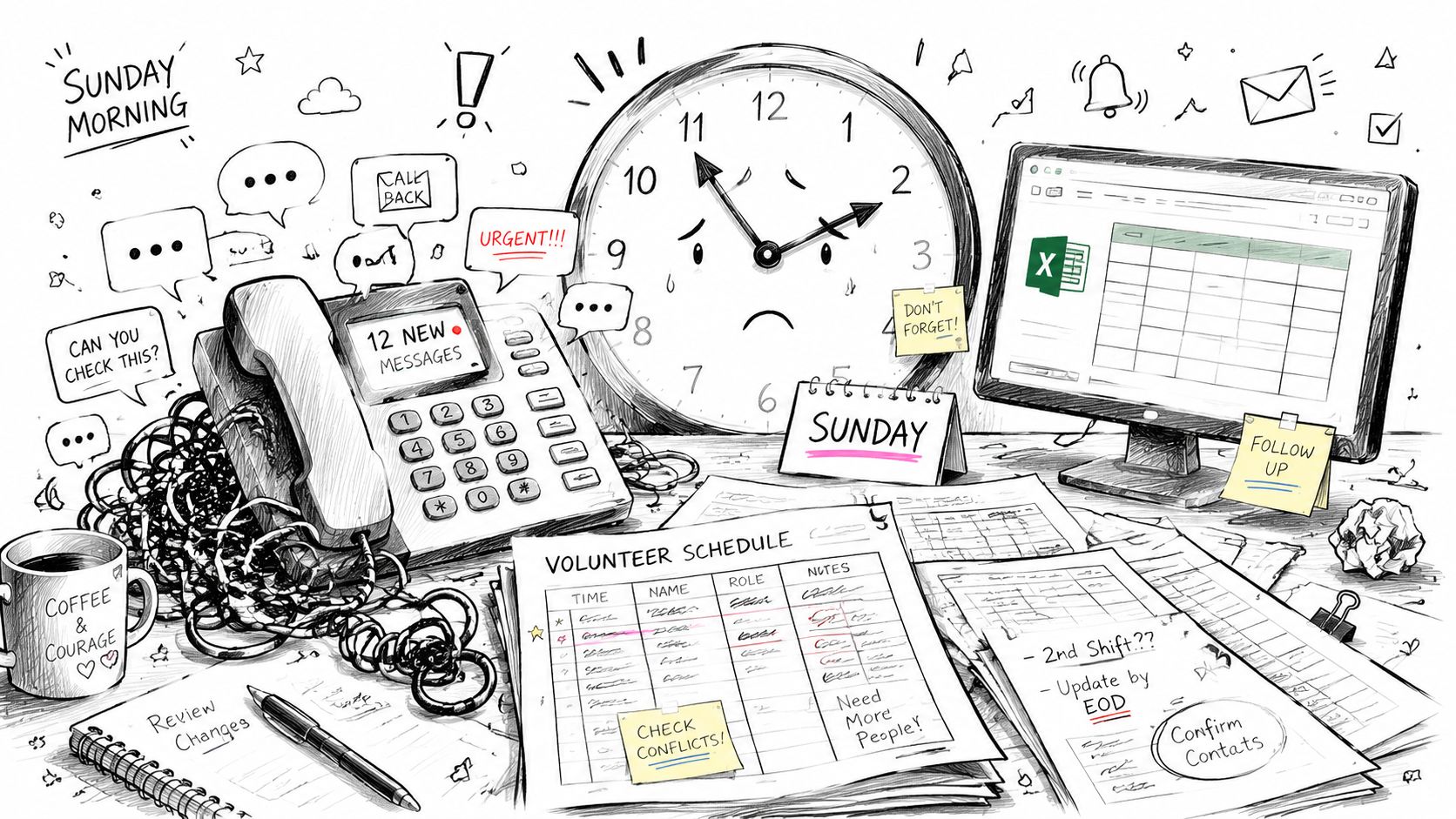
The Sunday scramble is usually a system problem
In most churches, the scramble looks spiritual because it happens in ministry. But it's still a systems issue. If leaders can't quickly see who's serving, who needs a reminder, who is new, or where the gaps are, they end up doing emergency administration instead of pastoral leadership.
That tension adds up fast:
- Children's ministry leaders chase coverage instead of welcoming families.
- Hospitality coordinators send duplicate messages because they don't know who replied where.
- Pastors and staff get pulled into schedule repair when they should be focused on people.
If your church is working through volunteer recruiting issues too, this guide on church volunteer recruitment ideas pairs well with the scheduling side of the problem.
Practical rule: If one volunteer absence creates a chain reaction of calls and texts, your church doesn't just need more volunteers. It needs a better system.
Churches are treating this like real operations now
Volunteer coordination used to feel like a small admin task. It doesn't anymore. One market estimate values the volunteer management software market at USD 2.2 billion in 2026 and projects it will reach USD 5.1 billion by 2035, with an 11.2% CAGR, according to Business Research Insights' volunteer management software market report. That projection matters because it shows organizations, including churches, are increasingly treating volunteer coordination as an operational function that needs dedicated software.
Churches feel this shift in practical ways. Multi-service Sundays, rotating teams, background checks, event support, follow-up, and communication all create more complexity than a paper signup sheet can hold.
A better volunteer system brings calm back to ministry. You stop rebuilding the plan every week. People know where they're serving. Leaders know who needs help. Your church stops running on organized chaos and starts running on clarity.
What Is Volunteer Management Software Exactly
Think of volunteer management software as a digital hub for ministry teams.
It puts the moving parts of volunteer coordination into one place instead of spreading them across spreadsheets, inboxes, text threads, sign-up forms, and Sunday morning memory. For a church, that means one shared system where leaders and volunteers can both see what's happening.
One place instead of five
Most churches already use tools. The issue is that they don't connect in a clean way.
A typical manual system looks like this:
| Task | Old way many churches handle it |
|---|---|
| Recruiting | Paper forms, email replies, verbal conversations |
| Scheduling | Spreadsheet tabs or a calendar no one checks |
| Reminders | Group texts sent manually every week |
| Serving history | Notes in someone's head or a separate file |
| Reporting | Rebuilding data by hand after the event |
Volunteer management software replaces that patchwork with one source of truth. According to VolunteerHub's platform overview, the primary value of volunteer management software is reducing administrative workload by centralizing recruitment, scheduling, communication, hour tracking, and reporting in one system, which removes the need for manual spreadsheet reconciliation.
That's the key idea. It isn't just “a scheduling app.” It's a coordination system.
What it feels like in church life
A church leader usually asks, “What would this change for me?”
Here's the plain-language answer. Instead of texting fifteen people to fill two openings in kids ministry, you open one dashboard. Instead of wondering whether a first-time volunteer completed onboarding, you check one profile. Instead of sending reminder texts one by one, the system handles that step.
A good volunteer system works like a well-run church kitchen. Everyone knows what they're bringing, when they're serving, and who's covering if plans change.
It helps both leaders and volunteers
This part can be easy to miss. Good volunteer management software isn't only for administrators. It also helps the volunteer.
When it's working well, volunteers can:
- See their schedule without asking a leader
- Accept or decline a role in a simple way
- Update availability before a conflict becomes a problem
- Receive reminders without needing a personal follow-up
- Stay informed through one consistent communication channel
For churches, that shared clarity matters. Ministry is relational, but relationships get strained when the system is confusing. Software can't create commitment, but it can remove a lot of the friction that makes committed people feel overwhelmed.
Core Features and Benefits for Your Ministry
Some software lists can feel like reading the back of a router box. Churches don't need that. They need to know what each feature changes in daily ministry life.
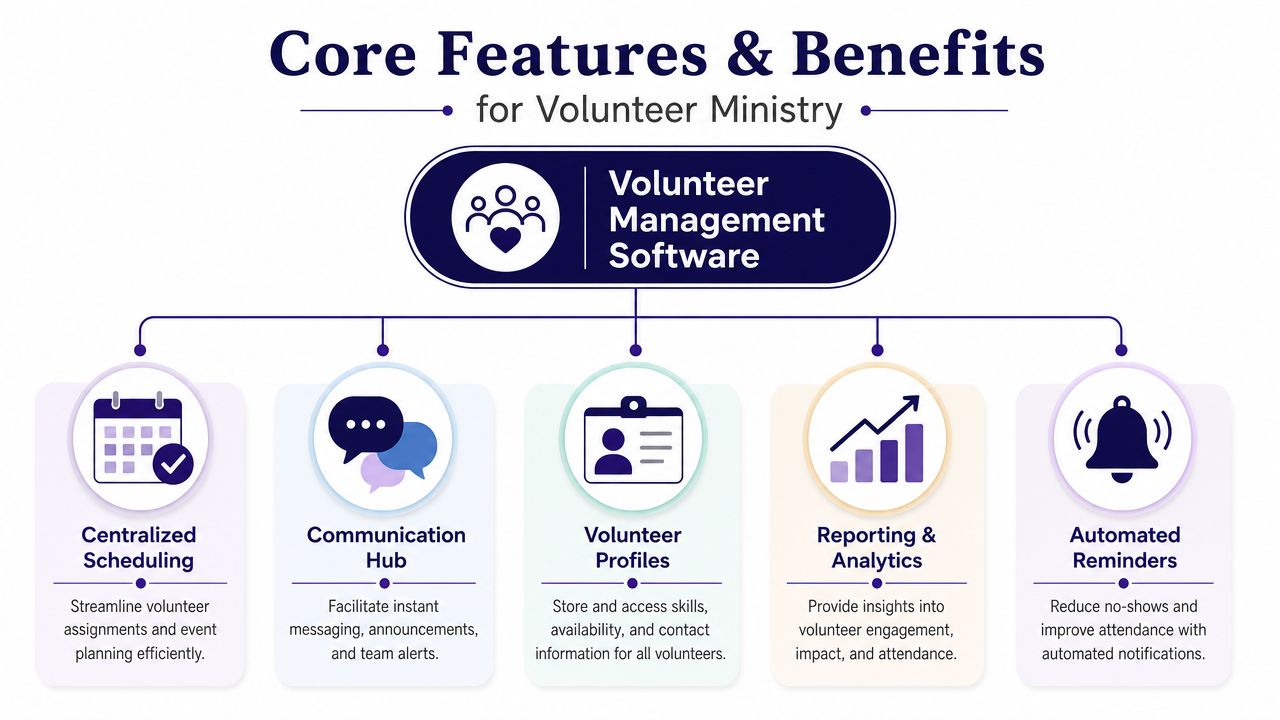
One provider notes that automation can save organizations 15+ hours per week by handling recruitment, scheduling, and communication, as described in Mobilize's guide to volunteer management software. For a church, that's time a ministry assistant, volunteer coordinator, or pastor can spend on people instead of admin cleanup.
Scheduling that prevents last-minute panic
The most obvious feature is scheduling. But the primary benefit isn't the calendar itself. It's the reduction in surprises.
When schedules live inside a proper system, leaders can assign roles, view open spots, and adjust plans before Sunday morning becomes a rescue operation. That matters for rotating teams like:
- Nursery and children's church
- Greeters and parking
- Production and livestream
- Coffee, setup, and teardown
- Midweek event support
Automated reminders help too. People are busy. A reminder sent at the right time is often the difference between a smooth service and a frantic search for backup.
Communication that stays in one lane
Churches often lose time because communication is scattered. Some volunteers reply to email. Others only answer text messages. Someone else comments in a planning app that nobody checks.
A volunteer platform gives leaders a consistent lane for updates. That makes practical ministry easier.
Here's what centralized communication helps prevent:
| Ministry issue | What centralized communication changes |
|---|---|
| A volunteer misses a time change | Leaders update one place, not multiple threads |
| Someone says “I never saw the message” | Notifications come from the system tied to the assignment |
| Team leaders send mixed instructions | Everyone sees the same shift details |
Profiles, screening, and readiness
Volunteer profiles are more useful than they sound. They let a church keep track of availability, skills, service history, and role fit. That becomes important when you're trying to place people wisely, not just fill holes.
For ministries working with children or vulnerable groups, screening matters as well. If your church is evaluating safer onboarding processes, FCRA-compliant volunteer screening can be a helpful reference point when thinking about how screening fits into a broader volunteer workflow.
Ministry insight: The right person in the right role often comes from better visibility, not better guessing.
Reporting that helps pastors lead better
Reporting can sound corporate, but in church life it's simple. It helps leaders answer real questions.
Are the same people serving too often? Which ministry teams need recruiting attention? Are new volunteers getting placed? Which events required the most support?
Those answers help pastors and ministry leaders care for people more thoughtfully. If a few names appear on every schedule, that may signal faithfulness. It may also signal burnout approaching. A good system helps you see the difference before someone steps away unnoticed.
How to Choose the Right Software for Your Church
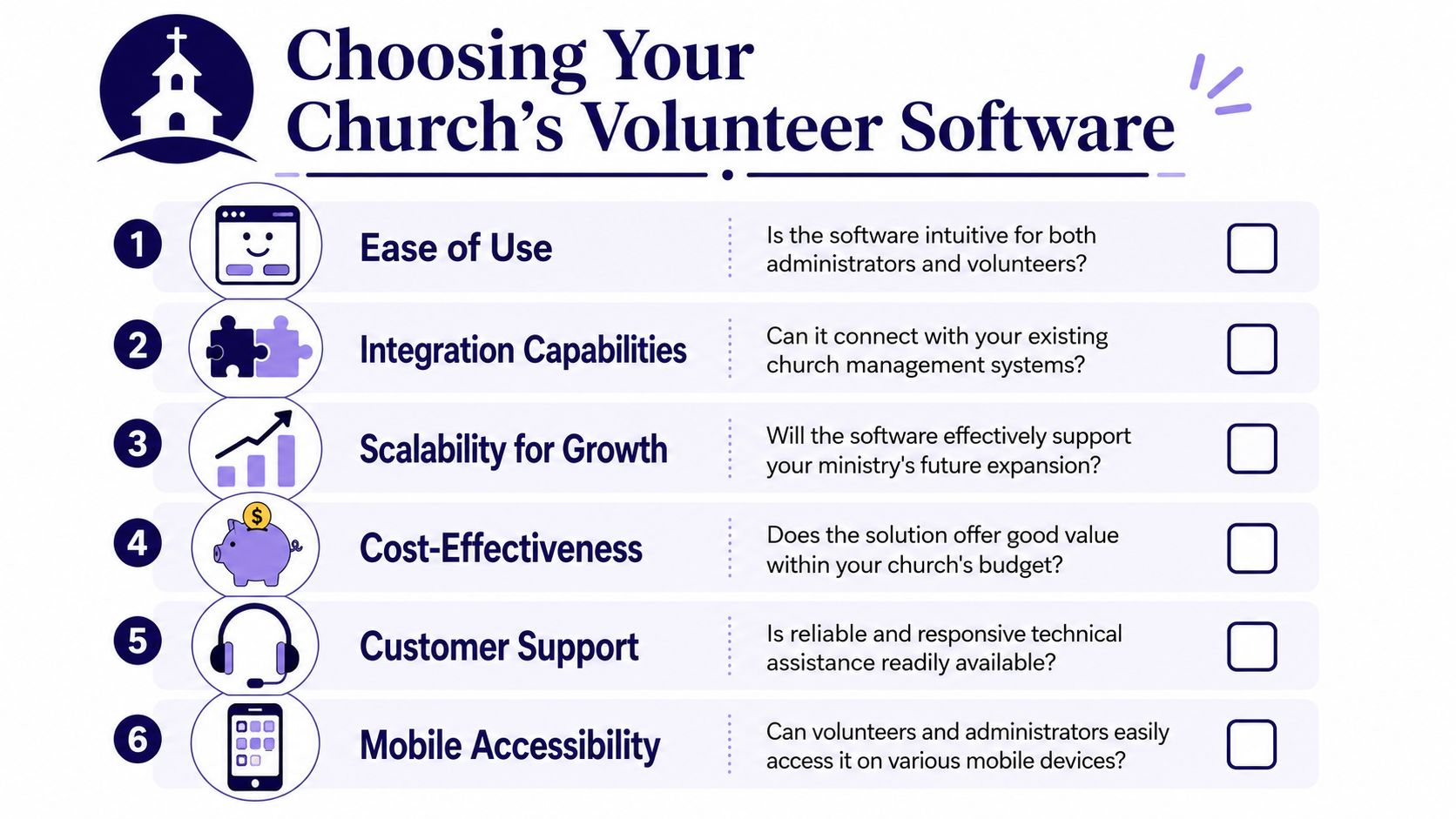
The right software for a church isn't the one with the longest feature list. It's the one your people will use.
That sounds basic, but churches often get pulled toward complicated tools because they look powerful in a demo. Then volunteers avoid them, leaders create side workarounds, and the church ends up paying for a system that never becomes part of real ministry life.
Start with the volunteer experience
The University of San Diego notes that nonprofits are facing a shortage of volunteers and that the best software isn't the one with the most admin features, but the one that lowers volunteer effort through self-service signups and easy communication. It also warns that software can increase abandonment if it complicates the volunteer experience, as explained in this University of San Diego guide on volunteer management software.
That principle is especially important in churches. Your volunteers are not employees. They're serving before work, after work, with kids in tow, or between other responsibilities. If the software feels like homework, it will discourage participation.
Ask simple questions during a demo:
- Can a new volunteer sign up without needing a long explanation?
- Can an older volunteer use it on a phone without frustration?
- Can someone decline a serving request quickly if plans change?
- Can team leaders update schedules without calling the church office?
If the system saves staff time but creates confusion for volunteers, it's solving the wrong problem.
Check what it connects to
Churches rarely need one isolated tool. They need a tool that plays well with the systems already in place.
If your church uses Planning Center, a church calendar, Google Calendar, or a broader church management setup, integration matters because it reduces duplicate work. Staff shouldn't have to enter the same event details in multiple places just to keep teams aligned.
If you're comparing broader admin stacks, this overview of church management software comparison options can help you think about where volunteer tools fit inside the larger church tech picture.
Look for fit, not flash
Here's a practical way to evaluate options:
- Choose one ministry as your test case. Children's ministry or hospitality usually reveals strengths and weaknesses quickly.
- Have a volunteer try it, not just staff. The best feedback often comes from the least technical person in the room.
- Review the mobile experience. Many volunteers will only interact with the system on a phone.
- Ask about support. Churches often need help during setup, especially if the tool affects multiple ministry leaders.
A flashy dashboard can be nice. A simple system that your people trust is better.
Pay attention to church-shaped complexity
Some churches only need weekly scheduling. Others need more.
A multi-site church may need shared oversight across campuses. A church with a weekday preschool, food pantry, and events calendar may need ministry-specific workflows. Seasonal ministries like VBS, Easter, and Christmas can also expose weak systems very quickly.
That's why decision-making should be grounded in your real ministry patterns. Don't buy for an imaginary future. Don't settle for a tool that can't handle your current reality either.
Connecting Volunteer Management to Social Media
Sunday morning often reveals the gap. The team was scheduled, the doors opened on time, and the event happened. But by Monday, no one outside that ministry knows what took place, who served, or how to join next time.
A healthy volunteer culture needs more than coverage. It needs visibility. Scheduling handles the behind-the-scenes work. Social media helps people see the ministry, understand the opportunity, and remember that real people are serving with joy and purpose.

Scheduling fills roles. Storytelling keeps ministry visible
Many churches treat volunteer coordination and public communication like two separate rooms in the same building. One team handles schedules. Another team handles posts. The problem is that the handoff often never happens.
That gap creates predictable ministry problems. A serve day gets organized, but the church never sees the invitation. A women's event runs well, but no one shares the story afterward. A student ministry launch needs more helpers, but the need stays inside staff conversations instead of reaching the people who may be ready to serve.
A social workflow becomes important here. It connects the back-office work of assigning roles with the front-facing work of inviting, celebrating, and telling the story. If your team needs a starting structure, this social media strategy template gives a helpful framework for planning themes, timing, and channels.
One church workflow that feels natural
A practical rhythm might look like this:
- An event gets planned in Planning Center or another church calendar.
- Volunteer roles get assigned in your volunteer system.
- Social posts get prepared to invite attendance, recruit extra help, and explain what the ministry is about.
- Follow-up content gets shared after the event to thank volunteers, highlight impact, and make the next opportunity easier to say yes to.
That pattern works like a church foyer and a church office working together. The office keeps things organized. The foyer helps people see where they belong.
ChurchSocial.ai fits on the social side of that process. It helps churches create sermon-based reels, turn sermon transcripts into content, build graphics and carousels from templates, manage a drag-and-drop social calendar, and connect with Planning Center and other church calendars for event-based content planning.
A signup fills a slot. A thank-you post, volunteer spotlight, or recap reel helps people feel noticed and makes future serving opportunities easier to understand.
Social media can lower confusion and strengthen retention
This connection is not only about promotion. It also helps set expectations before someone ever joins a team.
Clear event graphics, volunteer callouts, ministry updates, and recap posts show people what they are stepping into. That reduces the vague lobby conversation that sounds encouraging in the moment but never turns into real follow-through. It also gives new volunteers context. They can see the ministry in action before they commit.
Public appreciation matters too, especially when it is specific and wise. Volunteers who feel invisible often drift. Churches that regularly celebrate service help people connect their task to the larger mission. If you want to carry that care beyond recruiting and into long-term ministry health, these volunteer retention strategies for churches can help.
Putting Your New System into Practice
Don't roll out a new system to every ministry at once. Most churches do better with a pilot.
Start with one team that feels the pain most clearly. The welcome team, children's ministry, or Sunday production team usually works well because the scheduling rhythm is consistent and the feedback comes quickly. Set up the basics, invite a small group of volunteers in, and watch where people get stuck.
A simple rollout plan
Use a short, ministry-friendly process:
- Pick one ministry first. Choose the team with the most recurring scheduling needs.
- Keep setup lean. Start with schedules, reminders, and communication before adding extra workflows.
- Ask volunteers what felt easy or confusing. Their experience matters as much as the admin view.
- Refine before expanding. Small fixes early prevent larger frustration later.
If your church is also trying to keep people engaged after they start serving, these volunteer retention strategies for churches can help you think beyond scheduling and into long-term care.
A better volunteer system is not just a tech purchase. It's a ministry decision. When people know where to serve, feel equipped to show up, and sense that their contribution matters, the whole church becomes more steady, more welcoming, and easier to lead.
If your church wants to connect volunteer coordination with consistent outreach, ChurchSocial.ai can help your team plan social content, turn sermons into reels and posts, build event graphics, and manage your church calendar in one place alongside the stories that keep volunteers engaged.


