
A volunteer posts a cheerful youth-group photo, tags a teenager, and discovers that no parent ever approved the image. Later that weekend, a pastor answers a criticism in the comments, the exchange turns into a public theological argument, and nobody knows who has authority to hide replies or issue a correction. The people involved usually mean well. The church lacks a shared operating document.
A strong church social media policy template closes that gap. It defines who can publish, what requires approval, how the church protects minors and confidential information, and what happens when a conversation becomes unsafe or reputationally damaging. The guidance below is written as a usable draft, with annotations and daily workflows, so your policy becomes something volunteers can follow rather than a PDF that sits on a shelf.
The Moment Every Church Realizes It Needs a Written Policy
Church social media often begins informally. A pastor creates a Facebook page, a volunteer adds Instagram, someone else starts uploading sermon clips, and a ministry leader asks for access because they need to promote an event. The arrangement works until the church's online presence becomes a public extension of ministry rather than a casual noticeboard.
That shift happened quickly across the sector. Lifeway Research reported that church Facebook adoption rose from 47% in 2010 to 84% in 2017, while the same survey recorded church use of Twitter at 16% and Instagram at 13% in 2017 (Lifeway Research's church social media findings). Churches used social media to inform people about upcoming events, interact with their congregation, and engage outsiders. Those are ministry functions, not occasional promotional tasks.
The Church of England's communications guidance also records an average monthly reach of 3.6 million people through social media and app outreach, while its 2018 #FollowTheStar Advent and Christmas campaign reached 7.94 million, an increase of 1.14 million from 2017 (Church of England communications guidance). Scale makes informal habits harder to defend.
Practical rule: Treat every official post, comment, direct message, image, livestream, and staff interaction that could affect the church's reputation as part of one communication system.
The failure usually isn't bad character. It's missing documentation. A written policy gives a well-meaning volunteer a safe answer before a risky situation appears, and it gives church leaders a consistent response afterward. The rest of this guide provides copy-ready clauses, annotations, and a rollout path for putting those clauses into daily practice.
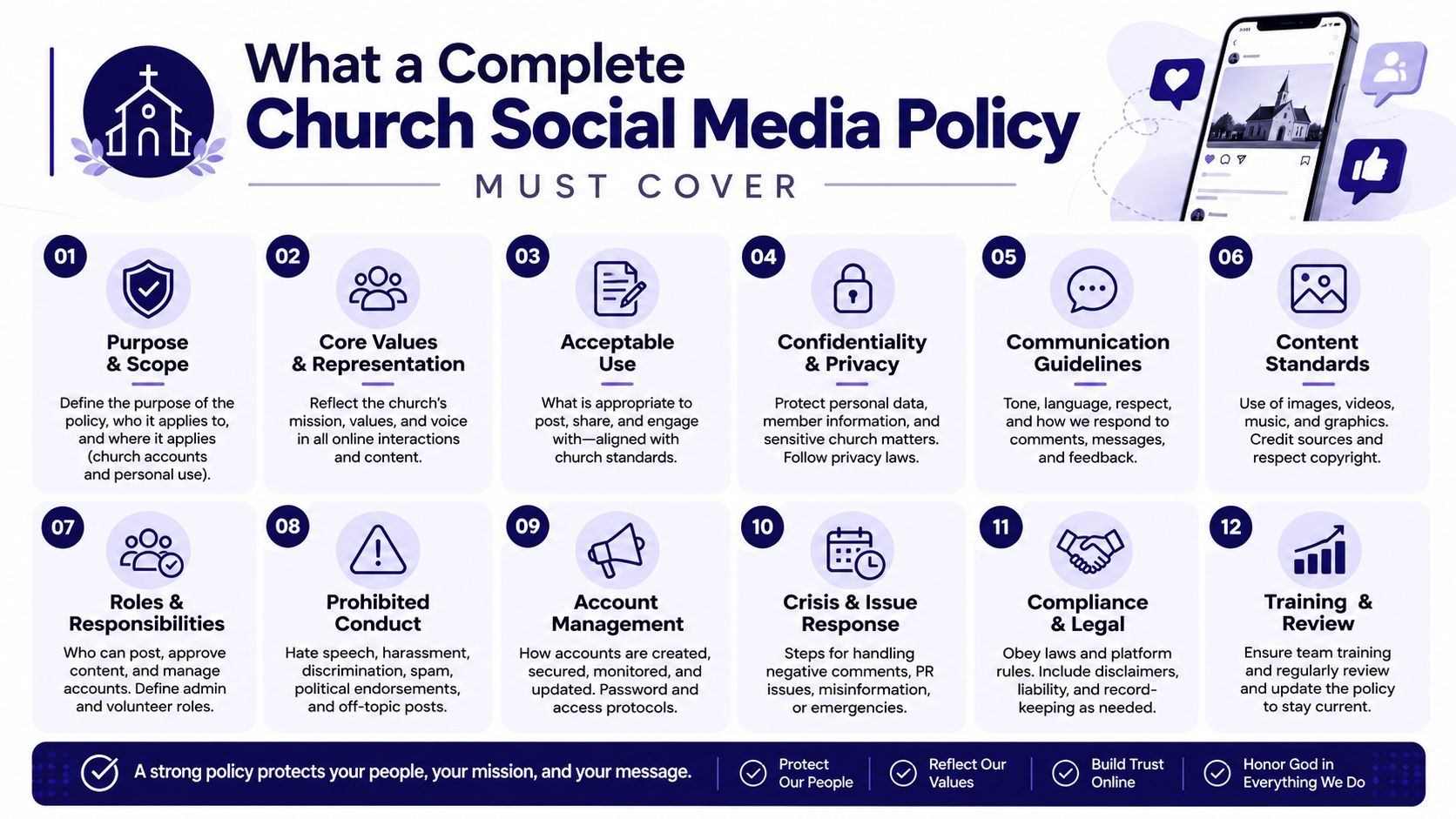
What a Complete Church Social Media Policy Must Cover
Churches often draft policies that sound reasonable. A volunteer facing a real question needs an operational answer, especially when a child's face, a prayer request, or a heated comment is involved. Make the policy a source of truth for purpose, authority, review, and risk response.
Build the document around these working components:
- Purpose and scope: Define ministry use and cover official accounts, personal use that may affect the church, platforms, livestreams, comments, and direct messages.
- Roles and approvals: Name administrators, approvers, contributors, safeguarding contacts, and crisis decision-makers. In ChurchSocial.ai, assign each person the appropriate role so an unapproved volunteer cannot publish directly.
- Safeguarding and consent: Set rules for minors, vulnerable adults, photography, tagging, private messages, and pastoral conversations. Store consent status with the relevant content record, then block publication when consent is missing.
- Content standards: Define tone, confidentiality, copyright, accessibility, visual style, scripture use, and sensitive topics. Require a second review for posts involving allegations, grief, politics, or disputed teaching.
- AI-generated content: Require human review of sermon clips, captions, chatbot replies, transcripts, and generated images. ChurchSocial.ai should keep the draft, reviewer, edits, and approval history together.
- Incident response: Give volunteers a decision tree for harassment, misinformation, doctrinal disputes, safeguarding concerns, and account compromise. Route urgent cases to the named leader instead of letting a volunteer improvise in public.
- Calendar integration: Connect approved event sources to the content calendar while suppressing sensitive events. A scheduled workflow should flag missing details before an event post reaches approval.
- Review cadence: Set policy reviews, consent checks, training, and trigger-based updates after incidents or staff changes.
Safeguarding, consent, access control, confidentiality, and incident escalation are required. Brand preferences, recurring caption formats, and platform-specific refinements can change with the church's needs.
The policy also governs how the church represents people, handles vulnerability, and speaks publicly across ministries. Catholic and diocesan guidance frames media policy as communication for the common good, not merely marketing. ChurchSocial.ai gives those clauses a daily workflow, so the approved standard remains visible in drafts, permissions, reviews, and incident records instead of sitting unused in a PDF.
Annotated Purpose and Scope Clauses You Can Copy
Start with language that establishes authority without turning the policy into legal fog. Copy the clauses below, then replace the bracketed terms with your church's details.
Purpose clause
“[Church name] uses social media to communicate its Christian mission, serve its congregation, welcome the wider community, share ministry information, and encourage respectful participation in the life of the church. All online communication made on behalf of [Church name] must reflect our mission, safeguarding commitments, confidentiality obligations, and applicable denominational guidance.”
Why this wording works: It defines social media as ministry communication, not just advertising. It also connects every later rule to the church's stated responsibilities.
Customize it: Add your denomination, parish structure, or governing body. Don't replace the mission language with a slogan so broad that it gives volunteers no practical standard.
Official account definition
“An official account is any profile, page, channel, group, business manager, or publishing tool created, funded, or authorized by [Church name] or one of its ministries. Personal accounts are separate from official accounts, but this policy applies to personal social media use when that use may affect the church's work, reputation, safeguarding responsibilities, or confidential information.”
This is one of the lines churches skip most often. A church and charity template states that social media policies should cover all forms of social media and personal use where it may affect the church's work or reputation (church and charity social media policy template). That scope protects the church without pretending it can control every private opinion.
Platform and content definition
“This policy applies to Facebook, Instagram, TikTok, YouTube, websites, livestream chats, messaging features, group conversations, comments, stories, reels, images, video, audio, captions, links, and any future platform used for church communication.”
Name current channels in an appendix, but keep this broad clause in the main policy. Platforms change faster than printed documents.
Authority and precedence
“This policy operates alongside [denominational safeguarding rules], [church bylaws or polity], employment and volunteer agreements, privacy requirements, copyright law, and local safeguarding procedures. Where rules conflict, the stricter safeguarding or legal requirement applies, and the designated approver must seek appropriate advice before publication.”
The second commonly skipped line concerns personal use. Keep it. The policy shouldn't punish ordinary private activity, but it must address public conduct that reveals confidential information, creates a safeguarding concern, or falsely implies an official church position.
Roles, Approvals, and Access for Church Teams
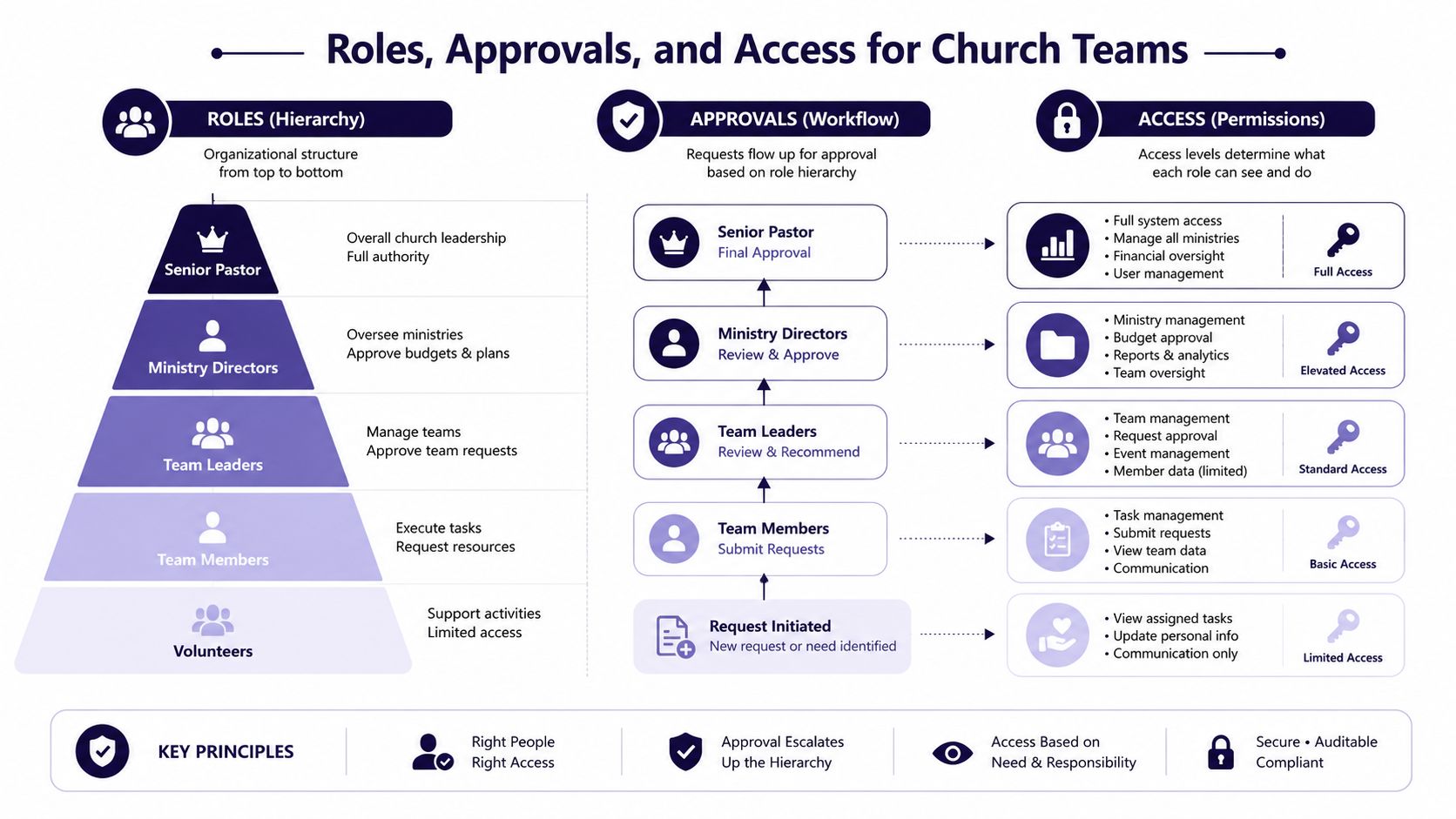
A policy fails when everyone can post and nobody is accountable. Use three permission tiers, even if one person currently fills more than one role.
Page Admin
“A Page Admin is a senior staff member designated by [church body]. The Page Admin manages account ownership, publishing rights, recovery procedures, integrations, approved users, and the master content schedule. Admin access is limited to people who need it for their assigned duties.”
Content Approver
“A Content Approver is the communications director, senior pastor, elder, or other named leader authorized to approve content before publication. The approver reviews doctrinal, safeguarding, reputational, and factual concerns. Approval cannot be delegated to an unnamed volunteer.”
Contributor
“A Contributor may draft captions, upload proposed media, suggest calendar items, and respond to assigned tasks. A Contributor may not publish, alter account ownership, approve their own content, or conduct private pastoral or youth communication through an official account.”
Use a platform with role-based permissions to enforce this chain. In ChurchSocial.ai, contributors can work in draft-only queues, approvers can receive Slack or email review alerts with approve or reject actions, and admins can maintain the master schedule. A visual team calendar setup across platforms can also help ministries understand ownership before posts begin moving between people.
Password rules belong in the policy, not in a private message between staff members:
“Personal Facebook or Instagram logins must not be used as the ownership mechanism for church pages. Shared credentials must be stored in an approved password manager, with multifactor authentication enabled where available. Users must not copy, export, or share credentials outside the approved access process.”
For churches managing several accounts, document account ownership, recovery email responsibility, and the exact person who removes access. The guide to managing multiple social media accounts is useful when one team serves several ministries or locations.
“When a staff member or volunteer leaves the role, the Page Admin must revoke access within 24 hours, review scheduled content, recover shared assets, and confirm that no personal device or application retains account access.”
Annual acknowledgment makes the policy active. Use this block:
- Page Admin: Name: ______ Signature: ______ Date: ______
- Content Approver: Name: ______ Signature: ______ Date: ______
- Contributor: Name: ______ Signature: ______ Date: ______
- Safeguarding contact: Name: ______ Signature: ______ Date: ______
Safeguarding, Photo Consent, and Youth Protection Clauses
Safeguarding language must be operational. “Protect children online” is a value statement. Volunteers need to know what they can post, where consent is recorded, and who receives a message from a young person.
Use this photo clause:
“[Church name] will not publish an identifiable photograph or video of a child, young person, or vulnerable adult without written consent from the parent, guardian, or person authorized to provide consent. Consent must identify the intended online use and remain available for audit. A person may withdraw consent, and the church will remove future use of the image where reasonably practicable.”
Church resources consistently require written parental or guardian consent before identifiable images of minors are published online (United Methodist social media and internet guidance). Practical consent form guidance, including fields and release considerations, is available in these EventUploader consent form tips.
Add a strict identification rule:
“The church will not identify a minor by name in a public post, caption, tag, mention, location reference, or image filename. Tagging and mentions for anyone under 18 are disabled by default unless the safeguarding lead confirms documented permission and a legitimate ministry need.”
Private communication requires even firmer boundaries:
“Workers and volunteers must not send private messages, texts, emails, photographs, or videos through social platforms to children or young people they serve. Messages involving a minor must remain visible to an approved group or route to a monitored team inbox.”
Pastoral care belongs outside casual DMs:
“Official social accounts must not be used for private counseling, confidential prayer requests, crisis intervention, or the collection of sensitive personal information. A public reply should direct the person to an approved pastoral channel. Staff must not screenshot private conversations for content, training, or promotional use.”
Require two-adult visibility on any thread involving a minor. Store signed annual permissions alongside membership or ministry records, and attach the relevant consent status to the content record. The strategy guide for church user-generated content can help teams collect contributions without losing responsibility for review.
| Policy Clause | Risk Addressed | ChurchSocial.ai Enforcement |
|---|---|---|
| Written consent before identifiable youth images | Unauthorized publication | Attach consent records to contact or media records before approval |
| No public names, tags, or mentions for minors | Unwanted identification and profile exposure | Apply tag-blocking rules to flagged profiles and require an approver override |
| No one-to-one youth messaging | Safeguarding boundary failure | Route youth messages to a monitored team inbox |
| Two-adult visibility | Unobserved interaction | Assign conversations to a team queue rather than an individual |
| No screenshots of private conversations | Confidentiality breach and secondary misuse | Restrict downloads and record approved content sources |
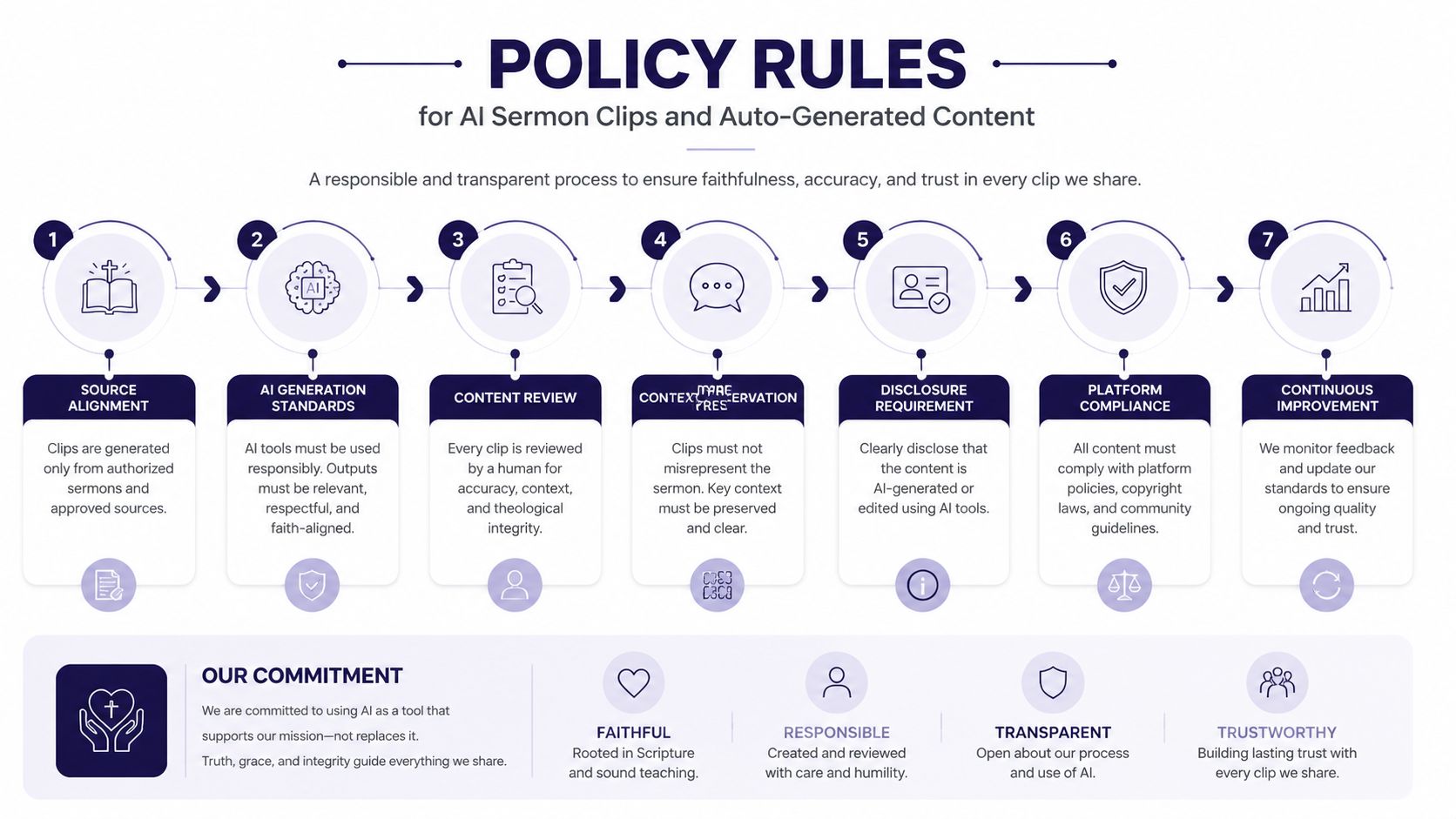
Policy Rules for AI Sermon Clips and Auto-Generated Content
AI can help a church turn a sermon transcript into reels, captions, discussion questions, blogs, or other formats. It also creates a new review obligation. The tool can shorten a sentence, remove context, misread a name, or make a pastoral statement sound more authoritative than the speaker intended.
Use this clause:
“AI-assisted content may be drafted or edited for church communication, but no AI-generated or AI-assisted material may be published without review by the designated Content Approver. The approver must review the source transcript, theological meaning, names, captions, visual treatment, and safeguarding implications.”
For sermon clips, add a specific workflow:
“Before publication, the approver must confirm that the clip accurately represents the sermon source, automated captions have been checked, identifiable minor faces have been removed or approved, and the final edit does not imply a teaching claim outside the source message.”
Disclosure should be simple and consistent:
“Where AI materially generates a caption, clip edit, image, or reply, the church must use its approved disclosure language. Where appropriate, include an opt-in disclosure marker such as #AICaption.”
AI must not become the church's pastor:
“AI tools must not provide doctrinal rulings, pastoral counseling, prayer responses, medical advice, legal advice, or financial advice on behalf of [Church name]. Tools must be configured to refuse those prompts or route them to a human leader.”
Any chatbot response involving a prayer request or pastoral concern must reach a human pastor within 24 hours, with the interaction preserved according to the church's record-retention rules. Review the basics in this explanation of AI-generated content before approving a workflow.
Store prompts, source transcripts, approvals, and final outputs for a quarterly audit. The audit should check whether the tool followed the church's style, safeguarding, disclosure, and escalation rules.
Adapting the Template for Solo, Mid-Sized, and Multi-Site Churches
The policy shouldn't become so elaborate that a small church ignores it. Keep the same protections, then adjust the number of people, approval lanes, and central controls.
A solo church can assign the pastor as Page Admin and one trusted trustee as Content Approver. The volunteer may draft and schedule ordinary announcements, but the pastor should approve safeguarding-sensitive content, doctrinal statements, crisis responses, and sermon clips. Use a shared calendar, disable live direct messaging with youth, and require every image involving children to carry a recorded consent decision.
A mid-sized congregation should separate production from approval. A communications team of three can divide writing, design, and scheduling, while one named leader approves content. Weekly content reviews help the team identify duplicated events, outdated announcements, consent gaps, and posts that need accessibility adjustments.
A multi-site network needs central governance with local contribution. Campus social leads should draft local content, a network approver should control crisis and doctrinal messaging, and a central admin should own account access, visual standards, and the master publishing calendar. Local teams can preserve their voice for ministry life, but they shouldn't invent separate safeguarding rules.
| Profile | Approver Count | Content Ownership | Key Customizations |
|---|---|---|---|
| Solo church | Pastor plus one trusted trustee | One volunteer drafts, pastor approves sensitive items | Shared calendar, no youth DMs, simple consent register |
| Mid-sized church | One designated communications approver | Small communications team creates and schedules | Weekly review, consent database, assigned platform lanes |
| Multi-site network | Network approver with campus leads | Campus teams draft, central team governs shared content | Central crisis source, local voice rules, centralized access removal |
The policy should name what stays local and what doesn't. Local campuses can choose event photos and ministry stories within the consent rules. The network should control account ownership, crisis statements, safeguarding escalation, and any content representing the whole church.
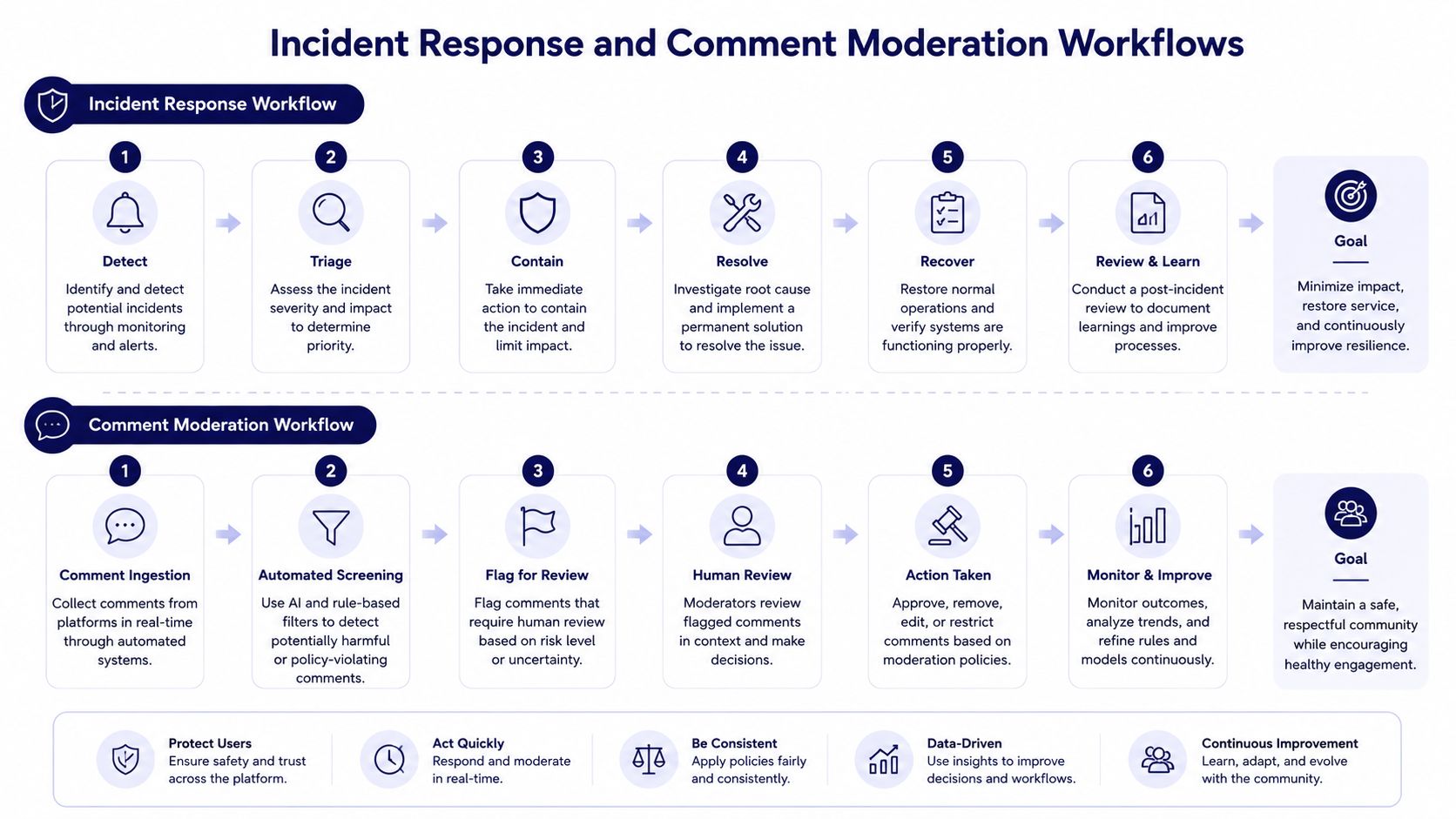
Incident Response and Comment Moderation Workflows
Volunteers need a short decision tree they can follow under pressure. They shouldn't improvise a theological defense while a comment thread grows.
Use this response matrix:
- Hostile comment: Hide or remove threats, slurs, doxxing, or targeted harassment. Preserve the record, notify the approver, and don't debate.
- Doctrinal argument: Reply once with a calm invitation to continue through an appropriate pastoral channel. Don't turn the comments into a public dispute.
- False accusation: Don't make a rapid denial if facts aren't confirmed. Escalate to the senior approver and prepare a holding statement.
- Crisis news: Pause scheduled content if it could appear insensitive. Use only the approved source of truth, and let the designated leader authorize a public statement.
Copy-ready replies help:
“Thank you for raising this. We're reviewing the matter with the appropriate church leader and won't discuss confidential details in this thread.”
“We'd be glad to continue this conversation privately with a pastor. Please use the pastoral contact details on our website.”
Apply a 30-minute escalation rule for an active post that is attracting hostility, contains a safeguarding concern, or appears factually wrong. The volunteer tags the senior approver within that window, stops adding replies, and moves the conversation to the moderation queue. Lock comments when threats, personal data, repeated harassment, or an unmanageable pile-on makes continued public interaction unsafe.
Archive the full thread, including the original post, edits, replies, moderation action, approver decision, and related messages. Retention periods should match the church's insurer and legal counsel guidance rather than an invented universal number. Teams building moderation standards can also consult this guide to creating safer online spaces.
Connecting the Policy to Your Church Calendar and Events
Event promotion becomes safer when it starts with an approved source rather than a volunteer's memory. ChurchSocial.ai can connect with Planning Center Online and Church Community Builder, allowing church events to feed into a social media content calendar. Planning Center's integration ecosystem also includes calendar-sync workflows that make church events visible while teams plan posts (Planning Center calendar integration listing).
Set rules by event type. A public worship service, open community meal, or general Bible study can create a draft caption and enter the ordinary approval lane. A youth trip, pastoral-care gathering, funeral, counseling event, or confidential support meeting should require heightened review or be suppressed from automatic content generation.
Use explicit rule logic:
- Public event: Create a draft, apply the church voice, add accessibility checks, and route to the named Content Approver.
- Youth event: Create a draft without identifiable participant images, require consent verification, and send it to the safeguarding-aware approver.
- Pastoral or funeral event: Suppress automatic posting unless the family or responsible pastor authorizes publication.
- Cancelled or changed event: Update or remove the related draft before publication, then record who confirmed the change.
- Uncategorized event: Hold it for manual classification rather than guessing from the title.
ChurchSocial.ai can use its drag-and-drop calendar to plan, create, schedule, and update posts across church accounts. It can also help generate sermon-based reels, transcript-based social posts and blogs, and branded photos or carousels through templates and an editor. Those capabilities are useful only when the policy determines which content may move automatically and which content must stop for human review.
Every published event post should retain its calendar source, approver, consent decision where relevant, scheduled time, and final asset. That audit trail makes the policy testable.
What Changes When You Run the Policy Inside ChurchSocial.ai
A spreadsheet can list responsibilities, but it can't reliably stop the wrong person from publishing. Email can contain approval, but it scatters the decision across inboxes and makes later reconstruction difficult. A platform-based workflow places the policy at the point where the volunteer drafts, edits, approves, and schedules.
| Workflow Task | Manual Process | Inside ChurchSocial.ai |
|---|---|---|
| Drafting | Volunteer sends copy and media by email | Contributor creates a draft in the assigned queue |
| Approval | Approver replies to an email thread | Approver receives a review alert and approves or rejects the item |
| Youth photo review | Volunteer remembers to check a separate consent folder | Consent status and safeguarding checks can be attached to the post workflow |
| AI sermon clip | Staff member edits, then asks for informal feedback | Source transcript, clip, caption, and doctrinal review remain connected |
| Scheduling | Spreadsheet dates may become outdated | Drag-and-drop calendar shows scheduled content and changes |
| Moderation | Volunteers search individual platform inboxes | Flagged items move into moderation queues for assigned reviewers |
| Records | Screenshots and exported emails are stored manually | Published assets, approvals, and changes form a searchable audit trail |
The biggest gain is not faster content production. It's visible enforcement. A contributor can't publish outside the assigned role. An AI-assisted sermon clip can remain on doctrinal-review hold until the approver acts. A photo rule can become a required consent checkpoint rather than a reminder buried in a document.
Churches can create AI-generated reels from sermons, turn sermon transcripts into captions, blogs, and discussion content, and use graphic templates and an editor for photos and carousels. The unified calendar then gives the team one place to manage publishing across Facebook, Instagram, TikTok, YouTube, and other accounts. The policy remains the authority, while the workflow records whether people followed it.
That distinction matters for pastors. A policy is honest only when the system makes the correct action easier than the risky shortcut.
Quick-Reference Checklist and Policy Review Calendar
Print this checklist and keep it beside the workstation used for church publishing.
Go-live checklist
- Finalize scope: List official accounts, platforms, livestreams, comments, direct messages, and personal-use boundaries.
- Assign roles: Name the Page Admin, Content Approver, Contributors, safeguarding contact, and crisis decision-maker.
- Secure access: Remove personal ownership, store shared credentials in an approved password manager, and enable available security controls.
- Configure safeguarding: Record consent status, disable youth tagging, establish two-adult visibility, and route sensitive messages to a monitored inbox.
- Set content standards: Approve tone, visual style, scripture sources, accessibility expectations, copyright handling, and sensitive-topic rules.
- Define AI controls: Name the doctrinal reviewer, disclosure language, prohibited advice categories, and audit process.
- Import event sources: Connect approved church calendars, classify sensitive events, and set approval or suppression rules.
- Train volunteers: Use realistic examples, including a youth photo, a prayer request, a hostile comment, and a sermon clip.
- Archive existing access: Review current administrators, scheduled posts, old pages, stored media, and inactive accounts.
- Collect signatures: Have every role acknowledge the policy before receiving access.
Review calendar
| Timing | Owner | Deliverable |
|---|---|---|
| Quarterly | Page Admin and Content Approver | Policy, access, AI prompts, moderation records, and workflow audit |
| Biannually | Safeguarding lead | Consent log review and youth communication review |
| Annually | Church leadership | Full policy rewrite and role acknowledgment |
| After an incident | Senior approver and safeguarding lead | Incident review, corrective action, and policy update |
| After staff or volunteer change | Page Admin | Access revocation, scheduled-content review, and replacement training |
The annual rewrite should align with the church's fiscal or ministry year. Don't wait for a crisis to discover that the approver listed in the policy left the church or that a ministry has created an unofficial account.
Frequently Asked Questions Before You Adopt the Policy
How often should the policy be reviewed?
Run a quarterly operational audit, review consent records biannually, and complete a full rewrite annually. Review it immediately after a safeguarding concern, serious moderation incident, platform change, or staff transition.
Who must sign it?
The Page Admin, Content Approver, Contributors, and safeguarding contact should sign. Elders, deacons, trustees, or ministry leaders should sign when your polity gives them authority over public communication, safeguarding, or crisis response.
How do we train volunteers without overwhelming them?
Give them a short orientation built around decisions they'll face. Show the difference between a public announcement and a private pastoral matter, then have each volunteer draft one post, process one consent check, and escalate one difficult comment before receiving publishing access.
Does the policy cover personal social media?
Yes, but narrowly. It should apply when personal use affects the church's reputation, reveals confidential information, creates a safeguarding concern, or falsely presents a private opinion as the church's official position. It shouldn't attempt to control ordinary private life.
What should we do with a confidential prayer request?
Don't copy it into a public post, screenshot it for content, or answer it through an unmonitored personal account. Acknowledge receipt without exposing details, then route it to the approved pastoral process.
Do livestream comments follow the same rules?
Yes. Livestream chats, comments, and direct messages are official communication spaces when the church operates them. Assign moderation before the broadcast and give moderators authority to hide unsafe content and escalate concerns.
How should we handle violations?
Apply the same process regardless of whether the person is paid staff or a volunteer. Remove access when necessary, preserve the record, notify the appropriate leader, document the decision, and provide retraining or disciplinary action according to church policy.
What about retention?
Ask your insurer and legal counsel how long incident records, consent documents, private-message escalations, and published content should be retained. Put the answer in the policy and make the archive accessible to authorized leaders.
Church plants without legal counsel should adopt the safeguarding and confidentiality rules first, identify a senior approver, use denominational guidance where available, and seek qualified local advice before publishing sensitive material. A simple policy that people follow is safer than a complex document nobody understands.
ChurchSocial.ai gives churches one workspace to turn this policy into daily practice, with sermon clip creation, AI-assisted captions and blogs, graphic templates, carousels, approvals, scheduling, and church-calendar integrations. Visit ChurchSocial.ai to plan and manage your church social media accounts with the roles, consent checks, and publishing workflow your written policy requires.


