
A volunteer schedules a Sunday worship Reel on Saturday night, adds the song title in the caption, tags the worship leader, and assumes the church has done the responsible thing. By Monday morning, the audio is muted and the platform has sent a copyright notice. The team now has to explain why a post recorded inside the church triggered a claim.
That situation is common because copyright safety isn't a matter of good intentions or generous attribution. It depends on whether the church has permission for each creative element, whether that permission covers the intended platform and use, and whether someone recorded the decision before publication. The practical answer to how to avoid copyright issues is a repeatable publishing workflow that makes safe choices easier than risky reuse.
When a Worship Clip Gets Flagged
Monday morning starts with a warning on Instagram. A part-time social manager at a 200-member church sees a copyright strike attached to a 30-second clip of the worship team performing a popular Hillsong or Bethel song. The post is muted, distribution has been limited, and the pastor wants to know why the church suddenly seems invisible.
The social manager may have assumed that recording the service made the church owner of the video. It doesn't. The church might have permission to perform a song during worship while lacking permission to distribute that recording online. The U.S. religious-service exemption is narrow. It covers certain performances during worship at a place of worship, but it doesn't automatically cover retransmitting or streaming the service online, as explained in this copyright primer for congregations.
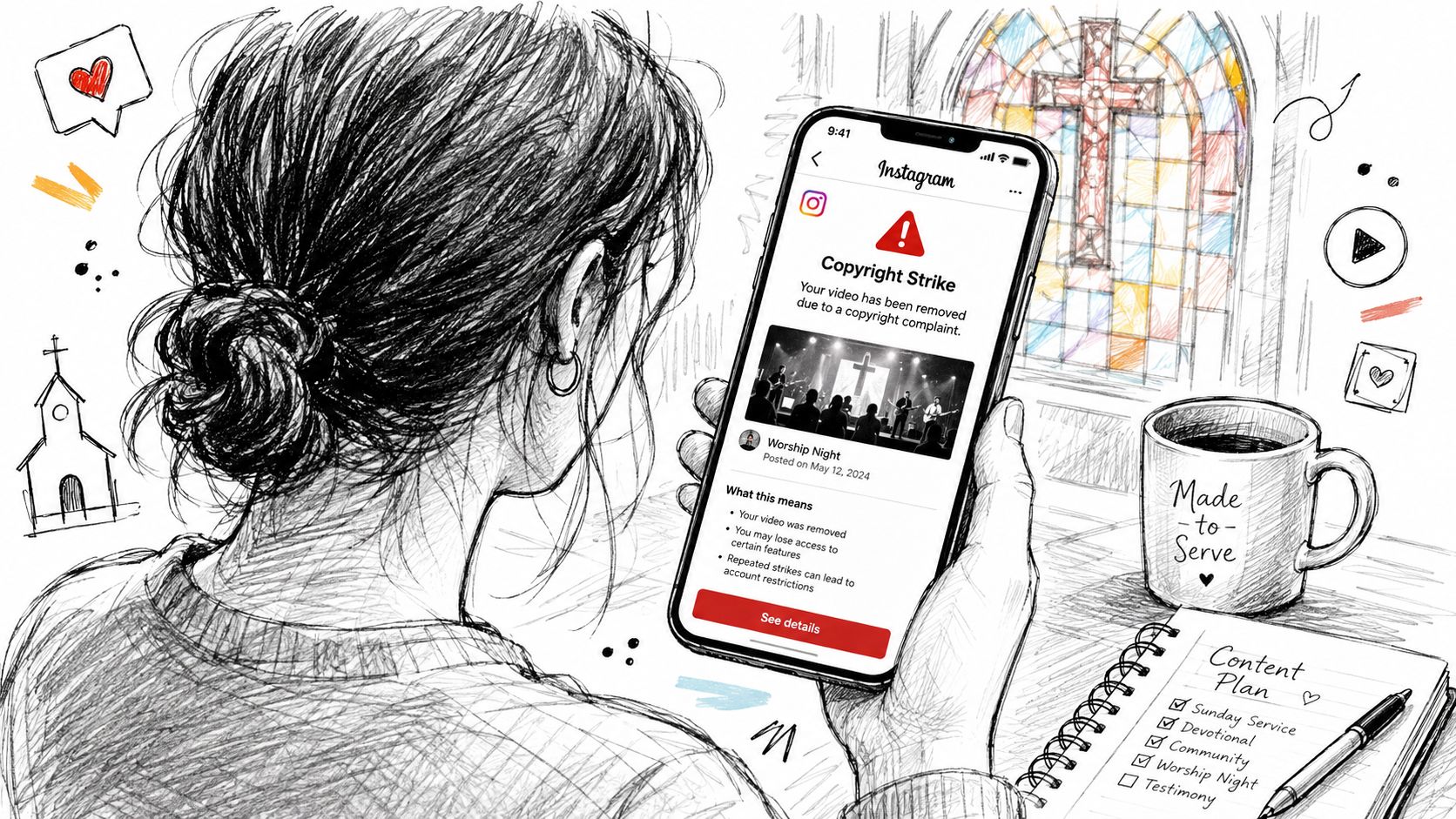
The immediate problem is a muted post. The wider problem includes lost reach, repeat-strike risk, possible demonetization, and an uncomfortable leadership conversation about who approved the clip. A second claim can create more disruption than the original notice because the team may need to audit older posts, remove scheduled content, and contact rights holders while still producing the next week's announcements.
This isn't a character flaw. It's a workflow gap. Small churches often rely on volunteers who are expected to film, edit, write captions, schedule posts, and monitor comments without a clear rights checklist. The fix isn't a one-time apology. It's a publishing gate that asks what the church created, what it licensed, and what it can prove.
ChurchSocial.ai's YouTube copyright claim dispute guide is useful when a claim has already appeared because it directs teams to review the claimant, timestamps, and policy in YouTube Studio before disputing a claim. The same discipline belongs before publication, not only after a platform flags the content.
Practical rule: Treat every asset as unavailable until someone can identify its source and permission status.
The Copyright Rules Church Teams Actually Need
Start with a conservative default: an image, song, video, or written work found online is copyrighted unless the church has permission or a clearly applicable exception. UCC guidance specifically tells churches to assume online images are copyrighted and obtain written authorization before using them, because photographs and graphics remain protected even when they appear freely available on the internet. WIPO defines infringement broadly to include unauthorized reproduction, distribution, adaptation, performance, or display, which covers many ordinary social-media actions. Its overview also notes that piracy sites received more than 219 billion visits in 2022, a reminder that online copying operates at massive scale. WIPO's copyright overview provides the broader legal context.
Fair use isn't a permission shortcut. The Copyright Act of 1976 formalized the four-factor test, building on earlier U.S. court recognition of fair use, including Folsom v. Marsh in 1841. Use these factors as a practical screening exercise:
- Purpose and character: Commentary, criticism, news reporting, scholarship, and some educational uses may support fair use. A promotional church Reel designed to attract viewers isn't automatically fair because the church is nonprofit.
- Nature of the work: Highly creative works, including songs, photographs, films, and expressive performances, generally create a more difficult fair-use argument than factual material.
- Amount and substantiality: The smaller and less central the excerpt, the stronger the argument may be. The U.S. Copyright Office describes fair use as allowing limited portions, such as quotations, for particular purposes. A recognizable excerpt can still create risk, even when it is short.
- Market effect: Ask whether the post could substitute for the original or reduce licensing demand. The fourth factor considers “the effect of the use upon the potential market for or value of the copyrighted work,” as discussed in the analysis of fair-use market harm.
A full worship song, an extended movie scene, or a substantial sermon excerpt rarely becomes safe merely because the post is devotional or educational. Creative Commons can help, but it isn't a magic label. The license may require attribution, limit commercial use, restrict adaptations, or impose other conditions, so the team must save the exact license terms.
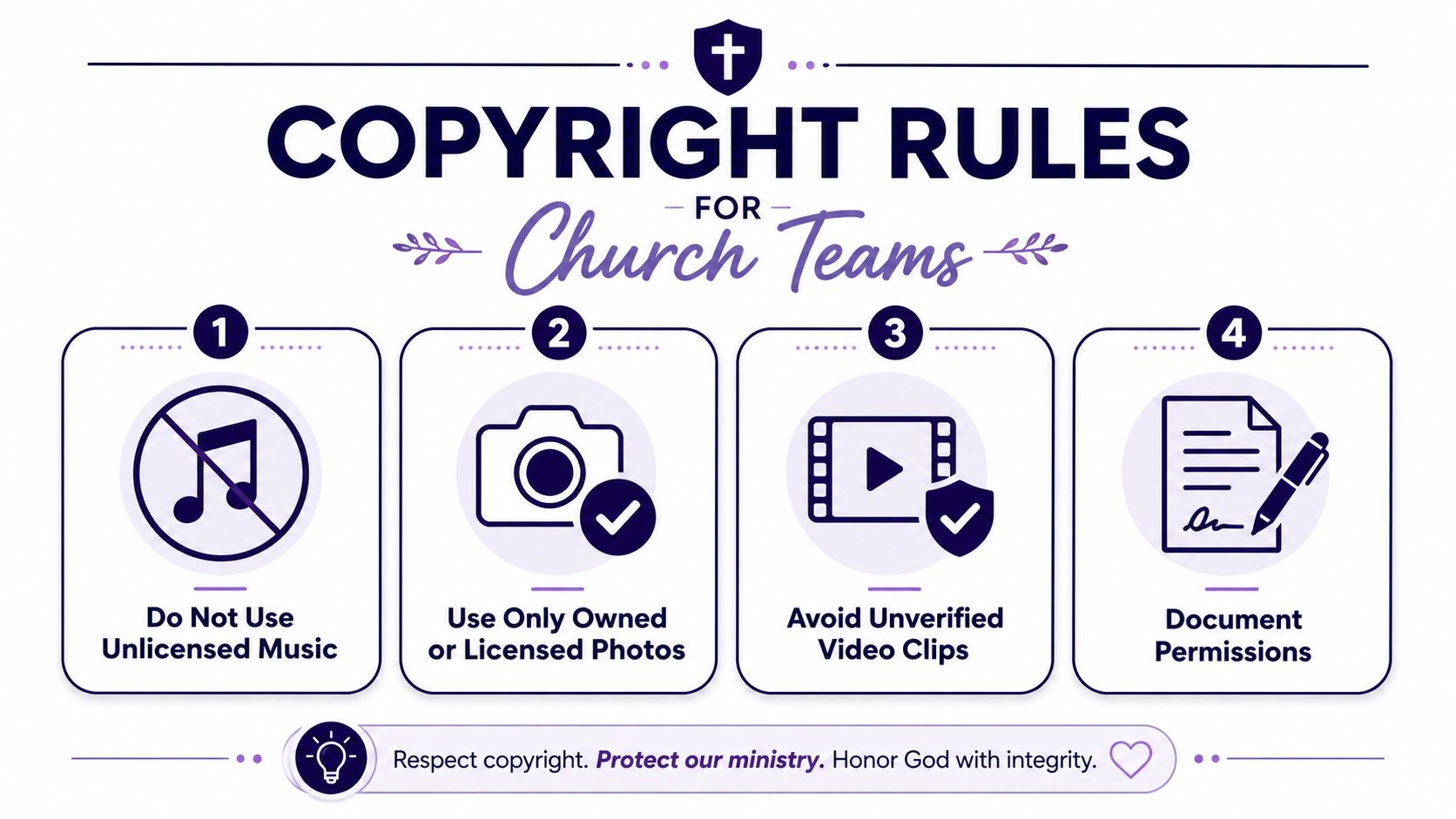
Performance rights also differ from distribution rights. A church music license may address congregational worship, while a recording or livestream can involve separate permissions. Teams working through those distinctions can use this church music licensing guide alongside their licensing provider's terms.
ChurchSocial.ai's templates and editor can support the final publishing check by keeping approved visual assets, credit language, and license notes connected to the post. The tool doesn't replace legal judgment, but it can make documentation part of the routine instead of an afterthought.
Building a Permission-First Publishing Workflow
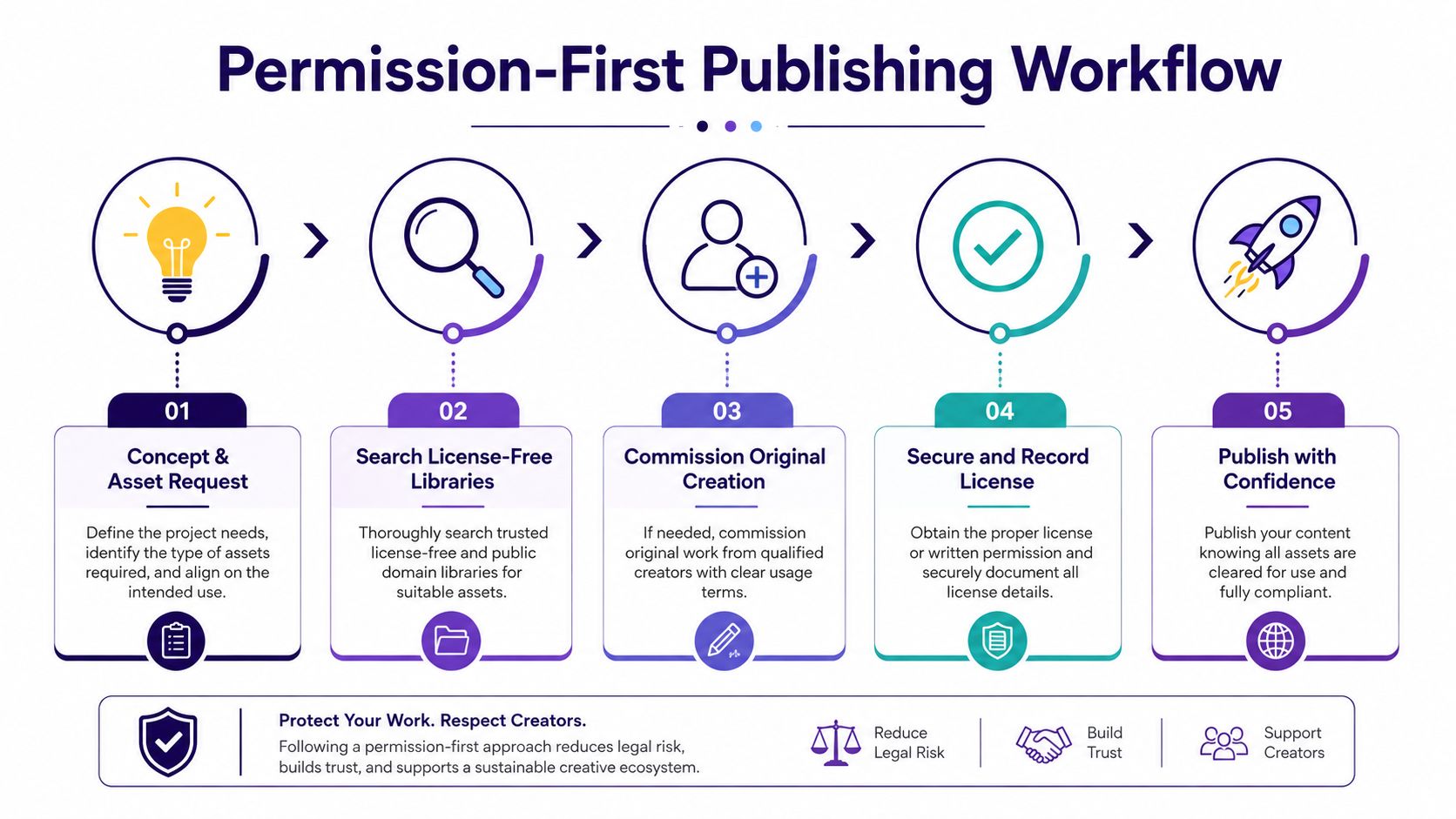
A volunteer finds a striking photo, adds a worship song, and schedules the post before anyone asks where either asset came from. A permission-first workflow stops that sequence early. Classify each asset as original, licensed, or third-party, then require a written-rights check for anything that is not wholly original. The Association of Corporate Counsel guidance on copyright compliance points to practical controls: a formal policy, an assigned owner, periodic training, and records showing the source of reused content. Teams can formalize those responsibilities with a church social media policy template.
Start with the asset request
Define the communication goal before anyone searches for a visual or adds audio. A baptism-service post may need a calm background, a date, and a clear call to action. It probably does not need a downloaded photograph of another congregation or a popular song chosen because it performs well on social media.
For images, use the church's archive, properly licensed stock, public-domain sources, or Creative Commons material whose terms have been recorded. AI-generated visuals can reduce the need to borrow imagery when the prompt is based on a sermon summary or series theme. Keep people out of generated images whenever possible. Add text only when it makes visual sense, such as words printed on paper or a whiteboard. If the post needs a headline, add it as a deliberate overlay in the editor instead of asking the image model to generate readable words.
Choose music and video deliberately
Music clearance requires more than identifying the song. Separate performance permissions from recording and distribution permissions, then check whether the church's provider covers the exact use. CCL, CCLI, and streaming licenses may address different activities, so save the license name, scope, dates, and platform restrictions with the post.
When the rights remain unclear, replace a full cover with a spoken devotional, original musical material, or a short sermon reflection. For video, use licensed b-roll, film original announcements, and create sermon teasers instead of downloading movie scenes, sports footage, or concert clips. A UK online infringement tracker found that, among respondents who had accessed content illegally in the prior three months, film and software each represented 20%, while music represented 18%. The tracker's executive summary shows why copied media needs a deliberate review.
Record the decision
For each non-original element, record the creator or provider, source URL, license or written permission, permitted platforms, attribution language, and expiration or renewal details. Store permission emails with the asset. For library content, save the relevant license page or download record. A future volunteer should be able to answer, “Why can we use this?” without searching through personal inboxes.
For sermon content, the church usually controls its recording and transcript workflow, subject to separate participant or music rights. ChurchSocial.ai can turn a sermon transcript into captions, social posts, blogs, and other formats. Its Sermon Clip Creator can produce short vertical videos from the church's own message, while graphic templates and the editor support branded photos and carousels. The drag-and-drop calendar can place those assets into a review queue, and integrations with Planning Center and other church calendars can turn event information into scheduled content without sending volunteers through scattered files.
The practical result is a repeatable review path. The team spends less time hunting for material that needs clearance and more time publishing original content that reflects the church's teaching.
Attribution, Embeds, and Platform-Native Sharing
A church can give generous credit and still lack permission. Tagging the original photographer in a reposted stock image doesn't create a license. Writing “via @newsoutlet” beneath an embedded news clip doesn't authorize downloading the clip, editing it, and uploading a new copy. Attribution recognizes a creator. Permission grants a defined right to use the work.
A familiar mistake starts with a concert livestream. A volunteer screen-records a 30-second worship performance, uploads it as an Instagram Reel, and credits the concert account. The source may have allowed viewers to watch the livestream on its platform, but that doesn't necessarily authorize the church to create a new copy and distribute it elsewhere.
The team rule: If the asset was downloaded, re-shot, or screen-recorded, permission must exist outside the platform, regardless of the credit in the caption.
Native sharing features work differently because the platform provides a pathway for displaying or distributing the original post under its own terms. A YouTube embed generally points viewers to the original video through YouTube's player rather than creating a separate uploaded copy. A Facebook share button, a retweet, or a TikTok duet or stitch can likewise operate within the platform's sharing mechanisms, subject to the creator's settings and the platform's rules.
That distinction doesn't make every embed automatically safe. A church website should use the official YouTube embed code and avoid altering or downloading the underlying file. An Instagram embed on a blog is more defensible when it displays the original post through Instagram's authorized embed function. If the church copies the file, removes the original context, or republishes it as its own media, the platform-native pathway may no longer apply.
The same reasoning helps with sermon promotion. Linking to the church's YouTube sermon or embedding the official player keeps the audience connected to the original upload. Downloading a third party's sermon, clipping it, adding church branding, and posting it as a Reel requires separate permission.
Native sharing is convenient, but it isn't a substitute for reading platform terms or checking the creator's settings. When the team isn't sure whether a feature is an authorized sharing function, use a direct link or ask the rights holder.
AI-Generated Reels, Captions, and Sermon Clips
AI changes the workflow, but it doesn't remove copyright questions. The U.S. Copyright Office explains that an AI-assisted work may receive copyright protection when a human contributes sufficient creative expression, while purely AI-generated output isn't protected by copyright. That creates a practical trade-off for churches: generated visuals may reduce copying risk, but a purely generated image may not give the church exclusive control over the finished asset.
The European Parliament's 2025 study similarly says fully AI-generated outputs without meaningful human input have no copyright protection in the EU. Churches serving international audiences should therefore keep records of the human contribution, including the source sermon, editorial choices, selected clips, rewritten captions, layout decisions, and final approvals. The U.S. Copyright Office's AI guidance is a useful starting point for that documentation.
Use AI to transform owned material
The safest AI pattern starts with content the church already created. A pastor's recorded sermon can become a short vertical clip through AI-assisted editing. A transcript the church owns can generate captions, discussion prompts, devotional posts, or a blog draft. A visual generated from the sermon's theme can replace a stock image that would otherwise require a separate license.
ChurchSocial.ai's Sermon Clip Creator supports this kind of workflow by turning a recorded message into short-form clips with generated captions and on-brand motion graphics. The church still needs to review the transcript for accuracy, confirm that background music is cleared, and check whether anyone appearing in the footage has the necessary release. AI handles production friction. The church remains responsible for the final publication decision.
Don't add unlicensed music just because an AI editor makes it easy to synchronize audio. A short clip isn't automatically fair use, and the work's recognizability and market effect still matter. For teams exploring AI-assisted song covers or remixes as a separate creative project, Vocuno's AI cover tutorial offers technical context, but a tutorial doesn't grant rights to the underlying composition or recording.
Label and review the result
Transparency is becoming a sound publishing practice for AI-assisted content, particularly when a realistic visual or voice treatment could confuse viewers. Label the post when the audience needs to understand that AI materially shaped the image, voice, or video. Also keep the original sermon file and editing record so the team can explain what came from the church and what the system generated.
A useful internal test is simple: Could the church show the human source and the human decisions behind this asset? If the answer is no, treat the output as less defensible for exclusive brand use and avoid presenting it as a documentary record of real people or events.
Handling Takedowns and User-Generated Content
Even careful teams receive automated claims. Panic makes the response worse, especially when a volunteer deletes evidence before anyone identifies what the platform flagged.
Use a calm intake process:
- Preserve the notice: Screenshot the warning, affected post, claimant name, timestamps, and platform message before changing anything.
- Classify the complaint: Determine whether it is a DMCA takedown, a platform policy strike, a music rights claim, or a trademark complaint.
- Assign one owner: Route the notice to a named communications lead rather than asking several volunteers to respond independently.
- Check the asset record: Compare the claim with the source file, permission, license scope, and the exact portion used.
- Choose the response: Remove or edit the post when the claim appears valid. Dispute it only when the church has evidence supporting its rights or a credible exception.
- Escalate carefully: Ask legal counsel or the church's insurance carrier for guidance when the claimant demands money, threatens litigation, challenges repeated content, or the team cannot interpret the rights involved.
Don't invent a legal defense in a response. A counter-notice is a formal step that can carry consequences, and the team should understand the applicable process and response window before using it. Some platform workflows involve a 10 to 14 day period for a rights holder to act after a counter-notice, so a church should obtain legal advice before submitting one when the matter is disputed or consequential.
A separate risk comes from user-generated content. Members may post testimonies, event photographs, children's ministry pictures, or volunteer-shot videos to the church's page. A person's decision to comment or tag the church doesn't automatically grant permission for the church to download and reuse that material in a Reel, newsletter, website, or advertisement.
Give volunteers a one-page checklist
Create a release form that identifies the content, grants the church permission to reproduce and adapt it on named channels, and explains how the contributor can request removal. Pair it with a comment moderation policy and a documented process for honoring removal requests.
The checklist should name:
- Monitoring inbox: Which email address and platform notification area receives claims.
- Notice fields: Claimant, post URL, asset, timestamp, stated right, and deadline.
- Evidence location: The folder containing licenses, releases, source files, and approval notes.
- Response template: A neutral acknowledgment that confirms receipt without admitting infringement.
- Escalation path: The communications owner, pastor or administrator, counsel, and insurance contact.
For additional channel hygiene, teams can consult this guide on how to protect your YouTube channel. The operational goal isn't to make volunteers act like lawyers. It's to ensure that routine notices reach the right person with the evidence needed for a measured decision.
Putting It All on One Calendar
Copyright safety works best when it appears beside the post, not in a forgotten policy document. During the weekly planning meeting, each scheduled item should show its asset source, permission status, attribution language, reviewer, and any renewal date. A Tuesday post shouldn't reach the final approval stage with the team still asking where the background image came from.
Build the calendar around a small set of repeatable statuses:
- Draft: The communication goal and source sermon or event are identified.
- Asset review: Every image, audio track, video segment, and user contribution is classified.
- Rights cleared: The permission record is attached or the asset is confirmed as original, public domain, or properly licensed.
- Final review: A named person checks captions, overlays, music, links, and platform-specific details.
- Scheduled or published: The final version and approval record remain available for later claims.
ChurchSocial.ai's unified visual calendar can place Facebook, Instagram, TikTok, YouTube, and other church content into one planning view. Its templates and graphics editor help teams reuse approved layouts, while sermon-derived posts and clips can begin with the church's own transcript rather than a search for third-party material. Planning Center and other church calendar integrations can also supply event details for content planning, reducing duplicate entry and missed announcements.
Keep images visually intentional. Use people-free imagery whenever possible, and place text as a clean overlay or in a natural setting such as a paper sign, whiteboard, or printed page. Avoid generated text scattered across unrelated objects because it creates design problems and can make approval harder.
Run the workflow every week. Log permissions where the whole team can see them, let original sermon content do the heavy lifting, and treat the calendar as the single source of truth for what is safe to publish.
ChurchSocial.ai helps churches turn their own sermons and event information into original social posts, AI-assisted Reels, graphics, carousels, blogs, and scheduled content while keeping everything organized in one calendar. Visit ChurchSocial.ai to plan your next publishing cycle with a clearer rights check and less dependence on risky third-party media.


