
Sunday afternoon, the sanctuary is finally quiet. A volunteer has a sermon recording, a phone full of worship photos, an upcoming event to promote, and less time than expected before Monday begins. The usual question is, “What can we post this week?” A better question is, “Which part of Sunday can help someone discover our church, and which part can help someone take a meaningful next step?”
Social media Reels are useful for the first question. They can turn a sermon's clearest moment into a short invitation for someone who doesn't follow the church yet. Carousels, captions, and text-led posts often serve the second question better, especially when the goal is reflection, prayer, conversation, or registration. A healthy church content plan uses both.
Why Social Media Reels Matter for Church Outreach
On Sunday afternoon, a volunteer reviews the sermon and stops at one sentence about forgiveness: “You can release the debt without pretending the wound never happened.” That clear thought can become a 20-second Reel with clean audio, vertical framing, and captions that make sense to someone who has never attended the church. The work is sermon repurposing, not producing a second sermon from scratch.
Social media Reels help churches place a message in front of people beyond their existing audience. The format suits a single idea, a brief testimony, or a direct invitation. Carousels and text-led posts often serve different ministry goals, such as guiding reflection, explaining an event, inviting prayer, or helping someone decide to visit.
Instagram introduced Reels in August 2020 as a short-form video feature inside the app. The format has since become a major discovery channel. One 2026 industry summary reports that Reels account for 50% of all time spent on Instagram, reach about 2 billion monthly users, and generate roughly 140 billion daily views across Instagram and Facebook combined. It also reports an average Reels reach rate of 30.81%, more than twice the reach of carousels, image posts, and Stories, with 55% of Reels views coming from non-followers according to the cited Reels industry summary.
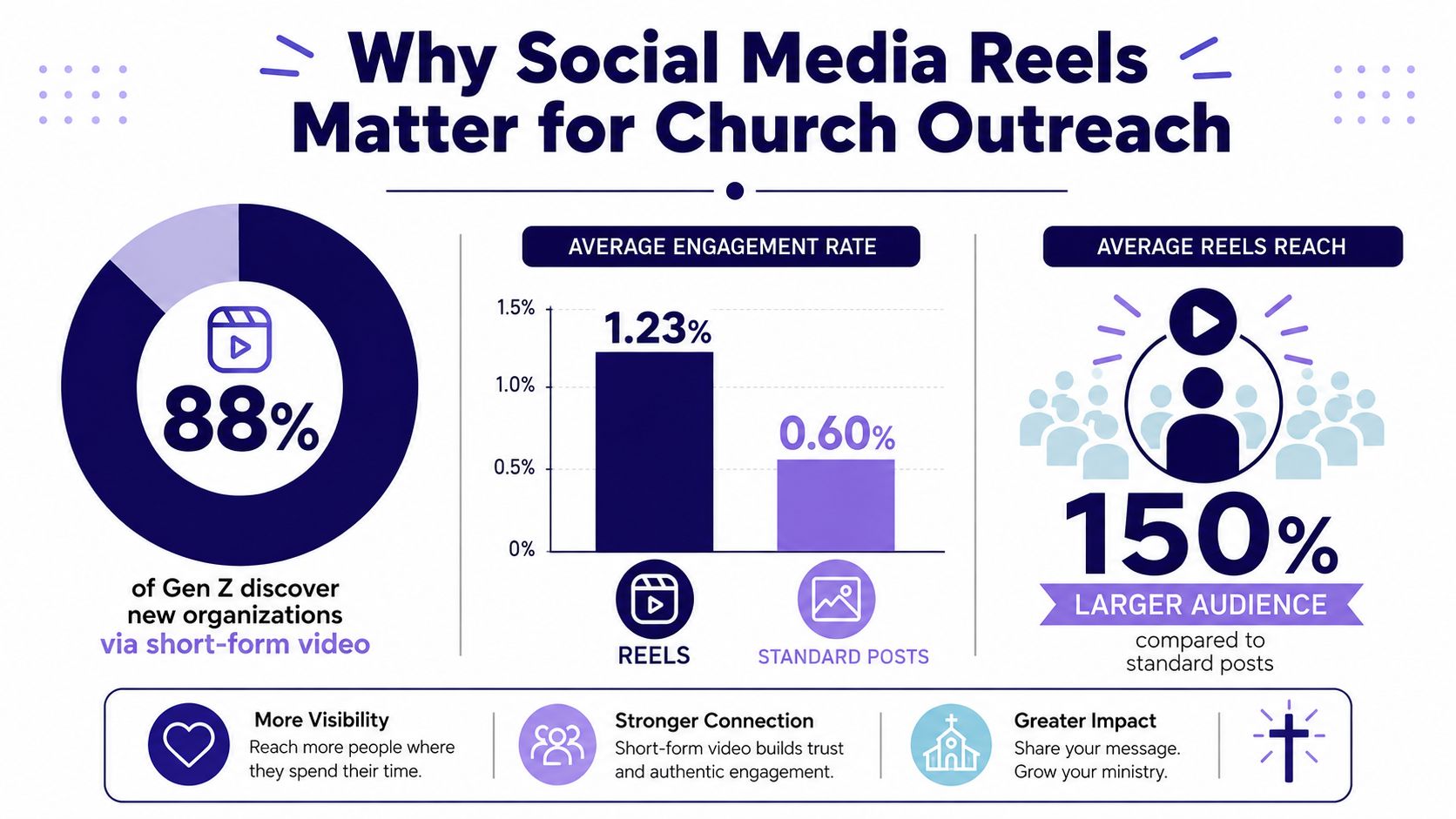
Reels serve discovery before retention
That non-follower reach changes the job of the format. A Sunday announcement graphic usually serves people who already know the church account. A sermon Reel can introduce one pastoral idea to someone scrolling related content, then point that person toward a full message, website, or gathering.
Discovery still has trade-offs. A Reel may earn attention without producing reflection, registration, or a pastoral conversation. Those next steps often need a caption, carousel, text post, or personal follow-up. Volunteers should therefore choose the source moment first, then choose the format that matches the ministry goal.
A clear opening, usable audio, and a self-contained message matter more than elaborate effects. A small congregation can publish a straightforward clip consistently, while a polished production schedule may consume time needed for captions, replies, and member care.
Practical rule: Use Reels to open the door, then use other formats to help people decide whether to walk through it.
The wider conversation around short-form publishing changes quickly. Volunteers can review broader context through these podcast short form trends. Reels should support the sermon, website, pastoral care, and in-person welcome, not replace them.
Platform Specs and Filming Fundamentals
Sunday afternoon is a poor time to discover that the sermon recording is sideways, backlit, or full of room echo. Set up the phone and audio path before filming, then check a short test clip. Vertical 9:16 video fits a phone screen and suits short-form viewing. In its comparison of vertical Facebook Reels, an analysis reported higher reach and retention for vertical video than for square and horizontal formats, in its comparison of vertical Facebook Reels.
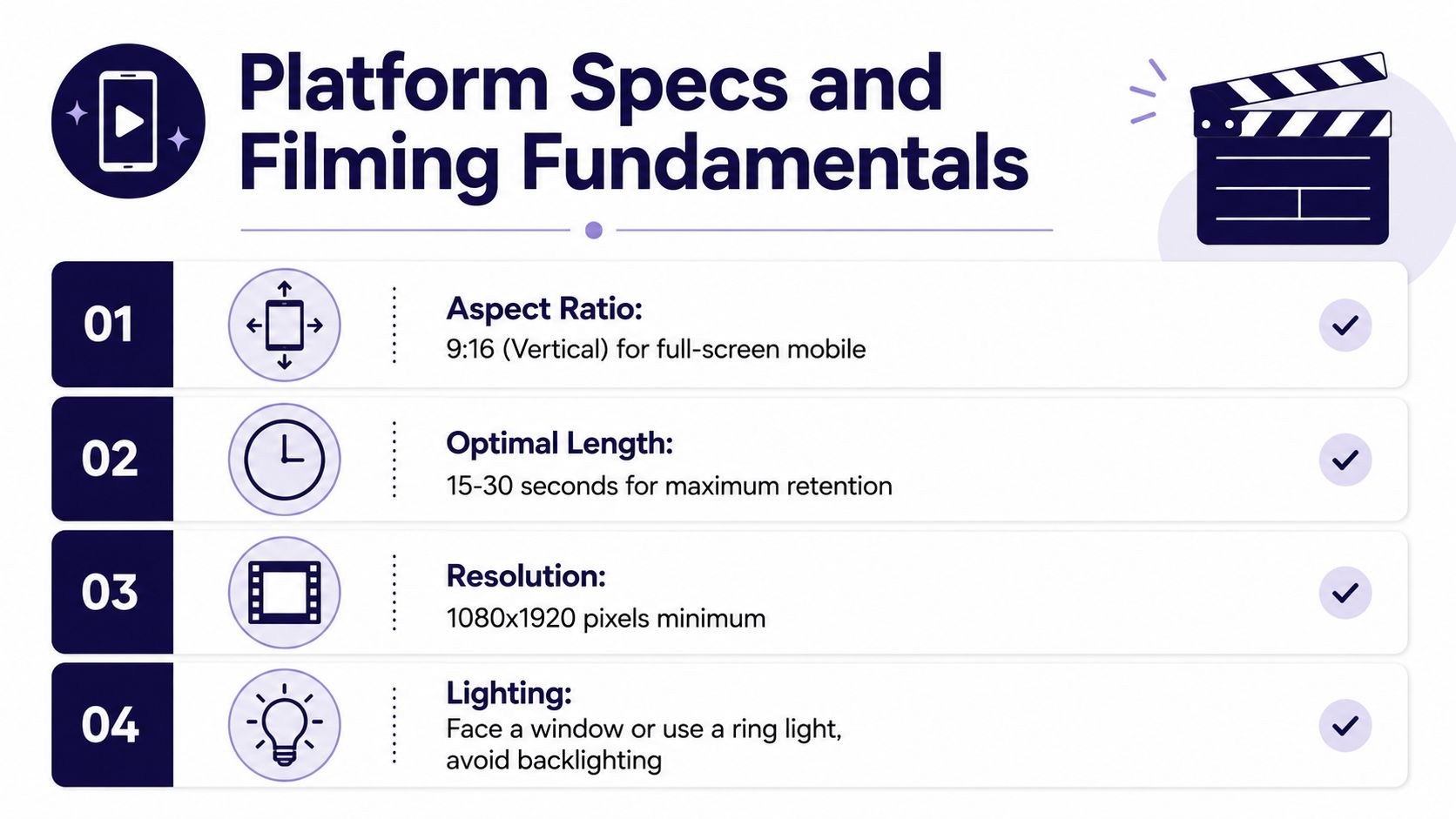
Use a top-to-bottom filming checklist
Framing: Record with the phone upright. Use a stable tripod or fixed mount, keep the speaker's face visible, and check that the pulpit, lectern, or platform does not cut through the composition. If the church has a video feed, request a clean post-service recording from the media volunteer instead of filming from the back row with a shaking hand.
Lighting: Sanctuaries often have a bright stage and dark seating area, which can confuse a phone camera. Lock exposure when possible, and avoid placing the speaker directly in front of a bright window. For an interview or short introduction, face a window or use a ring light. Backlighting leaves the face too dark.
Audio: Clean speech matters more than decorative footage. A modest image with clear sound remains usable, while a well-framed clip with echo, overpowering music, or microphone noise is difficult to watch. Capture the church audio-system feed when the production team can provide it. Listen to the first few seconds before recording a full batch.
Safe area: Add the hook and captions where platform controls will not cover them. Guidance summarized for Stories recommends avoiding the top approximately 14% and bottom approximately 20% of a 1080×1920 canvas, and keeping image text at 20% or less of the image area in the cited creative guidance.
Check the finished Reel on a phone, not only in the editor. Use this guide to the Reels safe area as a shared standard when several volunteers edit. Consistent placement prevents late redesigns and keeps sermon clips readable.
For additional creative guidance, review how to make Instagram Reels that grow, then adapt those principles to sermon clips rather than copying influencer-style production. The goal is a repeatable workflow that protects the message while leaving volunteers time for captions, replies, and pastoral care.
Turning Sermons into Reels with AI Workflows
The sermon-to-Reel process works best when the church starts with the transcript, not with random footage. A transcript makes the message searchable, gives the editor exact wording, and reveals several possible content angles from one recording.

Find moments that can stand alone
Read through the transcript and mark moments that fit one of three categories:
- Emotional clarity: A sentence that names a fear, hope, struggle, or truth people may want to share.
- Practical direction: A specific way to pray, forgive, serve, trust, or respond.
- Memorable wording: A concise line that makes sense even when separated from the full sermon.
A clip shouldn't require the viewer to know the entire introduction. If the pastor says, “That's why this matters,” but the audience hasn't heard what “this” means, the Reel starts with a gap. Begin with the clearest statement or add a brief on-screen setup that gives the sentence context.
ChurchSocial.ai can generate Reels from sermon audio or video, use sermon transcripts to create social posts and blogs, and provide templates and an editor for photos and carousels. Its drag-and-drop calendar also helps a church plan content across its social accounts. AI should reduce repetitive editing, but a pastor or trusted volunteer still needs to review theology, names, Scripture references, tone, and captions before anything goes live.
Build a repeatable editing pass
A reliable volunteer workflow looks like this:
- Upload the recording or transcript. Keep the original sermon file organized by date and series.
- Select promising clips. Choose moments with a complete thought, not merely a dramatic sentence.
- Open with the point. The first two seconds need to tell viewers why they should keep watching.
- Add captions. Many people encounter short-form video without sound, and captions also improve comprehension.
- Trim the exit. End after the thought lands. Don't leave several seconds of silence or a return to the livestream feed.
- Review the frame. Check the safe area, spelling, names, Scripture references, and visual distractions.
- Create companion pieces. Turn the same transcript into a written post, a discussion question, or a blog draft rather than forcing every idea into video.
The companion content matters because one sermon usually contains more than one ministry purpose. A Reel may introduce the theme. A carousel can summarize the teaching. A text post can ask, “Where do you need prayer this week?” The AI content repurposing workflow gives volunteers a useful model for turning one source into several formats without rewriting everything manually.
A Reel should feel like a complete thought, not a piece of evidence that the church livestream exists.
Batch the work when attention is available. After the sermon, select several clips, generate draft captions, create a few supporting graphics from templates, and place everything on the calendar. The volunteer can then review the week as a whole instead of reopening the same recording every day.
When Reels Are the Wrong Format for Your Goals
A sermon clip can attract someone who has never encountered your church, yet fail to help a current member register for an event or respond to a prayer prompt. Reels are strongest for discovery. Carousels and text posts often give people more room to read, reflect, and act.
One 2026 analysis reported that Reels generated 36% more reach than carousels, while carousels produced 109% more engagement per person reached in its Reels and carousel comparison. Use that trade-off when planning the week. A Reel can introduce the main idea from a sermon series. A carousel can then summarize the teaching, list discussion questions, or explain how to register for the related gathering.
Match the format to the ministry outcome
| Ministry Goal | Best Format | Why It Works |
|---|---|---|
| Help new people encounter a sermon theme | Reels | Short video communicates a strong idea quickly and can reach beyond current followers. |
| Invite prayer responses | Carousel or text post | Written prompts give people room to read, pause, and respond. |
| Explain event details | Carousel or graphic | Multiple slides separate the date, location, registration step, and audience clearly. |
| Encourage discussion | Text-led post or carousel | A direct question is easier to find and answer than one buried inside a fast-moving clip. |
| Build awareness for a ministry | Reels | Motion and voice can show the ministry's purpose more clearly than a static image. |
| Help people revisit a teaching | Carousel or blog | Structured writing supports saving, rereading, and sharing specific points. |
A practical example is a sermon series on anxiety. Publish a Reel with one clear pastoral insight to reach people outside the church's audience. Follow it with a carousel that outlines the series, includes the meeting details, and answers common questions. The Reel serves discovery. The carousel supports registration and follow-through.
Expect selective performance
Short-form video remains useful, but no sermon clip deserves an automatic place on the calendar. One 2026 social media study reported that Instagram Reels reach dropped 35% year over year, while posts declined 31%, alongside increased competition in the study's Instagram findings. Another study found Reels generated more than four times the interactions of single-image posts, while average watch time more than doubled year over year to 8.5 seconds in the cited 2026 analysis.
Churches should stop promising that every sermon clip will perform and start assigning each post a job. Before exporting a clip, decide whether the goal is discovery, prayer, discussion, registration, or teaching review. If the goal is discovery, choose the Reel. If people need several details or a slower response, use a carousel or text post, then schedule the formats together as one ministry sequence.
Captions, Calls to Action, and Scheduling Strategy
A Reel caption should add context, not repeat the sermon transcript. State the central idea, identify the message or series when that helps, and give viewers one clear next step.
Use three parts to draft quickly:
The idea: “You don't have to carry yesterday's shame into today's obedience.”
The context: “A short moment from this Sunday's message on grace.”
The invitation: “Send this to someone who needs hope today.”
As a finished caption, those parts become:
You don't have to carry yesterday's shame into today's obedience. This short moment from Sunday's message on grace points to the freedom Christ offers. Send this to someone who needs hope today.
The call to action should sound like something a pastor or church member would say. “Share this with someone who needs to hear it” fits a pastoral clip that naturally invites sharing. “Tell us what you're praying about this week” suits a discussion post. “Visit the link in our bio for this week's sermon” works when the destination is ready and clearly relevant.
Choose one action. Asking viewers to like, comment, share, register, visit the website, and follow the account turns a simple caption into a checklist. Match the request to the post's purpose, whether that is discovery, prayer, conversation, or registration.
Create a calendar volunteers can maintain
ChurchSocial.ai provides a visual calendar for planning and managing social accounts, with templates and an editor for photos and carousels. Its AI tools can turn sermon material into draft Reels, captions, blog content, and other social formats. Volunteers still need to review the drafts, check theology and details, and schedule the approved pieces.
Planning Center Calendar supports church event and resource scheduling, and its public API can provide an event source for content planning and automation in its official API documentation. In practice, a volunteer can use the church calendar to coordinate event details with social posts, rather than copying dates between separate planning documents.
A weekly rhythm might include a sermon Reel, a written reflection, an event reminder, and a prayer prompt. Keep the plan manageable for the people serving. Build a small content bank, cross-post appropriate Reels to Facebook, and make ownership visible in the calendar.
Church teams comparing scheduling approaches can also review this resource on planning Reels with Trendy. The platform matters less than the workflow: prepare in batches, customize each post where needed, and leave time for pastoral review. When a message needs discovery, schedule the Reel. When people need several details or a slower response, pair it with a carousel or text post instead.
Reading Analytics Without Getting Discouraged
A Sunday sermon Reel can collect modest likes while reaching people who have never encountered your church. Another clip may attract thousands of views without prompting prayer, attendance, or a conversation. Analytics help when each metric is tied to a ministry goal, not treated as a verdict on the message.
For discovery, watch reach to non-followers, shares, saves, and profile visits. For a prayer prompt, comments and direct messages may show more value. For an event, the useful action may happen on the registration page, not inside Instagram. That difference should shape the format too. A short sermon clip can introduce the church, while a carousel can explain event details and a text post can invite a slower response.
Use benchmarks as a decision aid. One large-sample 2025 to 2026 Instagram study found that Reels averaged around 0.52% engagement, with results varying by account size and creative format in the cited benchmark coverage. Treat that figure as a broad reference. For a church account, a healthy result is consistent improvement in the action tied to the post, such as non-follower reach for discovery or replies for pastoral connection, rather than matching an industry average.
Timing also affects review. One widely cited benchmark found that about 65% of Reels views and 61% of interactions happen within the first three days in the cited Reels benchmark. Check the post after that window, then compare several weeks of sermon clips before changing the workflow.
Use a simple iteration loop:
- Keep: Repeat topics and openings that earn shares or strong non-follower reach.
- Change: Test a different opening, caption, crop, or supporting format.
- Record: Add the sermon theme, clip type, call to action, and outcome to a shared spreadsheet tab or the scheduling calendar's notes field.
- Review: Compare patterns over time with this guide to measuring social media engagement.
The goal is better stewardship of volunteer time. Reels support discovery, while carousels and text posts may serve explanation, registration, or prayer more effectively.
ChurchSocial.ai helps churches turn sermon recordings and transcripts into Reels, captions, blogs, and other social content. Its templates, editor, integrations, and drag-and-drop calendar keep publishing organized. Visit ChurchSocial.ai to review a sermon-to-social workflow without adding a full production department.


