
You post the sermon on Sunday. A few people watch it that afternoon. By Tuesday, the momentum is gone.
That's where many churches get stuck on YouTube. The channel exists, the sermons are uploaded, but the congregation doesn't hear from you again until the next service. In practice, that creates a weekly communication gap. People drift, event reminders get missed, and the church's YouTube presence starts to feel like an archive instead of a living community.
YouTube Community Posts help close that gap. They give churches a simple way to show up in people's feeds during the week with prayer prompts, event reminders, questions, polls, and encouragement, without producing a full video every time.
Engage Your Church Community Beyond Sunday
A lot of churches already have the raw material for midweek engagement. They have sermon takeaways, announcements, volunteer needs, event reminders, prayer prompts, and discipleship questions. The problem usually isn't a lack of content. It's finding a format that's fast enough to use consistently.
That's why YouTube Community Posts matter. They let your church publish lightweight updates directly inside YouTube, where your congregation already watches sermons, devotionals, and worship content. Instead of asking people to follow another platform first, you can meet them where they already are.
One change made this much more practical for smaller ministries. A significant 2023 policy shift removed the 1,000-subscriber threshold for Community Posts, enabling YouTube accounts with fewer subscribers to publish according to Buffer's coverage of the policy update. For small churches, church plants, and niche ministries, that removed a major barrier.
What churches should post between services
Midweek posts work best when they serve one of three purposes:
- Reconnect people to Sunday's message with a key takeaway, reflection question, or short Scripture prompt.
- Help people take a next step through event reminders, volunteer invitations, or prayer requests.
- Start a conversation with a poll or simple question people can answer in seconds.
If you're trying to improve this rhythm, it helps to study broader social media engagement tactics and then apply only what fits ministry. Churches don't need gimmicks. They need consistent, relational communication.
Practical rule: If a post wouldn't help someone pray, participate, reflect, or respond, it probably doesn't need to go on your church YouTube channel.
Why this matters for ministry
A YouTube channel can support more than video distribution. It can reinforce belonging.
When a member sees a Wednesday prayer prompt, a Saturday event reminder, or a poll about a sermon discussion topic, the church stays present in ordinary life. That's often the main value of YouTube Community Posts. They keep the congregation connected between gatherings and give online visitors a clearer sense that your church is active, welcoming, and attentive.
What Are YouTube Community Posts and Why Use Them
Think of YouTube Community Posts as your church's digital bulletin board inside YouTube. Instead of uploading a full sermon, livestream, or announcement video, you can publish a short update using text, images, polls, quizzes, or video directly to your audience.
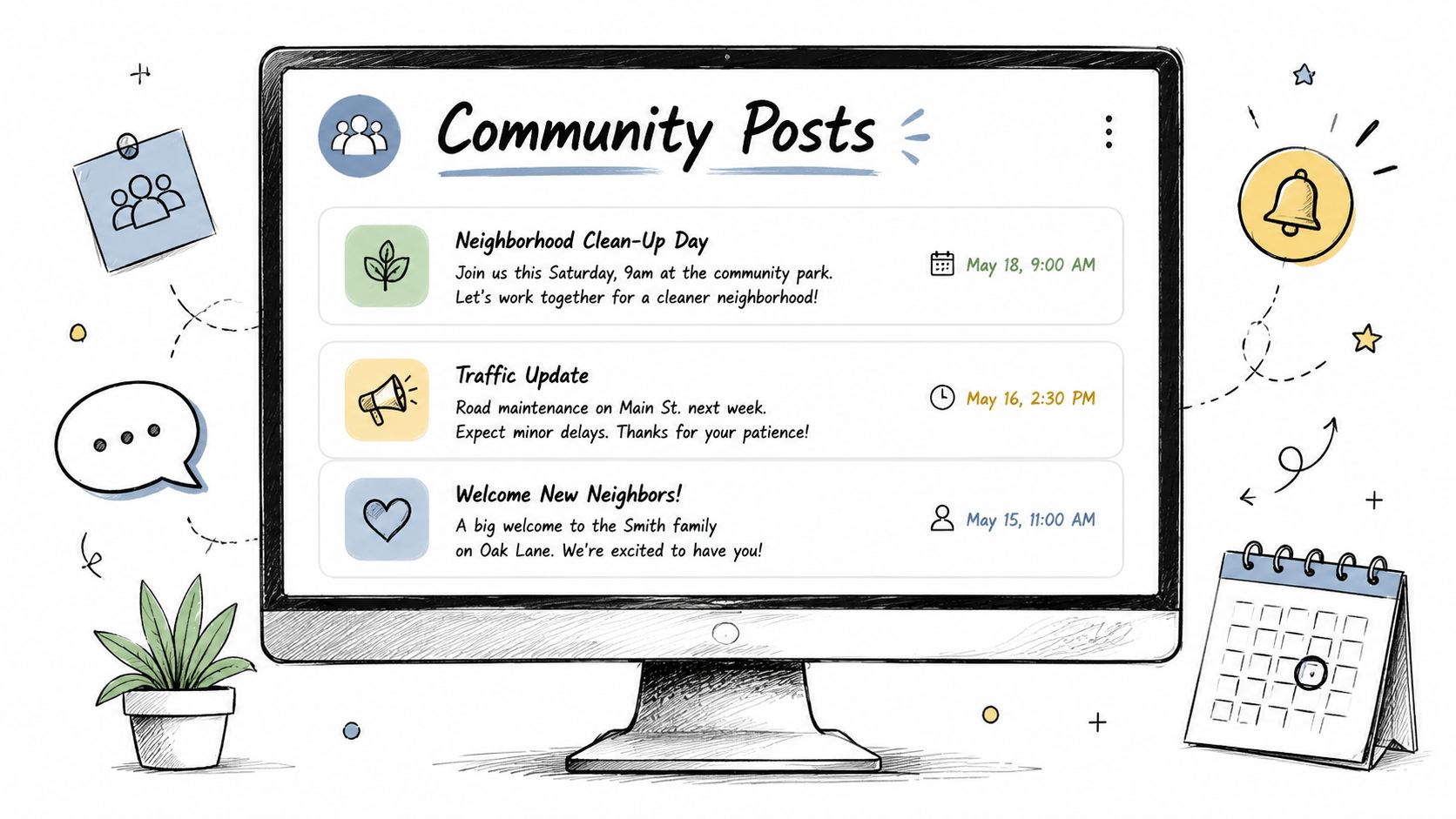
For churches, that changes the role of YouTube. It stops being only a sermon library and starts acting more like a weekly communication hub. A pastor can share a reflection question on Monday. A ministry leader can post a reminder about youth night on Thursday. A communications volunteer can run a poll about a testimony series without opening a video editor.
Why churches should use them
Community Posts solve a practical ministry problem. Not every church has the time or staff to create fresh videos all week. But most churches can still post a question, image, verse, or reminder in a few minutes.
They also support outreach. Posts can appear in subscribers' feeds, and some may also surface more broadly in YouTube's home experience. That gives churches another way to stay visible when there isn't a new sermon upload.
A few strong use cases stand out:
- Discipleship support through Scripture prompts, reflection questions, and follow-up discussion from Sunday.
- Community building through polls, check-ins, and volunteer spotlights.
- Event awareness through reminders for baptisms, classes, outreach days, or special services.
- Sermon promotion by pointing people to the latest message or a recap resource.
If your sermons are already on YouTube, it helps to think about how posts and videos support each other. A sermon can draw attention on Sunday, and a post later in the week can continue the conversation. Churches working on both formats together may also benefit from these ideas for YouTube church sermons.
What they are not
They're not a replacement for strong preaching, pastoral care, or in-person ministry. They're also not a place to dump every announcement from the bulletin.
A good community post feels like a conversation starter, not a noticeboard crammed with everything at once.
Churches get the most from YouTube Community Posts when they treat them as a relational tool. Short, clear, timely posts usually outperform cluttered updates that try to say five things in one graphic.
Unlocking and Creating Your First Community Post
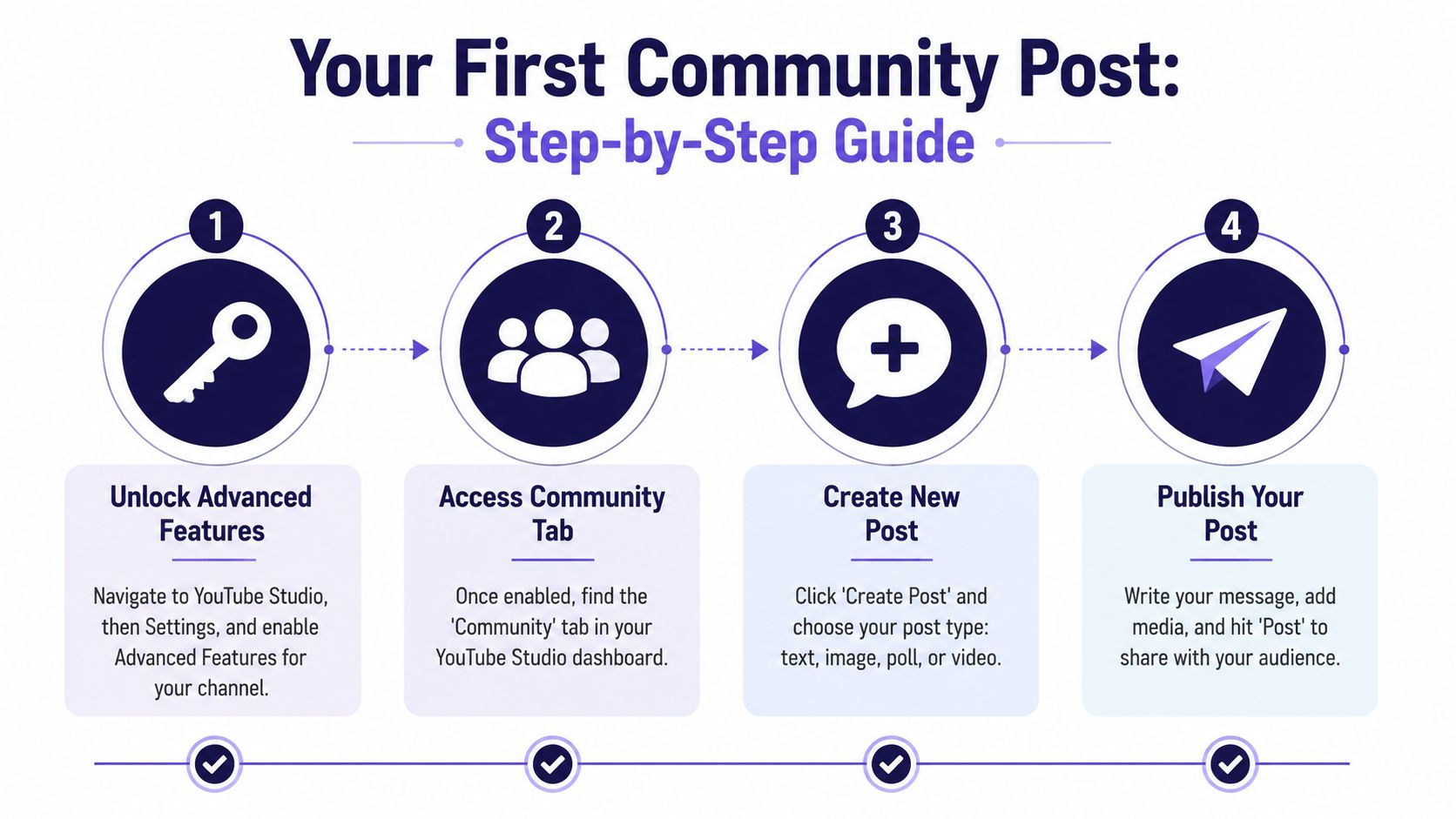
Before your church can publish YouTube Community Posts, the channel needs the right access. This is the part many teams miss. They assume the feature should already be there, but YouTube ties it to channel permissions.
To create Community Posts, creators must enable Advanced Features by verifying a phone number and then submitting a valid ID or using Channel History for approval according to YouTube guidance summarized here. That same guidance notes that image posts have a max file size of 16 MB and a recommended 1:1 aspect ratio for optimal display.
Unlock the feature first
Handle this once, then your team can focus on posting.
Verify the channel phone number
Start by enabling the required channel verification steps inside YouTube.Maintain good channel standing
YouTube's access flow depends on account trust and approval status.Submit ID or use Channel History
Advanced Features approval comes after that verification chain is complete.
If your church uses a shared Google login or inherited channel setup, confirm who has admin access before you start. Many delays come from simple permissions issues, not from YouTube itself.
Create a post on desktop or mobile
Once access is active, your team can post from either desktop or mobile.
On desktop, open YouTube Studio, go to Content, then Posts. From there, create a new post and choose the format you want.
On mobile, open the YouTube app, tap the Create button, then choose Post. That flow is often easier for pastors or ministry leaders who want to publish a quick update on the go.
Here are the core post formats churches can use:
- Text posts for quick encouragement, reminders, or Scripture.
- Polls for gathering feedback and inviting simple participation.
- Quizzes for Bible knowledge, sermon review, or fun engagement.
- Image posts for event slides, ministry announcements, or verse graphics.
- Video posts for linking viewers to existing video content in a lighter format.
Avoid the common formatting mistakes
A few details make a big difference in how polished your post looks:
- Use square images when possible because YouTube recommends a 1:1 aspect ratio.
- Keep image files under 16 MB so uploads don't fail unexpectedly.
- Write one clear message per post instead of combining a prayer request, event reminder, and sermon recap in the same graphic.
- Check the preview before posting so the image crop and text spacing still look clean on mobile.
Churches usually don't need fancy design here. They need readability, good timing, and one clear action.
Your first post doesn't need to be clever. A simple “How can we pray for you this week?” is often enough to get the habit started.
Strategic Content Ideas for Your Church
Most churches don't struggle with whether they have something to say. They struggle with choosing the right format for what they already want to communicate.
That's where YouTube Community Posts become useful. Different post types do different jobs. A text post can encourage. A poll can invite quick participation. An image can carry a visual reminder for an event. A quiz can reinforce Sunday's message in a way that feels light instead of formal.
One format deserves special attention. Polls in YouTube Community Posts receive up to 3.5x more engagement than standard image posts, according to ChurchSocial.ai's roundup on social media automation tools. For churches, that makes polls more than a novelty. They're one of the easiest ways to invite response.
Match the format to the ministry goal
Here's a practical way to think about post planning.
| Post Type | Content Idea | Ministry Goal |
|---|---|---|
| Poll | Ask which topic people want covered in a future Q&A night | Build shared ownership |
| Poll | Let members choose between event options or ministry workshop themes | Gather quick feedback |
| Text | Share a midweek prayer prompt tied to Sunday's sermon | Encourage discipleship |
| Text | Post a short pastoral encouragement with one Scripture reference | Offer care between services |
| Quiz | Ask a question based on the sermon passage | Reinforce biblical learning |
| Image | Share a clean event reminder graphic for baptism Sunday or VBS registration | Increase awareness |
| Image | Highlight a serving opportunity with simple visual branding | Recruit volunteers |
| Video post | Re-share a sermon clip or testimony already on the channel | Extend message reach |
| Link-focused post | Point people to a sermon recap or ministry blog article | Drive deeper follow-up |
Ministry examples that work
A church running a sermon series on prayer might post a poll asking, “What's hardest for you right now: consistency, focus, time, or knowing what to pray?” That gives pastoral leaders a quick read on what people are experiencing, and it signals that the church is listening.
A children's ministry team could post an image reminder for a family event. A care pastor could post a text update asking for prayer requests. A discipleship pastor could use a quiz to revisit a key point from Sunday's passage.
These don't need to feel corporate. They should sound like your church.
The best church posts usually answer one question well, not ten questions at once.
Repurpose what you already have
The fastest content often comes from content you've already made. Sermon notes can become a text post. A transcript can become a discussion question. An announcement slide can become an image post with minor edits. If your team wants broader ideas for stretching one message into multiple formats, these tips for repurposing your content are worth reviewing.
Churches can also support click-through goals with posts that point to helpful follow-up material. That might be a devotion, a registration page, or a sermon summary. If you're building that system, this guide to a church social media post strategy can help connect content planning to ministry outcomes.
What usually falls flat
Some post ideas sound useful but underperform in practice:
- Bulletin copy pasted into YouTube because it feels administrative, not relational.
- Overdesigned graphics with too much text because people won't read paragraphs in-feed.
- Generic inspirational quotes because they don't sound like your church.
- Posts with no response path because people don't know whether to comment, click, pray, register, or share.
A simple church question, posted consistently, will usually do more than a polished graphic that says very little.
Scheduling and Measuring Post Performance
Consistency matters more than bursts of activity. Most churches don't need a heroic posting week followed by silence. They need a repeatable rhythm their team can sustain.
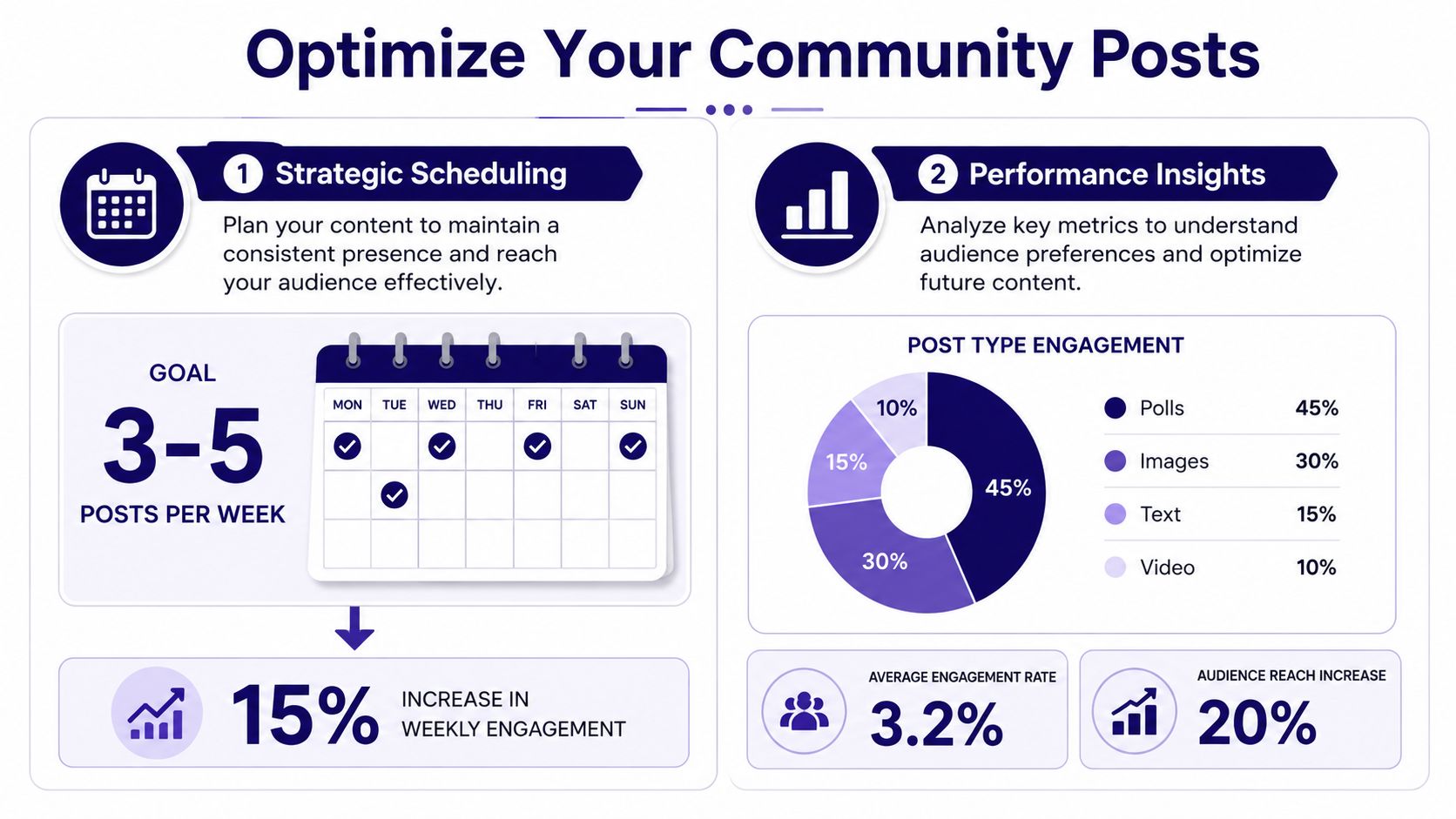
That's why YouTube's scheduling option matters. When you create a post, you can use the scheduling controls to set the date, time, and time zone in advance. This works well for churches that already know their weekly rhythm, such as a Monday reflection post, a Thursday reminder, and a Saturday invitation to worship.
Build a simple weekly cadence
A practical church schedule often looks like this:
- Early week for sermon follow-up, prayer prompts, or reflection questions.
- Midweek for polls, quizzes, or volunteer spotlights.
- Late week for event reminders, service invitations, or registration pushes.
That structure keeps your posts from repeating the same purpose every time. It also gives your congregation different ways to engage across the week.
One caution matters here. The specific impact of timing on community post engagement is still poorly quantified, and most advice remains general rather than precise, as noted in this guide discussing the timing gap. So don't chase mythical perfect posting windows. Start with your congregation's real habits and adjust from there.
Read the analytics in ministry terms
A big improvement arrived in 2023. YouTube introduced analytics for Community Posts, allowing creators to see impression and engagement rates for the first time directly in YouTube Analytics, as reported by Search Engine Journal.
For church teams, those two metrics are enough to make better decisions.
- Impressions tell you how many times people were shown the post. In ministry terms, that answers, “How many people likely saw our prayer prompt or event reminder?”
- Engagement rate tells you how people responded after seeing it. That helps answer, “Did this spark conversation or action?”
If a post gets seen but no one responds, the issue may be the message. If it gets strong engagement from limited reach, the issue may be timing or format.
Over time, patterns become clear. Polls may get stronger response than static graphics. Prayer prompts may draw more comments than generic announcements. Event reminders may do better when posted earlier instead of the night before.
If your team wants a stronger framework for interpreting those patterns, this guide on measuring social media engagement is useful.
What to change based on results
Use your analytics to make small adjustments, not dramatic overhauls.
- If impressions are weak, test a different posting day or a more timely topic.
- If engagement is weak, simplify the post and give people a clearer action.
- If comments are strong, create follow-up posts around the same ministry need.
- If event posts underperform, shorten the copy and make the ask more obvious.
That's the discipline. Post, observe, refine, repeat.
Streamline Your Workflow with ChurchSocial.ai
The hard part isn't usually coming up with one good post. It's building a system that your church can keep up with during busy weeks, staff transitions, and volunteer handoffs.
That's where a dedicated workflow helps. Churches often create content in one tool, design graphics in another, manage calendars in a third, and then scramble for approvals in group texts. Community Posts become one more task in an already fragmented process.

Keep planning in one place
A drag-and-drop calendar matters more than people think. It gives ministry teams a single view of what's going out this week, what still needs approval, and where content gaps exist.
For YouTube Community Posts, that means you can plan around the church calendar, not just social media ideas. Sermon series launches, baptisms, small group signups, outreach weekends, and seasonal services can all shape your posting rhythm.
Planning gets even easier when the platform connects with church operations. Integrations with Planning Center and other church calendars help teams turn scheduled events into actual content opportunities instead of forgotten announcements.
Turn sermons into multiple post formats
Churches already produce their richest content every week from the pulpit. The issue is packaging it well.
With ChurchSocial.ai, churches can create AI generated reels from their sermons and generate AI generated content from the sermon transcript like social posts, blogs, and more. That supports a practical YouTube workflow. One sermon can lead to a clip for video promotion, a text-based reflection question for a community post, and a blog recap that gives people a deeper next step.
That matters because Community Posts can also support traffic goals. Channels using YouTube Community Posts to promote external blog links or events see an average click-through rate of 6.8%, according to ChurchSocial.ai's analysis of AI tools for content creation. For churches, that creates a direct path to event registrations, sermon summaries, or ministry pages.
Create visuals without slowing the team down
A lot of churches don't need a full-time designer. They need graphics that look clean, consistent, and easy to make.
ChurchSocial.ai helps there too. Churches can use graphic templates and an editor to create and post photos and carousels, which is especially helpful for event reminders, sermon quote graphics, and announcement slides adapted for YouTube. For image direction, keep church visuals simple. Images should not have people whenever possible, and they should only include text when it makes sense, like on paper, whiteboards, or as a clean overlay added intentionally afterward.
That approach reduces visual clutter and keeps the focus on the message.
Reduce burnout for staff and volunteers
The best workflow is the one your team can repeat without frustration. If a volunteer can open one calendar, adapt one sermon transcript, use one template system, and schedule the week's content in one sitting, Community Posts stop feeling like extra work.
They become part of the church's normal communication rhythm.
Churches don't need more complexity. They need a practical system for planning, creating, and scheduling content that supports discipleship and outreach all week long. ChurchSocial.ai helps churches do that with AI generated sermon reels, transcript-based social posts and blogs, graphic templates, a drag-and-drop content calendar, and integrations with Planning Center and other church calendars so your team can manage church social media with less stress and more consistency.


